AI Code Review
The Best Way to do Code Review on Bitbucket

Ninad Pathak

Organic Growth
Bitbucket is a comprehensive CI/CD platform. And most of what it is designed to do, runs behind the scenes: pipelines, deployments, branch rules, merge automation. You rarely need to worry about those.
But code review is one part you need to understand and structure well, because Bitbucket uses it as a quality check for PR processing.
In this guide, we'll walk you through what you need to know to run code review well and how to set it up safely.
Bitbucket ties code review to the merge as part of its design. Approvals, passing builds, resolved tasks, and owner sign-off become conditions on the merge button, applied automatically on every pull request, so your standards hold without anyone remembering to enforce them.
What you'll learn
How to configure default reviewers, merge checks, and CODEOWNERS so the right people see the right code.
How to prepare a change that is fast to review, and review one without becoming the bottleneck.
How to comment at every scope, suggest exact fixes, and batch feedback into a single pass.
How to automate lint, tests, and security with Bitbucket Pipelines and gate merges on the result.
How to approve and merge with a strategy your team can keep to.
How do you run a code review in Bitbucket?
The workflow runs in the order below. Most of it is configured once, after which the day-to-day becomes routine.
1. Configure the repository
Do this once per repo. It decides whether reviews flow or stall.
Add default reviewers
Go to Repository settings → Default reviewers and add the people who should attach to pull requests automatically. New PRs targeting the branches you specify get them without the author tagging anyone. Default reviewers decide who looks at a change.
Blocking a merge is handled separately, by merge checks.
Turn on merge checks
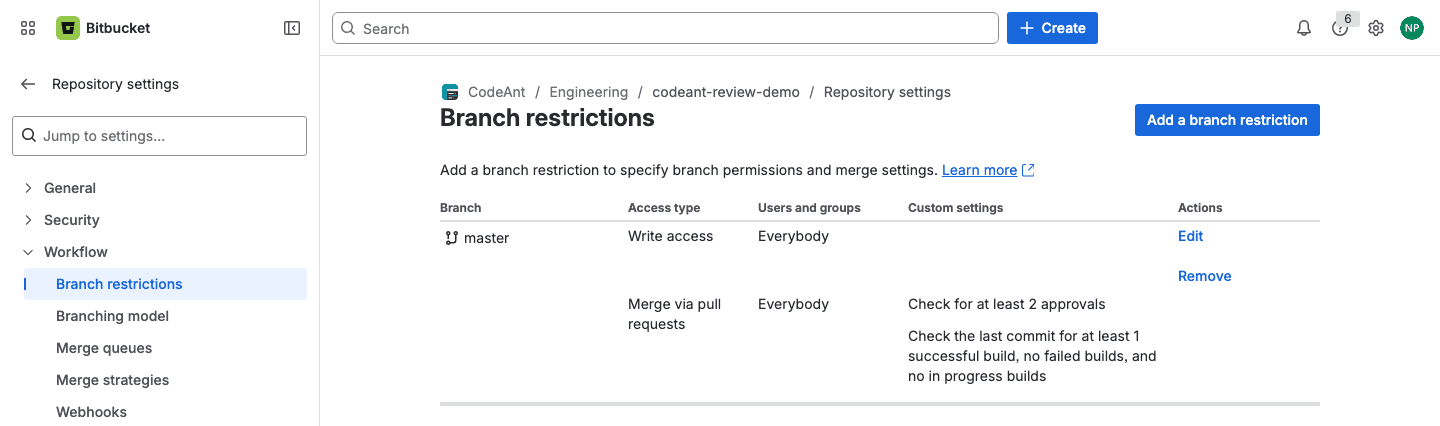
Open Repository settings → Workflow → Branch restrictions and add a restriction for your main branch. The merge checks live under its merge-access settings. The ones worth setting:
Check for at least N approvals. Set the count, such as 1 or 2. The PR cannot merge until that many reviewers approve.
Check for at least N approvals from default reviewers. Requires sign-off from the people you designated, not just anyone with access.
A check that blocks the merge while there are unresolved pull request tasks (tasks created from review comments).
If you set both a default-reviewer check and a minimum-approvals check, both have to be satisfied. Reaching the raw approval count is not enough while a default reviewer still has not approved.
Enforcing these checks, instead of only displaying them, needs a Premium workspace on Bitbucket Cloud. On the free tier they are advisory. If review discipline matters, this is the line item worth paying for.
Route reviews by path with CODEOWNERS
Default reviewers apply to the whole repo. To route reviews by path, add a CODEOWNERS file. In Bitbucket Cloud it lives in the repository's .bitbucket/ directory.
A PR that touches src/backend/ now pulls in the backend owner. A PR that touches a migration pulls in the data team. No manual tagging.
2. Prepare the change
The cheapest review comment is the one a reviewer never has to write, because you caught it first.
Keep the pull request small. A widely cited SmartBear study of a Cisco engineering team found that defect detection drops sharply once a review passes roughly 400 lines of changed code, and that effectiveness falls after about 60 minutes at the screen. Large pull requests get skimmed. When a change is large, split it into one branch per logical step.
Self-review first. Read your own diff in the pull request view before you ask for anyone's time. The PR view shows the change the way a reviewer sees it, which surfaces leftover debug logging, commented-out blocks, and half-finished renames. Check that:
the diff contains only the change it claims to, with no stray formatting churn or unrelated files
tests are added or updated and pass locally
debug output, dead code, and stray
TODOs are goneeach commit message explains its own change
Write the description for the reviewer. Three lines covers it: what changed, why, and where you want attention. "Refactored the auth middleware. The retry logic in withSession is the risky part, please check the lock ordering." That saves the reviewer ten minutes of reconstructing your intent.
Run an automated pass before humans. CodeAnt AI reviews the PR the moment it opens and flags bugs, anti-patterns, and exposed secrets. The obvious issues are marked before a colleague starts reading, so their time goes to the parts that need a person.
3. Open the pull request
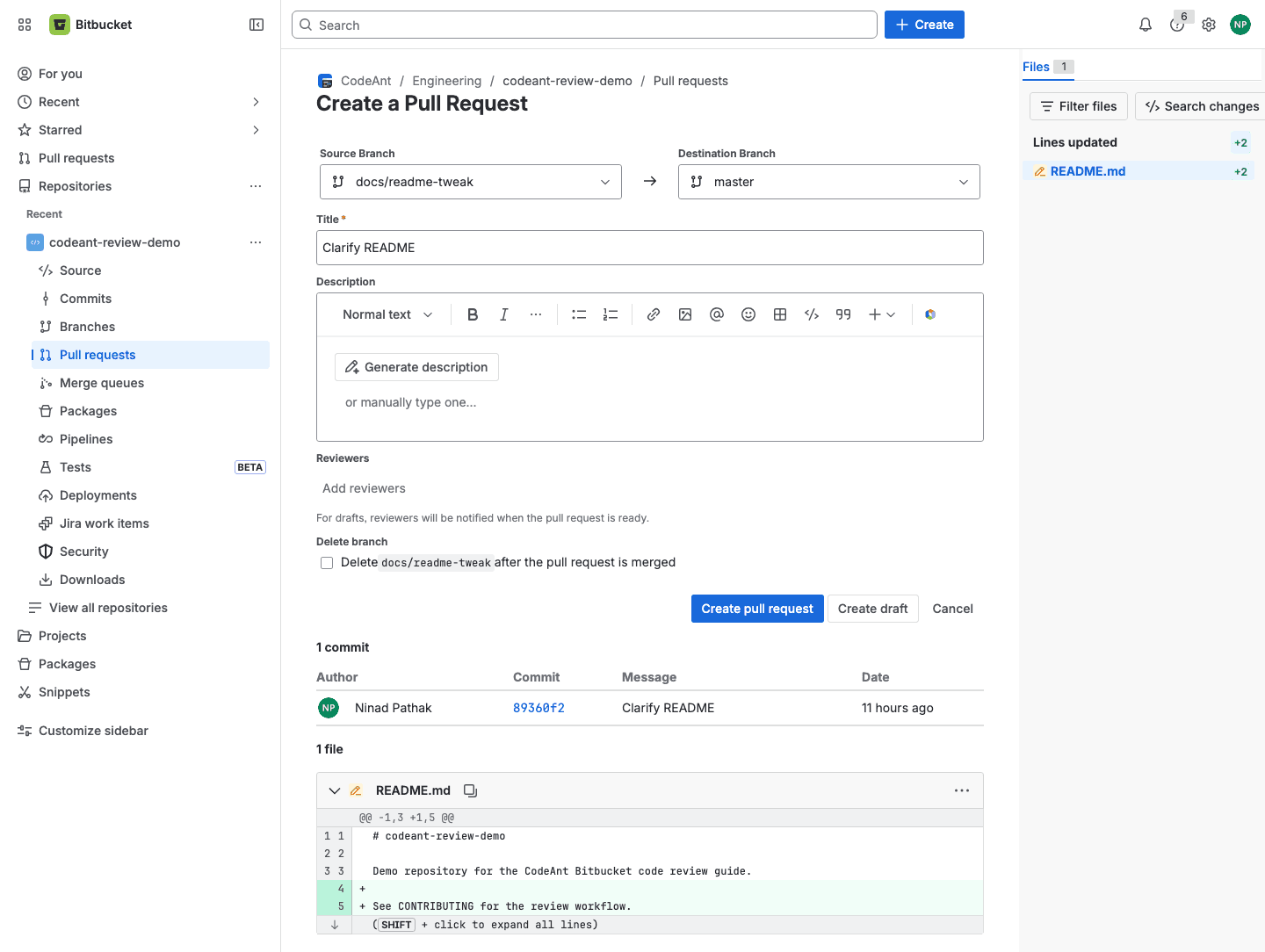
You know this part, so here are the three things worth a second look. Push the branch, then create the PR from the repository (Create, or Create pull request from the Pull requests view).
Destination branch. Confirm it. Merging into the wrong long-lived branch is a common, avoidable mistake.
Description. Point reviewers at the parts that need judgment.
Draft or ready. Open it as a draft if it is not ready, which keeps reviewers from spending attention early.
Default reviewers and code owners attach automatically. Add anyone else whose context you need. If your team keeps the branch list clean, tick Delete branch after merge.
4. Review the code
The mechanics take a few paragraphs. The judgment is the rest of the section.
Comment at the right scope
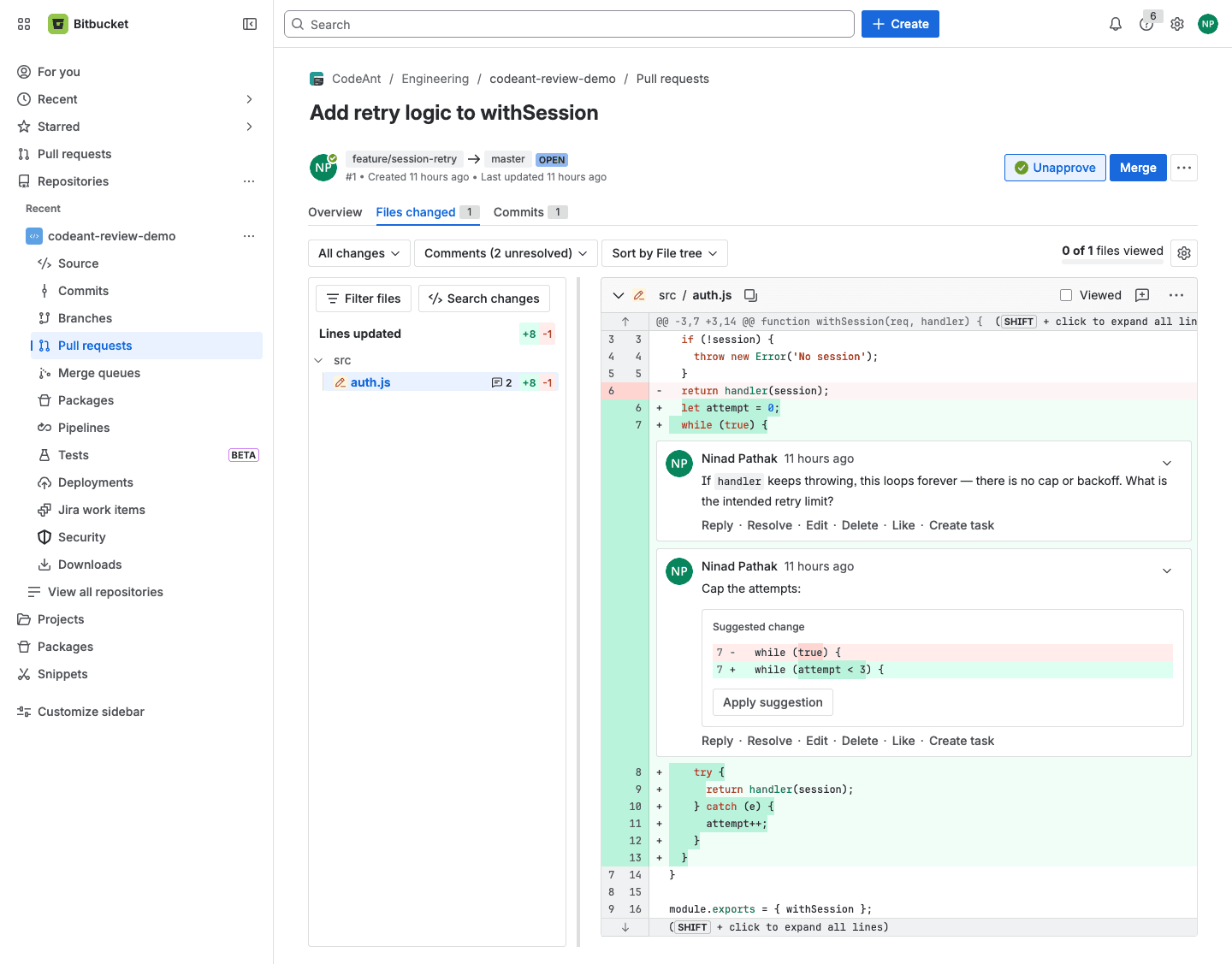
Open the PR and you land on the diff. Added lines are green, removed lines are red. Bitbucket has four comment scopes:
Whole pull request. The "What do you want to say?" field under Activity. Use it for summary feedback.
One line. The
+in the gutter.Several lines. Click the
+on the first line and drag across the range.A whole file. Add comment on the file header.
Each comment supports Reply, Resolve, Edit, Delete, Like, Reopen, and Create task. A task turns a comment into a tracked item the author has to close, and you can gate the merge on open tasks.
Suggest the exact fix
For a small change, write the replacement instead of describing it. Click the + on the line, choose Suggest code (or type /suggestcode), and enter the code. Anyone with write access applies it with Apply suggestion, then Commit changes, from inside the PR. A typo fix should not cost a round-trip.
Batch your comments
Click Start review, add comments as you go, then Finish review to publish them together. The author gets one notification and the full set, instead of a stream of partial feedback that arrives while you are still reading.
Mark files Viewed
On a large PR, tick the Viewed checkbox on each file header as you finish. The file collapses, so you can see what is left.
What to read for
This is the part tooling cannot supply. Read in priority order, because comments do not carry equal weight.
Correctness and intent. Does the code do what the PR says? Are the edge cases handled: empty input, the failure path, the concurrent case? Spend most of your attention here.
Design and blast radius. Does the change fit the system, and will it make the next change harder?
Tests. Do they exist, do they test behavior rather than implementation, and would they fail if the code broke?
Security and data. Unvalidated input, a secret in the diff, a query that just became N+1, a missing permission check.
Readability. Names, structure, and comments that explain the reasoning behind the code.
Items 1 through 3 depend on human judgment. Items 4 and 5 are mechanical, and step 5 of this workflow hands them to automation.
Write comments people can act on
Mark severity. Prefix optional notes with "nit:" or "optional:" so the author can tell a blocker from a preference.
Ask questions. "What happens if
itemsis empty here?" invites a fix and leaves room for you to be wrong.Give the reason. "Let's extract this, it is the third copy and they will drift" tells the author what to generalize and why.
5. Automate the mechanical checks
Items 4 and 5 from that list, formatting, lint, obvious bugs, leaked secrets, and dependency CVEs, are mechanical. Running them by eye wastes a reviewer's attention and still misses cases. Move them to automation and let reviewers spend their judgment on items 1 through 3.
Bitbucket Pipelines for the deterministic checks
Bitbucket's built-in CI reads a file named bitbucket-pipelines.yml at the root of the repository. The name has no leading dot and does not sit under .bitbucket/. A minimal pipeline that lints, tests, and builds every pull request:
Two notes:
The
pull-requestssection runs only on PRs, so the build status shows on the change itself. The'**'glob matches any source branch. Add abranches:section if you also want checks on direct pushes.npm ciinstalls exactly what the lockfile pins and fails on a stale lockfile, which is the behavior you want in CI.
Close the loop in Repository settings → Workflow → Branch restrictions. Enable the check "Check the last commit for at least 1 successful build, no failed builds, and no in progress builds". A red or still-running pipeline then blocks the merge, and the PR's checks panel shows the build status next to the approval count.
AI review between lint and humans
Linters catch what fits a rule, and humans catch design and intent. A wide band sits between them: a bug spread across three files, a security pattern a regex cannot model, an unhandled error path, a secret about to be committed. That band is too contextual for a linter and too mechanical to deserve a senior engineer's first pass.
CodeAnt AI works in that band. It reviews each pull request on open, flags likely bugs and anti-patterns, runs security and secret scanning, and posts a short summary of the change. It comments inline, in the same threads your team already uses. By the time a person opens the PR, the mechanical issues are already marked, so their reading goes to correctness, design, and intent.
6. Approve and merge
When the change is right, approve it: click Approve in the upper-right of the pull request. A green check appears next to your name in the Reviewers list, and the approval counts toward your merge checks.
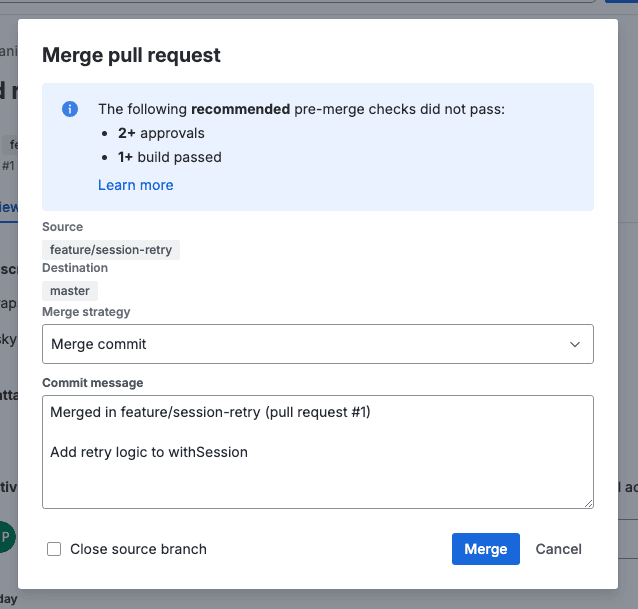
Once the merge checks are satisfied, with approvals in, builds green, and tasks resolved, merge. Bitbucket offers three strategies, and the choice shapes your history:
Merge commit. Keeps every branch commit plus a merge commit. Full history, more noise.
Squash. Collapses the branch into one commit on the destination. The per-commit detail stays in the PR. A clean default for a linear history.
Fast-forward. Moves the branch pointer with no merge commit. Cleanest graph, available only when the destination has not moved.
Pick one as a team convention and keep to it. A repo with three merge styles has a history nobody trusts. With Delete branch after merge enabled, the source branch is removed once the merge lands.
Adding CodeAnt AI to your Bitbucket review process
We talked about what CodeAnt can do inside a PR. This section covers how to wire it into your Bitbucket workspace so it runs automatically on every pull request, and how to connect it with the branch restrictions and CODEOWNERS setup you already have.
Connect CodeAnt to your workspace
Go to app.codeant.ai, choose Bitbucket (Cloud or Data Center), and authorize via OAuth. CodeAnt requests repository read, pull-request read/write, and webhook permissions. Once connected, pick which repositories to activate. From that point every new pull request triggers an automated review pass without any author action.
CodeAnt supports both Bitbucket Cloud and Data Center. Most AI review tools only cover Cloud, so Data Center teams generally have to do without an automated review layer. The integration works the same way on both: CodeAnt receives the PR webhook, runs the analysis, and posts results back as native Bitbucket PR comments.
What appears in the pull request
When a PR opens or gets a new commit, CodeAnt posts three things:
A summary comment at the top: what the change does, a risk level, and a grouped list of issues found.
Inline comments on specific lines, each with a severity (Info, Minor, Major, Critical), steps to reproduce, and a suggested fix the author can apply with one click using Bitbucket's native Apply suggestion flow.
A SAST, secrets, and dependency scan on the same diff, so security findings land in the same thread as code quality issues rather than in a separate tool the author has to go find.
Your reviewers then run Bitbucket's Start review / Finish review on top. The mechanical issues are already marked before anyone reads the diff. Reviewers spend their attention on correctness, design, and intent.
Wire quality gates into branch restrictions
CodeAnt's quality gates post a build status to the PR on Bitbucket Cloud, and use the Builds API on Data Center. That build status slots directly into your existing branch restriction at Repository settings → Workflow → Branch restrictions: enable "Check the last commit for at least 1 successful build, no failed builds, and no in progress builds" and the CodeAnt gate joins your approvals check. A PR with unresolved critical issues cannot merge until the author addresses them.
You can configure which severity levels block: critical only, or major and above. Combine this with your minimum-approvals requirement and you get a complete gate where automation clears the mechanical layer and a human clears the judgment layer.
Use CODEOWNERS ownership as reviewer context
Bitbucket reads your .bitbucket/CODEOWNERS file to assign reviewers when a PR touches paths those owners cover. CodeAnt reads the same ownership data as context when generating review comments, flagging when a change touches a file owned by a team that was not added as a reviewer. This surfaces missing ownership gaps in the PR itself rather than after a merge.
Run a pipeline step for pre-PR checks
You can also run CodeAnt's CLI as a step in bitbucket-pipelines.yml to catch critical issues before the PR is even opened for review:
The pipeline blocks on critical issues, the in-PR comments surface the context and one-click fixes, and the branch restriction enforces both. Authors get feedback at the earliest possible point in the workflow. For the full CLI reference and configuration options, see the CodeAnt documentation.
Edge cases worth planning for
A few situations need more than the default setup:
External contributors and forks. PRs from forks come from people without write access. Decide who is allowed to run pipelines on fork PRs, and lean on CODEOWNERS and required approvals rather than branch permissions alone.
Free tier versus Premium. On a non-Premium workspace, merge checks are shown as recommended but not enforced, so a determined author can still merge past them. If you need hard enforcement, that is the reason to upgrade.
Required builds need a build source. The successful-build check only works if something posts build status, whether that is Bitbucket Pipelines or an external CI using the build-status API. With no build reporting, the check can never pass.
Large or stacked changes. When a change genuinely cannot be small, split it across stacked branches and review each in order, rather than approving one giant diff that no one can hold in their head.
Monorepos. Lean on CODEOWNERS so each area pulls in its owners, and keep each PR scoped to one area so the diff stays legible.
Bitbucket Data Center. Self-hosted Bitbucket uses different navigation and feature names from Cloud. The concepts carry over, but the exact labels in this guide are for Bitbucket Cloud.
The code review checklist
A complete pass, grouped by who does what and when.
Before you request review (author)
Scope is tight. The diff contains only the change it claims to, with no unrelated files or formatting churn.
Self-reviewed. You read your own diff in the PR view and removed debug logging, dead code, and stray
TODOs.Tests included. New behavior has tests, and they pass locally.
Description is useful. It states what changed, why, and where you want attention.
Automated pass run. Lint, build, and an AI review have run, and you have addressed what they flagged.
Reviewers set. Default reviewers and code owners are attached, plus anyone with needed context.
While reviewing (reviewer)
Correctness. The code does what the PR claims, and the edge cases are handled.
Design fit. The change suits the system and does not make the next change harder.
Tests are real. They test behavior, not implementation, and would fail if the code broke.
Security and data. No unvalidated input, leaked secret, new N+1 query, or missing permission check.
Readability. Names and structure are clear, and comments explain the reasoning.
Comments are actionable. Blockers and nits are marked, and each comment is specific.
Before you merge
Build is green and required checks pass.
Approvals are in, including default reviewers or code owners on the paths they own.
Threads resolved and tasks closed.
Description still matches the final diff.
Destination branch is correct.
Merge strategy matches your team convention.
Where this leaves you
A working review process on Bitbucket comes down to the setup more than the day-to-day clicking. With merge checks and CODEOWNERS in place, automation catching the mechanical issues, and reviewers spending their attention on correctness and design, reviews stay fast as the team and the codebase grow. The highest-leverage step is the repository configuration you did first, because it applies to every pull request that follows.
FAQs
How many reviewers does a Bitbucket PR need?
Where does the CODEOWNERS file go in Bitbucket Cloud?
What is the difference between default reviewers and code owners?
Can Bitbucket enforce “quality gates” like blocking merges until tests or scans pass?
How can we balance speed with thorough reviews in fast-moving sprints?