GitHub

AI Code Reviews

Cut code review time and bugs by 80%

Trusted by Startups to Fortune 500

Feature

Code Reviews That Fit Engineering Workflows

Fix in IDE
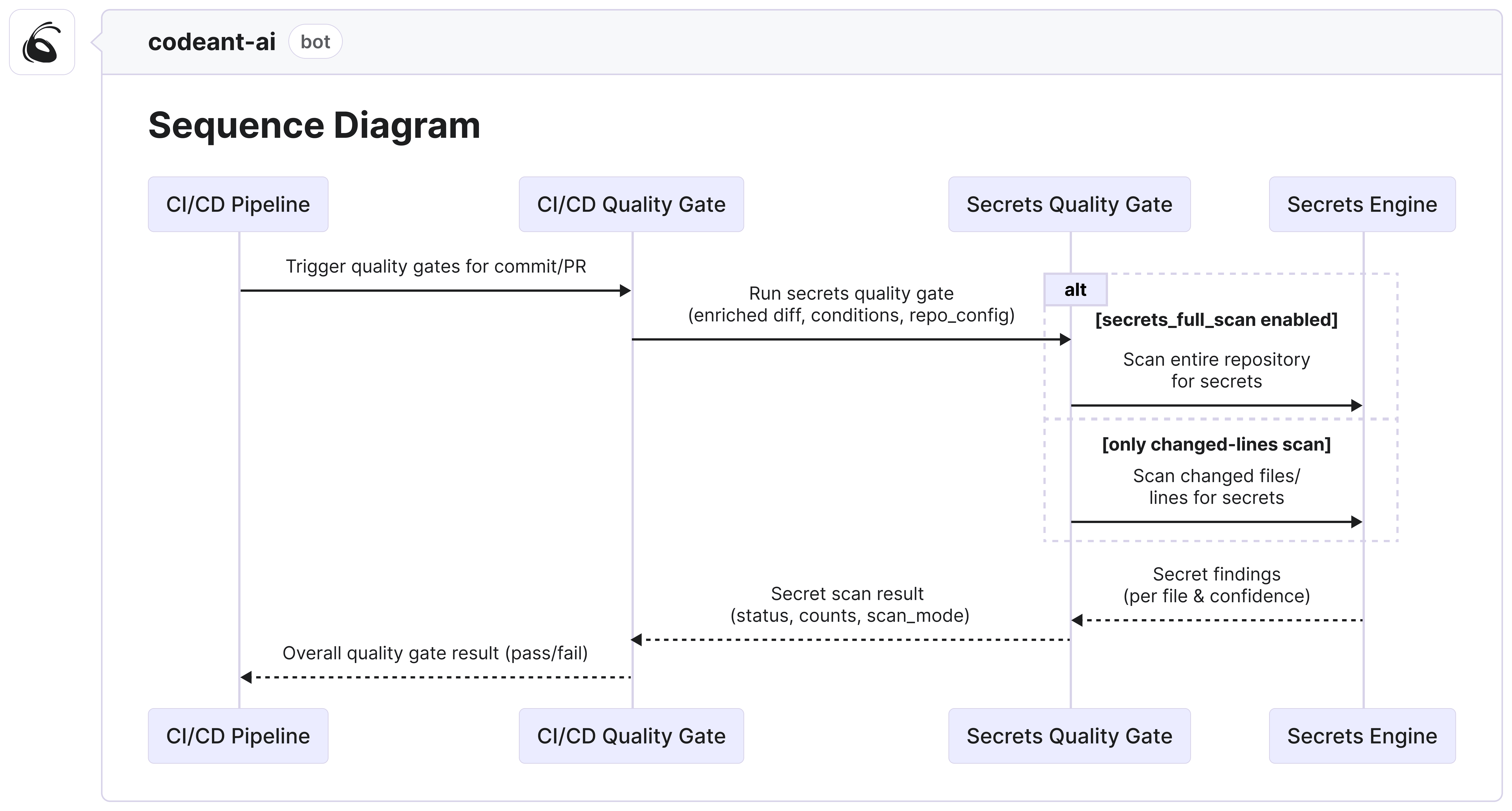
Sequence Diagrams

See cross-service changes before you merge

AI Learnings
Pull Request Summary
Inline Review
Quality Gates
Steps of Reproduction
Review Dashboard
CI/CD Review Hook
Fix in IDE
Sequence Diagram
AI Learnings
PR Summary
Inline Review
Quality Gates
AI Chat
Steps of Reproduction
Review Dashboard
CI/CD Review Hook
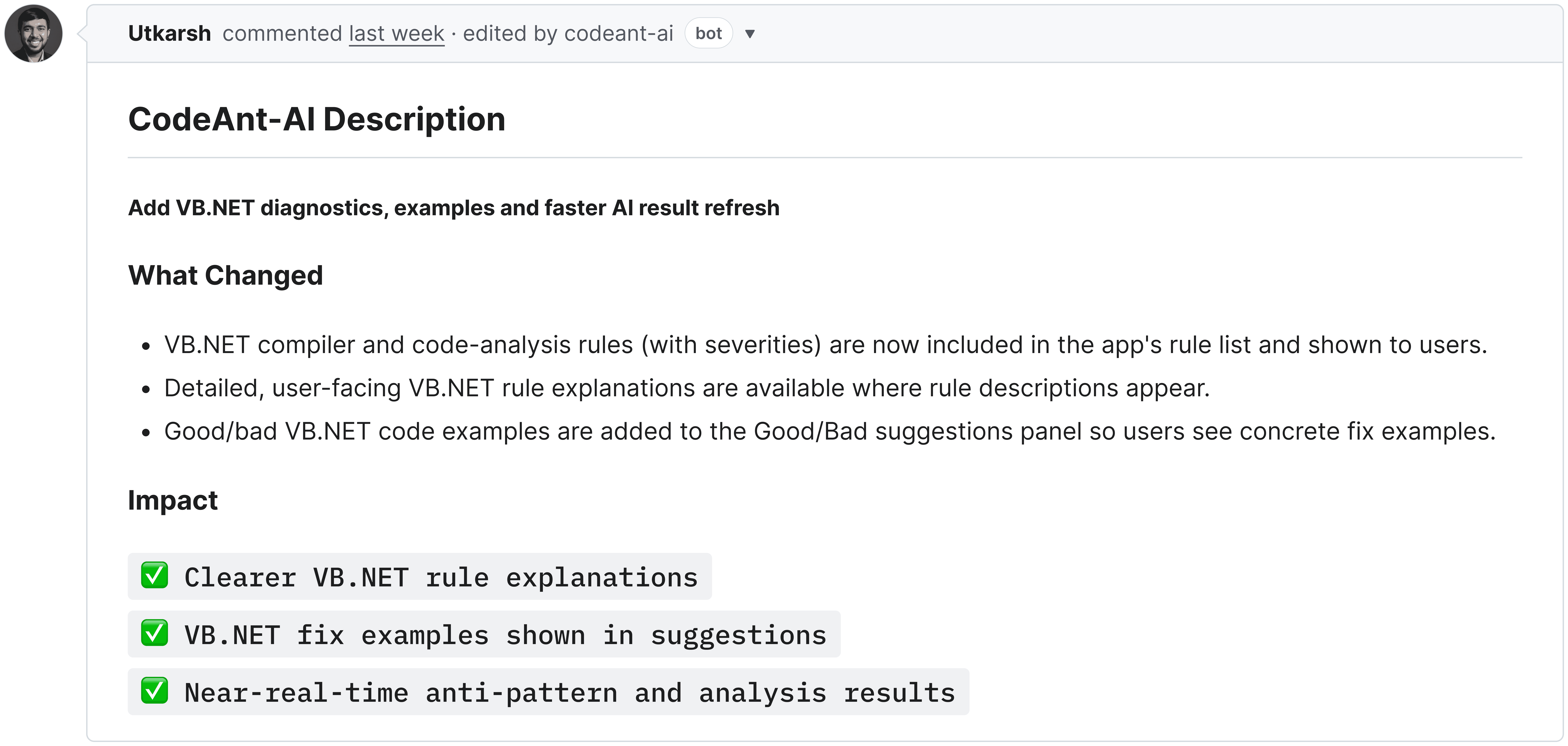
CodeAnt AI pull request summary comment posted automatically inside a GitHub pull request. The summary shows a structured breakdown of the changes in plain English: a short one-sentence overview, a bullet list of what was added or modified (such as new VB.NET diagnostic rules, updated test examples, and refreshed documentation), and a separate section listing the practical impact on the codebase such as improved clarity, better performance, and broader language coverage. The comment is authored by the CodeAnt AI bot and appears at the top of the PR conversation thread, giving reviewers an instant grasp of the PR scope without having to read the full diff. The interface is styled in GitHub's dark mode.

Know exactly what a PR does in seconds.

A single clear summary that explains what changed and why.

How CodeAnt AI Reviews Every Single PR?

How CodeAnt AI Reviews Every Single PR?

How CodeAnt AI Reviews Every Single PR?

Customer Love

Trusted by Startups to Fortune 500

Series B, $75M+ Raised

"CodeAnt went deeper than any penetration test we've ever commissioned. The most thorough offensive security platform we've used."

Jeson Patel, CTO

Series B, $75M+ Raised

"CodeAnt went deeper than any penetration test we've ever commissioned. The most thorough offensive security platform we've used."

Jeson Patel, CTO

Series B, $75M+ Raised

"CodeAnt went deeper than any penetration test we've ever commissioned. The most thorough offensive security platform we've used."

Jeson Patel, CTO

Why Best Teams Love CodeAnt AI

Enterprise-grade security

CodeAnt AI is HIPAA compliant
SOC 2 Type II certified — CodeAnt AI is independently audited and compliant with SOC 2 Type II security standards

No code storage

Zero data retention

5M+ PRs/month

Handles effortlessly

1 Billion+

Lines of Code Scanned

Why Best Teams Love CodeAnt AI

Enterprise-grade security

CodeAnt AI is HIPAA compliant
SOC 2 Type II certified — CodeAnt AI is independently audited and compliant with SOC 2 Type II security standards

No code storage

Zero data retention

5M+ PRs/month

Handles effortlessly

1 Billion+

Lines of Code Scanned

Git Integrations
CodeAnt AI and Bitbucket integration
Codeant AI and Gitlab integration
CodeAnt AI and Azure Devops integration
CodeAnt AI and Github integration

Why Best Teams Love CodeAnt AI

Enterprise-grade security

CodeAnt AI is HIPAA compliant
SOC 2 Type II certified — CodeAnt AI is independently audited and compliant with SOC 2 Type II security standards

No code storage

Zero data retention

5M+ PRs/month

Handles effortlessly

1 Billion+

Lines of Code Scanned

Integration

Works with your entire stack

IDE
CLI

Fix Security Issues in the IDE

Inline security alerts as you type

One-click fix suggestions

Works in VS Code, Cursor, IntelliJ

CodeAnt AI inline code review comment shown directly on a specific line inside a GitHub pull request diff view. The comment is pinned to a highlighted line of Python code and explains a detected security issue — a PII data leak where a decoded email address is being logged in plaintext using Python's logging module. The inline comment includes a severity badge labeled "Critical", a clear explanation of why the practice is dangerous (log files may be accessible to unauthorized parties), and a suggested fix showing a masked version of the email. A "Apply fix" button sits below the suggestion for one-click remediation. The surrounding diff context shows red-highlighted removed lines and green-highlighted added lines, making the issue location immediately clear to reviewers.
IDE
CLI

Fix Security Issues in the IDE

Inline security alerts as you type

One-click fix suggestions

Works in VS Code, Cursor, IntelliJ

CodeAnt AI inline code review comment shown directly on a specific line inside a GitHub pull request diff view. The comment is pinned to a highlighted line of Python code and explains a detected security issue — a PII data leak where a decoded email address is being logged in plaintext using Python's logging module. The inline comment includes a severity badge labeled "Critical", a clear explanation of why the practice is dangerous (log files may be accessible to unauthorized parties), and a suggested fix showing a masked version of the email. A "Apply fix" button sits below the suggestion for one-click remediation. The surrounding diff context shows red-highlighted removed lines and green-highlighted added lines, making the issue location immediately clear to reviewers.

FAQs

How is CodeAnt AI Code Review different from GitHub Copilot or ChatGPT-style assistants?

Can AI really understand the context of my whole codebase, not just one PR?

What happens if the AI review misses something critical?

Does CodeAnt AI adapt to my team’s review style?

How is inline AI review different from linting tools?

Can CodeAnt AI handle multi-repo and monorepo environments?