

Security vulnerabilities discovered in production cost 30 times more to fix than those caught during development. Yet many teams still treat security scanning as a pre-release checkpoint rather than a continuous practice woven into every commit.
Continuous code security scanning changes that equation by automating vulnerability detection directly within your CI/CD pipeline—analyzing code for flaws, secrets, and dependency risks on every pull request. This guide covers the scanning types that matter, how to integrate them into modern pipelines, and the practices that separate effective security programs from checkbox exercises.
What is Continuous Code Security Scanning
Continuous code security scanning automates vulnerability detection within CI/CD pipelines, analyzing your codebase for security flaws, secrets, misconfigurations, and dependency risks on every code change. Rather than running security checks once before release, this approach integrates scanning directly into developer workflows—through IDEs, pull request comments, and pipeline gates. The result is a shift-left strategy where issues get caught early, when fixes are faster and cheaper.
In practice, it works like having an expert reviewer watching every commit. When a developer pushes code or opens a pull request, scans trigger automatically and flag problems like SQL injection vulnerabilities, hardcoded API keys, or risky open-source dependencies. This forms a core part of DevSecOps, transforming security from a late-stage gate into an ongoing safeguard throughout the software development lifecycle.
Why Continuous Security Scanning Matters for Modern Development
The impact of continuous security scanning shows up in four practical areas: earlier detection, lower remediation cost, stronger compliance evidence, and faster developer feedback.
Catching vulnerabilities before production
Security issues discovered in production are exponentially harder to fix than those caught during development. When a scanner flags a vulnerability in a pull request, the developer still has full context—they wrote the code minutes ago. Fixing it takes minutes, not days.
Compare that to finding the same issue after deployment. Now you’re dealing with emergency patches, incident response, and potentially notifying customers. The context is gone, the pressure is high, and the cost multiplies.
Dependency scanning is particularly important when attackers target trusted packages. Our analysis of the Shai-Hulud npm supply chain attack shows how a compromised npm dependency can become part of a much larger attack chain.
Reducing the cost of late-stage fixes
A vulnerability caught during code review might take an hour to remediate. That same vulnerability discovered in production could require rolling back releases, coordinating across teams, and explaining the incident to stakeholders. Early detection isn’t just about security—it’s about protecting your team’s time and your organization’s resources.
Meeting compliance and audit requirements
Frameworks like SOC 2, PCI-DSS, and HIPAA require documented vulnerability management processes. Continuous scanning creates automatic audit trails showing when issues were detected, who fixed them, and how quickly. Manual processes struggle to provide this level of documentation, while automated scanning generates it as a byproduct of normal development.
Maintaining developer velocity
Here’s what might surprise you: automated security scanning actually speeds teams up. When security checks run automatically on every pull request, developers get immediate feedback without waiting for manual reviews. Security becomes part of the natural workflow rather than a bottleneck before release.
Types of Automated Scanning Tools for Continuous Security
Different vulnerability types require different detection approaches. Most mature security programs layer multiple scan types together for comprehensive coverage.
Tool Type | What It Detects | When It Runs |
Code-level vulnerabilities | Pre-commit, PR | |
DAST | Runtime vulnerabilities | Staging/QA |
Dependency risks | Build time | |
Exposed credentials | Pre-commit, PR | |
Infrastructure misconfigurations | PR, deployment |
Static application security testing (SAST)
SAST analyzes source code without executing it. The scanner looks for patterns that indicate vulnerabilities—SQL injection, cross-site scripting, insecure data handling—and flags them before code leaves the developer’s machine. Because SAST works on source code directly, it catches issues at the earliest possible stage.
Dynamic application security testing (DAST)
While SAST examines code, DAST tests running applications. It probes your deployed application for vulnerabilities that only show up at runtime, like authentication bypasses or session management flaws. DAST complements SAST by finding issues that static analysis misses.
Software composition analysis (SCA)
Modern applications rely heavily on open-source libraries, and those dependencies carry their own vulnerabilities. SCA scans your dependency tree against databases of known CVEs (Common Vulnerabilities and Exposures), alerting you when a library you’re using has a published security flaw.
Secret detection and credential scanning
Hardcoded passwords, API keys, and tokens are among the most common—and most dangerous—security mistakes. Secret detection tools scan commits for credential patterns before they’re pushed to repositories, preventing accidental exposure that could compromise your entire infrastructure.
Infrastructure as code security scanning
Terraform, CloudFormation, and Kubernetes manifests can contain misconfigurations that create security gaps. IaC scanning catches issues like overly permissive IAM policies or publicly accessible storage buckets before infrastructure gets provisioned.
How Continuous Security Scanning Works in CI/CD Pipelines
In practice, continuous security scanning follows a predictable flow that aligns with how code already moves through modern CI/CD pipelines. Such as:
Triggering scans on pull requests and commits
The typical flow starts when a developer pushes code or opens a pull request. This event triggers the scanning pipeline, which runs configured security checks against the changed files. Results appear within minutes—fast enough to address issues while the code is still fresh.
Enforcing security gates before merge
Teams can configure pipelines to block merges when critical vulnerabilities are detected. This creates a hard stop that prevents high-risk code from entering protected branches. Most teams allow warnings for lower-severity findings to avoid blocking legitimate work while still maintaining visibility.
Delivering findings in developer workflows
Effective scanning tools surface results where developers already work:
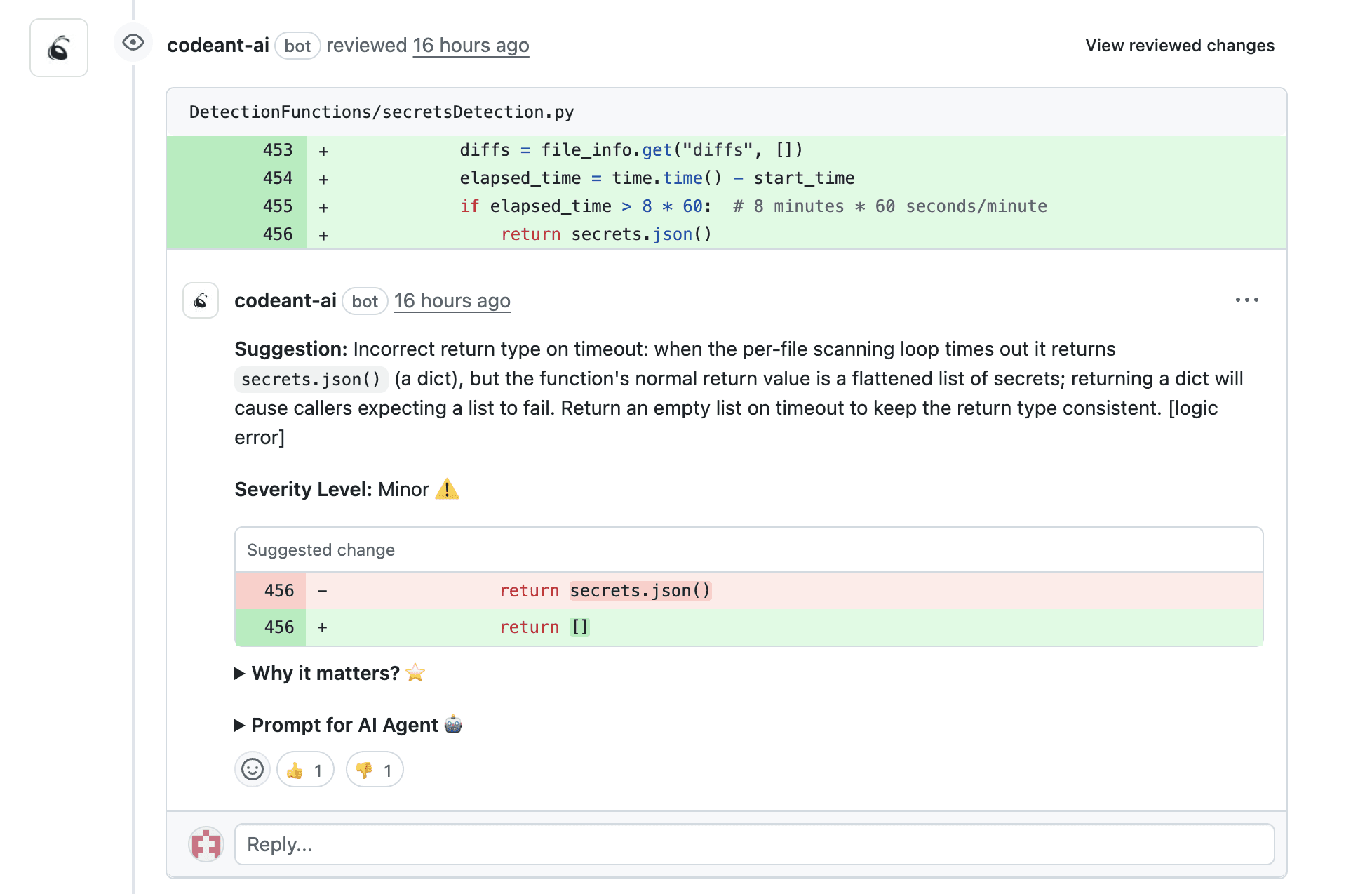
Pull request comments: Inline annotations pointing to specific vulnerable lines
IDE integrations: Real-time feedback as code is written
Slack or Teams notifications: Alerts for critical findings requiring immediate attention
Dashboards: Aggregated views for security teams tracking trends
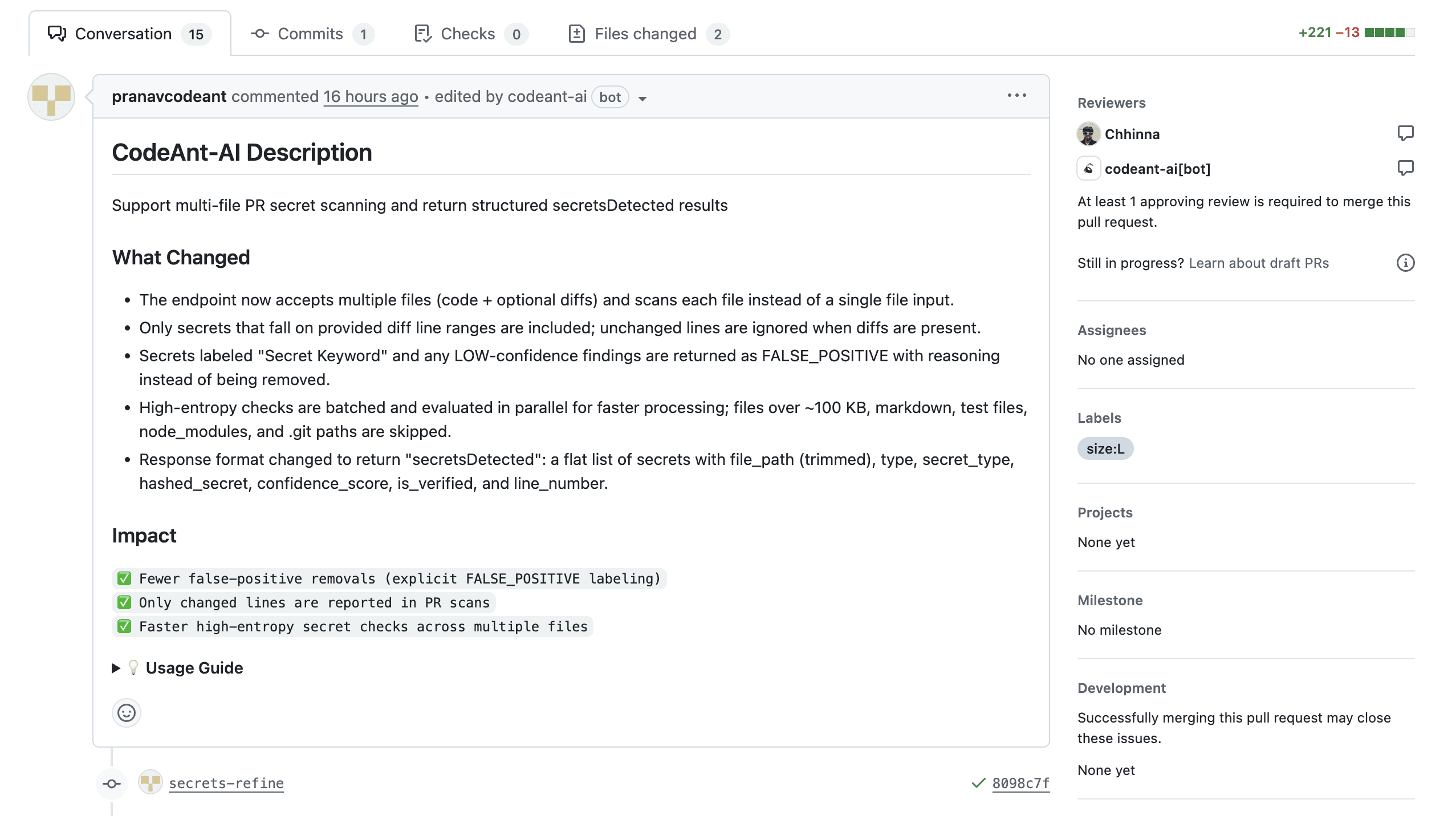
Key Features of Modern Security Scanning Tools
At scale, security scanning must operate continuously, prioritize real risk, and integrate cleanly with development systems. These capabilities separate effective tools from checkbox scanners, such as:
Automated scheduling and continuous monitoring
Beyond PR-triggered scans, mature tools run scheduled full-repository scans to catch newly disclosed vulnerabilities in existing code. A library that was safe yesterday might have a CVE published today—scheduled scans catch these without waiting for code changes.
Low false positive rates and AI-powered prioritization
Nothing kills developer adoption faster than alert fatigue. When every scan produces dozens of warnings that turn out to be non-issues, developers start ignoring findings entirely. The best scanning tools use AI to prioritize findings by actual exploitability and business impact, filtering out theoretical vulnerabilities that don’t apply to your specific context.
Actionable remediation guidance
Flagging a vulnerability is only half the job. Useful tools explain why something is risky and suggest specific fixes—ideally with code snippets developers can apply directly. A finding that says “SQL injection vulnerability” is less helpful than one that shows exactly how to parameterize the query.
Repository and developer tool integration
Seamless integration matters more than feature count. A tool that works natively with GitHub, GitLab, or Bitbucket and posts findings directly to pull requests will see far higher adoption than one requiring developers to check a separate dashboard.
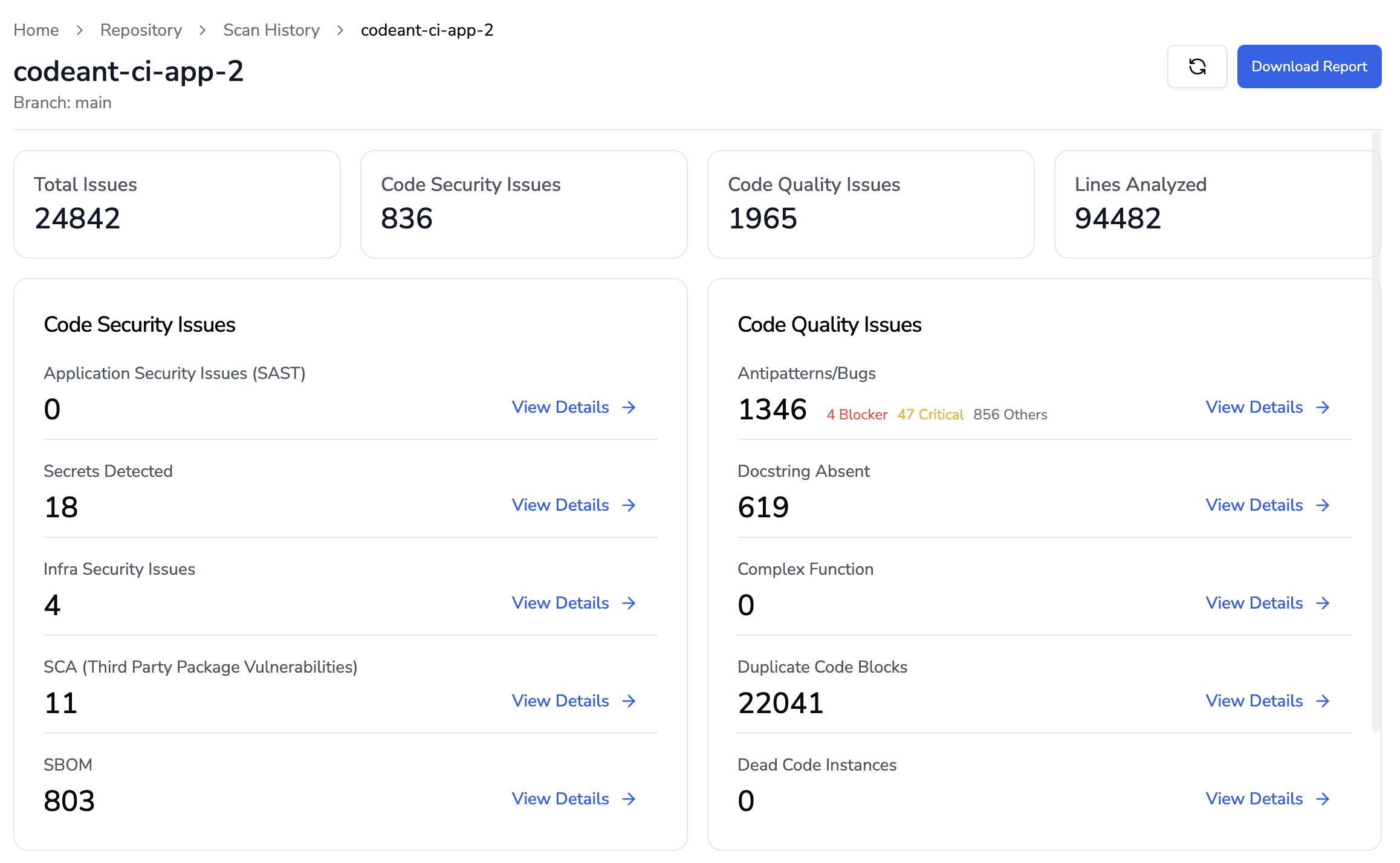
Unified dashboard for code health visibility
Security doesn’t exist in isolation. Platforms that combine security findings with code quality metrics, technical debt tracking, and review analytics give teams a complete picture of code health across all repositories. This unified view helps teams spot patterns and prioritize improvements.
Common Challenges in Continuous Security Scanning
Despite its benefits, continuous scanning introduces trade-offs that teams must actively manage. Recognizing these pitfalls is the first step toward building a sustainable security workflow.
Managing alert fatigue and false positives
When every scan produces dozens of warnings, developers start ignoring them. The solution involves tuning scan rules to your codebase, suppressing known false positives, and prioritizing by severity. A well-tuned scanner that surfaces ten real issues beats a noisy one that surfaces a hundred questionable findings.
Balancing scan depth with pipeline performance
Thorough scans take time, and slow pipelines frustrate developers. Most teams run fast, focused scans on pull requests while reserving comprehensive deep scans for nightly or weekly schedules. This balance keeps feedback loops tight without sacrificing coverage.
Encouraging developer adoption
Security tools fail when developers see them as obstacles rather than helpers. The key is making findings actionable and surfacing them in existing workflows—not asking developers to learn new tools or check separate systems. When security feedback feels like a natural part of code review, adoption follows.
Best Practices for Continuous Code Security Scanning
Once common pitfalls are understood, the focus shifts to execution. These practices help teams turn continuous scanning into a reliable, low-friction part of development.
1. Shift security left by scanning early in the SDLC
“Shift left” means moving security checks earlier in development. Configure scans to run on pre-commit hooks or immediately when pull requests are opened. Catching issues at the commit stage is more efficient than finding them in staging or production.
2. Layer multiple scan types for comprehensive coverage
No single tool catches everything. Combine SAST for code-level issues, SCA for dependency vulnerabilities, and secret detection for credential exposure. Each addresses a different attack surface, and together they provide defense in depth.
3. Automate scans on every pull request
Manual or periodic scans create gaps where vulnerabilities slip through. Automated PR scanning ensures consistent coverage without relying on developers to remember to run checks.
4. Tune scanning rules to reduce noise
Out-of-the-box configurations often flag issues irrelevant to your stack. Invest time customizing rules, suppressing false positives, and adjusting severity thresholds to match your risk tolerance. This investment pays off in developer trust and engagement.
5. Integrate security findings into developer workflows
Results that appear in pull request comments get fixed. Results buried in separate dashboards get ignored. Meet developers where they work, and security becomes part of the natural development flow.
6. Track metrics and optimize continuously
Measure mean time to remediation, vulnerability escape rates, and false positive ratios. These metrics reveal whether your scanning program is actually improving security outcomes or just generating noise.
How to measure security scanning effectiveness
An effective security program is defined by results, not scan volume. The right metrics show whether scanning drives real remediation and adoption.
Mean time to remediation
MTTR tracks how quickly vulnerabilities get fixed after detection. Shorter times indicate that findings are actionable and developers are engaged with the process. If MTTR is climbing, it often signals alert fatigue or unclear remediation guidance.
Vulnerability escape rate
This measures what percentage of vulnerabilities reach production despite scanning. A low escape rate validates that your scanning catches issues before deployment. A high rate suggests gaps in coverage or scan timing.
False positive ratio
Track how many flagged issues turn out to be non-issues. High false positive rates erode trust and lead to alert fatigue. If developers dismiss findings without investigation, the ratio is probably too high.
Developer adoption metrics
Monitor scan coverage across repositories, percentage of PRs that include security checks, and how often developers engage with findings. Low adoption signals friction in the process that warrants investigation.
Building a Unified Code Security Strategy
Point solutions create fragmentation. When security scanning, code quality analysis, and review automation live in separate tools, teams waste time context-switching and miss connections between issues. A vulnerability might relate to a broader code quality problem, but siloed tools won’t show that relationship.
A platform approach brings continuous scanning, automated code review, and code health metrics into a single view. This unified perspective helps teams understand not just individual vulnerabilities, but overall code health trends across the organization.Start a free trial of the CodeAnt AI defensive and offensive security platform to see how unified security, quality, and review automation works in practice.

