Code Security
SonarQube Alternative: When to Replace SonarQube with a Modern SAST Tool

Sonali Sood

Founding GTM, CodeAnt AI
SonarQube is one of the most widely adopted code analysis platforms in the world, used by over 7 million developers. Many teams start with SonarQube for code quality, tracking code smells, duplication, and maintainability, and it does that job well. The Community Build is free and open-source, making it the natural entry point for teams that want to measure and improve code hygiene.
But code quality and application security are different disciplines. As teams mature their security programs, they consistently hit the same friction points with SonarQube:
limited security detection depth
rising false positive noise
enterprise licensing costs that scale faster than the team
rule-based engine that struggles with the volume and novelty of AI-generated code
These are not bugs in SonarQube, they reflect the fact that SonarQube was built as a code quality platform, not a security-first tool.
This guide helps you determine whether you have outgrown SonarQube, what to look for in a modern alternative, and how to migrate without losing coverage. For a broader view of the SAST landscape, see SonarQube in our full SAST tools comparison.
When SonarQube No Longer Fits: Signs You’ve Outgrown It
SonarQube remains a strong choice for teams whose primary need is code quality analysis. The decision to evaluate alternatives typically arises when one or more of the following conditions apply.
Security Depth Isn’t Enough for Production-Grade AppSec
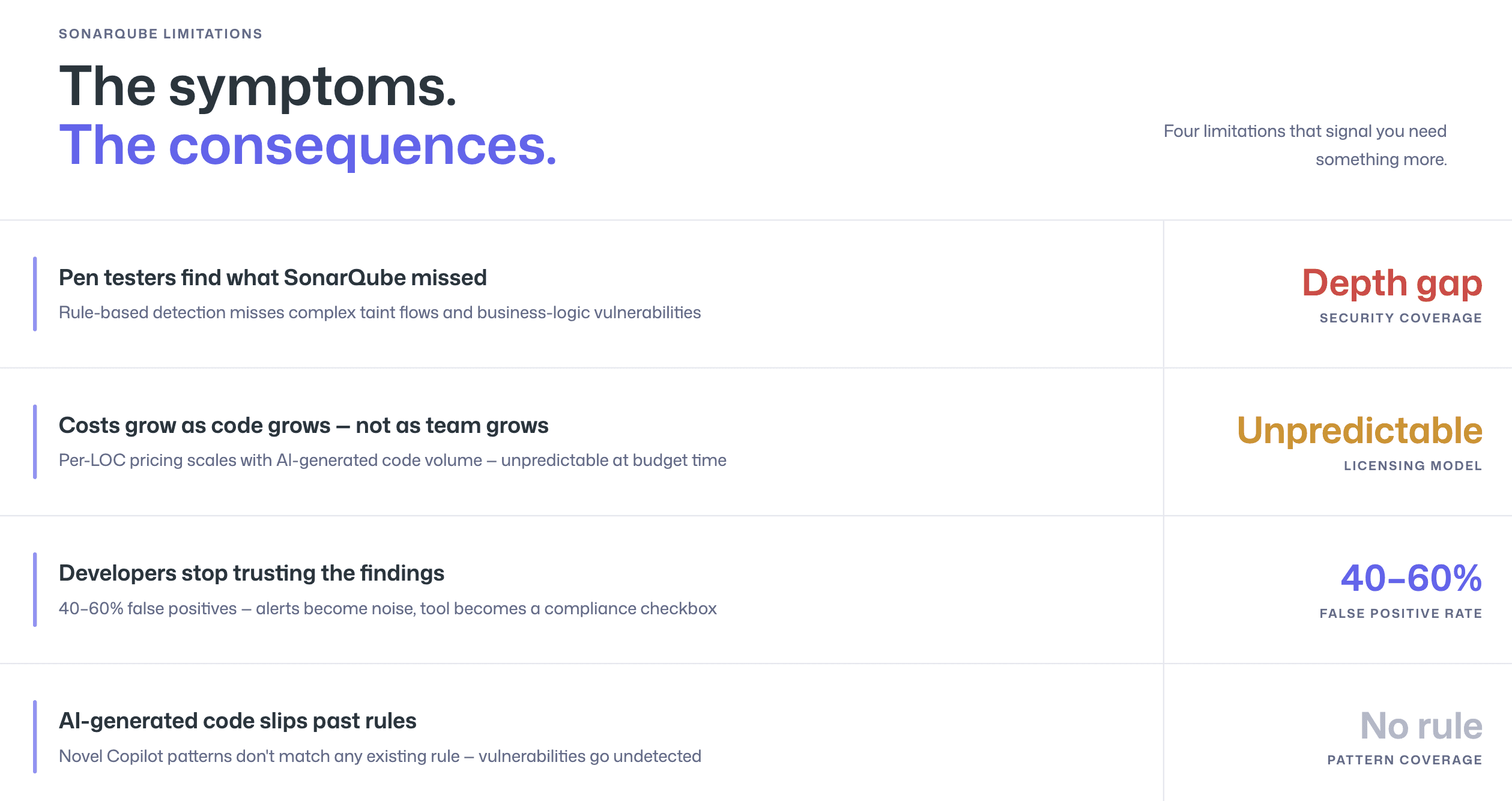
SonarQube’s SAST capabilities have improved significantly, it now covers OWASP Top 10 and CWE categories across 30+ languages. But security remains secondary to code quality in the platform’s architecture. The detection engine uses rule-based pattern matching, which catches known vulnerability signatures but struggles with complex taint flows, cross-file data propagation, and business-logic vulnerabilities.
For teams that need production-grade application security, the kind that satisfies SOC 2 auditors, withstands penetration testing, and catches the vulnerabilities that actually get exploited, SonarQube’s security layer often produces an uncomfortable gap between “we run SAST” and “our SAST catches real vulnerabilities.”
The tell-tale sign: your penetration testers keep finding vulnerabilities that SonarQube did not flag, or your security team supplements SonarQube with manual code review for anything high-risk.
Enterprise Licensing Costs Are Scaling Faster Than Your Team
SonarQube’s pricing model can create scaling friction. The Community Build is free, but the security features most teams need (branch analysis, OWASP/CWE detection, and security hotspots) require paid editions. SonarQube Server Developer Edition starts at $720/year, and SonarQube Cloud charges based on lines of code analyzed, which means costs grow as your codebase grows, regardless of whether team size stays flat.
For enterprise teams with large monorepos or multi-repository architectures, the per-LOC pricing model can produce bills that scale unpredictably. When AI coding assistants increase the volume of code entering the codebase, those costs accelerate further. Compare this to per-user pricing models, where costs scale linearly with team size and are predictable at budget time, and the economic case for switching becomes clear. For a detailed pricing breakdown, see pricing tiers across SAST tools.
False Positives and Noise Are Eroding Developer Trust
Rule-based SAST engines inherently produce more false positives than AI-native alternatives. SonarQube’s engine flags patterns that match known vulnerability signatures, but it lacks the contextual understanding to determine whether a flagged pattern is genuinely exploitable in your specific codebase. It does not recognize custom sanitizers, framework-specific protections, or runtime conditions that make a flagged code path unreachable.
The result is familiar to any team that has run SonarQube at scale: developers stop trusting the findings. When 40–60% of security alerts turn out to be false positives, the rational developer response is to start ignoring alerts entirely. The tool becomes a compliance checkbox rather than a security tool. For a technical breakdown of why this happens and what to do about it, see how to reduce SAST false positives.
AI-Generated Code Needs More Than Rule-Based Analysis
This is the most recent, and increasingly urgent, trigger for migration. AI coding assistants like GitHub Copilot and Cursor produce code patterns that frequently differ from the exact signatures in SonarQube’s rule library. When Copilot generates a novel string concatenation that produces a SQL injection, SonarQube may not flag it because the pattern does not match any existing rule, even though the vulnerability is real.
AI-native SAST tools address this by reasoning about what code does rather than matching patterns. They identify vulnerabilities in code constructions that no rule author anticipated, which makes them fundamentally better suited for the era where a significant percentage of code entering pull requests is AI-generated.
What Modern SAST Offers That SonarQube Doesn’t
The following comparison focuses on the capabilities most relevant to teams evaluating a SonarQube alternative. It is based on publicly available information and reflects the state of both platforms as of early 2026. For a fair and detailed comparison, see our CodeAnt AI vs SonarQube page.
Capability | SonarQube (Server/Cloud) | Modern AI-Native SAST (e.g., CodeAnt AI) |
Primary focus | Code quality + basic SAST | Security-first (SAST + SCA + secrets + IaC) |
Detection engine | Rule-based pattern matching | AI-native / LLM-powered semantic analysis |
False positive rate | Higher (rule-based limitations) | Lower (contextual understanding, reachability analysis) |
Auto-fix | Partial (AI CodeFix, limited availability) | Yes, AI-generated one-click fixes in PR |
Steps of Reproduction | No | Yes, full attack path + exploit scenario per finding |
EPSS exploit scoring | No | Yes, real-world exploit probability for prioritization |
PR-native workflow | Partial (dashboard-centric; MR decoration available) | Yes, inline comments on affected lines in PR |
AI-generated code handling | Rule-based (misses novel patterns) | AI-native (reasons about behavior, not patterns) |
SCA (dependency scanning) | Limited (available in paid editions) | Included, full dependency vulnerability scanning |
Secrets detection | Limited (security hotspots) | Included, dedicated secrets scanner |
IaC scanning | No | Included, Terraform, CloudFormation, Kubernetes |
Code quality analysis | Deep (code smells, duplication, complexity, tech debt) | Included (complexity, duplication, dead code) |
Platform support | GitHub, GitLab, Bitbucket, Azure DevOps | GitHub, GitLab, Bitbucket, Azure DevOps |
Self-hosted deployment | Yes (Server editions) | [Check vendor for current deployment options] |
Pricing model | Per instance (Server) or per LOC (Cloud) | Per user |
Free tier | Community Build (limited security features) | Free trial available |
This comparison is deliberately fair. SonarQube’s code quality analysis, code smells, technical debt tracking, maintainability ratings, is deeper and more mature than what most SAST-focused tools provide. If your primary need is code quality monitoring with basic security scanning, SonarQube remains a solid choice. The case for switching becomes compelling when security depth, false positive reduction, AI-generated code handling, or consolidated scanning (SAST + SCA + secrets + IaC in one tool) are priorities.
How to Evaluate SonarQube Alternatives
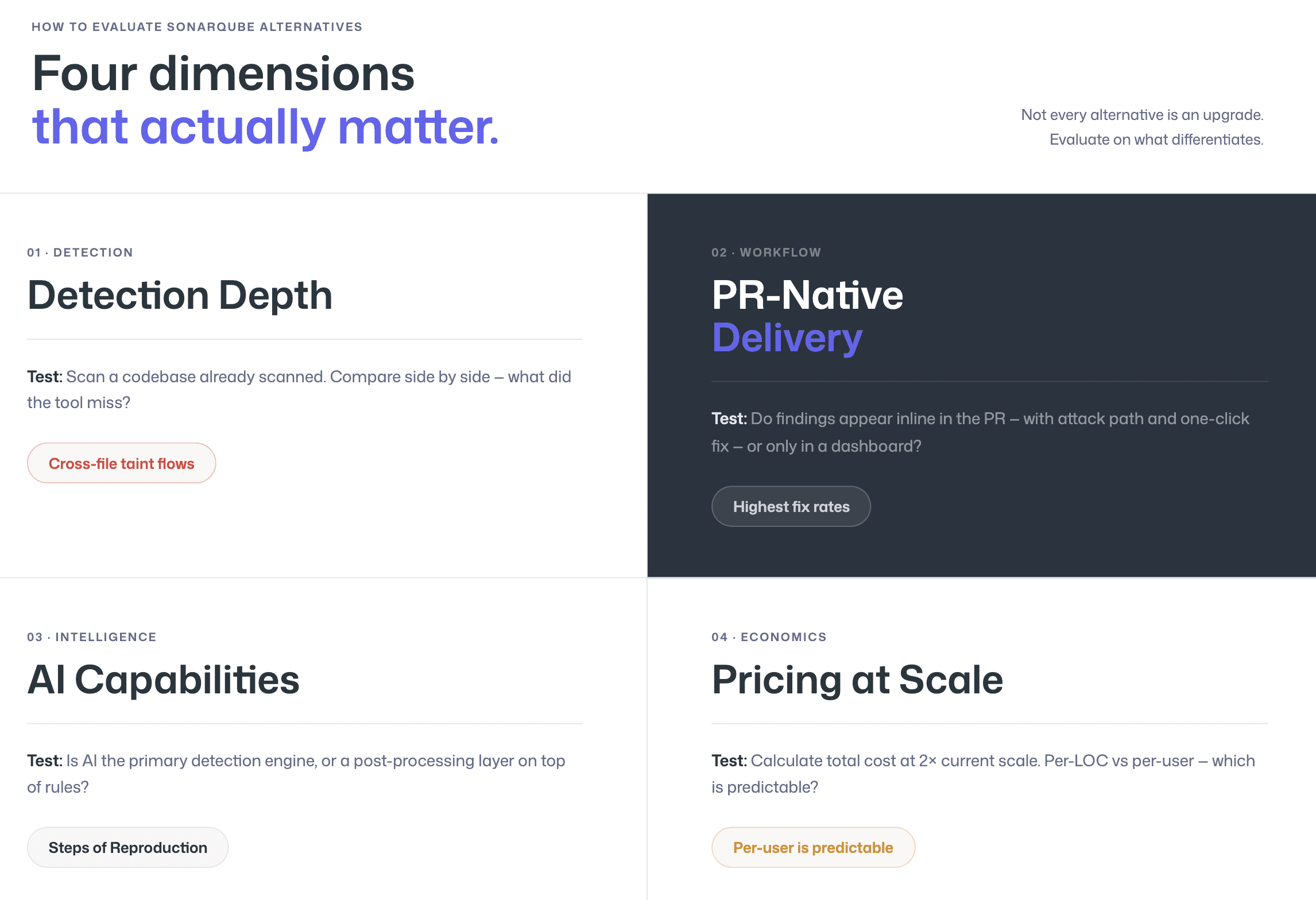
Not every alternative to SonarQube is an upgrade. Some tools trade one set of limitations for another. The following evaluation framework focuses on the four dimensions where SonarQube alternatives most commonly differentiate.
Detection Depth: Beyond Code Quality into Real Security
Ask the alternative tool to scan a codebase that SonarQube has already scanned. Compare the findings side by side. Look specifically for vulnerabilities that SonarQube missed, cross-file taint flows, business-logic flaws, framework-specific injection patterns, and vulnerabilities in AI-generated code. Also look for false positives that SonarQube flagged but that are not genuinely exploitable. The delta between the two scans tells you exactly what the new tool adds.
A useful test: take the most recent findings from your penetration test or security audit and check whether the alternative tool would have caught them. If SonarQube missed them and the alternative catches them, that is concrete evidence of improved detection depth.
AI Capabilities: Triage, Auto-Fix, Steps of Reproduction
Modern SAST tools use AI at three levels: detection (identifying vulnerabilities), triage (reducing false positives and prioritizing findings), and remediation (generating fix suggestions). Evaluate all three.
For detection, check whether the tool uses AI as its primary engine (AI-native) or as a post-processing layer on rule-based results (AI-assisted). For triage, look for contextual understanding, does the tool recognize custom sanitizers, framework-specific protections, and dead code paths? For remediation, test the quality of auto-fix suggestions: are they one-click applicable in the PR, or do they require manual editing? And critically, check for Steps of Reproduction, does the tool provide the full attack path and exploitation scenario for every finding, or just a CWE classification and a line number?
PR-Native Workflow: Not Just Dashboard Reports
SonarQube’s default workflow is dashboard-centric. Findings appear in the SonarQube dashboard, and developers must navigate to a separate interface to review them. While SonarQube offers merge request decoration, the depth of information in those PR comments varies, and the tool’s architecture was designed around the central dashboard, not the PR.
PR-native SAST tools deliver findings as inline comments on the specific lines of code affected, within the pull request where the developer is already working. The developer sees the vulnerability, the explanation, the attack path, and a fix suggestion without leaving the PR. This is not a workflow preference, it is the single biggest determinant of whether developers actually fix the vulnerabilities the tool finds. Tools with PR-native delivery achieve dramatically higher fix rates than dashboard-only tools.
Pricing That Scales with Your Team
SonarQube’s pricing on the cloud tier is based on lines of code analyzed, which creates unpredictable scaling, especially as AI coding assistants increase code volume. Per-user pricing models are more predictable: you know what you will pay based on team size, regardless of how much code is written.
During evaluation, calculate the total cost of ownership for both tools at your current scale and at 2x scale. Include not just license costs but also the operational cost of running SonarQube Server (infrastructure, maintenance, upgrades) vs. a SaaS alternative. For many teams, the SaaS model eliminates a significant operational burden.
Migration Checklist: From SonarQube to CodeAnt AI
Migration from SonarQube to a modern SAST tool typically takes 2–4 weeks for most teams. The goal is to maintain security coverage continuity while validating that the new tool meets or exceeds SonarQube’s detection capabilities. The following checklist applies to any SonarQube alternative, though the examples reference CodeAnt AI specifically.
Step 1: Audit Your Current SonarQube Configuration
Before migrating, document everything you have configured in SonarQube that is not default. Refer to the SonarQube administration documentation for export procedures. This includes custom quality profiles (rules you have enabled, disabled, or modified), quality gate conditions (the thresholds that block merges or fail builds), file exclusion patterns, custom rules you have written, and any integrations with Jira, Slack, or CI/CD pipelines.
Export your current quality profiles (Administration → Quality Profiles → Back Up). This gives you the complete list of active rules to map to the new tool. Also export your quality gate configuration and any project-specific settings. The biggest migration risk is rule-mapping gaps, failing to cover a custom rule that your team relies on.
Step 2: Map Rules to Your New Tool
Take the exported rule list and map each active rule to the equivalent detection capability in the new tool. For CodeAnt AI, most SonarQube security rules (OWASP Top 10, CWE categories) are covered by the AI-native detection engine, which analyzes code behavior rather than matching specific rule patterns. This means that instead of a 1:1 rule mapping, CodeAnt AI’s semantic analysis often covers the same vulnerability class through behavioral detection, catching both the exact pattern SonarQube would flag and novel variations SonarQube would miss.
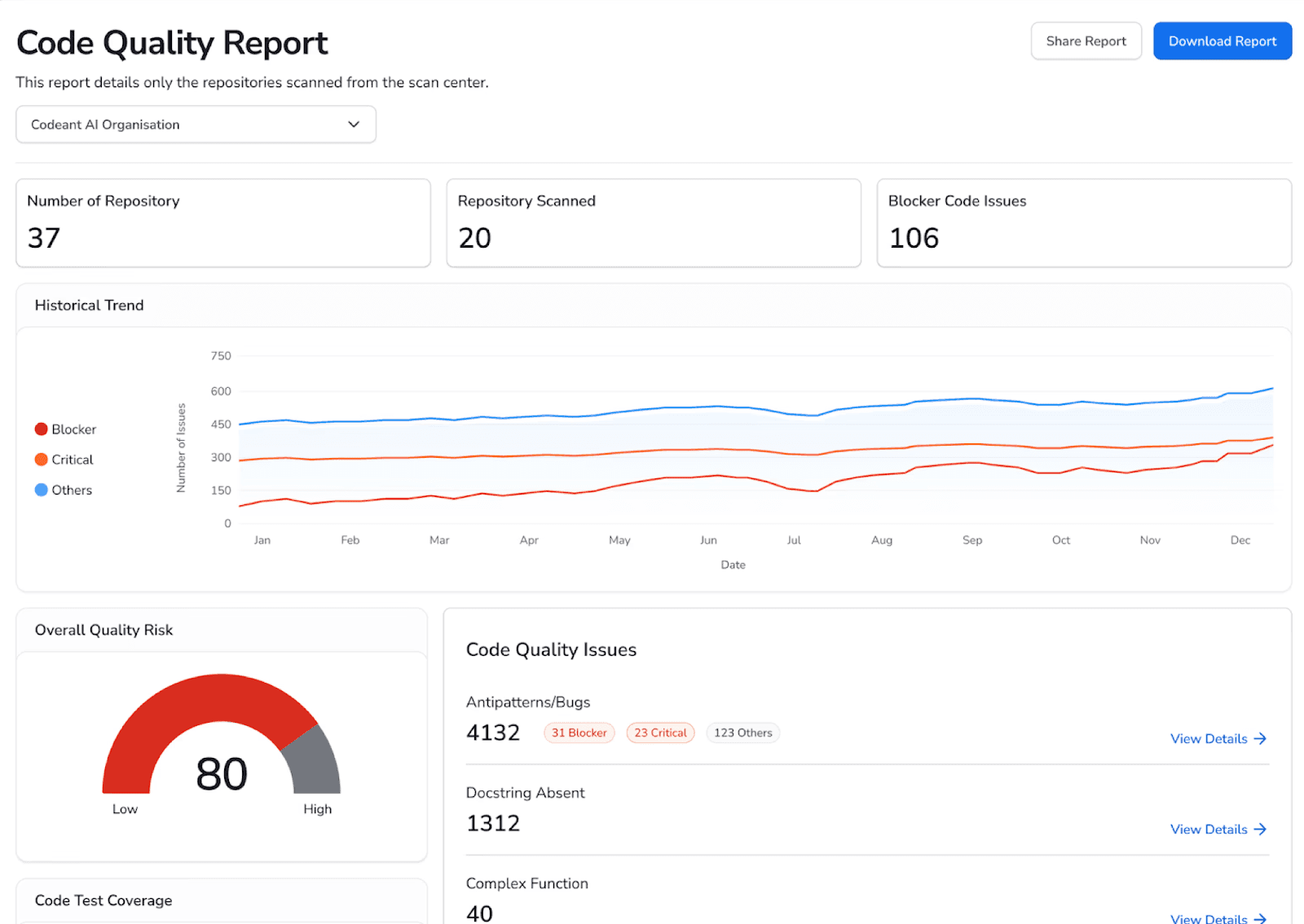
For code quality rules (code smells, complexity, duplication), verify that the new tool covers the metrics your team tracks. CodeAnt AI includes code quality analysis covering complexity, duplication, and dead code. If your team uses SonarQube-specific metrics like “maintainability rating” or “technical debt ratio,” determine whether equivalent metrics exist in the new tool or whether your quality gates need to be redefined.
Step 3: Run Parallel Scans During Transition
This is the most important step. Run both SonarQube and the new tool on the same codebase for 2–4 weeks. Compare findings across three dimensions: coverage (does the new tool catch everything SonarQube catches?), precision (does the new tool produce fewer false positives?), and net-new findings (does the new tool catch vulnerabilities SonarQube missed?).
During the parallel period, ask developers to use both tools and provide feedback on workflow, finding quality, and fix suggestion usefulness. Third-party review platforms like G2’s SonarQube reviews can also provide perspective on what other teams experience at scale. Developer adoption is the leading indicator of whether the migration will succeed. If developers prefer the new tool’s workflow and finding quality, the migration is on track. If not, investigate the friction points before decommissioning SonarQube.
Step 4: Validate Results and Decommission
Once the parallel period confirms that the new tool meets or exceeds SonarQube’s coverage with fewer false positives, migrate your CI/CD pipeline integration from SonarQube to the new tool. Update quality gates to reflect the new tool’s severity classifications. Remove SonarQube’s webhook/notification integrations and redirect Jira/Slack integrations to the new tool.
Decommission SonarQube Server (if self-hosted) only after confirming that historical scan data has been exported or archived for compliance purposes. Some regulatory frameworks require retention of historical security scan records, verify your requirements before deleting SonarQube data.
What CodeAnt AI Adds Beyond SonarQube
CodeAnt AI is not just a SonarQube replacement, it is a consolidation. Where SonarQube focuses primarily on code quality with security as a secondary capability, CodeAnt AI combines three functions that most teams currently run separate tools for:
AI code review
code quality analysis
security scanning (SAST + SCA + secrets detection + Infrastructure-as-Code scanning)
This replaces the common enterprise pattern of running SonarQube for quality alongside Snyk or Checkmarx for security alongside a separate code review process.
The specific capabilities that drive teams to switch from SonarQube to CodeAnt AI:
AI-native detection engine
CodeAnt AI uses LLM-powered semantic analysis as its primary detection method, not rule-based pattern matching. This catches vulnerabilities that rule-based engines miss, cross-file taint flows, novel AI-generated code patterns, framework-specific injection vectors, while producing significantly fewer false positives because the engine understands what code does, not just what it looks like.
Steps of Reproduction for every finding
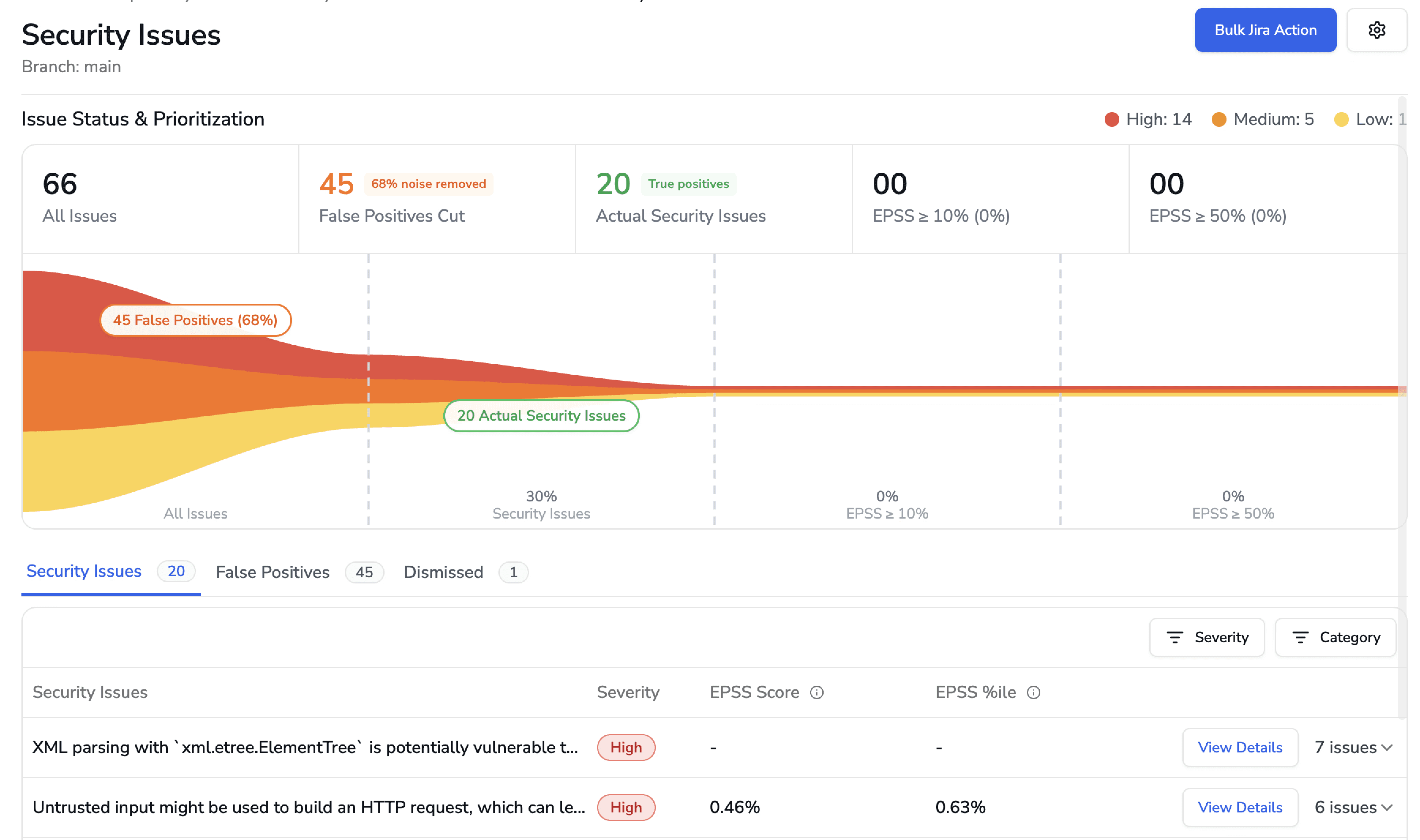
Every security finding includes the complete attack path, from entry point through each intermediate step to the vulnerable sink, with a concrete exploitation scenario. SonarQube provides a CWE classification and a line number. CodeAnt AI provides the full chain of evidence that lets a developer validate the finding in under two minutes.
EPSS exploit probability scoring
Findings are prioritized by real-world exploit probability using the Exploit Prediction Scoring System, not just severity tier. This means teams fix what is actually being exploited in the wild first, not what has the highest CVSS score on paper.
One-click AI-generated fixes
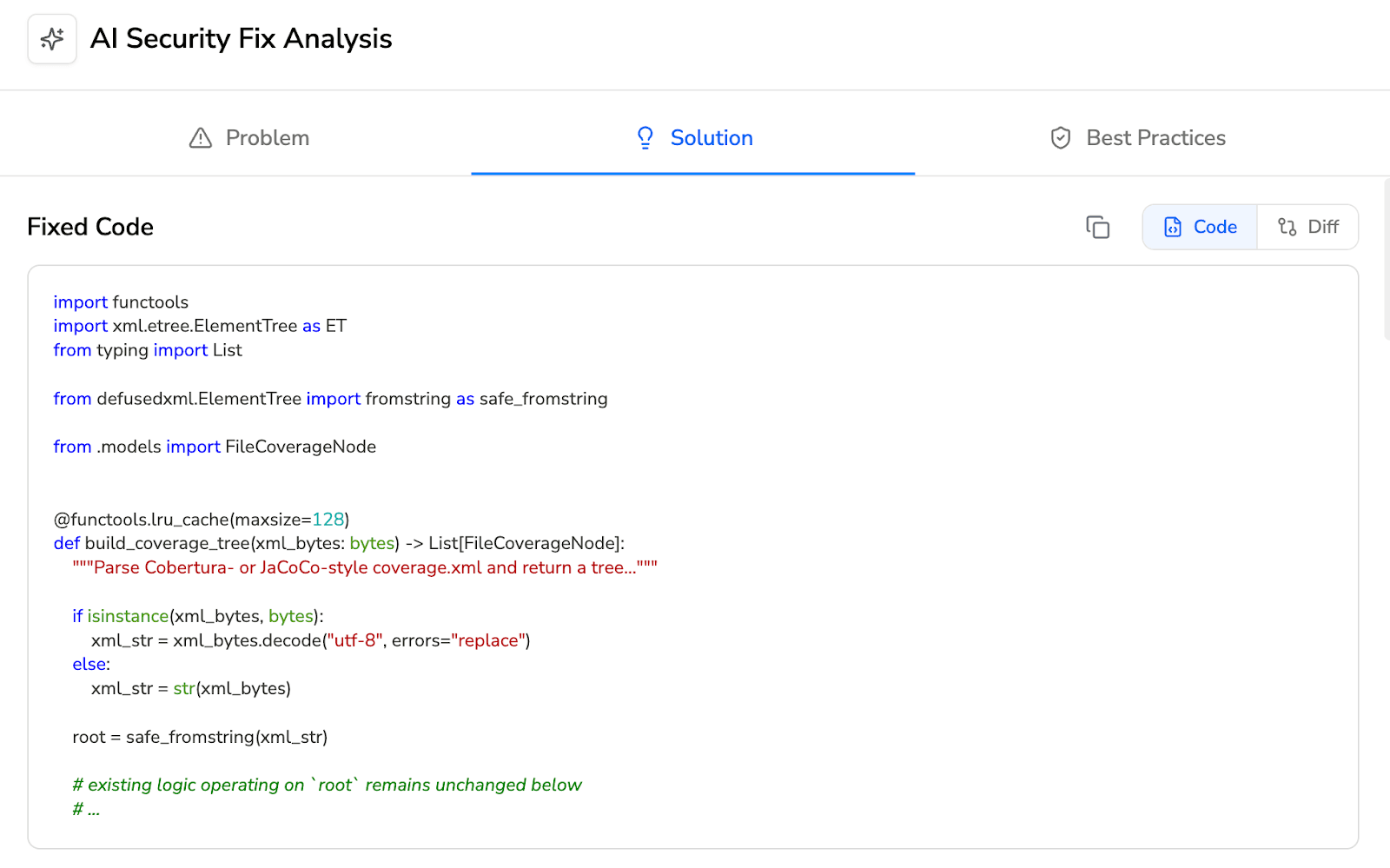
Every finding includes an AI-generated fix suggestion that the developer can review and apply directly within the pull request. SonarQube’s AI CodeFix feature provides limited fix suggestions; CodeAnt AI’s fixes are PR-native and one-click applicable.
PR-native inline comments
Every finding appears as an inline comment on the affected lines in the pull request, across GitHub, GitLab, Azure DevOps, or Bitbucket. The developer sees the vulnerability, the attack path, and the fix without leaving their workflow.
Consolidated scanning
One tool replaces SonarQube (quality) + Snyk/Checkmarx (security) + manual code review. One dashboard, one set of inline comments, one pricing contract.
What teams say after switching
On Gartner Peer Insights, a Director of IT at a mid-market software company, who evaluated SonarSource and Snyk before choosing CodeAnt AI, reported that “one click scans help us out to identify any security issues within the codebase such as identification of vulnerable packages or secrets embedded deep within the code base.” Commvault’s 800-developer team saw time-to-first-review-comment drop from 3.5 days to under one minute after adopting CodeAnt AI, with 17,000+ merge requests reviewed and 25% handled entirely by AI (full case study).
You can even read some real customer use cases here.
Unlike SonarQube's dashboard-centric model, CodeAnt AI covers the complete developer workflow from first keystroke to production: CLI pre-commit hooks block secrets and high-risk patterns before they enter Git, IDE integration (VS Code, JetBrains, Cursor, Windsurf) surfaces findings where developers work with AI-prompted fixes via Claude Code or Cursor, PR-native scanning delivers findings with one-click fixes, CI/CD gates enforce policy across GitHub Actions, Jenkins, GitLab CI, Bitbucket Pipelines, and Azure DevOps Pipelines, and a SecOps dashboard provides vulnerability trends, OWASP/CWE/CVE mapping, and remediation tracking via Jira and Azure Boards. Security tooling fails when it is mapped to a dashboard instead of to how developers actually ship code, and CodeAnt AI is built for the latter.
How to Reduce SAST False Positives and Choose the Right AI-Native SAST Tool
False positives are not the cost of doing SAST. They are the cost of outdated rule-based detection.
Modern AI-native SAST reduces noise through semantic analysis, reachability filtering, exploit probability scoring, and evidence-backed findings. Issues are validated before they reach developers. What remains is signal.
When false positives drop:
Developers stop ignoring alerts
Security teams regain trust
Fix rates increase
Velocity improves
The difference is measurable. Run an AI-native SAST scan on your own repository. Compare it side-by-side with your current tool. Look at the findings, the noise level, and the time to validate.
Start your free CodeAnt AI trial - import repos in minutes or book a short walkthrough to see how AI-native SAST performs on your real code, not a demo project.
FAQs
When should you replace SonarQube with a modern SAST tool?
What is the biggest limitation of SonarQube for application security?
How does AI-native SAST differ from SonarQube’s rule-based engine?
Is SonarQube pricing more expensive than modern SAST alternatives?
Can a modern SAST tool completely replace SonarQube?













