

Picture this: you're reviewing a pull request that touches six services, and the author's explanation is "refactored payment flow." You could spend 20 minutes tracing the changes yourself, ask for a whiteboard session that won't happen until tomorrow, or wish someone had just drawn you a diagram.
That tension ,between the flexibility of manual whiteboarding and the speed of automatic diagram generation—is one of the quieter debates in modern code review workflows. This guide breaks down when each approach works best, where they fall short, and how to combine them for faster, clearer reviews.
What is Manual Whiteboarding During Code Reviews
The choice between automatic diagrams and manual whiteboarding isn't about picking a winner. Manual whiteboarding works best for dynamic, real-time collaboration where you're exploring ideas together. Automatic diagrams bring consistency and version control to routine reviews. Most teams get the best results by using both.
Manual whiteboarding means hand-drawing diagrams to explain code changes, either on a physical board or using digital tools like Miro or Excalidraw. Teams typically reach for it during complex pull requests, architecture discussions, or when onboarding someone new to a codebase.
You'll see whiteboarding show up in a few common scenarios:
Architecture walkthroughs: explaining how new code fits into existing systems
Data flow explanations: tracing how information moves through components
Edge case discussions: visualizing failure modes or boundary conditions
What is Automatic Diagram Generation for Code Reviews
Automatic diagrams are tool-generated visualizations that parse your code and produce diagrams without manual effort. They plug directly into pull request workflows and update as the code changes, so the visuals always reflect the current state of your codebase.
Automatic diagram tools typically generate:
Dependency graphs: showing relationships between modules or services
Call flow diagrams: tracing function or API invocations
Change impact maps: highlighting which components a PR affects
Some platforms like CodeAnt.ai generate a sequence diagram for every PR, capturing the core runtime flow introduced or modified by the change.
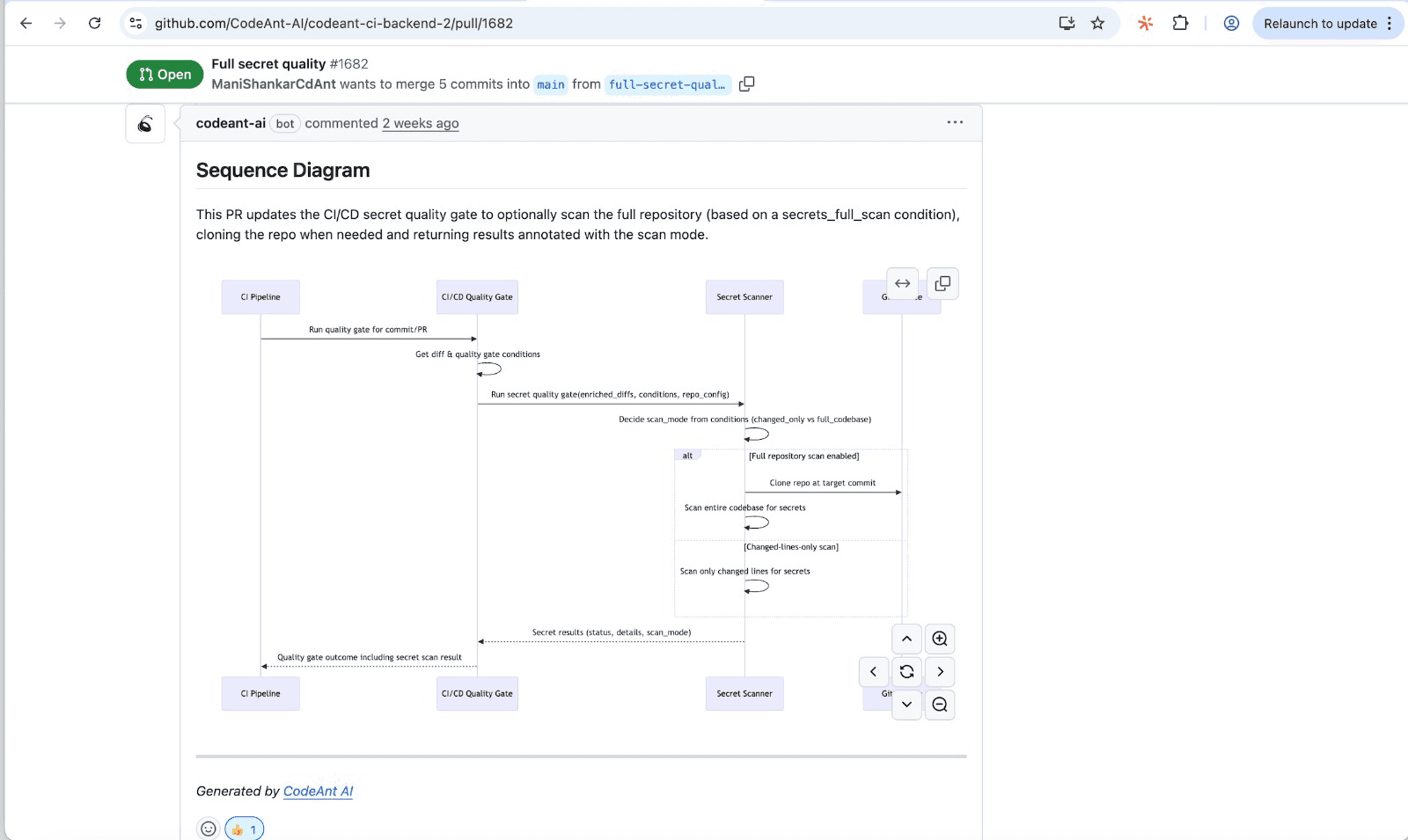
The goal is to give reviewers a quick, high-signal glance at what the PR actually does, which modules interact, in what order, and where the key decision points happen.
Key Differences Between Manual Whiteboarding and Automatic Diagrams
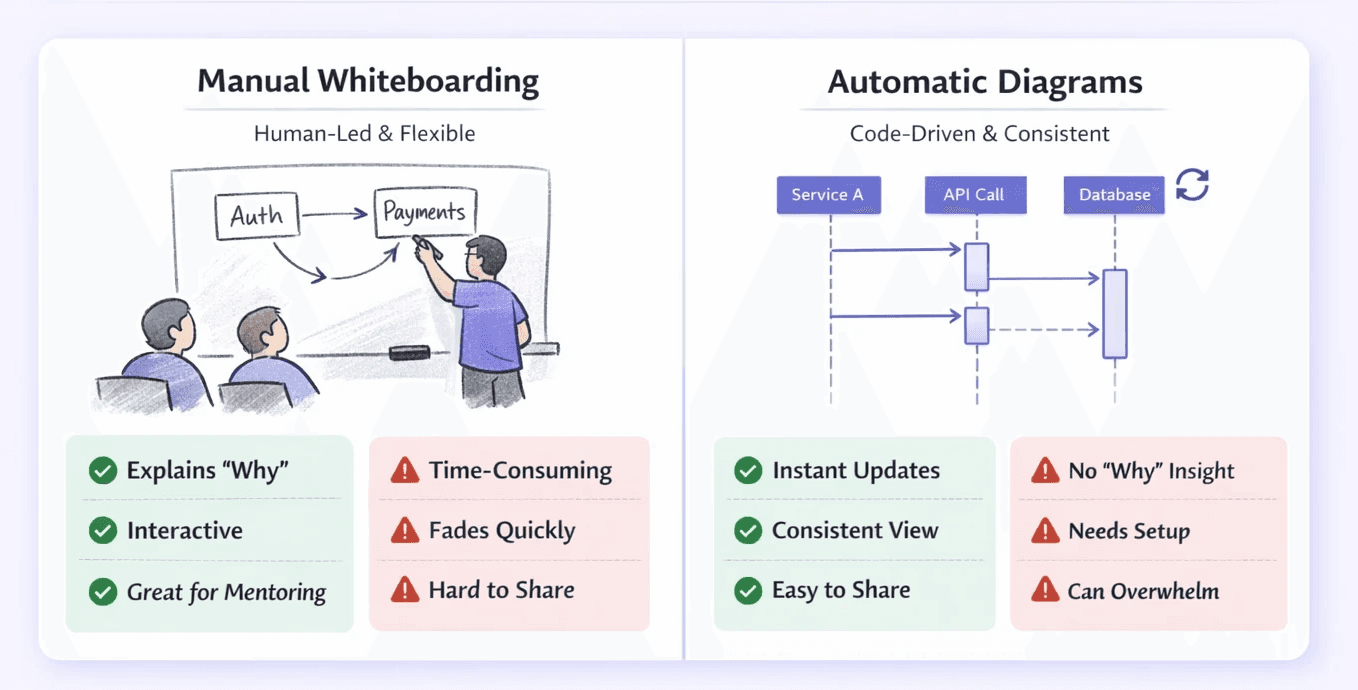
The main differences come down to speed, consistency, effort, and depth of context.
Factor | Manual Whiteboarding | Automatic Diagrams |
Creation time | Requires active effort each session | Generated instantly from code |
Consistency | Varies by author | Uniform output every time |
Context depth | High—captures intent and nuance | Moderate—reflects code structure only |
Maintenance | Diagrams become stale quickly | Updates with each commit |
Collaboration | Synchronous, works best in real time | Asynchronous-friendly |
Pros and Cons of Manual Whiteboarding
Advantages of Manual Whiteboarding
Manual whiteboarding gives you flexibility. You can draw anything—high-level concepts, detailed logic flows, or something in between. There's no template forcing you into a specific format.
It's also valuable for mentorship. Senior developers can interactively teach junior team members about system design, walking through decisions step by step. And unlike auto-generated diagrams, whiteboarding captures the "why" behind a decision, including trade-offs that aren't visible in the code itself.
Drawbacks of Manual Whiteboarding
On the other hand, whiteboarding takes time. Someone has to stop and manually draw diagrams for each complex review, which slows down the review cycle.
Quality and clarity also vary significantly from person to person. One engineer's diagram might be crystal clear; another's might confuse everyone in the room. And once the meeting ends, diagrams are often erased or lost—providing no lasting value as documentation.
For distributed teams, synchronous whiteboarding is especially challenging across time zones.
Pros and Cons of Automatic Diagrams
Advantages of Automatic Diagrams
Automatic diagrams appear instantly, giving reviewers immediate context without manual effort from the author. They provide a standardized visual language across all pull requests, reducing ambiguity.
Because they update with each commit, you never have to worry about stale diagrams. And they fit naturally into an automated code review workflow, complementing AI-driven review tools like CodeAnt AI.
Drawbacks of Automatic Diagrams
Automatic diagrams can't capture business logic, design rationale, or the "why" behind the code. They show structure, not intent.
On very large PRs, generated diagrams can be overwhelming without proper filtering. And setting them up requires initial integration into your CI/CD pipeline and code review platform.
When to Use Manual Whiteboarding vs Automatic Diagrams
When Manual Whiteboarding Works Best
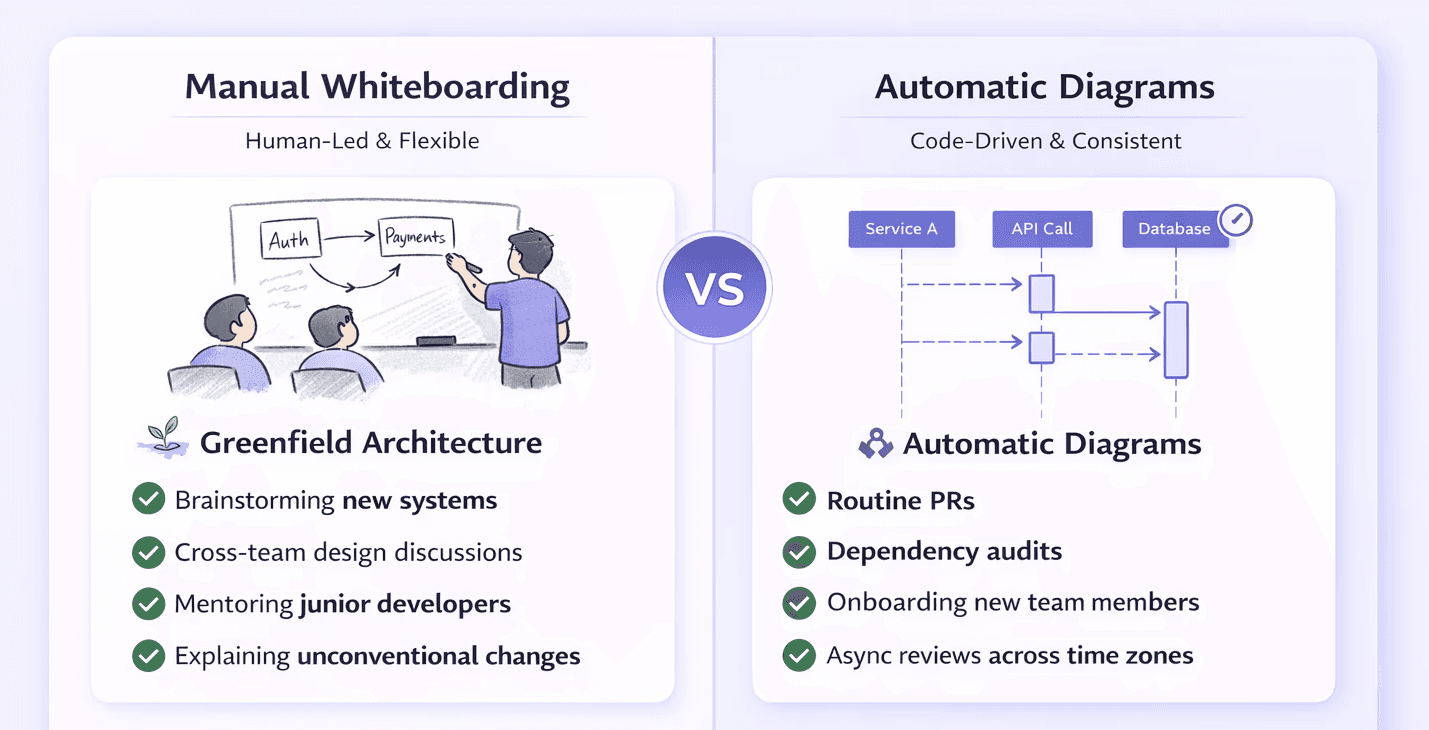
Whiteboarding shines in a few specific situations:
Greenfield architecture decisions: brainstorming new systems before any code exists
Cross-team design discussions: aligning on high-level interactions between services
Mentoring junior developers: interactively explaining complex patterns
Explaining unconventional changes: when a PR requires discussing trade-offs and business context
When Automatic Diagrams Work Best
Automatic diagrams are better suited for:
Routine PRs: giving reviewers quick context on everyday code changes
Dependency audits: understanding relationships and ripple effects within a service
Onboarding new team members: helping new hires navigate unfamiliar code
Async reviews across time zones: providing clear context without a real-time meeting
How to Combine Manual Whiteboarding with Automated Code Reviews
The most effective teams don't choose one or the other. They build a hybrid workflow that uses both.
1. Automate routine visualizations
Let tools generate baseline diagrams for every pull request. Reviewers always start with foundational context, freeing up whiteboarding time for only the most complex discussions.
2. Reserve whiteboarding for complex discussions
Use manual sessions strategically, major architecture changes, ambiguous requirements, or deep dives into high-risk code paths. If an auto-diagram already tells the story, skip the whiteboard.
3. Standardize diagram types across your team
Agree on which diagram types (sequence, class, flow) map to which review scenarios. A shared visual language reduces confusion and helps new hires get up to speed faster.
4. Measure and iterate on review efficiency
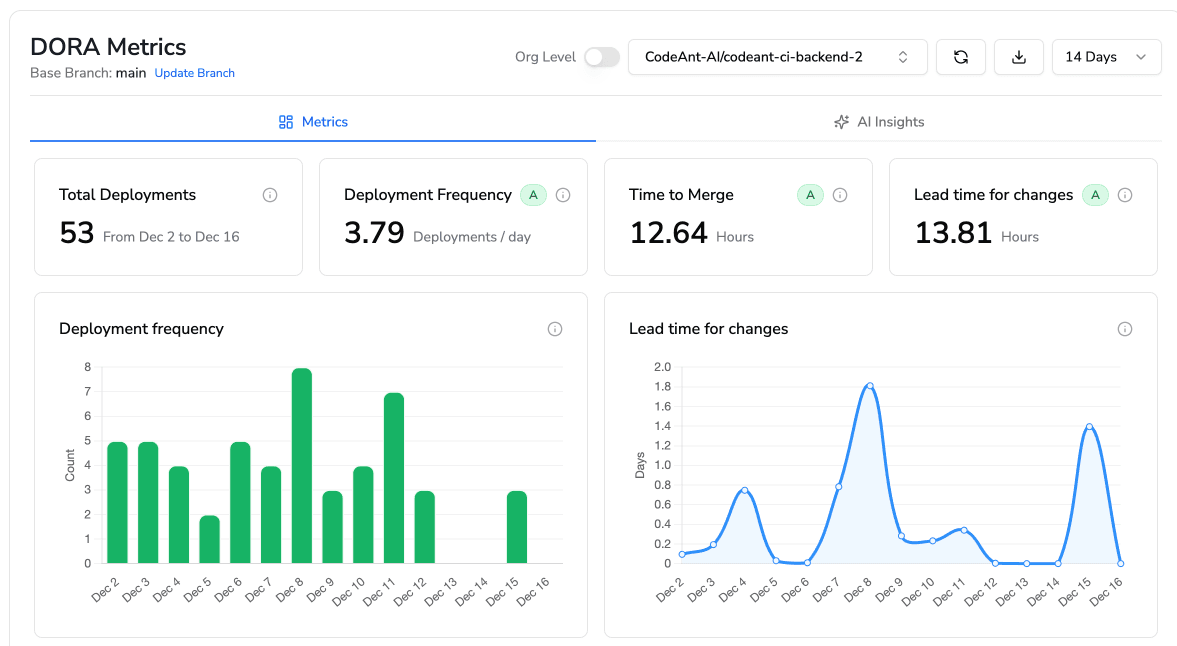
Track metrics like review cycle time and feedback quality. Unified platforms like CodeAnt AI surface DORA metrics and review analytics to help teams continuously refine their process.
How to Choose an Automatic Diagram Tool
Integration with Your Code Review Platform
The tool has to plug natively into your existing workflow: GitHub, GitLab, Azure DevOps, or Bitbucket. Seamless integration prevents context-switching and keeps diagrams where reviewers already work.
Language and Framework Support
Confirm the tool can accurately parse your team's entire tech stack. CodeAnt AI, for example, supports over 30 languages, ensuring comprehensive coverage for polyglot environments.
Accuracy and Signal-to-Noise Ratio
Evaluate the output. A good tool surfaces meaningful relationships and highlights critical changes. A poor one buries reviewers in irrelevant nodes and excessive detail.
Security and Compliance Compatibility
For teams in regulated industries, ensure the tool meets compliance standards like SOC 2 or GDPR. CodeAnt AI offers both cloud and self-hosted versions to meet different security requirements. Check it out here: https://app.codeant.ai/
Common Myths About Automatic Diagrams in Code Reviews
Auto-diagrams replace the need for human review: They provide context but can't assess intent, business logic, or code quality. Human judgment remains critical.
Whiteboarding is obsolete: Manual diagrams remain essential for high-level design discussions, creative brainstorming, and mentorship.
Generated diagrams are always accurate: Output quality depends on the code's structure and the tool's sophistication. Poorly structured code can lead to confusing diagrams.
How Automatic Diagrams Improve Code Review Metrics
Connecting visualization directly to your workflow leads to measurable outcomes:
Reduced review cycle time: reviewers get context faster and spend less time asking clarifying questions
Lower defect escape rate: visual context helps reviewers spot integration issues and architectural mismatches earlier
Improved reviewer onboarding: new team members contribute to reviews more quickly when they have visual aids
CodeAnt AI tracks review metrics alongside security, quality, and DORA insights in a single dashboard, giving teams a holistic view of review process health.
Smarter Code Reviews Start with Better Visualization
The best engineering teams blend the efficiency of automatic diagrams for routine reviews with the collaborative depth of selective whiteboarding for complex design discussions. Evaluate your current workflow and consider platforms that unify visualization, automated code reviews, security scanning, and quality metrics into a single process.
To know more on how you can ship clean, secure code, book your 1:1 with our experts today!

