

When an enterprise security team evaluates a SAST tool, the first question is usually about detection accuracy or language support. In regulated industries, financial services, defense, healthcare, automotive, government, the first question is different: where does my source code go during the scan?
This is not a hypothetical concern. Source code is intellectual property. It contains business logic, proprietary algorithms, and sometimes hardcoded credentials or infrastructure details that should never leave the organization’s network boundary. For organizations subject to GDPR, FedRAMP, ITAR, or industry-specific data sovereignty regulations, sending source code to a third-party cloud for analysis may violate contractual, regulatory, or legal requirements.
Yet most SAST vendor marketing glosses over this entirely. “Cloud-native” appears as a feature, not a constraint. This guide explains the three SAST deployment models, maps which tools support which models, and provides the specific questions you should ask every vendor about how they handle your source code.
Why Data Residency Matters for SAST
SAST is fundamentally different from most SaaS tools your organization uses. A project management tool processes metadata, task names, dates, assignments. A SAST tool processes your entire source code repository. Every file, every function, every secret that was accidentally committed. The data sensitivity profile is not comparable.
Data residency for SAST involves three distinct concerns.
Regulatory compliance
GDPR Article 28 requires a Data Processing Agreement (DPA) when a third party processes data on your behalf, and imposes restrictions on cross-border data transfers. If your SAST vendor processes source code in a jurisdiction without an EU adequacy decision, you need Standard Contractual Clauses or equivalent safeguards. For U.S. government contractors, FedRAMP authorization or equivalent security posture is typically required. For defense contractors, ITAR may prohibit source code from leaving the country entirely.
Intellectual property protection
Source code is the most sensitive artifact your engineering team produces. Unlike customer data (which has clear regulatory frameworks), source code IP protection is governed primarily by trade secret law and contractual obligations. Sending source code to a third-party cloud introduces a data exposure surface that your legal and security teams must evaluate, even if the vendor has strong security practices.
Supply chain risk
A SAST vendor that processes your source code in their cloud becomes part of your software supply chain. If that vendor is compromised, your source code is potentially exposed. This is not theoretical, the 2020 SolarWinds attack demonstrated that security vendors themselves can be compromised, and any vendor with access to your source code is a high-value target.
On-prem deployment considerations are especially relevant for compliance workflows. Teams building SAST-driven compliance evidence for SOC 2, ISO 27001, or PCI DSS need to ensure their deployment model does not introduce compliance gaps, see SAST for compliance workflows for the full mapping.
3 SAST Deployment Models Compared
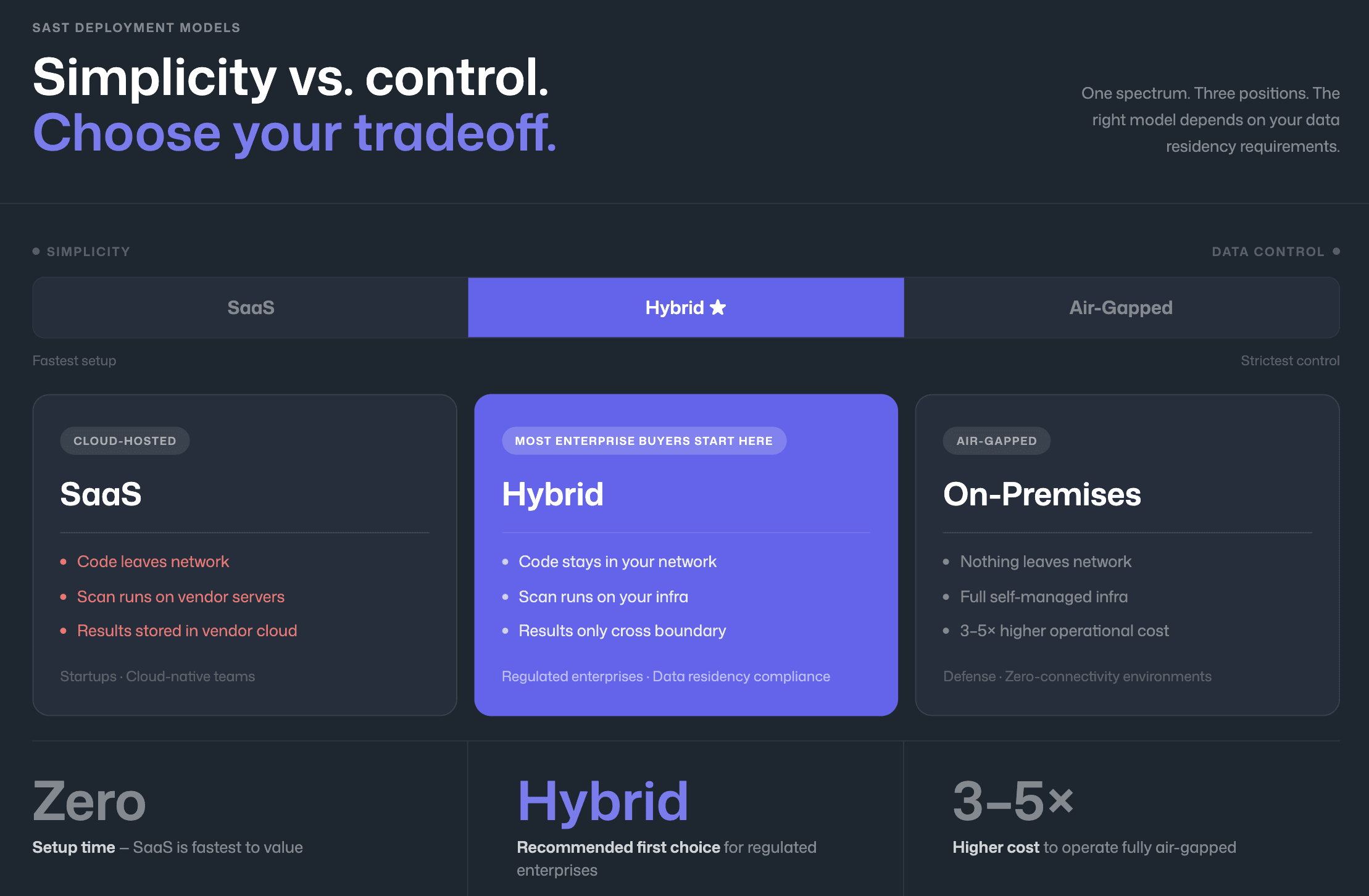
Every SAST tool falls into one of three deployment models. The critical distinction is not “cloud vs. on-prem,” it is where the scan executes and what data leaves your network.
Fully Cloud-Hosted (SaaS)
In this model, your source code is uploaded to the vendor’s cloud infrastructure for scanning. The scan executes on the vendor’s servers, and results are stored in the vendor’s cloud dashboard. Your source code leaves your network boundary during every scan.
This is the simplest deployment model and the one most SaaS-native SAST tools default to. It requires no infrastructure management, scales automatically, and typically offers the fastest time-to-value. The tradeoff is that your source code is processed and temporarily stored in a third-party environment.
Best fit: startups, cloud-native companies, and organizations without strict data residency requirements.
Hybrid (On-Prem Scanning + Cloud Dashboard)
In the hybrid model, the scan engine runs on your infrastructure, typically on your CI/CD build agents or a self-hosted scanner. Source code never leaves your network boundary. Only scan results (findings, metadata, severity classifications) are transmitted to the vendor’s cloud dashboard for visualization and management.
This model preserves source code privacy while retaining the convenience of a cloud-hosted dashboard for trend analysis, compliance reporting, and team management. It is the deployment model that most enterprise SAST buyers should evaluate first, because it addresses the core data residency concern (source code privacy) without the operational burden of fully self-hosted infrastructure.
Best fit: enterprises in regulated industries that need data residency compliance but do not require air-gapped deployment.
Fully On-Premises / Air-Gapped
In this model, everything runs on your infrastructure, the scan engine, the results database, the dashboard, and all management interfaces. No data of any kind leaves your network. This is the only model suitable for air-gapped environments (networks with no internet connectivity).
The tradeoff is significant: you are responsible for infrastructure provisioning, software updates, scaling, and maintenance. Rule updates and detection model improvements require manual import rather than automatic delivery. This model is typically 3–5× more expensive to operate than SaaS or hybrid models when accounting for infrastructure and personnel costs.
Best fit: defense, intelligence, government, and organizations with air-gapped network requirements.
Deployment Model | Source Code Leaves Network? | Scan Results Leave Network? | Dashboard Location | Compliance Fit | Operational Overhead |
Fully Cloud (SaaS) | Yes, uploaded to vendor cloud | N/A, stored in vendor cloud | Vendor cloud | Low regulatory fit (requires DPA, data transfer safeguards) | Lowest, vendor manages everything |
Hybrid | No, scans run on your agents | Yes, findings metadata sent to vendor cloud | Vendor cloud | High, satisfies most data residency requirements | Medium, you manage build agents |
Fully On-Premises | No | No | Self-hosted | Highest, suitable for air-gapped environments | Highest, you manage all infrastructure |
Which SAST Tools Offer On-Prem Deployment?
“On-prem support” is not binary. Some tools offer full self-hosted deployment including the dashboard. Others offer on-prem scanning only, with results still flowing to a cloud dashboard (hybrid model). A few offer both. The table below maps the actual deployment options for every major SAST tool. For the full feature comparison across all evaluation dimensions, see the SAST tools comparison.
Tool | SaaS | Hybrid (On-Prem Scan + Cloud Dashboard) | Fully On-Premises | Air-Gapped Support | Notes |
CodeAnt AI | ✓ | ✓ | ✓ | ✓ | Scans run on your infrastructure; findings metadata flows to dashboard |
Checkmarx One | ✓ | ✓ | ✓ (Checkmarx SAST) | ✓ | Legacy Checkmarx SAST is fully on-prem; Checkmarx One is primarily cloud |
SonarQube | ✓ (Cloud) | ✓ | ✓ (Server / Data Center) | ✓ | Data Center Edition designed for enterprise self-hosted deployment |
Semgrep | ✓ | ✓ (Enterprise) | ✓ (Enterprise) | Partial | Enterprise tier supports self-managed deployment |
OpenText Fortify | ✓ (FoD) | ✓ | ✓ (Fortify SAST) | ✓ | Strongest air-gapped support; decades of on-prem enterprise deployment |
Veracode | ✓ | Partial | ✓ (limited) | Partial | Primarily SaaS; some on-prem scanning available for specific use cases |
HCL AppScan | ✓ | ✓ | ✓ | ✓ | Full on-prem deployment available; IBM/HCL enterprise heritage |
GitLab SAST | ✓ | N/A | ✓ (Self-Managed) | ✓ | GitLab Self-Managed includes SAST in Ultimate tier |
Snyk | ✓ | Partial (Snyk Broker) | No | No | Snyk Broker proxies API calls but source code may still be processed in cloud |
Mend.io | ✓ | Partial | No | No | Primarily SaaS; some on-prem scanning capabilities |
GitHub Advanced Security | ✓ | ✓ (GHES) | ✓ (GHES) | Partial | GitHub Enterprise Server supports on-prem; requires GHES license |
Cycode | ✓ | Partial | No | No | Cloud-native; no fully on-prem option |
Aikido Security | ✓ | Partial | No | No | Cloud-first platform |
Key pattern: The tools with the strongest on-prem and air-gapped support, Fortify, SonarQube, HCL AppScan, are also the oldest and most operationally complex. Newer, AI-native tools tend to be cloud-first with hybrid options emerging as enterprise demand grows. This creates a tradeoff: enterprises in regulated industries must choose between modern developer experience (PR-native AI findings, one-click fixes) and deployment flexibility.
The Fortify-to-modern-tool migration is a common pattern. Teams that originally deployed Fortify for on-prem requirements often explore alternatives when they find that Fortify’s developer experience does not meet modern expectations. If you are evaluating SonarQube as an alternative, see SonarQube alternatives for enterprise teams.
Questions to Ask Vendors About Data Handling
When evaluating a SAST tool’s data handling, generic questions like “is my data secure?” produce generic answers. These specific questions produce useful information.
Where does the scan execute?
The scan engine location determines whether your source code leaves your network. Ask whether the scan runs on your build agents, on the vendor’s cloud infrastructure, or on a vendor-managed but customer-dedicated instance. “On your build agents” is the strongest answer for data residency.
What data is transmitted to your cloud?
Even hybrid-model tools transmit some data. Get specifics: scan results only (finding descriptions, file paths, line numbers)? Source code snippets for context? Full file contents for AI analysis? The difference between “findings metadata” and “source code snippets” is the difference between compliant and non-compliant for many regulatory frameworks.
Can I see the data flow diagram?
Any vendor serious about enterprise deployment should be able to produce an architecture diagram showing exactly what data flows where. If they cannot, their “enterprise” positioning is marketing, not engineering.
Where is your infrastructure hosted?
AWS us-east-1 is different from AWS eu-west-1 for GDPR purposes. Ask for specific regions. If the vendor uses sub-processors (other cloud services for AI inference, for example), ask where those sub-processors are hosted as well.
What happens to my source code after the scan?
SaaS SAST tools must temporarily store source code during the scan. How long is “temporary”? Is the code deleted after scanning? Is it stored encrypted at rest? Is it accessible to vendor employees? Get the retention policy in writing.
Do you support Data Processing Agreements?
For GDPR compliance, a DPA is not optional, it is a legal requirement under Article 28 when a third party processes data on your behalf. Ask to see the vendor’s standard DPA before procurement, not after.
What is your incident response process for source code exposure?
If the vendor’s infrastructure is compromised and your source code is exposed, what is their notification timeline? What forensic capabilities do they have? What contractual liability do they accept? These questions reveal the vendor’s actual security maturity.
How CodeAnt AI Handles Source Code Privacy
CodeAnt AI offers three enterprise deployment models designed for different data residency requirements, from fully air-gapped installations to managed cloud.
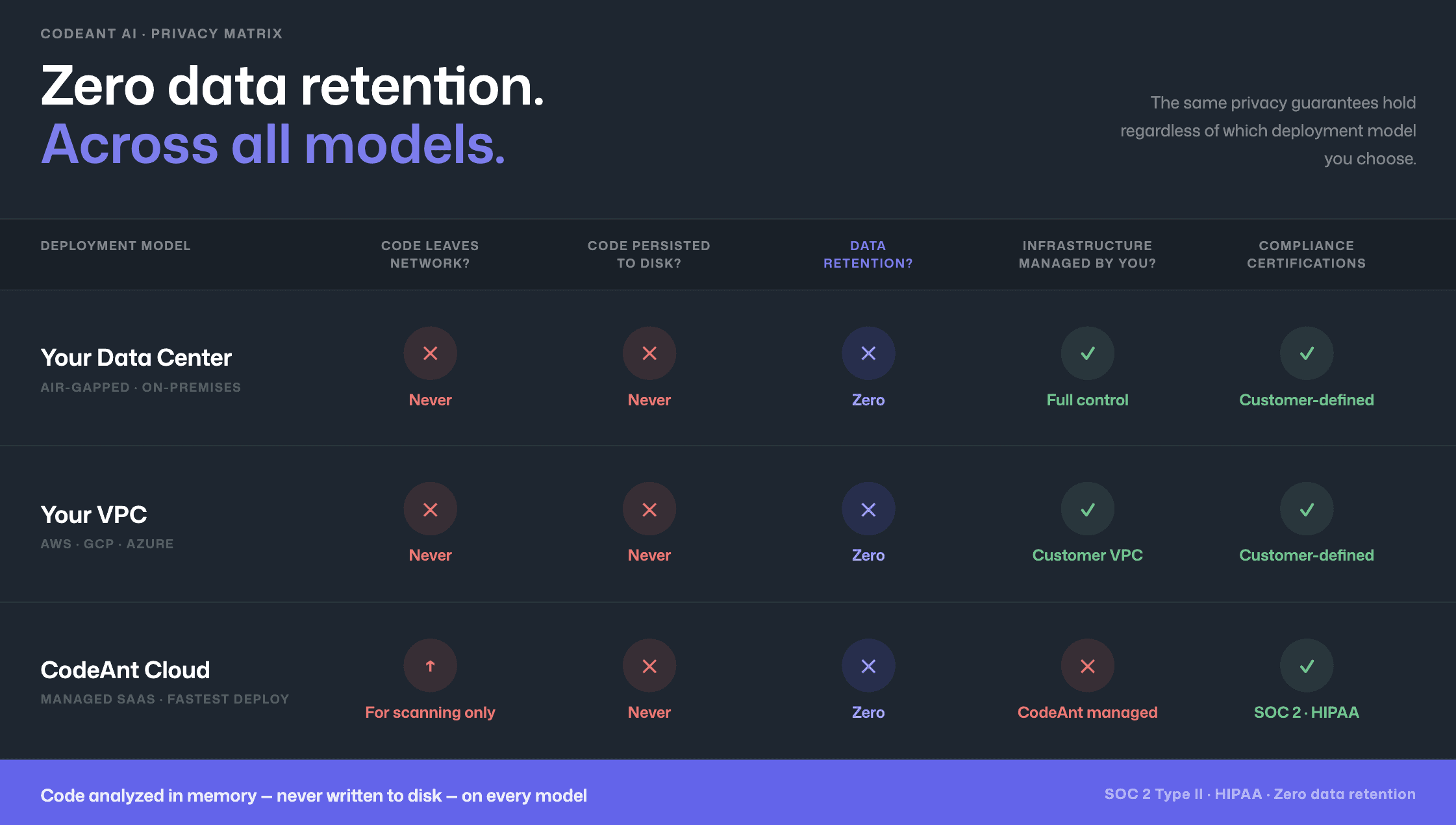
Model 1: Customer data center (air-gapped)
Deploys entirely within customer's on-premises infrastructure, including fully air-gapped environments with zero external network connectivity. No code, no metadata, no telemetry leaves the network. Full workflow, CLI pre-commit scanning, IDE integration, PR-native findings, CI/CD policy gates, and SecOps dashboard, operates entirely within customer infrastructure. Serves defense contractors, government agencies, financial institutions.
Model 2: Customer cloud (AWS, GCP, Azure)
Deploys within the customer's own cloud environment (VPC), the customer retains full control over infrastructure, data, and network boundaries. Same end-to-end workflow as air-gapped model with cloud operational benefits.
Model 3: CodeAnt cloud
Hosted infrastructure, SOC 2 Type II certified, HIPAA compliant. Fastest deployment, no infrastructure to manage.
Zero data retention across all models: Code analyzed in memory, never persisted to disk even temporarily.
End-to-end security regardless of deployment model: Every deployment model provides the same continuous security workflow: CLI/pre-commit hooks, IDE integration (VS Code, JetBrains, Visual Studio, Cursor, Windsurf) with AI-prompted fixes via Claude Code/Cursor, PR-native scanning with Steps of Reproduction and one-click fixes, CI/CD gates (GitHub Actions, Jenkins, GitLab CI, Bitbucket Pipelines, Azure DevOps Pipelines), SecOps dashboard with vulnerability trends, OWASP/CWE/CVE mapping, team risk distribution, and compliance reporting with Jira and Azure Boards.
Commvault’s 800-developer team chose CodeAnt AI in part because of this architecture, 17,000+ merge requests scanned with source code remaining within Commvault’s infrastructure throughout the process (full case study). For Azure DevOps teams evaluating deployment options, see the Azure DevOps SAST integration guide which covers on-prem Azure DevOps Server compatibility.
Conclusion: Deployment Model is a Security Decision
SAST is not just about detection accuracy. It is about where your source code lives during the scan.
In regulated industries, sending source code to a third-party cloud is not a convenience question, it is a compliance and legal question. The right deployment model must align with your regulatory obligations, intellectual property protection, and supply chain risk tolerance.
SaaS may be sufficient for startups.
Hybrid satisfies most regulated enterprises.
Fully air-gapped deployment is mandatory for defense and high-security environments.
Do not accept vague answers about “secure cloud processing.” Ask where the scan runs. Ask what data leaves your network. Ask for the architecture diagram.
If you need a SAST solution that keeps source code inside your infrastructure while still delivering modern developer workflows, evaluate deployment options side-by-side.
Book a technical walkthrough or request a deployment architecture review to see exactly how source code flows in your environment.

