

Code reviews are supposed to be the safety net before production. In reality, they often turn into a cognitive tax.
Reviewers scan diffs across multiple files, jump between modules, and mentally simulate how the change behaves at runtime. Even experienced engineers miss subtle side effects, not because the code is bad, but because diffs don’t show behavior.
At CodeAnt AI, we built automatic per-PR sequence diagrams to solve exactly this problem.
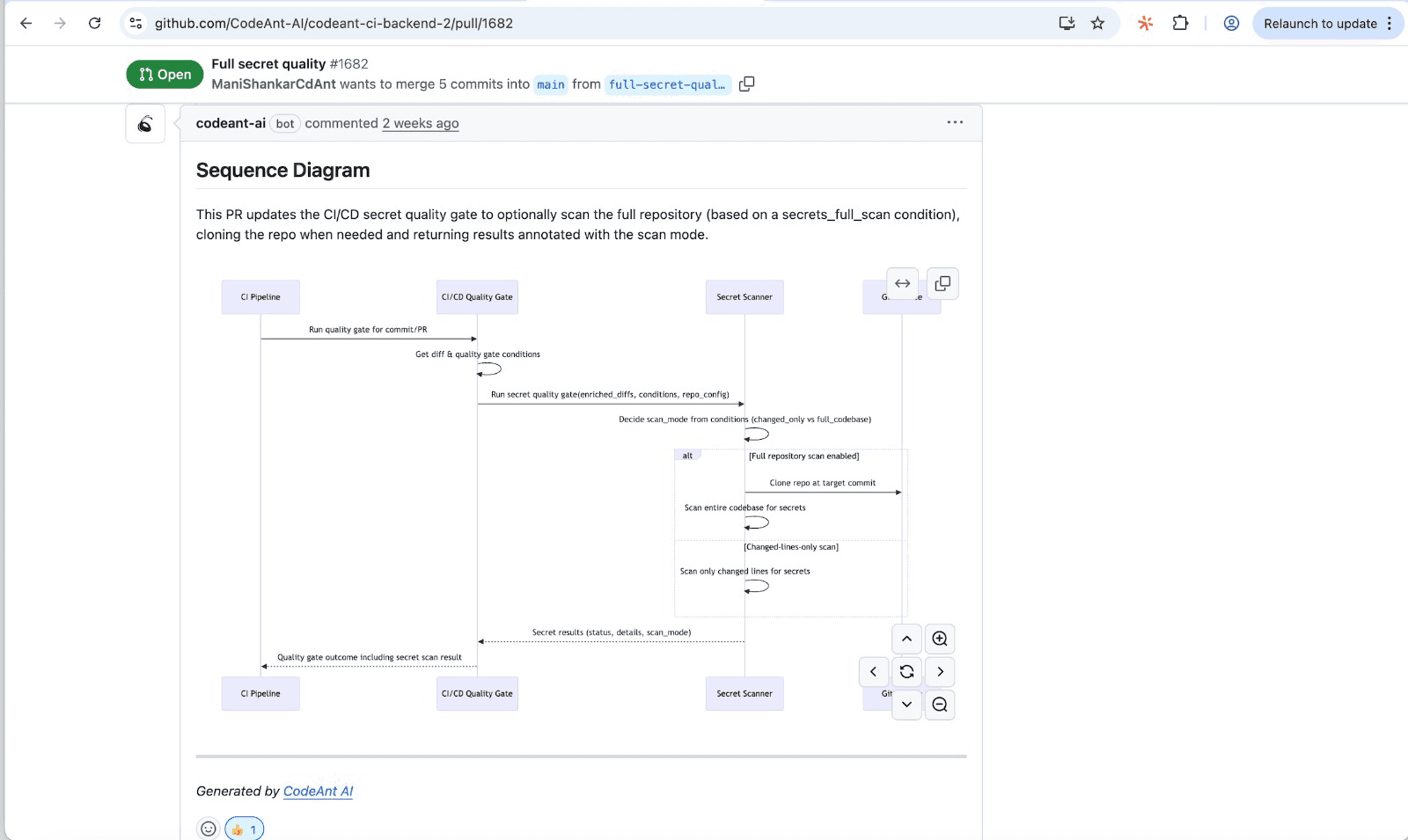
For every pull request, our tool generates a high-signal runtime flow diagram that shows reviewers, at a glance, what the change actually does.
Not what changed syntactically. Not how many lines moved. But how execution flows through the system after the change.
The Core Problem: Diffs Don’t Explain Runtime Behavior
Traditional code review tools focus on static differences:
Which files changed
Which lines were added or removed
Which functions were modified
What they don’t show is:
How control flows at runtime
Which modules interact now that didn’t before
Where validation, authorization, retries, or error handling actually occur
What downstream systems are affected
To understand that, reviewers are forced to:
Open multiple files
Trace function calls manually
Infer side effects from naming and conventions
Hope tests or reviewers catch edge cases later
This mental simulation is slow, error-prone, and inconsistent across reviewers.
What CodeAnt.ai Generates for Every PR
For every pull request, our tool automatically generates a sequence diagram that captures the core runtime flow introduced or modified by that PR.
The goal is simple: Give reviewers a one-shot, high-signal glance at what the change actually does.
Each diagram answers three critical questions immediately:
Where does execution start?
Which components interact, and in what order?
Where are the decision points, side effects, and risks?
What These Sequence Diagrams Focus On (and Why)
Unlike traditional architecture diagrams, CodeAnt.ai’s PR-level diagrams are intentionally compressed.
We don’t try to draw the entire system.
Instead, we focus on the most relevant touchpoints introduced or affected by the change.
1. Primary Entry Point
Every diagram starts from the real execution entry point:
API handler
Background job
Event consumer
Queue worker
This anchors the diagram in reality, how the code is actually triggered in production.
2. Downstream Modules and Function Calls
From the entry point, we trace:
Internal modules and services
Function invocations
Control flow transitions
This shows how responsibility flows through the system, not just where code lives.
3. External Dependencies
Modern systems rarely operate in isolation. The diagram includes:
Databases
Caches
Queues
Third-party APIs
Reviewers can instantly see:
New dependencies introduced
Changed call order
Additional external risk surfaces
4. Critical Transitions and Risk Points
The most important part of the diagram highlights:
Validation steps
Authorization checks
Retry logic and timeouts
Error paths and fallback behavior
These are the places where:
Security bugs hide
Performance regressions start
Production incidents are born
Why We Show the “Happy Path” Plus High-Risk Branches
A full system-wide sequence diagram is technically impressive, and practically useless in a code review.
Our tool intentionally compresses each diagram to:
The primary happy path
The highest-risk branches
This design choice matters. Reviewers don’t need to see everything. They need to see what could break. By focusing on the most probable execution path plus the most dangerous deviations, reviewers can:
Validate correctness faster
Spot unintended side effects
Ask better questions earlier
How This Changes the Code Review Experience
With a per-PR sequence diagram, reviewers no longer start with guesswork. They start with context.
Faster Understanding
Reviewers can immediately see:
What changed behavior-wise
Where the change propagates
Which systems are now involved
No more reconstructing flows from memory.
More Consistent Reviews
Because every PR includes the same standardized artifact:
Reviews become more uniform
Important checks aren’t skipped
Junior and senior reviewers align faster
The diagram acts as a shared reference point.
Better Risk Detection
Visualizing runtime flow makes it easier to:
Catch missing authorization checks
Notice retries in the wrong layer
Spot expensive calls in hot paths
Identify unhandled error branches
These issues are often invisible in diffs, but obvious in flow.
Sequence Diagrams as a Living Change Log
Over time, these diagrams become more than a review aid.
They become a living record of how core flows evolve:
Each PR adds or modifies a documented execution path
Changes are tied directly to code and diffs
Tribal knowledge becomes explicit
New team members ramp faster. Context doesn’t disappear when people leave. Architecture drift becomes visible instead of accidental.
How This Fits into the Modern SDLC
CodeAnt.ai’s sequence diagrams don’t replace:
Tests
Observability tools
They fill a gap those tools don’t cover.
Tests tell you if something breaks.
Static analysis tells you what might be risky.
Logs tell you what already happened.
Sequence diagrams tell you what the code intends to do, before it ships.
Why This Matters at Scale
As systems grow:
Codebases become harder to reason about
Review fatigue increases
Risk hides in cross-module interactions
Automatic per-PR sequence diagrams scale with your codebase, not against it.
They reduce cognitive load, not add to it.
From Code Diffs to Runtime Clarity Our Final Takeaway..
Code reviews fail not because engineers don’t care, but because understanding runtime behavior from diffs alone doesn’t scale.
As systems grow more interconnected, the real risk isn’t a missing semicolon. It’s an unexpected interaction, an overlooked authorization check, or a retry loop hiding in the wrong layer. These issues don’t stand out in code diffs, but they become obvious when you can see the execution flow.
By automatically generating per-PR sequence diagrams, CodeAnt AI makes behavior visible at review time, when it’s still cheap to fix. Reviewers get instant clarity on what changed, where it propagates, and what could break, without mentally simulating the system across files and services.
This isn’t about adding more review artifacts. It’s about removing cognitive load and replacing guesswork with shared understanding.
If your team is serious about faster reviews, safer releases, and fewer production surprises, it’s time to stop reviewing code in the dark.
See what your pull requests actually do, before they ship.
👉 Try CodeAnt.ai and experience runtime clarity in every review.

