

You're three files deep into a pull request, mentally tracing a request from controller to service to database, when you realize you've lost track of which method calls which. The code works, probably, but you can't see the flow without holding the entire system in your head.
Sequence diagrams solve this problem by mapping interactions between components in chronological order, giving reviewers a visual shortcut to understand what a change actually does. This guide covers how to read, create, and streamline sequence diagrams so your code reviews focus on critical changes instead of noise.
What Is a Sequence Diagram in Software Engineering
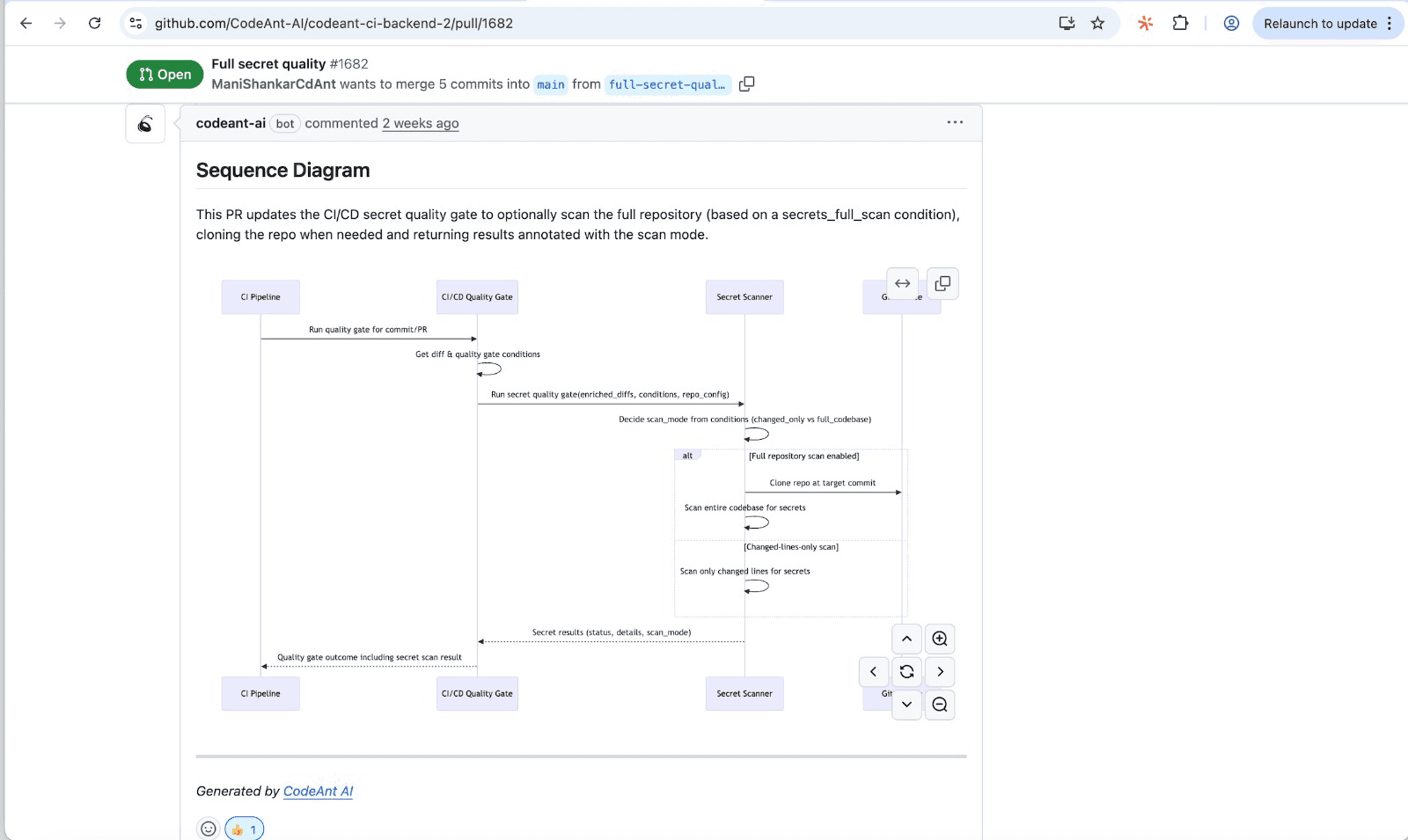
Sequence diagrams cut through noise by visually mapping time-ordered message flows between components. They isolate critical interactions, simplify complex logic into clear steps, and use combination fragments (like alt and loop) to show conditional paths. This makes it easy to spot bottlenecks, validate designs, and focus only on the relevant parts of a scenario rather than the whole system's complexity.
A sequence diagram is a type of UML (Unified Modeling Language) diagram that shows how objects interact over time. Unlike static diagrams that show structure, sequence diagrams capture behavior—the back-and-forth communication between system components in chronological order.
Three core elements make up every sequence diagram:
Lifelines: Vertical dashed lines representing objects, services, or actors participating in the interaction
Messages: Horizontal arrows showing communication between lifelines, read from top to bottom
Activation boxes: Thin rectangles on lifelines indicating when an object is actively processing
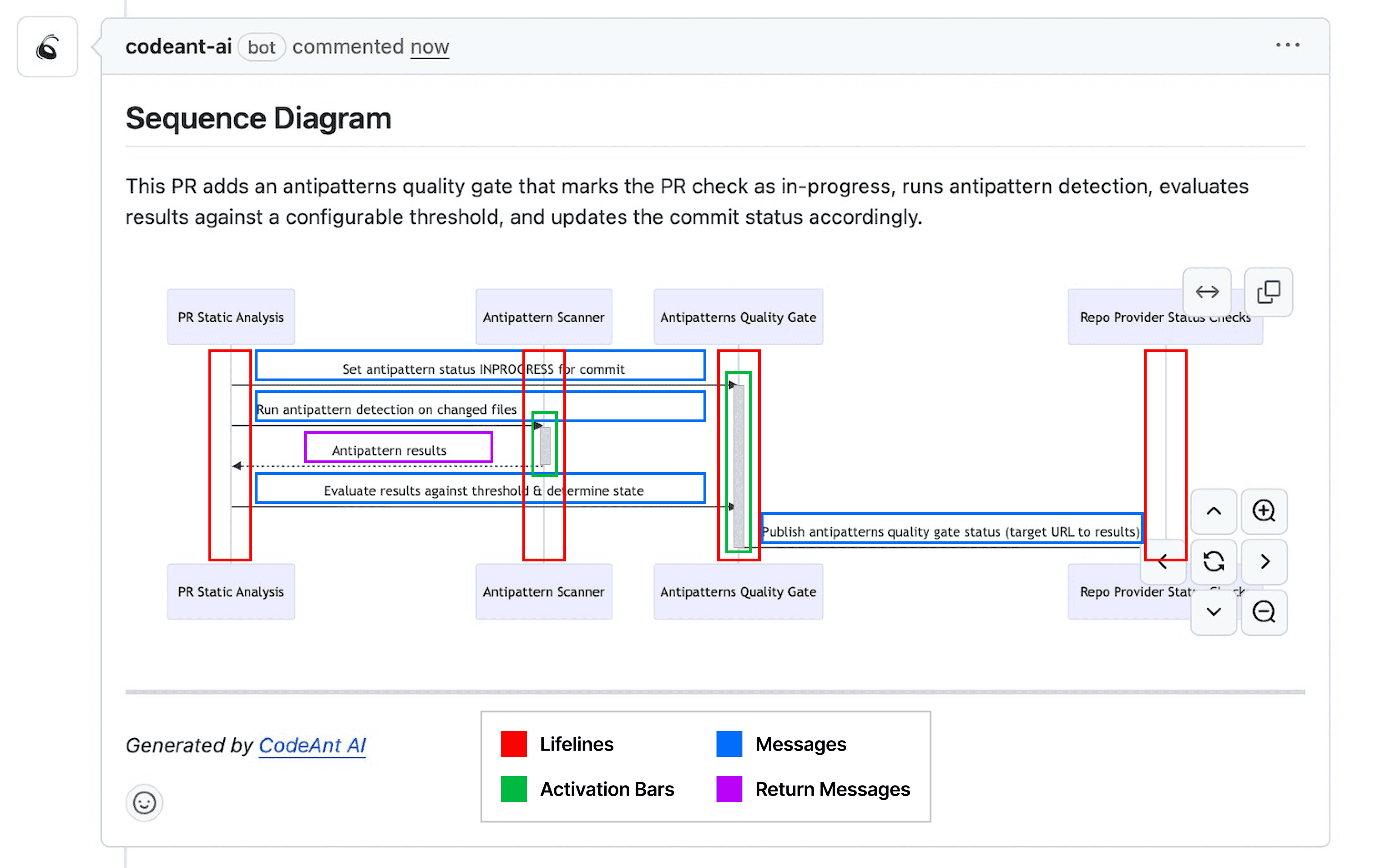
Think of a sequence diagram as a screenplay for your code. Each actor has their lines (messages), and the script unfolds in order from the first scene to the last.
Why Sequence Diagrams Help You Focus on Critical Code Changes
When you're reviewing a pull request that touches multiple files across several services, mentally simulating the flow is exhausting. Sequence diagrams give reviewers a one-shot, high-signal glance at what the PR actually does.
Visualize System Interactions at a Glance
Instead of jumping between files to trace a request, you see the entire flow in one view. The diagram shows which modules interact, in what order, and where the key decision points happen. This visual shortcut replaces the mental gymnastics of reconstructing behavior from scattered code.
Identify High-Impact Changes Quickly
Not all code changes carry equal weight. A sequence diagram highlights which components a change touches and how far its effects ripple. If a PR modifies an authentication service, you'll immediately see every downstream system affected.
Reduce Cognitive Load During Reviews
Code reviews demand intense focus. Sequence diagrams compress complex logic into digestible steps, freeing your brain to evaluate correctness rather than reconstruct flow. Reviewers can assess whether the interactions make sense before diving into implementation details.
Communicate Changes Across Teams
Diagrams serve as a shared language. A backend engineer, QA tester, and product manager can all look at the same sequence diagram and understand what happens when a user clicks "checkout." This alignment reduces miscommunication and speeds up cross-functional reviews.
Essential Sequence Diagram Notations for Code Analysis
You don't need to master every UML symbol. A handful of notations cover most code review scenarios.
Actors and Lifelines
Actors represent external entities like users, external APIs, or systems outside your boundary. Lifelines represent internal objects or services. Together, they define who participates in the interaction. When reviewing a PR, the lifelines typically map to the classes, services, or modules the change touches.
Synchronous and Asynchronous Messages
Synchronous messages (solid arrows with filled arrowheads) block the caller until a response returns. Asynchronous messages (solid arrows with open arrowheads) fire and forget, meaning the caller continues without waiting.
This distinction matters for code review. If you see a synchronous call to an external API, you know latency could block the entire flow. Async messages suggest queued processing or event-driven patterns.
Guards and Conditional Logic
Guards are conditions written in square brackets that control whether a message fires. They map directly to if/else or switch statements in code. For example, [user.isAuthenticated] before a message indicates the call only happens when that condition is true.
Combination fragments extend conditional logic further:
Fragment | Meaning | Code Equivalent |
| Alternative paths | if/else |
| Optional execution | if (no else) |
| Repeated execution | for/while |
| Parallel execution | async/concurrent |
How to Filter Noise and Streamline Your Sequence Diagrams
A diagram showing every method call in your system isn't helpful. The goal is signal, not completeness.
1. Define Your Analysis Scope
Start by setting boundaries. For a PR review, your scope is the code that changed, not the entire system. Identify the entry point (API handler, event consumer, or job trigger) and trace only the paths that PR introduces or modifies.
2. Collapse Repetitive Interactions
If a loop calls the same service 100 times, you don't need 100 arrows. Use a loop fragment with a single representative message. This abstraction preserves meaning while eliminating visual clutter.
3. Highlight Critical Paths Only
Focus on the "happy path" plus the highest-risk branches. Error handling, retries, and edge cases matter, but they can live in separate, focused diagrams rather than cluttering the main flow.
4. Use Abstraction Layers for Complex Systems
When a subsystem's internal workings aren't relevant to the review, represent it as a single lifeline. You don't need to show every database query if the reviewer only cares that "data gets persisted." Abstraction keeps diagrams readable.
Tip: Modern tools like CodeAnt AI can automatically filter framework calls and background processes, revealing just your application's core logic.
How to Create a Sequence Diagram for Code Review
Building a useful diagram follows a repeatable process. Here's how to create one tied to a specific pull request.
1. Map the Entry Point of the Change
Every flow starts somewhere. Identify the trigger, whether that's an API endpoint, a scheduled job, or an event consumer. This becomes the first message in your diagram, typically from an actor (user or external system) to your application.
2. Trace Method Calls and Dependencies
Follow the chain of calls from the entry point through affected classes and services. Note external dependencies: databases, caches, queues, and third-party APIs. Each hop becomes a message arrow between lifelines.
3. Annotate Security and Quality Checkpoints
Mark where validation, authentication, authorization, or error handling occurs. Checkpoints like input validation and auth checks are often where bugs hide. Platforms like CodeAnt AI automatically flag security and quality checkpoints during review, but visualizing them in the diagram helps reviewers verify they exist.
4. Validate Against Expected Behavior
Compare your diagram to requirements or prior behavior. Does the new flow match what the PR claims to do? Are there missing error handlers? Unexpected dependencies? The diagram makes gaps visible.
UML Sequence Diagram Samples and Practical Examples
Concrete examples make abstract concepts stick. Here are three common patterns you'll encounter.
API Request and Response Flow
A simple REST endpoint: the client sends a request, the server validates input, queries the database, and returns a response.
This pattern appears in nearly every web application. The diagram shows the exact sequence with no ambiguity about what happens first.
Authentication and Authorization Sequence
Login flows involve multiple services and security checks:
The alt fragment clearly shows both success and failure paths, which is critical for security reviews.
Microservices Communication Pattern
Distributed systems add complexity. Async messaging and service-to-service calls benefit enormously from visualization:
Without a diagram, tracing this flow requires reading code across multiple repositories. With one, the entire chain is visible in seconds.
How Sequence Diagrams Integrate with Modern Development Workflows
Diagrams are most valuable when they stay current with your code, not when they rot in a wiki.
Automated Generation from Pull Requests
Manual diagramming doesn't scale. Modern tools parse your code diffs and generate sequence diagrams automatically. CodeAnt AI creates diagrams for every PR, showing reviewers the runtime flow introduced or modified by the change.
CI/CD Pipeline Integration
Diagrams can be generated as build artifacts. When a pipeline runs, it produces an updated sequence diagram alongside test results and coverage reports. This keeps documentation synchronized with the codebase.
Real-Time Updates as Code Evolves
Static diagrams become stale the moment code changes. Automated generation solves this problem because each PR gets a fresh diagram reflecting the current state. Over time, diagrams become a living changelog of how core flows evolve.
Challenges of Using Sequence Diagrams at Scale
Sequence diagrams aren't a silver bullet. Understanding their limitations helps you use them effectively.
Maintaining Accuracy in Large Codebases
Manual diagrams drift from reality fast. A team might update code but forget to update the diagram, leaving reviewers with misleading information. Automation is the only sustainable solution for large codebases.
Handling Distributed and Async Systems
When timing and ordering aren't linear, diagrams get complicated. Async messages, parallel execution, and eventual consistency introduce ambiguity. Use par and async notation carefully, and consider separate diagrams for different scenarios rather than one massive diagram.
Build a Smarter Code Review Process with Visual Analysis
Sequence diagrams transform code review from a tedious file-by-file slog into a focused conversation about behavior. They answer the question every reviewer asks: what does this change actually do?
By standardizing per-PR diagrams, your review process becomes faster and more consistent. Reviewers immediately identify what changed, where it propagates, and what could break. Teams build shared context as diagrams become a living record of how core flows evolve.
Ready to see this in action? CodeAnt AI automatically generates sequence diagrams from your pull requests.To know more try CodeAnt.ai today!

