AI Code Review
How Standardized PR Sequence Diagrams Transform Team Alignment in 2026

Sonali Sood

Founding GTM, CodeAnt AI
Your PR process probably makes sense to you. But ask three engineers on your team to describe it, and you'll get three different answers, each one missing steps the others consider obvious.
That gap between "how I think it works" and "how it actually works" is where PRs stall, reviews get skipped, and merge conflicts multiply. Standardized PR sequence diagrams close that gap by putting your entire workflow on paper, showing every handoff, every automated check, and every approval gate in one visual timeline. This guide covers what PR sequence diagrams are, why standardization matters for team alignment, and how to create diagrams that actually get used.
What is a PR Sequence Diagram?
A PR sequence diagram is a visual map of your pull request workflow. It shows how developers, reviewers, automated systems, and repositories interact over time—from the moment someone submits code until it merges.
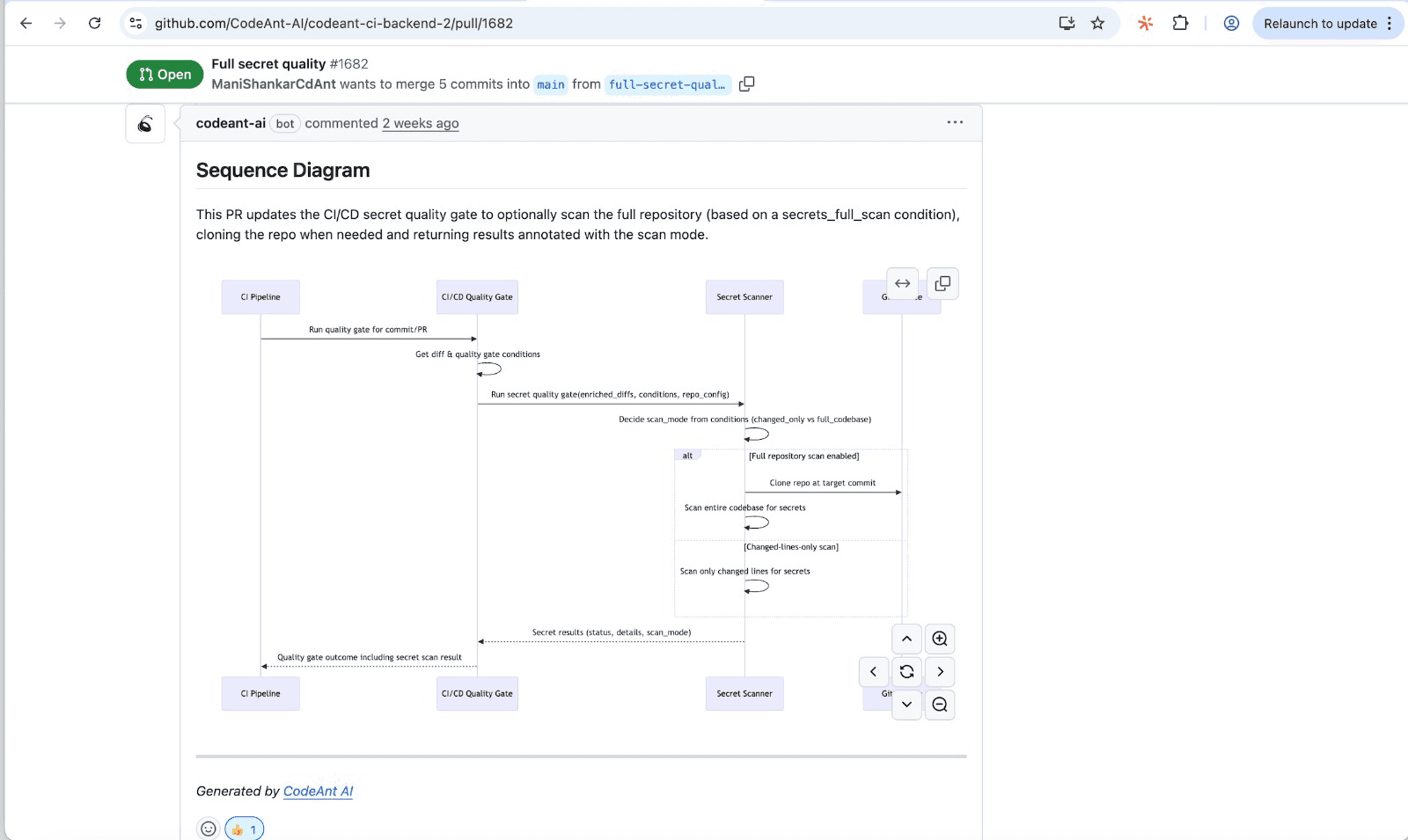
The diagram uses UML (Unified Modeling Language) notation. Each participant appears as a vertical "lifeline," and arrows between lifelines show messages passing back and forth. The result is a timeline view of who does what, when, and in what order.
Most teams have an informal understanding of their PR process, but that understanding lives in people's heads. A sequence diagram puts it on paper where everyone can see it.
![PR sequence diagram example showing developer, CI pipeline, reviewer, and repository interactions]
Why Standardized PR Sequence Diagrams Improve Team Alignment
Standardized PR sequence diagrams create a shared mental model across your engineering organization. They work as a common language that developers, QAs, product managers, and security teams all understand. When everyone operates from the same playbook, the "I thought you were handling that" moments disappear.
The key word here is standardized. A one-off diagram helps, but consistent diagrams across all workflows transform how teams communicate. Every team member sees the same handoffs, the same expectations, and the same process.
Visualizing the Complete Code Review Workflow
A well-built sequence diagram reveals every step in your PR process, including the ones people forget about. You'll see automated tests firing, security scans running, and notification triggers activating. Nothing hides in the gaps.
This visibility helps teams spot bottlenecks before they become problems. If your diagram shows three sequential approval steps, you immediately understand why PRs sit idle for days.
Clarifying Roles and Responsibilities Across Teams
Sequence diagrams assign ownership at each stage through actors and lifelines. There's no ambiguity about who reviews what or when automated systems take over.
Common actors in a PR workflow:
Developer: submits PR, responds to feedback, addresses requested changes
Reviewer: evaluates code quality, leaves comments, approves or requests changes
CI/CD pipeline: runs tests, performs static analysis, reports results
Security scanner: checks for vulnerabilities, secrets, and misconfigurations
Approver: provides final sign-off before merge
When roles appear visually, accountability becomes clear. New team members can trace the entire flow without asking "who handles this?"
Reducing Miscommunication in Distributed Teams
Async and remote teams benefit from documented, visual workflows. When your colleagues work across time zones, assumptions about process cause delays and frustration.
A standardized diagram answers questions before they're asked: When does the security scan run? Who gets notified if tests fail? What blocks a merge? The answers live in the diagram, available 24/7, regardless of who's online.
Supporting Compliance and Audit Documentation
For teams operating under SOC 2, ISO 27001, or other regulatory frameworks, standardized PR diagrams serve as living documentation. Auditors want to see your controls, and a sequence diagram shows exactly where security gates, approval requirements, and quality checks occur.
When every PR follows the documented flow, you have evidence that governance isn't just policy—it's practice.
Key Components of a PR Sequence Diagram
Before creating your own diagrams, you'll want to understand the building blocks.
Actors and Lifelines
Actors represent the participants in your workflow, both human and automated. Each actor gets a lifeline: a vertical dashed line showing their existence over time.
Common actors in PR workflows:
Developers and reviewers (human participants)
CI/CD runners (GitHub Actions, Azure Pipelines, Jenkins)
Security scanning tools (SAST, dependency checkers)
Notification systems (Slack, email, Teams)
Code review platforms (GitHub, GitLab, Azure DevOps, or Bitbucket)
Messages and Interactions
Messages are the arrows connecting lifelines. They show communication between actors—requests, responses, and notifications.
Synchronous messages: the sender waits for a response before continuing
Asynchronous messages: the sender continues without waiting
Return messages: indicate completion or results flowing back
In a PR context, a synchronous message might be "run tests and wait for results." An asynchronous message might be "notify reviewer via Slack."
Automated Checkpoints and Quality Gates
Modern PR workflows depend heavily on automation. Your diagram captures where CI/CD pipelines, security scans, linting, and AI-assisted reviews fit into the sequence.
Platforms like CodeAnt AI appear as actors in sequence diagrams. They automatically review code, flag issues, and provide feedback before human reviewers engage.
Decision Points and Conditional Branching
Not every PR follows the same path. Sequence diagrams use "alt" and "opt" fragments to show conditional flows. For example: "If tests fail, notify developer and halt the review process. If tests pass, assign reviewer."
How to Create a Standardized PR Sequence Diagram
Creating effective diagrams takes upfront work, but the payoff compounds over time.
1. Define Your PR Workflow Stages
Start by listing every stage in your current process—not your ideal process, your actual one.
Common stages include:
PR creation and initial submission
Automated checks (tests, linting, security scans)
Review assignment and notification
Feedback loops and requested changes
Approval and final checks
Merge and post-merge actions
Document what actually happens today. You can optimize later.
2. Identify All Actors and Systems
Map every participant, human and automated. Teams often forget to include CI/CD pipeline runners, security scanning tools, notification systems, and deployment systems triggered post-merge.
If it touches your PR workflow, it belongs in the diagram.
3. Map Message Flows and Dependencies
Draw arrows showing who communicates with whom and in what order. Pay special attention to "waiting" states, as they often reveal bottlenecks.
Ask yourself: What happens after the developer submits? Who gets notified? What runs automatically? What blocks progress until completion?
4. Add Automation and Security Checkpoints
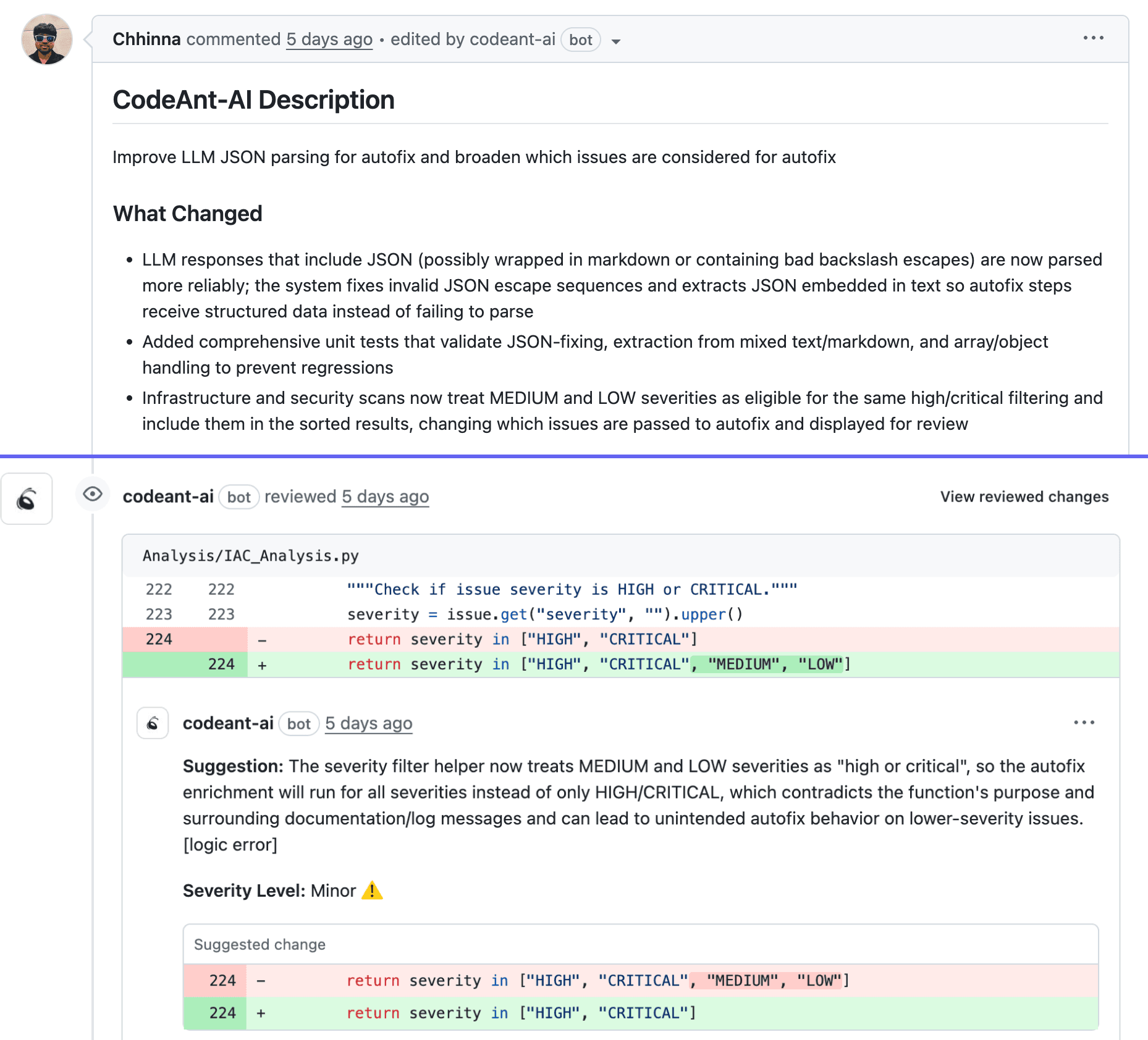
Insert automated code review, static analysis, and security gates into your diagram. Tools like CodeAnt AI can be represented as actors that provide instant feedback, flagging security vulnerabilities, code quality issues, and standards violations before human reviewers see the PR.
5. Validate and Iterate with Your Team
A diagram only aligns teams if teams agree it's accurate. Share your draft with developers, reviewers, and stakeholders. Ask: "Does this match reality?"
Plan to revisit diagrams quarterly or whenever your process changes. Outdated diagrams cause more confusion than no diagrams at all.
Best Practices for PR Sequence Diagram Standardization
Once you've created diagrams, a few practices help maintain their value over time.
Keep Diagrams Simple and Scannable
A diagram that takes more than a few minutes to understand defeats the purpose. Focus on the primary path first. Create separate diagrams for edge cases and exception flows.
Tip: If your diagram requires scrolling, it's probably too complex. Split it into multiple focused diagrams.
Version Diagrams Alongside Your Codebase
Store diagrams in your repository using diagram-as-code formats like Mermaid or PlantUML. This approach enables version control, code review for diagram changes, and CI/CD integration. When diagrams live with code, they evolve together.
Review and Update on a Regular Cadence
Treat diagrams as living documentation. Tie updates to sprint retrospectives, process changes, or tool additions. Assign ownership so someone on the team is responsible for keeping diagrams current.
Make Diagrams Accessible to All Stakeholders
Non-engineers like product managers, security teams, and compliance officers benefit from understanding your PR workflow. Avoid excessive technical notation that excludes non-technical stakeholders.
A good test: Can a new PM understand the diagram without explanation? If not, simplify.
Common Mistakes That Undermine PR Workflow Diagrams
Even well-intentioned teams make mistakes that reduce diagram effectiveness.
Overcomplicating with Unnecessary Detail
Including every edge case, error handler, and retry loop creates noise. Focus on the primary path and highest-risk branches. Save edge cases for supplementary diagrams.
Omitting Automated Steps from the Sequence
Skipping CI/CD, security scans, or AI-assisted reviews creates blind spots. Modern PR workflows depend heavily on automation, and your diagram reflects reality only when automation appears.
Treating Diagrams as Static Documentation
Outdated diagrams mislead team members and erode trust in documentation. If your diagram shows a process you abandoned six months ago, it's worse than having no diagram.
Tools for Creating PR Sequence Diagrams
You have options depending on your team's preferences and technical comfort.
Diagram-as-Code Solutions
PlantUML, Mermaid, and ZenUML let you write diagrams in text format. Benefits include version control, code review for diagrams, and CI/CD integration.
Visual Diagramming Platforms
Lucidchart, Draw.io, and Miro offer drag-and-drop interfaces. They work well for cross-functional teams who prefer visual editing over code.
Integrated Documentation and Collaboration Tools
Confluence, Notion, and GitHub wikis let you embed diagrams where teams already work.
Tool Type | Examples | Best For |
Diagram-as-code | PlantUML, Mermaid, ZenUML | Engineering teams wanting version-controlled diagrams |
Visual platforms | Lucidchart, Draw.io, Miro | Cross-functional teams needing collaborative editing |
Integrated docs | Confluence, Notion, GitHub wiki | Teams wanting diagrams embedded in existing workflows |
How Automation Strengthens PR Sequence Diagram Workflows
Standardized diagrams and automation work together to create faster, more reliable PR processes.
Connecting Diagrams to CI/CD Pipelines
Documented workflows help teams identify automation opportunities. When you see a manual step in your diagram, ask: "Can this be automated?" Your diagram becomes a roadmap for pipeline improvements.
Embedding Security and Quality Gates
AI-driven code review platforms like CodeAnt AI fit into the sequence as automated actors. They enforce standards before human review begins, catching security vulnerabilities, code quality issues, and compliance violations automatically.
Enabling Real-Time Workflow Visibility
Teams can track actual PR flow against the documented sequence. When reality drifts from the diagram, you've identified a process problem or a diagram that needs updating.
Align Your Team with Standardized PR Workflows and Automated Reviews
Standardized PR sequence diagrams make your workflow visible, explicit, and shared. Combined with automated code review, they transform PR processes from bottlenecks into competitive advantages.
CodeAnt AI helps teams enforce the quality gates and security checks documented in their PR sequence diagrams, automatically, on every pull request. The platform generates sequence diagrams for each PR, showing reviewers exactly which modules interact, in what order, and where key decision points occur.
Ready to automate your PR workflow? Check out our 14-day free self-hosted version today!
FAQs
How often should teams update their PR sequence diagrams?
Can small engineering teams benefit from PR sequence diagrams?
What is the difference between a PR sequence diagram and a flowchart?
How do PR sequence diagrams support asynchronous code review?
Should PR sequence diagrams include automated security scanning steps?