

The Library Everyone Trusts, The Token Nobody Rotated
On March 31, 2026, at 00:21 UTC, a backdoored version of axios appeared on the npm registry. For approximately two hours and fifty-four minutes, every developer who ran npm install, every CI/CD pipeline that pulled dependencies, every build server that resolved latest — pulled a remote access trojan onto their machine.
Axios has over 100 million weekly downloads. It is the most widely used JavaScript HTTP client ever built. It is in your frontend, your backend, your mobile APIs, your microservices. It is a dependency of hundreds of thousands of packages. And for ~2h54m on March 31, 2026, installing it was the same as running an attacker's malware on your machine.
The attack did not begin on March 31. It began months or years earlier, the moment a long-lived npm access token was created, used once, and never rotated again. That token sat dormant somewhere: in a .npmrc file, a CI/CD environment variable, a local credential store, perhaps on a previously compromised machine. The attacker found it, and everything that followed was operationally pre-planned.
This is the complete story, not just what happened during the attack window, but how the attacker got in, why the ecosystem's trust model made it so effective, and what structural changes would make this class of attack significantly harder next time.
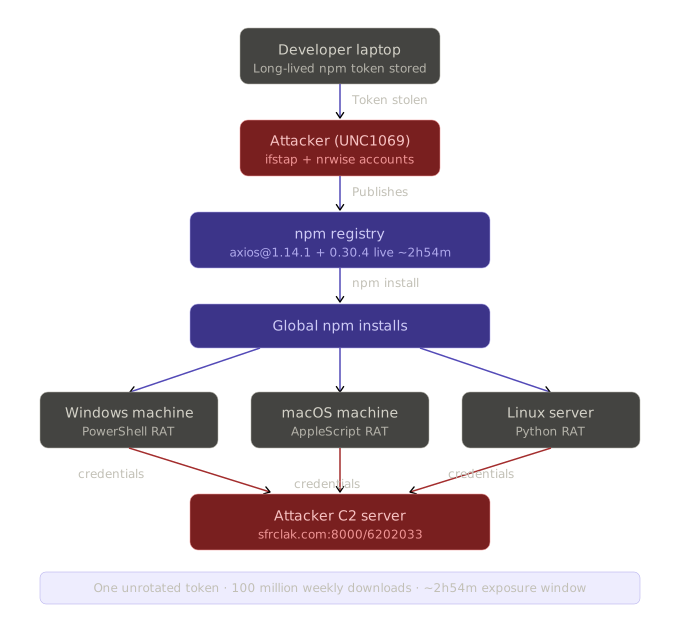
How the Maintainer Account Was Taken Over
What is Confirmed And What Isn't
No public statement from jasonsaayman himself has been published explaining exactly how his credentials were obtained. The axios GitHub repository and npm account do not contain an official post-mortem as of this writing. What is confirmed from forensic analysis by multiple security firms:
The attacker is believed to have obtained a long-lived classic npm access token for the account, using it to take control and directly publish poisoned versions of axios to the registry.
That one detail, a long-lived classic npm access token, is the entire story of how this happened. Understanding what that means is essential context for every engineering team and security leader reading this.
What a Long-Lived npm Classic Token Is (And Why It's Dangerous)
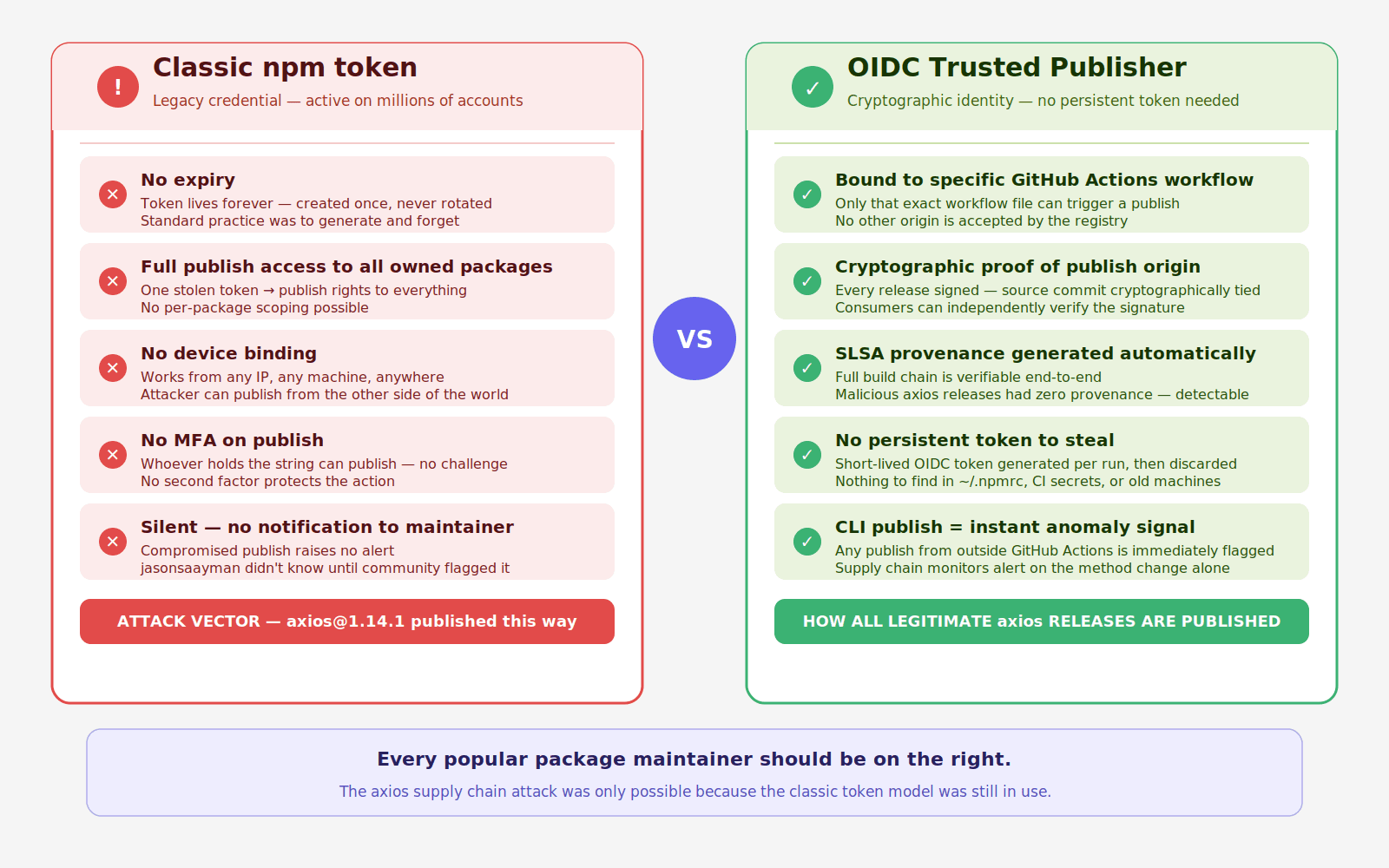
npm has two token types. The first is a granular access token tied to specific packages with configurable scopes and expiry. The second, the classic token, is a persistent credential with no expiry, full publish access to all packages the account controls, and no binding to any specific session, device, or workflow.
Classic tokens were the default for years. Millions were generated by maintainers setting up CI/CD pipelines, automating releases, or simply following old tutorials. Most were never rotated. Many still exist in places their owners have forgotten:
A long-lived token doesn't expire. There's no MFA challenge when it's used. There's no device verification. There's no login notification. Whoever has the token string can publish to any package the account owns, from anywhere, at any time, with a single CLI command.
The attacker almost certainly obtained jasonsaayman's token from one of these locations, possibly through a previous breach of a system where the token was stored, a compromised machine earlier in the UNC1069 campaign (the same North Korea-nexus group that hit Trivy, KICS, and LiteLLM in the weeks prior), or token exposure via a prior npm ecosystem compromise.
The Forensic Signals That Confirmed Account Compromise
Every legitimate axios 1.x release is published via GitHub Actions with npm's OIDC Trusted Publisher mechanism, cryptographically tying the publish to a verified CI/CD workflow. The malicious axios@1.14.1 was published manually with a stolen npm access token, no OIDC binding, no gitHead, and no corresponding commit or tag in the axios GitHub repository.
This is the forensic fingerprint that distinguishes a compromised publish from a legitimate one. Legitimate axios releases have:
Five signals simultaneously wrong. Any monitoring system watching for these mismatches would have flagged the malicious release within seconds of it appearing on the registry, before most developers or pipelines could have installed it.
Why npm's Trust Model Creates This Risk Systemically
The axios attack is not unique to axios. It is a demonstration of a systemic vulnerability that affects every popular open-source package maintained by a small number of humans with long-lived credentials.
The npm ecosystem runs on implicit trust: if a package is published under a known maintainer's account, it is assumed to be legitimate. This trust is reasonable when accounts are secure. It becomes catastrophically misplaced when:
Long-lived tokens exist and are never rotated
No second factor protects the publishing action
The registry doesn't enforce OIDC-only publishing for high-impact packages
No anomaly detection flags a change in publish method, email, or missing provenance
npm has made significant progress, OIDC Trusted Publishers, granular access tokens, 2FA requirements for top packages. But the ecosystem still contains millions of classic tokens in the wild, and the registry still accepts them for packages where OIDC isn't required or enforced.
The Lesson for Maintainers
If you maintain any npm package, popular or not, three actions protect you and every project that depends on you:
How the Attack Was Pre-Staged: 18 Hours of Preparation
With account access secured, the attacker spent 18 hours constructing the weapon before deploying it.
Two Attacker Accounts, Two Roles
The operation used two attacker-controlled npm accounts:
ifstap@proton.me: used after compromising jasonsaayman's account. This email replaced jasonsaayman's gmail on the axios account.nrwise@proton.me: a separate, purpose-built account used to publish the maliciousplain-crypto-jspackage. Two accounts, operationally separated, each playing a distinct role.
The Decoy Package: A Clone of a Real Crypto Library
The attacker's first move, 18 hours before the attack, was to publish plain-crypto-js@4.2.0 to npm from the nrwise account. This version contained no malware. All 56 crypto library files were byte-for-byte identical to the legitimate crypto-js@4.2.0 published by Evan Vosberg, a well-known, widely trusted cryptography library.
The naming, the cloning, the clean first version, all deliberate evasion. By the time the malicious 4.2.1 appeared, the package:
Had a publication history (not brand new)
Had a clean version that passed any inspection
Had a name that sounded like a legitimate fork of a known library
Had files that were identical to a trusted package
Standard "new package" detection rules would not have flagged it.
The Complete Pre-Attack Timeline
This attack did not start with axios.
It started almost a full day earlier with a seemingly harmless package publish. What followed was a carefully staged sequence designed to build trust, introduce malicious behavior, and then weaponize a widely used dependency at the exact moment it would have maximum impact.
The timeline below shows how the attack unfolded step by step.
Timestamp (UTC) | Event | What Changed | Why It Matters |
|---|---|---|---|
March 30, 05:57 |
| Exact clone of | Establishes legitimacy and history. Helps bypass new-package suspicion |
March 30, 23:59 |
| Same files plus a malicious | Introduces the payload. This is the weaponized version |
March 31, 00:21 |
| Injects | Pushes malicious code into the default install path via |
March 31, 01:00 |
| Same dependency injection applied to legacy branch | Expands impact to older versions. Both major branches now compromised |
~March 31, 03:15 | npm removes malicious axios versions |
| Ends active distribution. Total exposure window was about 2 hours 54 minutes |
March 31, 03:25 | npm flags malicious dependency | Security hold placed on | Prevents further installs of the malicious package |
March 31, 04:26 | npm publishes security placeholder |
| Locks the package name to prevent reuse by attackers |
What This Timeline Reveals
The attack was not rushed. It was staged.
A clean version of the package was published first to build trust
The malicious version was introduced quietly hours later
The dependency was injected into axios only when everything was in place
Both modern and legacy versions were targeted within minutes
This sequencing ensured that:
detection signals were minimal
trust signals were maximized
impact spread across the widest possible install base
By the time the malicious versions were removed, the package had already propagated through developer environments and CI/CD pipelines. This was not a single event. It was a coordinated sequence. Each step was designed to make the next one harder to detect.
How the Malware Actually Worked
The Injection Mechanism: npm's postinstall Hook
Installing either compromised axios version automatically pulls plain-crypto-js@^4.2.1 as a dependency. The malicious package.json declares:
node setup.js executes automatically during npm install no user action required. Before npm finishes resolving the dependency tree, the dropper has already run.
The Obfuscated Dropper: Two-Layer Encoding
setup.js is not readable malware. It uses two encoding layers:
Layer 1: String reversal followed by Base64 decoding.
Layer 2: XOR cipher. The full formula is charCode XOR key[(7 × r × r) % 10] XOR 333. The key string OrDeR_7077 is parsed through JavaScript's Number() function, which produces the effective key array [0, 0, 0, 0, 0, 0, 7, 0, 7, 7]. The additional XOR 333 final step is what makes partial reverse-engineering fail, analysts who only decode the position-dependent XOR step get garbled output without the final constant XOR.
All critical strings, URLs, and commands live in an encoded array stq[] decoded at runtime. Static analysis produces nothing useful without executing the decode logic.
The C2 Contact
The decoded dropper performs OS detection, then sends an HTTP POST to http://sfrclak.com:8000/6202033 where 6202033 is the campaign identifier embedded in the URL path.
Critical detail: The platform identifiers (packages.npm.org/product0, packages.npm.org/product1, packages.npm.org/product2) are POST body contents sent to the C2, not URL paths. This matters enormously for detection. URL-based firewall filtering and URL logging will not show these strings. Detection requires full HTTP payload inspection of outbound traffic, not just URL monitoring. The attacker chose spoofed npm-registry-style strings in the POST body specifically to blend into npm-related network activity when captured only at the URL level.
C2 infrastructure:
Domain:
sfrclak[.]comIP:
142.11.206.73Port:
8000Campaign URL:
http://sfrclak.com:8000/6202033
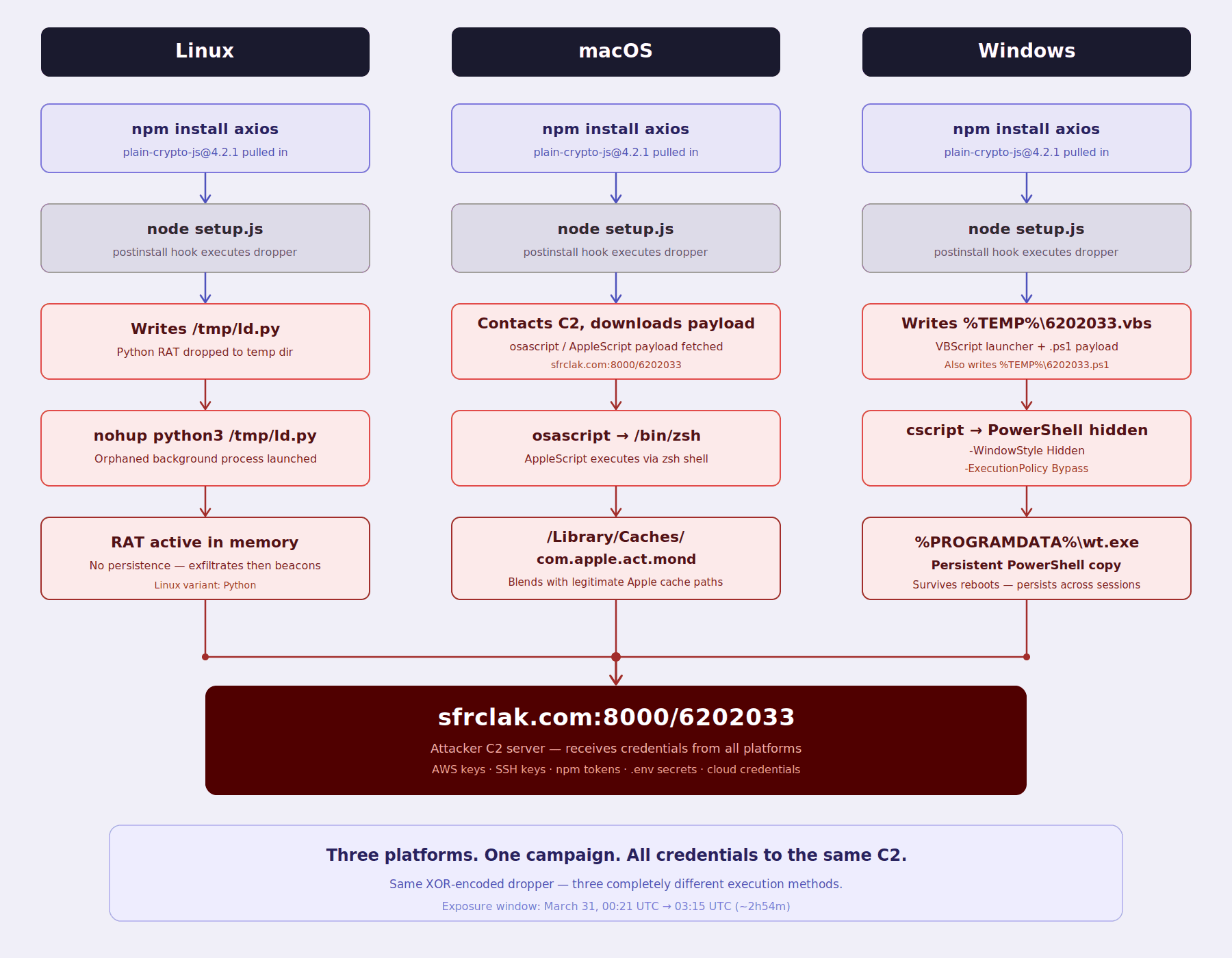
Platform-Specific Payloads: Three Delivery Methods
Each platform uses a completely different execution approach:
Linux - Python RAT: A Python script is downloaded to
/tmp/ld.pyand launched as a background orphaned process vianohup python3 /tmp/ld.py, detaching from the parent terminal. The RAT beacons to the C2 server, supporting remote command execution and file operations.macOS - AppleScript via osascript: The macOS payload is not a compiled binary. It is delivered via AppleScript executed through
osascriptand/bin/zsh, with the C2 URL passed as a parameter. The payload is stored at/Library/Caches/com.apple.act.mondchosen to blend with legitimate Apple system cache paths.Windows - VBScript to PowerShell: The Windows dropper writes two temporary files:
%TEMP%\6202033.ps1(the PowerShell payload) and%TEMP%\6202033.vbs(a VBScript launcher). The VBScript is executed viacscript, which in turn launches PowerShell with-WindowStyle Hidden -ExecutionPolicy Bypassflags to run invisibly. For persistence, a copy of PowerShell is written to%PROGRAMDATA%\wt.exe, establishing a persistent foothold that survives process termination.
Google’s Threat Intelligence Group (GTIG) published its attribution analysis on April 1, 2026.
It identifies the Windows payload as WAVESHAPER.V2, an updated version of the WAVESHAPER backdoor. This malware has previously been linked to UNC1069, a financially motivated threat actor with ties to North Korea, active since at least 2018.
GTIG attributes this activity based on overlaps in both infrastructure and tooling with earlier UNC1069 campaigns.
According to the analysis, WAVESHAPER.V2 includes capabilities such as:
system reconnaissance, including hostname, username, OS version, and running processes
arbitrary command execution, including in-memory PE injection
file system enumeration
The Self-Destruct Sequence: Why npm audit Shows Nothing
After the second-stage payload executes, setup.js runs a specific three-step cleanup:
fs.unlink(__filename)- deletessetup.jsitselffs.unlink("package.json")- deletes the maliciouspackage.jsoncontaining the postinstall hookfs.rename("package.md", "package.json")- moves a pre-staged stub file into place as the newpackage.json
The stub file reports version 4.2.0, not 4.2.1.
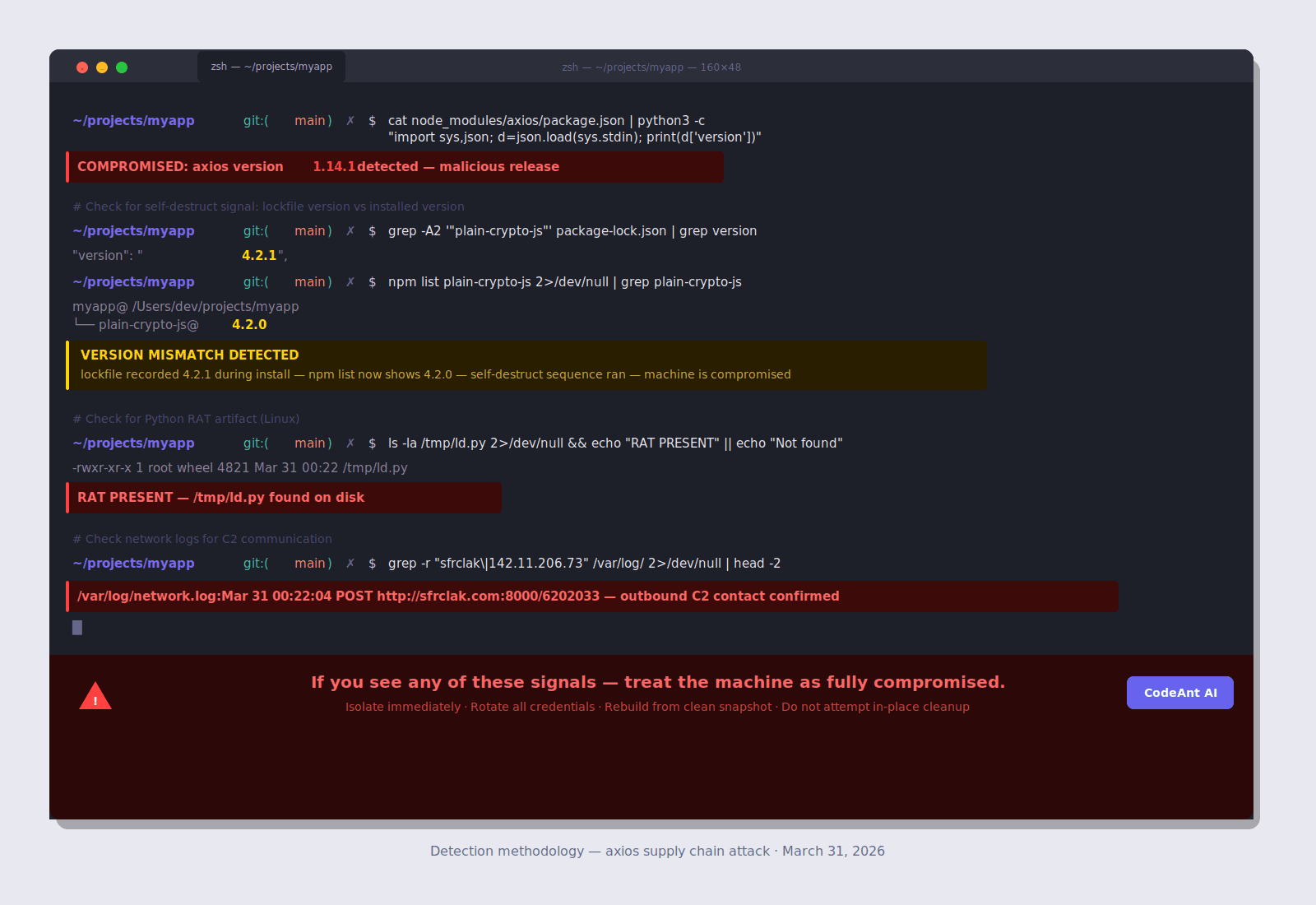
This means: after the attack runs, npm list plain-crypto-js returns 4.2.0. npm audit shows nothing. Manually inspecting node_modules/plain-crypto-js/package.json shows a clean file with no postinstall script. There is zero visible evidence in the installed package directory.
The detectable signal this creates: If your package-lock.json shows plain-crypto-js@4.2.1 was resolved during install, but npm list now shows 4.2.0 in your node_modules, that mismatch is your forensic indicator. The lockfile records what was installed. The package directory has been tampered to hide it. This version delta is the only post-execution trace visible without network or filesystem IOC hunting.
Who Is Behind This
Google Threat Intelligence Group (GTIG) published attribution on April 1, 2026, identifying the actor as UNC1069, a financially motivated, North Korea-nexus threat actor active since at least 2018. The attribution rests on the use of WAVESHAPER.V2 (an updated variant of UNC1069's known WAVESHAPER backdoor) and infrastructure overlaps with prior UNC1069 activity.
The axios attack does not stand alone. In 12 days:
Date | Target | Type |
|---|---|---|
March 19 | Trivy (vulnerability scanner) | Open source tool |
March 23 | KICS (IaC scanner) | Open source tool |
March 25 | LiteLLM (AI proxy library on PyPI) | Python library |
March 31 | Axios (HTTP client, npm) | JavaScript library, 100M+ weekly downloads |
The targeting logic is deliberate. Security tools (Trivy, KICS) give access to production environments of organizations that depend on them. Developer infrastructure libraries (LiteLLM, Axios) install with CI/CD credentials in scope. Each breach harvests credentials that potentially enable the next one.
Are You Affected? Complete Detection
The Version Mismatch Check (Most Important)
Full Detection Suite
Detection Reference Table
What to Check | Platform | Command/Path | Compromised If |
|---|---|---|---|
axios version | All |
|
|
Lockfile reference | All |
| Any hit |
Version mismatch | All | Compare lockfile vs npm list | Lockfile=4.2.1, list=4.2.0 |
Python RAT | Linux |
| File exists |
Running RAT | Linux |
| Process present |
AppleScript payload | macOS |
| File exists |
PowerShell persistence | Windows |
| File exists |
Temp payload | Windows |
| File exists |
Temp VBScript | Windows |
| File exists |
C2 network | All | Firewall logs for | Any POST |
Campaign path | All | Full-payload logs for | Any match |
CI/CD Build Log Audit
Immediate Response
If You Are Confirmed Compromised
Treat any system where the malicious package executed as fully compromised. Credentials are exfiltrated within seconds of install. Act before the attacker uses them, prior supply chain campaigns show attackers pivoting within hours of credential exfiltration.
Step 1: Isolate the system. Take it offline. Don't clean it, rebuild from a known-clean state.
Step 2: Rotate every credential that existed on the machine.
Step 3: Audit for lateral movement. With arbitrary code execution, the attacker may have read source code for hardcoded credentials, used exfiltrated IAM keys to access cloud environments, pushed commits to repositories using exfiltrated git credentials, or compromised additional packages using exfiltrated npm tokens.
Step 4: Report. If customer data was accessible from any compromised credential, evaluate GDPR Article 33 / CCPA notification obligations.
If You're Not Confirmed Affected
Why This Succeeded: The Structural Failures
Failure 1: Long-Lived npm Tokens in the Wild
The entire attack was possible because a long-lived classic npm token existed for a high-impact maintainer account. This is not unique to jasonsaayman, it describes millions of npm accounts across the ecosystem. Classic tokens generated years ago for convenience, never rotated, sitting in ~/.npmrc files and CI/CD secret stores worldwide.
The fix isn't complicated. It requires two things:
Maintainers: Revoke all classic tokens. Move to granular tokens with expiry. Adopt OIDC Trusted Publishing via GitHub Actions so no persistent token is needed at all.
Consumers: Monitor for publish method changes on your critical dependencies. A package that has always published via OIDC suddenly publishing via CLI token is a red flag.
Failure 2: No Pinned Dependencies
Organizations running npm ci in CI/CD (which respects the lockfile exactly) and committing their package-lock.json were substantially protected. Organizations running npm install without a committed lockfile were fully exposed.
Failure 3: postinstall Scripts Not Disabled
The tradeoff is real, some packages need postinstall for native compilation. Audit your specific dependency graph for which packages actually require it, and allow only those through.
Failure 4: No OIDC Provenance Verification
Every legitimate axios release carries SLSA provenance, a cryptographic attestation that the package was built from a specific verified commit via a specific GitHub Actions workflow. The malicious releases had none. An organization or tool verifying SLSA provenance before installing would have rejected both malicious versions instantly.
Failure 5: No Supply Chain Monitoring for New Transitive Dependencies
Standard SCA tools answer the question: "Is any installed package version in the CVE database?" That question had no useful answer for this attack, no CVE existed during the ~2h54m exposure window. The right question is: "Did a package appear in my dependency graph today that wasn't there yesterday?" That question had a clear answer: yes, plain-crypto-js appeared as a brand-new transitive dependency of axios, published 22 minutes ago, by an account with no prior npm history, with a postinstall hook, with no corresponding GitHub tag on the axios repository.
That is the signal that was missing from every standard SCA tool.
What CodeAnt AI's SCA Program Catches That Standard Tools Miss
CodeAnt AI sends weekly SCA reports to engineering teams via Slack and email. For the axios attack, the relevant detection layer is supply chain monitoring, not CVE matching.
The Detection Timeline Comparison
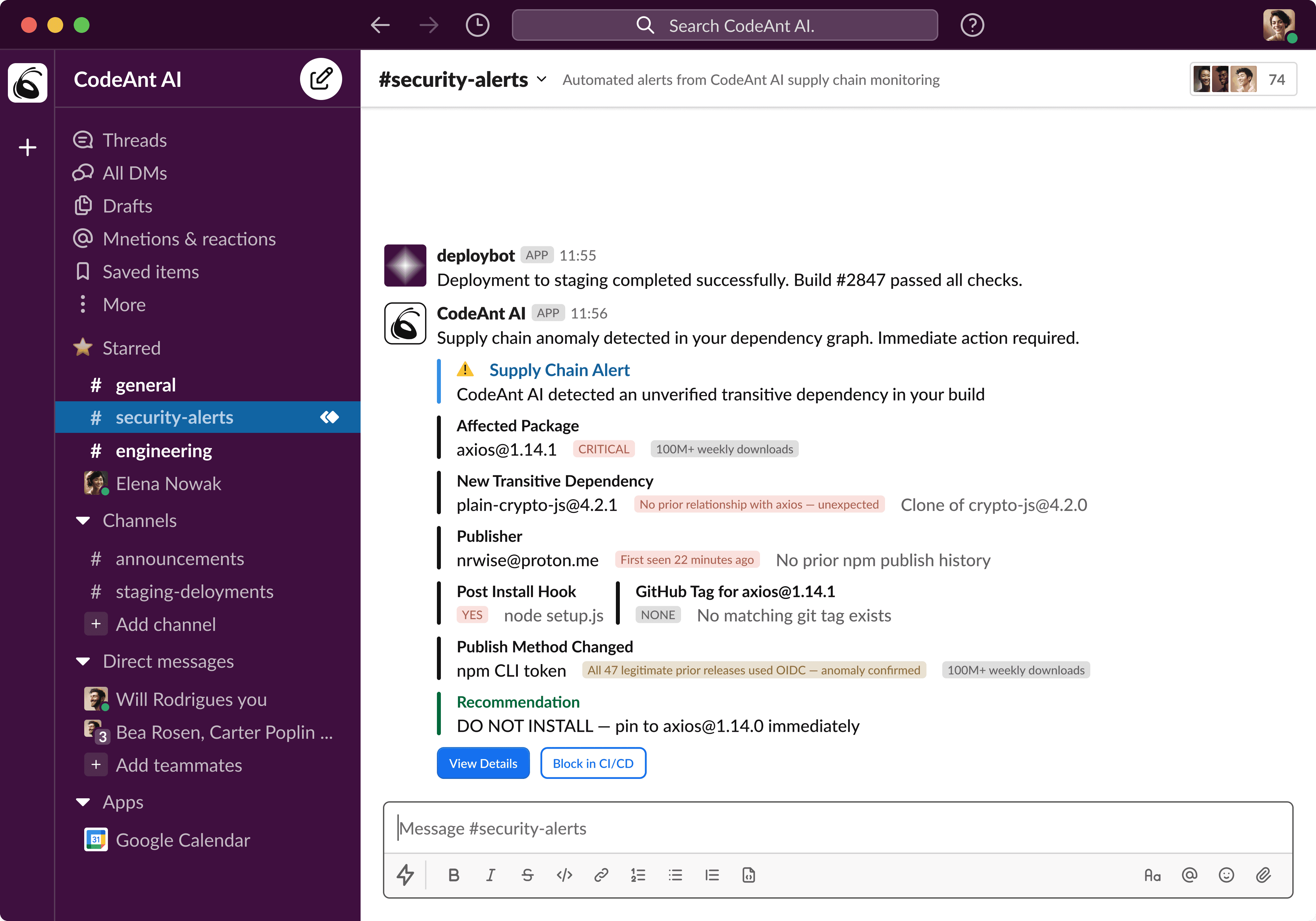
What the Weekly SCA Report Surfaces
Beyond the real-time supply chain alert, every engineering team receives a weekly structured report:
Reachability: The Filter for Everything Else
For conventional CVE findings (the majority of SCA output), CodeAnt AI applies reachability analysis: tracing the call graph from your application code to the vulnerable function, confirming user input reaches the vulnerable parameter, verifying no sanitization intercepts the path.
A typical Node.js SCA scan returns 30–60 findings. Reachability analysis reduces that to the 3–5 that are genuinely exploitable in your specific codebase, eliminating the noise that causes alert fatigue and burying critical findings.
For the axios attack, reachability is not the operative layer, a postinstall hook runs regardless of whether your code ever calls axios. The supply chain monitoring layer is the right detection mechanism here. Both layers serve different threat models. Both are necessary.
The Complete Defense Architecture
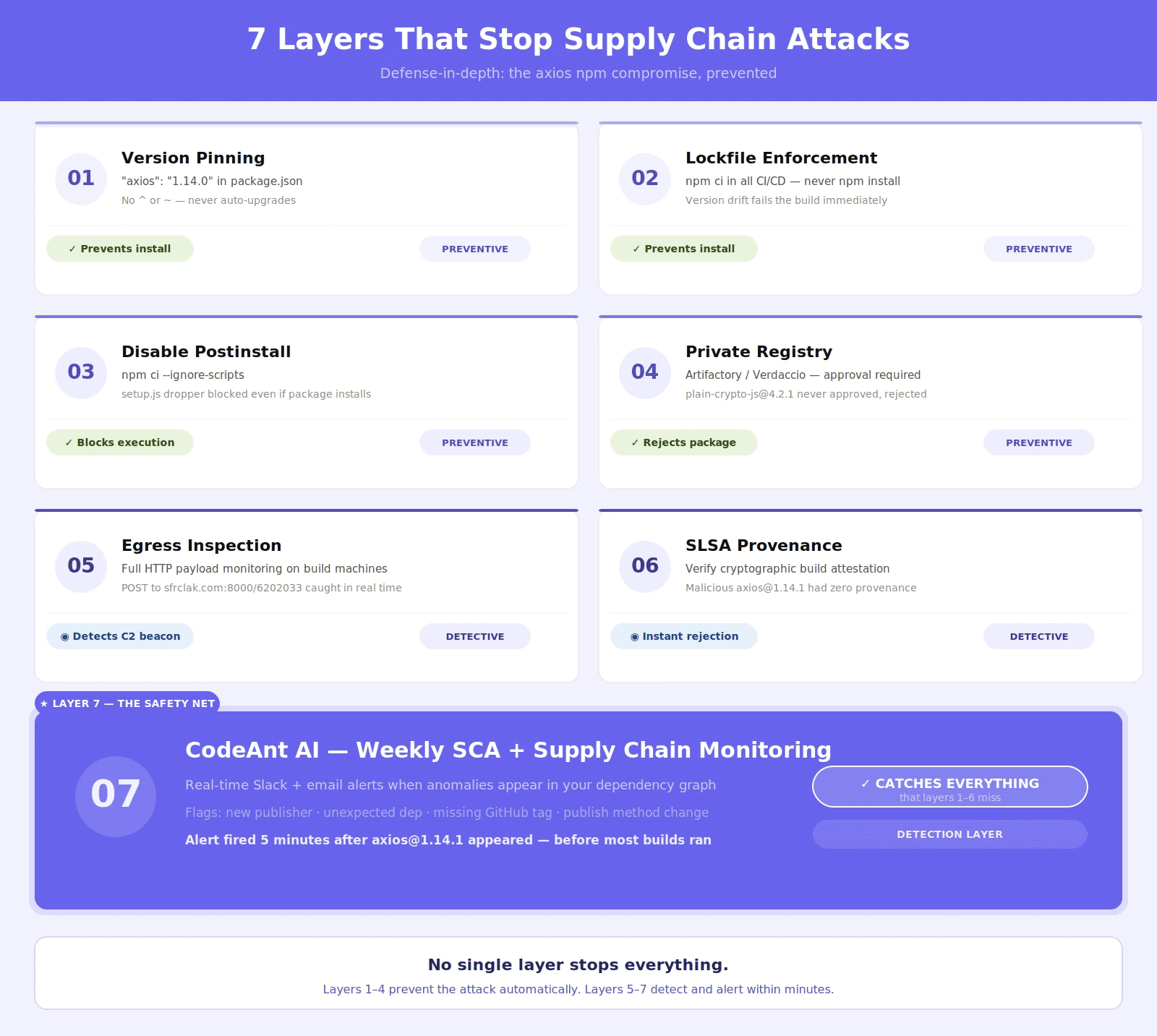
Supply chain attacks do not fail because one control exists. They fail when multiple independent controls overlap. The axios incident is a good example. No single control would have stopped the attack in every environment. But a layered approach would have either blocked execution or surfaced the anomaly early. Below is a practical seven-layer defense model that maps directly to how this attack worked.
Layer | Control | What It Stops | How It Would Have Helped |
|---|---|---|---|
1 | Exact version pinning | Silent upgrades to compromised versions | Prevents pulling |
2 | Lockfile enforcement ( | Dependency drift in CI/CD | Ensures builds stay on known safe versions |
3 | Script execution controls ( | Install-time code execution | Blocks malicious |
4 | Private registry with approvals | Untrusted dependencies entering builds |
|
5 | Egress monitoring on build machines | Data exfiltration and C2 callbacks | Detects outbound malicious traffic during install |
6 | Provenance verification (SLSA / OIDC) | Tampered or unverifiable package releases | Flags axios releases without trusted build origin |
7 | Continuous SCA + runtime-aware monitoring | Unknown or zero-day dependency risks | Detects anomalies in real time across dependency graph |
How Each Layer Maps to the Attack
Layers 1–3: Prevent Execution: These controls stop the attack before it runs.
Version pinning avoids pulling compromised releases
Lockfiles ensure reproducible builds
Ignoring scripts prevents execution even if the package is installed
If all three are active, the malicious payload never executes.
Layer 4: Block Untrusted Dependencies: Private registries act as a gate.
In this attack, the malicious package:
had no trust history
appeared suddenly
was not previously approved
A registry with an approval workflow would have blocked it immediately.
Layers 5–6: Detect Infrastructure-Level Anomalies: These controls operate outside the dependency system.
Egress monitoring detects unexpected outbound traffic from build systems
Provenance verification ensures packages come from trusted build pipelines
In this case:
the malicious axios release had no verified provenance
the payload communicated externally
Both signals could have triggered alerts even if earlier layers failed.
Layer 7: Detect What Others Miss: This is where traditional tools fail. The attack used:
a new dependency
no known CVE
valid npm behavior
A semantic, behavior-aware system would detect:
new transitive dependency introduction
publisher anomalies
mismatch between expected and installed packages
What This Architecture Actually Achieves
With all seven layers in place:
Layers 1–4 block the attack completely in most environments
Layers 5–7 detect the attack before widespread execution
Which means:
The attack either never runs, or it is detected before it spreads.
Supply chain security is not about trusting packages. It is about verifying every stage of how a package enters and executes in your system. CodeAnt AI operates at the final layer, where most attacks evade detection.
It continuously monitors:
new transitive dependencies
publisher and metadata changes
version mismatches between lockfile and runtime
real reachability of vulnerable code paths
In this attack scenario, these signals would have surfaced within minutes of the malicious release.
That said, no single tool stops supply chain attacks. But a layered system ensures that:
compromise does not propagate silently
anomalies are surfaced early
execution is controlled at multiple checkpoints
The difference between compromise and containment is not speed. It is coverage.
Permanent Changes Your Organization Should Make Now
For Maintainers of npm Packages
For Engineering Teams
The Complete Checklist
This is not a theoretical checklist. These are the exact actions teams should take to determine exposure, contain risk, and prevent recurrence after a supply chain attack like this.
Immediate Actions (Right Now)
Start with confirmation and containment.
Check your lockfile for any reference to
plain-crypto-js. Any presence should be treated as a potential compromise and investigated immediately.Compare installed versions against your lockfile. A mismatch such as
4.2.1installed but4.2.0expected is a strong indicator of tampering.Inspect systems for known indicators of compromise across environments:
Linux:
/tmp/ld.pymacOS:
/Library/Caches/com.apple.act.mondWindows:
%PROGRAMDATA%\wt.exe,%TEMP%\6202033.ps1,%TEMP%\6202033.vbs
Block known command-and-control endpoints including
sfrclak.comand142.11.206.73.Pin axios to safe versions (
1.14.0or0.30.3) across all repositories to prevent accidental installs of compromised versions.Replace
npm installwithnpm ciin all CI/CD pipelines to enforce deterministic builds.
Short-Term Actions (This Week)
Move from detection to cleanup and verification.
Audit all
package.jsonfiles and eliminate unpinned dependency ranges.Identify packages that use
postinstallscripts and reduce or remove them where possible.Review CI/CD build logs during the exposure window (March 31, 00:21 to 03:15 UTC) to identify affected builds.
Rotate credentials for any system that executed builds during this window, including API keys, tokens, and service credentials.
For npm maintainers, revoke all classic tokens and migrate to OIDC-based publishing to prevent credential-based compromise.
Mid-Term Actions (This Month)
Strengthen controls to prevent similar attacks.
Implement a private npm registry with an approval workflow for new dependencies.
Enable continuous SCA monitoring with weekly reporting to surface dependency changes and risks early.
Introduce provenance verification using SLSA or OIDC for critical dependencies.
Restrict and monitor outbound network traffic from build systems with full-payload inspection where possible.
Update your incident response playbook to explicitly include supply chain compromise scenarios.
Long-Term Controls (Permanent)
These are structural controls, not one-time fixes.
Enforce exact version pinning for all production dependencies.
Standardize
npm cias the only installation method in CI/CD environments.Review SCA reports weekly as part of a defined security process.
Require explicit review of all new transitive dependencies before they are allowed into builds.
Eliminate classic npm tokens and enforce periodic credential rotation, at minimum every quarter.
Most teams respond to supply chain attacks once. Effective teams turn them into permanent controls. Because the next attack will follow a different path, but it will exploit the same assumptions.
Indicators of Compromise: Complete Reference
The Uncomfortable Truth About Open-Source Trust
The axios attack didn’t succeed because of advanced malware. It succeeded because one credential still worked. A long-lived npm token gave an attacker publish access to a package used by millions. No code compromise. No zero-day. Just trust that was never re-verified.
That’s the real risk. Open-source packages aren’t secured by systems. They’re secured by people, and their credentials.
tokens that don’t expire
access that isn’t audited
publish actions that aren’t always strongly verified
The ecosystem is improving with OIDC, 2FA, and expiring tokens. But adoption is slow. Legacy access still exists everywhere. So the question isn’t whether the ecosystem is safe. It’s whether your systems assume it might not be.
Because you don’t control maintainer security. You control what happens when that trust breaks.
What actually reduces risk:
pin versions so nothing upgrades silently
enforce lockfiles so builds stay predictable
block install-time scripts where possible
verify provenance before trusting packages
monitor for unexpected dependency changes
detect anomalies as they happen, not after disclosure
Most teams rely on CVEs and audits. This attack wasn’t in a database. It was live. The teams that win are the ones that detect change, not just known vulnerabilities.
CodeAnt AI is built for exactly that. It flags new transitive dependencies, publisher changes, and real exploitability within minutes, not days later in a report.
So the real question is simple: If a package you trust is compromised tonight, will you know before your next build runs?
→ See how CodeAnt AI would have caught this.

