

Most DevSecOps tool lists are 25 logos in a row. They tell you what exists. They do not tell you what you are missing.
The useful question is narrower. Every category of tool catches one class of problem and is blind to the others, and a stack with four tools in one category and none in another has a gap nobody will notice until something reaches production.
This guide is organised by category rather than by vendor. For each one: what it analyses, what it catches, what it structurally cannot catch, and which tools are worth shortlisting. Then how to assemble them into a toolchain without buying six products that overlap.
Where this connects: CodeAnt AI covers AI code review and code security in one pass on every pull request, spanning SAST, SCA, IaC, and secret detection, which is four of the six categories below.
Key Facts at a Glance
Question | Short answer |
|---|---|
What a DevSecOps tool is | Anything that moves a security check earlier than production and runs without a human starting it |
The six categories | SAST, SCA, secret detection, IaC scanning, container and runtime, policy and supply chain |
What most stacks over-buy | SAST. Three overlapping scanners is common |
What most stacks under-buy | IaC scanning and secret detection |
The number that decides adoption | Actioned findings, not total findings |
Where a tool has to run | On the pull request, and as a gate. A dashboard-only tool gets ignored |
Open source viability | High for scanning, low for triage and reporting |
What Counts as a DevSecOps Tool
A DevSecOps tool does two things a traditional security product does not.
It runs without a human starting it. The scan is a pipeline job or a webhook, not a scheduled engagement. If someone has to remember to run it, it is a security tool being used in a DevSecOps context, not a DevSecOps tool.
It reports where the work happens. A finding on the pull request that caused it is actionable. The same finding in a quarterly report is archaeology.
That definition rules a lot of things out. Observability platforms, log aggregators, and APM tools are genuinely useful for detecting problems in production, and they are not DevSecOps tools. They belong to the shift-right half, and including them in a toolchain list is how teams end up thinking they have coverage they do not have.
The Six Categories, and What Each One Misses
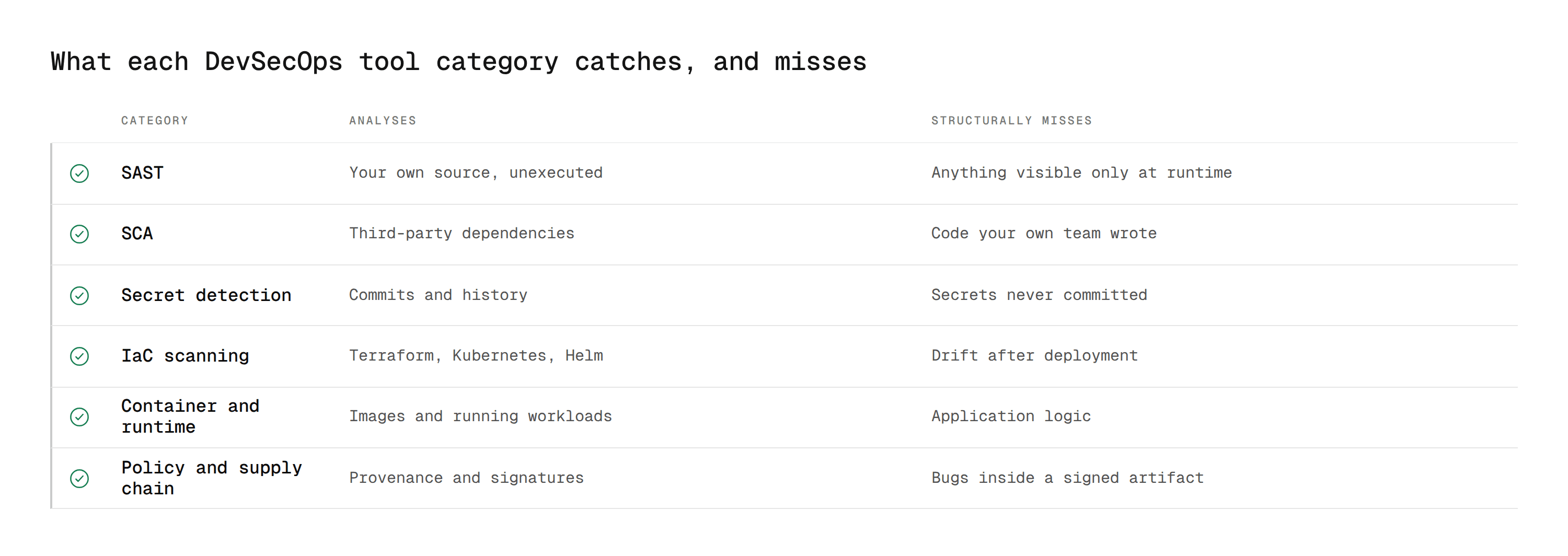
This table is the whole argument. Every row catches something the others cannot.
Category | Analyses | Catches | Structurally misses |
|---|---|---|---|
SAST | Your own source, without running it | Injection paths, unsafe deserialisation, insecure crypto, hardcoded logic flaws | Anything only visible at runtime, config drift |
SCA | Third-party dependencies and their transitive tree | Known CVEs in packages you pulled in, licence risk | Defects in code your own team wrote |
Secret detection | Commits, history, and config files | Committed tokens, keys, connection strings | Secrets that were never committed, secrets in a vault |
IaC scanning | Terraform, Kubernetes, CloudFormation, Helm | Public buckets, over-permissive IAM, open security groups | Drift after deployment, runtime misconfiguration |
Container and runtime | Built images, and running workloads | Vulnerable OS and language packages, anomalous process behaviour | Application logic, pre-build issues |
Policy and supply chain | Build provenance, signatures, policy decisions | Unsigned artifacts, policy violations, tampered images | Vulnerabilities inside a correctly signed artifact |
Two observations worth acting on.
Most teams have three SAST-ish tools and no IaC scanning. SAST is the most familiar category and the easiest to buy, so it accumulates. IaC misconfiguration is where a surprising share of real cloud incidents start, and it is the category most often missing entirely.
No category covers exploitability. Every row above reports what it found. None of them tells you which findings an attacker could reach in your specific codebase, which is why the backlog grows at the rate the scanners run.
What to Check Before Adding Any Tool
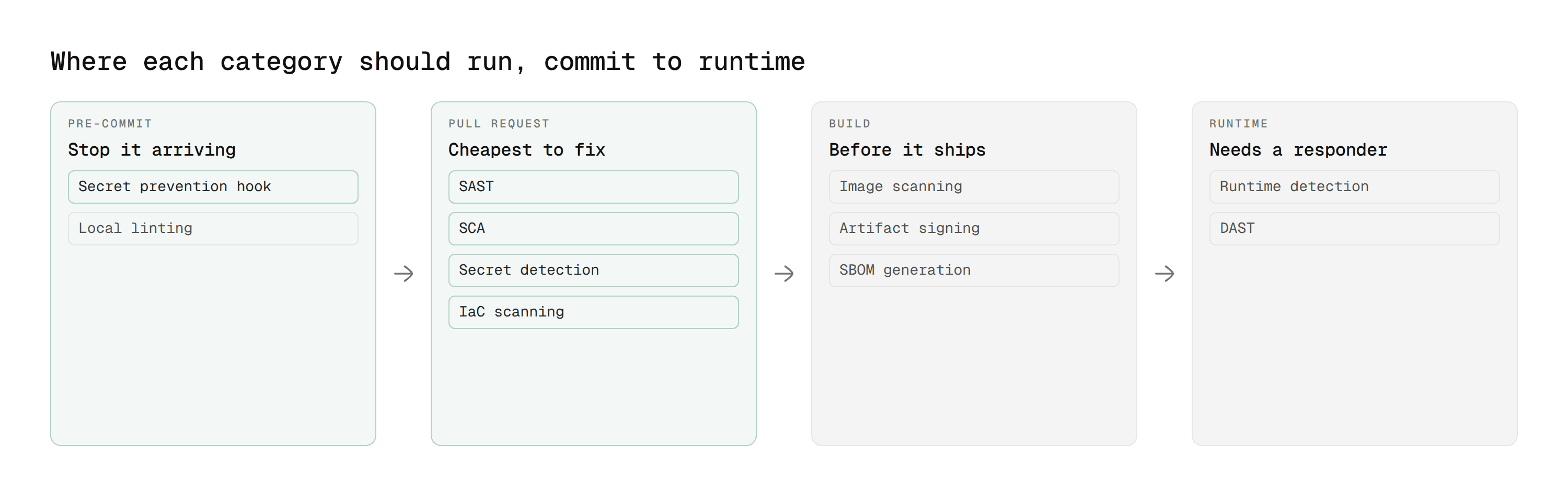
Five questions, in the order that eliminates candidates fastest.
Does it run on the pull request? Not nightly, not weekly. A finding detached from the change that caused it needs someone to reconstruct context, and that someone rarely exists.
Can it block a merge? On every Git platform, a tool gates by posting a status or failing a pipeline job. A tool that only writes comments is advice, not a control.
What is the actioned-findings ratio? Not total findings. A tool posting 200 findings of which four get fixed is worse than one posting twelve of which nine do.
Does it deploy where you need it? Hosted, your own VPC, or fully on-premises. If code cannot leave the network, this eliminates most of the market before features matter. Our guide to on-prem SAST and data residency covers that constraint.
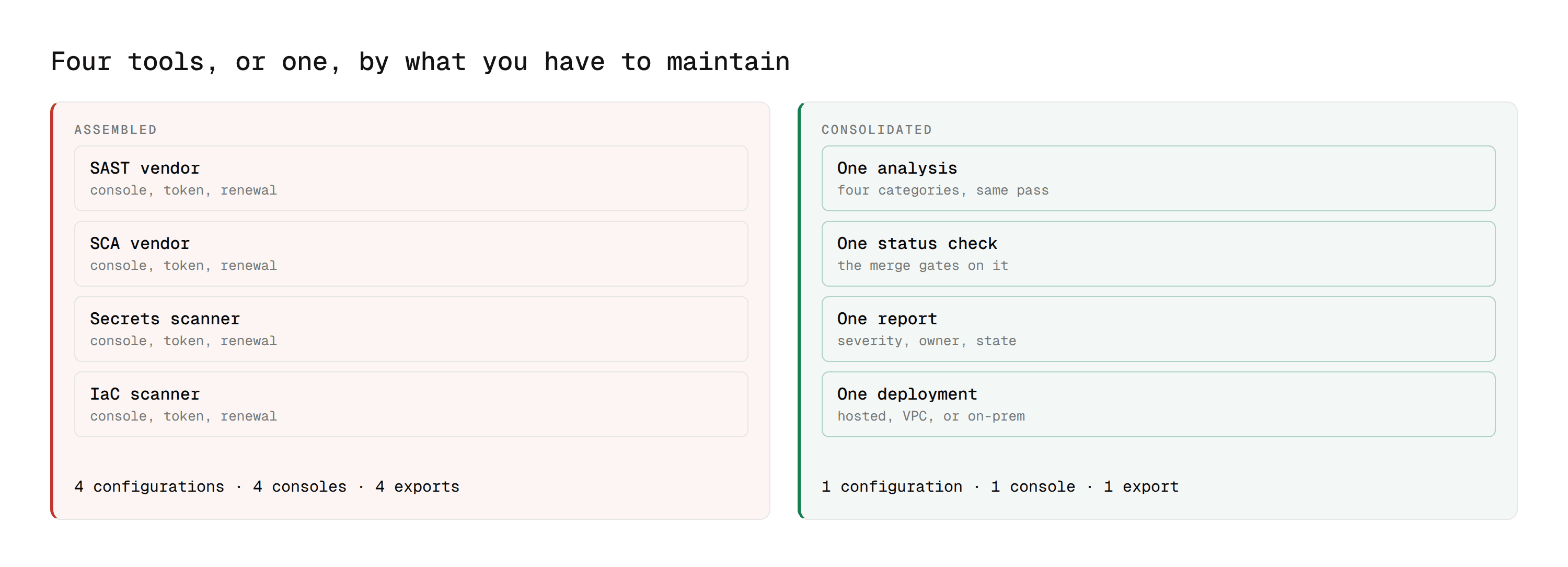
How many consoles does it add? Each tool brings its own dashboard, its own token, its own renewal, and its own export to reconcile before an audit.
Code Security: SAST Tools
Static application security testing analyses your own source without executing it, tracing data from where it enters your application to where it gets used. Our SAST explainer covers the category in depth and best SAST tools covers the field in more detail than fits here.
1. CodeAnt AI
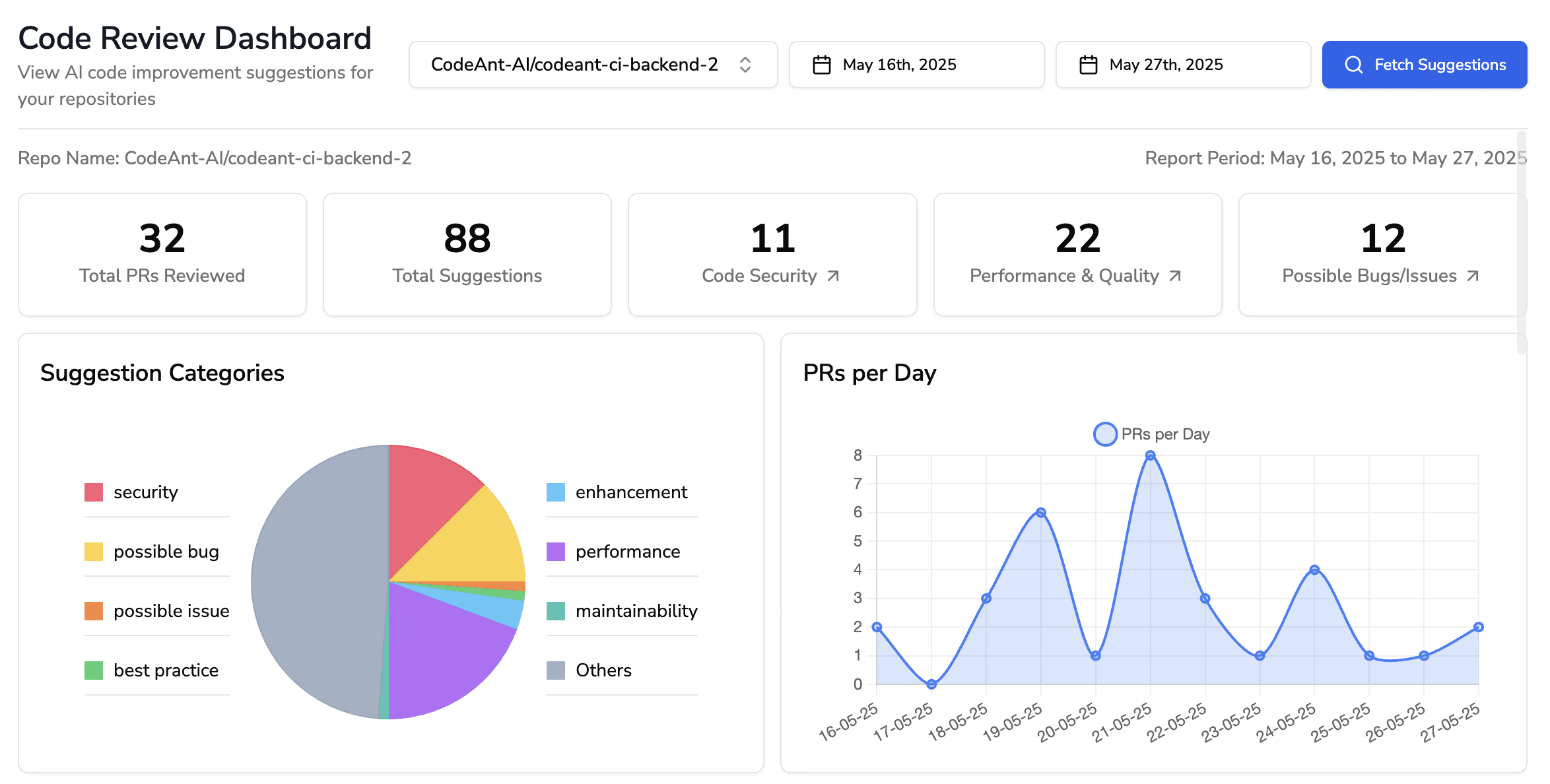
Runs AI code review and security analysis in the same pass on every pull request, combining a deterministic engine of more than 30,000 checks with AI review across 30 or more languages.
Covers: SAST, SCA, IaC, and secret detection together, plus code quality and DORA metrics.
Gating: posts a status check that branch policies, merge checks, or approval rules can require.
Deployment: hosted, your own VPC on AWS, GCP, or Azure, or fully air-gapped on-premises with zero data retention.
Differentiator: built as a defensive and offensive platform, so findings are checked for real exploitability before a developer sees them. Each carries Steps of Reproduction showing the full path rather than a rule identifier.
Limits: newer than SonarQube or Checkmarx, so less accumulated community configuration to borrow. Not open source.
Pricing: from $10 per developer per month, 14-day trial.
2. Semgrep
Pattern-based static analysis with rules written in YAML, fast enough to run on every commit.
Strength: custom rules are genuinely easy to write, which matters for enforcing organisation-specific standards.
Limits: no dynamic analysis, and default rulesets need tuning before the signal-to-noise ratio is workable.
Pricing: open source core, paid plans from $40 per user per month.
3. SonarQube
The long-standing quality-and-security platform, with quality gates that block a merge on a defined threshold.
Strength: breadth of language coverage and a mature rule library.
Limits: rule-driven rather than reasoning about intent, and self-hosting at scale is a maintained service with real headcount attached. See our SonarQube comparison.
Pricing: Community edition free, paid editions scale by lines of code.
4. Snyk Code
Security-first static analysis inside a broader platform covering dependencies and containers.
Strength: fix examples drawn from real remediations rather than generic guidance.
Limits: security rather than code health, so quality and maintainability need something else. Usage-based pricing needs modelling at scale.
5. Checkmarx, 6. Veracode, 7. Fortify
The enterprise incumbents. All three offer SAST plus DAST and SCA in one platform, all three are priced and scoped for large programmes, and all three carry real setup and tuning cost.
Worth shortlisting if you need a single vendor with procurement history and compliance reporting built for auditors. Worth skipping if you want something a team can adopt in a week.
Dependencies: SCA Tools
Software composition analysis checks third-party packages against known vulnerabilities. Our SCA guide covers the category.
The thing that separates good SCA from noisy SCA is reachability. A critical CVE in a package whose vulnerable function your code never calls is a lower real risk than a medium-severity issue on a path your customers hit daily. Tools that report the package rather than the call path generate backlogs nobody clears.
# | Tool | Strength | Watch for |
|---|---|---|---|
8 | Snyk Open Source | Broad ecosystem coverage, fix PRs | Usage-based pricing at scale |
9 | Trivy | Free, fast, scans images and filesystems too | CLI-only, no triage state |
10 | Dependabot | Free on GitHub, automatic update PRs | No reachability, GitHub only |
11 | OWASP Dependency-Check | Fully open source, no vendor | Higher false positive rate, needs tuning |

CodeAnt AI covers this category too, with SCA running in the same pass as the review and reachability separating the vulnerable functions your code actually calls from the ones it never touches.
Secrets: Detection and Prevention
The category most often missing, and the one with the shortest path from finding to incident.
Two things worth knowing before you choose.
Scanning history is different from scanning the diff. A credential committed two years ago is still in the repository even if it was rotated. Rotating fixes the exposure and does not remove the finding, and removing it requires rewriting history.
Detection and prevention are different products. A scanner tells you a secret is there. A pre-commit or pre-receive hook stops it arriving. Most teams need both, and most buy only the first.
# | Tool | Strength | Watch for |
|---|---|---|---|
12 | GitGuardian | Breadth, and historical scanning across full commit history | Volume on a first run against an old repository |
13 | TruffleHog | Open source, verifies findings against live services | CLI-first, no triage workflow |
14 | Spectral | Fast repo scanning with almost no setup | Detection only, no remediation guidance |
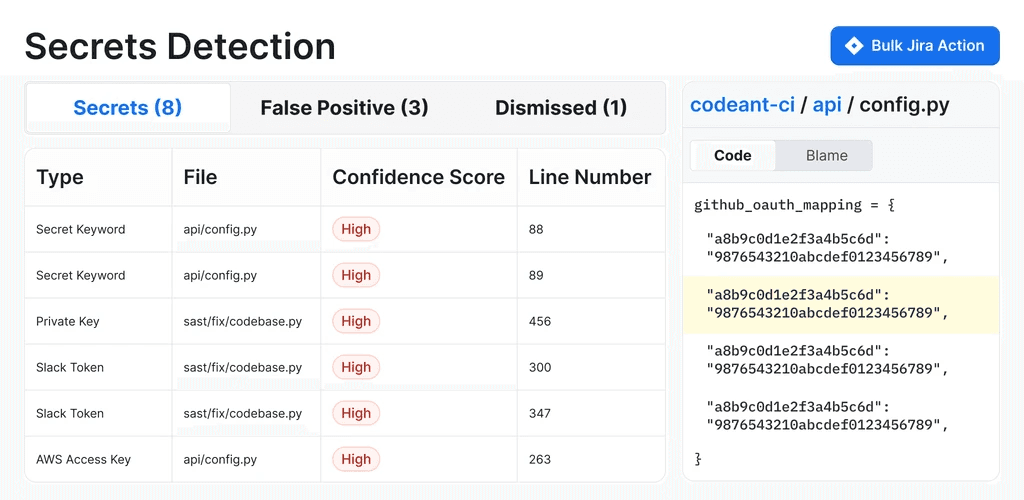
CodeAnt AI also covers this category, with secret detection running in the same pass as the review rather than as a separate tool.
Infrastructure as Code
The category most teams skip, and the one where a single missed line becomes a public bucket.
IaC scanning parses Terraform, Kubernetes manifests, CloudFormation, and Helm charts before they are applied, checking for over-permissive IAM policies, open security groups, unencrypted storage, and missing logging.
# | Tool | Covers | Notes |
|---|---|---|---|
15 | Checkov | Terraform, K8s, CloudFormation, Helm, ARM | 1,000+ built-in policies, custom rules in Python |
16 | Terrascan | Terraform, K8s, Helm | OPA-based policy engine |
17 | Open Policy Agent | Any JSON-shaped input | Not IaC-specific, it is the policy layer underneath |
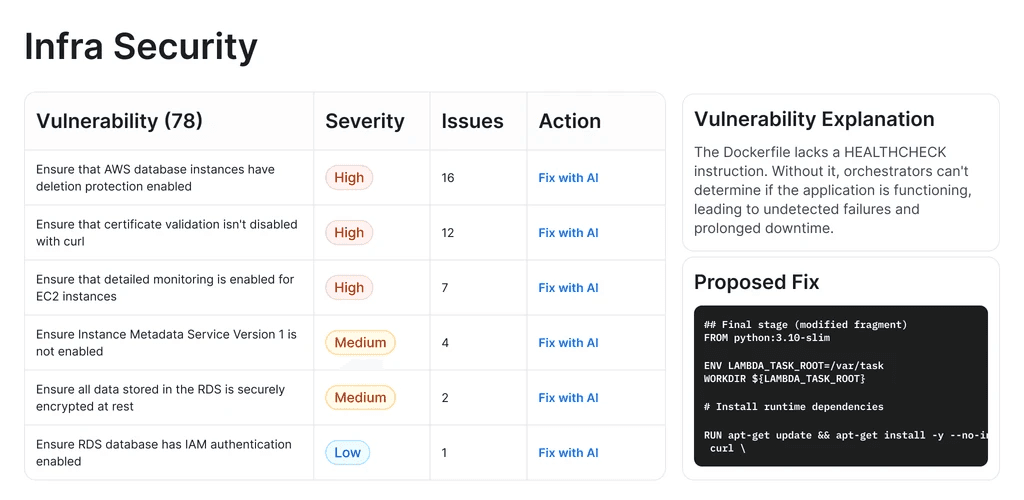
Trivy covers IaC as well as dependencies and images, which is why it appears in more than one category here. CodeAnt AI covers it alongside the review.
The practical advice is to scan at the pull request rather than at apply time. A Terraform plan that fails in the deployment pipeline has already cost someone their afternoon.
Containers and Runtime
Two distinct jobs often sold together.
Image scanning checks built images for vulnerable OS and language packages before they ship. Trivy and Grype are the open-source defaults, and every major platform now ships something.
Runtime security watches running workloads for behaviour that should not be happening. Falco is the CNCF-incubating open-source option, with Aqua and Sysdig as the commercial platforms.
The distinction matters because they fail differently. Image scanning is preventive and cheap. Runtime detection is reactive, generates alerts that need a responder, and is wasted spend if nobody is on the other end of it.
Policy and Supply Chain
The newest category and the one regulation is pushing hardest.
Open Policy Agent decouples policy from application code, letting you express rules once and enforce them across Kubernetes, CI/CD, and APIs. Cosign and the wider Sigstore project handle signing and verifying artifacts so you can prove an image is the one you built. Syft generates SBOMs, increasingly a procurement requirement, and that capability is now built into most scanners including Trivy.
This category catches a class of problem no scanner does: an artifact that is vulnerability-free and also not the one you built.
The Platforms
GitLab and GitHub both ship meaningful native security, which changes the buying question on those platforms.
GitLab bundles SAST, secret detection, dependency scanning, container scanning, and DAST as pipeline templates, with deeper analysis and the Vulnerability Report on upper tiers. Our GitLab SAST guide covers the configuration.
GitHub Advanced Security covers secret scanning, dependency review, and CodeQL as platform capabilities rather than pipeline jobs.
Bitbucket and Azure DevOps ship considerably less, which is why teams on those platforms buy more. See Bitbucket Data Center and the GitLab vs GitHub comparison for the platform-by-platform picture.
Open Source or Commercial
A fair question, and the honest answer splits by category.
Open source is strong for scanning. Trivy, Checkov, Semgrep, OWASP ZAP, and Falco are genuinely good at finding things, free, and used in production by serious teams.
Open source is weak for triage. None of them give you finding state, ownership, a timestamp on each transition, or a cross-project view. That is the part an auditor asks for, and the part you end up building yourself out of JSON artifacts and a spreadsheet.
The realistic pattern is open-source scanners early, then a commercial layer once the question changes from "what did we find" to "what have we fixed, and can you prove it".
Building the Toolchain Without Buying Six Things
Three stages, in the order that removes the most risk per unit of effort.
Stage 1: the merge request
SAST, SCA, and secret detection running on every pull request, with at least one of them able to block a merge. This is the highest-leverage stage and it is where most teams stop.
Gate on critical only at first. Widen once the critical count is genuinely zero for a few weeks.
Stage 2: infrastructure and images
IaC scanning on the pull request, image scanning in the build. Both are cheap, both are preventive, and IaC is the category most likely to be missing entirely.
Stage 3: runtime and supply chain
Runtime detection and artifact signing. Both need someone to respond to what they produce, so do them after the first two stages are working rather than alongside.
The consolidation question
Each tool adds a configuration surface, a console, a token, and an export. Four scanners means four of each, and a compliance story assembled by hand.
That is the real argument for consolidation, and it is a governance cost rather than a licence cost. Our guide to SAST tool consolidation covers when it is worth doing.
The Number That Actually Predicts Adoption
Not coverage. Not the rule count. Actioned findings as a share of total findings.
A scanner producing two hundred findings on first run against a legacy codebase does not get triaged, it gets muted. Within a month someone sets it to non-blocking, and the programme is over without anyone deciding to end it.
Three things protect against that.
Exclude what you do not own. Test fixtures, vendored dependencies, and generated code produce findings nobody will fix.
Separate new findings from the backlog. A developer can answer "did this change introduce something". They cannot answer "why does this repository have two hundred findings".
Prioritise by exploitability rather than severity. Severity measures impact if exploited. It says nothing about whether exploitation is possible in your codebase, and the gap between those two is where every security backlog comes from. Our guide to false positives in AI code review covers the adoption side of this.
Where CodeAnt AI Fits
Four of the six categories in one pass, on the pull request, with one gate.
One tool across four categories. SAST, SCA, IaC scanning, and secret detection run together with AI code review and code quality tracking, rather than as five configurations and five consoles.
Exploitability rather than severity. Findings are checked against whether the path is actually reachable before a developer sees them, and each carries Steps of Reproduction showing the full route. On dependency findings, reachability separates the vulnerable functions your code calls from the ones it never touches.
It gates. The analysis posts a status check, so a critical finding holds the merge rather than joining a thread someone resolves to move on. Works the same on GitHub, GitLab, Bitbucket, and Azure DevOps, including self-managed.
It runs where your code has to stay. Hosted, your own VPC, or fully air-gapped on-premises with zero data retention.
Custom policies can be written in plain English rather than rule configuration, which is how team-specific standards get enforced rather than documented.
Buy for the Gap, Not the Category
Every list like this one ends with a recommendation to evaluate carefully. Here is a more specific version.
Open the table of six categories above and mark which ones run on a pull request in your busiest repository today. Most teams find two or three marked, several tools clustered in one of them, and infrastructure-as-code blank.
That map is your buying decision. Not the vendor comparison, not the rule count, and not which tool a competitor mentioned on a podcast.
Where to start this week
Take the six categories and answer one question for each: does anything run on a pull request, and can it block a merge. Two columns, six rows, ten minutes. Almost every team discovers the same two things, that they own more tools than they have categories covered, and that nothing they own can actually stop a merge. The second one is usually the cheaper fix.
Book a walkthrough with our team →
Related reading
What Is DevSecOps: the practice these tools serve, if you are earlier in the journey.
What Is SAST and Best SAST Tools: the largest category, in depth.
Software Composition Analysis: the dependency half, and why reachability decides the backlog.
SAST Tool Consolidation: when running fewer tools beats running better ones.
10 Best AI Code Review Tools: the review layer these security tools sit alongside.

