

Most teams that adopt a SAST tool start by running it manually or in an IDE. That catches some issues, but it depends on individual developers remembering to run the scanner, and it leaves gaps when code is written by AI assistants, contributed by contractors, or rushed in under deadline pressure.
Integrating SAST into your CI/CD pipeline removes the human dependency. Every pull request, every commit, every build is scanned automatically, no code reaches the main branch without security review. This guide walks through the setup for the three platforms where most engineering teams work: GitHub Actions, Bitbucket, GitLab CI/CD, and Azure DevOps. Each section includes a working configuration and the rationale behind the choices.
If you are new to SAST, start with What Is SAST? Static Application Security Testing Explained. If you are evaluating tools, see which SAST tools support your CI/CD platform in our master comparison table.
Why SAST Belongs in Your CI/CD Pipeline (Not Just Your IDE)
IDE plugins provide real-time feedback, but they depend on too many variables.
They only work if:
The developer has the plugin installed
The plugin is enabled
The IDE is supported
The scan is actually run before pushing code
In a 20-person engineering team, those conditions rarely hold consistently. Developers use different editors. Some disable plugins for performance. Others forget to scan before committing. The result is inconsistent coverage.
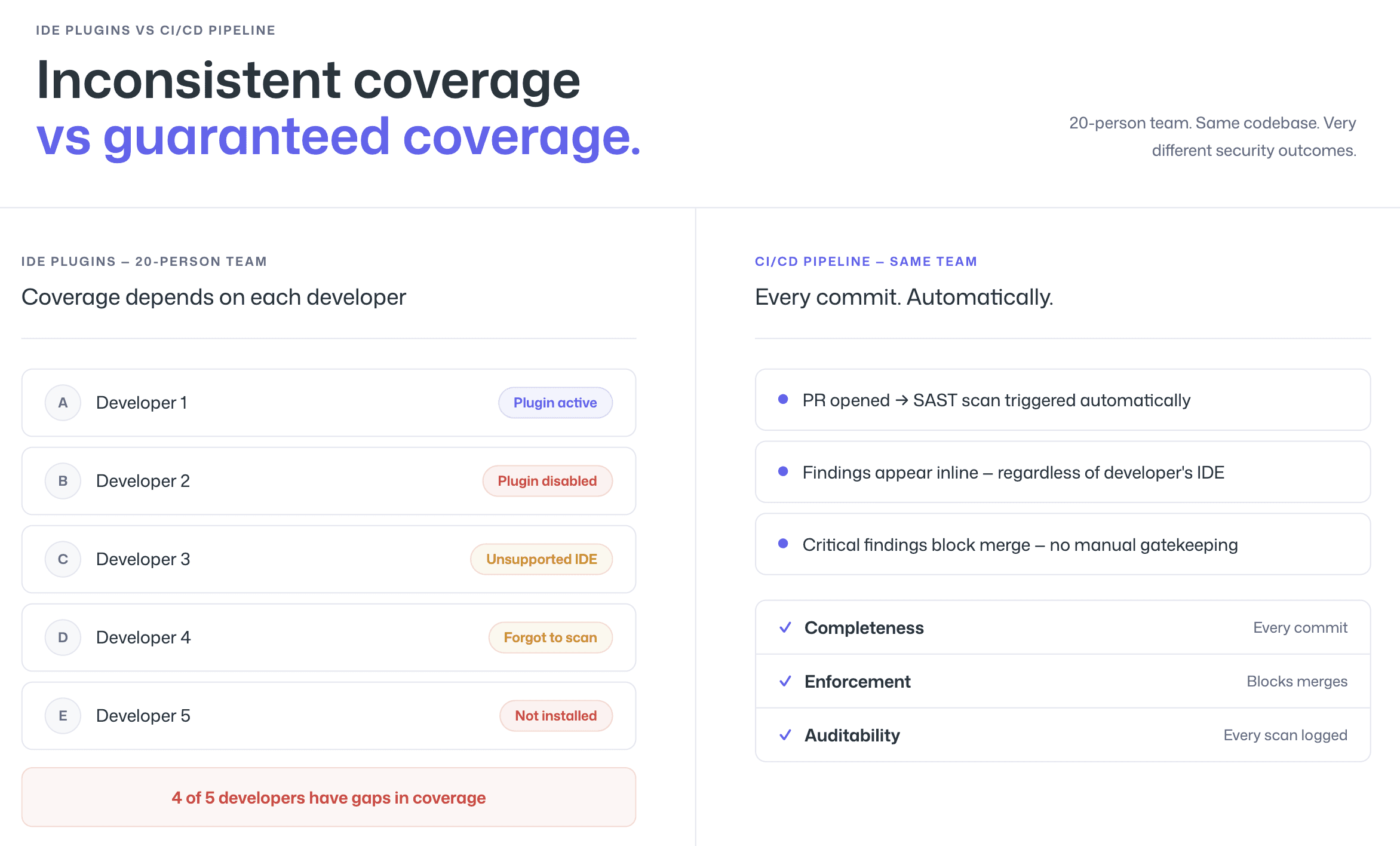
CI/CD pipeline integration solves this problem.
When SAST runs automatically during pull requests or merge requests, every code change is scanned before it reaches the main branch. Findings appear inline, directly in the review workflow.
Pipeline-level SAST guarantees three things IDE-only scanning cannot:
Completeness: Every commit is scanned, regardless of who authored it or which tools they use
Enforcement: Critical vulnerabilities can block merges automatically
Auditability: Every scan produces a record, supporting compliance requirements
This is how shift-left security becomes real. Not as a philosophy, but as an automated control applied to every change.
The economics make the case clear. Fixing a vulnerability during a pull request takes minutes. Fixing the same issue after deployment can cost 10–100 times more due to context switching, debugging, and redeployment cycles.
Pipeline integration ensures vulnerabilities are caught when remediation is cheapest, before they ever reach production.
Where to Scan: IDE vs PR vs Pipeline vs Nightly
SAST can run at four different points in the development lifecycle. Each serves a distinct purpose. The strongest security programs layer them instead of relying on just one.
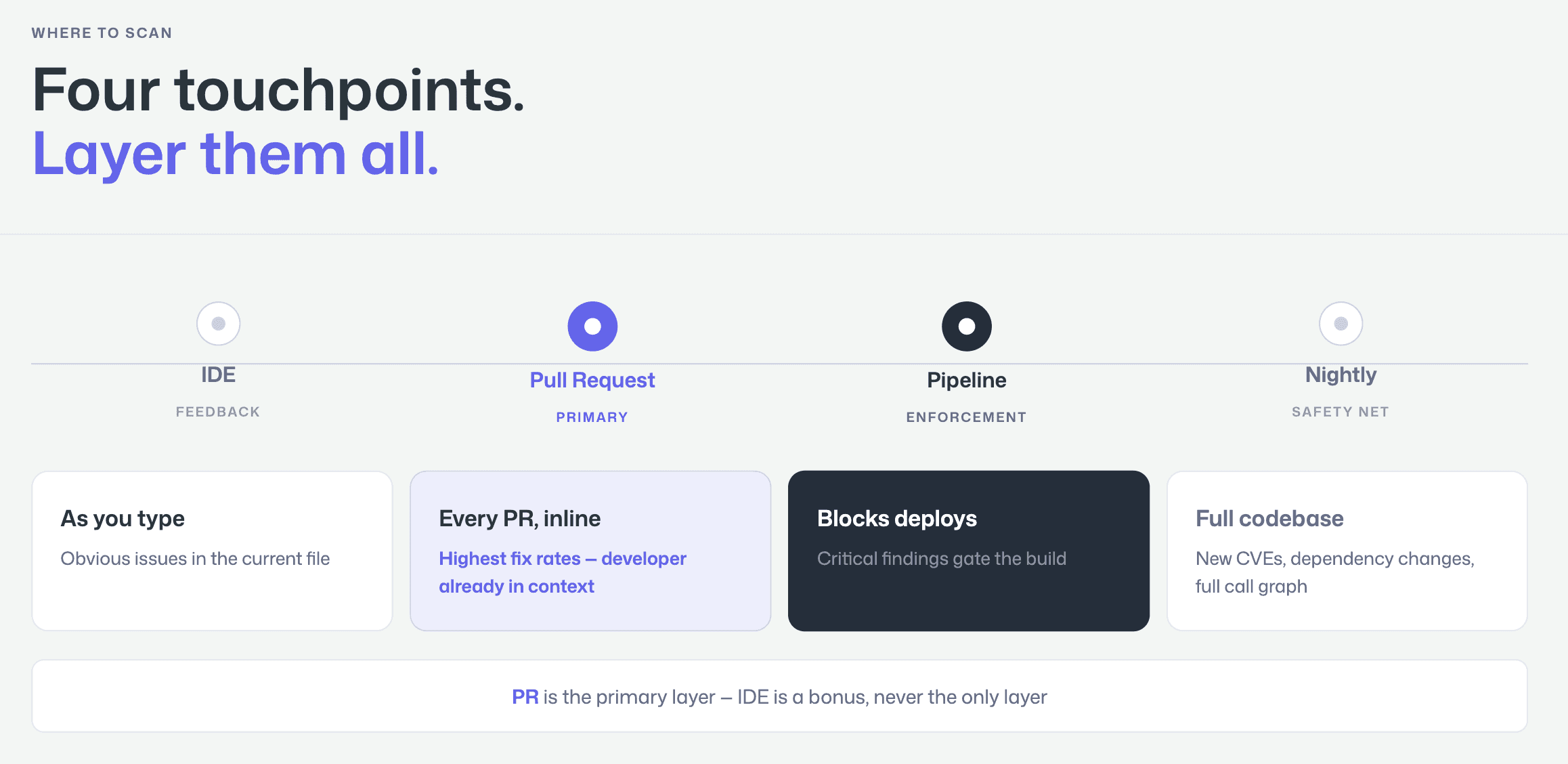
IDE Scanning
IDE scanning runs inside the developer’s editor and provides real-time feedback while code is being written.
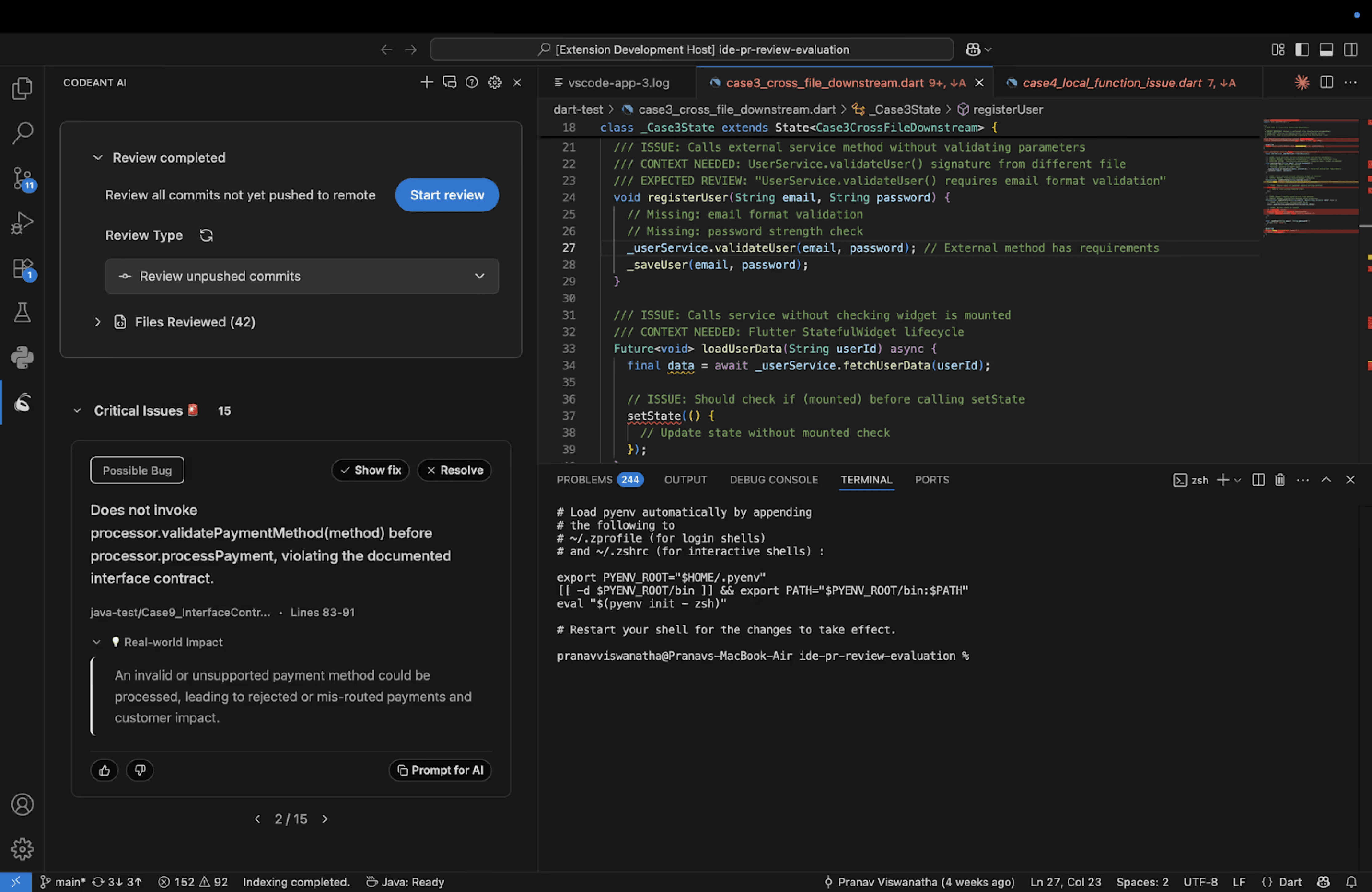
It is best for:
Catching obvious issues immediately
Hardcoded secrets
Insecure function calls
Known vulnerable patterns
However, it has limitations. It only analyzes what the developer is currently working on and depends on the plugin being properly installed and enabled. Coverage varies by individual behavior.
PR-Level Scanning
Pull request scanning provides the best balance of speed and coverage.
Every code change is scanned automatically when a PR is opened, and findings appear as inline comments on the affected lines. Developers see vulnerabilities exactly where they are already reviewing code.
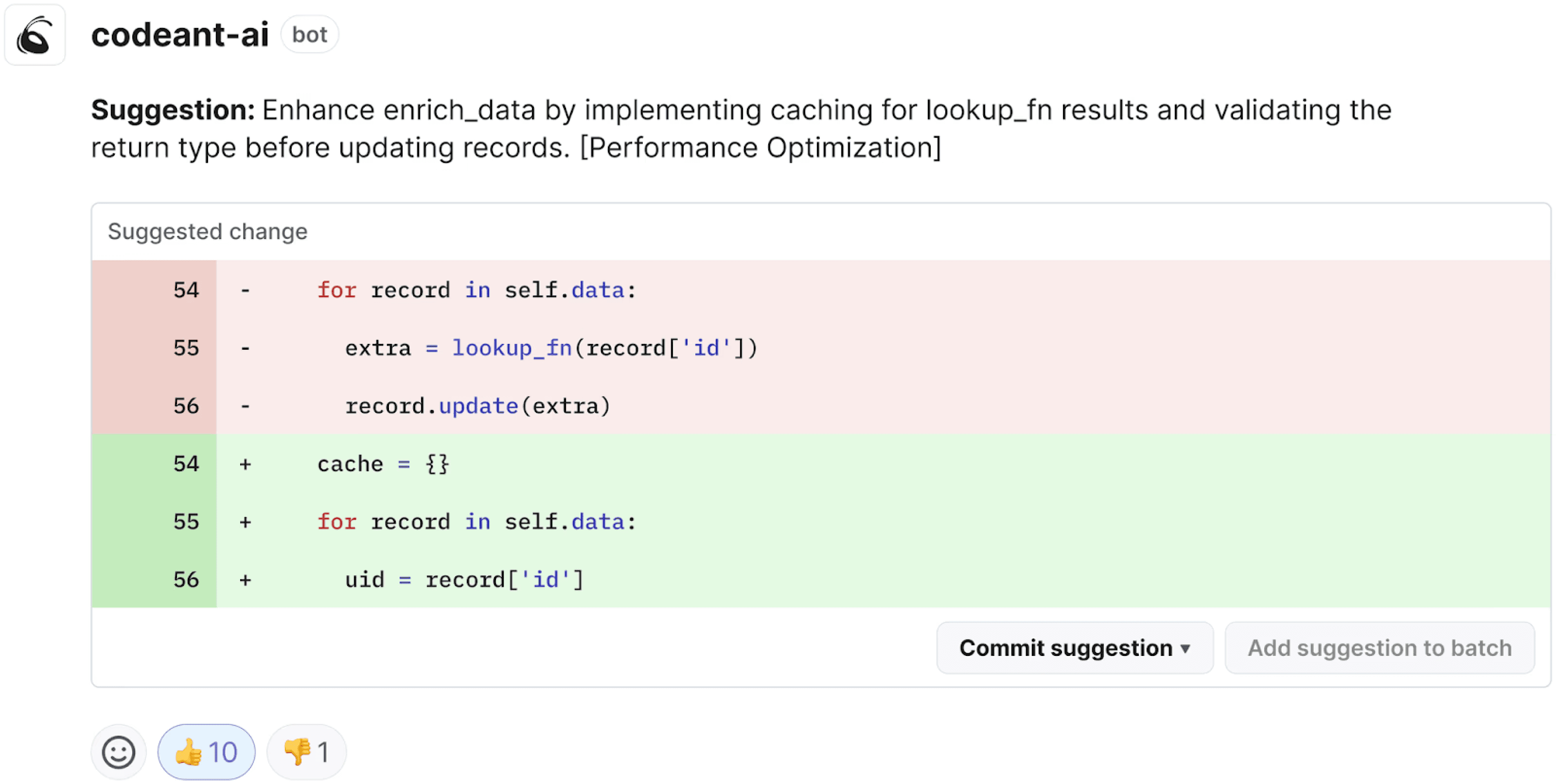
This model drives the highest fix rates because:
There is no dashboard context-switching
No separate triage workflow
No delay between detection and remediation
PR-level scanning integrates directly into GitHub, GitLab, Azure DevOps, or Bitbucket workflows, making it the most practical “shift-left” control.
CI/CD Pipeline Scanning
Pipeline scanning runs as a build step, typically after compilation and before deployment.
This is where enforcement happens. Security gates can:
Fail builds
Block deployments
Enforce severity thresholds
Pipeline scanning guarantees compliance and control, but feedback arrives later than PR-level scanning. By this stage, the developer may have already moved on to other work.
Nightly or Scheduled Scanning
Nightly scans analyze the entire codebase on a fixed schedule.
They are useful for catching:
Vulnerabilities introduced by dependency updates
Newly disclosed CVEs affecting existing code
Issues that only surface when the full call graph is analyzed
This acts as a safety net for comprehensive coverage beyond incremental PR scans.
Step-by-Step: Adding SAST to GitHub Actions
GitHub Actions is the most common CI/CD platform for teams using GitHub. Adding SAST requires a workflow file that triggers pull request events.
Step 1: Create the workflow file. Add a file at .github/workflows/sast-scan.yml:
Step 2: Configure the API token. Add your CodeAnt AI API token as a repository secret (Settings → Secrets and variables → Actions → New repository secret). Name it CODEANT_API_TOKEN.
Step 3: Set the failure threshold. The fail-on parameter controls which severity levels block the PR. Setting it to critical means only critical-severity findings will cause the check to fail, high, medium, and low findings will appear as inline comments but will not block the merge. Adjust this based on your team’s risk tolerance and maturity.
Step 4: Verify the workflow. Open a pull request with a known vulnerable pattern (a string-concatenated SQL query is the easiest test) and confirm that the scan runs, the finding appears as an inline PR comment, and the check status reflects your fail-on threshold.
The key detail in this configuration is permissions: pull-requests: write. Without it, the scanner can detect vulnerabilities but cannot post inline comments on the PR — which is the entire point of PR-native scanning. Many teams miss this during setup and end up with findings that only appear in the Actions log, dramatically reducing developer adoption.
For more details on GitHub Actions workflow syntax, see the GitHub Actions documentation.
Step-by-Step: Adding SAST to GitLab CI/CD
GitLab CI/CD uses a .gitlab-ci.yml file at the repository root. Adding SAST as a pipeline stage is straightforward.
Step 1: Add the scan stage to your pipeline. Add or update .gitlab-ci.yml:
Step 2: Add the API token as a CI/CD variable. Navigate to Settings → CI/CD → Variables and add CODEANT_API_TOKEN as a masked, protected variable.
Step 3: Enable merge request integration. For inline MR comments (equivalent to GitHub’s PR comments), enable the CodeAnt AI GitLab integration in your CodeAnt AI dashboard. This connects via GitLab’s API to post findings directly on the merge request diff.
Step 4: Review the Security Dashboard. GitLab’s built-in Security Dashboard will display CodeAnt AI findings alongside any other security scanners you run, because the output uses GitLab’s native SAST report format. This gives your security team a unified view without requiring a separate dashboard.
The rules block is important: the scan triggers on merge request events (for PR-level feedback) and on pushes to main (for post-merge audit). This dual trigger ensures that developers see findings during review and that the main branch is continuously monitored.
Step-by-Step: Adding SAST to Azure DevOps Pipelines
Azure DevOps is frequently underserved in the SAST ecosystem. Many vendors offer limited support, often restricted to basic CLI integrations without native pull request commenting.
Native integration matters.
In Azure DevOps environments, effective SAST should include:
Inline PR comments in Azure Repos
Direct integration with Azure Pipelines
Enforceable security gates within the build workflow
This is especially important because Azure DevOps remains widely used across automotive, manufacturing, financial services, and other compliance-driven enterprise sectors where auditability and enforcement are critical.
Before selecting a tool, verify whether it provides true Azure DevOps integration or only pipeline-level scanning without PR-native feedback.
Step 1: Add the scan task to your pipeline. Update azure-pipelines.yml:
Step 2: Add the API token. In Azure DevOps, go to Pipelines → Library → Variable Groups and create a variable group containing CODEANT_API_TOKEN. Mark it as a secret. Link the variable group to your pipeline.
Step 3: Enable PR decoration. Install the CodeAnt AI extension from the Azure DevOps Marketplace. This enables inline PR comments on Azure Repos pull requests, the same experience GitHub and GitLab users get. Without this step, findings appear only in the pipeline log.
Step 4: Configure branch policies. In Azure DevOps, navigate to Repos → Branches → Branch policies for your main branch. Add the security scan as a required status check. This ensures that no pull request can be completed unless the CodeAnt AI scan passes.
For teams on Azure DevOps Server (on-premises), the setup is similar but requires configuring the CodeAnt AI agent to communicate with your server instance. For a complete guide covering multi-repo scanning, on-prem vs. cloud, and data residency considerations, see our dedicated SAST for Azure DevOps guide.
For the full Azure Pipelines YAML reference, see the Azure DevOps Pipelines documentation.
Setting Up Security Gates (Block vs Warn)
A security gate is a pipeline rule that blocks a build, merge, or deployment when SAST findings exceed a defined threshold. The question is not whether to use gates, but how strict to make them, and the answer depends on your team’s maturity.
Start with “warn” mode. When first adopting SAST, configure the scanner to report findings without blocking anything. This gives your team time to understand the tool’s signal quality, triage the initial backlog, and build confidence that findings are real before enforcing gates. If you start with strict blocking on day one, developers hit false positives, builds break for non-critical issues, and adoption collapses.
Graduate to “block on critical.” Once the team trusts the tool’s accuracy, enable gates that block merges or deployments only for critical-severity findings, SQL injection, remote code execution, hardcoded production credentials. High and medium findings appear as warnings that developers are expected to address but that do not block their work. This is the configuration most teams settle on long-term.
Reserve “block on high” for regulated environments. Teams with compliance requirements (SOC 2, PCI DSS, HIPAA) often need stricter gates. Blocking on both critical and high-severity findings ensures that no significant vulnerability reaches production. The tradeoff is more friction in the development workflow, which is acceptable only when the tool’s false positive rate is low enough that blocked builds are almost always real issues.
The fail-on parameter in the configurations above controls this threshold. Set it to none during initial rollout, critical for most teams, and high for regulated environments. CodeAnt AI’s low false positive rate makes stricter gates practical, when nearly every finding is a true positive, blocking on high-severity issues does not produce the false-alarm fatigue that drives teams to disable gates.
Handling Results Without Slowing Down Development
SAST adoption rarely fails because of detection quality alone. It fails because of workflow friction. A scanner that generates findings but does not drive remediation creates noise, not security.
Two factors determine whether SAST improves security or becomes shelfware: delivery model and triage clarity.
The PR-Native Model
PR-native SAST delivers findings directly inside the pull request as inline comments on the affected lines of code. Developers see:
The vulnerability
A clear explanation
A fix suggestion
All within the review workflow. This contrasts sharply with dashboard-based tools that require developers to log into a separate portal after the fact.
The difference in behavior is predictable. When developers encounter a validated finding during code review, they fix it immediately. When they receive a notification days later asking them to investigate a separate dashboard, remediation slows or never happens.
PR-native delivery increases fix rates because it eliminates context-switching and delay.
Faster Triage with Steps of Reproduction
Even with inline delivery, developers need confidence that a finding is real.
Steps of Reproduction transform triage by showing:
The exact entry point
The data flow through the application
The vulnerable sink
The concrete exploitation scenario
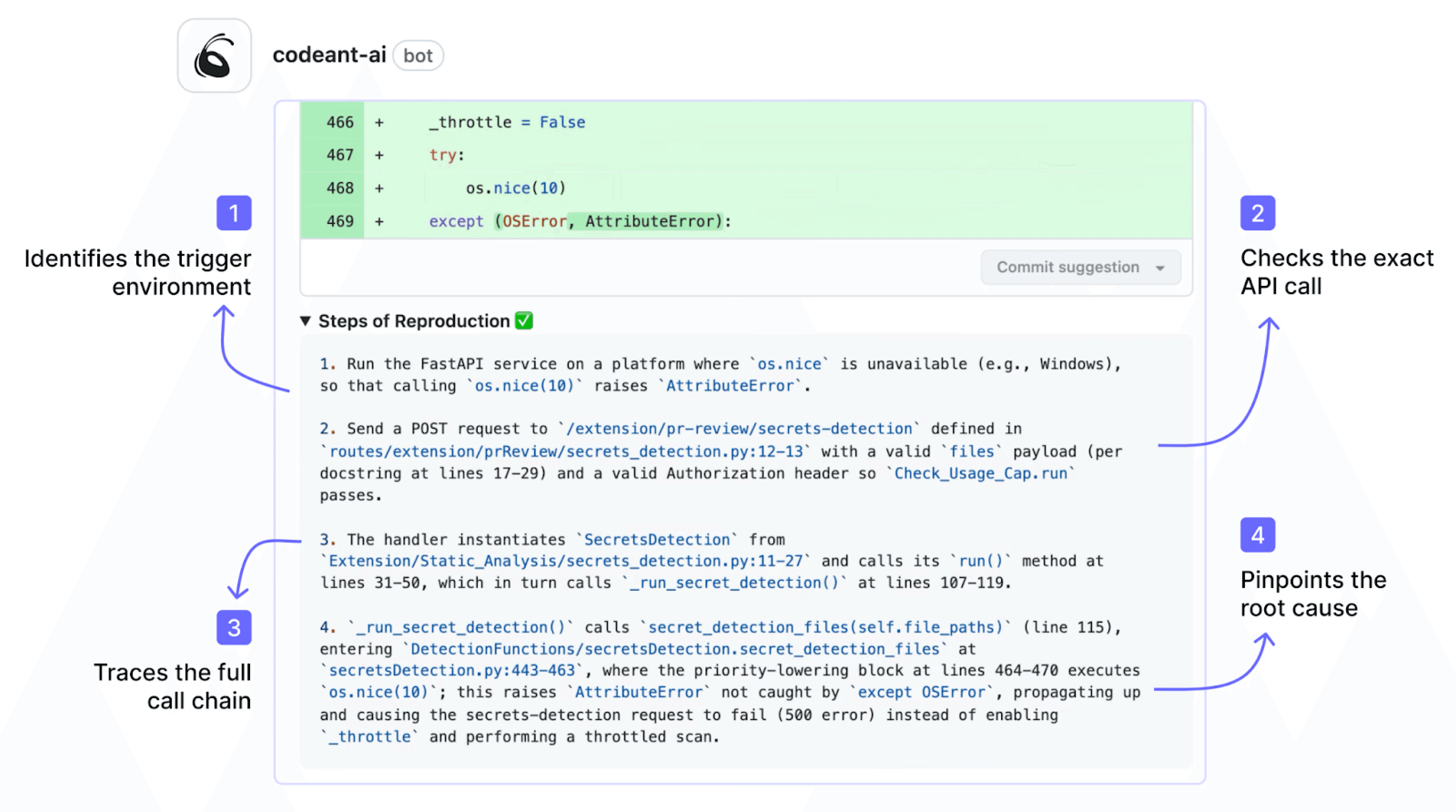
Instead of a vague alert such as “possible SQL injection,” developers see the complete attack path and understand why it matters.
This reduces validation time dramatically. Traditional alerts can take 10–30 minutes to investigate. Evidence-backed findings can often be confirmed in under two minutes because the reasoning is already mapped.
The result is faster fixes, fewer false dismissals, and less friction between security and engineering.
When SAST integrates into pull requests and provides clear exploit evidence, remediation becomes part of normal development rather than an external security task. That is the difference between scanning code and actually improving security.
Key Takeaways
SAST in your CI/CD pipeline is not optional. It is the control that turns security from a best-effort activity into an automated guarantee.
The technical setup is simple:
A workflow file in GitHub Actions
A stage in
.gitlab-ci.ymlA task in
azure-pipelines.yml
The real decisions are strategic:
Where to scan: PR-level as primary, pipeline as enforcement, nightly as safety net
How strict to gate: start with warnings, then move to block-on-critical
How to deliver results: PR-native findings, not dashboard-only alerts
Modern platforms integrate directly into developer workflows with inline pull request comments, exploit-prioritized findings, clear reproduction steps, and guided fixes. When SAST runs automatically on every PR and enforces policy in the pipeline, vulnerabilities stop being optional.
If you want to see how this looks in a real pull request, connect your repository and run a live scan. Setup takes minutes, and the first PR shows you exactly how findings are surfaced, prioritized, and fixed before merge. Set up CodeAnt AI in your pipeline in under 5 minutes.

