

Choosing the right SAST tool in 2026 means navigating a market that has split into three tiers: legacy rule-based scanners, AI-assisted platforms that bolt machine learning onto existing engines, and a newer class of AI-native tools that reason about code rather than match patterns. This guide compares 15 SAST tools across a consistent six-dimension evaluation framework, including the pricing data and AI capability comparisons that most buyer guides leave out.
What is SAST?
Static Application Security Testing (SAST) is a white-box testing methodology that analyzes source code, bytecode, or binary code to identify security vulnerabilities without executing the program. Unlike testing approaches that require a running application, SAST examines code as it is written, catching vulnerabilities like SQL injection, cross-site scripting, hardcoded credentials, and insecure cryptographic patterns before they ever reach production.
SAST tools have become foundational to modern DevSecOps programs because they let engineering teams find and fix vulnerabilities at the pull request level, where remediation is fastest and cheapest. In regulated industries, SAST also generates the audit evidence needed for compliance frameworks like SOC 2, ISO 27001, and PCI DSS.
For a deeper technical introduction, see our full guide: Static Code Analysis Explained?
How Static Application Security Testing Works
SAST tools work by parsing code into abstract syntax trees, applying security rules to detect vulnerable patterns, correlating findings with context, and reporting results with remediation guidance. The process follows four core steps:
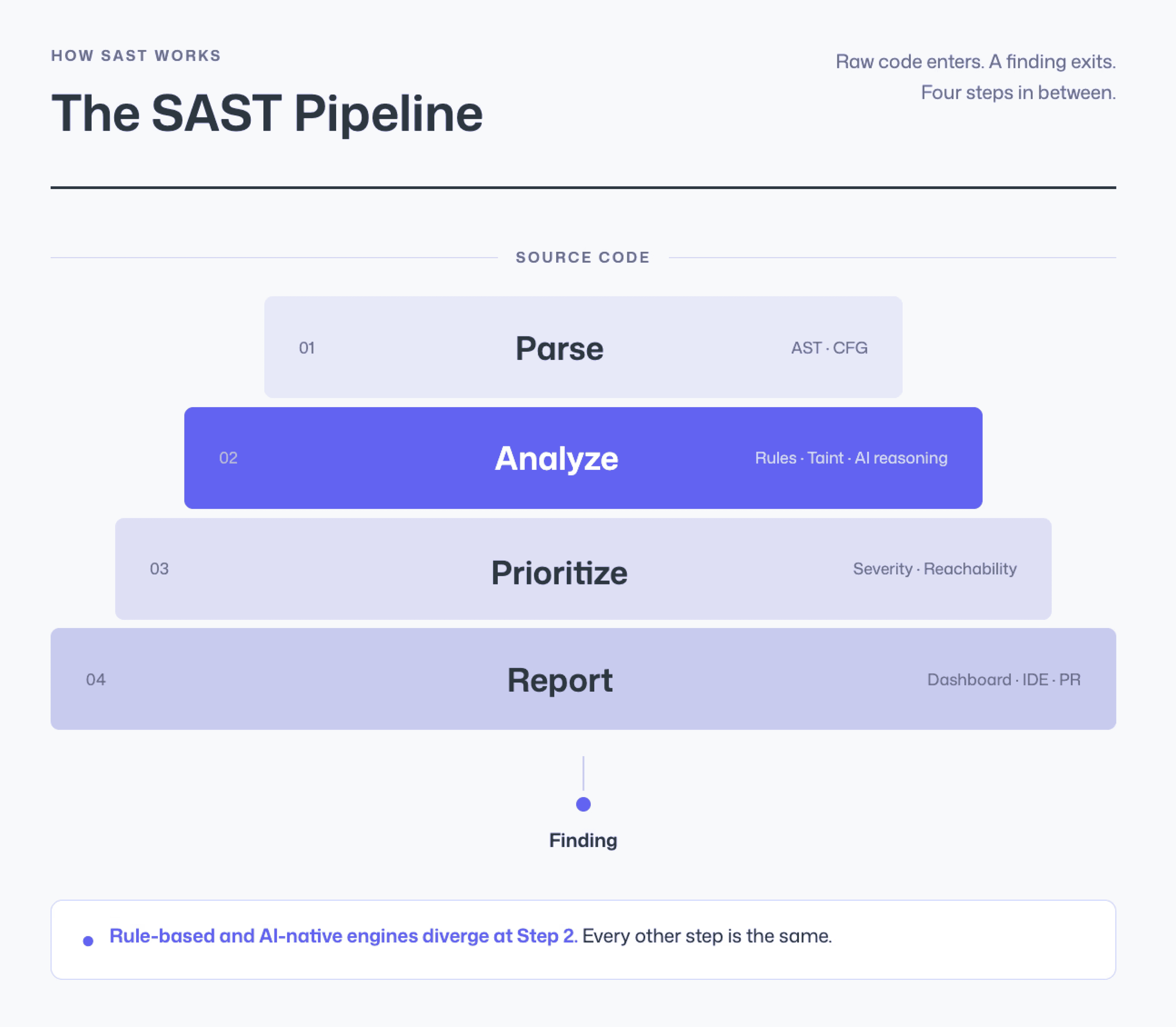
Code Parsing: The tool reads source code and constructs an abstract syntax tree (AST) or control flow graph (CFG), creating a structural representation of how the program operates.
Rule-Based and AI Analysis: The engine applies security rules, pattern matching, taint analysis, or AI-powered behavioral reasoning, to identify code that matches known vulnerability signatures or exhibits risky data flows.
Prioritization and Filtering: Findings are ranked by severity, reachability, and exploitability. More advanced tools apply reachability analysis to determine whether a vulnerability is actually accessible through the application’s execution paths, filtering out theoretical risks that cannot be exploited in practice.
Reporting and Remediation: Results are delivered to developers, either as dashboard alerts, IDE warnings, or inline pull request comments with fix suggestions.
SAST vs DAST vs SCA: When to Use Each
Three testing approaches form the foundation of a modern application security program. Each addresses a different surface area.
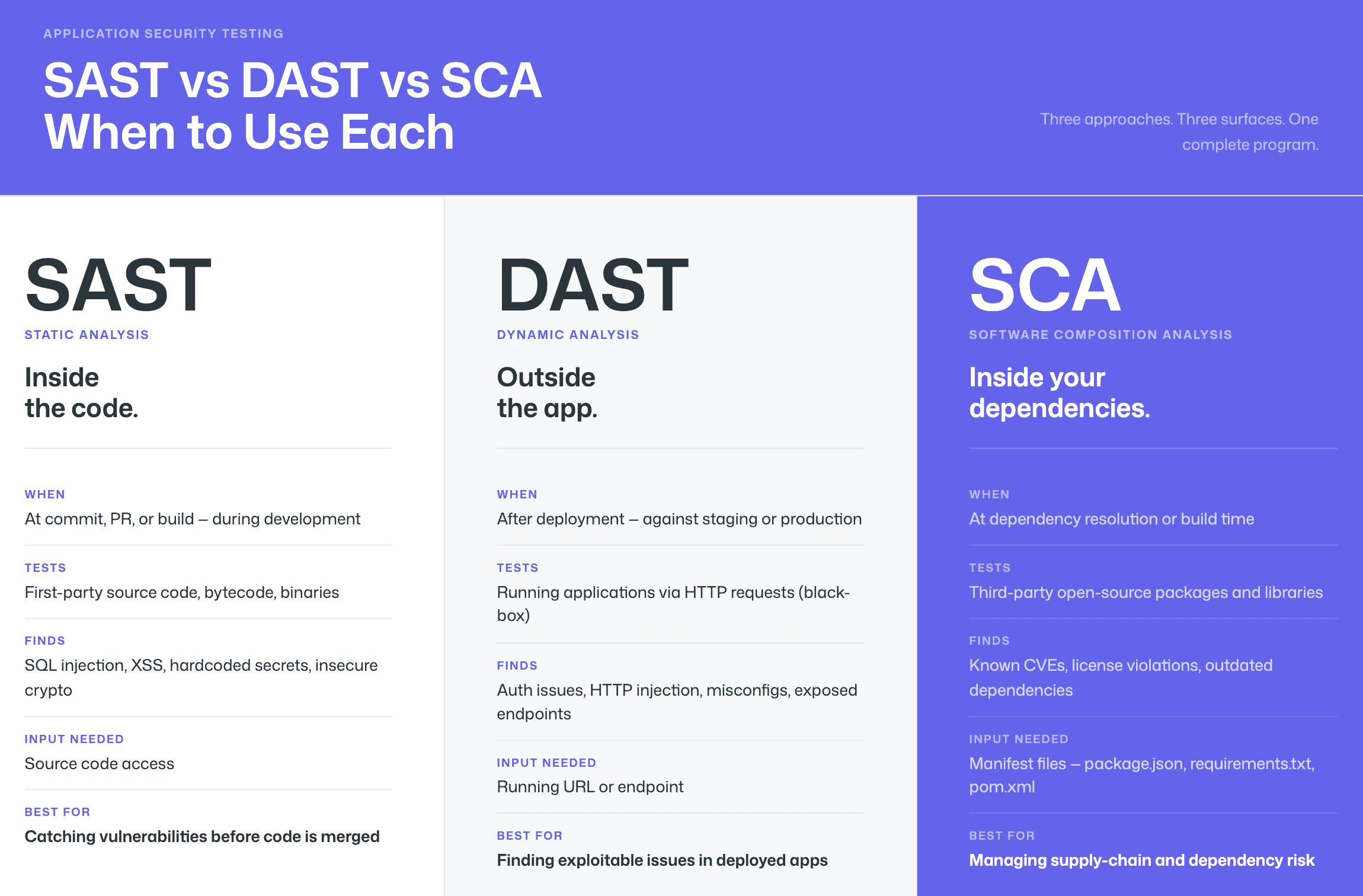
The key difference between SAST and DAST is that:
SAST examines code during development without execution, while DAST tests running applications from the outside to find exploitable weaknesses.
Software Composition Analysis (SCA) identifies vulnerabilities in third-party open-source dependencies, while SAST detects security flaws in proprietary first-party code written by the development team.
Dimension | SAST | DAST | SCA |
What it tests | Source code, bytecode, or binaries (first-party code) | Running applications via HTTP requests (black-box) | Third-party open-source dependencies and libraries |
When it runs | During development, at commit, PR, or build time | After deployment, against staging or production environments | During development, at dependency resolution or build time |
What it finds | SQL injection, XSS, hardcoded secrets, insecure crypto, buffer overflows, business-logic flaws | Authentication issues, injection via HTTP, misconfigurations, exposed endpoints | Known CVEs in open-source packages, license violations, outdated dependencies |
Input required | Source code access | Running URL / endpoint | Manifest files (package.json, requirements.txt, pom.xml) |
Best for | Catching vulnerabilities before code is merged | Finding exploitable issues in deployed apps | Managing supply-chain and dependency risk |
How AI Is Changing SAST in 2026
The SAST market has undergone a fundamental shift over the past two years. While every vendor now mentions AI somewhere on their marketing page, the depth of that AI integration varies enormously. Understanding these differences is essential to evaluating which tools will actually reduce noise, catch novel patterns, and generate trustworthy fix suggestions.
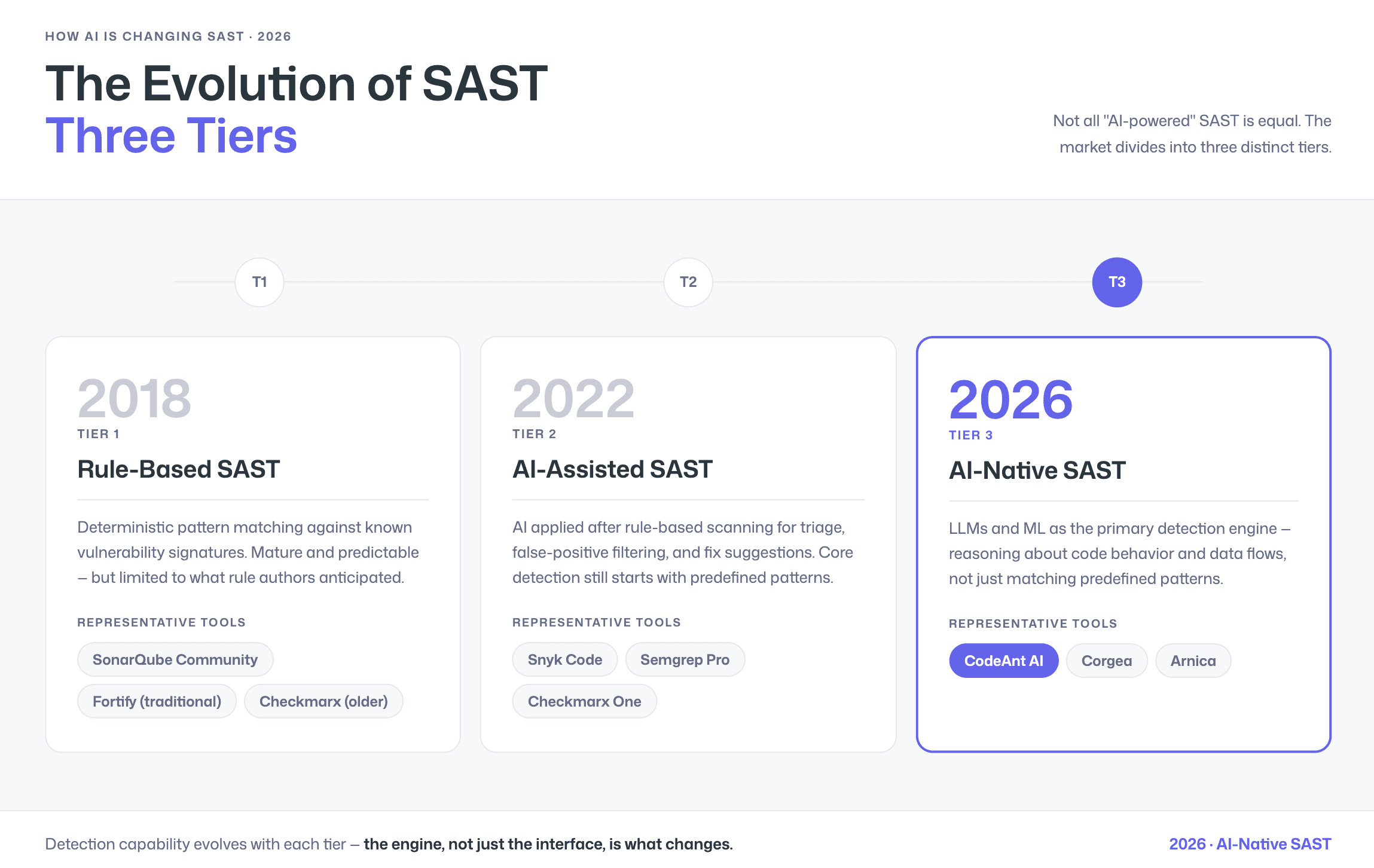
The 3 Tiers of SAST: Rule-Based vs AI-Assisted vs AI-Native
Not all “AI-powered” SAST tools are created equal. The market divides into three distinct tiers:
Tier 1: Rule-Based SAST. Rule-based SAST tools use deterministic pattern matching against known vulnerability signatures, offering predictable results but struggling with novel attack patterns and business-logic flaws. Tools in this category include SonarQube (Community/Developer editions), traditional Fortify configurations, and older Checkmarx deployments. These tools are mature and well-understood, but their detection capability is limited to what the rule authors have anticipated.
Tier 2: AI-Assisted SAST. AI-assisted SAST tools apply artificial intelligence after traditional rule-based scanning to help with triage, false positive filtering, and generating remediation suggestions, but the core detection remains rule-driven. Snyk Code, Semgrep (with Pro rules), and Checkmarx One fall into this tier. The AI layer adds value, but the underlying detection engine still starts with predefined patterns.
Tier 3: AI-Native SAST. AI-native SAST tools use large language models and machine learning as the primary detection engine, reasoning about code behavior and data flows rather than relying solely on predefined pattern-matching rules. CodeAnt AI, Corgea, and Arnica position themselves in this tier. The promise is better detection of novel vulnerabilities, lower false positive rates, and more accurate auto-fix suggestions, because the engine understands what the code is doing, not just what patterns it matches.
Why AI-Generated Code Makes Modern SAST Essential
AI-generated code from tools like GitHub Copilot and Cursor requires the same SAST scrutiny as human-written code, as AI coding assistants can introduce vulnerabilities including injection flaws, insecure defaults, and hardcoded credentials. With enterprise Copilot adoption growing rapidly in 2026, the volume of code entering pull requests has increased, and so has the volume of potential vulnerabilities.
This makes PR-level SAST scanning more important than ever. Tools that scan at the pull request stage catch AI-generated vulnerabilities before they are merged, regardless of whether the code was written by a developer or a coding assistant.
The False Positive Problem, And How Steps of Reproduction Solve It
False positives in SAST happen when a scanner flags code as vulnerable even though it is actually safe. The result is predictable: alert fatigue and wasted developer time. Modern AI-powered tools claim to reduce false positives using contextual analysis and reachability testing, but every vendor says that. The real buyer question is simple:
How does the tool prove a finding is real?
Most SAST tools present findings as alerts with:
A severity rating
A CWE reference
A file and line location
From there, the developer has to investigate exploitability. That means tracing data flow, checking sanitization, and validating whether the issue is reachable. This can take minutes or hours per finding, and trust drops quickly when false positives pile up.
Steps of Reproduction changes that workflow.
Instead of a generic alert like “possible SQL injection,” a finding with Steps of Reproduction includes:
The specific input path
The taint flow through the code
The conditions under which the issue becomes exploitable
This shifts the developer experience from:
“Maybe vulnerable, go investigate”
to
“Here is exactly how this can be triggered.”
The result is faster validation and more confident remediation.
To learn more, see How Do AI Tools Generate Reproduction Steps?
How We Evaluated These 15 Tools
We evaluated each tool on the same six dimensions for consistency. Where pricing is not publicly listed, we note the pricing model and link to the vendor’s page. Feature claims are verified against current vendor documentation.
Dimension | What We Looked For | Why It Matters |
Detection Accuracy | Vulnerability coverage, false positive rate, support for OWASP Top 10 and CWE categories, taint analysis depth | A tool that misses real vulnerabilities or floods developers with noise will not be adopted |
AI Capabilities | AI tier (rule-based / assisted / native), AI in detection vs. triage-only, auto-fix quality, Steps of Reproduction | AI maturity determines how well the tool handles novel patterns and reduces manual triage burden |
Developer Experience | PR-native feedback, inline comments, IDE integration, scan speed, fix suggestion quality | Developers will bypass tools that disrupt their workflow or require context-switching to dashboards |
Integrations | GitHub, GitLab, Bitbucket, Azure DevOps support; CI/CD pipeline compatibility; Jira/Slack notifications | The tool must fit your existing development stack without requiring platform migration |
Pricing Model | Free tier availability, per-user vs. per-repo pricing, enterprise contract structure, total cost at scale | Pricing that scales unpredictably or that hides behind “contact sales” for basic plans creates budget risk |
Enterprise Readiness | On-prem / self-hosted options, compliance certifications, SSO/SAML, role-based access, audit logs, data residency | Enterprises in regulated industries need deployment flexibility and compliance evidence |
Quick Comparison: 15 SAST Tools at a Glance
Tool | AI Tier | Pricing Tier | Languages | GitHub | GitLab | Bitbucket | Azure DevOps | Auto-Fix | On-Prem | Steps of Reproduction | Best For |
CodeAnt AI | AI-Native | $ | 30+ | ✓ | ✓ | ✓ | ✓ | Yes | [Check vendor] | Yes | Teams wanting unified code review + quality + security with PR-native AI |
Snyk Code | AI-Assisted | 20+ | ✓ | ✓ | ✓ | ✓ | Yes | No | No | Developer-first SCA + SAST with broad ecosystem | |
Checkmarx One | AI-Assisted | $ | 30+ | ✓ | ✓ | ✓ | ✓ | Yes | Yes | No | Enterprise AppSec programs needing full AST suite |
SonarQube | Rule-Based | Free– | 30+ | ✓ | ✓ | ✓ | ✓ | Partial | Yes | No | Code quality + basic SAST with self-hosted deployment |
Semgrep | AI-Assisted | Free– | 30+ | ✓ | ✓ | ✓ | ✓ | No | Yes (Enterprise) | No | Teams wanting custom rule authoring and open-source flexibility |
Veracode | AI-Assisted | $ | 100+ | ✓ | ✓ | ✓ | ✓ | Yes | Yes | No | Enterprises needing binary analysis and compliance documentation |
GitHub Advanced Security | AI-Assisted | 40+ | ✓ | ✗ | ✗ | ✗ | Yes (Copilot Autofix) | No | No | Teams fully committed to GitHub Enterprise | |
GitLab SAST | Rule-Based | Included in Ultimate | 15+ | ✗ | ✓ | ✗ | ✗ | No | Yes (Self-Managed) | No | GitLab-native teams wanting built-in security scanning |
Mend.io SAST | AI-Assisted | 30+ | ✓ | ✓ | ✓ | ✓ | Yes | No | No | SCA-first teams adding first-party code scanning | |
OpenText Fortify | Rule-Based | $ | 30+ | ✓ | ✓ | ✓ | ✓ | No | Yes | No | Large enterprises with air-gapped or on-prem requirements |
Cycode | AI-Assisted | –$ | 20+ | ✓ | ✓ | ✓ | ✓ | Yes | No | No | ASPM-focused teams wanting pipeline security + SAST |
HCL AppScan | Rule-Based | $ | 30+ | ✓ | ✓ | ✓ | ✓ | No | Yes | No | IBM/HCL ecosystem enterprises with compliance requirements |
Aikido Security | AI-Assisted | $ | 20+ | ✓ | ✓ | ✓ | ✓ | Yes | No | No | Cloud-native startups and scale-ups wanting all-in-one DevSecOps |
Arnica | AI-Native | 15+ | ✓ | ✓ | ✗ | ✗ | Yes | No | No | Teams prioritizing pipelineless, behavior-based security | |
Corgea | AI-Native | $$ | 15+ | ✓ | ✓ | ✗ | ✗ | Yes | No | No | Teams focused on AI-powered auto-remediation of SAST findings |
Note: Pricing tiers are directional indicators ($ = under $20/user/month, = $20–50,$ = $50+ or custom enterprise contracts). See the detailed pricing table below for specifics. Language counts and integration support verified against vendor documentation as of February 2026.
See how CodeAnt AI reviews your PRs → Start free trial
The 15 Best SAST Tools for 2026
1. CodeAnt AI
CodeAnt AI is a defensive and offensive security platform that combines AI code review, SAST, SCA, secrets detection, and Infrastructure-as-Code scanning into a single PR-native workflow across GitHub, GitLab, Bitbucket, and Azure DevOps.
Unlike traditional SAST tools that surface an alert with a severity level and CWE reference, CodeAnt AI generates Steps of Reproduction for every finding. Developers see the exact input path, taint flow, and exploit conditions, shifting the workflow from investigating whether an issue is real to reviewing evidence and applying a fix.
CodeAnt AI operates as a Tier 3 AI-native scanner, meaning AI is the primary detection engine rather than a post-processing layer applied to rule-based results.
End-to-End SDLC Integration
What differentiates CodeAnt AI architecturally is its integration across the full developer workflow:
1. CLI and Pre-Commit: Blocks secrets, credentials, API keys, tokens, and high-risk SAST or SCA issues before they enter Git. Pre-commit hooks enforce dependency checks, secrets scanning, and OWASP/CWE patterns before push, reducing blast radius at the earliest stage.
2. IDE: Integrates with VS Code, JetBrains (IntelliJ, PyCharm, WebStorm), Visual Studio, Cursor, and Windsurf. Scans code in context and provides one-click fixes. It can also generate AI prompts that trigger tools like Claude Code or Cursor to remediate vulnerabilities directly within the editor.
3. Pull Request: Runs line-by-line AI code security analysis at PR creation. Every security finding includes Steps of Reproduction and one-click AI-generated fixes. This enables security review to scale even when security headcount is limited.
4. CI/CD: Integrates with GitHub Actions, Jenkins, GitLab CI, Bitbucket Pipelines, and Azure DevOps Pipelines. Configurable policy gates can fail builds based on severity, CWE category, OWASP classification, or custom rules.
5. SecOps Dashboard and Compliance: A unified dashboard tracks vulnerability trends, true vs false positives, remediation status, EPSS exploit scoring, and OWASP/CWE/CVE mappings. Integrates with Jira and Azure Boards for remediation tracking. Generates audit-ready reports for SOC 2, ISO 27001, and OWASP-based compliance. Attribution reporting highlights risk by repository and contributor.
Key Features
AI-native SAST with attack path context for every finding
Workflow coverage from pre-commit to SecOps dashboard
Inline PR comments with one-click AI fixes
Unified platform covering SAST, SCA, Secrets, IaC, and SBOM generation
Custom rules written in plain English
30+ programming languages and 85+ frameworks supported
Native integrations with GitHub, GitLab, Bitbucket, and Azure DevOps
Pricing: Starts at $20 per user per month (Code Security)
Best for: Engineering teams that want full SDLC security coverage in one platform without increasing security headcount
Try CodeAnt AI free for 14 days - no credit card required
2. Snyk Code
Snyk Code is the SAST component of the broader Snyk developer security platform, which also includes SCA (Snyk Open Source), container scanning, and Infrastructure-as-Code analysis. tool uses a proprietary AI-assisted engine trained on vulnerability data to detect issues across 20+ languages.
Key features:
AI-assisted SAST with real-time scanning
Auto-fix suggestions delivered as pull requests
Combined SCA, SAST, container, and IaC scanning
IDE plugins for VS Code, IntelliJ, and other editors
Large vulnerability database with remediation guidance
Unified dashboard for managing first-party and third-party risk
Limitations:
Strongest in SCA; SAST detection depth may not match dedicated SAST-first tools for complex first-party code
Pricing scales quickly for larger teams
Does not provide Steps of Reproduction for findings
Pricing: Free tier available; Team plan starts at $25 per developer per month (minimum 5 developers); Enterprise pricing is custom
Best for: Teams that want a unified SCA + SAST platform with strong developer tooling and broad integration support
Checkout this Synk alternative.
3. Checkmarx One
Checkmarx uses AI and machine learning to prioritize vulnerabilities by correlating findings across multiple scan types. This helps reduce noise and surface issues most likely to be exploitable. Few vendors provide SAST, DAST, SCA, API security, and container scanning together with comparable language coverage. However, that breadth comes with enterprise-level pricing and implementation complexity.
Key features:
Full AST suite covering SAST, SCA, DAST, API security, container, and IaC scanning
AI-assisted prioritization across multiple scan types
30+ programming languages with deep framework support
Compliance reporting for SOC 2, ISO 27001, PCI DSS, and HIPAA
Cloud and on-premises deployment options
Limitations:
Enterprise pricing may be prohibitive for smaller teams
Implementation and tuning can be complex
Developer adoption may lag behind more lightweight, PR-native tools
Does not provide Steps of Reproduction
Pricing: Custom enterprise contracts (Contact Sales), typically $$$ tier
Best for: Enterprise security programs requiring a comprehensive multi-modal AST platform with strong compliance capabilities
Checkout this Checkmarx Alternative.
4. SonarQube / SonarCloud
SonarQube is available in two deployment models:
SonarQube Server (self-hosted)
SonarQube Cloud (formerly SonarCloud, SaaS)
Its SAST capabilities now cover OWASP Top 10 and CWE categories. However, security is an extension of its original quality-focused architecture rather than the platform’s primary design principle.
Key features:
Code quality analysis with long-term maintainability tracking
SAST scanning aligned to OWASP Top 10 and CWE categories
Self-hosted deployment with a free Community edition
Quality Gates for CI/CD enforcement
AI Code Assurance for identifying AI-generated code
Limitations:
Security depth is limited compared to dedicated SAST tools
Rule-based detection struggles with novel or complex patterns
Dashboard-centric workflow rather than fully PR-native
No Steps of Reproduction
Pricing based on lines of code can become unpredictable at scale
Pricing:
Community Build: Free
Server Developer Edition: Starts at $720 per year
Cloud Team Plan: Starts at €30 per month for up to 100K lines of code
Enterprise: Custom pricing
Best for: Teams prioritizing code quality and maintainability with basic SAST, particularly those requiring self-hosted deployment
Checkout this SonarQube Alternative.
5. Semgrep
Semgrep is a lightweight, open-source static analysis engine and one of the most widely adopted open-source SAST tools on GitHub. Its core strength is developer-friendly rule authoring. Security teams can write custom rules using a pattern-matching syntax that closely resembles the code it analyzes.
Key features:
Open-source core engine (Apache 2.0) with optional commercial Pro tier
Custom rule authoring using readable pattern-matching syntax
Pro Engine for cross-file and deeper semantic analysis
Combined SAST, SCA, and secrets detection capabilities
Free tier available for up to 10 contributors
Fast incremental scans, typically completing in seconds
Limitations:
No AI-generated auto-fix suggestions
Cross-file analysis requires the paid Pro Engine
Does not provide Steps of Reproduction
Enterprise support and scale may be more limited compared to larger vendors like Checkmarx or Veracode
Pricing: Free for up to 10 contributors; Team tier priced per contributor; Enterprise pricing is custom
Best for: Teams that prioritize open-source flexibility, custom rule authoring, and a lightweight CLI-first workflow
If Semgrep is on your shortlist, see our detailed CodeAnt AI vs Semgrep comparison for a deeper look at detection, custom rules, remediation, workflow coverage, and pricing.
6. Veracode
Veracode is a long-established enterprise application security platform with more than 15 years in the market. Its defining capability is binary analysis, allowing it to scan compiled code without requiring access to source code. This makes it particularly valuable for enterprises working with third-party components, commercial software, or legacy systems where source code is unavailable.
Key features:
Binary analysis without source code access
Support for 100+ languages and frameworks
SAST, SCA, DAST, and software composition analysis
Compliance reporting including FedRAMP authorization, SOC 2, and PCI DSS
IDE integration and pipeline-based policy enforcement
Published low false positive rate
Limitations:
Upload-and-wait scanning model can be slower than real-time PR-native tools
Enterprise-only pricing
Developer adoption may lag compared to lightweight, workflow-native platforms
Does not provide Steps of Reproduction
Pricing: Custom enterprise contracts (Contact Sales); typically $$$ tier
Best For: Large enterprises in regulated industries such as finance, healthcare, and government that require binary scanning, broad language coverage, and audit documentation
7. GitHub Advanced Security (CodeQL)
GitHub Advanced Security (GHAS) is GitHub’s native security suite, combining code scanning (powered by CodeQL), secret scanning, and dependency alerts (via Dependabot) directly within the GitHub platform. Copilot Autofix adds AI-generated fix suggestions for detected vulnerabilities. GHAS is built into GitHub and requires no external tool configuration.
Key features:
CodeQL semantic analysis engine with community-contributed queries
Native GitHub integration (code scanning, secret scanning, Dependabot)
Copilot Autofix for AI-generated fix suggestions
Zero-setup for GitHub repositories
Included with GitHub Enterprise Cloud and GitHub Enterprise Server
Limitations:
GitHub-only, no support for GitLab, Bitbucket, or Azure DevOps
Requires GitHub Enterprise tier for private repositories
CodeQL query language has a learning curve for custom rule development
Does not provide Steps of Reproduction for findings
Pricing: Included with GitHub Enterprise Cloud (starting at $21 per user per month). Individual repository pricing is available. Free for public repositories.
Best for: Teams fully committed to the GitHub ecosystem that want built-in, zero-configuration security scanning.
Checkout this GitHub alternative.
8. GitLab SAST
GitLab SAST is a built-in security scanning feature included in GitLab Ultimate tier. It runs multiple open-source scanning engines (including Semgrep, SpotBugs, and others) and aggregates their findings into GitLab’s vulnerability management dashboard.
Key features:
Built into GitLab Ultimate (no external tool setup)
Multiple scanning engines aggregated into one dashboard
Results surfaced directly in merge requests
Vulnerability management dashboard with tracking and triage
Self-managed and cloud-hosted deployment options
Limitations:
GitLab-only support. No GitHub, Bitbucket, or Azure DevOps integration.
Detection depth depends on the capabilities of underlying open-source engines.
No AI-generated auto-fix functionality.
No Steps of Reproduction in findings.
Requires Ultimate tier, which may be costly for teams that do not need the full Ultimate feature set.
Pricing: Included in GitLab Ultimate, starting at $99 per user per month. Not available in Free or Premium tiers.
Best for: Teams already standardized on GitLab Ultimate who want integrated security scanning without adding external vendors.
Checkout this GitLab alternative.
9. Mend.io SAST
Mend.io (formerly WhiteSource) built its reputation in SCA, providing deep analysis of open-source dependency risks. The platform has expanded to include SAST for first-party code, offering AI-assisted detection and auto-fix capabilities. The platform combines SCA and SAST findings in a unified view, helping security teams prioritize across both first-party and third-party risk surfaces.
Key features:
Combined SCA + SAST platform for unified first-party and third-party risk
AI-assisted detection with auto-fix suggestions
PR-native feedback with IDE plugins
30+ language support
Strong open-source vulnerability database
Limitations:
SCA remains the platform’s primary strength
SAST depth may not match SAST-first platforms
No Steps of Reproduction
Limited public pricing transparency
Pricing: Custom pricing (Contact Sales), typically mid-tier
Best for: Teams with strong SCA requirements that want to add first-party SAST without introducing another vendor
10. OpenText Fortify
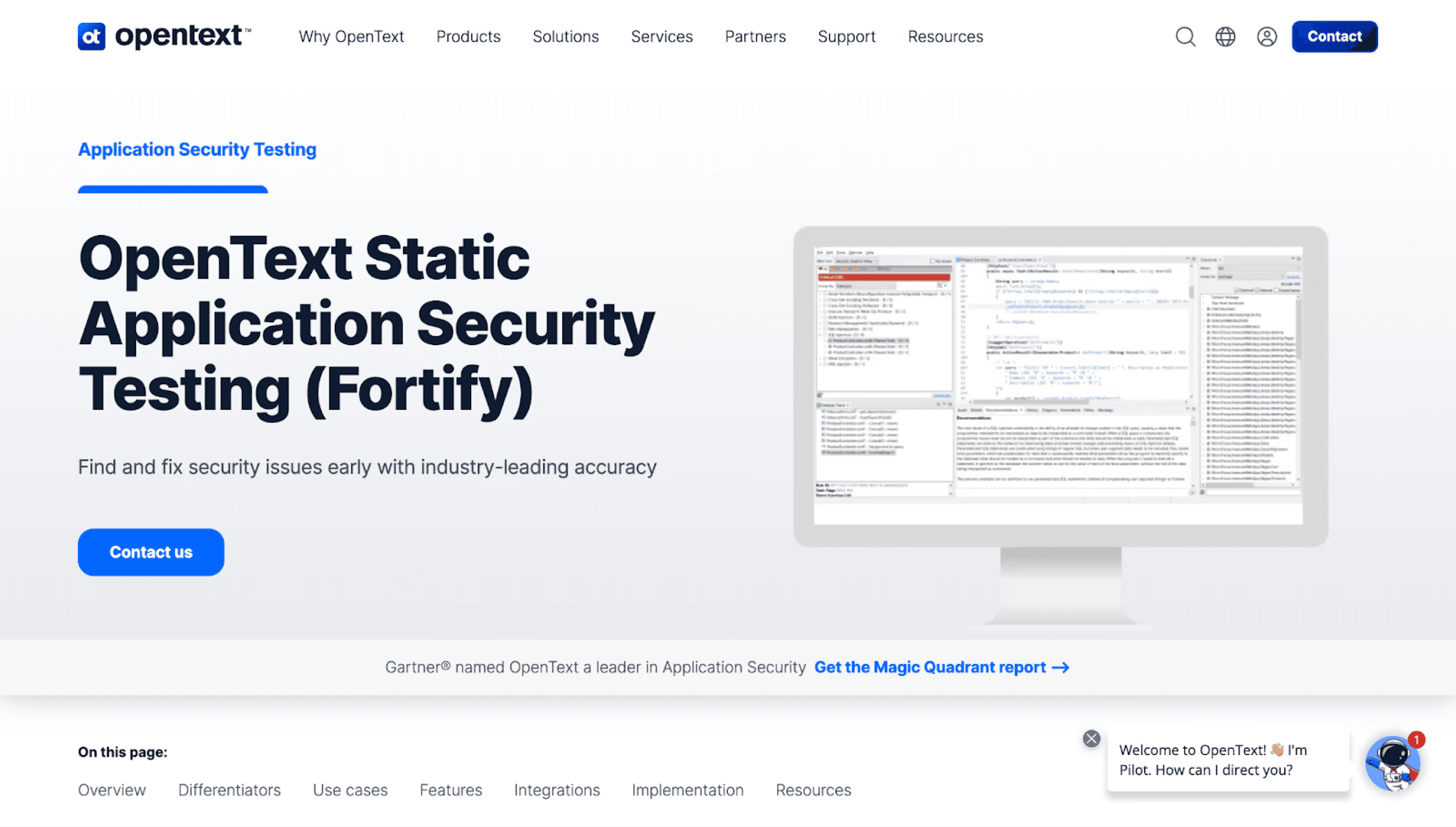
Fortify (now under OpenText, formerly Micro Focus and HP) is one of the longest-tenured SAST tools in the market, with deep language coverage (30+ languages including legacy languages like COBOL and ABAP) and a strong presence in government, defense, and large enterprises.
Key features:
Deepest language coverage including legacy languages (COBOL, ABAP, PL/I)
On-premises, air-gapped, and cloud (Fortify on Demand) deployment
Decades of vulnerability rule development
Compliance-ready reporting (government, defense, finance)
IDE integration via Fortify Audit Workbench
Limitations:
Developer experience is primarily dashboard and IDE-centric rather than PR-native
Scan times can be long for large repositories
Implementation and rule tuning often require significant effort
No Steps of Reproduction for findings
Enterprise-only pricing model
Pricing: Custom enterprise contracts, typically $$$ tier
Best for: Large enterprises with legacy codebases, air-gapped infrastructure, and strict compliance requirements
11. Cycode
Cycode positions itself as an Application Security Posture Management (ASPM) platform that includes SAST alongside pipeline security, SCA, secrets detection, and CI/CD posture management. Cycode’s differentiator is its “Risk Intelligence Graph” — a knowledge graph that correlates findings across scan types to prioritize risk based on exploitability and business context.
Key features:
ASPM platform with SAST, SCA, secrets, and pipeline security
Risk Intelligence Graph for cross-scan correlation and prioritization
CI/CD pipeline security posture management
GitHub, GitLab, Bitbucket, and Azure DevOps integration
Limitations:
SAST is one component of a broader platform. Detection depth may not match dedicated SAST-first tools. Does not provide Steps of Reproduction. Public pricing information is limited.
Pricing: Custom enterprise pricing (Contact Sales); typically $$–$$$ tier
Best for: Security teams seeking ASPM-level visibility across the entire SDLC rather than standalone code scanning.
12. HCL AppScan
HCL AppScan (acquired from IBM) is an enterprise application security platform offering SAST, DAST, SCA, and IAST capabilities. It has deep roots in the IBM enterprise ecosystem and is used by organizations with large Java, .NET, and mainframe codebases.
Key features:
SAST, DAST, SCA, and IAST in one platform
Strong Java and .NET analysis
On-premises deployment available
Compliance reporting for enterprise and government use cases
Intelligent Findings Analytics for triaging results
Limitations:
Older user experience compared to modern, developer-first tools
Limited adoption of AI-native detection capabilities
Integration with modern CI/CD platforms can require additional configuration, with strongest support centered around Jenkins
Scan times can be long for large or monolithic codebases
Enterprise-only pricing model may be prohibitive for mid-market teams
Does not provide Steps of Reproduction for validating findings
Pricing: Custom enterprise contracts (Contact Sales); typically $$$ tier
Best For: Large enterprises in the IBM/HCL ecosystem with established Java or .NET environments and on-premises requirements
13. Aikido Security
Aikido Security is an all-in-one DevSecOps platform targeting cloud-native startups and scale-ups. It bundles SAST, SCA, DAST, container scanning, secrets detection, and IaC scanning into a single platform with a focus on simplicity and noise reduction.
Key features:
All-in-one DevSecOps: SAST, SCA, DAST, container, secrets, IaC
AI-driven reachability analysis for false positive reduction
“Best For” categorization by use case
GitHub, GitLab, Bitbucket, and Azure DevOps integration
Competitive pricing for startups and growth-stage companies
Limitations:
Less established in large enterprise environments
Limited support for legacy or niche programming languages
SAST depth may not match dedicated SAST-first platforms for complex multi-file or business-logic vulnerabilities
Fewer advanced compliance and audit customization features compared to enterprise-focused tools
No Steps of Reproduction for validating findings
Pricing: Startup-focused pricing; contact vendor for current rates
Best for: Cloud-native startups and growth-stage teams that want broad security coverage without enterprise-level complexity
14. Arnica
Arnica positions itself as an AI-native, pipelineless security platform. Rather than running as a step in a CI/CD pipeline, Arnica operates at the SCM level, analyzing code behavior and developer patterns to detect risk without requiring pipeline configuration.
Key features:
Pipelineless architecture (operates at SCM level, not CI/CD)
AI-native detection with behavior-based analysis
Developer risk scoring and anomaly detection
GitHub and GitLab integration
Limitations:
Smaller language and framework coverage compared to enterprise-focused SAST platforms
No Bitbucket or Azure DevOps support
Newer platform with a limited enterprise track record
Lacks traditional CI/CD enforcement gates for teams that require build-time policy blocking
No Steps of Reproduction to validate findings with explicit exploit paths
Less mature compliance reporting compared to established enterprise vendors
Pricing: Custom pricing (Contact Sales), typically mid-tier enterprise pricing
Best for: Teams seeking behavior-based security monitoring without CI/CD configuration overhead
15. Corgea
Corgea focuses specifically on AI-powered auto-remediation of SAST findings. Rather than competing as a standalone scanner, Corgea integrates with existing SAST tools (Semgrep, CodeQL, Snyk, Checkmarx, and others) and uses AI to generate high-confidence fix patches for their findings.
Key features:
AI-powered auto-fix for findings from other SAST tools
Integrates with Semgrep, CodeQL, Snyk, Checkmarx, and others
Claims low false positive rate through AI-native analysis
Focus on remediation speed and quality
Limitations:
Not a standalone SAST solution. Requires an existing scanner for detection.
Detection quality depends entirely on the upstream SAST tool.
Limited SCM and CI/CD integrations compared to full security platforms.
No Steps of Reproduction or contextual exploit validation layer.
Remediation quality may vary for complex business logic or framework-specific patterns.
Adds an additional vendor and integration layer instead of consolidating tools.
Pricing: Custom pricing (Contact Sales); typically $$ tier
Best for: Teams that already have a SAST tool in place but want to reduce fix time and developer workload through automated patch generation
SAST Tools Pricing Comparison (2026)
Enterprise SAST tools typically follow per-user or per-repository pricing models, with costs ranging from free open-source tiers to custom enterprise contracts depending on team size, language coverage, and deployment model. One of the most common frustrations for SAST buyers is the lack of public pricing, most vendors require a sales conversation before revealing costs.
The table below compiles the pricing information we could verify from public sources as of February 2026. Where exact pricing is not published, we indicate the pricing model and link to the vendor’s pricing page.
Tool | Free Tier | Starting Price | Enterprise Price | Pricing Model |
CodeAnt AI | 14-day free trial | $20/user/month | Custom | Per user |
Snyk | Yes (limited tests) | $25/developer/month (Team, 5–10 devs) | Custom | Per contributing developer |
Checkmarx One | No | Contact Sales | Contact Sales | Custom contract |
SonarQube | Yes (Community Build; Cloud free up to 50K LOC) | $720/year (Server Developer Edition); Cloud from €30/month (100K LOC) | Contact Sales | Per instance (Server) or per LOC (Cloud) |
Semgrep | Yes (up to 10 contributors) | Per contributor (contact vendor) | Custom | Per contributor |
Veracode | No | Contact Sales | Contact Sales | Custom contract |
GitHub GHAS | Free (public repos) | Included with GitHub Enterprise Cloud ($21/user/month) | Included in Enterprise tier | Per user (bundled) |
GitLab SAST | No (requires Ultimate) | Included in GitLab Ultimate ($99/user/month) | Included in Ultimate tier | Per user (bundled) |
Mend.io | No | Contact Sales | Contact Sales | Custom contract |
OpenText Fortify | No | Contact Sales | Contact Sales | Custom contract |
Cycode | No | Contact Sales | Contact Sales | Custom contract |
HCL AppScan | No | Contact Sales | Contact Sales | Custom contract |
Aikido | Yes (limited) | Contact vendor | Contact vendor | Per developer |
Arnica | No | Contact Sales | Contact Sales | Custom contract |
Corgea | No | Contact Sales | Contact Sales | Custom contract |
Pricing data sourced from vendor websites and publicly available documentation as of February 2026. Where exact pricing is not published, we indicate the pricing model. Always verify with the vendor before making purchase decisions.
For a deeper analysis of pricing models, hidden costs, and ROI calculations, see our dedicated SAST Pricing Guide.
CodeAnt AI starts at $20/user/month. See pricing
How to Choose the Right SAST Tool
For Startups and Small Teams (< 20 developers)
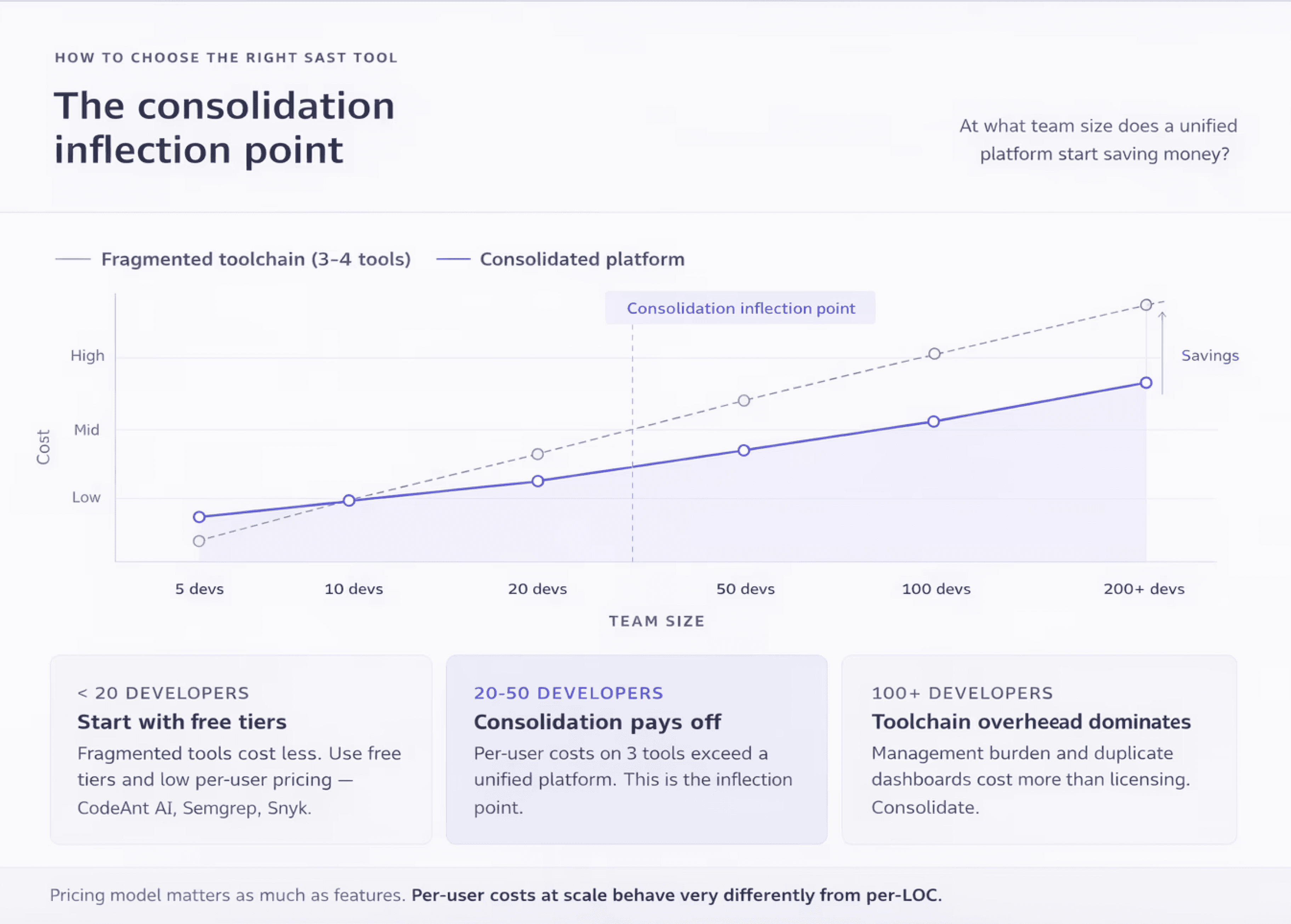
Startups need a tool that works out of the box with minimal configuration, scales without surprise costs, and covers security basics without requiring a dedicated security hire. Prioritize PR-native tools with free tiers or low per-user pricing.
Best options to evaluate: CodeAnt AI (unified review + security from $20/user/month), Semgrep (free up to 10 contributors), Snyk (free tier for small teams), Aikido (startup-friendly pricing).
For Mid-Market Teams (20–200 developers)
Mid-market teams need consistent scanning across multiple repositories and teams, with enough policy control to enforce standards without blocking velocity. At this scale, the pricing model matters enormously, per-user costs that seem reasonable at 10 developers become significant at 100. Consolidation also becomes valuable: running separate tools for code review, quality, and security creates context-switching overhead and toolchain management burden.
Best options to evaluate: CodeAnt AI (consolidated platform), Snyk (broad ecosystem), Semgrep (custom rules + flexibility), SonarQube (self-hosted cost control).
For Enterprise Security Programs (200+ developers)
Enterprises need compliance reporting, deployment flexibility (cloud, on-prem, or hybrid), role-based access, SSO/SAML, and audit logs. On-premises SAST deployment keeps source code within the organization’s infrastructure during scanning, which is a requirement for enterprises in regulated industries with strict data residency and sovereignty obligations. At enterprise scale, vendor support quality and implementation assistance matter as much as the product itself.
Best options to evaluate: Checkmarx One (full AST suite), Veracode (binary analysis + compliance), Fortify (air-gapped + legacy language support), CodeAnt AI (consolidated platform with enterprise support).
Replacing SonarQube or Legacy SAST
SonarQube is the most commonly mentioned tool across our competitive research, appearing on 11 of 12 competitor pages we analyzed. Many teams start with SonarQube for code quality and outgrow it as their security requirements mature. Common triggers for migration include: limited security detection depth, rising false positive noise, enterprise licensing costs at scale, and the need for AI-powered remediation.
Consolidating Multiple Security Tools
Tool consolidation in application security replaces fragmented toolchains of 3–5 overlapping scanners with unified platforms that combine code review, code quality, and security scanning in a single workflow. Most enterprises today run SonarQube for quality, Snyk or Checkmarx for security, and a separate tool for code review, each with its own dashboard, alert stream, and pricing contract.
Consolidation reduces total cost, simplifies the developer experience, and improves adoption rates. For a business-case framework, choose that one platform replaces 3 tools within 1 Platform.
SAST is only one part of a broader source-code security workflow. Our code audit tools guide compares tools that approach code auditing from different angles.
Not sure which tool fits? Book a 15-min consultation
SAST Best Practices for 2026
Integrating SAST into CI/CD Without Slowing Velocity
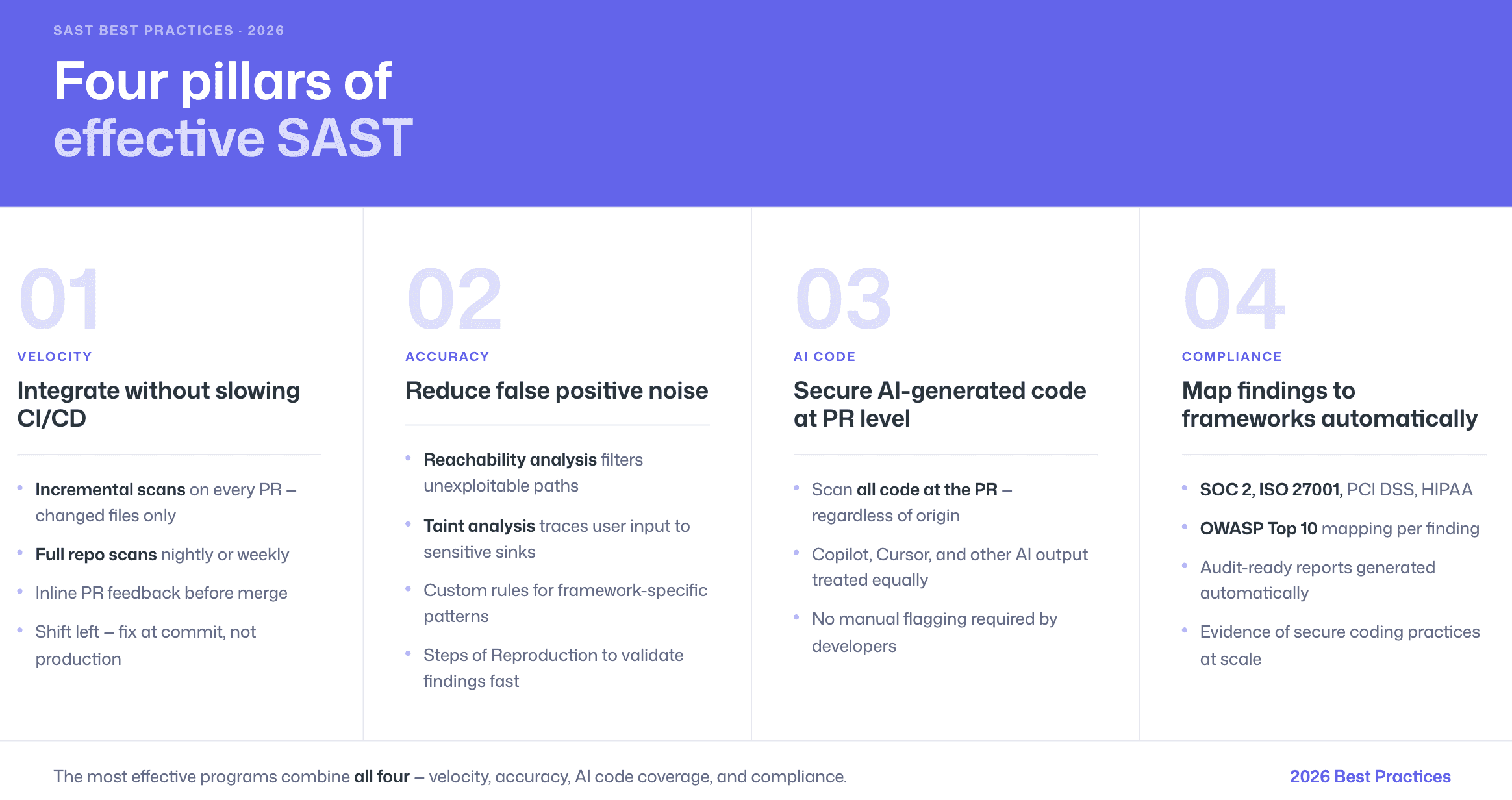
SAST tools integrate into CI/CD pipelines by running automated scans during pull requests or merge requests, providing inline feedback to developers before code is merged into the main branch. The key to maintaining velocity is choosing where and when to scan.
The shift-left security approach embeds SAST scanning early in the software development lifecycle, where fixing a vulnerability typically costs a fraction of addressing it after production deployment. The most effective implementation runs incremental scans on every PR (fast, focused on changed files) with full repository scans scheduled nightly or weekly.
Managing and Reducing False Positives
Taint analysis in SAST traces the flow of untrusted user input from its source through the application to a sensitive sink operation, identifying paths where unsanitized data could cause harm. When taint analysis lacks runtime context or misunderstands framework-specific sanitizers, false positives result.
Effective false positive management combines three approaches: using tools with reachability analysis to filter unreachable paths, configuring custom rules to teach the scanner about your framework’s security patterns, and choosing tools that provide Steps of Reproduction so developers can quickly validate findings.
Securing AI-Generated Code at the PR Level
The most effective approach to AI-generated code security is scanning at the pull request level, where the SAST tool evaluates all code changes regardless of origin. This means AI-generated code from Copilot, Cursor, or other assistants receives the same scrutiny as hand-written code, without requiring developers to manually flag which code is AI-generated.
See our full guide: AI-Generated Code Security: How SAST Catches What Copilot Misses.
Compliance Mapping (SOC 2, ISO 27001, OWASP Top 10)
SAST tools help organizations meet compliance requirements including SOC 2, ISO 27001, PCI DSS, HIPAA, and OWASP Top 10 by providing automated evidence that secure coding practices are followed. The key is choosing a tool that maps its findings to specific compliance controls and generates audit-ready reports.
For detailed mapping tables, see SAST for Compliance: Map Findings to SOC 2, ISO 27001 & OWASP.
AI Capabilities Comparison
Tool | AI in Detection | AI Triage | AI Auto-Fix | Custom AI Rules | Steps of Reproduction |
CodeAnt AI | Yes (LLM-native) | Yes | Yes (one-click in PR) | Yes (plain English) | Yes |
Snyk Code | Yes (proprietary engine) | Yes | Yes (PR patches) | No | No |
Checkmarx One | Partial (AI-assisted) | Yes | Yes | No | No |
SonarQube | Emerging (Cloud editions) | No | Partial (AI CodeFix, limited) | No | No |
Semgrep | Partial (Pro Engine) | No | No | Yes (YAML syntax) | No |
Veracode | Partial (AI-assisted) | Yes | Yes | No | No |
GitHub GHAS | Partial (CodeQL + Copilot) | No | Yes (Copilot Autofix) | Yes (CodeQL queries) | No |
GitLab SAST | No | No | No | No | No |
Yes (proprietary) | Yes | Yes | No | No | |
Fortify | Emerging (Aviator) | No | No | No | No |
Cycode | Partial | Yes | Yes | No | No |
HCL AppScan | Partial (IFA) | Yes | No | No | No |
Aikido | Partial (reachability) | Yes | Yes | No | No |
Arnica | Yes (behavior-based) | Yes | Yes | No | No |
Corgea | Yes (LLM-native) | Yes | Yes (primary focus) | No | No |
Conclusion
The SAST market in 2026 is no longer just about scanning code. It is about detection depth, false positive reduction, workflow integration, and how well a tool scales across your SDLC.
Rule-based scanners still serve a purpose. AI-assisted platforms improve triage. But AI-native SAST is redefining how vulnerabilities are detected, validated, and fixed, especially in a world of AI-generated code and growing pull request volume.
If you are evaluating tools, do not rely on feature lists alone. Run them on your own repositories. Compare findings. Validate false positives. Measure time to fix.
That is where the real difference becomes obvious. Ready to see it on your code? Run CodeAnt AI on your repositories and compare findings side by side. Start your free 14-day trial | Book your free demo.

