AI Code Review

Mar 2, 2026

Code Review in Azure DevOps: The Complete 2026 Guide (PRs, Policies & AI)

Amartya | CodeAnt AI Code Review Platform
Sonali Sood

Founding GTM, CodeAnt AI

Shipping code without a structured review process is one of the fastest ways to accumulate technical debt, introduce security vulnerabilities, and slow down engineering velocity. As teams grow, informal review habits break down, pull requests wait hours (or days), feedback becomes inconsistent, and security checks get pushed to “later.”

Azure DevOps provides one of the most structured and policy-driven code review systems available today. It combines pull requests, branch policies, pipelines, work item traceability, and merge controls into a single governance workflow designed for enterprise teams.

But simply using pull requests isn’t enough.

To run production-grade code reviews in Azure DevOps, teams need:

  • Clearly defined branch policies

  • Automated build validation pipelines

  • Security and dependency scanning

  • Merge strategy controls

  • Work item traceability

  • And increasingly, AI-assisted review to scale consistency

This guide walks through the complete end-to-end setup, from creating pull requests and configuring branch policies to automating review quality with pipelines and layering AI code review on top.

What is Code Review in Azure DevOps?

Code review in Azure DevOps is the process of reviewing proposed code changes through pull requests (PRs) in Azure Repos before they’re merged into a protected branch.

A typical review looks like this:

  • Reviewers examine the code diff

  • Leave inline comments

  • Vote to approve, request changes, or reject

The entire process is controlled by branch policies, which can require:

  • A minimum number of approvals

  • Linked Azure Boards work items

  • Successful pipeline builds

  • All comments resolved

  • Passing status checks from external tools (e.g., security scanners or AI code reviewers)

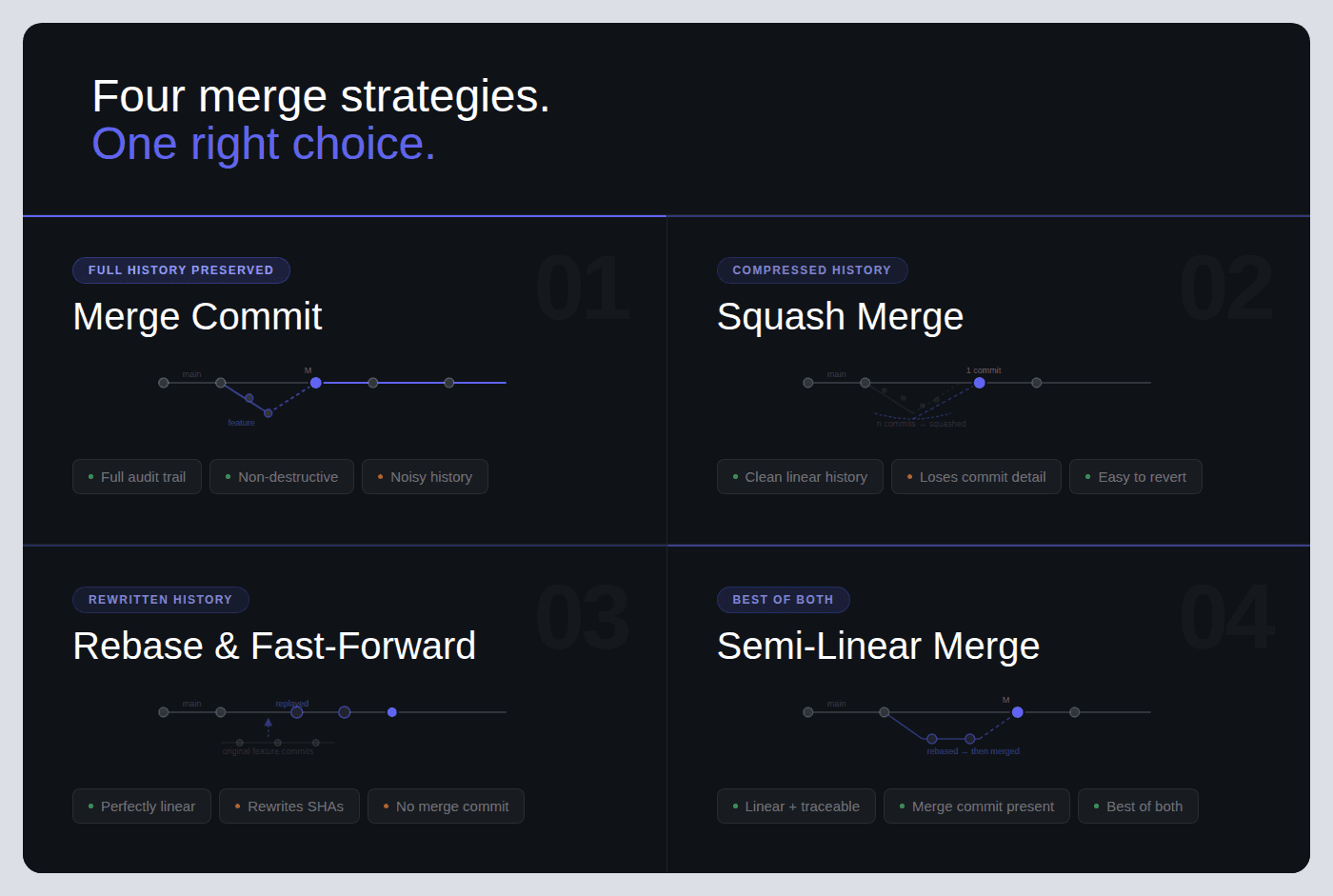
Azure DevOps supports four merge strategies:

  • Merge commit

  • Squash merge

  • Rebase and fast-forward

  • Semi-linear merge

Pull requests can also be set to auto-complete, meaning they merge automatically once every policy condition is satisfied.

Teams typically extend the built-in review workflow with:

Unlike GitHub’s review model, which primarily relies on CODEOWNERS and branch protection rules, Azure DevOps offers a tightly integrated, policy-driven workflow.

Every pull request can:

  • Link directly to Azure Boards work items

  • Automatically trigger Azure Pipelines

  • Enforce granular, branch-specific policies

This makes Azure DevOps especially well-suited for enterprise teams that require traceability, compliance controls, and structured governance over code changes.

How Code Reviews Work in Azure DevOps: End-to-End Flow

Every code review in Azure DevOps follows this flow:
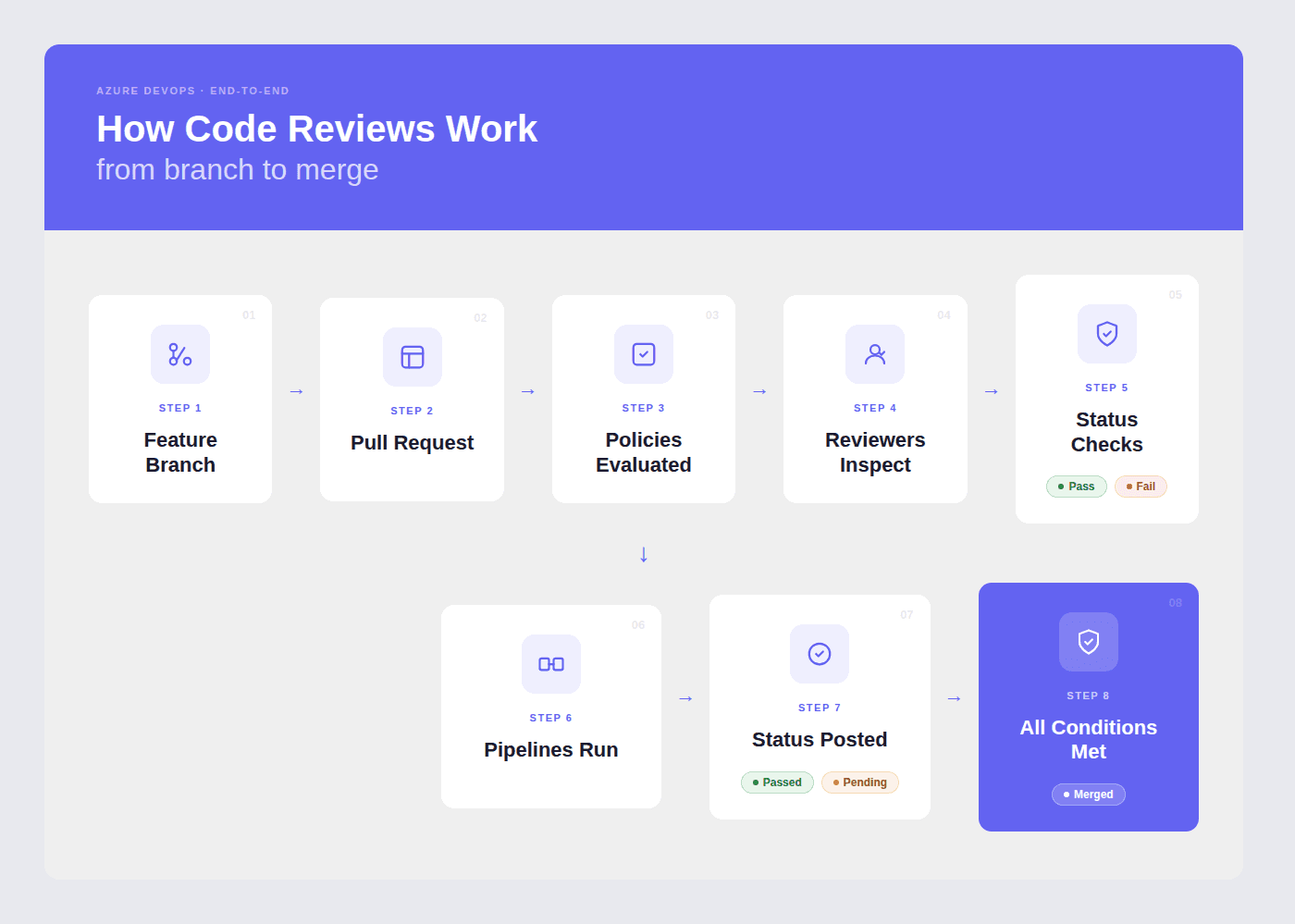
What happens at each stage:

1. Branch + Code Changes 

The developer creates a feature branch (e.g., feature/login-fix), makes changes, and commits. Azure DevOps suggests creating a PR when a branch is pushed.

2. Pull Request Created 

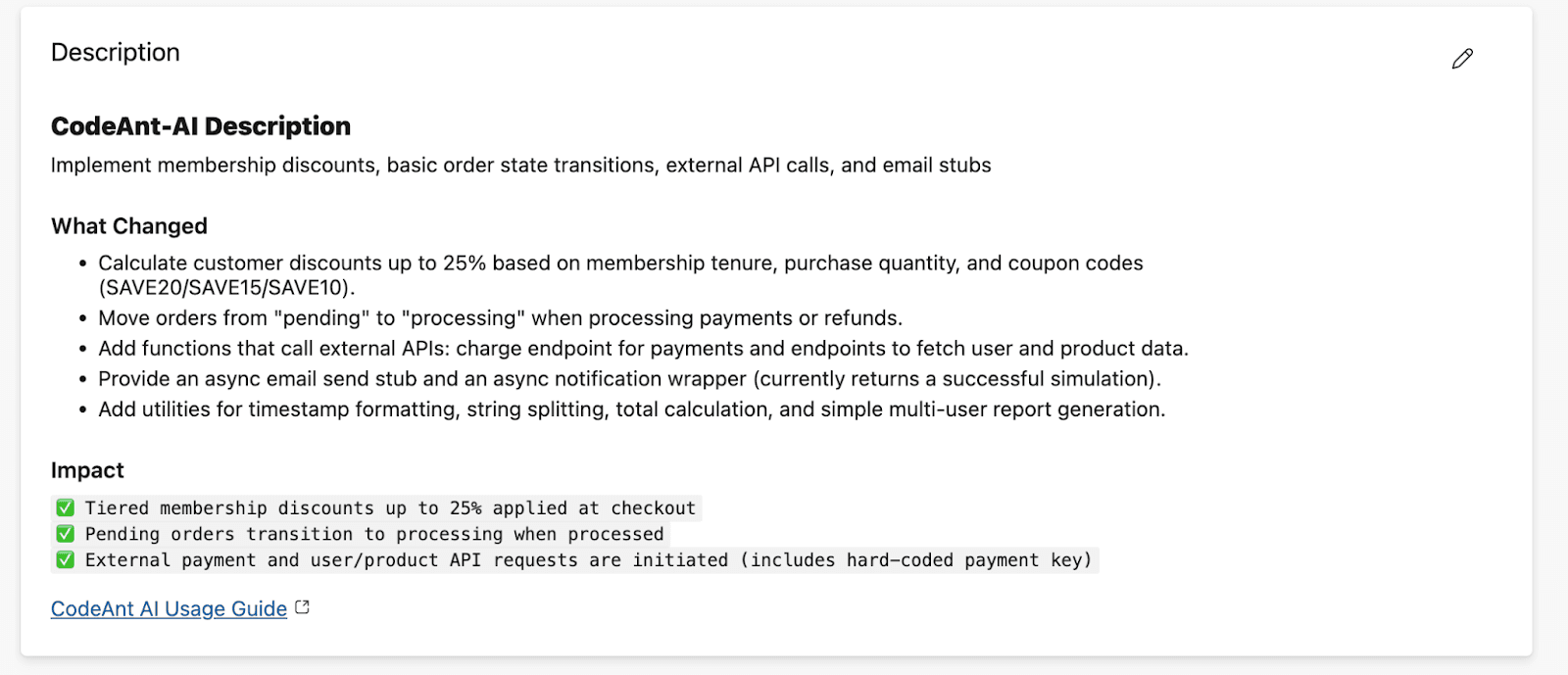
The PR includes a title, description, linked work items from Azure Boards, and assigned reviewers. If a PR template exists in the repo (.azuredevops/pull_request_template.md), it auto-populates the description.
3. Branch Policies 

Evaluate Automatically The moment a PR is created, Azure DevOps checks all configured branch policies: minimum reviewers, linked work items, build validation, status checks, and comment resolution requirements. Each policy shows pass/fail status on the PR overview.

4. Pipelines Run 

If build validation is configured, Azure Pipelines triggers automatically, running your CI pipeline (build, unit tests, linting, security scans). The pipeline result posts back to the PR as a required status.

5. Reviewers Inspect and Comment 

Reviewers open the Files tab, review the diff line-by-line, leave inline comments, and vote: Approve, Approve with Suggestions, Wait for Author, or Reject.
6. Status Checks from External Tools 

External services, AI code reviewers, SAST tools, coverage analyzers, post their own pass/fail statuses to the PR. If configured as required policies, these must pass before merge.
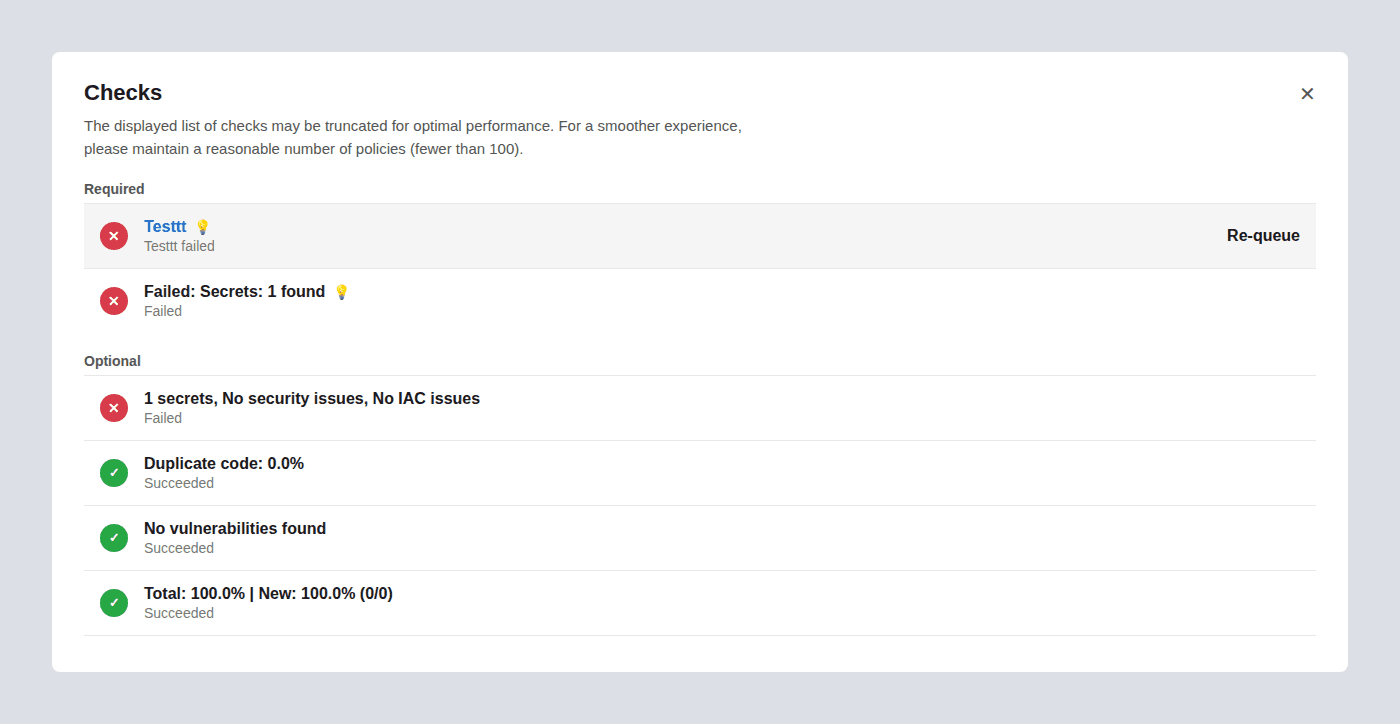
7. Merge 

When all policies pass and all required reviewers approve, the PR is completed. If auto-complete was enabled, the merge happens automatically. The source branch can be deleted automatically post-merge.

Step-by-Step: Create and Review a Pull Request

Creating a PR

Step 1: Navigate to Repos → Pull Requests in your Azure DevOps project sidebar.

Step 2: Click “New Pull Request” in the top-right corner.

Step 3: Select your source branch (the branch with your changes) and your target branch (usually main or develop).

Step 4: Write a clear title, use present tense and be specific.

  • Good: Fix session timeout redirect on login page

  • Bad: Fixed stuff or Updates

Step 5: Write a description explaining:

  • What changed and why

  • Any tradeoffs or edge cases

  • Testing you’ve done

  • Screenshots if UI changes are involved

If a PR template is configured, it will pre-populate the description with your team’s checklist.

Step 6: Link work items, search for the relevant Azure Boards task, bug, or story. This provides reviewers with context on why the change exists.

Step 7: Assign reviewers, add team members who know the code area. You can add both required and optional reviewers.

Step 8: Click “Create” (or “Create as draft” if the PR isn’t ready for full review).

Creating a PR via Azure CLI:

az repos pr create \\
  --title "Fix session timeout redirect on login page" \\
  --description "Resolves AB#1234. Fixes redirect loop when session expires during OAuth callback." \\
  --source-branch feature/login-fix \\
  --target-branch main \\
  --reviewers "jane@company.com" \\
  --work-items 1234 \\
  --open
az repos pr create \\
  --title "Fix session timeout redirect on login page" \\
  --description "Resolves AB#1234. Fixes redirect loop when session expires during OAuth callback." \\
  --source-branch feature/login-fix \\
  --target-branch main \\
  --reviewers "jane@company.com" \\
  --work-items 1234 \\
  --open

Reviewing a PR

Step 1: Open the PR from Repos → Pull Requests → Active.

Step 2: Read the Overview tab first, title, description, linked work items. Understand what the change does and why before looking at code.

Step 3: Switch to the Files tab to review the diff. You can view changes inline or side-by-side.

Step 4: Leave inline comments on specific lines. Be specific and actionable:

  • Instead of: “This needs work”

  • Write: “This query runs inside a loop, consider batching to avoid N+1. Here’s a pattern: SELECT ... WHERE id IN (...)

Step 5: Vote using the dropdown next to the Approve button:

Vote

What It Means

When to Use

Approve

Code is good to merge

No issues found, or only trivial items

Approve with Suggestions

Mergeable, but here are improvements

Non-blocking feedback you’d like the author to consider

Wait for Author

Needs changes before merge

Bugs, missing tests, or unclear logic that should be fixed

Reject

Fundamentally wrong approach

Rarely used, only for architectural or direction problems

Step 6: Once all comments are resolved, all reviewers approve, and all policies pass, click “Complete” or let auto-complete handle it.

Azure DevOps Branch Policies: Complete Reference

Branch policies are the enforcement layer of code review in Azure DevOps. They turn review best practices into rules that every PR must satisfy before merging.

To configure: 

Project Settings → Repos → Repositories → [Select repo] → Branch Policies → [Select branch]

Or via CLI: az repos policy list --repository-id <REPO_ID> --branch main

Branch Policy Settings Reference Table

Policy

What It Enforces

Recommended Default

Configuration Notes

Require minimum number of reviewers

Blocks merge until N reviewers approve the PR

1 for small teams (2–5 devs), 2 for teams of 6+

Uncheck “Allow requestors to approve their own changes.” Check “Require re-approval on last iteration” to prevent stale approvals when the author pushes new commits.

Check for linked work items

Requires PR to be linked to at least one Azure Boards work item

Required (not Optional)

Set to “Required” for traceability. Every code change should map to a task, bug, or story. Set to “Optional” only during early prototyping phases.

Check for comment resolution

Blocks merge until all review comments are resolved or marked “Won’t Fix”

Required

Prevents “merge and forget” ensures all feedback is addressed. Authors can resolve comments by fixing the code, replying with justification, or marking “Won’t Fix.”

Limit merge types

Restricts which merge strategies can be used on the target branch

Allow squash + merge commit

Lock down per branch: squash for feature→ develop (clean history), merge commit for develop→ main (preserve merge points). See the merge strategies section below.

Build validation

Runs an Azure Pipeline and requires it to pass before merge

Required, automatic trigger

Set “Build expiration” to 12 hours or “Immediately when target branch updates.” Choose your CI pipeline that runs build + tests + linting.

Status checks (external services)

Blocks merge until an external tool posts a “succeeded” status

Required for security/quality tools

Use for AI code review (CodeAnt AI), SAST scanners, coverage tools, or any external validator. Set “Authorized account” to restrict who can post status.

Automatically included reviewers

Auto-assigns specific reviewers based on file paths changed in the PR

Required for sensitive paths

Scope to /security/, /infrastructure/, /database/, or any path that needs specialist review. Use groups (not individuals) so the team isn’t blocked when someone is out.

Reset votes on new pushes

Resets existing approvals when the author pushes new commits to the source branch

“Require at least one approval on last iteration”

Prevents a scenario where a reviewer approves, the author pushes new (unreviewed) code, and the PR merges with stale approvals. “Reset all votes” is stricter but can slow teams down.

  • Minimum viable policy set for any team: Require 1 reviewer + successful build + linked work item + resolved comments. This takes 5 minutes to configure and prevents the most common quality failures.

  • Enterprise policy set: Add required reviewers for sensitive paths, external status checks for SAST/AI code review, vote reset on new pushes, and restrict merge types to squash only.

Configuring Branch Policies via Azure CLI

For teams managing multiple repositories, the CLI lets you script policy enforcement at scale:

# Require minimum 2 reviewers on main branch
az repos policy approver-count create \\
  --allow-downvotes false \\
  --blocking true \\
  --branch main \\
  --creator-vote-counts false \\
  --enabled true \\
  --minimum-approver-count 2 \\
  --repository-id <REPO_ID> \\
  --reset-on-source-push true
# Require linked work items
az repos policy work-item-linking create \\
  --blocking true \\
  --branch main \\
  --enabled true \\
  --repository-id <REPO_ID>
# Add build validation
az repos policy build create \\
  --blocking true \\
  --branch main \\
  --build-definition-id <PIPELINE_ID> \\
  --display-name "CI Build Validation" \\
  --enabled true \\
  --manual-queue-only false \\
  --queue-on-source-update-only true \\
  --repository-id <REPO_ID> \\
  --valid-duration 720
# Require minimum 2 reviewers on main branch
az repos policy approver-count create \\
  --allow-downvotes false \\
  --blocking true \\
  --branch main \\
  --creator-vote-counts false \\
  --enabled true \\
  --minimum-approver-count 2 \\
  --repository-id <REPO_ID> \\
  --reset-on-source-push true
# Require linked work items
az repos policy work-item-linking create \\
  --blocking true \\
  --branch main \\
  --enabled true \\
  --repository-id <REPO_ID>
# Add build validation
az repos policy build create \\
  --blocking true \\
  --branch main \\
  --build-definition-id <PIPELINE_ID> \\
  --display-name "CI Build Validation" \\
  --enabled true \\
  --manual-queue-only false \\
  --queue-on-source-update-only true \\
  --repository-id <REPO_ID> \\
  --valid-duration 720

PR Templates in Azure DevOps: Examples You Can Copy

Pull request templates auto-populate the PR description when a developer opens a new PR. They ensure every PR includes the context reviewers need and the checks authors should complete.

How PR Templates Work

Create a file named pull_request_template.md and place it in your repo’s default branch in one of these folders (Azure DevOps searches in this order):

  1. /.azuredevops/pull_request_template.md

  2. /.vsts/pull_request_template.md

  3. /docs/pull_request_template.md

For branch-specific templates, use: /.azuredevops/pull_request_template/branches/<branch-name>.md

Default PR Template (Copy-Paste Ready)

## Summary
<!-- What does this PR do? Why is it needed? -->
## Related Work Items
-AB#<!-- work item number -->
## Type of Change
-[ ] New feature
-[ ] Bug fix
-[ ] Refactor / tech debt
-[ ] Configuration / infrastructure
-[ ] Documentation
## Changes Made
<!-- Describe the key changes. Mention files/areas affected. -->
## Testing
-[ ] Unit tests added or updated
-[ ] Manual testing completed
-[ ] Edge cases considered and tested
## Screenshots / Evidence
<!-- Include screenshots for UI changes, logs for backend changes -->
## PR Author Checklist
-[ ] Code is self-reviewed (I read my own diff)
-[ ] No debug logs, TODOs without tickets, or commented-out code
-[ ] Changes are focused (one purpose per PR)
-[ ] Work item is linked
-[ ] Reviewers are assigned
-[ ] CI pipeline passes locally
## Reviewer Notes
<!-- Anything specific reviewers should focus on

## Summary
<!-- What does this PR do? Why is it needed? -->
## Related Work Items
-AB#<!-- work item number -->
## Type of Change
-[ ] New feature
-[ ] Bug fix
-[ ] Refactor / tech debt
-[ ] Configuration / infrastructure
-[ ] Documentation
## Changes Made
<!-- Describe the key changes. Mention files/areas affected. -->
## Testing
-[ ] Unit tests added or updated
-[ ] Manual testing completed
-[ ] Edge cases considered and tested
## Screenshots / Evidence
<!-- Include screenshots for UI changes, logs for backend changes -->
## PR Author Checklist
-[ ] Code is self-reviewed (I read my own diff)
-[ ] No debug logs, TODOs without tickets, or commented-out code
-[ ] Changes are focused (one purpose per PR)
-[ ] Work item is linked
-[ ] Reviewers are assigned
-[ ] CI pipeline passes locally
## Reviewer Notes
<!-- Anything specific reviewers should focus on

Security Review PR Template

For PRs touching authentication, authorization, cryptography, or sensitive data paths:

## Security Review PR Description
## Summary
<!-- What security-relevant change is this? -->
## Threat Model Considerations
-[ ] No new user input is trusted without validation
-[ ] No secrets, tokens, or credentials are hardcoded
-[ ] No new API endpoints exposed without authentication
-[ ] SQL/NoSQL queries use parameterized inputs
-[ ] File uploads are validated (type, size, content)
## OWASP Top 10 Check
-[ ] Injection (SQL, command, LDAP)
-[ ] Broken authentication
-[ ] Sensitive data exposure
-[ ] XML external entities (XXE)
-[ ] Broken access control
-[ ] Security misconfiguration
-[ ] Cross-site scripting (XSS)
-[ ] Insecure deserialization
-[ ] Using components with known vulnerabilities
-[ ] Insufficient logging & monitoring
## Testing
-[ ] Security-focused unit tests added
-[ ] SAST scan passed (CodeAnt AI / other)
-[ ] Dependency scan shows no new critical CVEs
## Related Work Items
-AB#<!-- work item number

## Security Review PR Description
## Summary
<!-- What security-relevant change is this? -->
## Threat Model Considerations
-[ ] No new user input is trusted without validation
-[ ] No secrets, tokens, or credentials are hardcoded
-[ ] No new API endpoints exposed without authentication
-[ ] SQL/NoSQL queries use parameterized inputs
-[ ] File uploads are validated (type, size, content)
## OWASP Top 10 Check
-[ ] Injection (SQL, command, LDAP)
-[ ] Broken authentication
-[ ] Sensitive data exposure
-[ ] XML external entities (XXE)
-[ ] Broken access control
-[ ] Security misconfiguration
-[ ] Cross-site scripting (XSS)
-[ ] Insecure deserialization
-[ ] Using components with known vulnerabilities
-[ ] Insufficient logging & monitoring
## Testing
-[ ] Security-focused unit tests added
-[ ] SAST scan passed (CodeAnt AI / other)
-[ ] Dependency scan shows no new critical CVEs
## Related Work Items
-AB#<!-- work item number

Hotfix / Release PR Template

## Hotfix / Release PR
## What's Being Fixed
<!-- Describe the production issue this hotfix resolves -->
## Root Cause
<!-- Brief root cause analysis -->
## Fix Applied
<!-- What was changed and why this approach was chosen -->
## Risk Assessment
-[ ] Change is isolated (no side effects on unrelated features)
-[ ] Rollback plan exists
-[ ] Monitoring/alerting is in place for the affected area
## Testing
-[ ] Fix verified in staging/test environment
-[ ] Regression tests pass
-[ ] Load/performance impact assessed (if applicable)
## Deployment Notes
<!-- Any special deployment steps, feature flags, or config changes needed

## Hotfix / Release PR
## What's Being Fixed
<!-- Describe the production issue this hotfix resolves -->
## Root Cause
<!-- Brief root cause analysis -->
## Fix Applied
<!-- What was changed and why this approach was chosen -->
## Risk Assessment
-[ ] Change is isolated (no side effects on unrelated features)
-[ ] Rollback plan exists
-[ ] Monitoring/alerting is in place for the affected area
## Testing
-[ ] Fix verified in staging/test environment
-[ ] Regression tests pass
-[ ] Load/performance impact assessed (if applicable)
## Deployment Notes
<!-- Any special deployment steps, feature flags, or config changes needed

Merge Strategies in Azure DevOps: Which One to Use

Azure DevOps offers four merge strategies when completing a pull request. Each affects your git history differently.

Merge Strategy Comparison Table

Strategy

What It Does

Git History Result

Best For

Merge (no fast-forward)

Creates a merge commit that joins the source branch into the target

Full history preserved, all individual commits visible plus a merge commit

develop → main merges where you want to see exactly when features were integrated. Default for release branches.

Squash merge

Combines all commits from the source branch into a single commit on the target

Clean, linear history, one commit per PR with a combined message

feature → develop merges where individual WIP commits (“fix typo”, “try again”) aren’t valuable. Most popular for feature work.

Rebase and fast-forward

Replays source commits on top of the target branch tip, then fast-forwards

Linear history with no merge commit, looks like all work happened sequentially

Small teams that want a perfectly linear main branch. Avoid if the source branch was shared with others (rebase rewrites history).

Semi-linear merge

Rebases source commits onto target, then creates a merge commit

Linear base with explicit merge points, combines benefits of rebase + merge visibility

Teams that want linear history but also want to see where PRs were integrated. Good middle ground for medium teams.

Decision Tree: Which Merge Strategy Should Your Team Use?

Start here: Is your team smaller than 5 developers?

  • Yes → Squash merge everything. Keeps history clean. One commit = one PR = one feature or fix. Easiest to reason about and revert.

  • No → Do you need audit-level traceability (compliance, regulated industry)?

    • Yes → Merge (no fast-forward) for protected branches (develop → main, release → main). Squash for feature branches (feature → develop). This preserves merge points for audit while keeping feature history clean.

    • No → Squash for features, semi-linear for integration branches. Gives you clean feature history with visible integration points.

How to enforce this per branch:

Go to Branch Policies → Limit merge types on each target branch and check only the allowed strategies. For example:

  • On main: Allow only “Merge (no fast-forward)”

  • On develop: Allow only “Squash merge”

Automate Review Quality with Azure Pipelines

Azure Pipelines can run automated checks on every pull request, catching issues before a human reviewer even opens the Files tab.

What to Automate in PR Validation

Check Type

Tools

Why It Matters

Build

dotnet build, npm run build, mvn compile

Proves the code compiles, catches syntax errors, missing imports, broken references

Unit tests

jest, pytest, xunit, JUnit

Catches functional regressions before review

Linting

eslint, flake8, checkstyle, rubocop

Enforces code style so reviewers don’t waste time on formatting

Formatting

prettier, black, clang-format

Ensures consistent formatting across the team

Security scanning (SAST)

CodeAnt AI, bandit, semgrep, snyk code

Catches vulnerabilities, hardcoded secrets, insecure patterns

Dependency scanning (SCA)

npm audit, pip-audit, snyk, CodeAnt AI

Flags known CVEs in third-party packages

Code coverage

istanbul, coverage.py, JaCoCo

Ensures new code has tests (set a threshold, e.g., 80%)

Production-Ready PR Validation Pipeline (YAML)

This pipeline runs on every PR and covers build, test, lint, and security:

# azure-pipelines.yml PR validation pipeline
trigger:
branches:
include:
- main
- develop
pr:
branches:
include:
-'*'
pool:
vmImage:'ubuntu-latest'
steps:
  # -- Build --
-task: UseNode@1
inputs:
version:'20.x'
displayName:'Setup Node.js'
-script: npm ci
displayName:'Install dependencies (clean)'
-script: npm run build
displayName:'Build'
  # -- Lint --
-script: npm run lint
displayName:'Run ESLint'
  # -- Test --
-script: npm test -- --coverage --ci
displayName:'Run unit tests with coverage'
-task: PublishTestResults@2
inputs:
testResultsFormat:'JUnit'
testResultsFiles:'**/test-results.xml'
displayName:'Publish test results'
-task: PublishCodeCoverageResults@2
inputs:
summaryFileLocation:'**/coverage/cobertura-coverage.xml'
displayName:'Publish code coverage'
  # -- Security --
-script: npm audit --audit-level=high
displayName:'Check dependencies for vulnerabilities'
continueOnError:true
  # -- Quality gate (optional: fail if coverage drops) --
  -script:|
      COVERAGE=$(cat coverage/coverage-summary.json | jq '.total.lines.pct')
      echo "Line coverage: $COVERAGE%"
      if (( $(echo "$COVERAGE < 80" | bc -l) )); then
        echo "##vso[task.logissue type=error]Coverage dropped below 80%"
        exit 1
      fi
displayName:'Enforce coverage threshold (80%)'
# azure-pipelines.yml PR validation pipeline
trigger:
branches:
include:
- main
- develop
pr:
branches:
include:
-'*'
pool:
vmImage:'ubuntu-latest'
steps:
  # -- Build --
-task: UseNode@1
inputs:
version:'20.x'
displayName:'Setup Node.js'
-script: npm ci
displayName:'Install dependencies (clean)'
-script: npm run build
displayName:'Build'
  # -- Lint --
-script: npm run lint
displayName:'Run ESLint'
  # -- Test --
-script: npm test -- --coverage --ci
displayName:'Run unit tests with coverage'
-task: PublishTestResults@2
inputs:
testResultsFormat:'JUnit'
testResultsFiles:'**/test-results.xml'
displayName:'Publish test results'
-task: PublishCodeCoverageResults@2
inputs:
summaryFileLocation:'**/coverage/cobertura-coverage.xml'
displayName:'Publish code coverage'
  # -- Security --
-script: npm audit --audit-level=high
displayName:'Check dependencies for vulnerabilities'
continueOnError:true
  # -- Quality gate (optional: fail if coverage drops) --
  -script:|
      COVERAGE=$(cat coverage/coverage-summary.json | jq '.total.lines.pct')
      echo "Line coverage: $COVERAGE%"
      if (( $(echo "$COVERAGE < 80" | bc -l) )); then
        echo "##vso[task.logissue type=error]Coverage dropped below 80%"
        exit 1
      fi
displayName:'Enforce coverage threshold (80%)'

To connect this pipeline as a branch policy:

  1. Go to Project Settings → Repos → Branch Policies → [branch]

  2. Under Build Validation, click +

  3. Select this pipeline

  4. Set Trigger to “Automatic”

  5. Set Policy requirement to “Required”

  6. Set Build expiration to “Immediately when [branch] is updated” (strictest) or “After 12 hours” (balanced)

Manual Review vs. Branch Policies vs. AI-Assisted Code Review

Most teams start with manual pull request reviews. As they grow, they add branch policies for enforcement. The most effective teams layer AI-assisted review on top for coverage and speed.

Here’s how the three approaches compare:

Dimension

Manual Review Only

Branch Policies + Pipelines

AI-Assisted Review (e.g., CodeAnt AI)

How it works

Author opens PR, tags reviewers, waits for comments and approval

Policies enforce reviewer count, build pass, linked work items, and status checks before merge

AI tool auto-reviews every PR: posts inline comments, runs SAST/SCA, and posts a quality gate status

Review speed

Hours to days (depends on reviewer availability and PR size)

Same human speed, but blocks merge if checks fail, no shortcuts

Seconds to minutes for AI pass; humans focus only on logic, architecture, and design

Consistency

Varies by reviewer: senior dev catches more than a tired junior at 5 PM Friday

Enforces process (who reviews, what must pass) but not review quality

Consistent: every PR gets the same depth of analysis across 30+ languages, every time

Security coverage

Only what reviewers manually catch, and manual review is inconsistent for security issues

Pipeline can run SAST tools, but needs explicit setup and tuning

Built-in SAST, SCA, secrets detection, and IaC scanning on every PR, automatically

Setup effort

Zero configuration

15–30 minutes per repo (branch policies + pipeline YAML)

5–10 minutes (marketplace install + personal access token + webhook config)

What it catches

Logic errors, design issues, code clarity, things that need human judgment

Build failures, test regressions, lint violations, things machines verify

Code smells, anti-patterns, security vulnerabilities, duplications, missing edge cases, things that need AI breadth

What it misses

Style violations, known vulnerability patterns, anything the reviewer doesn’t know about

Review quality, policies ensure reviews happen, not that they’re good

Architectural decisions, business logic correctness, team-specific context

Best for

Small teams (2–3 devs), low-risk code, early-stage projects

Any team wanting process guardrails and merge-blocking enforcement

Teams wanting speed + security + consistency at scale without burning out senior reviewers

Our recommendation: Layer all three. Use branch policies as the process foundation, pipelines for automated testing and linting, and AI code review for intelligent, line-by-line feedback on every PR. This gives you enforcement (policies), verification (pipelines), and insight (AI), without asking humans to do everything.

Recommended Code Review Setup by Team Size

There is no one-size-fits-all review configuration. What works for a 3-person startup will slow down a 50-person enterprise team, and vice versa. Here’s what we recommend based on team size, informed by patterns from teams running code reviews on Azure DevOps at scale.

Small Teams (2–5 Developers)

Setting

Recommended Value

Minimum reviewers

1

Required reviewers (path-based)

Not needed, team is small enough for everyone to review everything

Build validation

Required, even a simple build + test pipeline

Linked work items

Optional (enforce if using Azure Boards; skip if tracking elsewhere)

Comment resolution

Required

Merge type

Squash only

AI code review

Recommended, compensates for having fewer reviewer perspectives

Auto-complete

Enable, reduces merge friction

Why: Small teams move fast. The goal is to add just enough structure to catch regressions without creating bottlenecks. One reviewer + CI + AI code review gives you solid coverage without slowing anyone down.

Medium Teams (6–20 Developers)

Setting

Recommended Value

Minimum reviewers

2

Required reviewers (path-based)

Yes, assign specialist reviewers for /database/, /auth/, /infrastructure/

Build validation

Required, automatic trigger, 12-hour expiration

Linked work items

Required

Comment resolution

Required

Merge type

Squash for feature→ develop, merge commit for develop→ main

AI code review

Strongly recommended, catches cross-cutting issues that individual reviewers miss

Auto-complete

Enable with “reset on new pushes”

Status checks

Required for SAST/security scanning

Why: At this size, knowledge silos form. Path-based reviewers ensure the right eyes see the right code. Two reviewers prevent blind spots. AI code review becomes critical because no single person knows the full codebase anymore.

Large Teams (20+ Developers)

Setting

Recommended Value

Minimum reviewers

2 (consider 3 for main branch)

Required reviewers (path-based)

Yes, use groups (not individuals) for each domain. Add security team for /security/, /auth/, /crypto/ paths

Build validation

Required, automatic, “immediately expire when target updates”

Linked work items

Required (enforce for compliance/audit trail)

Comment resolution

Required

Merge type

Squash for features, merge commit for integration branches, locked down via policy

AI code review

Essential, manual review alone cannot scale to 20+ PRs/day. Use AI as the first pass; humans focus on architecture and business logic

Auto-complete

Enable with “reset all votes on new pushes”

Status checks

Required for: SAST, SCA, code coverage threshold, AI code review quality gate

Cross-repo policy scripts

Use Azure CLI to enforce identical policies across all repositories

PR templates

Required, use branch-specific templates for feature, release, and hotfix branches

Why: At scale, consistency matters more than speed. Policies should be scripted (not manually configured per repo), AI should handle the first review pass, and every PR should have full traceability back to work items. This is also where enterprise features, SOC 2 compliance, audit trails, and RBAC, become non-negotiable.

Troubleshooting Common Code Review Issues in Azure DevOps

“PR won’t merge: policies are blocking”

Cause: One or more branch policies haven’t been satisfied.

Fix: Check the PR overview for policy status. Common blockers:

  • Build validation failed → check pipeline logs

  • Required reviewer hasn’t approved → ping the reviewer or check if they’re out

  • Comments not resolved → scroll through all threads and resolve or mark “Won’t Fix”

  • Work item not linked → add a work item from Azure Boards

  • Status check pending → external tool (AI reviewer, SAST scanner) hasn’t posted results yet

“Build validation keeps expiring”

Cause: Someone merged into the target branch after your build passed, causing your build to expire.

Fix: Either:

  • Re-queue the build manually from the PR

  • Change build expiration to “After 12 hours” instead of “Immediately when target updates” (in branch policy settings)

  • Enable auto-complete, Azure will re-trigger the build and merge when it passes

“Reviewer added automatically but I don’t know why”

Cause: An “Automatically included reviewers” policy is configured based on file paths.

Fix: Check Project Settings → Repos → Branch Policies → Automatically included reviewers. You’ll see which paths trigger which reviewers. If the auto-reviewer shouldn’t be required, change their setting from “Required” to “Optional.”

“I approved but the PR still says ‘Waiting for approval’”

Cause: The policy requires a minimum number of reviewers, and your approval alone isn’t enough. Or, the policy has “Require re-approval on last iteration” enabled and the author pushed new commits after your approval.

Fix: Check the reviewer count in the policy. If your approval was reset, re-review the latest changes and approve again.

“Status check shows ‘Not applicable’ or never posts”

Cause: The external service (AI code reviewer, SAST tool) isn’t configured to post status, or its webhook isn’t firing.

Fix:

  1. Verify the tool is installed and connected to the repository

  2. Check Project Settings → Service Hooks for the correct webhook

  3. Verify the tool’s configuration includes the target branch

  4. Check the tool’s logs for errors

  5. If the policy is set to “Apply by default,” it will block even if the tool never posts — change to “Apply only when status is posted” if this is intentional

“Can’t push directly to main: getting TF402455 error”

Message: ! [remote rejected] main -> main (TF402455: Pushes to this branch are not permitted; you must use a pull request to update this branch.)

Cause: Branch policies are enabled on main, which blocks direct pushes.

Fix: This is working as intended. Create a feature branch, push your changes there, and open a pull request. If you need emergency access, a Project Administrator can temporarily bypass the policy (but this should be rare and audited).

Why Teams Choose CodeAnt AI for Code Reviews on Azure DevOps

CodeAnt AI is the leading AI code review platform for Azure DevOps, trusted by Fortune 500 enterprises and rated on Gartner Peer Insights for its inline review quality and enterprise security posture.

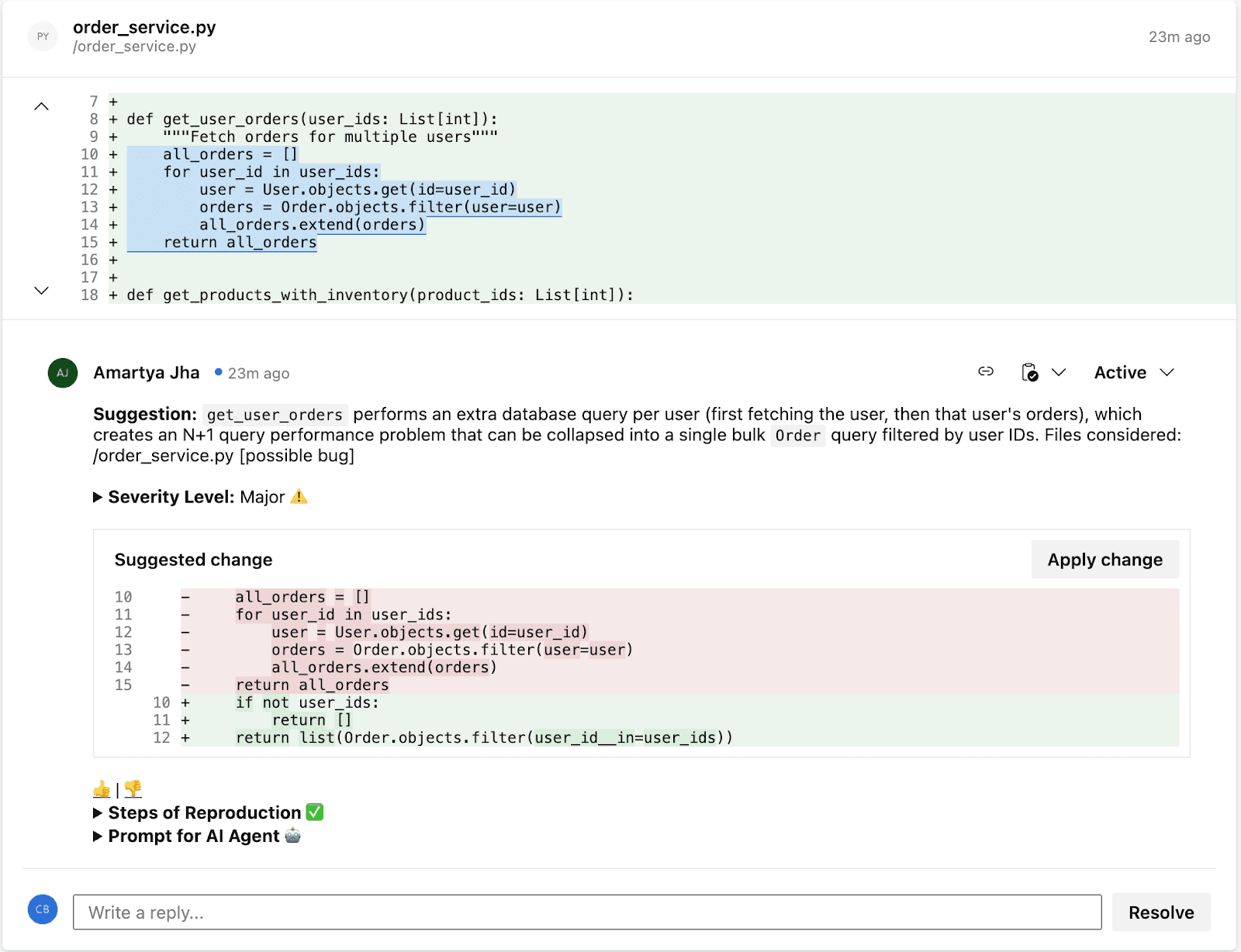
CodeAnt AI cuts code review time by 80% in Azure DevOps. It reviews every single line of every pull request, not just a sample, not just the diff summary — and posts inline findings for quality and security issues right inside the Azure DevOps PR, with one-click fixes that developers can apply and learn from on every review. What used to take humans hours or days now takes minutes.

What CodeAnt AI Does for Your Team

  • For developers: CodeAnt AI reviews every PR automatically and posts inline comments covering logical flaws, business logic errors, critical code flaws, performance issues, best practices, security vulnerabilities, and dependency risks. Each finding includes a one-click fix, developers apply the fix directly from the PR, see exactly what changed and why, and internalize the pattern for next time. Over time, the same issues stop appearing because developers learn from every fix.
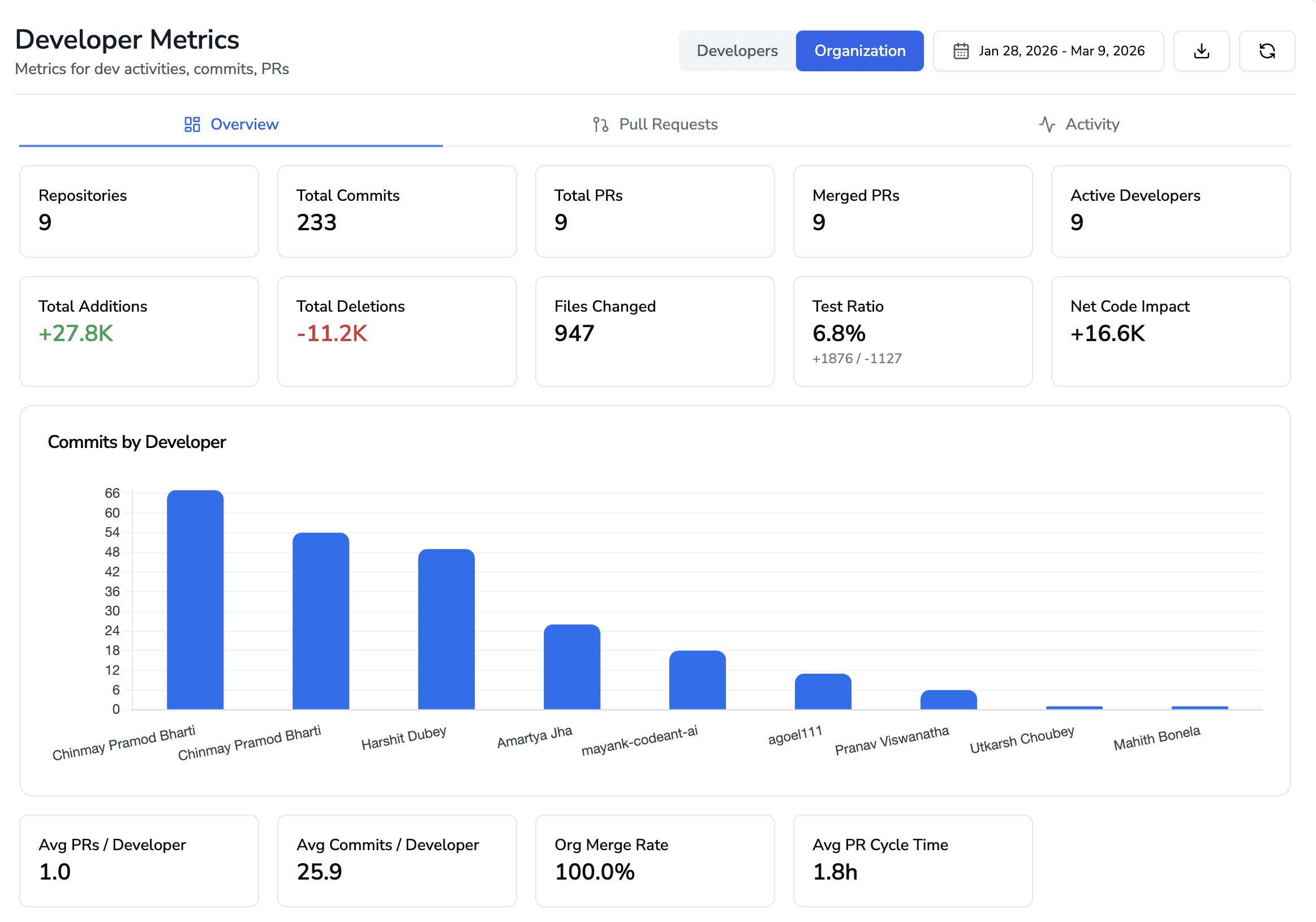
  • For engineering leaders: CodeAnt AI provides dashboards that show how code is being shipped across the organization, review velocity, code health trends, security posture, and developer productivity metrics. Leaders get visibility into which repositories have the most findings, which categories of issues are most common (indicating systemic patterns), and how code quality trends over time. This replaces the guessing game of “are we shipping quality code?” with data.
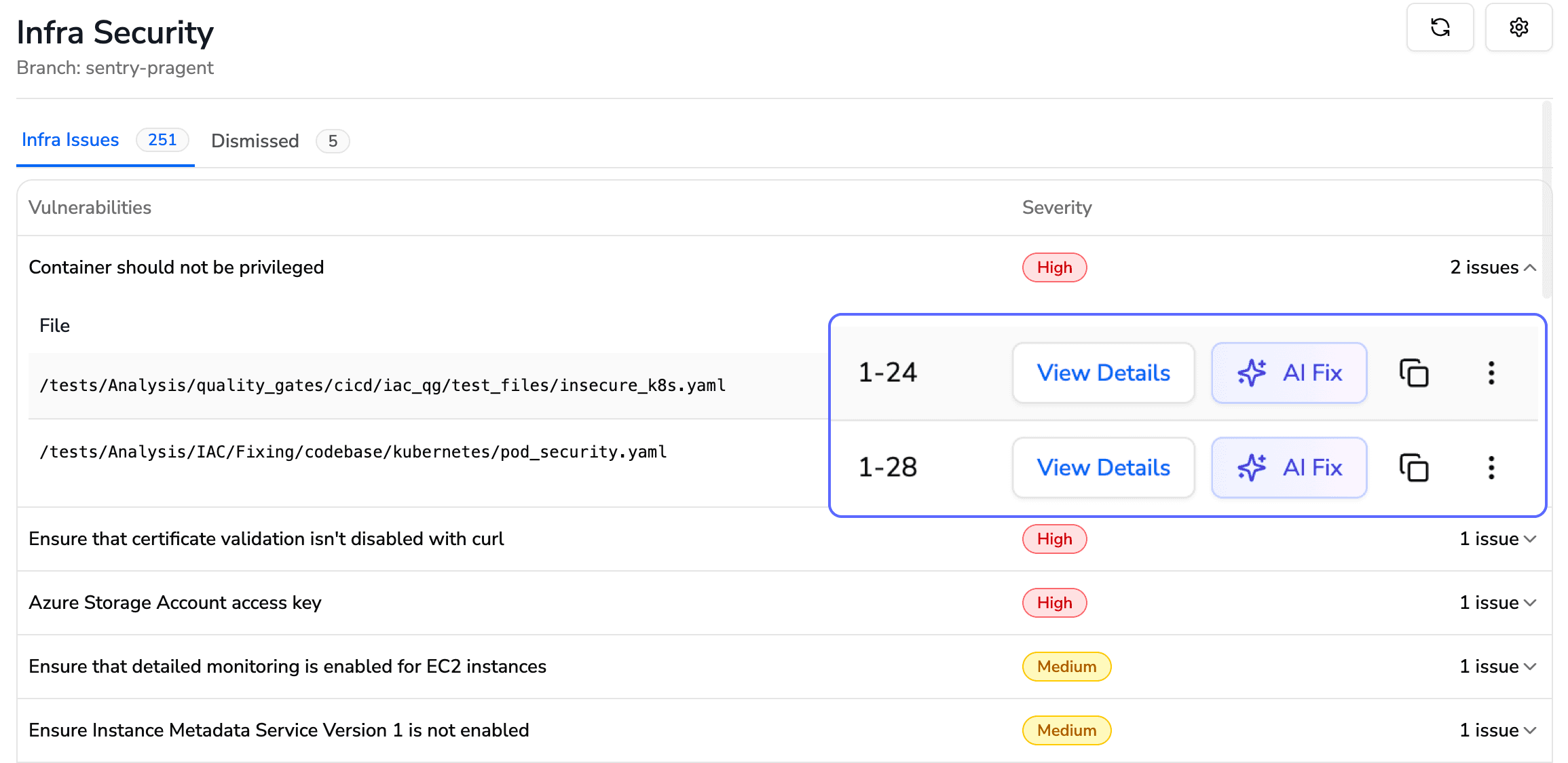
  • For security and compliance teams: Every PR gets SAST, SCA, IaC scanning, and secrets detection automatically. Security findings include Steps of Reproduction, a detailed proof of the full attack path showing exactly how an attacker would exploit the vulnerability. Quality gates block builds and prevent merges when critical issues are found, ensuring nothing ships to production with known security defects.

Azure DevOps Service

What CodeAnt AI Does

Azure Repos

Connects directly to your repositories; reviews every line of every pull request automatically

Pull Requests

Posts inline, context-aware AI review comments with one-click fixes, right inside your PRs, no context switching

Azure Pipelines

Acts as a quality gate, blocks builds and prevents merges when critical quality or security issues are detected

Azure Boards

Pulls work item context directly into reviews, so the AI understands why the code exists, not just what changed

Works on Both Cloud and Self-Hosted Azure DevOps

Many enterprise teams run Azure DevOps Server (on-premises) rather than Azure DevOps Services (cloud), for data residency, compliance, or network isolation reasons. CodeAnt AI supports both deployment models natively:

Azure DevOps Environment

CodeAnt AI Setup

Configuration Docs

Azure DevOps Services (Cloud): dev.azure.com

Connect directly from CodeAnt AI dashboard. No infrastructure to manage.

Cloud setup guide · Configure AI code review

Azure DevOps Server (Self-Hosted): on-premises or private cloud

CodeAnt AI connects to your self-hosted instance. Your code never leaves your network.

Self-hosted setup guide · Configure AI code review

This matters because most AI code review tools, including CodeRabbit and SonarCloud, only support cloud-hosted Azure DevOps. If your organization runs Azure DevOps Server on-prem (common in financial services, healthcare, government, and large enterprises), CodeAnt AI is one of the few tools that integrates natively without requiring you to migrate to the cloud.

What CodeAnt AI Reviews on Every PR

  • Logical flaws and business logic errors: Incorrect conditionals, off-by-one errors, scope creep beyond the linked work item

  • Critical code flaws: Null pointer dereferences, unhandled exceptions, resource leaks, deadlocks

  • Performance issues: N+1 queries, unnecessary allocations, blocking calls in async contexts

  • Best practices: Framework anti-patterns, naming convention violations, deprecated API usage

  • Security (SAST): Injection vulnerabilities, broken auth, hardcoded secrets, insecure configurations, with Steps of Reproduction showing the full attack path

  • Dependencies (SCA): Known CVEs in third-party packages, license compliance issues

  • One-click fixes: Every finding includes a suggested fix that developers can apply directly from the PR, no copy-pasting, no manual edits

Get started: Connect your Azure DevOps organization → select repos → create a pull request. See the setup guide!

Shipping code without a structured review process is one of the fastest ways to accumulate technical debt, introduce security vulnerabilities, and slow down engineering velocity. As teams grow, informal review habits break down, pull requests wait hours (or days), feedback becomes inconsistent, and security checks get pushed to “later.”

Azure DevOps provides one of the most structured and policy-driven code review systems available today. It combines pull requests, branch policies, pipelines, work item traceability, and merge controls into a single governance workflow designed for enterprise teams.

But simply using pull requests isn’t enough.

To run production-grade code reviews in Azure DevOps, teams need:

  • Clearly defined branch policies

  • Automated build validation pipelines

  • Security and dependency scanning

  • Merge strategy controls

  • Work item traceability

  • And increasingly, AI-assisted review to scale consistency

This guide walks through the complete end-to-end setup, from creating pull requests and configuring branch policies to automating review quality with pipelines and layering AI code review on top.

What is Code Review in Azure DevOps?

Code review in Azure DevOps is the process of reviewing proposed code changes through pull requests (PRs) in Azure Repos before they’re merged into a protected branch.

A typical review looks like this:

  • Reviewers examine the code diff

  • Leave inline comments

  • Vote to approve, request changes, or reject

The entire process is controlled by branch policies, which can require:

  • A minimum number of approvals

  • Linked Azure Boards work items

  • Successful pipeline builds

  • All comments resolved

  • Passing status checks from external tools (e.g., security scanners or AI code reviewers)

Azure DevOps supports four merge strategies:

  • Merge commit

  • Squash merge

  • Rebase and fast-forward

  • Semi-linear merge

Pull requests can also be set to auto-complete, meaning they merge automatically once every policy condition is satisfied.

Teams typically extend the built-in review workflow with:

Unlike GitHub’s review model, which primarily relies on CODEOWNERS and branch protection rules, Azure DevOps offers a tightly integrated, policy-driven workflow.

Every pull request can:

  • Link directly to Azure Boards work items

  • Automatically trigger Azure Pipelines

  • Enforce granular, branch-specific policies

This makes Azure DevOps especially well-suited for enterprise teams that require traceability, compliance controls, and structured governance over code changes.

How Code Reviews Work in Azure DevOps: End-to-End Flow

Every code review in Azure DevOps follows this flow:

What happens at each stage:

1. Branch + Code Changes 

The developer creates a feature branch (e.g., feature/login-fix), makes changes, and commits. Azure DevOps suggests creating a PR when a branch is pushed.

2. Pull Request Created 

The PR includes a title, description, linked work items from Azure Boards, and assigned reviewers. If a PR template exists in the repo (.azuredevops/pull_request_template.md), it auto-populates the description.

3. Branch Policies 

Evaluate Automatically The moment a PR is created, Azure DevOps checks all configured branch policies: minimum reviewers, linked work items, build validation, status checks, and comment resolution requirements. Each policy shows pass/fail status on the PR overview.

4. Pipelines Run 

If build validation is configured, Azure Pipelines triggers automatically, running your CI pipeline (build, unit tests, linting, security scans). The pipeline result posts back to the PR as a required status.

5. Reviewers Inspect and Comment 

Reviewers open the Files tab, review the diff line-by-line, leave inline comments, and vote: Approve, Approve with Suggestions, Wait for Author, or Reject.

6. Status Checks from External Tools 

External services, AI code reviewers, SAST tools, coverage analyzers, post their own pass/fail statuses to the PR. If configured as required policies, these must pass before merge.

7. Merge 

When all policies pass and all required reviewers approve, the PR is completed. If auto-complete was enabled, the merge happens automatically. The source branch can be deleted automatically post-merge.

Step-by-Step: Create and Review a Pull Request

Creating a PR

Step 1: Navigate to Repos → Pull Requests in your Azure DevOps project sidebar.

Step 2: Click “New Pull Request” in the top-right corner.

Step 3: Select your source branch (the branch with your changes) and your target branch (usually main or develop).

Step 4: Write a clear title, use present tense and be specific.

  • Good: Fix session timeout redirect on login page

  • Bad: Fixed stuff or Updates

Step 5: Write a description explaining:

  • What changed and why

  • Any tradeoffs or edge cases

  • Testing you’ve done

  • Screenshots if UI changes are involved

If a PR template is configured, it will pre-populate the description with your team’s checklist.

Step 6: Link work items, search for the relevant Azure Boards task, bug, or story. This provides reviewers with context on why the change exists.

Step 7: Assign reviewers, add team members who know the code area. You can add both required and optional reviewers.

Step 8: Click “Create” (or “Create as draft” if the PR isn’t ready for full review).

Creating a PR via Azure CLI:

az repos pr create \\
  --title "Fix session timeout redirect on login page" \\
  --description "Resolves AB#1234. Fixes redirect loop when session expires during OAuth callback." \\
  --source-branch feature/login-fix \\
  --target-branch main \\
  --reviewers "jane@company.com" \\
  --work-items 1234 \\
  --open

Reviewing a PR

Step 1: Open the PR from Repos → Pull Requests → Active.

Step 2: Read the Overview tab first, title, description, linked work items. Understand what the change does and why before looking at code.

Step 3: Switch to the Files tab to review the diff. You can view changes inline or side-by-side.

Step 4: Leave inline comments on specific lines. Be specific and actionable:

  • Instead of: “This needs work”

  • Write: “This query runs inside a loop, consider batching to avoid N+1. Here’s a pattern: SELECT ... WHERE id IN (...)

Step 5: Vote using the dropdown next to the Approve button:

Vote

What It Means

When to Use

Approve

Code is good to merge

No issues found, or only trivial items

Approve with Suggestions

Mergeable, but here are improvements

Non-blocking feedback you’d like the author to consider

Wait for Author

Needs changes before merge

Bugs, missing tests, or unclear logic that should be fixed

Reject

Fundamentally wrong approach

Rarely used, only for architectural or direction problems

Step 6: Once all comments are resolved, all reviewers approve, and all policies pass, click “Complete” or let auto-complete handle it.

Azure DevOps Branch Policies: Complete Reference

Branch policies are the enforcement layer of code review in Azure DevOps. They turn review best practices into rules that every PR must satisfy before merging.

To configure: 

Project Settings → Repos → Repositories → [Select repo] → Branch Policies → [Select branch]

Or via CLI: az repos policy list --repository-id <REPO_ID> --branch main

Branch Policy Settings Reference Table

Policy

What It Enforces

Recommended Default

Configuration Notes

Require minimum number of reviewers

Blocks merge until N reviewers approve the PR

1 for small teams (2–5 devs), 2 for teams of 6+

Uncheck “Allow requestors to approve their own changes.” Check “Require re-approval on last iteration” to prevent stale approvals when the author pushes new commits.

Check for linked work items

Requires PR to be linked to at least one Azure Boards work item

Required (not Optional)

Set to “Required” for traceability. Every code change should map to a task, bug, or story. Set to “Optional” only during early prototyping phases.

Check for comment resolution

Blocks merge until all review comments are resolved or marked “Won’t Fix”

Required

Prevents “merge and forget” ensures all feedback is addressed. Authors can resolve comments by fixing the code, replying with justification, or marking “Won’t Fix.”

Limit merge types

Restricts which merge strategies can be used on the target branch

Allow squash + merge commit

Lock down per branch: squash for feature→ develop (clean history), merge commit for develop→ main (preserve merge points). See the merge strategies section below.

Build validation

Runs an Azure Pipeline and requires it to pass before merge

Required, automatic trigger

Set “Build expiration” to 12 hours or “Immediately when target branch updates.” Choose your CI pipeline that runs build + tests + linting.

Status checks (external services)

Blocks merge until an external tool posts a “succeeded” status

Required for security/quality tools

Use for AI code review (CodeAnt AI), SAST scanners, coverage tools, or any external validator. Set “Authorized account” to restrict who can post status.

Automatically included reviewers

Auto-assigns specific reviewers based on file paths changed in the PR

Required for sensitive paths

Scope to /security/, /infrastructure/, /database/, or any path that needs specialist review. Use groups (not individuals) so the team isn’t blocked when someone is out.

Reset votes on new pushes

Resets existing approvals when the author pushes new commits to the source branch

“Require at least one approval on last iteration”

Prevents a scenario where a reviewer approves, the author pushes new (unreviewed) code, and the PR merges with stale approvals. “Reset all votes” is stricter but can slow teams down.

  • Minimum viable policy set for any team: Require 1 reviewer + successful build + linked work item + resolved comments. This takes 5 minutes to configure and prevents the most common quality failures.

  • Enterprise policy set: Add required reviewers for sensitive paths, external status checks for SAST/AI code review, vote reset on new pushes, and restrict merge types to squash only.

Configuring Branch Policies via Azure CLI

For teams managing multiple repositories, the CLI lets you script policy enforcement at scale:

# Require minimum 2 reviewers on main branch
az repos policy approver-count create \\
  --allow-downvotes false \\
  --blocking true \\
  --branch main \\
  --creator-vote-counts false \\
  --enabled true \\
  --minimum-approver-count 2 \\
  --repository-id <REPO_ID> \\
  --reset-on-source-push true
# Require linked work items
az repos policy work-item-linking create \\
  --blocking true \\
  --branch main \\
  --enabled true \\
  --repository-id <REPO_ID>
# Add build validation
az repos policy build create \\
  --blocking true \\
  --branch main \\
  --build-definition-id <PIPELINE_ID> \\
  --display-name "CI Build Validation" \\
  --enabled true \\
  --manual-queue-only false \\
  --queue-on-source-update-only true \\
  --repository-id <REPO_ID> \\
  --valid-duration 720

PR Templates in Azure DevOps: Examples You Can Copy

Pull request templates auto-populate the PR description when a developer opens a new PR. They ensure every PR includes the context reviewers need and the checks authors should complete.

How PR Templates Work

Create a file named pull_request_template.md and place it in your repo’s default branch in one of these folders (Azure DevOps searches in this order):

  1. /.azuredevops/pull_request_template.md

  2. /.vsts/pull_request_template.md

  3. /docs/pull_request_template.md

For branch-specific templates, use: /.azuredevops/pull_request_template/branches/<branch-name>.md

Default PR Template (Copy-Paste Ready)

## Summary
<!-- What does this PR do? Why is it needed? -->
## Related Work Items
-AB#<!-- work item number -->
## Type of Change
-[ ] New feature
-[ ] Bug fix
-[ ] Refactor / tech debt
-[ ] Configuration / infrastructure
-[ ] Documentation
## Changes Made
<!-- Describe the key changes. Mention files/areas affected. -->
## Testing
-[ ] Unit tests added or updated
-[ ] Manual testing completed
-[ ] Edge cases considered and tested
## Screenshots / Evidence
<!-- Include screenshots for UI changes, logs for backend changes -->
## PR Author Checklist
-[ ] Code is self-reviewed (I read my own diff)
-[ ] No debug logs, TODOs without tickets, or commented-out code
-[ ] Changes are focused (one purpose per PR)
-[ ] Work item is linked
-[ ] Reviewers are assigned
-[ ] CI pipeline passes locally
## Reviewer Notes
<!-- Anything specific reviewers should focus on

Security Review PR Template

For PRs touching authentication, authorization, cryptography, or sensitive data paths:

## Security Review PR Description
## Summary
<!-- What security-relevant change is this? -->
## Threat Model Considerations
-[ ] No new user input is trusted without validation
-[ ] No secrets, tokens, or credentials are hardcoded
-[ ] No new API endpoints exposed without authentication
-[ ] SQL/NoSQL queries use parameterized inputs
-[ ] File uploads are validated (type, size, content)
## OWASP Top 10 Check
-[ ] Injection (SQL, command, LDAP)
-[ ] Broken authentication
-[ ] Sensitive data exposure
-[ ] XML external entities (XXE)
-[ ] Broken access control
-[ ] Security misconfiguration
-[ ] Cross-site scripting (XSS)
-[ ] Insecure deserialization
-[ ] Using components with known vulnerabilities
-[ ] Insufficient logging & monitoring
## Testing
-[ ] Security-focused unit tests added
-[ ] SAST scan passed (CodeAnt AI / other)
-[ ] Dependency scan shows no new critical CVEs
## Related Work Items
-AB#<!-- work item number

Hotfix / Release PR Template

## Hotfix / Release PR
## What's Being Fixed
<!-- Describe the production issue this hotfix resolves -->
## Root Cause
<!-- Brief root cause analysis -->
## Fix Applied
<!-- What was changed and why this approach was chosen -->
## Risk Assessment
-[ ] Change is isolated (no side effects on unrelated features)
-[ ] Rollback plan exists
-[ ] Monitoring/alerting is in place for the affected area
## Testing
-[ ] Fix verified in staging/test environment
-[ ] Regression tests pass
-[ ] Load/performance impact assessed (if applicable)
## Deployment Notes
<!-- Any special deployment steps, feature flags, or config changes needed

Merge Strategies in Azure DevOps: Which One to Use

Azure DevOps offers four merge strategies when completing a pull request. Each affects your git history differently.

Merge Strategy Comparison Table

Strategy

What It Does

Git History Result

Best For

Merge (no fast-forward)

Creates a merge commit that joins the source branch into the target

Full history preserved, all individual commits visible plus a merge commit

develop → main merges where you want to see exactly when features were integrated. Default for release branches.

Squash merge

Combines all commits from the source branch into a single commit on the target

Clean, linear history, one commit per PR with a combined message

feature → develop merges where individual WIP commits (“fix typo”, “try again”) aren’t valuable. Most popular for feature work.

Rebase and fast-forward

Replays source commits on top of the target branch tip, then fast-forwards

Linear history with no merge commit, looks like all work happened sequentially

Small teams that want a perfectly linear main branch. Avoid if the source branch was shared with others (rebase rewrites history).

Semi-linear merge

Rebases source commits onto target, then creates a merge commit

Linear base with explicit merge points, combines benefits of rebase + merge visibility

Teams that want linear history but also want to see where PRs were integrated. Good middle ground for medium teams.

Decision Tree: Which Merge Strategy Should Your Team Use?

Start here: Is your team smaller than 5 developers?

  • Yes → Squash merge everything. Keeps history clean. One commit = one PR = one feature or fix. Easiest to reason about and revert.

  • No → Do you need audit-level traceability (compliance, regulated industry)?

    • Yes → Merge (no fast-forward) for protected branches (develop → main, release → main). Squash for feature branches (feature → develop). This preserves merge points for audit while keeping feature history clean.

    • No → Squash for features, semi-linear for integration branches. Gives you clean feature history with visible integration points.

How to enforce this per branch:

Go to Branch Policies → Limit merge types on each target branch and check only the allowed strategies. For example:

  • On main: Allow only “Merge (no fast-forward)”

  • On develop: Allow only “Squash merge”

Automate Review Quality with Azure Pipelines

Azure Pipelines can run automated checks on every pull request, catching issues before a human reviewer even opens the Files tab.

What to Automate in PR Validation

Check Type

Tools

Why It Matters

Build

dotnet build, npm run build, mvn compile

Proves the code compiles, catches syntax errors, missing imports, broken references

Unit tests

jest, pytest, xunit, JUnit

Catches functional regressions before review

Linting

eslint, flake8, checkstyle, rubocop

Enforces code style so reviewers don’t waste time on formatting

Formatting

prettier, black, clang-format

Ensures consistent formatting across the team

Security scanning (SAST)

CodeAnt AI, bandit, semgrep, snyk code

Catches vulnerabilities, hardcoded secrets, insecure patterns

Dependency scanning (SCA)

npm audit, pip-audit, snyk, CodeAnt AI

Flags known CVEs in third-party packages

Code coverage

istanbul, coverage.py, JaCoCo

Ensures new code has tests (set a threshold, e.g., 80%)

Production-Ready PR Validation Pipeline (YAML)

This pipeline runs on every PR and covers build, test, lint, and security:

# azure-pipelines.yml PR validation pipeline
trigger:
branches:
include:
- main
- develop
pr:
branches:
include:
-'*'
pool:
vmImage:'ubuntu-latest'
steps:
  # -- Build --
-task: UseNode@1
inputs:
version:'20.x'
displayName:'Setup Node.js'
-script: npm ci
displayName:'Install dependencies (clean)'
-script: npm run build
displayName:'Build'
  # -- Lint --
-script: npm run lint
displayName:'Run ESLint'
  # -- Test --
-script: npm test -- --coverage --ci
displayName:'Run unit tests with coverage'
-task: PublishTestResults@2
inputs:
testResultsFormat:'JUnit'
testResultsFiles:'**/test-results.xml'
displayName:'Publish test results'
-task: PublishCodeCoverageResults@2
inputs:
summaryFileLocation:'**/coverage/cobertura-coverage.xml'
displayName:'Publish code coverage'
  # -- Security --
-script: npm audit --audit-level=high
displayName:'Check dependencies for vulnerabilities'
continueOnError:true
  # -- Quality gate (optional: fail if coverage drops) --
  -script:|
      COVERAGE=$(cat coverage/coverage-summary.json | jq '.total.lines.pct')
      echo "Line coverage: $COVERAGE%"
      if (( $(echo "$COVERAGE < 80" | bc -l) )); then
        echo "##vso[task.logissue type=error]Coverage dropped below 80%"
        exit 1
      fi
displayName:'Enforce coverage threshold (80%)'

To connect this pipeline as a branch policy:

  1. Go to Project Settings → Repos → Branch Policies → [branch]

  2. Under Build Validation, click +

  3. Select this pipeline

  4. Set Trigger to “Automatic”

  5. Set Policy requirement to “Required”

  6. Set Build expiration to “Immediately when [branch] is updated” (strictest) or “After 12 hours” (balanced)

Manual Review vs. Branch Policies vs. AI-Assisted Code Review

Most teams start with manual pull request reviews. As they grow, they add branch policies for enforcement. The most effective teams layer AI-assisted review on top for coverage and speed.

Here’s how the three approaches compare:

Dimension

Manual Review Only

Branch Policies + Pipelines

AI-Assisted Review (e.g., CodeAnt AI)

How it works

Author opens PR, tags reviewers, waits for comments and approval

Policies enforce reviewer count, build pass, linked work items, and status checks before merge

AI tool auto-reviews every PR: posts inline comments, runs SAST/SCA, and posts a quality gate status

Review speed

Hours to days (depends on reviewer availability and PR size)

Same human speed, but blocks merge if checks fail, no shortcuts

Seconds to minutes for AI pass; humans focus only on logic, architecture, and design

Consistency

Varies by reviewer: senior dev catches more than a tired junior at 5 PM Friday

Enforces process (who reviews, what must pass) but not review quality

Consistent: every PR gets the same depth of analysis across 30+ languages, every time

Security coverage

Only what reviewers manually catch, and manual review is inconsistent for security issues

Pipeline can run SAST tools, but needs explicit setup and tuning

Built-in SAST, SCA, secrets detection, and IaC scanning on every PR, automatically

Setup effort

Zero configuration

15–30 minutes per repo (branch policies + pipeline YAML)

5–10 minutes (marketplace install + personal access token + webhook config)

What it catches

Logic errors, design issues, code clarity, things that need human judgment

Build failures, test regressions, lint violations, things machines verify

Code smells, anti-patterns, security vulnerabilities, duplications, missing edge cases, things that need AI breadth

What it misses

Style violations, known vulnerability patterns, anything the reviewer doesn’t know about

Review quality, policies ensure reviews happen, not that they’re good

Architectural decisions, business logic correctness, team-specific context

Best for

Small teams (2–3 devs), low-risk code, early-stage projects

Any team wanting process guardrails and merge-blocking enforcement

Teams wanting speed + security + consistency at scale without burning out senior reviewers

Our recommendation: Layer all three. Use branch policies as the process foundation, pipelines for automated testing and linting, and AI code review for intelligent, line-by-line feedback on every PR. This gives you enforcement (policies), verification (pipelines), and insight (AI), without asking humans to do everything.

Recommended Code Review Setup by Team Size

There is no one-size-fits-all review configuration. What works for a 3-person startup will slow down a 50-person enterprise team, and vice versa. Here’s what we recommend based on team size, informed by patterns from teams running code reviews on Azure DevOps at scale.

Small Teams (2–5 Developers)

Setting

Recommended Value

Minimum reviewers

1

Required reviewers (path-based)

Not needed, team is small enough for everyone to review everything

Build validation

Required, even a simple build + test pipeline

Linked work items

Optional (enforce if using Azure Boards; skip if tracking elsewhere)

Comment resolution

Required

Merge type

Squash only

AI code review

Recommended, compensates for having fewer reviewer perspectives

Auto-complete

Enable, reduces merge friction

Why: Small teams move fast. The goal is to add just enough structure to catch regressions without creating bottlenecks. One reviewer + CI + AI code review gives you solid coverage without slowing anyone down.

Medium Teams (6–20 Developers)

Setting

Recommended Value

Minimum reviewers

2

Required reviewers (path-based)

Yes, assign specialist reviewers for /database/, /auth/, /infrastructure/

Build validation

Required, automatic trigger, 12-hour expiration

Linked work items

Required

Comment resolution

Required

Merge type

Squash for feature→ develop, merge commit for develop→ main

AI code review

Strongly recommended, catches cross-cutting issues that individual reviewers miss

Auto-complete

Enable with “reset on new pushes”

Status checks

Required for SAST/security scanning

Why: At this size, knowledge silos form. Path-based reviewers ensure the right eyes see the right code. Two reviewers prevent blind spots. AI code review becomes critical because no single person knows the full codebase anymore.

Large Teams (20+ Developers)

Setting

Recommended Value

Minimum reviewers

2 (consider 3 for main branch)

Required reviewers (path-based)

Yes, use groups (not individuals) for each domain. Add security team for /security/, /auth/, /crypto/ paths

Build validation

Required, automatic, “immediately expire when target updates”

Linked work items

Required (enforce for compliance/audit trail)

Comment resolution

Required

Merge type

Squash for features, merge commit for integration branches, locked down via policy

AI code review

Essential, manual review alone cannot scale to 20+ PRs/day. Use AI as the first pass; humans focus on architecture and business logic

Auto-complete

Enable with “reset all votes on new pushes”

Status checks

Required for: SAST, SCA, code coverage threshold, AI code review quality gate

Cross-repo policy scripts

Use Azure CLI to enforce identical policies across all repositories

PR templates

Required, use branch-specific templates for feature, release, and hotfix branches

Why: At scale, consistency matters more than speed. Policies should be scripted (not manually configured per repo), AI should handle the first review pass, and every PR should have full traceability back to work items. This is also where enterprise features, SOC 2 compliance, audit trails, and RBAC, become non-negotiable.

Troubleshooting Common Code Review Issues in Azure DevOps

“PR won’t merge: policies are blocking”

Cause: One or more branch policies haven’t been satisfied.

Fix: Check the PR overview for policy status. Common blockers:

  • Build validation failed → check pipeline logs

  • Required reviewer hasn’t approved → ping the reviewer or check if they’re out

  • Comments not resolved → scroll through all threads and resolve or mark “Won’t Fix”

  • Work item not linked → add a work item from Azure Boards

  • Status check pending → external tool (AI reviewer, SAST scanner) hasn’t posted results yet

“Build validation keeps expiring”

Cause: Someone merged into the target branch after your build passed, causing your build to expire.

Fix: Either:

  • Re-queue the build manually from the PR

  • Change build expiration to “After 12 hours” instead of “Immediately when target updates” (in branch policy settings)

  • Enable auto-complete, Azure will re-trigger the build and merge when it passes

“Reviewer added automatically but I don’t know why”

Cause: An “Automatically included reviewers” policy is configured based on file paths.

Fix: Check Project Settings → Repos → Branch Policies → Automatically included reviewers. You’ll see which paths trigger which reviewers. If the auto-reviewer shouldn’t be required, change their setting from “Required” to “Optional.”

“I approved but the PR still says ‘Waiting for approval’”

Cause: The policy requires a minimum number of reviewers, and your approval alone isn’t enough. Or, the policy has “Require re-approval on last iteration” enabled and the author pushed new commits after your approval.

Fix: Check the reviewer count in the policy. If your approval was reset, re-review the latest changes and approve again.

“Status check shows ‘Not applicable’ or never posts”

Cause: The external service (AI code reviewer, SAST tool) isn’t configured to post status, or its webhook isn’t firing.

Fix:

  1. Verify the tool is installed and connected to the repository

  2. Check Project Settings → Service Hooks for the correct webhook

  3. Verify the tool’s configuration includes the target branch

  4. Check the tool’s logs for errors

  5. If the policy is set to “Apply by default,” it will block even if the tool never posts — change to “Apply only when status is posted” if this is intentional

“Can’t push directly to main: getting TF402455 error”

Message: ! [remote rejected] main -> main (TF402455: Pushes to this branch are not permitted; you must use a pull request to update this branch.)

Cause: Branch policies are enabled on main, which blocks direct pushes.

Fix: This is working as intended. Create a feature branch, push your changes there, and open a pull request. If you need emergency access, a Project Administrator can temporarily bypass the policy (but this should be rare and audited).

Why Teams Choose CodeAnt AI for Code Reviews on Azure DevOps

CodeAnt AI is the leading AI code review platform for Azure DevOps, trusted by Fortune 500 enterprises and rated on Gartner Peer Insights for its inline review quality and enterprise security posture.

CodeAnt AI cuts code review time by 80% in Azure DevOps. It reviews every single line of every pull request, not just a sample, not just the diff summary — and posts inline findings for quality and security issues right inside the Azure DevOps PR, with one-click fixes that developers can apply and learn from on every review. What used to take humans hours or days now takes minutes.

What CodeAnt AI Does for Your Team

  • For developers: CodeAnt AI reviews every PR automatically and posts inline comments covering logical flaws, business logic errors, critical code flaws, performance issues, best practices, security vulnerabilities, and dependency risks. Each finding includes a one-click fix, developers apply the fix directly from the PR, see exactly what changed and why, and internalize the pattern for next time. Over time, the same issues stop appearing because developers learn from every fix.

  • For engineering leaders: CodeAnt AI provides dashboards that show how code is being shipped across the organization, review velocity, code health trends, security posture, and developer productivity metrics. Leaders get visibility into which repositories have the most findings, which categories of issues are most common (indicating systemic patterns), and how code quality trends over time. This replaces the guessing game of “are we shipping quality code?” with data.

  • For security and compliance teams: Every PR gets SAST, SCA, IaC scanning, and secrets detection automatically. Security findings include Steps of Reproduction, a detailed proof of the full attack path showing exactly how an attacker would exploit the vulnerability. Quality gates block builds and prevent merges when critical issues are found, ensuring nothing ships to production with known security defects.

Azure DevOps Service

What CodeAnt AI Does

Azure Repos

Connects directly to your repositories; reviews every line of every pull request automatically

Pull Requests

Posts inline, context-aware AI review comments with one-click fixes, right inside your PRs, no context switching

Azure Pipelines

Acts as a quality gate, blocks builds and prevents merges when critical quality or security issues are detected

Azure Boards

Pulls work item context directly into reviews, so the AI understands why the code exists, not just what changed

Works on Both Cloud and Self-Hosted Azure DevOps

Many enterprise teams run Azure DevOps Server (on-premises) rather than Azure DevOps Services (cloud), for data residency, compliance, or network isolation reasons. CodeAnt AI supports both deployment models natively:

Azure DevOps Environment

CodeAnt AI Setup

Configuration Docs

Azure DevOps Services (Cloud): dev.azure.com

Connect directly from CodeAnt AI dashboard. No infrastructure to manage.

Cloud setup guide · Configure AI code review

Azure DevOps Server (Self-Hosted): on-premises or private cloud

CodeAnt AI connects to your self-hosted instance. Your code never leaves your network.

Self-hosted setup guide · Configure AI code review

This matters because most AI code review tools, including CodeRabbit and SonarCloud, only support cloud-hosted Azure DevOps. If your organization runs Azure DevOps Server on-prem (common in financial services, healthcare, government, and large enterprises), CodeAnt AI is one of the few tools that integrates natively without requiring you to migrate to the cloud.

What CodeAnt AI Reviews on Every PR

  • Logical flaws and business logic errors: Incorrect conditionals, off-by-one errors, scope creep beyond the linked work item

  • Critical code flaws: Null pointer dereferences, unhandled exceptions, resource leaks, deadlocks

  • Performance issues: N+1 queries, unnecessary allocations, blocking calls in async contexts

  • Best practices: Framework anti-patterns, naming convention violations, deprecated API usage

  • Security (SAST): Injection vulnerabilities, broken auth, hardcoded secrets, insecure configurations, with Steps of Reproduction showing the full attack path

  • Dependencies (SCA): Known CVEs in third-party packages, license compliance issues

  • One-click fixes: Every finding includes a suggested fix that developers can apply directly from the PR, no copy-pasting, no manual edits

Get started: Connect your Azure DevOps organization → select repos → create a pull request. See the setup guide!

FAQs

How do I set up PR templates in Azure DevOps?

How do I add AI code review to Azure DevOps?

Can I enforce different review rules for different branches?

How do I require code reviews before merging in Azure DevOps?

What permissions do I need to create a pull request in Azure DevOps?

Table of Contents

Start Your 14-Day Free Trial

AI code reviews, security, and quality trusted by modern engineering teams. No credit card required!

Share blog: