

At 01:39 UTC on May 19, 2026, a clock started ticking. By 02:06 UTC, 22 minutes later, over 630 malicious package versions had been silently published to the npm registry, reaching an estimated 16 million weekly downloads. The attack was surgical, automated, and nearly invisible. By the time most security teams woke up, the payload had already run on thousands of developer machines and CI/CD pipelines across the globe.
Welcome to Wave 5 of Mini Shai-Hulud: the supply chain worm that just won't quit.
What Is Mini Shai-Hulud?
The name comes from Dune, the massive sandworms that move invisibly beneath the desert surface, swallowing everything in their path. It is fitting. This is not a smash-and-grab attack. It is a campaign that tunnels through the open-source ecosystem silently, feeding on the trust that developers place in the packages they install every day.
Mini Shai-Hulud is a credential-stealing, self-propagating npm worm attributed to a threat group called TeamPCP (also tracked under aliases DeadCatx3, PCPcat, ShellForce, and CipherForce). The campaign has been running continuously since September 2025, escalating in scope, sophistication, and blast radius with every new wave. The May 19 @antv attack is Wave 5, and it is the largest yet.
The Full Campaign Timeline: Eight Months of Escalation
To understand what happened on May 19, you need to understand the road that got us here.
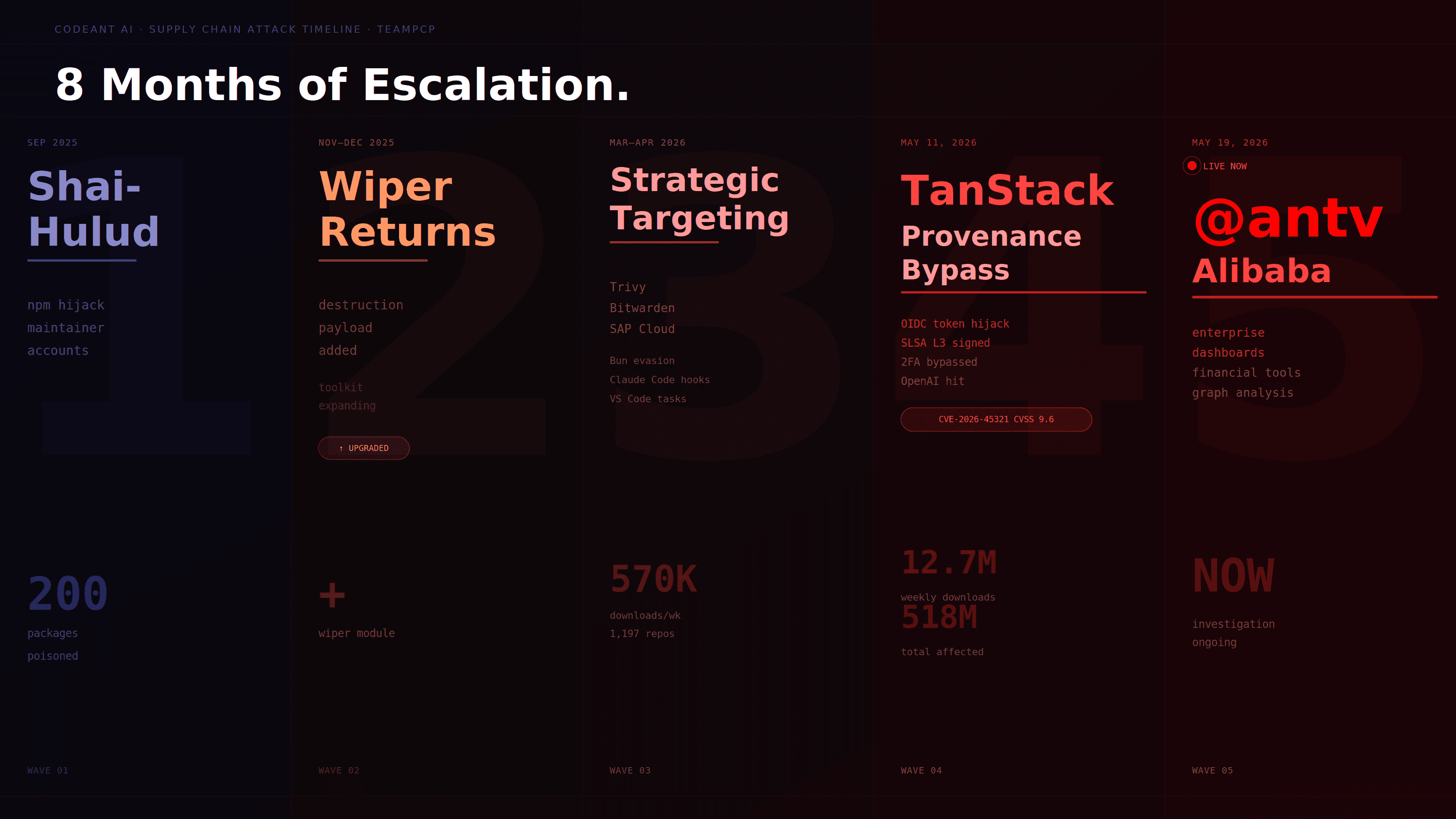
Wave 1: September 2025: The Original Shai-Hulud
The original Shai-Hulud worm was discovered by ReversingLabs researchers on September 15, 2025. It compromised over 200 npm packages and more than 500 versions between September 14 and 18. The mechanism was already sophisticated: the worm autonomously spread through the npm registry by hijacking maintainer accounts and injecting malicious code into public and private packages. Each infected package helped it spread further, creating a chain reaction across the ecosystem.
The malware targeted sensitive data like tokens, keys, and private repositories. Build environments were the primary victims.
Wave 2: November/December 2025: The Wiper Variant
Shai-Hulud returned in November and December 2025 with an upgraded payload, this time including data-wiping functionality. The escalation from theft to destruction was a warning sign that went underappreciated at the time. TeamPCP was experimenting, expanding its toolkit, and refining its techniques.
Wave 3: March–April 2026: Trivy, Bitwarden, and SAP
By early 2026, TeamPCP had moved from opportunistic targeting to strategic ones. The group compromised Aqua Security's Trivy vulnerability scanner in March 2026 and the Bitwarden CLI npm package in April 2026. These are not obscure packages, they are security tools embedded in enterprise CI/CD pipelines, trusted explicitly by the organizations that use them.
In late April, four SAP Cloud Application Programming Model packages totaling 570,000 weekly downloads were poisoned in a two-hour window. This wave introduced the Bun runtime as an evasion mechanism (more on that below) and persistence hooks targeting Claude Code SessionStart configurations and VS Code tasks. Over 1,197 victim repositories were live on GitHub within hours of infection.
Wave 4: May 11, 2026: TanStack (The Provenance Bypass)
The TanStack attack was a watershed moment. TeamPCP did not steal credentials this time, they hijacked TanStack's legitimate release pipeline using a chain of three vulnerabilities:
A Pwn Request via
pull_request_targetmisconfiguration in GitHub Actions CIGitHub Actions cache poisoning across the fork-to-base trust boundary
Runner memory extraction of an OIDC token at runtime
The attacker's code poisoned a GitHub Actions cache. When a legitimate maintainer merged to main, the release workflow restored the poisoned cache. Attacker binaries read /proc/pid/mem, extracted the OIDC token, and posted it directly to registry.npmjs.org bypassing two-factor authentication entirely because OIDC federation authenticates the CI workflow identity, not the human maintainer.
The result: 84 malicious versions across 42 @tanstack/* packages, including @tanstack/react-router with over 12.7 million weekly downloads. Every malicious version carried a valid SLSA Build Level 3 provenance attestation. The packages were cryptographically signed as legitimate. This was CVE-2026-45321, CVSS 9.6.
The campaign expanded rapidly to Mistral AI, UiPath, OpenSearch, and Guardrails AI. Over 170 packages, 518 million cumulative downloads affected. OpenAI later confirmed two employee devices were compromised through the TanStack attack.
Wave 5: May 19, 2026: @antv (The Current Attack)
The @antv attack hit on May 19, targeting Alibaba's data visualization suite, a cornerstone of enterprise dashboards, financial reporting tools, and graph analysis platforms. This is what we are digging into today.
Anatomy of the May 19 Attack
The Entry Point: A Compromised Maintainer Account
Unlike the TanStack wave, which exploited CI/CD pipeline misconfigurations, the @antv attack used a simpler but equally effective vector: account compromise. The atool npm account, maintained by a developer identified as atoolupdate@gmail.com was breached. This account maintained 547 packages, many of them core @antv libraries and their dependencies.
The attacker did not need to exploit GitHub Actions, forge OIDC tokens, or poison any cache. They simply needed the account credentials. Once obtained, everything else was automated.
The 22-Minute Publish Window
The attack happened in two automated bursts:
Wave | Time (UTC) | Versions Published |
|---|---|---|
First | 01:39 – 01:56 | ~317 versions |
Second | 02:05 – 02:06 | ~314 versions |
Four packages:
size-sensorecharts-for-reactjest-canvas-mockjest-date-mock
… received three malicious versions instead of two, indicating they were used as early test targets before the bulk publish. Most other packages received exactly two versions: one per wave.
Total: 631 malicious versions across 314 packages in under 22 minutes. This is automation at scale. No human could do this manually.
Affected Packages and Their Reach
The highest-impact packages compromised include:
Package | Monthly Downloads | Ecosystem Role |
|---|---|---|
size-sensor | 4.2M | Component resize detection |
echarts-for-react | 3.8M | React wrapper for Apache ECharts |
@antv/scale | 2.2M | Data scaling for visualizations |
timeago.js | 1.15M | Time formatting library |
@antv/g6 | 1.0M+ | Graph visualization |
@antv/g2 | 1.1M | Grammar of Graphics charting |
@antv/x6 | 975K | Diagramming engine |
@antv/l7 | 883K | Geographic visualization |
@antv/s2 | 751K | Multidimensional spreadsheet |
Beyond the core @antv packages, unrelated libraries including timeago.js, canvas-nest.js, and jest-canvas-mock were also compromised, all because their maintainer had access through the same atool account.
The Kill Chain: How the Payload Works
Stage 1: Execution Trigger
Every compromised package version makes exactly two changes to package.json:
The preinstall hook runs automatically before any other installation step. The payload executes the moment a developer runs npm install. By the time any scanner flags the package, the malicious code has already run.
The optionalDependencies entry points to a GitHub commit, a secondary payload delivery mechanism. This is the orphaned commit technique refined from the TanStack wave: the commit was authored by the attacker but forged to appear as huiyu.zjt@ant.com (a real maintainer). The attacker forked antvis/G2, created an orphan commit carrying the payload, then deleted the fork. GitHub's object storage retains commits from deleted forks until garbage collection runs, leaving the malicious commit accessible via its hash indefinitely.
Stage 2: Why Bun?
The payload runs under Bun, not Node.js. This is deliberate evasion. Security monitoring tools, SIEM rules, and runtime protection solutions are predominantly tuned for Node.js execution patterns. Bun-based execution bypasses a significant portion of Node.js-focused detection tooling in use across enterprise environments today.
The index.js file is a 498KB heavily obfuscated script using string-array lookup tables, runtime decoding, and a custom decryptor to hide sensitive strings from static analysis. The SHA256 of the payload is consistent across all 314 packages: a68dd1e6a6e35ec3771e1f94fe796f55dfe65a2b94560516ff4ac189390dfa1c. Every package received an identical payload.
Stage 3: Credential Harvesting
The payload harvests over 20 categories of secrets from the infected machine:
npm tokens and
.npmrcfilesGitHub Personal Access Tokens (PATs)
AWS access keys and secret keys
GCP service account credentials
Azure client secrets and certificates
SSH private keys
Kubernetes
kubeconfigfilesHashiCorp Vault tokens
Database connection strings (PostgreSQL, MySQL, MongoDB, Redis)
Stripe API keys
Slack bot tokens
Docker authentication configs
CI/CD environment variables (from memory, if running in a runner)
The scan is not limited to well-known credential file locations. The payload traverses the filesystem looking for credential patterns in configuration files, dotfiles, environment files, and shell history. In CI/CD environments, it reads environment variables directly from runner memory.
Stage 4: Sigstore Provenance Forgery
This is the technically novel element that first appeared in Wave 4 and was carried forward into Wave 5.
Using stolen GitHub Actions OIDC tokens, the malware requests signing certificates from Fulcio (fulcio.sigstore.dev) and creates in-toto provenance statements via Rekor (rekor.sigstore.dev), producing packages with cryptographically valid SLSA Build Level 3 attestations. This means affected packages carry provenance that most security tools will treat as a trusted signal — despite the packages being poisoned.
The lesson here is critical: a valid Sigstore attestation confirms which pipeline produced a package, not whether that pipeline was compromised. Provenance verification is a necessary but not sufficient security control.
Stage 5: Data Exfiltration
The payload uses multiple redundant exfiltration channels:
Primary: GitHub dead-drop repositories. If a GitHub token is found, the payload creates repositories on the victim's GitHub account with Dune-themed names — combinations of words like
sardaukar,fremen,atreides,sandworm,ornithopter,stillsuit, with a random number appended. Stolen data is committed asresults/results-<timestamp>-<counter>.json. The repo description decrypts to a reversed string: "niagA oG eW ereH :duluH-iahS" — "Shai-Hulud: Here We Go Again" read forward. The attacker disables issues, wiki, and discussions on these repos to minimize surface area. Over 2,700 rogue GitHub repositories had already been created when researchers identified the attack.Secondary: C2 infrastructure. The payload maintains encrypted communication with attacker-controlled command-and-control servers.
Tertiary: Session messenger network. First documented in the TanStack wave, the worm exfiltrates credentials through Signal's Session network as a backup channel that bypasses corporate network inspection.
HTTP requests use python-requests/2.31.0 as the User-Agent, a deliberate mismatch with the Bun runtime designed to confuse traffic analysis.
Stage 6: Persistence
Removing the malicious npm package is not enough to clean up a compromised machine. The payload installs several persistence mechanisms that survive npm uninstall:
AI coding agent hijacking: Creates
.claude/settings.jsonwith aSessionStarthook executingnode .claude/setup.mjs. This re-executes the malware whenever a developer opens a new Claude Code session in an affected directory. This technique first appeared in Wave 3 and has been carried forward in every subsequent wave.VS Code persistence: Creates or modifies
.vscode/tasks.jsonwith afolderOpentrigger, executing the malware whenever the project folder is opened in VS Code.MCP configuration harvesting: The payload reads
~/.claude.json,~/.claude/mcp.json, and~/.kiro/settings/mcp.json— files that store API keys and auth tokens for external MCP services connected to AI coding tools.Systemd/launchctl: On Linux and macOS systems, the malware installs OS-level service persistence through systemd units or launchctl plists, ensuring re-execution on system restart.
Docker container escape: If a Docker socket is accessible at the standard path, the payload attempts to mount the host filesystem via a privileged container, enabling full host compromise from within a containerized environment.
Stage 7: Worm Propagation
This is what makes the campaign truly dangerous: every infection is also a new infection source.
After harvesting credentials, the malware uses stolen npm tokens to query registry APIs and enumerate all other packages the compromised victim can maintain. It then downloads the package tarballs, injects the malicious preinstall hook, bumps the version number, and republishes the poisoned packages back to the registry, automatically, at machine speed.
The self-propagating loop is exactly how the campaign achieved 630+ malicious package versions in under 22 minutes. The atool account was the entry point, but the worm's propagation capability means any npm token captured from a developer machine or CI runner could extend the blast radius to additional packages entirely outside the atool portfolio.
Why This Attack Breaks the "Shift Left" Assumption
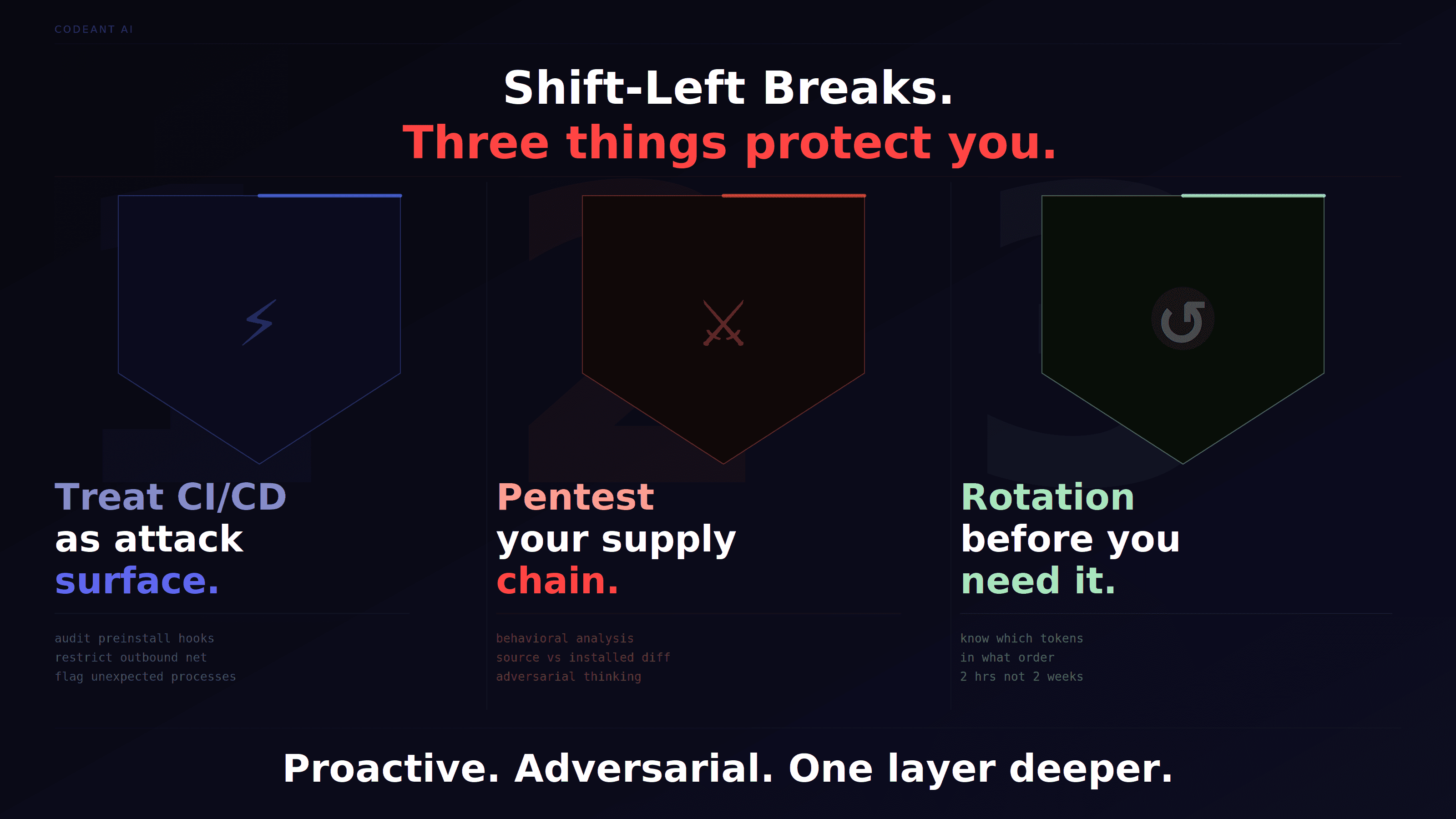
The shift-left movement pushed security earlier into the development cycle, catch bugs in code review, not in production. That logic holds for vulnerabilities you introduce. It breaks completely for vulnerabilities introduced by your dependencies.
Mini Shai-Hulud is not a vulnerability in your code. It is code execution happening inside your build pipeline, using packages your team chose and trusted. No linting rule catches it. No pull request review sees it. It runs in the gap between "dependency declared" and "build complete."
The teams least exposed to this attack shared a few traits:
They treated their CI/CD pipeline as an attack surface, not just a build tool. That means auditing
preinstallhooks acrossnode_modules, restricting outbound network access from runners, and treating any unexpected process spawned duringnpm installas a potential incident.They ran offensive security checks against their own dependency tree, not just "is this CVE present" but "does this package behave differently from its published source?" Behavioral analysis of packages at install time is the functional equivalent of pentesting your supply chain: you are actively probing for what an attacker would exploit before they get the chance.
They had secrets rotation playbooks ready before they needed them. When an incident like this hits, the difference between a 2-hour response and a 2-week investigation is whether your team already knows which tokens to revoke, in what order, and how to verify they are gone.
The offensive security framing matters here: supply chain attacks are not passive vulnerabilities waiting to be patched. They are active intrusions that run on a timer the moment npm install completes. Defending against them requires the same proactive, adversarial thinking that pentesting applies to your application layer, applied one layer deeper, to the tools your developers use to build it.
The Semver Trap: Why latest Tags Don't Protect You
The attacker made a subtle but deliberate choice: they did not move the latest dist-tag on most affected packages. For echarts-for-react, latest still points to 3.0.6, the legitimate version.
This provides zero protection.
npm's semver resolution picks the highest version matching a range, regardless of the latest tag. Any project with "echarts-for-react": "^3.0.6" in its package.json resolves to 3.2.7 (malicious) on the next clean install. Most production projects use caret ranges (^) because that is the default npm install --save behavior. This means projects that have never changed their package.json since the attack are still vulnerable on their next fresh install or CI run.
Lockfiles (package-lock.json, yarn.lock) provide protection only if they are committed, respected, and not overridden. In CI/CD pipelines, many teams run npm install without --frozen-lockfile or have CI configurations that regenerate lockfiles on each run. These pipelines would auto-resolve to the malicious versions.
The Broader Impact: Who Is Affected?
AntV is an Alibaba-originated data visualization suite used extensively across enterprise dashboards, financial reporting tools, and graph analysis platforms in Asia-Pacific and globally. The @antv packages underpin a significant portion of the JavaScript data visualization ecosystem.
echarts-for-react alone sees approximately 3.8 million monthly downloads. size-sensor, the most downloaded affected package, reaches 4.2 million monthly. When you aggregate across all 314 compromised packages, the theoretical exposure is in the tens of millions of installs.
The practical blast radius depends on:
Whether developers ran
npm installor CI ran fresh installs between 01:39 and the packages being unpublishedWhether lockfiles were committed and respected
Whether
--ignore-scriptswas set
The security firm Snyk notes that the self-propagating component means the blast radius may extend well beyond the initial atool account portfolio. Any npm token stolen in this attack could be used to poison additional packages in other namespaces, widening the campaign in ways that may not yet be fully visible.
Detection: How to Know If You Were Hit
Check Your Lockfile First
If your package-lock.json or yarn.lock references any package maintained by the atool account, check whether the resolved version was published between 01:39 and 02:18 UTC on May 19, 2026.
Specific malicious version ranges to check (non-exhaustive):
echarts-for-react: versions3.1.xand3.2.xpublished May 19size-sensor: versions1.1.xpublished May 19timeago.js: any version published May 19Any
@antv/*package with a version bump timestamped May 19 01:39–02:18 UTC
Technical Indicators of Compromise (IoCs)
Any package published by
atool(atoolupdate@gmail.com) on 2026-05-19 between 01:44 and 02:06 UTCpreinstallscript:bun run index.jsPayload SHA256:
a68dd1e6a6e35ec3771e1f94fe796f55dfe65a2b94560516ff4ac189390dfa1cGitHub commit:
antvis/G2#1916faa365f2788b6e193514872d51a242876569(message: "New Package")Optional dependency:
@antv/setup: github:antvis/G2#1916faa365f2788b6e193514872d51a242876569GitHub repositories with Dune-themed names containing
results/results-<timestamp>-<counter>.jsonfilesRepository descriptions containing variations of "Shai-Hulud: Here We Go Again"
HTTP traffic to C2 with User-Agent:
python-requests/2.31.0from Bun processesPresence of
.claude/settings.jsonwith unexpectedSessionStarthooksPresence of
.vscode/tasks.jsonwith unexpectedfolderOpentasksUnexpected
@antv/setupinoptionalDependencies
File System Artifacts to Check
Remediation: The Correct Order of Operations
Critical: Do not rotate npm tokens before removing persistence artifacts. If malware is still running and detects token rotation, it may trigger additional exfiltration or destructive payloads. Isolation and persistence removal come first.
Step 1: Isolate and Image
If you have reason to believe your machine or CI runner executed a compromised package, treat it as fully compromised. Isolate the system from the network before proceeding. Take a disk image if forensic preservation matters for your organization.
Step 2: Remove Persistence Artifacts
Step 3: Clean npm Installation
Step 4: Rotate All Credentials (In This Order)
npm tokens, revoke all, create new
GitHub Personal Access Tokens, revoke all
AWS access keys, rotate immediately, check CloudTrail for unauthorized API calls
GCP service account keys, rotate, check audit logs
Azure credentials, rotate, check activity logs
SSH keys, regenerate and update authorized_keys on servers
Kubernetes service account tokens, rotate
HashiCorp Vault tokens, revoke, reissue
Database passwords, rotate all
Stripe, Slack, and other service API keys, rotate
Step 5: Audit GitHub for Injected Repositories
Step 6: Prevent Future Exposure
Pin exact versions in
package.jsoninstead of using caret or tilde rangesCommit and enforce lockfiles, use
npm ci(notnpm install) in CI pipelinesRun
npm install --ignore-scriptsfor packages that do not need lifecycle scriptsEnable npm package provenance verification but do not treat provenance as a standalone trust signal
Audit maintainer account security, enforce hardware MFA, not SMS-based 2FA
Subscribe to security advisories from Socket.dev, Snyk, and Aikido for real-time malicious package detection
Implement SCA in CI, software composition analysis tools that flag malicious packages before they run
The Bigger Picture: What This Campaign Tells Us About Supply Chain Security
The Trust Model Is Broken
The core problem with npm (and most package registries) is that the trust model is binary: a package is either published by an authorized account or it is not. There is no mechanism for the registry to detect that an authorized account has been compromised, that a CI pipeline has been poisoned, or that a valid SLSA attestation was generated by malware.
The Mini Shai-Hulud campaign has now demonstrated that every layer of the trust stack, maintainer accounts, CI/CD pipelines, GitHub Actions OIDC, and Sigstore provenance, can be abused to publish malware that looks legitimate by every available signal.
The Self-Propagation Problem Is Unsolved
Traditional supply chain attacks require attackers to compromise individual packages one at a time. Self-propagating worms change the economics dramatically. One compromised account or one poisoned CI pipeline can cascade into hundreds of malicious publishes within minutes, at a scale that outpaces human response time.
The npm registry's publish API has no rate limiting that would stop a legitimate account from publishing 630 versions in 22 minutes. From the registry's perspective, everything that happened on May 19 was authorized.
The preinstall Hook Is a Loaded Gun
npm lifecycle scripts, particularly preinstall, execute arbitrary code at install time with the full permissions of the running process. In CI/CD environments, that often means root or privileged access. The preinstall hook was designed for legitimate use cases like native module compilation — but it has become the attack vector of choice for supply chain malware precisely because it is automatic, early, and ubiquitous.
npm has had --ignore-scripts as an option for years. Making it the default, or requiring explicit opt-in for lifecycle scripts, would break a significant portion of the ecosystem but would eliminate the most commonly abused attack vector in npm supply chain attacks.
The Bun Evasion Is a Genuine Problem
Running malicious payloads under Bun instead of Node.js is a simple evasion technique that bypasses a meaningful portion of existing detection coverage. Most npm security tooling, runtime protection solutions, and SIEM rules were built around Node.js execution. The security community needs to update detection logic to cover Bun and other alternative JavaScript runtimes (Deno, etc.) as first-class execution targets.
IDE Persistence Is the New C2
The decision to persist through VS Code tasks and Claude Code SessionStart hooks is strategically significant. These are not OS-level persistence mechanisms that endpoint detection tools routinely monitor. They are developer tool configuration files in project directories, files that get committed to repositories, shared across teams, and restored on new machines from version control.
An organization that cleans up a compromised machine but does not audit shared repository configurations may re-infect every developer who clones the repo.
CodeAnt AI Perspective: Detecting and Preventing This Class of Attack
Supply chain attacks like Mini Shai-Hulud expose a gap that traditional SAST and dependency scanners are not designed to fill. Static analysis of your own code will not tell you that a package you are depending on has been silently poisoned between CI runs.
The defensive posture required here combines several layers:
Real-time SCA with malicious package intelligence, not just CVE databases, but active tracking of newly published package versions for behavioral anomalies: version bumps with
preinstalladditions, packages that suddenly acquire optional GitHub dependencies, version histories with unusual publish velocity.Secrets detection in CI/CD, intercepting credentials before they leave the environment, and alerting on unexpected outbound connections from install-time processes.
Code signing and provenance verification with pipeline audit, as the TanStack wave demonstrated, provenance tells you the pipeline identity, not pipeline integrity. Auditing the pipeline configuration itself for
pull_request_targetmisconfigurations, cache poisoning vectors, and overly permissive OIDC scopes is a separate but necessary control.IDE configuration auditing, scanning
.claude/,.vscode/,.kiro/, and similar directories for unexpected hooks as part of security posture assessment.
The Shai-Hulud campaign is a preview of where supply chain attacks are going: automated, multi-stage, self-propagating, and capable of abusing every trust signal the ecosystem has built. The response has to match that sophistication.
Quick Reference: Shai-Hulud Campaign Summary
Wave | Date | Entry Vector | Packages Hit | Notable Technique |
|---|---|---|---|---|
1 | Sep 2025 | Compromised maintainer account | 200+ packages | Original worm, credential theft |
2 | Nov–Dec 2025 | Compromised accounts | Multiple | Data-wiping payload added |
3 | Mar–Apr 2026 | Trivy, Bitwarden, SAP, compromised accounts/CI | SAP packages | Bun evasion, Claude Code persistence |
4 | May 11, 2026 | TanStack CI pipeline, OIDC token extraction | 170+ packages (npm + PyPI) | Valid SLSA provenance, CVE-2026-45321 |
5 | May 19, 2026 | @antv maintainer account compromise | 314 packages | Largest wave, 16M weekly downloads |
TL;DR for Security Teams
What happened: TeamPCP compromised the
atoolnpm account and published 631 malicious package versions across 314 packages including core @antv libraries andecharts-for-react, collectively reaching ~16 million weekly downloadsHow: Automated self-propagating worm with
preinstallhook running a 498KB Bun-executed, heavily obfuscated payloadWhat the payload does: Steals 20+ categories of credentials, exfiltrates via GitHub dead-drops, plants persistence in VS Code and Claude Code configs, propagates to additional packages using stolen tokens
Who is at risk: Any developer or CI/CD pipeline that ran
npm installon affected packages between 01:39–02:18 UTC on May 19What to do now: Check lockfiles, remove persistence artifacts (in that order), rotate all credentials, audit GitHub for rogue repos, pin exact dependency versions going forward
This is not the last wave. The Shai-Hulud worm code has reportedly been open-sourced, meaning any threat actor, not just TeamPCP, can now deploy the same techniques. The supply chain attack surface has permanently expanded. Treat every npm install as a potential code execution event, because that is exactly what it is.

