Pull Request Templates in Azure DevOps: Examples You Can Copy Today
Sonali Sood
Founding GTM, CodeAnt AI
Meta Title: What are Pull Request Templates in Azure DevOps: 6 Examples You Can Copy Today
Meta Description: Learn how to create Azure DevOps pull request templates with ready-to-copy examples. Includes file locations, branch templates, and real PR checklist formats.
Description: Complete guide to Azure DevOps PR templates with examples you can copy today. Includes branch-specific templates and best practices for faster reviews.
Slug: azure-devops-pull-request-template-examples
Pull Request Templates in Azure DevOps: Examples You Can Copy Today
Most pull requests fail before the review even begins.
Not because the code is wrong, but because the PR description is empty, vague, or missing critical context. Reviewers open the diff and immediately start asking questions:
What problem does this change solve?
What parts of the system are affected?
Was this tested?
Is there a linked work item?
Every missing answer slows the review process. Developers wait for clarifications, reviewers chase context, and pull requests sit idle.
Azure DevOps pull request templates solve this problem.
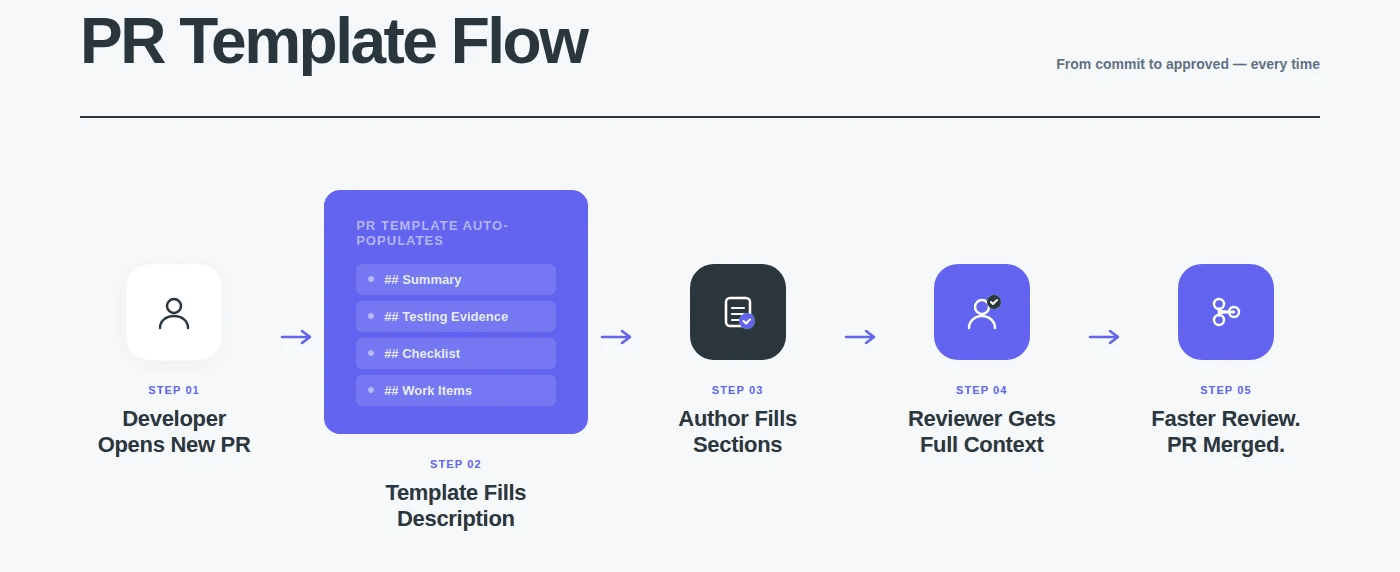
A PR template automatically populates the description field with a structured format, sections for summary, testing evidence, checklists, and related work items, so every pull request arrives with the minimum context reviewers need to evaluate it.
Instead of writing a description from scratch, developers simply fill in the template.
Instead of asking questions, reviewers focus on reviewing the code.
In this guide you'll learn:
Where Azure DevOps looks for PR template files
How to create a pull request template in minutes
Branch-specific templates for stricter production reviews
Ready-to-copy templates for security, hotfixes, migrations, APIs, and UI changes
How teams enforce template usage with branch policies and AI code review
By the end, you'll have production-ready PR templates you can copy directly into your repository. But first, let’s understand the basics..
What Are Pull Request Templates in Azure DevOps?
A pull request template in Azure DevOps is a Markdown file stored in your repository that automatically populates the description field when a developer creates a new pull request. Instead of starting with a blank description (which most developers leave empty or fill with one vague line), the template provides a structured format, sections for summary, testing evidence, checklists, and related work items, so every PR arrives with the context reviewers need.
PR templates solve two problems at once. For PR authors, they eliminate the “what should I write in the description?” question, the template tells you exactly what to include. For reviewers, they guarantee that every PR has the minimum context required for a meaningful review: what changed, why, how it was tested, and what to focus on. Teams that adopt PR templates consistently report faster review cycles because reviewers spend less time asking clarifying questions and more time reviewing actual code.
Azure DevOps supports three types of PR templates:
a default template (applied automatically to every PR in the repo)
branch-specific templates (applied when targeting a specific branch like main or release/*)
additional templates (selectable by the PR author from a menu). You can use all three simultaneously.
Where to Put PR Template Files: File Location Reference
Azure DevOps searches for PR template files in a specific order. If it finds a file in the first location, it uses that and stops looking. The file must be on the repo’s default branch (usually main), templates on feature branches are ignored.
Default Template File Locations
Azure DevOps searches for the default PR template in this order:
Priority
File Path
Notes
1 (first checked)
/.azuredevops/pull_request_template.md
Recommended location. Keeps templates alongside other Azure DevOps config files.
2
/.vsts/pull_request_template.md
Legacy location from VSTS era. Still works.
3
/docs/pull_request_template.md
Alternative if your repo already uses a /docs folder for documentation.
4
/pull_request_template.md
Root of the repository. Works but clutters the repo root.
Use the .azuredevops folder. It’s the current convention, keeps your repo root clean, and signals to other developers where to find Azure DevOps configuration.
Branch-Specific Template File Locations
Branch-specific templates override the default template when a PR targets a specific branch:
The branch name in the file path must match the target branch name exactly. For branches with / in the name (like release/v2.0), replace / with a directory separator in the file path.
Additional Templates (Multiple Templates per Repo)
You can offer multiple templates that PR authors choose from when creating a PR. Place additional template files in:
/.azuredevops/pull_request_template/
Each .md file in this folder (other than the branches/ subdirectory) appears as a selectable template in the PR creation screen. The file name becomes the template name in the dropdown, so security_review.md appears as “security_review” and hotfix.md appears as “hotfix.”
Quick Reference: File Structure for a Complete Setup
/.azuredevops/
pull_request_template.md ← Default (used for all PRs)
database_migration.md ← Additional: DB migration PRs
frontend_ui.md ← Additional: UI/frontend PRs
How to Create Your First PR Template
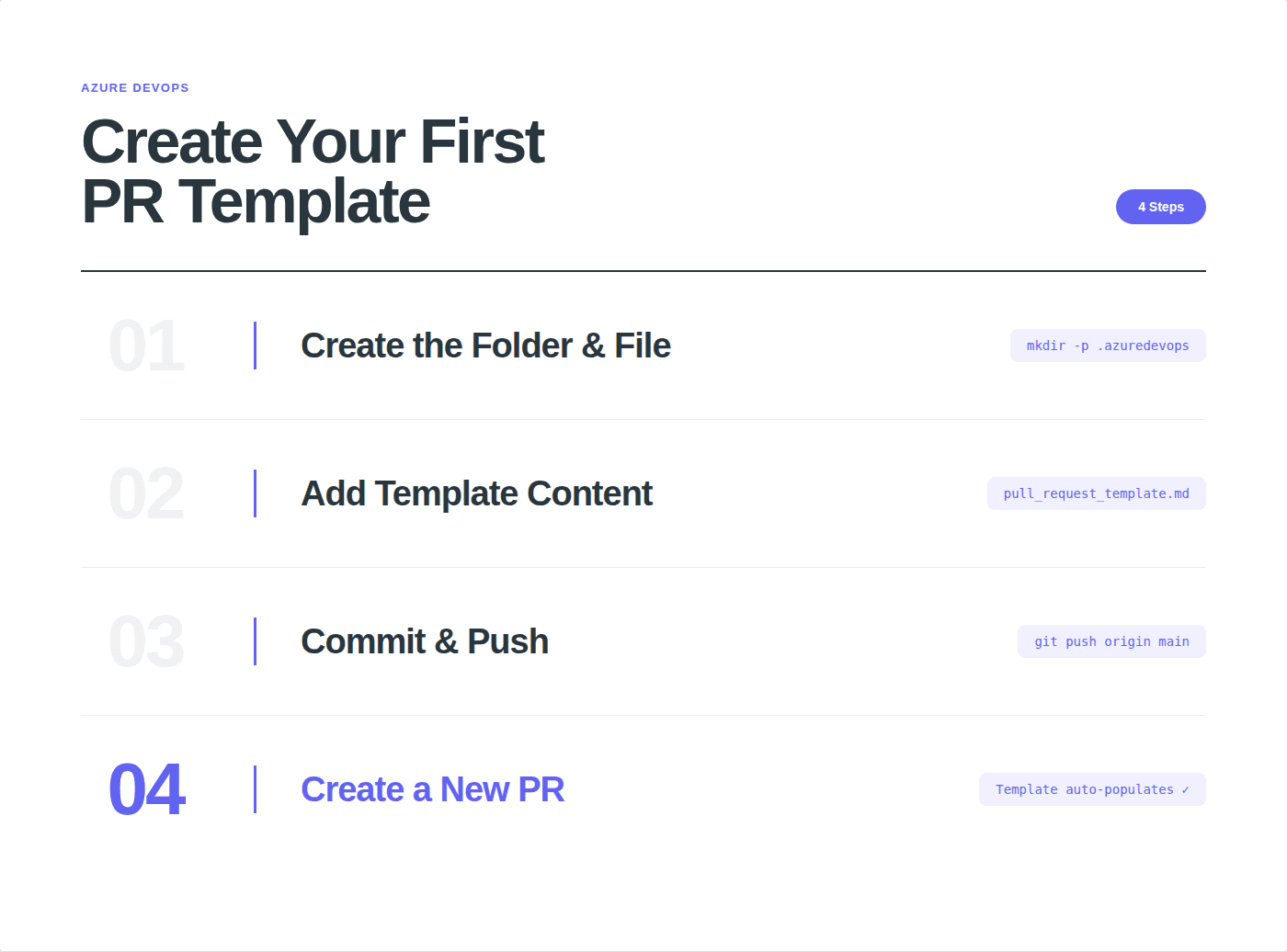
Step 1: Create the folder and file on your default branch:
mkdir -p .azuredevops
touch .azuredevops/pull_request_template.md
Step 2: Add your template content (see the ready-to-use templates below).
Step 3: Commit and push to your default branch:
git add .azuredevops/pull_request_template.md
git commit -m "Add default PR template"
git push origin main
Step 4: Create a new PR. The description field will automatically populate with your template content.
That’s it. No configuration in Azure DevOps settings, no pipeline changes, no admin permissions required. The template works immediately for every developer on the team.
Ready-to-Use PR Templates (Copy-Paste)
Every template below is tested and ready to use. Copy the markdown, paste it into your pull_request_template.md file, and customize the sections for your team.
Template 1: General Purpose (Default)
Use this as your default template. It covers the essentials for any type of code change.
File: /.azuredevops/pull_request_template.md
## Summary
<!-- What does thisPR do? Why is it needed? Link to the design doc ifapplicable. -->
## Related Work Items
-AB#<!-- work item number -->
## Typeof Change
-[]New feature
-[]Bug fix
-[]Refactor / tech debt
-[]Configuration / infrastructure
-[]Documentation
## Changes Made
<!-- Describe the key changes. Mentionfiles and areas affected. -->
1.2.3.
## Testing
-[]Unit tests added or updated
-[]Manual testing completed
-[]Edge cases considered and tested
-[]No regressionsinexisting tests
## Screenshots / Evidence
<!-- Include screenshots forUI changes,log output forbackend changes,before/after forrefactors. -->
## PR Author Checklist
-[]I read my own diff before requesting review
-[]No debug logs,TODOs without tickets,or commented-out code
-[] Changes are focused — one purpose per PR
-[]Work item is linked(AB#syntax)
-[]CI pipeline passes
-[]Reviewers are assigned
## Reviewer Notes
<!-- Anything specific reviewers should focus on? Areas of uncertainty
## Summary
<!-- What does thisPR do? Why is it needed? Link to the design doc ifapplicable. -->
## Related Work Items
-AB#<!-- work item number -->
## Typeof Change
-[]New feature
-[]Bug fix
-[]Refactor / tech debt
-[]Configuration / infrastructure
-[]Documentation
## Changes Made
<!-- Describe the key changes. Mentionfiles and areas affected. -->
1.2.3.
## Testing
-[]Unit tests added or updated
-[]Manual testing completed
-[]Edge cases considered and tested
-[]No regressionsinexisting tests
## Screenshots / Evidence
<!-- Include screenshots forUI changes,log output forbackend changes,before/after forrefactors. -->
## PR Author Checklist
-[]I read my own diff before requesting review
-[]No debug logs,TODOs without tickets,or commented-out code
-[] Changes are focused — one purpose per PR
-[]Work item is linked(AB#syntax)
-[]CI pipeline passes
-[]Reviewers are assigned
## Reviewer Notes
<!-- Anything specific reviewers should focus on? Areas of uncertainty
## Summary
<!-- What does thisPR do? Why is it needed? Link to the design doc ifapplicable. -->
## Related Work Items
-AB#<!-- work item number -->
## Typeof Change
-[]New feature
-[]Bug fix
-[]Refactor / tech debt
-[]Configuration / infrastructure
-[]Documentation
## Changes Made
<!-- Describe the key changes. Mentionfiles and areas affected. -->
1.2.3.
## Testing
-[]Unit tests added or updated
-[]Manual testing completed
-[]Edge cases considered and tested
-[]No regressionsinexisting tests
## Screenshots / Evidence
<!-- Include screenshots forUI changes,log output forbackend changes,before/after forrefactors. -->
## PR Author Checklist
-[]I read my own diff before requesting review
-[]No debug logs,TODOs without tickets,or commented-out code
-[] Changes are focused — one purpose per PR
-[]Work item is linked(AB#syntax)
-[]CI pipeline passes
-[]Reviewers are assigned
## Reviewer Notes
<!-- Anything specific reviewers should focus on? Areas of uncertainty
Why this works: The checklist format forces authors to self-review before tagging reviewers. The “Changes Made” numbered list requires authors to articulate what they did (not just “fixed stuff”). The “Reviewer Notes” section directs reviewer attention to the areas that matter.
Template 2: Security Review
Use this for PRs touching authentication, authorization, cryptography, payment processing, PII handling, or any security-sensitive code path.
## Security Review — PR Description
## Summary
<!-- What security-relevant change is this? -->
## Threat Model Considerations
-[]No newuser input is trusted without validation
-[]No secrets,tokens,or credentials are hardcoded
-[]No newAPI endpoints exposed without authentication
-[]SQL/NoSQL queries use parameterized inputs
-[]File uploads are validated(type,size,content)
-[]No sensitive data logged or exposedinerror messages
-[]Rate limiting considered fornewendpoints
## OWASP Top 10Check
-[] Injection (SQL,command,LDAP)
-[]Broken authentication
-[]Sensitive data exposure
-[]XML external entities(XXE)
-[]Broken access control
-[]Security misconfiguration
-[]Cross-site scripting(XSS)
-[]Insecure deserialization
-[]Using components withknown vulnerabilities
-[]Insufficient logging & monitoring
## Data Flow
<!-- Describe how user input flows through thischange. What's the path from input to storage/output? -->
## Testing
-[]Security-focused unit tests added
-[] SAST scan passed
-[]Dependency scan shows no newcritical CVEs
-[] Manual penetration testing(ifapplicable)
## Related Work Items
-AB#<!-- work item number -->
## Rollback Plan
<!-- If thischange introduces a security issue,how dowe roll back
## Security Review — PR Description
## Summary
<!-- What security-relevant change is this? -->
## Threat Model Considerations
-[]No newuser input is trusted without validation
-[]No secrets,tokens,or credentials are hardcoded
-[]No newAPI endpoints exposed without authentication
-[]SQL/NoSQL queries use parameterized inputs
-[]File uploads are validated(type,size,content)
-[]No sensitive data logged or exposedinerror messages
-[]Rate limiting considered fornewendpoints
## OWASP Top 10Check
-[] Injection (SQL,command,LDAP)
-[]Broken authentication
-[]Sensitive data exposure
-[]XML external entities(XXE)
-[]Broken access control
-[]Security misconfiguration
-[]Cross-site scripting(XSS)
-[]Insecure deserialization
-[]Using components withknown vulnerabilities
-[]Insufficient logging & monitoring
## Data Flow
<!-- Describe how user input flows through thischange. What's the path from input to storage/output? -->
## Testing
-[]Security-focused unit tests added
-[] SAST scan passed
-[]Dependency scan shows no newcritical CVEs
-[] Manual penetration testing(ifapplicable)
## Related Work Items
-AB#<!-- work item number -->
## Rollback Plan
<!-- If thischange introduces a security issue,how dowe roll back
## Security Review — PR Description
## Summary
<!-- What security-relevant change is this? -->
## Threat Model Considerations
-[]No newuser input is trusted without validation
-[]No secrets,tokens,or credentials are hardcoded
-[]No newAPI endpoints exposed without authentication
-[]SQL/NoSQL queries use parameterized inputs
-[]File uploads are validated(type,size,content)
-[]No sensitive data logged or exposedinerror messages
-[]Rate limiting considered fornewendpoints
## OWASP Top 10Check
-[] Injection (SQL,command,LDAP)
-[]Broken authentication
-[]Sensitive data exposure
-[]XML external entities(XXE)
-[]Broken access control
-[]Security misconfiguration
-[]Cross-site scripting(XSS)
-[]Insecure deserialization
-[]Using components withknown vulnerabilities
-[]Insufficient logging & monitoring
## Data Flow
<!-- Describe how user input flows through thischange. What's the path from input to storage/output? -->
## Testing
-[]Security-focused unit tests added
-[] SAST scan passed
-[]Dependency scan shows no newcritical CVEs
-[] Manual penetration testing(ifapplicable)
## Related Work Items
-AB#<!-- work item number -->
## Rollback Plan
<!-- If thischange introduces a security issue,how dowe roll back
Why this works: The OWASP Top 10 checklist ensures authors think through each category before submission. The “Data Flow” section forces authors to document how user input moves through the system, the most common source of security vulnerabilities. The rollback plan section is critical for security-sensitive changes where a bad deployment could expose customer data.
Template 3: Hotfix / Production Incident
Use this for emergency fixes that need expedited review. The template is intentionally shorter to avoid slowing down incident response, but still captures the essential context.
## Hotfix / Production Incident PR
**Severity:** <!-- P0 / P1 / P2 -->
**Incident link:** <!-- Link to incident ticket or status page -->
## What's Broken
<!-- What's the user-facing impact? Who is affected? -->
## Root Cause
<!-- Brief root cause analysis. What went wrong? -->
## Fix Applied
<!-- What was changed and why this approach was chosen over alternatives. -->
## Risk Assessment
-[ ] Change is isolated (no side effects on unrelated features)
-[ ] Rollback plan exists and is documented
-[ ] Monitoring/alerting is in place for the affected area
-[ ] On-call team is aware of this deployment
## Testing
-[ ] Fix verified in staging/test environment
-[ ] Regression tests pass
-[ ] Load/performance impact assessed (if applicable)
## Deployment Notes
<
## Hotfix / Production Incident PR
**Severity:** <!-- P0 / P1 / P2 -->
**Incident link:** <!-- Link to incident ticket or status page -->
## What's Broken
<!-- What's the user-facing impact? Who is affected? -->
## Root Cause
<!-- Brief root cause analysis. What went wrong? -->
## Fix Applied
<!-- What was changed and why this approach was chosen over alternatives. -->
## Risk Assessment
-[ ] Change is isolated (no side effects on unrelated features)
-[ ] Rollback plan exists and is documented
-[ ] Monitoring/alerting is in place for the affected area
-[ ] On-call team is aware of this deployment
## Testing
-[ ] Fix verified in staging/test environment
-[ ] Regression tests pass
-[ ] Load/performance impact assessed (if applicable)
## Deployment Notes
<
## Hotfix / Production Incident PR
**Severity:** <!-- P0 / P1 / P2 -->
**Incident link:** <!-- Link to incident ticket or status page -->
## What's Broken
<!-- What's the user-facing impact? Who is affected? -->
## Root Cause
<!-- Brief root cause analysis. What went wrong? -->
## Fix Applied
<!-- What was changed and why this approach was chosen over alternatives. -->
## Risk Assessment
-[ ] Change is isolated (no side effects on unrelated features)
-[ ] Rollback plan exists and is documented
-[ ] Monitoring/alerting is in place for the affected area
-[ ] On-call team is aware of this deployment
## Testing
-[ ] Fix verified in staging/test environment
-[ ] Regression tests pass
-[ ] Load/performance impact assessed (if applicable)
## Deployment Notes
<
Why this works: The severity and incident link fields at the top give reviewers immediate context about urgency. The “Post-Incident Follow-Up” section ensures the hotfix doesn’t become the permanent solution, it forces the author to commit to a proper fix.
Template 4: Database Migration
Use this for PRs that include schema changes, data migrations, or any modification to the database layer.
## Database Migration PR
## Summary
<!-- What schema/data change is this? Why isitneeded? -->
## Migration Details
-**Migration type:** <!-- Schema change / Data migration / Index change / Seed data -->
-**Database(s) affected:** <!-- List databases and environments -->
-**Estimated execution time:** <!-- How long will this migration take in production? -->
-**Reversible?** <!-- Yes (down migration exists) / No (destructive) -->
## Schema Changes
<!-- List tables, columns, indexes, constraints being added/modified/removed -->
| Action | Table | Column/Index | Details |
|--------|-------|-------------|---------|
| ADD | | | |
| MODIFY | | | |
| DROP | | | |
## Data Impact
-[ ] No existing data is deleted or modified
-[ ] Backfill strategy documented (if applicable)
-[ ] Large table operations have been load-tested
-[ ] Migration is backward-compatible with current application code
## Deployment Order
<!-- Does the migration need to run before, after, or alongside the application deployment? -->
1.
2.
3.
## Rollback Plan
<!-- How do we undo this migration if something goes wrong? Include the down migration or manual steps. -->
## Testing
-[ ] Migration tested on a production-size dataset
-[ ] Application works with both old and new schema (zero-downtime deployment)
-[ ] Indexes verified — no missing indexes on new foreign keys
-[ ] Query performance validated (no new slow queries)
## Related Work Items
-AB#<
## Database Migration PR
## Summary
<!-- What schema/data change is this? Why isitneeded? -->
## Migration Details
-**Migration type:** <!-- Schema change / Data migration / Index change / Seed data -->
-**Database(s) affected:** <!-- List databases and environments -->
-**Estimated execution time:** <!-- How long will this migration take in production? -->
-**Reversible?** <!-- Yes (down migration exists) / No (destructive) -->
## Schema Changes
<!-- List tables, columns, indexes, constraints being added/modified/removed -->
| Action | Table | Column/Index | Details |
|--------|-------|-------------|---------|
| ADD | | | |
| MODIFY | | | |
| DROP | | | |
## Data Impact
-[ ] No existing data is deleted or modified
-[ ] Backfill strategy documented (if applicable)
-[ ] Large table operations have been load-tested
-[ ] Migration is backward-compatible with current application code
## Deployment Order
<!-- Does the migration need to run before, after, or alongside the application deployment? -->
1.
2.
3.
## Rollback Plan
<!-- How do we undo this migration if something goes wrong? Include the down migration or manual steps. -->
## Testing
-[ ] Migration tested on a production-size dataset
-[ ] Application works with both old and new schema (zero-downtime deployment)
-[ ] Indexes verified — no missing indexes on new foreign keys
-[ ] Query performance validated (no new slow queries)
## Related Work Items
-AB#<
## Database Migration PR
## Summary
<!-- What schema/data change is this? Why isitneeded? -->
## Migration Details
-**Migration type:** <!-- Schema change / Data migration / Index change / Seed data -->
-**Database(s) affected:** <!-- List databases and environments -->
-**Estimated execution time:** <!-- How long will this migration take in production? -->
-**Reversible?** <!-- Yes (down migration exists) / No (destructive) -->
## Schema Changes
<!-- List tables, columns, indexes, constraints being added/modified/removed -->
| Action | Table | Column/Index | Details |
|--------|-------|-------------|---------|
| ADD | | | |
| MODIFY | | | |
| DROP | | | |
## Data Impact
-[ ] No existing data is deleted or modified
-[ ] Backfill strategy documented (if applicable)
-[ ] Large table operations have been load-tested
-[ ] Migration is backward-compatible with current application code
## Deployment Order
<!-- Does the migration need to run before, after, or alongside the application deployment? -->
1.
2.
3.
## Rollback Plan
<!-- How do we undo this migration if something goes wrong? Include the down migration or manual steps. -->
## Testing
-[ ] Migration tested on a production-size dataset
-[ ] Application works with both old and new schema (zero-downtime deployment)
-[ ] Indexes verified — no missing indexes on new foreign keys
-[ ] Query performance validated (no new slow queries)
## Related Work Items
-AB#<
Why this works: Database migrations are the highest-risk category of code changes. The “Estimated execution time” field prevents surprise 45-minute lock-table migrations in production. The “Deployment Order” section catches the common failure mode where the migration runs after the code that depends on it. The backward-compatibility check ensures zero-downtime deployments.
Template 5: Frontend / UI Change
Use this for PRs that modify user-facing interfaces — web, mobile, or desktop.
## Frontend / UI Change
## Summary
<!-- What UI change is this? What's the user-facing impact? -->
## Design Reference
<!-- Link to Figma,design spec,or mockup -->
## Screenshots / Screen Recording
### Before
<!-- Screenshot or recording of the current state -->
### After
<!-- Screenshot or recording of the newstate -->
## Browsers / Devices Tested
-[] Chrome (latest)
-[]Firefox(latest)
-[]Safari(latest)
-[]Edge(latest)
-[]Mobile responsive(viewport test)
-[]Screen reader / accessibility(ifapplicable)
## Accessibility Check
-[] Color contrast meets WCAG AA standards
-[]Interactive elements are keyboard-navigable
-[]ARIA labels added where needed
-[]Alt text provided forimages
## Performance
-[]No newrender-blocking resources
-[] Images optimized(WebP,lazy loadingwhereappropriate)
-[]Bundle size impact assessed
## Testing
-[]Visual regression tests updated
-[]Component tests added or updated
-[]Manual QA completed against design spec
## Related Work Items
-AB#<!-- work item number
## Frontend / UI Change
## Summary
<!-- What UI change is this? What's the user-facing impact? -->
## Design Reference
<!-- Link to Figma,design spec,or mockup -->
## Screenshots / Screen Recording
### Before
<!-- Screenshot or recording of the current state -->
### After
<!-- Screenshot or recording of the newstate -->
## Browsers / Devices Tested
-[] Chrome (latest)
-[]Firefox(latest)
-[]Safari(latest)
-[]Edge(latest)
-[]Mobile responsive(viewport test)
-[]Screen reader / accessibility(ifapplicable)
## Accessibility Check
-[] Color contrast meets WCAG AA standards
-[]Interactive elements are keyboard-navigable
-[]ARIA labels added where needed
-[]Alt text provided forimages
## Performance
-[]No newrender-blocking resources
-[] Images optimized(WebP,lazy loadingwhereappropriate)
-[]Bundle size impact assessed
## Testing
-[]Visual regression tests updated
-[]Component tests added or updated
-[]Manual QA completed against design spec
## Related Work Items
-AB#<!-- work item number
## Frontend / UI Change
## Summary
<!-- What UI change is this? What's the user-facing impact? -->
## Design Reference
<!-- Link to Figma,design spec,or mockup -->
## Screenshots / Screen Recording
### Before
<!-- Screenshot or recording of the current state -->
### After
<!-- Screenshot or recording of the newstate -->
## Browsers / Devices Tested
-[] Chrome (latest)
-[]Firefox(latest)
-[]Safari(latest)
-[]Edge(latest)
-[]Mobile responsive(viewport test)
-[]Screen reader / accessibility(ifapplicable)
## Accessibility Check
-[] Color contrast meets WCAG AA standards
-[]Interactive elements are keyboard-navigable
-[]ARIA labels added where needed
-[]Alt text provided forimages
## Performance
-[]No newrender-blocking resources
-[] Images optimized(WebP,lazy loadingwhereappropriate)
-[]Bundle size impact assessed
## Testing
-[]Visual regression tests updated
-[]Component tests added or updated
-[]Manual QA completed against design spec
## Related Work Items
-AB#<!-- work item number
Why this works: The before/after screenshot sections ensure reviewers can see the visual change without pulling the branch. The browser/device checklist catches cross-browser issues before they reach QA. The accessibility section ensures teams don’t ship inaccessible UI — a common blind spot in code review.
Template 6: API / Backend Service
Use this for PRs that add or modify API endpoints, service contracts, or backend integrations.
## Production-Bound PR — Merging to main
> This PR targets`main`and will be deployed to production.
> Please complete ALL sections thoroughly.
## Summary
<!-- What does thisPR do? Why is it being deployed now? -->
## Changes Made
<!-- Describe every change going to production. Bespecific. -->
## Risk Level
-[]Low — cosmetic change,config update,documentation
-[]Medium — newfeature behind feature flag,minor refactor
-[]High — database migration,auth change,payment flow,public API change
## Testing Evidence
-[] All CI checks pass
-[]Testedinstaging environment
-[]Manual QA sign-off(forMedium/High risk)
-[]Load test results(forHigh risk)
## Deployment Checklist
-[] Feature flags configured correctly
-[]Database migrations run before/after deploy(specify order)
-[]Environment variables / config changes applied
-[] Monitoring dashboards reviewed — know what to watch
-[]Rollback plan documented
## Rollback Plan
<!-- If thisdeployment fails,what's the rollback? Specific steps. -->
## Related Work Items
-AB#<!-- work item number -->
## Sign-Off
-[]Author self-review complete
-[]Security review complete(ifHigh risk)
-[]Tech lead approved
## Production-Bound PR — Merging to main
> This PR targets`main`and will be deployed to production.
> Please complete ALL sections thoroughly.
## Summary
<!-- What does thisPR do? Why is it being deployed now? -->
## Changes Made
<!-- Describe every change going to production. Bespecific. -->
## Risk Level
-[]Low — cosmetic change,config update,documentation
-[]Medium — newfeature behind feature flag,minor refactor
-[]High — database migration,auth change,payment flow,public API change
## Testing Evidence
-[] All CI checks pass
-[]Testedinstaging environment
-[]Manual QA sign-off(forMedium/High risk)
-[]Load test results(forHigh risk)
## Deployment Checklist
-[] Feature flags configured correctly
-[]Database migrations run before/after deploy(specify order)
-[]Environment variables / config changes applied
-[] Monitoring dashboards reviewed — know what to watch
-[]Rollback plan documented
## Rollback Plan
<!-- If thisdeployment fails,what's the rollback? Specific steps. -->
## Related Work Items
-AB#<!-- work item number -->
## Sign-Off
-[]Author self-review complete
-[]Security review complete(ifHigh risk)
-[]Tech lead approved
## Production-Bound PR — Merging to main
> This PR targets`main`and will be deployed to production.
> Please complete ALL sections thoroughly.
## Summary
<!-- What does thisPR do? Why is it being deployed now? -->
## Changes Made
<!-- Describe every change going to production. Bespecific. -->
## Risk Level
-[]Low — cosmetic change,config update,documentation
-[]Medium — newfeature behind feature flag,minor refactor
-[]High — database migration,auth change,payment flow,public API change
## Testing Evidence
-[] All CI checks pass
-[]Testedinstaging environment
-[]Manual QA sign-off(forMedium/High risk)
-[]Load test results(forHigh risk)
## Deployment Checklist
-[] Feature flags configured correctly
-[]Database migrations run before/after deploy(specify order)
-[]Environment variables / config changes applied
-[] Monitoring dashboards reviewed — know what to watch
-[]Rollback plan documented
## Rollback Plan
<!-- If thisdeployment fails,what's the rollback? Specific steps. -->
## Related Work Items
-AB#<!-- work item number -->
## Sign-Off
-[]Author self-review complete
-[]Security review complete(ifHigh risk)
-[]Tech lead approved
How to Enforce PR Template Usage
PR templates auto-populate the description, but they don’t prevent developers from deleting the content and writing “fixed stuff.” To actually enforce template usage, combine templates with Azure DevOps branch policies:
Require linked work items: Enable the “Check for linked work items” branch policy. This ensures the AB# field in the template is actually populated, a PR can’t merge without a linked work item.
Require comment resolution: Enable “Check for comment resolution” so reviewers can flag incomplete template sections as comments that must be resolved before merge.
Require reviewer approval: The template itself documents what reviewers should look for. Required reviewers enforce that someone actually reads it.
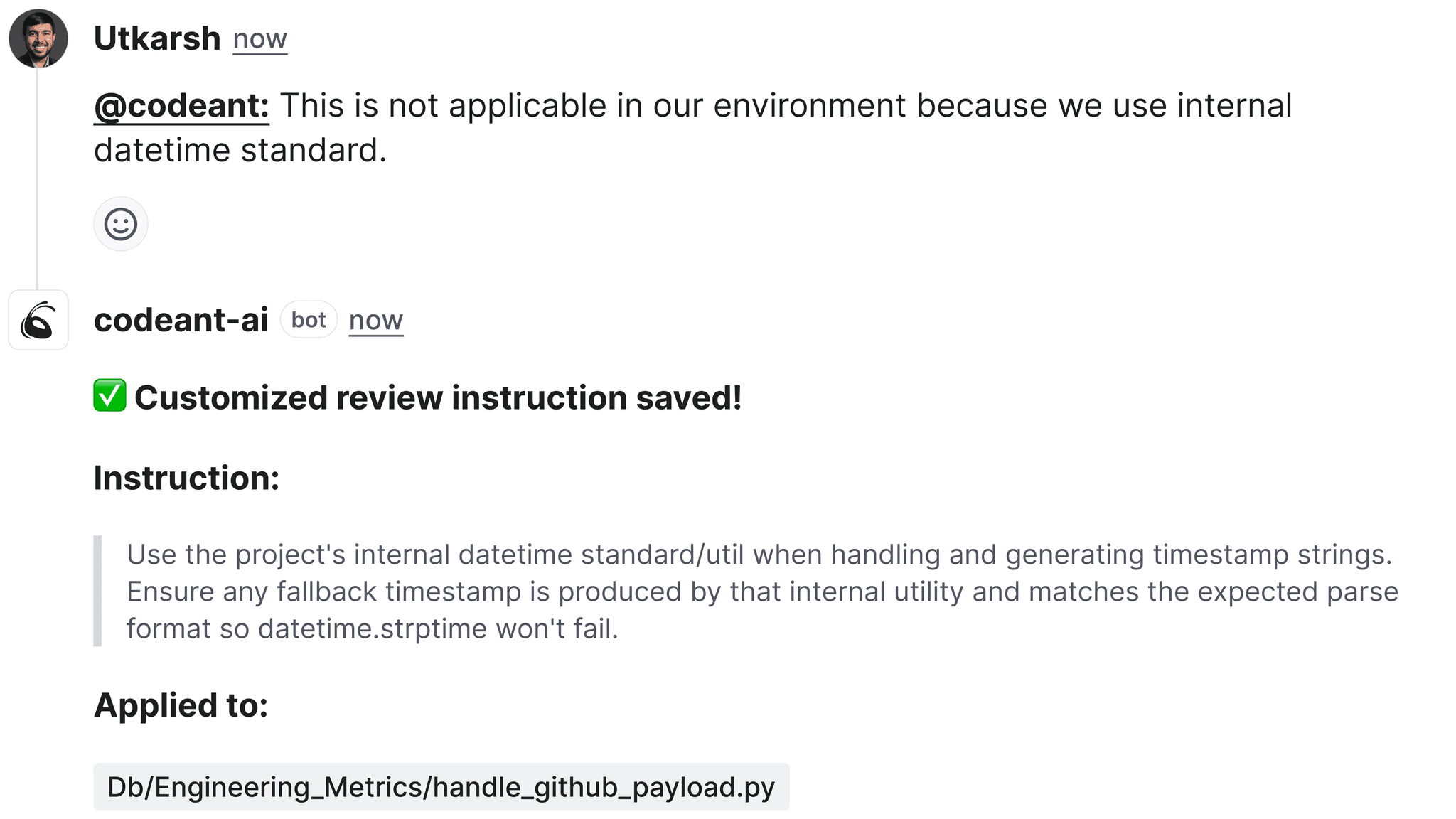
For automated enforcement, an AI code review tool like CodeAnt AI can validate that PR descriptions meet a minimum quality bar.
CodeAnt AI reads the PR description and linked work items as context for its review, so a well-filled template directly improves the quality of AI feedback by giving the tool more context about the intent behind the change.
When CodeAnt AI Auto-Generates PR Descriptions
One of the challenges with PR templates is that developers fill them out inconsistently, some write thorough descriptions, others check every box without reading it, and some delete the template entirely.
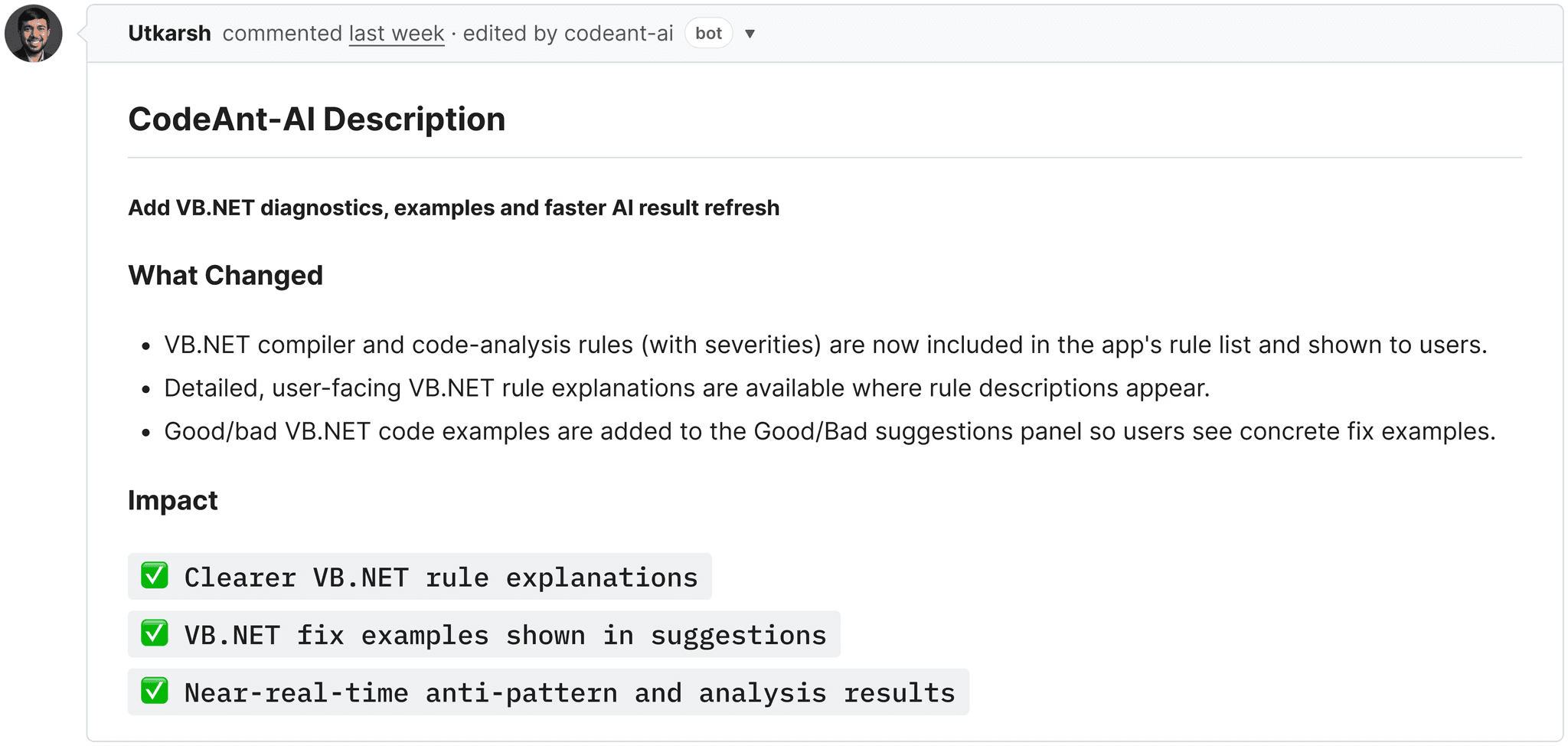
CodeAnt AI addresses this by auto-generating PR descriptions and summaries based on the actual code diff and linked work item context.
When a developer creates a PR with a blank or minimal description, CodeAnt AI generates:
A summary of what the PR does (derived from the diff, not copy-pasted from the commit message)
A description of why the change was made (derived from the linked work item)
A list of key changes organized by file and area
This doesn’t replace templates, it complements them. The ideal setup is: the template provides the structure and checklists (security review, testing evidence, deployment notes), and CodeAnt AI fills in the descriptive sections automatically. Authors still need to complete the checklists, but they no longer need to write the narrative portion from scratch.
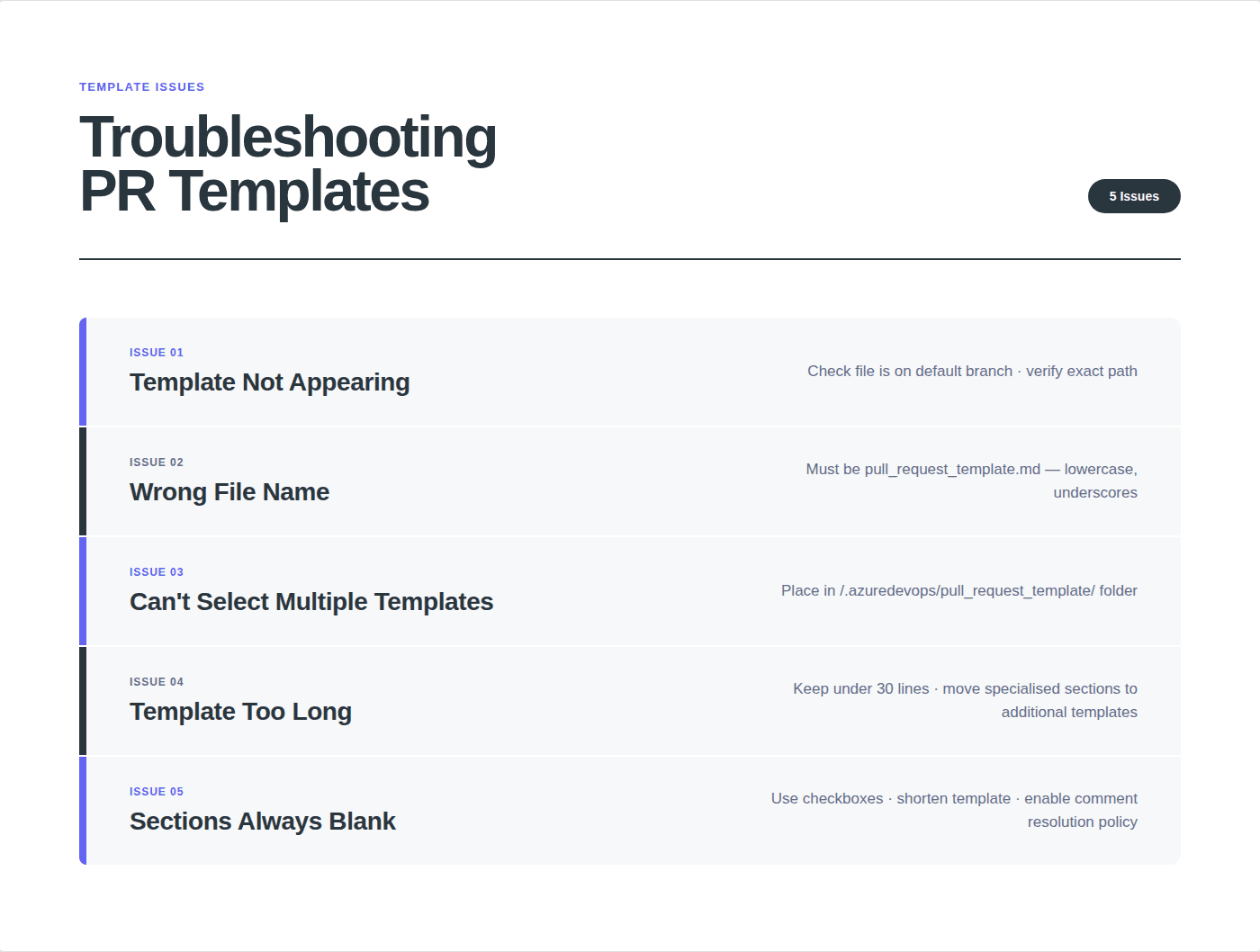
Wrong file location: The template file must be on the repo’s default branch (usually main). Templates on feature branches are ignored. Check that the file is at /.azuredevops/pull_request_template.md, not in a subfolder, not misspelled.
Wrong file name: The file must be named exactly pull_request_template.md (lowercase, underscores, not hyphens). PR_template.md, pull-request-template.md, and PullRequestTemplate.md won’t work.
Template committed to wrong branch: If you created the template on a feature branch and haven’t merged it to the default branch yet, it won’t take effect. Merge to main first.
Caching: Azure DevOps may cache the repository contents. After committing a template, wait a few minutes or hard-refresh the PR creation page.
“I have multiple templates but can’t select them”
Additional templates must be in the /.azuredevops/pull_request_template/ directory (note: this is a folder, not the file). Each .md file in this folder appears as a selectable option when creating a PR. If you only see the default template, check that your additional templates are in the correct subdirectory and that their file names end in .md.
“Branch-specific template isn’t overriding the default”
Branch-specific templates must be at: /.azuredevops/pull_request_template/branches/<branch-name>.md
The branch name must match exactly. For a branch called release/v2.0, the directory structure would be: /.azuredevops/pull_request_template/branches/release/v2.0.md
If the branch name contains characters that are invalid in file names on your OS, you may need to use a workaround, the default template will apply instead.
“Template is too long: developers skip it”
If your template has 50+ lines, developers stop reading it. The fix:
Keep your default template short (under 30 lines). Only include the sections that apply to every PR.
Move specialized sections into additional templates. Security checklists, database migration steps, and deployment notes should be in separate templates that developers select only when relevant.
Use HTML comments (<!-- instructions -->) for guidance text so it’s visible during editing but doesn’t clutter the rendered description.
“Template sections are always left blank”
This is a process problem, not a template problem. Solutions:
Enable “Check for comment resolution” in branch policies. Reviewers flag blank sections as comments that must be resolved.
Shorten the template. If a section is always blank, either make it optional (move to an additional template) or remove it entirely.
Use checkboxes instead of free text where possible. Checking a box takes 1 second; writing a paragraph takes 5 minutes. Developers will check boxes but skip paragraphs.
Use CodeAnt AI’s auto-generated PR descriptions to fill the narrative sections automatically, so developers only need to complete the checklists.
PR Templates Improve Reviews: But Context Still Matters
Pull request templates solve an important problem: every PR arrives with structured context instead of an empty description.
They help developers document:
What changed
Why the change exists
How it was tested
What reviewers should focus on
That alone can dramatically reduce review friction.
But templates have a limitation: they rely on humans to fill them out correctly.
In reality:
Some developers skip sections
Others check every box without verifying anything
Some delete the template entirely and write “minor fixes”
This is where automation becomes valuable. Tools like CodeAnt AIanalyze the pull request diff, the PR description, and linked Azure Boards work items to automatically generate summaries, highlight risky changes, and provide AI-driven review feedback directly inside the pull request.
The ideal workflow combines both:
Templates provide structure and checklists.
AI review provides analysis and validation.
Together they ensure that every pull request contains both context and intelligent review feedback before code reaches production.