Code Security
SAST for Azure DevOps: Integration Guide for Enterprise Teams

Sonali Sood

Founding GTM, CodeAnt AI
Azure DevOps is the development platform of choice for enterprise teams in automotive, manufacturing, financial services, and government organizations where compliance requirements, on-premises infrastructure, and Microsoft ecosystem investments make GitHub or GitLab impractical or impossible. Yet most SAST vendor documentation treats Azure DevOps as an afterthought. Integration guides focus on GitHub Actions and GitLab CI, with Azure DevOps relegated to a footnote: “also supported.”
This guide is the opposite. It is written specifically for enterprise teams running Azure DevOps, covering:
which SAST tools actually integrate well
how to configure pipeline-level scanning
how to enable PR-level feedback in Azure Repos
how to handle the enterprise-specific challenges (multi-repo scanning, on-prem Azure DevOps Server, data residency)
… that GitHub-focused guides never address.
For platform-agnostic CI/CD integration guidance that also covers GitHub Actions and GitLab CI, see the SAST CI/CD integration guide.
Why Azure DevOps Teams Need a Dedicated SAST Strategy
Azure DevOps differs from GitHub and GitLab in ways that matter for SAST integration. Understanding these differences prevents the common failure mode: installing a SAST tool that works well on GitHub but delivers a degraded experience on Azure DevOps.
Pipeline architecture is task-based, not action-based. Azure Pipelines use YAML-defined tasks with a different execution model than GitHub Actions or GitLab CI jobs. SAST tools that provide pre-built tasks in the Azure DevOps Marketplace integrate more cleanly than those requiring Docker-based workarounds or custom script steps.
PR feedback uses a different API. Azure Repos handles pull request comments and status checks differently from GitHub and GitLab. SAST tools that support “PR decoration” on GitHub may not have equivalent functionality for Azure Repos, meaning findings appear in a dashboard but not inline in the pull request where developers review code. This is the single most important integration quality to verify.
Enterprise features are standard, not premium. Azure DevOps includes branch policies, required reviewers, build validation, and artifact management in every tier. These features create natural integration points for SAST quality gates that do not require enterprise-tier licensing to configure.
On-premises deployment is common. Many enterprise Azure DevOps teams run Azure DevOps Server (formerly TFS) on-premises rather than Azure DevOps Services in the cloud. SAST tools must support this deployment model or risk being incompatible with a significant portion of the Azure DevOps market.
Which SAST Tools Support Azure DevOps? (Comparison Table)
“Supports Azure DevOps” means different things for different vendors. Some tools offer native Azure Repos integration with PR-level inline comments. Others offer a pipeline task that runs a scan but reports findings only in a separate dashboard. This distinction matters enormously for developer adoption. The table below breaks down the actual Azure DevOps integration quality for every major SAST tool. For the full comparison across all evaluation dimensions, see the SAST tools comparison.
Tool | Azure DevOps Support | PR Inline Comments | Marketplace Task | Pipeline CLI | On-Prem ADO Server |
CodeAnt AI | Native integration | Yes, inline in Azure Repos PRs | Via CLI task | ✓ | Contact vendor |
Checkmarx One | Native plugin | Yes, via ADO plugin | ✓ (Marketplace) | ✓ | ✓ |
Snyk | Pipeline integration | Partial, dashboard + some PR decoration | ✓ (Marketplace) | ✓ | No |
SonarQube | Native integration | Yes, via SonarQube extension | ✓ (Marketplace) | ✓ | ✓ |
Veracode | Pipeline integration | Limited, dashboard-centric | Community extension | ✓ | ✓ |
Semgrep | CLI-based | No native PR comments | Via CLI task | ✓ | ✓ (Enterprise) |
Fortify | Pipeline integration | Limited, SSC dashboard | ✓ (Marketplace) | ✓ | ✓ |
Mend.io | Pipeline integration | Partial, PR decoration available | ✓ (Marketplace) | ✓ | No |
GitHub Advanced Security for ADO | Native (GHAzDO) | Yes, via Advanced Security tab | ✓ (built-in) | ✓ | ✓ (ADO Server 2022+) |
GitLab SAST | Not supported | N/A | N/A | N/A | N/A |
Key takeaway: Only a handful of tools deliver the full experience on Azure DevOps, native PR inline comments, marketplace tasks, and on-prem support. Many tools that claim “Azure DevOps support” actually mean “you can run our CLI in a script step and view results in our dashboard.” Verify the PR comment experience before committing.
Step-by-Step: Adding SAST to Azure DevOps Pipelines
There are two primary integration patterns for adding SAST to Azure Pipelines. Both use the standard azure-pipelines.yml configuration.
Option 1: Extension Marketplace Integration
Most established SAST vendors publish extensions in the Azure DevOps Marketplace. This is the cleanest integration path: install the extension, add the task to your pipeline YAML, and configure credentials via Azure DevOps service connections.
The general pattern is: install the extension from the Marketplace → create a service connection in Project Settings → add the scan task to your pipeline YAML → configure branch triggers and PR validation. The specific task name and configuration parameters vary by vendor.
Option 2: CLI-Based Pipeline Task
For SAST tools that do not offer a marketplace extension (or when you want more control over the scan configuration), you can run the tool’s CLI directly in a pipeline script step. This works for any SAST tool that provides a command-line interface.
Important: Install the SARIF SAST Scans Tab extension to display analysis results directly in the pipeline’s Scans tab. Publishing SARIF files to the CodeAnalysisLogs artifact name enables automatic rendering in this tab, a native Azure DevOps feature that many teams overlook.
PR-Level Scanning in Azure Repos
Pipeline-level scanning catches vulnerabilities at build time. PR-level scanning catches them earlier, when the developer is still reviewing the code change and can fix issues immediately. This is the difference between “your build failed, go check the dashboard” and “here is the exact issue on line 47 with a suggested fix.”
For SAST tools that support Azure Repos PR decoration, PR-level scanning works by adding a build validation policy to your target branch. When a developer opens a PR, the pipeline runs automatically, and the SAST tool posts findings as inline comments on the specific lines of changed code.
To enable PR-triggered scanning, configure a build validation policy in Azure DevOps:
navigate to Project Settings → Repositories → select your repository → Policies → Branch Policies for your target branch (e.g., main) → Build Validation → add your SAST pipeline as a required build. Set the trigger to “Automatic” and the policy requirement to “Required” if you want to block merges on critical findings.
The quality of PR-level feedback varies dramatically between tools. Native integrations post findings as inline comments on the exact changed lines. CLI-based integrations may only post a summary comment or status check. When evaluating tools for Azure DevOps, always test the PR experience, it is the primary interface developers interact with.
Setting Up Security Gates and Branch Policies
Azure DevOps branch policies provide a natural enforcement mechanism for SAST quality gates. Unlike GitHub and GitLab, where status checks and protected branch rules require specific configurations, Azure DevOps builds branch policies into the platform’s core workflow.
Build validation as a SAST gate
The build validation policy you configured for PR scanning doubles as a security gate. If the SAST scan fails (critical findings detected, scan error), the PR cannot be merged. This enforces the “no known critical vulnerabilities in production” policy automatically.
Configuring failure criteria
Most SAST tools allow you to define what constitutes a scan failure: any critical finding, any high-or-above finding, new findings only (ignoring pre-existing baseline issues), or findings exceeding a specific count. Start with critical-only gating and expand the threshold as your team matures. Blocking on all findings from day one creates merge gridlock and destroys developer trust.
Required reviewers for security findings
Azure DevOps supports automatic reviewer assignment based on file paths. You can configure a security team member as a required reviewer when the SAST scan produces findings above a threshold, creating a human-in-the-loop approval for security decisions without slowing down clean PRs.
Status check integration
SAST tools that post status checks to Azure Repos PRs enable the branch policy to distinguish between “scan passed” and “scan found issues.” This is more granular than build pass/fail and allows policies like “merge is allowed with medium findings but blocked with critical findings.”
Common Pitfalls for Enterprise Azure DevOps Teams
Multi-Repo Scanning at Scale
Enterprise Azure DevOps organizations commonly manage 50–500+ repositories across multiple projects. Enabling SAST across all repositories requires a strategy beyond “add the task to each pipeline manually.”
The most effective approach is a shared pipeline template. Azure DevOps supports template references across repositories, you define the SAST configuration once in a central template repository, and every project pipeline references it. When you update the SAST configuration (new tool version, changed threshold), the update propagates to all pipelines automatically.
This pattern is essential for organizations with compliance requirements that mandate SAST scanning across all repositories, it ensures consistent configuration and prevents individual teams from disabling or misconfiguring the scan.
On-Prem Azure DevOps Server vs. Cloud
Many enterprise teams run Azure DevOps Server (formerly Team Foundation Server) on-premises rather than Azure DevOps Services in the cloud. This creates SAST integration challenges that cloud-only guides ignore entirely.
SAST tools that require cloud API endpoints (SaaS-only tools) will not work with on-prem Azure DevOps Server unless the server has outbound internet access, which many regulated environments restrict. Verify that your chosen SAST tool supports one of these deployment models: a self-hosted scanner that runs on your build agents without external API calls, or a hybrid model where the scanner runs locally but reports to a cloud dashboard through an approved egress path.
Microsoft’s GitHub Advanced Security for Azure DevOps (GHAzDO) supports Azure DevOps Server 2022 and later, but requires Azure DevOps Server to be connected to Azure. For fully air-gapped environments, GHAzDO is not an option, you need a SAST tool that can run entirely on-premises. For deeper guidance on on-premises deployment considerations, see on-prem SAST deployment options.
Data Residency Considerations
Enterprise teams in regulated industries (financial services, healthcare, government, EU-based organizations) often face data residency requirements that restrict where source code can be processed. SaaS-based SAST tools that upload source code to external servers for scanning may violate these requirements.
When evaluating SAST tools for data-sensitive Azure DevOps environments, verify three things. First, where does the scan execute, on your build agent or on the vendor’s infrastructure? Agent-based scanning keeps code within your network boundary. Second, what data is transmitted to the vendor, just scan results, or source code? Some tools send code snippets for AI analysis. Third, where is the vendor’s infrastructure located, and does it comply with your data residency requirements (GDPR, FedRAMP, data sovereignty regulations)?
SAST tools that scan entirely on the build agent and transmit only findings metadata (not source code) to the vendor’s dashboard provide the strongest data residency posture for enterprise Azure DevOps teams.
How CodeAnt AI Integrates with Azure DevOps
CodeAnt AI provides native Azure DevOps integration, not a CLI workaround with dashboard-only results, but a full PR-native experience equivalent to what GitHub and GitLab teams get.
PR inline comments in Azure Repos
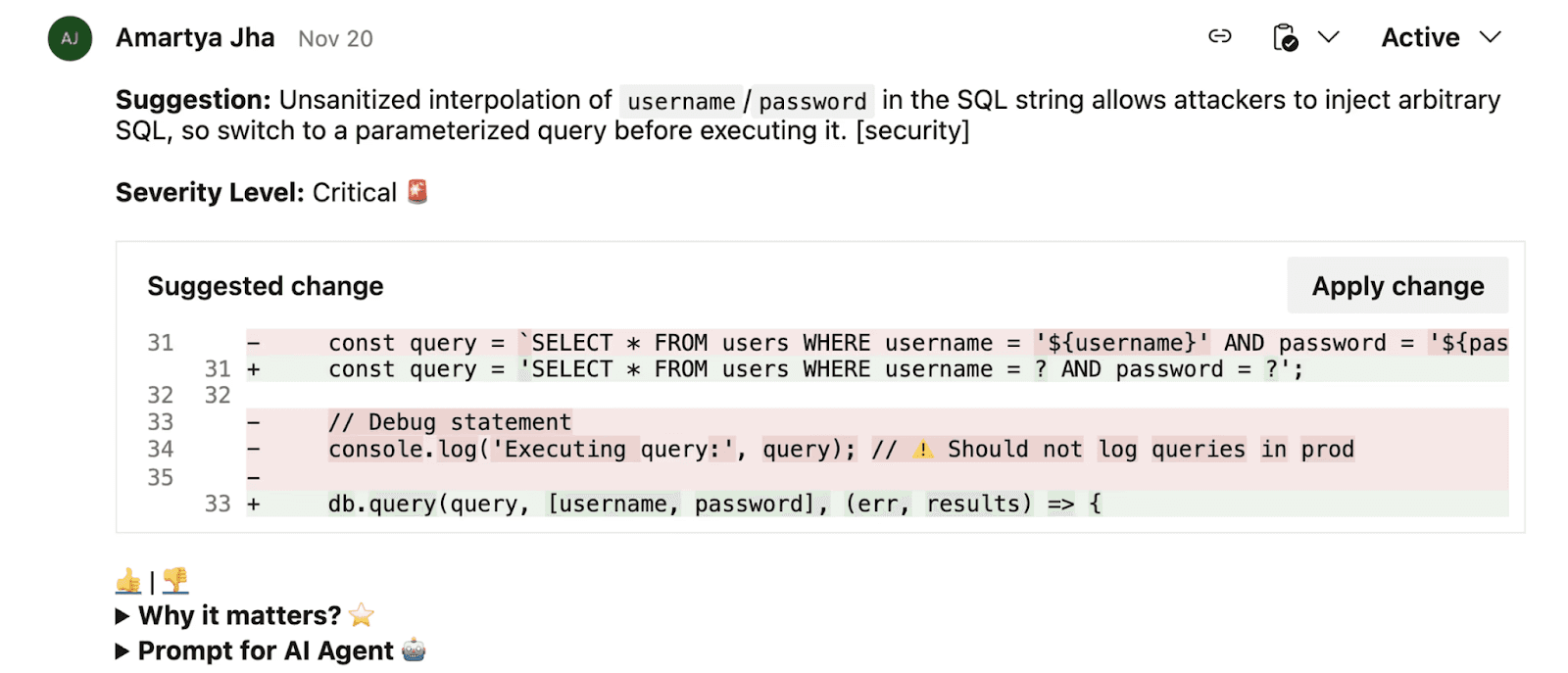
Every finding, security vulnerabilities, code quality issues, review comments, appears as an inline comment directly in the Azure DevOps pull request, on the specific changed line. Developers see findings in the same interface they use for code review, not in a separate dashboard they need to remember to check.
All scanning in one tool
SAST, SCA, secrets detection, IaC scanning, and AI code review run in a single scan per PR. This replaces the enterprise pattern of running Checkmarx for SAST, Snyk for SCA, and a separate secrets scanner, each requiring separate Azure DevOps marketplace extensions, separate service connections, and separate dashboard logins. For the full consolidation case, see SAST Tool Consolidation: Replace 3 Tools with 1.
Steps of Reproduction in every finding
Where other SAST tools post a CWE number and line reference in the PR comment, CodeAnt AI provides the full attack path, the exact conditions needed to trigger the vulnerability, the exploitation scenario, and a one-click AI-generated fix.
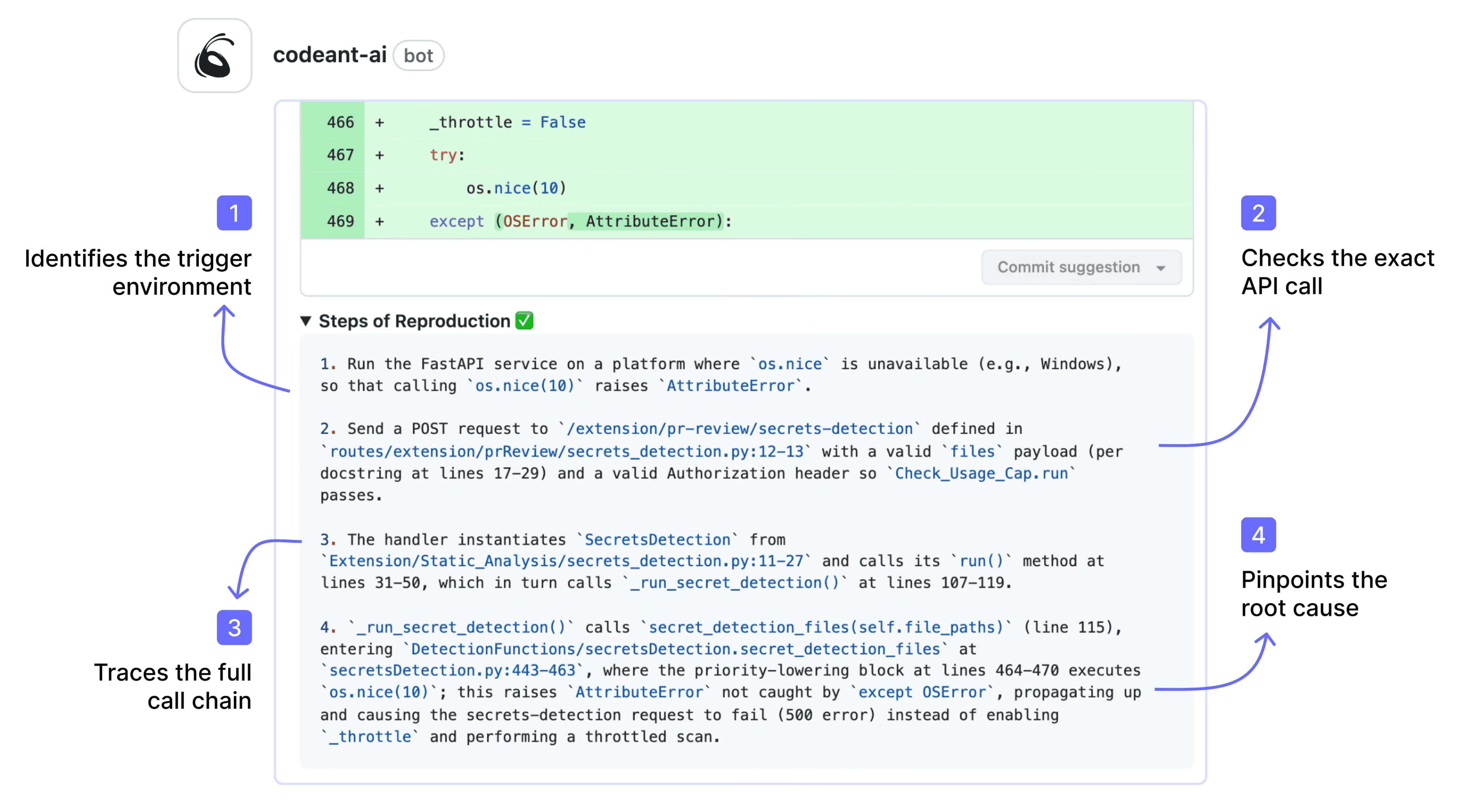
This transforms the developer’s response from “let me investigate if this is real” to “let me review the evidence and apply the fix.”
EPSS-based prioritization
Findings are prioritized by EPSS (Exploit Prediction Scoring System) probability rather than generic severity labels.
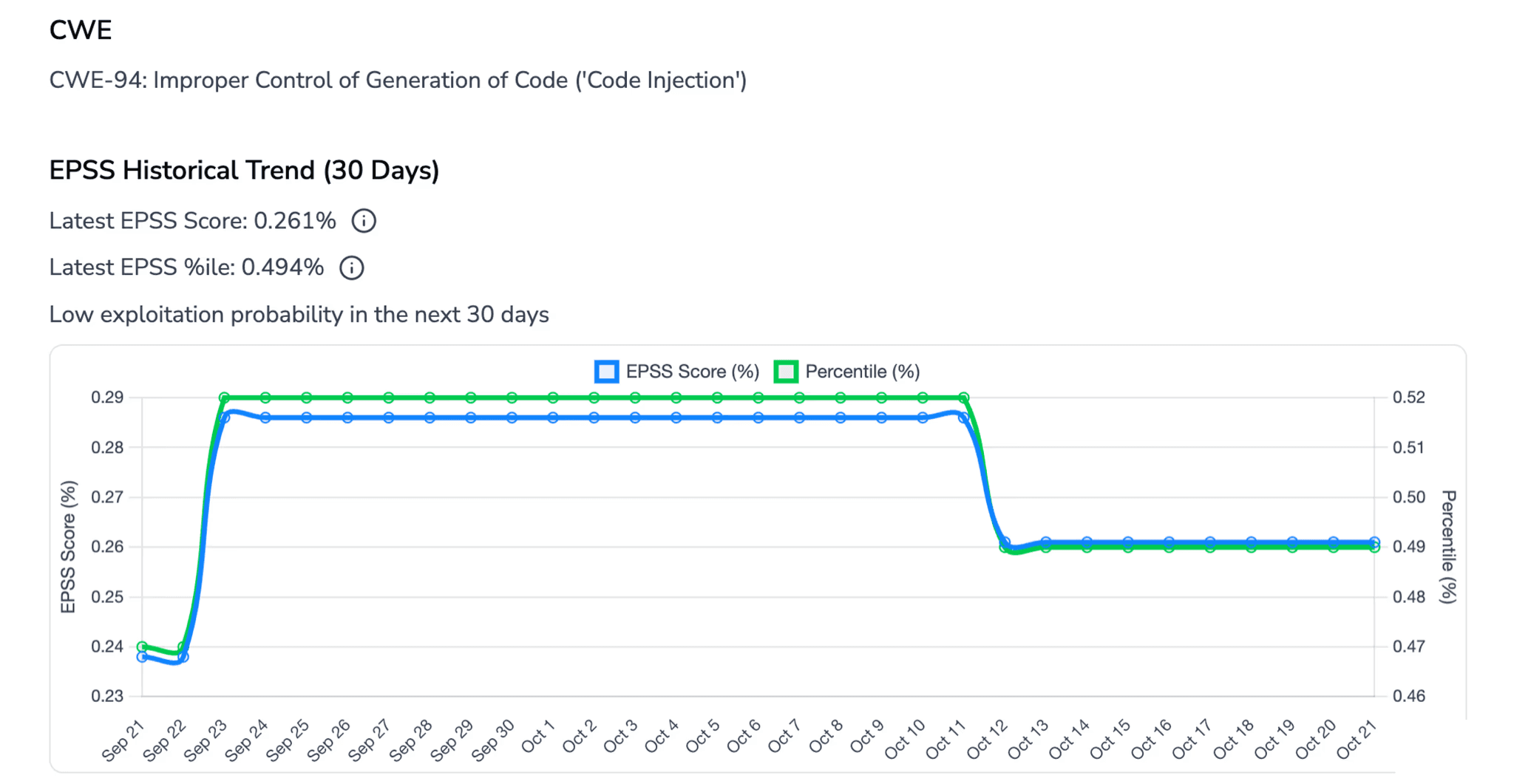
In an Azure DevOps environment with hundreds of repositories generating thousands of findings, this prioritization prevents alert fatigue by surfacing the vulnerabilities most likely to be exploited first.
Within the Azure DevOps ecosystem specifically, CodeAnt AI's end-to-end workflow maps to native Azure tooling at every stage: CLI pre-commit hooks and local scanning run alongside Azure Repos, IDE integration covers Visual Studio and VS Code (the primary Azure developer environments), PR-native scanning triggers on Azure DevOps pull requests with inline comments and one-click fixes, Azure DevOps Pipelines gates enforce security and quality thresholds with configurable fail conditions, and the SecOps dashboard integrates with Azure Boards for remediation ticketing, so every finding flows into the same work item tracking that Azure DevOps teams already use. For teams operating entirely within the Microsoft ecosystem, this means zero context switching between security tooling and development tooling.
Also, check out some kickass ADO alternatives here.
Conclusion: Azure DevOps Deserves First-Class SAST
Most SAST guides are written for GitHub. Enterprise teams running Azure DevOps are left stitching together CLI scripts and dashboard links.
That approach does not scale.
Effective Azure DevOps SAST requires three things:
PR-level inline feedback in Azure Repos
Pipeline-level enforcement through branch policies
Support for on-prem and enterprise constraints
If your current tool only runs in a script step and pushes results to a separate dashboard, developers will ignore it.
Test the PR experience
Test the branch gate
Test the scalability across 50+ repositories
Set up a pilot in Azure DevOps and evaluate the difference on real pull requests.
Start a 14-day trial or book a walkthrough to see how native Azure DevOps SAST should work.
FAQs
Does Azure DevOps support SAST natively?
How do you add SAST to Azure DevOps Pipelines?
Can SAST block pull requests in Azure DevOps?
Does SAST work with Azure DevOps Server (on-prem)?
What should enterprise teams verify before choosing a SAST tool for Azure DevOps?













