Code Security
How CVE 2026 28292 Enabled Remote Code Execution in simple git

Sonali Sood

Founding GTM, CodeAnt AI
Security bugs rarely announce themselves.
Most of the time, the code responsible for a vulnerability looks perfectly reasonable. It compiles. It passes tests. It appears to enforce the intended restriction.
That’s exactly what happened with CVE-2026-28292, a critical remote code execution vulnerability affecting the Node.js library simple-git.
At first glance, the library already had a defensive mechanism designed specifically to prevent this attack.
The plugin was literally called:
The intention was clear: prevent attackers from enabling dangerous Git transport protocols.
Yet despite this protection, attackers could still achieve arbitrary command execution.
The reason wasn’t missing security logic.
The reason was a subtle mismatch between the security control and the system it was protecting.
Understanding how that mismatch occurred requires walking through the plugin line by line.
And that’s exactly what we’re going to do.
Where the Security Control Lives
Inside the simple-git codebase, a plugin intercepts Git commands before execution.
Simplified architecture:

The security plugin acts as a gatekeeper.
It inspects command arguments before they reach Git.
If the plugin detects a configuration override enabling unsafe protocols, it blocks execution.
This plugin was added after earlier vulnerabilities in simple-git allowed attackers to enable the ext:: protocol.
Why the ext Protocol Is Dangerous
The Git ext:: transport protocol allows arbitrary command execution.
Example:
Git interprets this as:
Which becomes:
Any system that accepts user-controlled Git URLs must block this behavior.
That’s why the plugin attempts to block configuration overrides that enable it.
The Plugin Entry Point
Inside the plugin, arguments are inspected before execution.
Simplified code:
This function evaluates every Git argument.
If it detects a configuration override enabling dangerous protocols, it throws an exception.
This stops the command from executing.
On the surface, this looks correct.
But subtle assumptions inside the regex create the vulnerability.
Understanding the Regex
The regex used for detection is:
Let’s break it down.
Component | Meaning |
|---|---|
^ | Start of string |
\s* | Optional whitespace |
protocol | Match the word protocol |
(.[a-z]+)? | Optional suffix |
.allow | Match |
The regex attempts to detect keys like:
These configuration keys enable Git protocols.
If matched, the plugin blocks execution.
Visualizing the Detection Logic
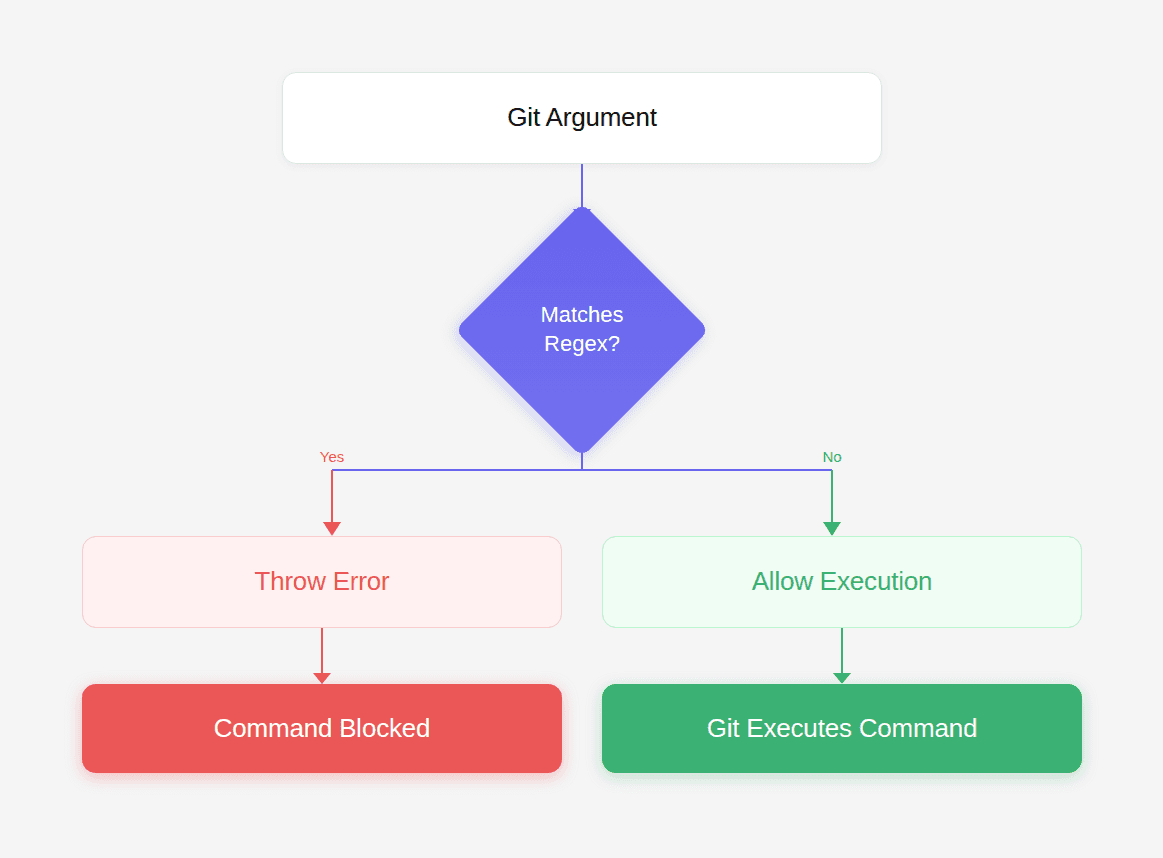
Everything depends on whether the argument matches the regex.
And that’s where the vulnerability hides.
The Hidden Weakness
Look closely at this part of the regex:
This means:
The regex is case-sensitive.
But Git configuration keys are case-insensitive.
Git internally normalizes keys to lowercase.
Example:
Output:
Git treats these inputs identically:
But the regex only matches the first.
Why the Filter Fails
This creates a classic case-sensitivity mismatch.
The filter assumes casing matters.
Git ignores casing entirely.
Attackers exploit that mismatch.
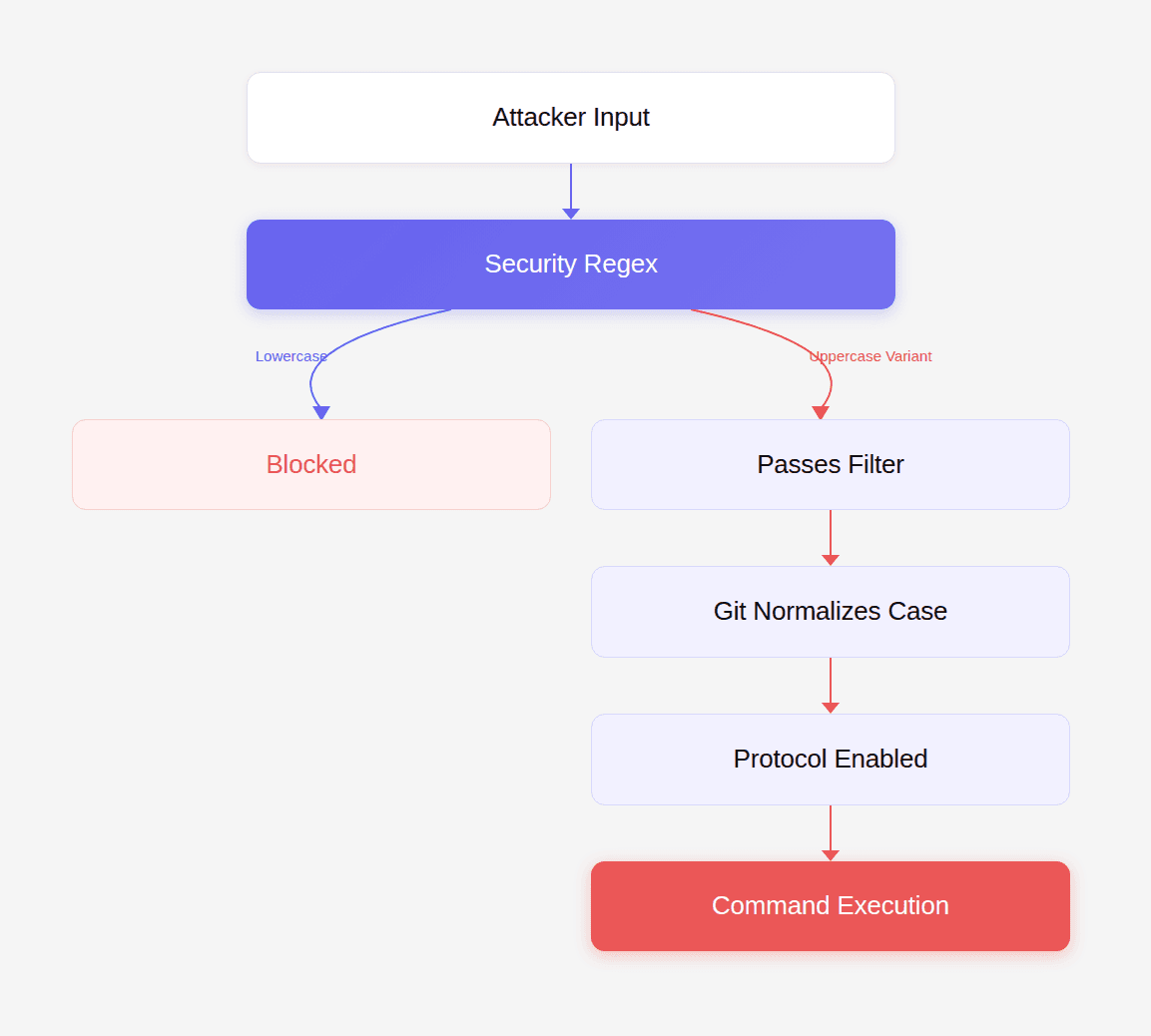
A simple capitalization bypasses the control.
Walking the Execution Path
Let’s trace a real attack step by step.
Step 1: Attacker supplies argument
Step 2: Plugin evaluates argument
Since the string begins with uppercase letters, the regex does not match.
The plugin returns early.
Meaning the argument passes through.
Step 3: Git receives the argument
Git processes the configuration override:
Internally Git converts it to:
Step 4: Dangerous protocol becomes enabled
Now Git accepts URLs such as:
Which leads to command execution.
Building the Exploit
To exploit this vulnerability, the attacker must:
Enable the protocol override
Supply an ext transport URL
Example exploit code:
When executed, Git runs:
File /tmp/pwned appears on the host system.
This confirms remote code execution.
Realistic Attack Scenario
Many applications use simple-git in automation pipelines.
Example:
If args is user controlled, the attacker sends:
And repository:
The server executes the payload.
Post-Exploitation Impact
Once command execution is achieved, attackers can:
steal credentials
dump SSH keys
install persistence
pivot to other infrastructure
Because the exploit runs with the Node.js process permissions, the attacker often gains access to:
API keys
database credentials
deployment tokens
cloud metadata
Why This Bug Is Hard to Spot
The code itself looks correct.
The plugin exists.
The regex appears reasonable.
But security failures often occur at system boundaries, not within individual lines of code.
In this case the boundary was between:
Traditional static analysis tools rarely reason about external system behavior.
They analyze code syntax.
But vulnerabilities like this exist at the interaction layer between components.
The Role of AI in Discovering This Bug
During internal research, CodeAnt AI analyzed patches for previously disclosed vulnerabilities.
Instead of checking only whether a patch existed, the system asked a deeper question:
When scanning the plugin, the AI flagged the [a-z] character class guarding a case-insensitive system.
That anomaly triggered manual investigation.
Within an hour, researchers confirmed full remote code execution.
This type of reasoning — connecting code logic with external system semantics — is exactly where traditional rule-based tools struggle.
Fixing the Vulnerability
The simplest fix is to make the regex case-insensitive.
Original:
Fixed:
The /i flag enables case-insensitive matching.
Now all variants are detected.
A More Secure Approach
Better security controls avoid regex entirely.
Example:
Normalizing input eliminates the mismatch.
Developer Security Checklist
When writing security filters:
Normalize input before validation
Avoid case-sensitive comparisons for case-insensitive systems
Prefer explicit parsing over regex
Test filters using mixed-case input
Review assumptions about external system behavior
These steps help prevent entire classes of bypass vulnerabilities.
Conclusion: The Kind of Bug Code Review Is Supposed to Catch
CVE-2026-28292 wasn’t caused by complex cryptography or obscure memory corruption.
It was caused by a single incorrect assumption about case sensitivity.
The security control existed.
The code looked correct.
Yet the vulnerability still slipped through.
This illustrates why the role of code review tools is evolving.
For years, automated code review has focused on improving developer productivity:
naming suggestions
formatting improvements
refactoring hints
But those are not the moments developers truly value.
The moment that matters is when a tool stops a pull request because it detected a critical vulnerability nobody else noticed.
The discovery of this vulnerability began when CodeAnt AI’s code reviewer flagged the semantic mismatch between a regex security filter and Git’s case-insensitive behavior.
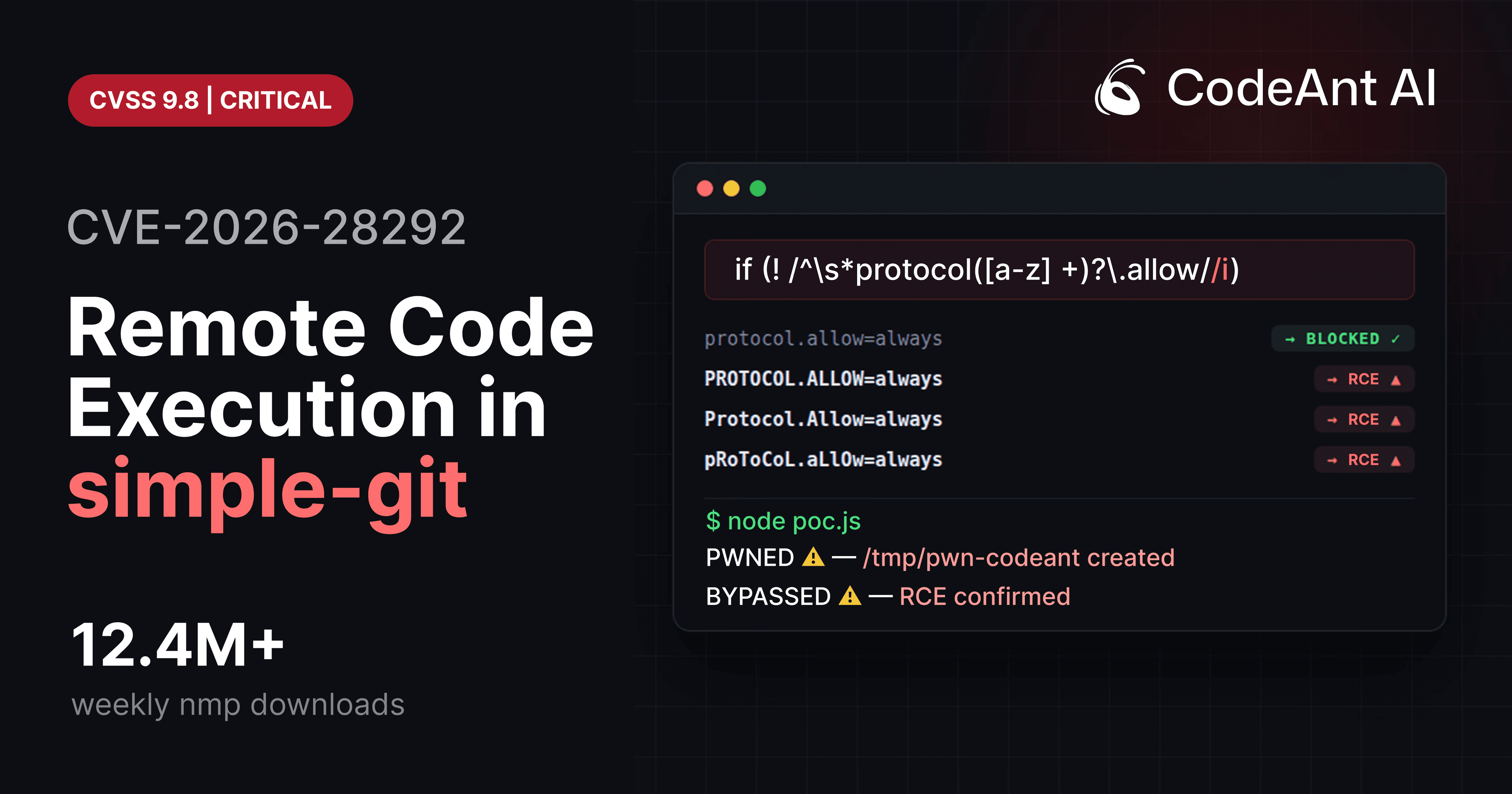
That small signal led to a full exploit chain and ultimately a critical CVE.
This is where the future of AI code review is heading.
Not toward surface-level suggestions.
But toward identifying the deep logic flaws that traditional tools and human reviewers often miss.
Because sometimes the difference between a secure system and a remote code execution exploit is just one missing character.
FAQs
Why does Git treat configuration keys as case-insensitive?
Why didn’t the security plugin catch uppercase variants?
Could this vulnerability affect CI/CD systems?
What makes vulnerabilities like this difficult for static analysis tools to detect?
How can developers audit their code for similar vulnerabilities?