Code Security
How Security Filters Fail in Real World Software

Sonali Sood

Founding GTM, CodeAnt AI
Security filters are everywhere in modern software.
Every application contains them:
input validation
authentication checks
command restrictions
path filters
protocol guards
deserialization controls
They exist for one reason:
to stop dangerous input from reaching sensitive systems.
But the uncomfortable reality is this:
security filters fail far more often than developers realize.
Not because developers forget to write them.
But because the filter and the system it protects often do not interpret input the same way.
That gap between the filter's assumptions and the system's behavior is where many real-world vulnerabilities live.
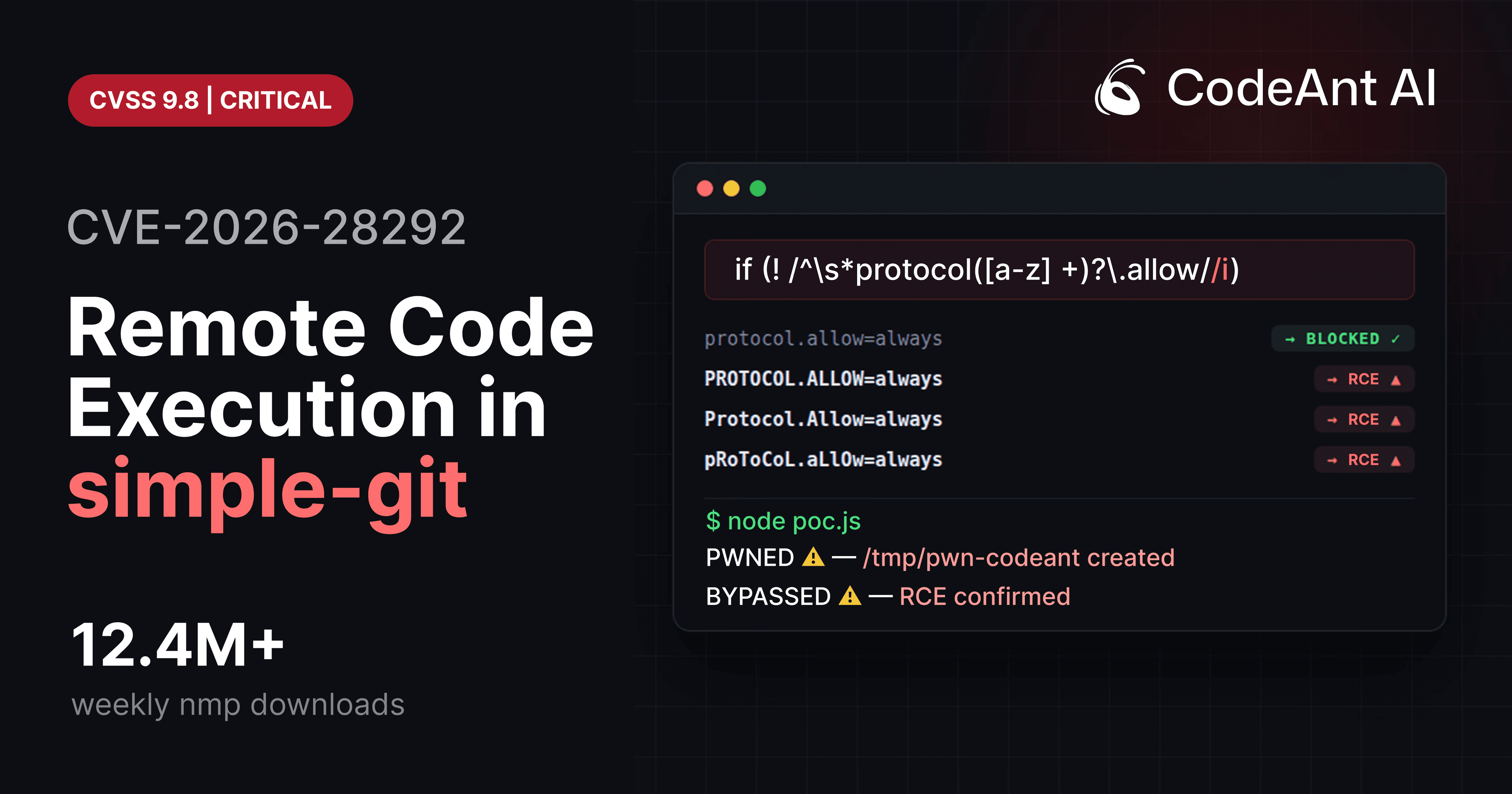
A perfect example appeared recently in CVE-2026-28292, a critical remote code execution vulnerability affecting the Node.js library simple-git, used in over 12 million weekly installations.
The vulnerability itself looked trivial.
A regular expression intended to block dangerous Git configuration overrides used a case-sensitive character class.
Git configuration keys, however, are case-insensitive.
That mismatch allowed attackers to bypass the filter and execute arbitrary shell commands through Git's ext:: protocol.
The bug was small.
The consequences were enormous.
But the most interesting lesson from CVE-2026-28292 isn't the regex mistake.
It's the deeper truth it reveals:
security filters are often far more complex than they appear.
Why Security Filters Fail More Often Than We Think
At a high level, security filters follow a simple model:
The filter checks the input and blocks anything dangerous before it reaches the underlying system.
In theory this works perfectly.
In practice the filter often misunderstands how the protected system behaves.
This creates what security researchers call a semantic mismatch.
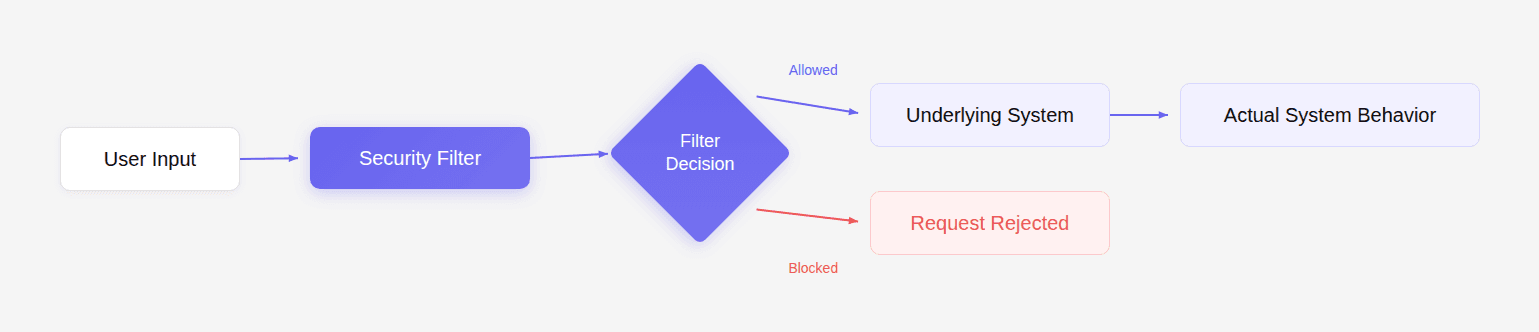
If the filter's assumptions do not match the system's behavior, attackers can craft input that bypasses the filter but is still interpreted as dangerous by the system.
This exact pattern appears again and again in security vulnerabilities.
CVE-2026-28292 is simply one recent example.
The Filter That Looked Correct
The security control inside simple-git attempted to block protocol overrides.
Simplified implementation:
The goal was to stop Git configuration options such as:
These options enable dangerous transport protocols like ext::.
If attackers enable that protocol, they can run arbitrary commands.
So the filter blocks those configuration keys.
At first glance, the code looks correct.
But the flaw hides in a small detail.
The regex contains:
Which means the pattern only matches lowercase letters.
The System Behind the Filter
Git configuration keys are case-insensitive.
Git internally normalizes them to lowercase.
Example:
Output:
Git treats all of the following as identical:
But the regex filter only catches the first.
This means the filter's model of the world looks like this:
But Git's model looks like this:
The difference creates the exploit.
How the Bypass Leads to Remote Code Execution
Attackers can exploit the mismatch by enabling Git's ext transport protocol.
The ext protocol allows arbitrary command execution.
Example payload:
Combined with the bypass configuration:
Git executes the command locally.
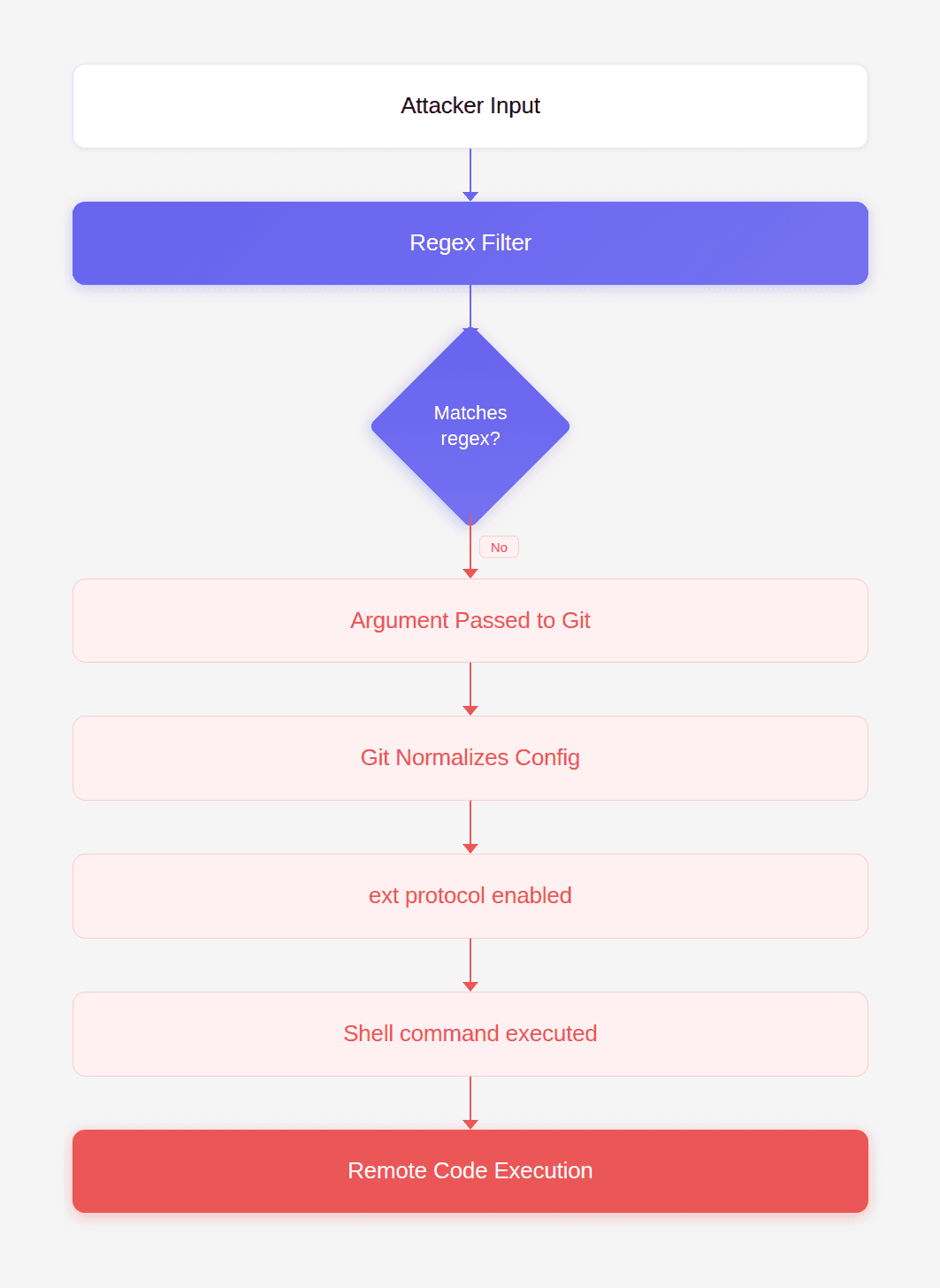
This is how CVE-2026-28292 enables full system compromise.
Security Filters Are Always Simplifications
The real lesson from this vulnerability is not about Git.
It is about how all security filters simplify reality.
Developers often assume the filter understands the system perfectly.
But filters are just small pieces of logic.
The underlying system may have dozens of rules the filter does not replicate.
When those models diverge, security breaks.
Other Real-World Filter Failures
This pattern appears across the entire software ecosystem.
Let's look at several well-known examples.
Example 1: Path Traversal Filters
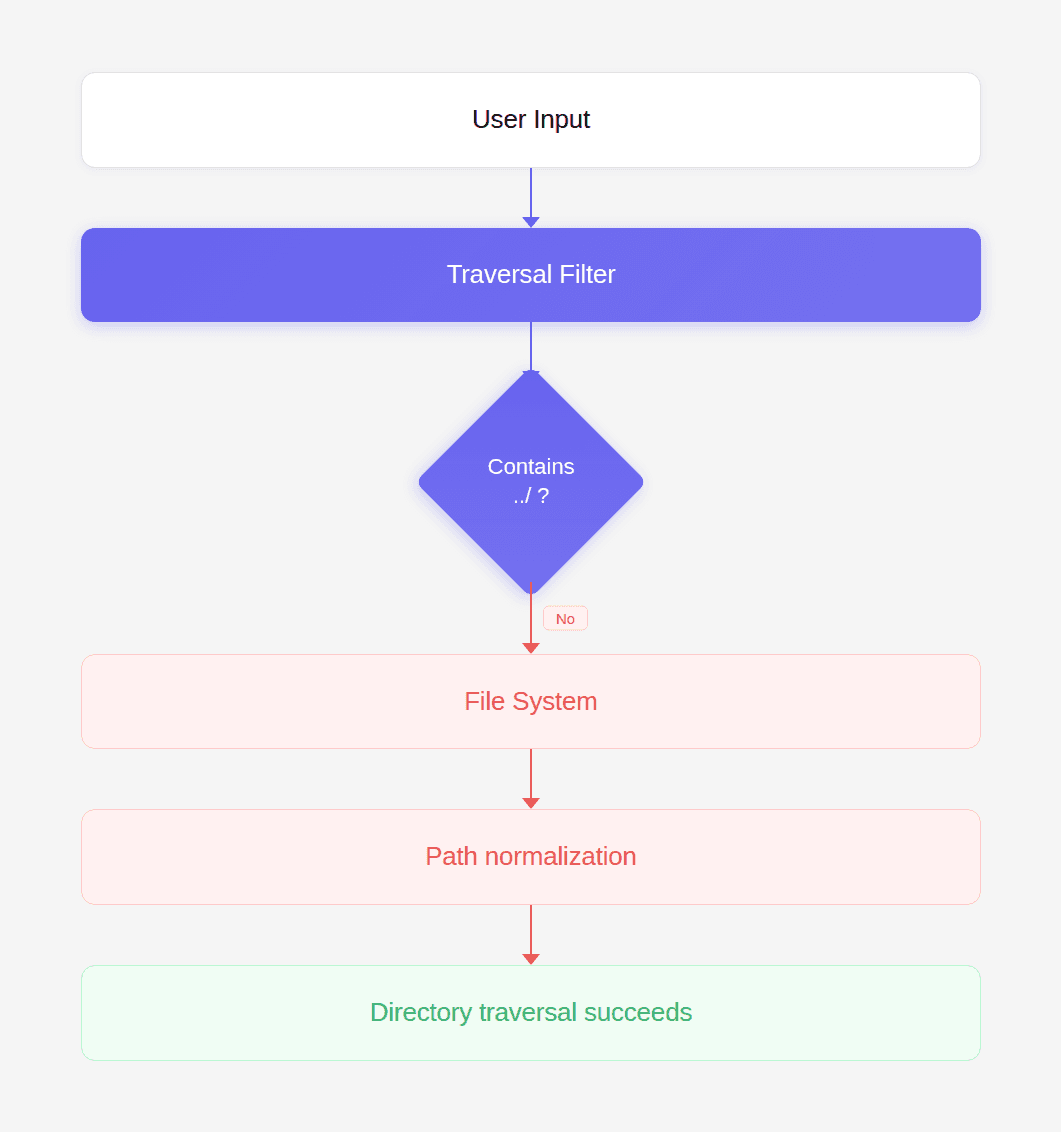
A common filter blocks ../ sequences to prevent directory traversal.
Example code:
But attackers can bypass this with alternate encodings:
The file system interprets these as traversal sequences even though the filter does not.
Example 2: HTML Tag Filters
Some web filters block <script> tags.
Example filter:
But HTML is case-insensitive.
Attackers use:
Browsers interpret it exactly the same way.
Example 3: SQL Injection Filters
Early filters attempted to block the keyword UNION.
Example:
Attackers quickly bypassed this with variations:
The SQL parser still recognizes the keyword.
Example 4: Windows File Paths
Windows file systems are case-insensitive.
Filters that assume case sensitivity can be bypassed.
Example:
Both refer to the same location.
The Pattern Behind All These Bugs
All these vulnerabilities share the same root cause:
the filter and the system interpret input differently.
This can occur due to:
Difference | Example |
|---|---|
case sensitivity | CVE-2026-28292 |
encoding | path traversal |
normalization | URL decoding |
syntax rules | SQL parsing |
protocol semantics | Git ext transport |
Whenever a security filter fails to fully model the underlying system, attackers gain room to maneuver.
Why Traditional Security Tools Miss These Bugs
Most security tools rely on pattern detection.
They search for known vulnerable APIs, unsafe functions, or specific syntax patterns.
But semantic mismatches are not patterns.
They require understanding relationships between:
the filter
the protected system
the data flow between them
This is precisely why the vulnerability in CVE-2026-28292 remained unnoticed until deeper analysis was performed.
During internal security research, CodeAnt AI's code reviewer flagged the regex because it was guarding a system known to treat configuration keys case-insensitively.
That observation triggered a manual review.
Within an hour, researchers confirmed the remote code execution exploit.
This is the type of issue traditional static analysis rules rarely detect.
Why This Matters for Modern Code Review
Code review gates exist to catch the rare, catastrophic bug before it reaches production.
But most automated review tools today optimize for developer convenience.
They suggest:
variable renaming
formatting changes
minor refactors
style improvements
Useful suggestions, but not the moments developers remember.
Developers remember the moment when a review tool stops a pull request because it discovered something dangerous.
A subtle authentication flaw.
A race condition.
A logic bug that leads to privilege escalation.
Or a security filter that silently fails under a slightly different input.
Those findings change how teams trust their tooling.
The discovery of CVE-2026-28292 illustrates exactly where the future of AI-assisted code review is heading.
Not toward prettier code.
But toward discovering vulnerabilities that nobody has formally documented yet.
Designing Security Filters That Actually Work
Developers can significantly reduce these risks by following several principles.
Normalize Input Before Validation
Always normalize inputs before applying security checks.
Example:
Then apply validation rules.
Prefer Allowlists Over Denylists
Instead of blocking dangerous values, allow only known safe ones.
Example:
Avoid Regex-Only Security Filters
Regex filters are easy to bypass because they rarely capture the full grammar of a system.
Use proper parsers where possible.
Understand the Target System
Filters must match the behavior of the system they protect.
That includes:
case sensitivity
normalization rules
encoding behavior
parsing logic
Why This Problem Is Growing
Modern applications increasingly rely on external systems:
Git
container runtimes
package managers
databases
message queues
cloud APIs
Every integration introduces new semantics that filters must understand.
The complexity multiplies quickly.
And that means subtle mismatches become more common.
Conclusion: The Security Bug Hidden in Plain Sight
CVE-2026-28292 demonstrates how easily security filters can fail.
The code looked reasonable.
The patch had already been written.
The library had already fixed the original vulnerability.
Yet a single assumption about case sensitivity reopened the entire attack surface.
This type of vulnerability is exactly why code review gates exist.
Not to debate naming conventions.
Not to suggest formatting improvements.
But to stop the rare bug that could compromise an entire system.
During internal research, CodeAnt AI's code reviewer surfaced the flaw because it reasoned about how the regex filter interacted with Git's case-insensitive configuration system.
That reasoning led directly to the discovery of a critical RCE vulnerability affecting millions of installations. And it illustrates something important about the future of automated code review. The tools that matter most will not be the ones that help developers write prettier code. They will be the ones that catch the vulnerability nobody else realized existed.
FAQs
What exactly made CVE-2026-28292 a critical vulnerability?
Why are case-sensitivity bugs so dangerous in security controls?
How common are semantic mismatches like the one in CVE-2026-28292?
How can developers test their security filters for bypasses?
What role can AI code review play in detecting these vulnerabilities?