Code Security
How a Missing /i Flag in a Regex Enabled Remote Code Execution

Sonali Sood

Founding GTM, CodeAnt AI
Security vulnerabilities sometimes hide in the most mundane places.
Not cryptographic primitives.
Not complex memory corruption bugs.
Sometimes the entire exploit chain begins with one missing character in a regular expression.
In early 2026, a vulnerability discovered by CodeAnt AI researchers demonstrated exactly this: a single missing /i flag in a regex inside the widely used Node.js library simple-git enabled attackers to bypass security controls and execute arbitrary commands on the host machine.
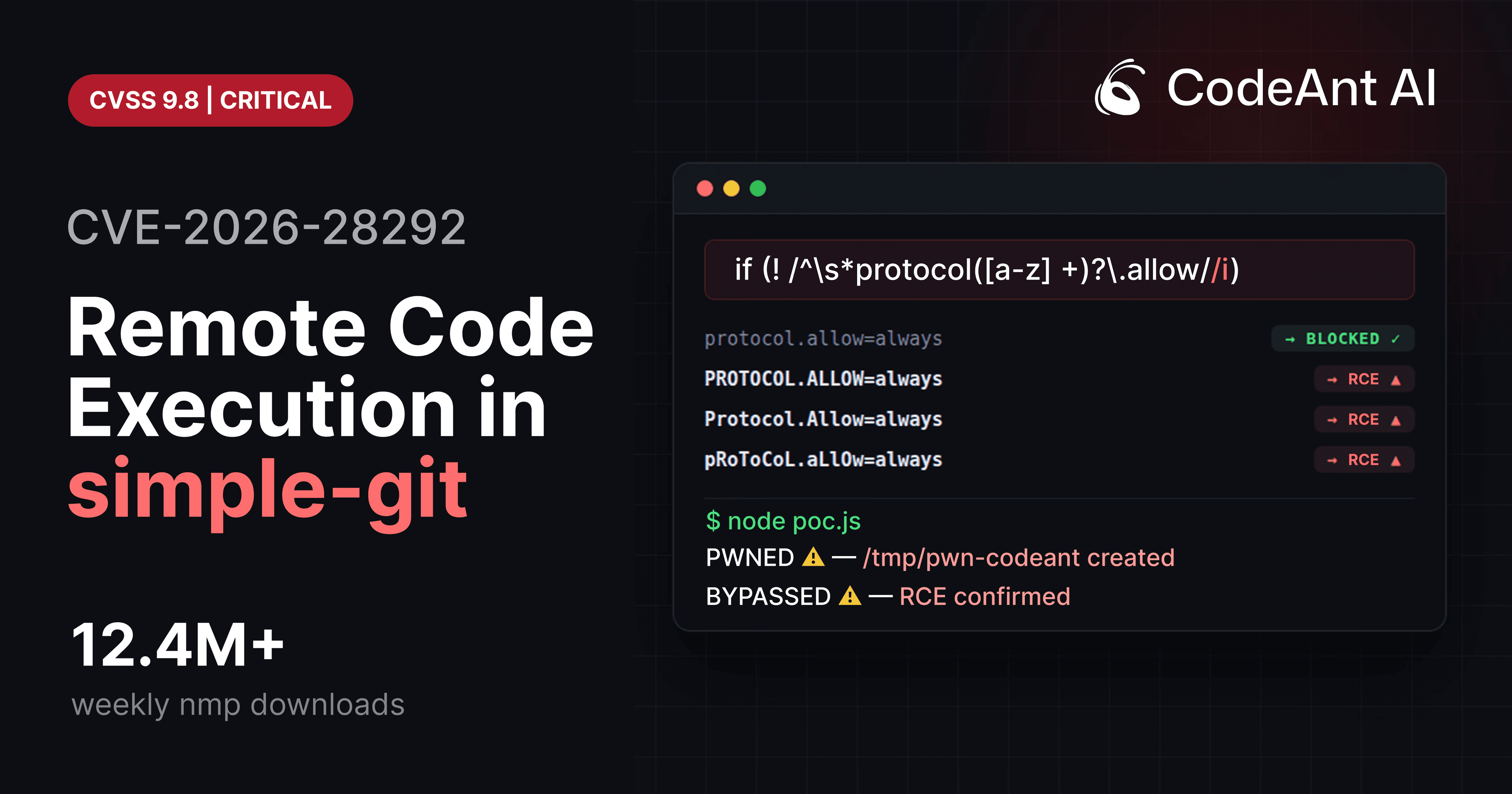
The vulnerability was assigned CVE-2026-28292 (CVSS 9.8 Critical) and affected a package downloaded over 12 million times per week.
The root cause was deceptively simple:
A case-sensitive security filter protecting a case-insensitive system.
That mismatch created a gap large enough to drive remote code execution (RCE) through.
This article breaks down the vulnerability at the code level, explains why the bypass works, and shows how developers can prevent similar issues in their own systems.
The System Being Protected: Git Transport Protocols
To understand the vulnerability, you first need to understand how Git transport protocols work.
Git supports several transport mechanisms for cloning repositories:
But Git also supports a lesser-known feature called the ext transport protocol.
Example:
This protocol allows Git to execute arbitrary commands.
Git documentation describes this mechanism as:
“a mechanism to allow custom command execution when fetching repositories.”
In practice, this means that any system allowing user-controlled Git URLs must explicitly block ext::.
Otherwise, attackers can execute arbitrary shell commands.
How simple-git Prevented the Attack
The simple-git library introduced a security plugin to block this protocol.
Inside the library, a function called preventProtocolOverride inspects command arguments before executing Git.
Simplified version:
The intention is clear:
Block configuration keys such as:
These settings enable Git’s dangerous transport protocols.
If detected, the command is blocked before reaching Git.
At first glance, the regex looks reasonable.
But the vulnerability hides in the character class:
Why This Regex Fails
The regex used in the filter:
This regex is case-sensitive.
It matches:
But Git configuration keys are case-insensitive.
Git internally normalizes keys to lowercase.
Example:
Output:
Git treats these values identically:
The regex only catches the first.
Everything else bypasses the filter.
The Security Mismatch
This is a classic example of CWE-178: Improper Handling of Case Sensitivity.
The problem can be visualized like this:
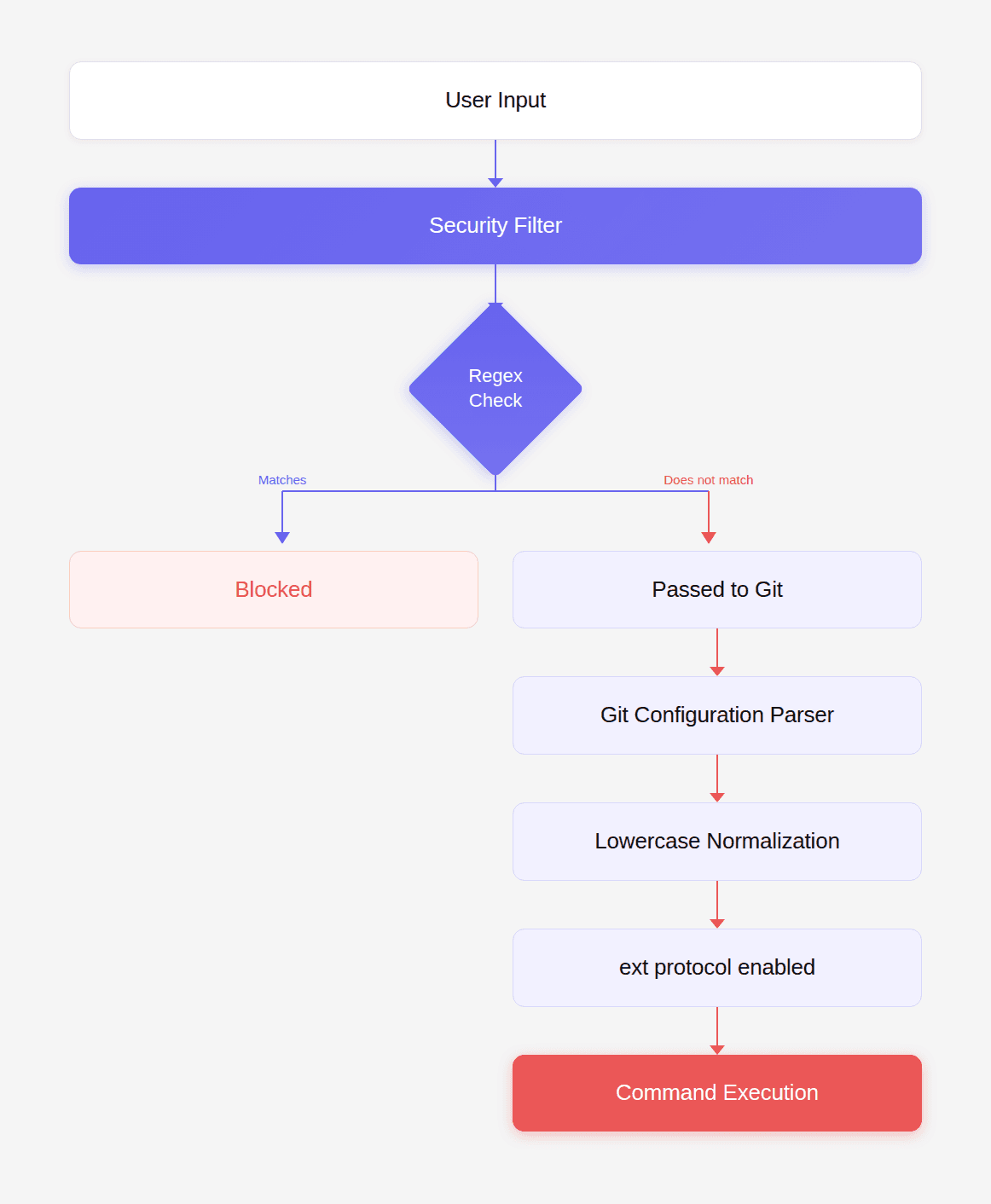
The filter assumes case matters.
Git does not.
Attackers exploit the mismatch.
Exploiting the Bypass
The bypass is trivial.
Simply capitalize the configuration key.
Instead of:
Use:
Because the regex lacks /i, the uppercase variant bypasses the filter.
Building a Minimal Proof of Concept
First install a vulnerable version:
Then run the following PoC.
Expected result:
The ext:: command executes.
The file /tmp/pwned appears on the host.
This confirms remote code execution.
Real-World Attack Scenario
Many applications use simple-git to clone repositories provided by users.
Example:
If args is user-controlled, the attacker can send:
Result:
executes on the server.
This is full remote code execution with the privileges of the Node.js process.
What Attackers Can Do After Exploitation
Once the ext protocol executes commands, attackers gain complete control.
Examples:
Read sensitive files
Exfiltrate environment secrets
Reverse shell
Install persistence
Because this runs inside the application environment, attackers can access:
environment variables
database credentials
API tokens
SSH keys
deployment infrastructure
The One Character Fix
The vulnerability disappears with a single change.
Original regex:
Secure regex:
Adding /i makes the check case-insensitive.
Now all variants are blocked:
A Better Security Design
Even better than a regex fix is explicit normalization.
Example:
Security rule:
Normalize input before validating it.
This removes ambiguity.
How to Audit Your Own Code
Look for patterns like:
Then check whether the underlying system is case-insensitive.
Example targets:
System | Case sensitivity |
|---|---|
Git configs | case insensitive |
Windows paths | case insensitive |
HTTP headers | case insensitive |
HTML tags | case insensitive |
SQL collations | often insensitive |
If the filter assumes case sensitivity but the system does not, you likely have a vulnerability.
Security Testing Checklist
When reviewing code that filters dangerous input, test variants such as:
Example fuzzing script:
This technique frequently exposes filter bypasses.
How to Protect Your Applications
If you use simple-git, upgrade immediately.
Minimum safe version:
Then audit your code for:
Ensure:
repository URLs are trusted
user input cannot reach
customArgsarguments are validated
The Bigger Lesson
This vulnerability demonstrates something deeper about modern software security.
The problem was not complex cryptography.
Not memory corruption.
Not advanced exploitation.
It was a semantic mismatch between a security filter and the system it protected.
Traditional static analysis tools missed it.
Dependency scanners missed it.
Security advisories did not yet exist.
Yet a single missing /i created remote code execution across millions of installations.
The most dangerous vulnerabilities are often not the most complicated.
They are the ones hiding in the assumptions we never question.
Conclusion: What This Vulnerability Says About the Future of Code Review
The key lesson from CVE-2026-28292 is not just the regex bug itself. It is what the bug reveals about how modern vulnerabilities survive even after patches. In this case, a case-sensitive regex was protecting a case-insensitive Git configuration system, creating a mismatch that allowed a remote code execution vulnerability to slip through multiple prior fixes.
Traditional security tools struggled to detect it because they focus on patterns rather than reasoning.
Most tools look for things like:
known dangerous APIs
insecure cryptography usage
injection patterns
vulnerable dependencies listed in CVE databases
These approaches work well for known issues. But semantic security vulnerabilities like this one require understanding multiple conditions at once:
Git configuration keys are case-insensitive
The security filter used a case-sensitive regex
The regex was protecting a security boundary
The mismatch allowed a protocol override bypass
The bypass enabled the ext:: Git transport protocol
That protocol ultimately allowed arbitrary command execution
This type of reasoning is where traditional rule-based security analysis often fails.
It is also where AI-assisted code review is beginning to change the landscape. Systems like the security analysis capabilities in CodeAnt AI evaluate code paths, boundary assumptions, and behavioral mismatches rather than only matching patterns.
The real purpose of a code review gate is simple:
catch the vulnerability that could compromise the system
detect the edge case no one documented
stop the exploit before it reaches production
When a single missing /i flag can lead to remote code execution across millions of installations, the value of automated code review becomes clear.
The most valuable code review tool is the one that finds the bug nobody else noticed.
FAQs
What exactly caused the simple-git vulnerability (CVE-2026-28292)?
Why didn’t traditional security tools detect this vulnerability?
What is CWE-178 and how does it relate to this vulnerability?
How can developers prevent similar vulnerabilities in their own systems?
What does this vulnerability reveal about the future of AI-assisted code review?