AI Code Review

Mar 12, 2026

Why AI Code Review Bots Get Ignored by Developers

Amartya | CodeAnt AI Code Review Platform
Sonali Sood

Founding GTM, CodeAnt AI

The bot posts 23 comments on your PR. You read the first three. They're about variable naming and missing semicolons, stuff your linter already catches. You dismiss the rest without reading them. Next PR, you dismiss everything immediately. Six PRs later, you've configured the bot to only comment on files you explicitly ask it to review. Three months later, your team votes to remove it entirely.

This is the most common AI code review adoption story. Not a dramatic failure. Just a slow, quiet death by false positive.

The tool worked technically. The integration was clean. The problem was signal quality, and nobody fixed it before the team lost trust.

This article breaks down why developers turn off AI review bots, what separates high-signal from low-signal tools, and how to configure your pipeline so developers actually act on what the tool surfaces.

TL;DR

  • Developers don't turn off AI review bots because they dislike AI, they turn them off because the signal-to-noise ratio makes the tool more work than it saves

  • The four failure modes: too many low-severity comments, no reproduction steps, findings that duplicate existing linters, and reviews that ignore codebase context

  • Resolution rate is the canary in the coal mine, if developers are fixing less than 50% of flagged issues, your tool has a noise problem

  • Cursor BugBot's 8-pass majority voting approach pushed resolution rate from 52% to 70%+, proving the problem is solvable

  • CodeAnt AI addresses noise systematically: Steps of Reproduction on every finding, ~80% auto-fix coverage, severity-gated commenting, and full codebase context

The Math of Developer Trust

Developer trust in a review tool follows a simple formula: how often is a flagged issue real, divided by how often they have to read something that isn't.

When that ratio is high, developers read findings carefully. When it drops below roughly 50%, alert fatigue kicks in. Below 30%, the tool becomes background noise, technically on, effectively off.

Cursor BugBot's launch data illustrated this precisely. Their initial multi-pass approach achieved a 52% resolution rate, meaning developers acted on just over half of flagged issues. That sounds reasonable until you consider the inverse: 48% of findings were dismissed, often without investigation. At that rate, developers are doing coin-flip triage. After moving to 8-pass majority voting with consensus filtering, resolution rate climbed to over 70%. The underlying bugs being caught were the same. The signal quality improvement changed developer behavior.

The benchmark worth tracking: anything below 50% resolution rate indicates a noise problem. Above 65% means developers trust the output. Above 70% means the tool has earned a permanent place in your workflow.

The Four Reasons Developers Stop Listening

1. Volume without severity calibration

The most common failure mode: a tool configured to comment on everything, with no differentiation between "this will cause a production incident" and "this variable name could be more descriptive."

Developers have limited attention. A PR with 20 comments, 3 critical, 17 style preferences, gets triaged like this: scan the list, dismiss what looks minor, maybe read the ones labeled "error," move on. The 3 critical findings get the same dismissal treatment as the 17 trivial ones because there's no efficient way to separate them.

The fix isn't reducing sensitivity. It's tiering output so severity shapes behavior.
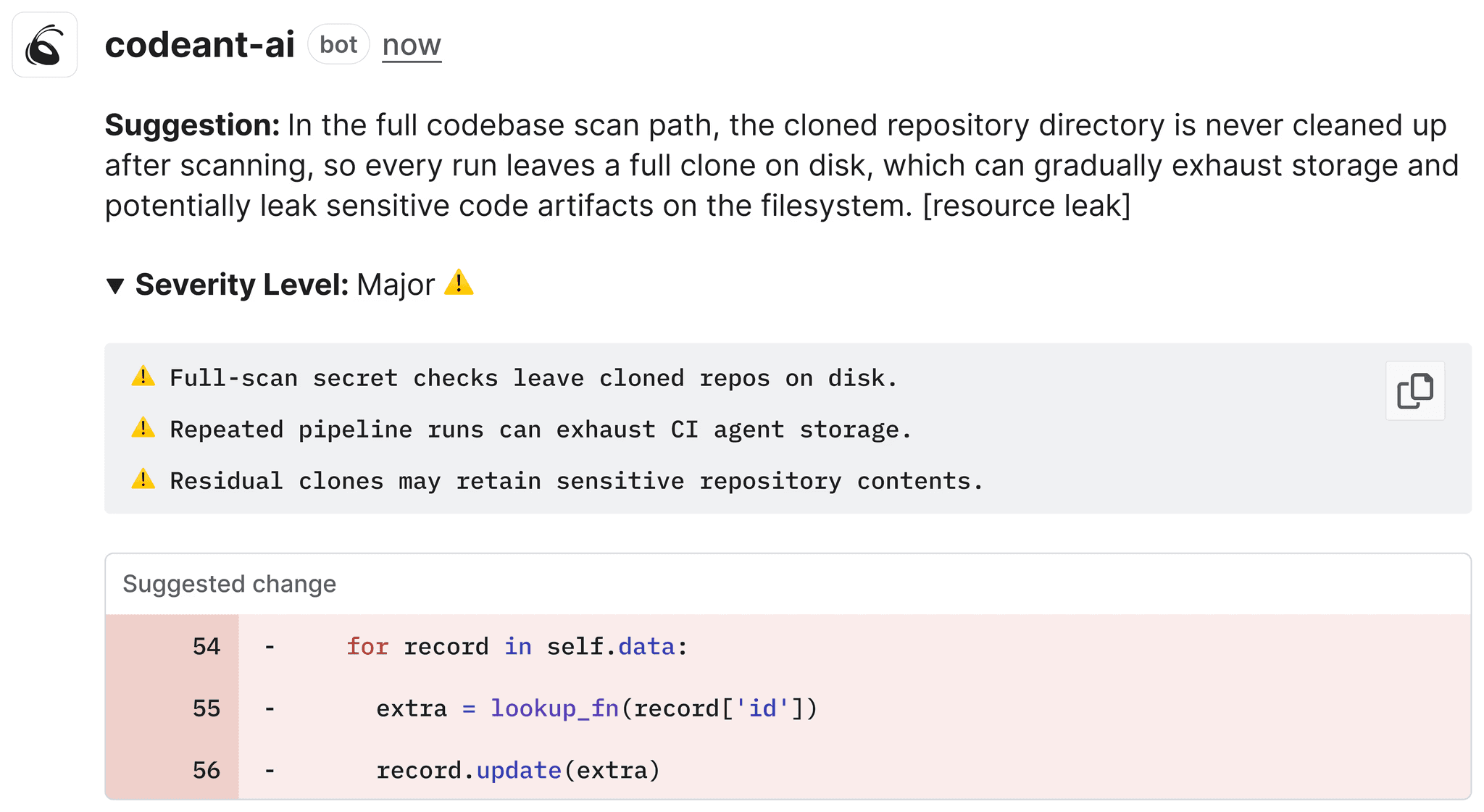
Critical findings should block the PR. High findings should require acknowledgment. Medium and low findings should be visible but non-blocking, dismissible in one click. When the tool cries wolf on variable names, developers stop believing it about SQL injection.

2. Findings without reproduction steps

"Potential null reference exception on line 47."

Is it real? You'd need to trace the call stack, understand what inputs could produce a null, and verify whether there's an upstream null check you're missing. That's 10 minutes of investigation — for a finding that might be a false positive.

Multiply that by 15 findings per PR. Most developers make a rational choice: dismiss the ambiguous ones, fix the obvious ones, move on. The problem is that AI review tools surface genuinely subtle bugs — bugs that are hard to spot precisely because they require non-obvious input sequences to trigger. Without reproduction steps, those are exactly the findings that get dismissed.

Steps of Reproduction solve this by providing the exact conditions, inputs, and sequence needed to trigger a flagged bug, including expected vs. actual behavior.
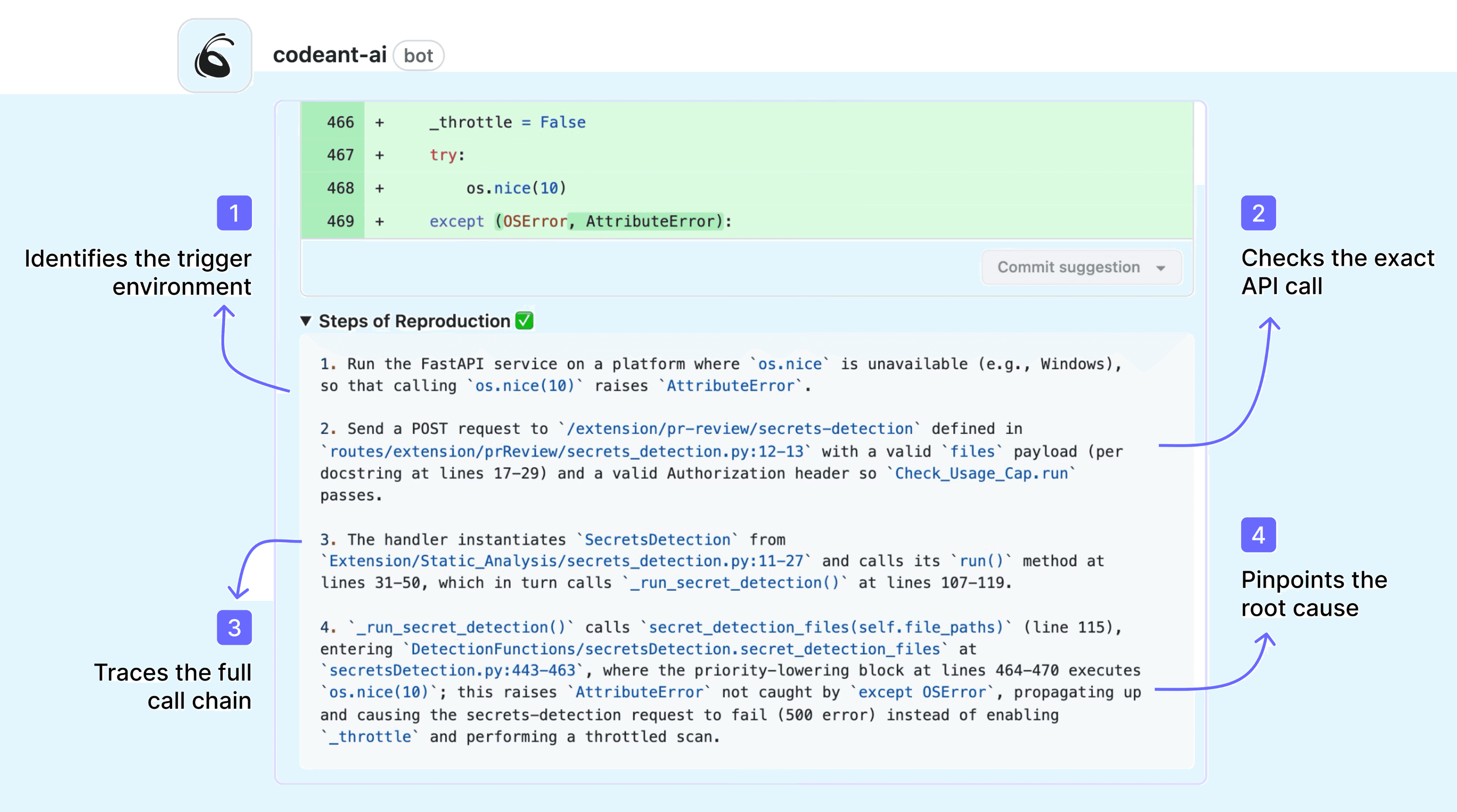
A finding that says "this returns null when user_id is 0 and session_active is false" takes 30 seconds to verify. A finding that says "potential null" takes 10 minutes or gets dismissed. The information content is the same. The actionability is completely different.

3. Duplicating what the linter already does

If your ESLint, Flake8, or Checkstyle is already enforcing semicolons, indentation, and unused variable warnings, and your AI review bot is also flagging semicolons, indentation, and unused variable warnings, you've doubled the noise and added zero signal.

This happens when AI review tools are configured without knowing what other tools are already in the pipeline. The developer experience: two sets of almost-identical comments, slightly differently phrased, on the same issues. It creates the impression that the AI tool isn't actually thinking, it's just running its own linter on top of yours.

The right configuration scopes AI review to what static rules can't catch: logic errors, architectural violations, context-dependent security issues, and AI-generated code failure modes like hallucinated APIs and copy-paste amplification. Everything that a rule can catch should be caught by a rule, not by an AI comment.

4. Context blindness: comments that don't understand your codebase

"Consider using a more descriptive variable name than x."

The function is a 3-line pure math utility that's been in the codebase for four years. Every developer on the team knows what x means in that context. The comment is technically accurate, completely unhelpful, and signals that the tool has no understanding of your codebase's conventions or history.

This is the context blindness problem. Diff-only review tools analyze the changed lines without understanding the broader codebase. They can't know that x is conventional in math utilities, that db is an established abbreviation in your service layer, or that the "insecure" HTTP call is to an internal service on a private network.

AI-native tools with full codebase context produce fundamentally different review quality. When the reviewer understands that your team uses a custom RetryableHttpClient wrapper, it flags cases where code bypasses that wrapper, instead of commenting on the wrapper itself every time it appears.

What High-Signal AI Review Actually Looks Like

The difference between a tool developers trust and one they mute isn't the underlying model, it's how findings are filtered, contextualized, and presented.

Severity-gated output

High-signal tools tier their output and let teams configure what triggers a comment vs. a block vs. silence:

# Example quality gate configuration
comment_on:
  - severity: critical    # always comment
  - severity: high        # always comment
  - severity: medium      # comment, but collapsible

block_merge_on:
  - severity: critical
    category: [security, secrets]
  - severity: high
    category: [security]

suppress:
  - severity: low
    category: [style]     # let the linter handle this
# Example quality gate configuration
comment_on:
  - severity: critical    # always comment
  - severity: high        # always comment
  - severity: medium      # comment, but collapsible

block_merge_on:
  - severity: critical
    category: [security, secrets]
  - severity: high
    category: [security]

suppress:
  - severity: low
    category: [style]     # let the linter handle this

When developers know that a bot comment means something, that it's not going to flag their indentation, they read the comments instead of dismissing them.

Full codebase context, not diff-only analysis

Consider the difference:

Diff-only review:

# PR adds this function
def get_user(user_id):
    return db.execute(f"SELECT * FROM users WHERE id = {user_id}")
# PR adds this function
def get_user(user_id):
    return db.execute(f"SELECT * FROM users WHERE id = {user_id}")

Comment: "Consider using parameterized queries."

Full codebase context review:

# PR adds this function
def get_user(user_id):
    return db.execute(f"SELECT * FROM users WHERE id = {user_id}")
# PR adds this function
def get_user(user_id):
    return db.execute(f"SELECT * FROM users WHERE id = {user_id}")

Comment: "SQL injection vulnerability, this bypasses the SafeQuery wrapper used throughout services/. See services/order_service.py:47 for the established pattern. Steps to reproduce: pass user_id = "1; DROP TABLE users" to observe unescaped execution."

The second comment tells the developer exactly what's wrong, where the fix pattern exists, and how to verify the issue. It's actionable in 90 seconds instead of 10 minutes, or a dismissal.

Auto-fix for the mechanical stuff

For roughly 80% of flagged issues, the fix is deterministic enough that the tool can generate it directly. Letting developers apply a fix with one click, without leaving the PR review interface, removes all friction between "this is flagged" and "this is fixed."
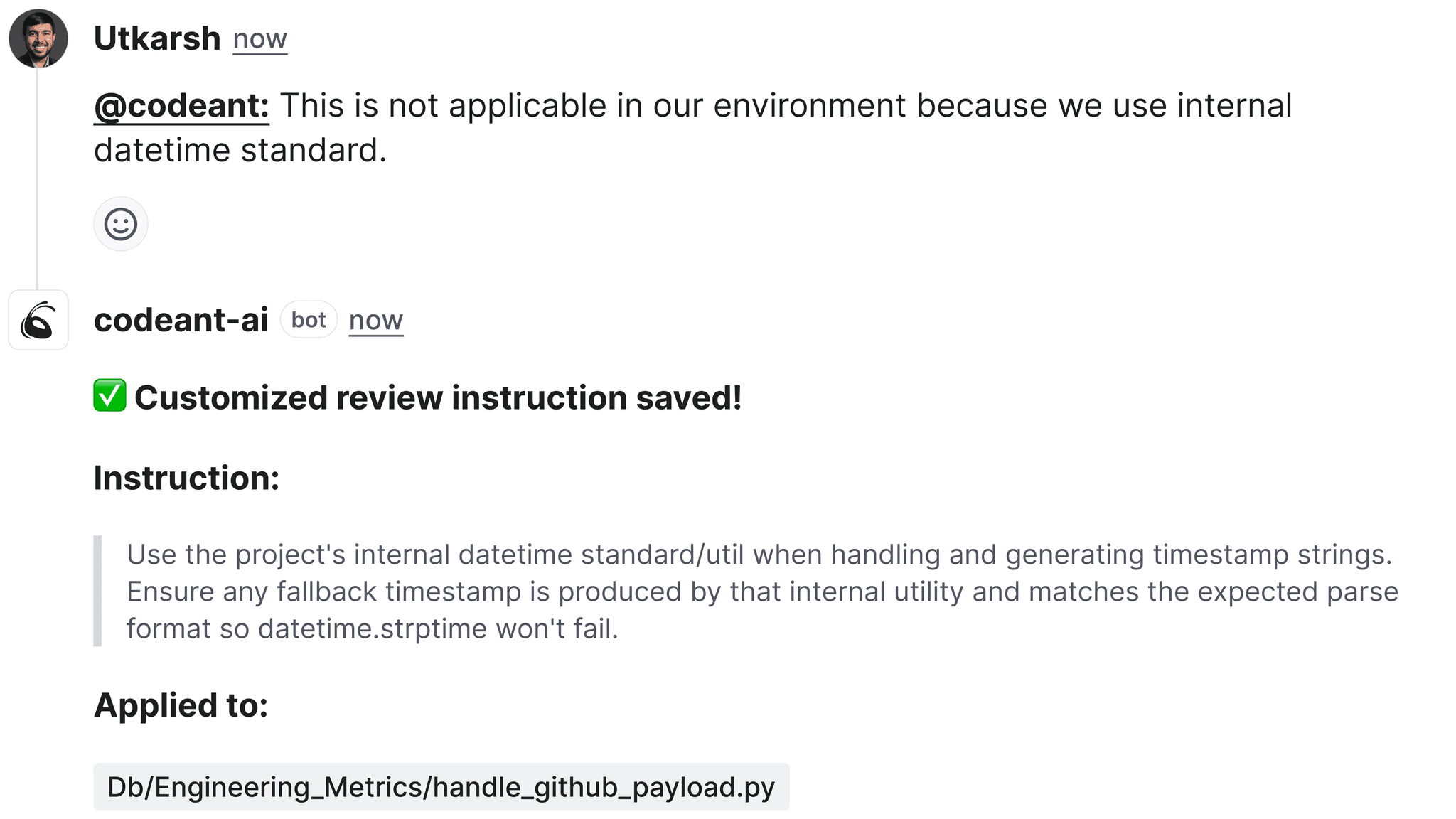
This changes developer behavior in a measurable way. When dismissing a finding requires more clicks than fixing it, developers fix things. When fixing requires opening an IDE, finding the line, implementing the change, committing, and pushing, developers dismiss.

Multi-pass consensus filtering

Single-pass AI review introduces noise because the model is probabilistic. The same code reviewed twice may produce different findings. Findings that appear in only one of five review passes are more likely to be false positives than findings that consistently appear across passes.

Cursor BugBot's architecture runs 8 parallel review passes with randomized diff ordering, then surfaces only findings that appear in the majority of passes. This is why their resolution rate climbed from 52% to 70%+ not because the model improved, but because the filtering improved.

Not every tool implements this, but it's the right architecture for high-stakes review where false positives have real costs.

How to Diagnose Your Current Tool's Noise Problem

Before switching tools, measure whether you have a noise problem and where it originates.

Step 1: Pull your resolution rate

Of the findings your AI review tool posted in the last 30 days, what percentage were acknowledged and acted on by developers (fix applied, PR merged with the change)? If you don't have this data, that's already a problem, a good tool surfaces it in its analytics dashboard.

Step 2: Categorize dismissed findings

Sample 20–30 dismissed findings and categorize them: (a) genuine false positive, the issue isn't real, (b) duplicate of linter, already caught elsewhere, (c) not actionable, no reproduction steps, (d) context blindness, comment doesn't understand codebase conventions, (e) severity mismatch, flagged as high but actually low. This tells you which failure mode to fix first.

Step 3: Audit category overlap with existing tools

List what your linter, SAST scanner, and formatter already enforce. Compare against what your AI review tool is also commenting on. Any category covered by both is pure noise from the AI tool's perspective.

Step 4: Run a controlled A/B

Create two configurations: your current default vs. a "high severity only" configuration that suppresses everything below medium severity and everything that duplicates existing linters. Run both on the same set of PRs (or alternate by team) for 30 days. Measure resolution rate, comment volume, and developer sentiment.

Configuring CodeAnt AI for High Resolution Rates

CodeAnt AI is built to avoid the failure modes above, but it still needs to be tuned to your team's conventions and existing toolchain.

Start with severity calibration

In your first week, run CodeAnt AI in observation mode, comment but don't block. Review the output and identify any category generating consistent false positives. Suppress those categories at the team level. CodeAnt AI's finding categories are granular enough to suppress "naming convention" comments without suppressing "security vulnerability" comments.

Define your existing tool boundaries

CodeAnt AI has its own SAST engine, but if you're running ESLint with Airbnb config or Checkstyle with your own ruleset, configure CodeAnt AI to defer on the categories those tools already cover. The goal is complementary coverage, CodeAnt AI handling what rules can't catch, your existing tools handling rule-enforceable standards.

Enable Steps of Reproduction for security and logic findings
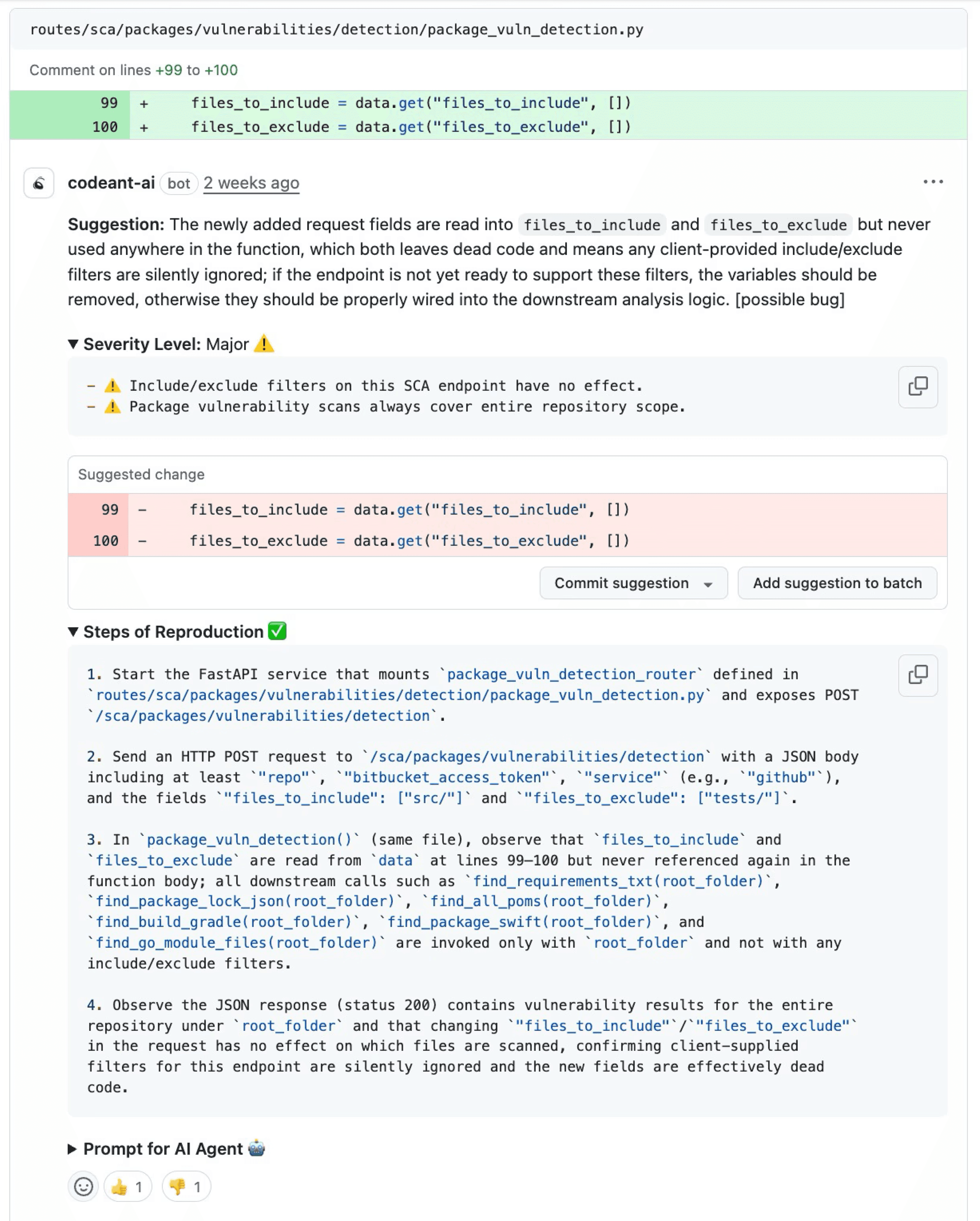
This is on by default for security findings and logic errors. Verify it's active and review a sample of findings to confirm the reproduction steps are specific enough to be actionable. If they're generic ("pass unexpected input"), that indicates the finding needs more context, flag it as a false positive and it trains the system.

Set quality gates for critical findings only initially

Blocking merges on medium-severity findings in your first month will generate developer resistance before trust is established. Start by blocking only on critical security findings (secrets exposure, critical CVEs, injection vulnerabilities). Expand to high-severity findings after 30 days, once the team has seen that critical findings are real and actionable.

Track resolution rate weekly

CodeAnt AI surfaces this in the analytics dashboard. If it drops below 50%, pull the dismissed findings and identify the category. If it climbs above 65%, expand the categories that post comments, there's more signal to surface. For more on how to measure this and the ROI of your review pipeline, see our AI code review ROI metrics guide.

The Team Dynamics Piece Nobody Talks About

Technical configuration isn't the only reason developers turn off bots. There's a trust and ownership dimension that matters equally.

  • Who decides what gets flagged? If developers have no input into what the bot comments on, they experience it as surveillance, not assistance. The teams with the highest tool adoption involve developers in severity calibration. Let the team collectively decide: what should block a PR? What should be a warning? What should be suppressed? Developers who helped configure the tool are stakeholders in it working, they're less likely to disable it when it produces findings they disagree with.

  • How are disputed findings handled? Every AI review tool produces some genuine false positives. If there's no clear process for developers to dispute findings and have them acknowledged as false positives, the frustration accumulates until someone turns the tool off. A simple process: developer flags as false positive in the PR, tech lead reviews, suppression rule added if confirmed. Two-click path, closed loop.

  • Is the signal landing in the right place? A common failure mode: security findings posted as PR comments that developers dismiss because they don't feel empowered to make security decisions. High-severity security findings should notify the security team as well as the developer, not to create a bottleneck, but to ensure someone with security authority sees and acts on them. This also reduces pressure on developers to make judgment calls about whether a security finding is real.

Signal Quality Is an Engineering Problem, Not a Configuration Checkbox

The developers who turned off the bot weren’t wrong. The tool was producing noise. Disabling it was a rational response. The real mistake happened earlier, when nobody diagnosed and fixed the signal problem before trust eroded.

High-signal AI code review is achievable when review quality is treated as an engineering problem, not a configuration checkbox. That means designing the review pipeline to surface only issues that developers should actually act on.

Key elements include:

Severity calibration so critical findings stand out
Full codebase context instead of diff-only analysis
Steps of reproduction for complex bugs
Auto-fix for mechanical issues like formatting or simple refactors
A clear process to flag false positives and improve the system

When these pieces are in place, developer behavior changes:

• Resolution rates increase
• Developers read comments instead of dismissing them
• The system starts catching real bugs before they reach production

The tools already exist. The configuration usually takes less than a week. The result is a review pipeline that developers actively rely on instead of quietly disabling.

If your team previously abandoned AI review because it was too noisy, the problem likely wasn’t automation. It was signal quality.

👉 Start a 14-day free trial of CodeAnt AI to see what high-signal AI code review looks like in practice. It installs in minutes and begins analyzing pull requests immediately.

The bot posts 23 comments on your PR. You read the first three. They're about variable naming and missing semicolons, stuff your linter already catches. You dismiss the rest without reading them. Next PR, you dismiss everything immediately. Six PRs later, you've configured the bot to only comment on files you explicitly ask it to review. Three months later, your team votes to remove it entirely.

This is the most common AI code review adoption story. Not a dramatic failure. Just a slow, quiet death by false positive.

The tool worked technically. The integration was clean. The problem was signal quality, and nobody fixed it before the team lost trust.

This article breaks down why developers turn off AI review bots, what separates high-signal from low-signal tools, and how to configure your pipeline so developers actually act on what the tool surfaces.

TL;DR

  • Developers don't turn off AI review bots because they dislike AI, they turn them off because the signal-to-noise ratio makes the tool more work than it saves

  • The four failure modes: too many low-severity comments, no reproduction steps, findings that duplicate existing linters, and reviews that ignore codebase context

  • Resolution rate is the canary in the coal mine, if developers are fixing less than 50% of flagged issues, your tool has a noise problem

  • Cursor BugBot's 8-pass majority voting approach pushed resolution rate from 52% to 70%+, proving the problem is solvable

  • CodeAnt AI addresses noise systematically: Steps of Reproduction on every finding, ~80% auto-fix coverage, severity-gated commenting, and full codebase context

The Math of Developer Trust

Developer trust in a review tool follows a simple formula: how often is a flagged issue real, divided by how often they have to read something that isn't.

When that ratio is high, developers read findings carefully. When it drops below roughly 50%, alert fatigue kicks in. Below 30%, the tool becomes background noise, technically on, effectively off.

Cursor BugBot's launch data illustrated this precisely. Their initial multi-pass approach achieved a 52% resolution rate, meaning developers acted on just over half of flagged issues. That sounds reasonable until you consider the inverse: 48% of findings were dismissed, often without investigation. At that rate, developers are doing coin-flip triage. After moving to 8-pass majority voting with consensus filtering, resolution rate climbed to over 70%. The underlying bugs being caught were the same. The signal quality improvement changed developer behavior.

The benchmark worth tracking: anything below 50% resolution rate indicates a noise problem. Above 65% means developers trust the output. Above 70% means the tool has earned a permanent place in your workflow.

The Four Reasons Developers Stop Listening

1. Volume without severity calibration

The most common failure mode: a tool configured to comment on everything, with no differentiation between "this will cause a production incident" and "this variable name could be more descriptive."

Developers have limited attention. A PR with 20 comments, 3 critical, 17 style preferences, gets triaged like this: scan the list, dismiss what looks minor, maybe read the ones labeled "error," move on. The 3 critical findings get the same dismissal treatment as the 17 trivial ones because there's no efficient way to separate them.

The fix isn't reducing sensitivity. It's tiering output so severity shapes behavior.

Critical findings should block the PR. High findings should require acknowledgment. Medium and low findings should be visible but non-blocking, dismissible in one click. When the tool cries wolf on variable names, developers stop believing it about SQL injection.

2. Findings without reproduction steps

"Potential null reference exception on line 47."

Is it real? You'd need to trace the call stack, understand what inputs could produce a null, and verify whether there's an upstream null check you're missing. That's 10 minutes of investigation — for a finding that might be a false positive.

Multiply that by 15 findings per PR. Most developers make a rational choice: dismiss the ambiguous ones, fix the obvious ones, move on. The problem is that AI review tools surface genuinely subtle bugs — bugs that are hard to spot precisely because they require non-obvious input sequences to trigger. Without reproduction steps, those are exactly the findings that get dismissed.

Steps of Reproduction solve this by providing the exact conditions, inputs, and sequence needed to trigger a flagged bug, including expected vs. actual behavior.

A finding that says "this returns null when user_id is 0 and session_active is false" takes 30 seconds to verify. A finding that says "potential null" takes 10 minutes or gets dismissed. The information content is the same. The actionability is completely different.

3. Duplicating what the linter already does

If your ESLint, Flake8, or Checkstyle is already enforcing semicolons, indentation, and unused variable warnings, and your AI review bot is also flagging semicolons, indentation, and unused variable warnings, you've doubled the noise and added zero signal.

This happens when AI review tools are configured without knowing what other tools are already in the pipeline. The developer experience: two sets of almost-identical comments, slightly differently phrased, on the same issues. It creates the impression that the AI tool isn't actually thinking, it's just running its own linter on top of yours.

The right configuration scopes AI review to what static rules can't catch: logic errors, architectural violations, context-dependent security issues, and AI-generated code failure modes like hallucinated APIs and copy-paste amplification. Everything that a rule can catch should be caught by a rule, not by an AI comment.

4. Context blindness: comments that don't understand your codebase

"Consider using a more descriptive variable name than x."

The function is a 3-line pure math utility that's been in the codebase for four years. Every developer on the team knows what x means in that context. The comment is technically accurate, completely unhelpful, and signals that the tool has no understanding of your codebase's conventions or history.

This is the context blindness problem. Diff-only review tools analyze the changed lines without understanding the broader codebase. They can't know that x is conventional in math utilities, that db is an established abbreviation in your service layer, or that the "insecure" HTTP call is to an internal service on a private network.

AI-native tools with full codebase context produce fundamentally different review quality. When the reviewer understands that your team uses a custom RetryableHttpClient wrapper, it flags cases where code bypasses that wrapper, instead of commenting on the wrapper itself every time it appears.

What High-Signal AI Review Actually Looks Like

The difference between a tool developers trust and one they mute isn't the underlying model, it's how findings are filtered, contextualized, and presented.

Severity-gated output

High-signal tools tier their output and let teams configure what triggers a comment vs. a block vs. silence:

# Example quality gate configuration
comment_on:
  - severity: critical    # always comment
  - severity: high        # always comment
  - severity: medium      # comment, but collapsible

block_merge_on:
  - severity: critical
    category: [security, secrets]
  - severity: high
    category: [security]

suppress:
  - severity: low
    category: [style]     # let the linter handle this

When developers know that a bot comment means something, that it's not going to flag their indentation, they read the comments instead of dismissing them.

Full codebase context, not diff-only analysis

Consider the difference:

Diff-only review:

# PR adds this function
def get_user(user_id):
    return db.execute(f"SELECT * FROM users WHERE id = {user_id}")

Comment: "Consider using parameterized queries."

Full codebase context review:

# PR adds this function
def get_user(user_id):
    return db.execute(f"SELECT * FROM users WHERE id = {user_id}")

Comment: "SQL injection vulnerability, this bypasses the SafeQuery wrapper used throughout services/. See services/order_service.py:47 for the established pattern. Steps to reproduce: pass user_id = "1; DROP TABLE users" to observe unescaped execution."

The second comment tells the developer exactly what's wrong, where the fix pattern exists, and how to verify the issue. It's actionable in 90 seconds instead of 10 minutes, or a dismissal.

Auto-fix for the mechanical stuff

For roughly 80% of flagged issues, the fix is deterministic enough that the tool can generate it directly. Letting developers apply a fix with one click, without leaving the PR review interface, removes all friction between "this is flagged" and "this is fixed."

This changes developer behavior in a measurable way. When dismissing a finding requires more clicks than fixing it, developers fix things. When fixing requires opening an IDE, finding the line, implementing the change, committing, and pushing, developers dismiss.

Multi-pass consensus filtering

Single-pass AI review introduces noise because the model is probabilistic. The same code reviewed twice may produce different findings. Findings that appear in only one of five review passes are more likely to be false positives than findings that consistently appear across passes.

Cursor BugBot's architecture runs 8 parallel review passes with randomized diff ordering, then surfaces only findings that appear in the majority of passes. This is why their resolution rate climbed from 52% to 70%+ not because the model improved, but because the filtering improved.

Not every tool implements this, but it's the right architecture for high-stakes review where false positives have real costs.

How to Diagnose Your Current Tool's Noise Problem

Before switching tools, measure whether you have a noise problem and where it originates.

Step 1: Pull your resolution rate

Of the findings your AI review tool posted in the last 30 days, what percentage were acknowledged and acted on by developers (fix applied, PR merged with the change)? If you don't have this data, that's already a problem, a good tool surfaces it in its analytics dashboard.

Step 2: Categorize dismissed findings

Sample 20–30 dismissed findings and categorize them: (a) genuine false positive, the issue isn't real, (b) duplicate of linter, already caught elsewhere, (c) not actionable, no reproduction steps, (d) context blindness, comment doesn't understand codebase conventions, (e) severity mismatch, flagged as high but actually low. This tells you which failure mode to fix first.

Step 3: Audit category overlap with existing tools

List what your linter, SAST scanner, and formatter already enforce. Compare against what your AI review tool is also commenting on. Any category covered by both is pure noise from the AI tool's perspective.

Step 4: Run a controlled A/B

Create two configurations: your current default vs. a "high severity only" configuration that suppresses everything below medium severity and everything that duplicates existing linters. Run both on the same set of PRs (or alternate by team) for 30 days. Measure resolution rate, comment volume, and developer sentiment.

Configuring CodeAnt AI for High Resolution Rates

CodeAnt AI is built to avoid the failure modes above, but it still needs to be tuned to your team's conventions and existing toolchain.

Start with severity calibration

In your first week, run CodeAnt AI in observation mode, comment but don't block. Review the output and identify any category generating consistent false positives. Suppress those categories at the team level. CodeAnt AI's finding categories are granular enough to suppress "naming convention" comments without suppressing "security vulnerability" comments.

Define your existing tool boundaries

CodeAnt AI has its own SAST engine, but if you're running ESLint with Airbnb config or Checkstyle with your own ruleset, configure CodeAnt AI to defer on the categories those tools already cover. The goal is complementary coverage, CodeAnt AI handling what rules can't catch, your existing tools handling rule-enforceable standards.

Enable Steps of Reproduction for security and logic findings

This is on by default for security findings and logic errors. Verify it's active and review a sample of findings to confirm the reproduction steps are specific enough to be actionable. If they're generic ("pass unexpected input"), that indicates the finding needs more context, flag it as a false positive and it trains the system.

Set quality gates for critical findings only initially

Blocking merges on medium-severity findings in your first month will generate developer resistance before trust is established. Start by blocking only on critical security findings (secrets exposure, critical CVEs, injection vulnerabilities). Expand to high-severity findings after 30 days, once the team has seen that critical findings are real and actionable.

Track resolution rate weekly

CodeAnt AI surfaces this in the analytics dashboard. If it drops below 50%, pull the dismissed findings and identify the category. If it climbs above 65%, expand the categories that post comments, there's more signal to surface. For more on how to measure this and the ROI of your review pipeline, see our AI code review ROI metrics guide.

The Team Dynamics Piece Nobody Talks About

Technical configuration isn't the only reason developers turn off bots. There's a trust and ownership dimension that matters equally.

  • Who decides what gets flagged? If developers have no input into what the bot comments on, they experience it as surveillance, not assistance. The teams with the highest tool adoption involve developers in severity calibration. Let the team collectively decide: what should block a PR? What should be a warning? What should be suppressed? Developers who helped configure the tool are stakeholders in it working, they're less likely to disable it when it produces findings they disagree with.

  • How are disputed findings handled? Every AI review tool produces some genuine false positives. If there's no clear process for developers to dispute findings and have them acknowledged as false positives, the frustration accumulates until someone turns the tool off. A simple process: developer flags as false positive in the PR, tech lead reviews, suppression rule added if confirmed. Two-click path, closed loop.

  • Is the signal landing in the right place? A common failure mode: security findings posted as PR comments that developers dismiss because they don't feel empowered to make security decisions. High-severity security findings should notify the security team as well as the developer, not to create a bottleneck, but to ensure someone with security authority sees and acts on them. This also reduces pressure on developers to make judgment calls about whether a security finding is real.

Signal Quality Is an Engineering Problem, Not a Configuration Checkbox

The developers who turned off the bot weren’t wrong. The tool was producing noise. Disabling it was a rational response. The real mistake happened earlier, when nobody diagnosed and fixed the signal problem before trust eroded.

High-signal AI code review is achievable when review quality is treated as an engineering problem, not a configuration checkbox. That means designing the review pipeline to surface only issues that developers should actually act on.

Key elements include:

Severity calibration so critical findings stand out
Full codebase context instead of diff-only analysis
Steps of reproduction for complex bugs
Auto-fix for mechanical issues like formatting or simple refactors
A clear process to flag false positives and improve the system

When these pieces are in place, developer behavior changes:

• Resolution rates increase
• Developers read comments instead of dismissing them
• The system starts catching real bugs before they reach production

The tools already exist. The configuration usually takes less than a week. The result is a review pipeline that developers actively rely on instead of quietly disabling.

If your team previously abandoned AI review because it was too noisy, the problem likely wasn’t automation. It was signal quality.

👉 Start a 14-day free trial of CodeAnt AI to see what high-signal AI code review looks like in practice. It installs in minutes and begins analyzing pull requests immediately.

FAQs

How do I convince my team to re-enable AI code review after a bad experience?

What's the right amount of PR comments from an AI review tool?

Should AI code review block merges?

What is a good resolution rate for AI code review?

Why do developers ignore AI code review comments?

Table of Contents

Start Your 14-Day Free Trial

AI code reviews, security, and quality trusted by modern engineering teams. No credit card required!

Share blog: