

If you've been told your company needs a penetration test, the next question is almost always the same: what type of penetration testing do you need?
The three main types of penetration testing are black box, white box, and gray box testing. They differ primarily in the information and access the tester receives before the engagement begins. That starting point changes what the tester can investigate, which vulnerabilities are easiest to uncover, and which parts of your attack surface may remain untested.
Black box penetration testing tests your application from an external attacker's perspective with minimal prior knowledge. White box penetration testing gives testers access to source code and internal system information so they can identify code-level and configuration vulnerabilities. Gray box penetration testing gives testers limited internal knowledge or authenticated access to simulate a legitimate user abusing their privileges. For comprehensive coverage, organizations can combine all three approaches.
The right choice depends on the security question you need answered. If you want to know what an unknown internet attacker can reach, black box is the closest simulation. If you want to uncover code-level vulnerabilities and insecure configurations, white box provides deeper visibility. If you're concerned about compromised accounts, privilege escalation, IDOR, or business logic abuse, gray box testing targets those authenticated attack paths.
This guide explains how each methodology works, what it can and cannot find, and how to choose the right penetration test for your application.
Black Box Penetration Testing: The External Attacker Simulation
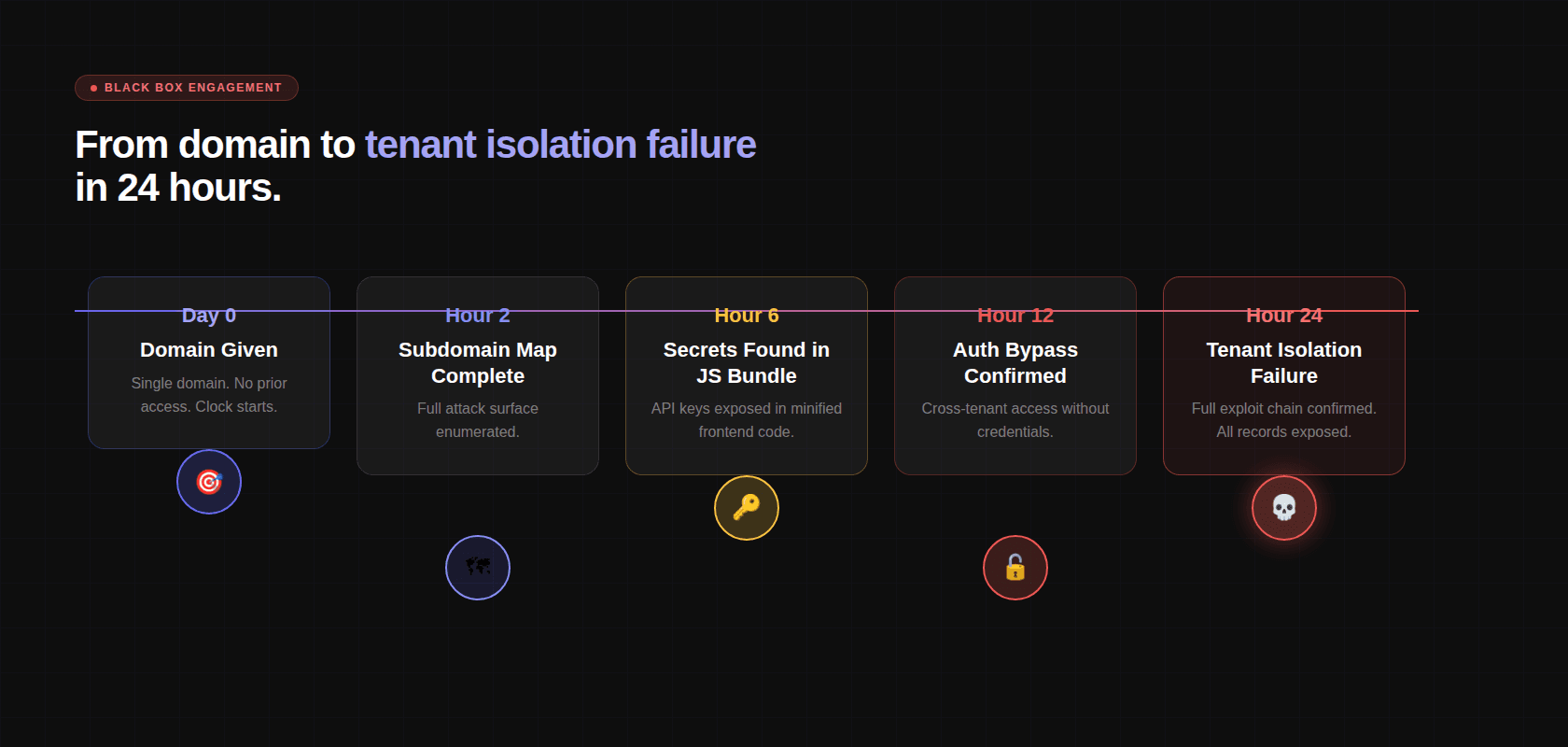
In a black box test, the tester starts with a single piece of information: your domain. No credentials. No code access. No documentation. No architecture diagrams. The inside of the system is opaque, hence "black box."
This is the most faithful simulation of what an external attacker with no prior knowledge or inside access would be able to do. The question a black box test answers is precise: what could someone on the internet, starting from nothing, actually do to your users' data?
What Is Black Box Penetration Testing?
Black box penetration testing simulates an attacker who starts with little or no privileged information about the target.
The tester typically receives a defined target, such as a domain, application URL, IP range, or external asset list, but does not receive source code, internal architecture documentation, or privileged credentials at the start of the engagement.
The tester therefore has to discover the attack surface independently.
This makes black box testing particularly useful for answering:
"What could an external attacker discover and exploit without inside knowledge?"
What Happens During a Black Box Engagement
Reconnaissance and External Surface Mapping
Before a single vulnerability is tested, the AI builds a complete map of everything visible from the outside. This is called reconnaissance, and it is far more comprehensive than most teams expect.
Subdomain enumeration uses brute-force DNS resolution across 150+ common prefix patterns, not just www, api, mail, but dev, staging, uat, internal, jenkins, grafana, admin, portal, and hundreds more. Each prefix is checked against the target domain. Discovered subdomains are added to scope.
Certificate Transparency (CT) logs are queried. Every TLS certificate issued for any subdomain of your domain is publicly logged. CT log queries surface subdomains that DNS brute-forcing might miss, including historical subdomains that are no longer in active use but may still be running a server.
CNAME records are resolved to identify underlying cloud providers and CDNs, information that tells the tester what infrastructure they're dealing with before they've sent a single HTTP request.
Port scanning runs across all discovered hosts. Not just ports 80 and 443, all TCP ports. This finds databases accidentally exposed to the internet, internal admin interfaces bound to 0.0.0.0, container orchestration APIs, monitoring dashboards, message queue management interfaces. The number of companies with a Redis instance or Elasticsearch cluster accessible from the public internet without authentication remains astonishing.
Cloud Asset Discovery
Modern applications don't live only on their own servers. They use cloud storage, managed databases, serverless functions, CDNs, and CI/CD infrastructure. All of it is in scope.
Cloud Asset Type | What's Being Tested |
|---|---|
S3 Buckets | Public read access, public write access, bucket name enumeration |
Azure Blob Containers | Anonymous access, container listing, SAS token exposure |
GCP Storage Buckets | allUsers permissions, bucket enumeration via known naming patterns |
CI/CD Dashboards | Jenkins, CircleCI, GitHub Actions, exposed without authentication |
Container Registries | Private images accessible without credentials |
Monitoring Endpoints | Grafana, Kibana, Datadog, exposed management interfaces |
JavaScript Bundle Analysis
This is a technique most traditional pentesters don't apply systematically, and it is one of the highest-value steps in a modern black box engagement.
Every JavaScript bundle served by the application is downloaded and statically analyzed. Modern single-page applications ship 5–15 MB of minified JavaScript to the browser, and inside that code is often more sensitive information than most teams realize.
What the analysis extracts:
Hardcoded secret detection runs across 30+ pattern types: AWS access keys, Stripe live keys, GitHub tokens, JWT secrets, database connection strings, Sentry DSNs, Google API keys, Twilio credentials, SendGrid keys. Every hit is verified for validity before being reported.
Staging vs. production bundle comparison surfaces endpoints that were removed from production but remain reachable on non-production URLs, a common source of forgotten API endpoints with weaker security controls.
API Authentication Testing
Every endpoint discovered, from documentation, from JS bundle analysis, from Swagger/OpenAPI exposure, from GraphQL introspection, is tested unauthenticated first.
The response classification is simple:
Response Code | What It Means |
|---|---|
200 OK with data | No authentication enforced, confirmed finding |
401 Unauthorized | Authentication required and enforced |
403 Forbidden | Authenticated but unauthorized (check if bypassable) |
500 Internal Server Error | Request processed before auth check ran, potential finding |
302 Redirect to login | Auth enforced via redirect (check direct access bypass) |
Authentication bypass patterns are tested systematically on every endpoint that returns anything other than a clean 401:
CORS Policy Testing
Cross-Origin Resource Sharing misconfigurations are a consistent finding in production applications. The AI tests every domain with 7+ attacker-controlled origins:
Exploit Chaining
No finding is evaluated in isolation. Every confirmed finding is cross-referenced against every other finding, and the AI constructs the highest-impact chain possible from the confirmed set.
Tenant ID leaking from the user profile endpoint + IDOR in the records endpoint = complete cross-tenant data access. Hardcoded internal API hostname in the JS bundle + unauthenticated endpoint on the internal API = access to internal services with no credentials. The combination of findings is almost always more dangerous than any single finding.
What Black Box Penetration Testing Can Miss
Black box testing cannot find what's invisible from the outside:
Authentication bypass vulnerabilities buried in middleware configuration that produce normal HTTP responses
Business logic flaws in flows that require authentication to reach
Secrets in Git history or config files
Vulnerabilities in internal microservices not exposed to the internet
Dependency vulnerabilities that require code access to assess reachability
Black box testing is intentionally limited by its starting conditions. If a vulnerability requires authenticated access, source-code visibility, internal architecture knowledge, or access to an internal service, it may remain outside the scope of what a black box tester can discover.
That limitation is not a weakness in the methodology. It is the consequence of the threat model.
This is why black box testing works best as one part of a broader security assessment when an organization needs visibility across both external attack paths and internal application logic.
White Box Penetration Testing: The Source Code Audit
In a white box penetration test, the tester receives substantial internal information about the application before or during the engagement. This may include source code, configuration files, infrastructure definitions, dependency manifests, architecture documentation, and version history.
Instead of asking only what an external attacker can discover, white box testing asks a different question:
"What vulnerabilities exist in the application's implementation, even if they are not obvious from the outside?"
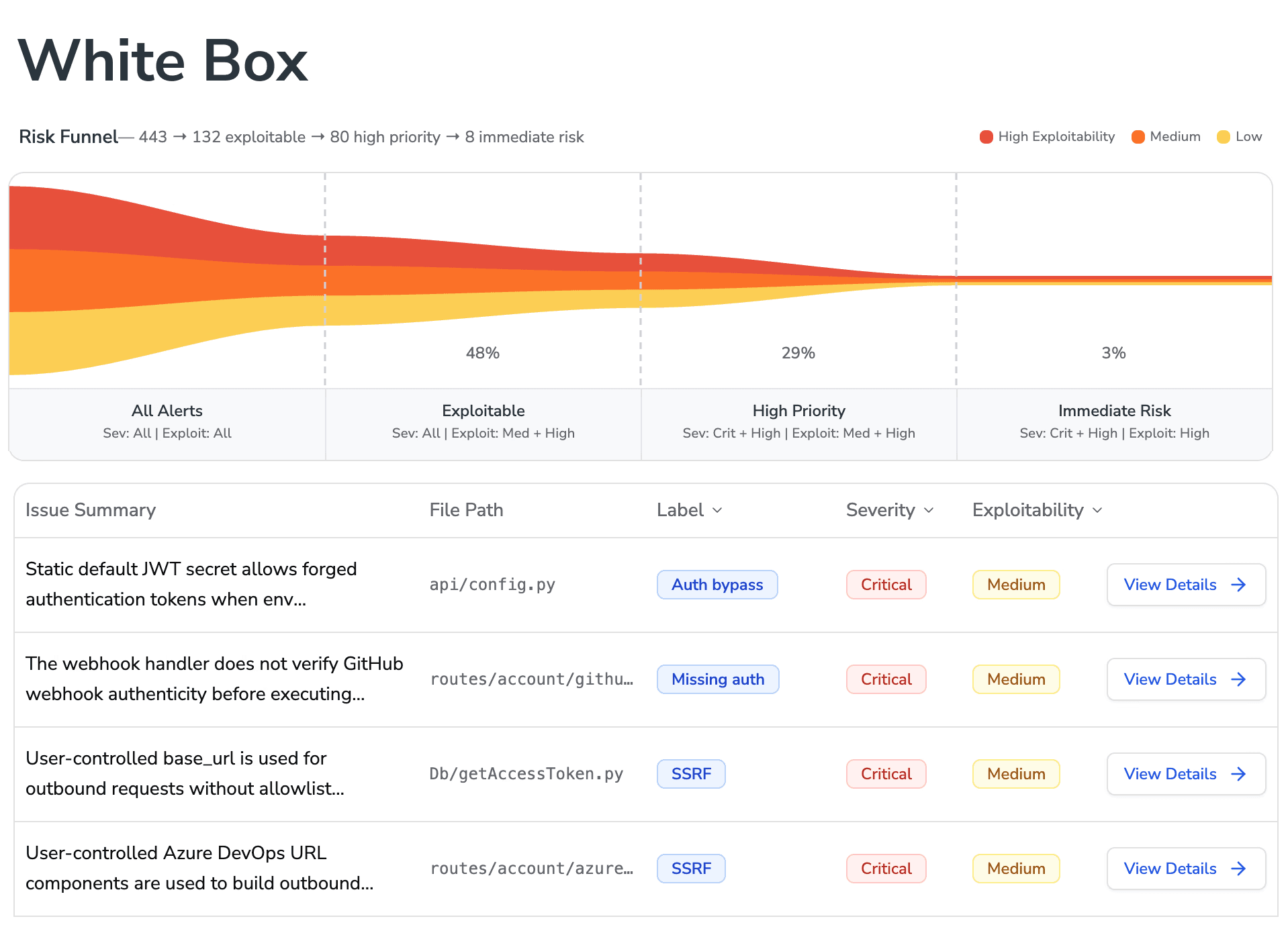
This makes white box testing particularly useful for finding code-level authorization failures, insecure data flows, exposed secrets, vulnerable configurations, dependency issues, and weaknesses hidden behind authenticated or otherwise difficult-to-reach application paths.
Security Configuration Analysis
The first thing a white box engagement does is read every authentication and authorization configuration in the codebase.
Spring Security (Java):
An external scanner sees the /api/v2/admin/users endpoint responding correctly. It has no idea the response is bypassing authentication because the security filter chain was excluded for the entire /api/v2/ namespace. A white box read catches this immediately.
Express.js middleware ordering (Node.js):
The admin endpoint returns 200 OK with real data to unauthenticated requests. The external response looks normal. The vulnerability is entirely in the code.
Secrets and Credential Scanning
Every configuration file in the repository is scanned:
A common finding in CI/CD pipelines:
Git history is scanned separately from the current HEAD. A credential committed and deleted is still in version control:
Dataflow Tracing and Root Cause Analysis
For every trust boundary identified, the AI traces the data forward — all the way from the HTTP request to every place the input is used. This is how injection vulnerabilities are found with precision.
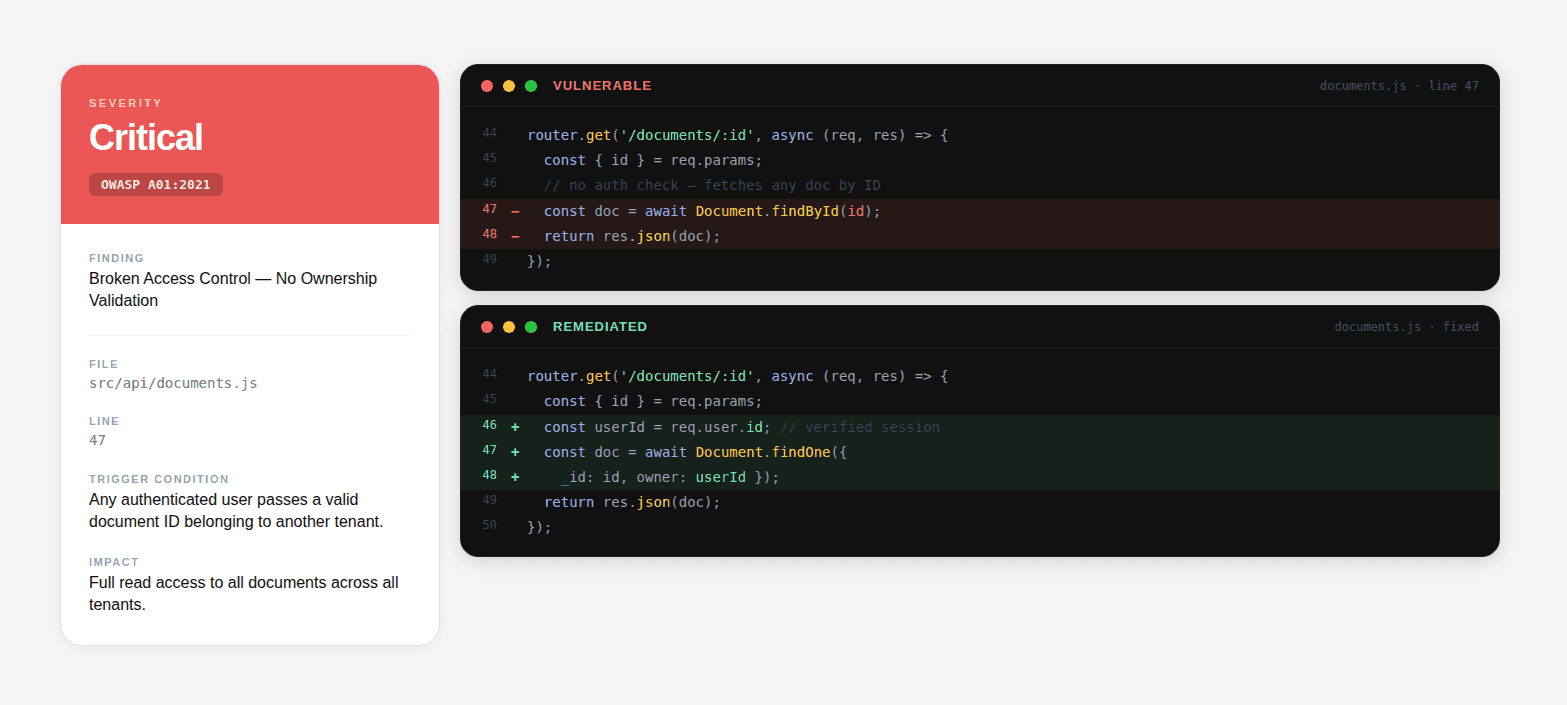
The finding in the report doesn't say "SQL injection detected." It says: app/views/products.py, line 14, search_products(), the category parameter from request.GET reaches a raw SQL query via string formatting. Payload: ' OR '1'='1' --. Effect: returns all products regardless of category and featured status. Root cause: use of Product.objects.raw() with f-string interpolation instead of parameterized query.
Remediation diff:
That's the level of specificity a white box engagement should produce. Engineers fix the right thing on the first attempt.
Infrastructure and Dependency Analysis
Dependency reachability analysis goes beyond CVE matching. A vulnerable dependency never called in the application's code paths is not the same as one that processes every user file upload. The analysis determines whether the vulnerable function is actually reachable given the application's dependency usage patterns, reducing false positives and prioritizing real risk.
Gray Box Penetration Testing: The Insider Threat Simulation
In a gray box penetration test, the tester receives some internal context without having complete visibility into the application. The most common starting point is authenticated access through one or more test accounts, although the engagement may also provide limited architecture documentation, API specifications, or other application context.
Gray box testing is designed to answer a different question:
"What can someone do after they have legitimate access to the application?"
That makes it particularly valuable for SaaS applications where users, customers, employees, and contractors already have valid credentials but should be restricted by role, tenant, object ownership, or workflow state.
Access Control and Privilege Escalation
Every admin endpoint is tested with non-admin credentials:
JWT claim manipulation:
IDOR Testing: Systematic Identifier Enumeration
Authenticated testing is essential for identifying vulnerabilities that cannot be reached from an unauthenticated external perspective.
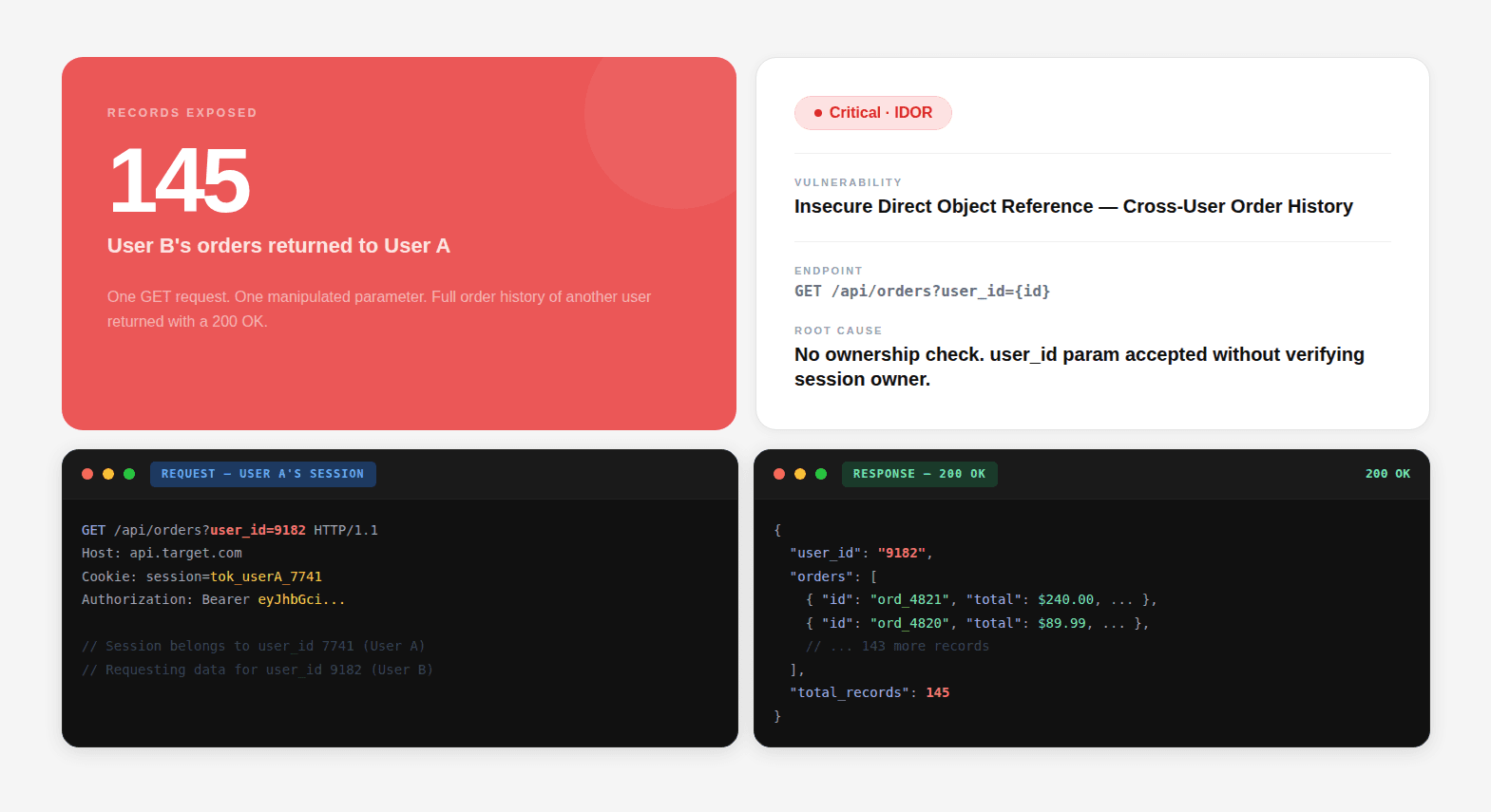
Every endpoint that accepts an object identifier should be evaluated for object-level authorization. Depending on the application, those identifiers may be sequential integers, UUIDs, slugs, usernames, filenames, tenant IDs, or IDs embedded inside JSON and GraphQL requests.
The tester verifies that a user who is authorized to access Object A cannot simply substitute the identifier for Object B and access, modify, or delete it.
This is particularly important in multi-tenant applications, where the authorization boundary must be enforced between customers as well as between individual users.
For a deeper explanation of this vulnerability class, see What is an IDOR Vulnerability?.
Business Logic Testing
This is the category where gray box testing produces findings that no other methodology reaches:
Business Logic Test | What's Being Checked |
|---|---|
Price manipulation | Can the total be modified in the request before payment confirmation? |
Discount code reuse | Can a single-use code be replayed by intercepting and resending the validation request? |
Workflow bypass | Can step 5 ( |
Subscription tier abuse | Can a free-tier user call a premium endpoint directly via API? |
Rate limit evasion | Can rate limits be bypassed by rotating user IDs, IP headers, or request parameters? |
Quantity manipulation | In an e-commerce flow, can negative quantities be used to reduce total price? |
Concurrent request exploitation | Can two simultaneous requests exploit a race condition in inventory or balance checks? |
None of these produce anomalous HTTP response patterns. None of them match known CVE signatures. They require understanding what the application is supposed to do, and then methodically testing whether it actually enforces that intent at every entry point.
Black Box vs White Box vs Gray Box Penetration Testing
The three test types are not interchangeable, and they are not additive in a simple sense either. Each one has a structural blind spot that only the other two can close. Before picking one, here is exactly how they differ across every dimension that matters:
Dimension | Black Box | White Box | Gray Box |
|---|---|---|---|
Attacker simulated | External attacker with little or no prior knowledge | Attacker or insider with access to internal implementation details | Legitimate user or attacker with some internal access |
Starting knowledge | Target/domain and externally available information | Source code, configuration, architecture, dependencies, and other internal information | Test credentials and selected application context |
Primary focus | External attack surface | Code, configuration, data flows, and implementation | Authenticated attack paths and application behavior |
Strong at finding | Exposed services, unauthenticated endpoints, cloud exposure, external misconfigurations | Code-level authorization flaws, insecure data flows, secrets, dependency and configuration issues | IDOR, privilege escalation, broken access control, business logic flaws |
Can miss | Vulnerabilities requiring authentication or internal visibility | Runtime behavior that only appears under specific production conditions | Unauthenticated external exposure and vulnerabilities outside the authenticated attack paths |
Best question answered | "What can an external attacker reach?" | "What vulnerabilities exist in the implementation?" | "What can an authenticated user abuse?" |
The three methodologies should not be viewed as simple levels of difficulty. They represent different starting conditions and threat models.
A clean black box report does not mean the application is free from code-level vulnerabilities. A clean white box assessment does not mean an externally exposed service cannot be attacked. A clean gray box assessment does not prove that the unauthenticated attack surface is secure.
The methodology determines what the tester is positioned to see.
Which Type of Penetration Test Do You Need?
The right type of penetration testing depends on the security question you need to answer.
Your Situation | Recommended Approach | Why |
|---|---|---|
You have never had a comprehensive pentest | Full Assessment | Establish visibility across external, authenticated, and code-level attack surfaces |
You are preparing to launch a new application | Gray Box + White Box | Focus on authenticated abuse, authorization, business logic, and implementation flaws |
You need to understand your internet-facing attack surface | Black Box | Simulates an external attacker with minimal prior knowledge |
You have already completed several black box tests | White Box or Gray Box | Look beyond the external surface for code-level and authenticated vulnerabilities |
You are investigating risks in a multi-tenant SaaS application | Gray Box | Tests tenant isolation, object-level authorization, privilege boundaries, and business logic |
You need continuous security validation | Combine methodologies over time | Different attack surfaces and application states require different testing perspectives |
There is no universally correct methodology for every engagement. The right choice depends on the threat model, application architecture, regulatory requirements, and the level of assurance you need.
For example, if your primary concern is external exposure, black box testing may be the most relevant starting point. If your biggest concern is whether a compromised customer account can access another customer's data, gray box testing is more appropriate. If you need to understand whether authentication and authorization are correctly implemented throughout the codebase, white box testing provides the necessary visibility.
The full assessment, black box, white box, and gray box run as a single engagement with a unified report, is the right starting point for most teams. Each methodology surfaces a different class of vulnerability; running only one gives you a partial picture and the false confidence of a clean report that didn't actually look where the vulnerabilities are.
For pre-launch products handling customer data, gray box combined with white box is the highest-priority pairing. Business logic flaws and code-level authentication issues are what ship to production in a first release. The external attack surface can be addressed continuously once the application is live.
If your organization has been tested before, especially if those were traditional black box engagements, white box is likely the highest-value next investment. Most prior engagements never looked at the code. That's where the deepest vulnerabilities live.
Get a full audit-grade pentest report, SOC 2 and ISO 27001 ready, in 48 hours, not weeks.
Why Combine Black Box, White Box, and Gray Box Testing?
Black box, white box, and gray box penetration testing expose different parts of the same attack surface.
Black box testing shows what an external attacker can discover and exploit without privileged access. White box testing exposes weaknesses in source code, configuration, dependencies, and data flows that may not be visible from the outside. Gray box testing examines what an authenticated user can do with legitimate access, including whether they can cross role, object, or tenant boundaries.
The value of combining them is not simply broader coverage. Findings from one testing perspective can provide context for another.
For example:
Black box discovers an externally exposed API endpoint.
White box traces the endpoint into the application's authorization logic and identifies how access is enforced.
Gray box tests that endpoint with authenticated credentials to determine whether a user can manipulate an object ID and access another user's data.
The result is a more complete view of exploitability than any single methodology can provide.
This is particularly important for modern SaaS applications, where a vulnerability may span multiple layers. An exposed endpoint may only become dangerous when combined with a missing authorization check. A code-level weakness may only become exploitable once the corresponding endpoint is discovered. An IDOR found during authenticated testing may reveal a broader tenant-isolation problem that should also be investigated in the application's code.
For teams that want to understand how these testing approaches fit into a broader security workflow, see the AI Penetration Testing Methodology.
CodeAnt's Full Assessment
CodeAnt combines defensive code intelligence with offensive penetration testing so that vulnerabilities can be analyzed from both the implementation and attack-surface perspectives. Its pentesting platform supports black box, white box, and gray box testing alongside attack-chain validation and exploit evidence.
The advantage of this model is context.
A black box test might identify an exposed API. Code-level analysis can reveal how authentication and authorization are implemented behind that API. Authenticated testing can then determine whether those controls actually prevent a user from reaching another user's objects.
That same approach applies to other attack paths:
An exposed service can be investigated alongside the code that handles its requests.
A potential authorization flaw can be tested against authenticated roles and tenant boundaries.
A source-code finding can be evaluated for whether the vulnerable path is actually reachable.
Multiple individually moderate findings can be evaluated together to determine whether they form a higher-impact attack chain.
Instead of treating defensive code analysis and offensive testing as unrelated security programs, a unified assessment connects the evidence between them.
The result is a more useful question than "How many vulnerabilities did we find?"
It is:
"Which vulnerabilities can actually be combined into an attack path, and what would that path allow an attacker to reach?"
See a CodeAnt pentest sample report or start a penetration test.
Conclusion
Black box, white box, and gray box penetration testing are three different methodologies built around three different starting conditions.
Black box penetration testing asks what an external attacker can discover and exploit. White box penetration testing examines the code and internal implementation for weaknesses that may not be visible externally. Gray box penetration testing tests what an authenticated user can do with legitimate access, making it particularly useful for authorization, privilege escalation, IDOR, and business logic testing.
The right methodology depends on the threat you need to understand.
If you have never had a comprehensive assessment, combining the three provides broader coverage than relying on a single perspective. If your main concern is internet-facing exposure, black box testing provides the most relevant threat model. If you need deeper visibility into how security controls are implemented, white box testing is the stronger choice. If you're concerned about compromised accounts, tenant isolation, or abuse of legitimate permissions, gray box testing should be part of the assessment.
The important point is that a clean result from one methodology does not mean the attack surface is completely secure. Each approach has blind spots created by its starting conditions.
A penetration test is therefore only as useful as the threat model behind it. Match the methodology to the attacker you are trying to simulate, and combine perspectives when you need confidence across the full application attack surface.
For teams that want to connect code intelligence with offensive validation, CodeAnt's penetration testing platform combines black box, white box, and gray box testing with a unified security workflow.

