

Two pentesting firms quote you the same price for a web application assessment. Both say they use AI. Both promise a comprehensive report. Both have reasonable-sounding websites.
AI penetration testing methodology is the structured process an AI-powered penetration testing system uses to discover attack surfaces, identify vulnerabilities, validate exploitation, construct attack chains, assess business impact, and produce remediation evidence.
Unlike automated vulnerability scanning, AI pentesting combines reconnaissance, application understanding, exploitation, and reasoning across multiple stages of an engagement.
A modern AI pentest can combine black-box external testing, white-box source-code analysis, and gray-box authenticated testing, with findings from each track feeding the others.
The difference between them, the difference between finding your most critical vulnerability and missing it entirely, is methodology. Specifically: what does the tester actually do, in what sequence, with what tools, and how do they reason about what they find?
Methodology is not a marketing word. It is the operational definition of what happens inside the engagement. A firm with a strong methodology and average tools beats a firm with strong tools and no methodology every time. Tools don't find vulnerabilities. Reasoning about what tools reveal finds vulnerabilities.
This guide walks through the complete methodology of an AI penetration testing engagement, phase by phase.
If you're new to AI penetration testing, start with our AI penetration testing guide for an overview of how AI pentesting works, where it differs from vulnerability scanning, and how to evaluate AI penetration testing platforms.
Penetration Testing Frameworks: OWASP, NIST, MITRE, and CVSS
A modern AI penetration test should not replace established security-testing methodology with an AI-specific checklist.
AI changes how testing can be performed, particularly reconnaissance, code comprehension, test generation, exploitation, and attack-chain analysis, but the underlying security objectives remain grounded in established frameworks.
The most useful frameworks and standards each answer a different part of the penetration testing methodology:
OWASP Web Security Testing Guide (WSTG): Provides a structured framework for web application security testing, including information gathering, configuration testing, identity and authentication testing, authorization, session management, input validation, business logic, client-side testing, and API testing. OWASP's WSTG also includes threat modeling, source-code review, penetration testing, and security testing across the SDLC.
OWASP API Security Top 10: Provides a complementary framework for API-focused testing, including broken object-level authorization, broken authentication, broken object-property authorization, unrestricted resource consumption, broken function-level authorization, SSRF, security misconfiguration, and improper API inventory management.
NIST SP 800-115: Provides guidance for planning and conducting technical security tests, analyzing findings, and developing mitigation strategies.
MITRE ATT&CK: Can be used as a complementary adversary-behavior framework for describing attacker techniques and mapping validated attack paths to recognizable tactics and techniques.
CVSS v4.0: Provides a standardized framework for communicating vulnerability severity. In a penetration test, CVSS can support severity assessment alongside exploitability, demonstrated impact, affected assets, and business context.
Framework / Standard | What it contributes to an AI penetration test |
|---|---|
OWASP Web Security Testing Guide | Web application testing methodology |
OWASP API Security Top 10 | API-specific attack classes |
NIST SP 800-115 | Assessment planning, execution, analysis, and reporting |
MITRE ATT&CK | Adversary tactics and techniques |
CVSS v4.0 | Vulnerability severity and contextual scoring |
NIST SP 800-115: A Practical Penetration Testing Framework
NIST SP 800-115 provides a structured approach to technical information security testing. It covers planning, discovery, attack and penetration, and reporting activities that can be adapted to modern application and infrastructure testing.
AI penetration testing does not replace these methodological principles. Instead, AI-driven testing can automate and scale parts of reconnaissance, analysis, exploitation, validation, and reporting while keeping scope, authorization, and human oversight as core requirements.
For modern application security teams, NIST SP 800-115 provides a useful foundation for understanding where AI-driven testing fits within a broader penetration testing methodology.
The Architecture of a Complete AI Pentest Engagement
10 Phases of an AI Penetration Test
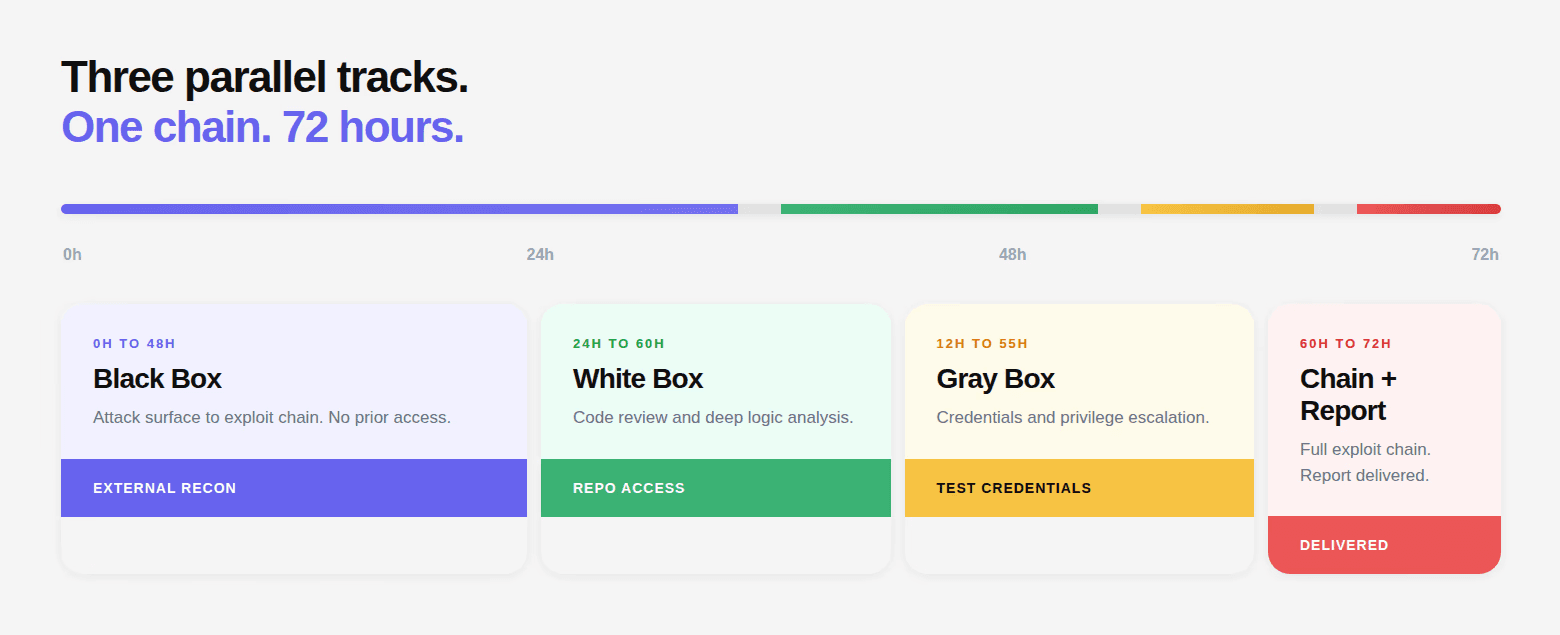
Before going phase by phase, it helps to see the full architecture. A complete AI penetration test, the Full Assessment can combine three complementary testing perspectives: black-box external testing, white-box source-code analysis, and gray-box authenticated testing.
The AI penetration testing methodology can be broken into ten connected phases:
Phase 0: Scoping and Authorization
Define the assets, testing model, access requirements, rules of engagement, authorization, and communication procedures.Phase 1: Reconnaissance and External Surface Mapping
Discover domains, subdomains, exposed services, cloud assets, APIs, and other externally accessible components.Phase 2: Service Fingerprinting and Configuration Analysis
Identify technologies, frameworks, exposed services, security headers, TLS configuration, email authentication, and other security-relevant configuration.Phase 3: JavaScript and Client-Side Analysis
Analyze client-side code to discover API endpoints, parameters, internal services, potential secrets, authentication flows, and client-side vulnerabilities.Phase 4: Source Code Analysis
Analyze authentication configuration, data flows, dangerous sinks, configuration files, dependencies, and repository history from a white-box perspective.Phase 5: API Authentication Testing
Test discovered endpoints for missing authentication, authentication bypasses, token weaknesses, authorization inconsistencies, and API-specific security issues.Phase 6: Authenticated Testing
Use authorized credentials to test role boundaries, privilege escalation, IDOR/BOLA, business logic, workflow manipulation, and other gray-box attack paths.Phase 7: Exploit Chain Construction
Correlate findings across black-box, white-box, and gray-box testing to identify multi-step attack paths and validate their combined impact.Phase 8: Report Generation
Document validated findings with severity, evidence, root cause, exploitation context, remediation guidance, and relevant risk context.Phase 9: Walkthrough and Retest
Review findings with the engineering team, answer remediation questions, retest fixes, and continue validation as the application changes.
This structure is consistent with established penetration-testing principles: reconnaissance and attack-surface discovery, configuration and application testing, authentication and authorization testing, business-logic testing, exploitation, reporting, and retesting.
OWASP's Web Security Testing Guide organizes web application testing around these same broad testing domains, while NIST SP 800-115 provides guidance for planning, conducting, analyzing, and reporting technical security assessments.
Several phases run in parallel. The white-box source code analysis starts as soon as repository access is granted and runs concurrently with the black-box external testing. The gray-box authenticated testing begins once reconnaissance has produced a working map of the attack surface. Chain construction synthesizes findings from all parallel tracks.
The output of each phase feeds subsequent phases. Subdomains found in Phase 1 become targets in Phase 5. Endpoints discovered in Phase 3 JavaScript analysis become targets for authentication bypass testing in Phase 5. Findings from Phase 4 code review inform what chains are possible in Phase 7.
The phases are not independent checkboxes; they are an interconnected reasoning process.
What Should an AI Penetration Test Cover?
A complete AI penetration test should evaluate more than the obvious web application entry points. The exact scope depends on the engagement, but a mature penetration testing methodology considers the full attack surface and the relationships between its components.
Attack surface | What should be tested |
|---|---|
External infrastructure | DNS, subdomains, ports, exposed services, TLS |
Web applications | Authentication, authorization, input validation, sessions |
APIs | BOLA, BOPLA, function authorization, authentication, SSRF |
GraphQL | Introspection, authorization, depth and resource abuse |
Client-side | JavaScript, DOM XSS, CORS, WebSockets, browser storage |
Cloud | Storage, metadata services, IAM exposure, serverless endpoints |
Source code | Dataflow, authentication logic, secrets, dangerous sinks |
Business logic | Workflow bypass, race conditions, abuse cases |
Identity | OAuth, JWT, session management, privilege escalation |
Attack chains | Multi-step exploitation and lateral movement |
Remediation | Root cause, fix guidance, and retest |
Phase 0: Scoping and Authorization: The 30 Minutes That Define Everything
Why Scoping Matters More Than Any Tool
A penetration test without a properly defined scope is not a penetration test. It is liability without accountability. The scope document defines what's being tested, under what rules, with what authorization, and it's the difference between a legitimate security engagement and unauthorized computer access.
The scoping call accomplishes five specific things:
1. Target definition: What exactly is being tested? The production web application? The staging API? Specific microservices? Mobile backend? The scope must be precise, not "our application" but specific domain names, IP ranges, repository URLs, and test account credentials.
2. Test type selection: Black box, white box, grey box, or Full Assessment. This determines what access is needed, what credentials are provided, and what the engagement will and won't find.
3. Rules of engagement: Timing windows. Whether denial-of-service testing is permitted. Whether social engineering is in scope. Whether physical security is included. How critical findings are escalated during the test, do you get a call the moment a CVSS 9+ is confirmed, or do you wait for the final report?
4. Authorization documentation: This is non-negotiable. A signed authorization letter from the organization's legal representative explicitly permitting penetration testing against the defined scope, for the defined period, by the defined testing entity. Without this, the engagement cannot proceed. This document is what distinguishes a penetration tester from an attacker in the eyes of law enforcement.
5. Communication protocol: Who receives the report? Who is the engineering point of contact during the engagement? If the team discovers an active breach in progress, not a test finding but evidence of a real, ongoing attack, what is the escalation path?
After the scoping call: fixed-price quote delivered same day, authorization letter issued, testing begins within 24 hours. For a practical starting point, see our penetration testing authorization letter template.
Phase 1: Reconnaissance and External Surface Mapping
Building the Complete Attack Surface Map
Reconnaissance is the foundation everything else is built on. Every target missed in this phase is a potential vulnerability that never gets tested. Thoroughness here is not optional.
The AI begins external reconnaissance immediately after scope is confirmed. The goal: build the most complete possible picture of everything externally accessible before a single vulnerability is probed.
DNS enumeration and subdomain discovery:
The enumeration runs against a wordlist of 150+ common subdomain prefixes, plus any organization-specific terms derived from the company name, products, or technologies identified during initial research.
Certificate Transparency log queries:
CT logs record every TLS certificate ever issued. Querying them surfaces subdomains that DNS brute-forcing misses, because the subdomain existed when the certificate was issued, even if it's no longer in active DNS rotation.
Port scanning:
Every discovered host gets a full port scan. Not just 80 and 443. The complete TCP range, with service identification on every open port.
Discovery | What Gets Checked | High-Priority Finding |
|---|---|---|
Port 6379 open | Redis, authentication required? | Unauthenticated Redis → full data read/write |
Port 9200 open | Elasticsearch, authentication? | Unauthenticated → all indices readable |
Port 8080/8443 | Internal API or admin panel | Admin interface exposed to internet |
Port 3000 | Grafana, Node dev server | Dashboard or dev environment exposed |
Port 9090 | Prometheus metrics | All application metrics publicly readable |
Port 27017 | MongoDB | Database directly accessible |
Port 5432 | PostgreSQL | Database directly accessible |
Port 9229 | Node.js inspector | Remote code execution if accessible |
Port 22 | SSH | Default credentials or key exposure check |
Port 8888 | Jupyter Notebook | Code execution environment exposed |
Every open port that shouldn't be publicly accessible gets documented and tested. An exposed Redis instance without authentication is a critical finding on its own, full read access to every key in the cache, which may include session tokens, API keys, and user data.
Cloud asset enumeration:
Cloud storage buckets, CDN configurations, serverless function endpoints, and managed service interfaces are enumerated separately from the web application surface.
A public S3 bucket containing customer exports or application backups is one of the most commonly found critical findings in black box engagements, and one of the most consistently preventable. Cloud misconfigurations like this are covered in more depth in our AI Penetration Testing For Cloud Security blog.
A public S3 bucket containing customer exports or application backups is one of the most commonly found critical findings in black box engagements, and one of the most consistently preventable.
API and GraphQL attack-surface discovery:
Modern web applications expose much of their business logic through APIs rather than server-rendered pages. API discovery therefore becomes a separate attack-surface task rather than a by-product of crawling the frontend.
The assessment inventories REST endpoints, OpenAPI and Swagger specifications, GraphQL endpoints, alternate API versions, undocumented routes, debug endpoints, mobile API endpoints, and endpoints referenced by JavaScript bundles.
For each API, the tester records HTTP methods, authentication requirements, object identifiers, user-controlled properties, rate limits, and relationships between resources. This inventory becomes the input for authentication, authorization, business-logic, and data-exposure testing.
The methodology maps API testing to the OWASP API Security Top 10, including broken object-level authorization, broken authentication, broken object-property-level authorization, unrestricted resource consumption, broken function-level authorization, SSRF, security misconfiguration, and improper API inventory management.
Phase 2: Service Fingerprinting and Configuration Analysis
Characterizing Every Discovered Service
Once the surface is mapped, every discovered service is characterized in detail. This fingerprinting phase builds the information that authentication bypass testing and vulnerability testing will use.
Framework and technology identification: HTTP response headers, error messages, cookie names, URL patterns, and response structure all reveal the technology stack. This matters because different frameworks have different vulnerability patterns and different configuration locations.
Security header analysis: Every domain gets a full HTTP security header audit. Missing or misconfigured headers are documented as findings with compliance impact:
Header | Expected Value | Finding If Missing/Wrong |
|---|---|---|
Strict-Transport-Security |
| HTTP downgrade attack possible |
Content-Security-Policy | Specific directive list | XSS impact scope unrestricted |
X-Frame-Options |
| Clickjacking attacks possible |
X-Content-Type-Options |
| MIME sniffing attacks possible |
Referrer-Policy |
| Sensitive URLs leak in Referer header |
Permissions-Policy | Specific feature restrictions | Browser features unrestricted |
SSL/TLS configuration audit: Protocol versions, cipher suites, certificate validity, and HSTS configuration are all checked. Accepting TLS 1.0 or 1.1, using weak cipher suites, or having a certificate chain with intermediate issues are all documented.
Email authentication: SPF, DMARC, and DKIM records are queried for every discovered domain. This assesses domain spoofing viability, whether an attacker could send convincing phishing emails from the target domain to its own users.
Phase 3: JavaScript and Client-Side Analysis
JavaScript, Client-Side and API Discovery
Modern web applications serve megabytes of JavaScript to every visitor. This code contains a complete map of the application's API surface, every endpoint the frontend calls, every parameter it sends, every internal service it references. It also, consistently, contains secrets that were never meant to be there.
Bundle download and extraction: Every JavaScript file served by the application is downloaded. For a typical React or Vue SPA, this is between 3 and 20 MB of minified, compiled JavaScript, the compiled output of hundreds of source files, assembled by the build pipeline.
Client-side security testing: JavaScript analysis is not limited to endpoint and secret discovery. The assessment also identifies DOM-based injection paths, unsafe client-side URL handling, CORS weaknesses, browser-storage exposure, WebSocket endpoints, Web Messaging interfaces, clickjacking protections, and client-side template injection opportunities.
The analysis pipeline:
Every confirmed secret is verified before being reported. A Stripe API key gets tested against the Stripe API to determine whether it's a live key, what permissions it has, and what data it can access. An AWS access key gets tested against AWS STS to determine what IAM permissions it grants.
Staging vs. production comparison: If both staging and production bundles are accessible, they're compared. Endpoints present in the staging bundle but absent from the production bundle were removed from the UI, but they may still be deployed on the production API server.
Phase 4: Source Code Analysis: The White Box Track
Reading the Codebase as an Attacker Would
The white box track runs in parallel with the external black box testing. With read-only repository access, the AI reads every authentication configuration, traces every data flow, scans every configuration file, and examines every commit in the repository history.
This phase is where CodeAnt AI's code comprehension capability is most directly applied. Building a code review SaaS product means deep, systematic understanding of how different frameworks implement authentication, where configurations break, and where data flows lead to exploitable sinks.
Authentication configuration deep-read: Every framework-specific authentication configuration is read end to end:
For every auth exclusion found, the analysis immediately asks: what routes exist under this excluded path? Those routes are added to the list of confirmed unprotected endpoints.
Complete dataflow trace, from HTTP entry to every sink: The dataflow analysis traces user-controlled input from the entry point through every function call to its destination. The "sinks" that matter are:
A real dataflow trace finding from the methodology:
Git history scan: Every branch, every tag, every commit is scanned. Not just for secrets, for any change that might indicate a security-relevant historical state:
Every discovered historical secret is verified for current validity. A database password rotated after the deletion is documented as low severity, the secret exists in history but is no longer valid. A database password never rotated after deletion is documented as critical, the secret is active and accessible to anyone who has cloned the repository.
Phase 5: API Authentication Testing
Every Endpoint, Every Bypass Pattern
This phase systematically tests authentication enforcement across every endpoint discovered in Phases 1 and 3. The goal: find every endpoint that responds to requests it shouldn't, whether because authentication is missing, incorrectly enforced, or bypassable through a known technique.
Endpoint inventory and unauthenticated baseline: Every discovered endpoint is hit without credentials. The response is classified and determines the subsequent testing approach:
Systematic authentication and authorization testing: For every endpoint, the tester evaluates whether authentication is required, whether authentication can be bypassed, and whether the authenticated identity is correctly enforced throughout the request lifecycle.
Testing includes token substitution, expired and malformed tokens, JWT claim manipulation, algorithm-confusion conditions where applicable, OAuth redirect and authorization-flow weaknesses, missing authentication middleware, inconsistent enforcement across HTTP methods, and alternate API versions.
Authorization testing: Authentication proves who the caller is; authorization determines what that caller can access. Every endpoint accepting object identifiers or role-sensitive operations is tested for broken object-level authorization (BOLA/IDOR), broken function-level authorization, and broken object-property-level authorization. These correspond directly to major categories in the OWASP API Security Top 10.
API documentation and introspection testing: Exposed API documentation is a finding in itself, and also a map of endpoints to test:
A publicly accessible /actuator/env is a critical finding. It returns all environment variables, including DATABASE_URL, STRIPE_SECRET_KEY, JWT_SECRET, and every other secret injected via environment variable. A publicly accessible /actuator/heapdump is worse, it's a binary dump of the JVM's heap memory, which can be parsed to extract active credentials and session tokens stored as string objects.
Phase 6: Authenticated Testing: Gray Box Track
The Insider Perspective
With test credentials established during scoping, the gray box track — the middle ground between black box and white box testing — tests what legitimate users can access beyond their intended permissions. This track runs concurrently with the white box analysis after reconnaissance is complete.
Role boundary mapping: The first step is mapping what each role is supposed to be able to do, from the application's own UI and documentation. This establishes the intent that the testing will then systematically violate.
Privilege escalation testing: Every admin endpoint is tested with free-tier and pro-tier credentials. Every pro-tier endpoint is tested with free-tier credentials. This isn't a random probe, it's systematic verification of every role boundary.
IDOR systematic enumeration: Every endpoint accepting an identifier gets systematic enumeration:
Business-logic and workflow testing: Technical vulnerabilities are not the only attack paths. The tester models the intended business process and then attempts to violate its assumptions: price manipulation, discount or coupon reuse, subscription-tier abuse, workflow bypass, quantity manipulation, replay attacks, rate-limit evasion, race conditions, and unauthorized state transitions.
OWASP's current testing guidance treats business-logic testing as a distinct testing domain because these vulnerabilities often cannot be identified through signature-based scanning alone.
Phase 7: Exploit Chain Construction
Turning Individual Findings Into Maximum Impact Paths
This is the phase that most directly separates AI penetration testing from everything else. Every finding from every track: black box, white box, grey box, is loaded into a unified findings model. The AI then systematically evaluates every possible combination for chain potential.
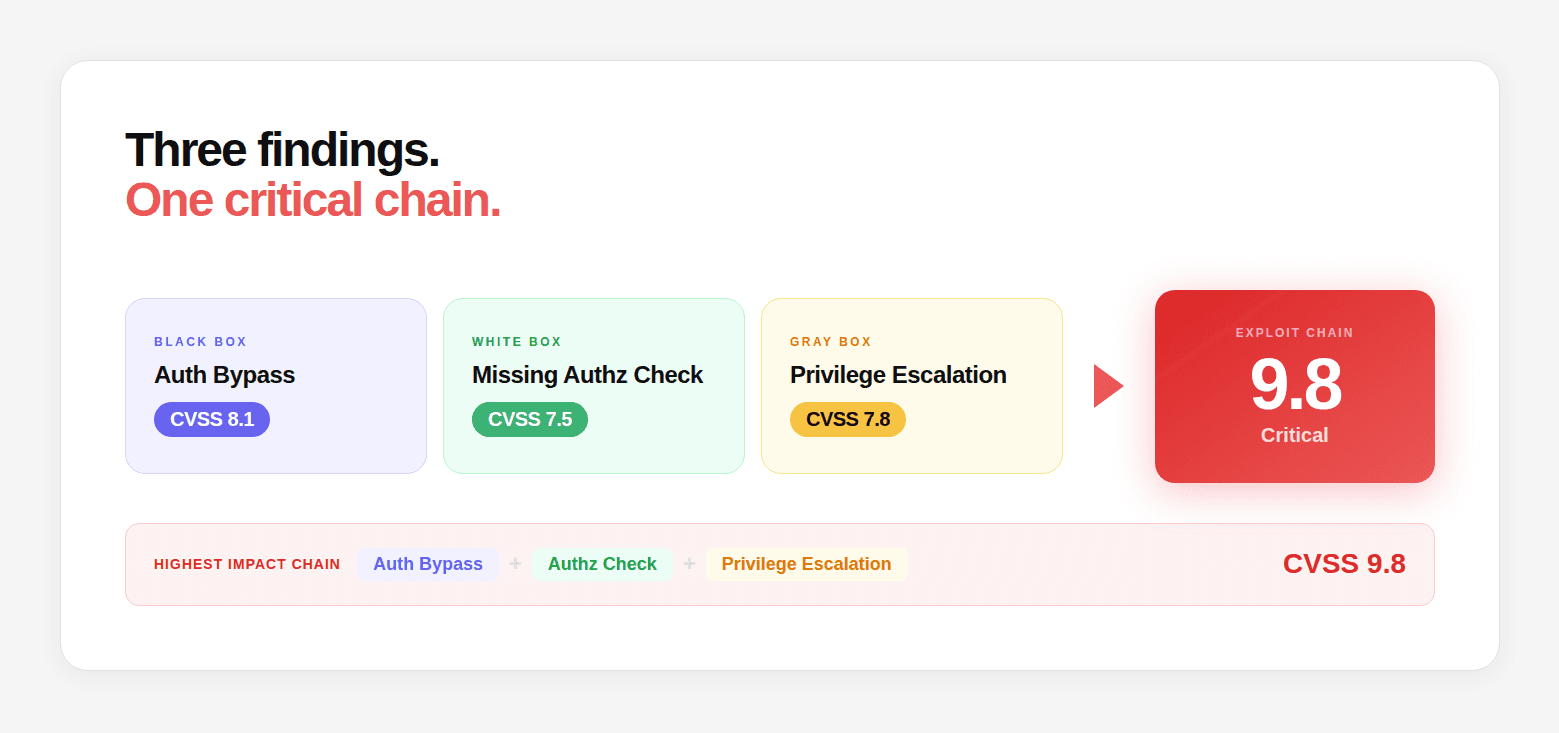
The chain construction asks three questions about every finding pair:
Does Finding A enable or enhance Finding B? (A provides information or access that makes B more impactful)
Does the combination of A and B produce an impact greater than either alone? (Low + Low = Critical)
What is the minimum chain that achieves the highest-impact outcome?
Every confirmed chain is then exploited with a working proof-of-concept, not just described, but executed. The impact is quantified: how many records were accessible, what data types were exposed, what is the realistic attacker path from zero to maximum data access.
Where AI Penetration Testing Still Requires Human Expertise
AI can automate reconnaissance, test generation, code analysis, exploitation and attack-chain exploration, but a production penetration test still requires human-defined scope, authorization, safety boundaries, and final judgment.
Human expertise remains particularly important for ambiguous business logic, unusual application behavior, safety-sensitive production systems, interpreting organizational risk, validating high-impact findings, deciding whether exploitation is safe, and communicating remediation priorities to engineering and leadership teams.
The strongest AI pentesting methodology is therefore not "AI instead of humans." It is AI handling high-volume, repeatable reasoning and exploration while security professionals retain control over scope, safety, validation, and risk decisions.
Phase 8: Report Generation
The Deliverable That Engineering Teams and Auditors Both Need
The report is structured to serve two audiences simultaneously: the engineering team remediating the findings, and the auditor verifying that security controls are in place.
Report structure:
CVSS 4.0 scoring and risk context: CVSS is a standardized way to communicate vulnerability severity, but a CVSS Base score is not the same thing as organizational risk. CVSS v4.0 separates Base, Threat, Environmental, and Supplemental metrics.
Threat metrics capture factors such as exploit maturity, while Environmental metrics account for the importance and characteristics of the affected organization's environment.
FIRST recommends communicating which metric groups were used, such as CVSS-B, CVSS-BT, CVSS-BE, or CVSS-BTE.
Risk Context | How It Changes Remediation Priority |
|---|---|
Exploitable from internet without authentication | Tier 1 — fix within 24 hours |
Working public exploit exists | Tier 1 — fix within 24 hours |
CVSS 9+ with active data exposure in production | Tier 1 — immediate escalation during test |
CVSS 9+ in non-production only | Tier 2 — fix this sprint |
CVSS 7–8.9, no public exploit | Tier 2 — fix this sprint |
CVSS 4–6.9, clear exploitation path | Tier 3 — fix this quarter |
CVSS 4–6.9, limited exploitation path | Tier 4 — backlog |
Phase 9: Walkthrough Call
Turning the Report Into an Action Plan
A report without a walkthrough is just a document. The 60-minute walkthrough call with the engineering team turns findings into a shared understanding of what happened, why it matters, and exactly what to do about it.
The walkthrough covers:
Priority alignment: Not every CVSS 8 is equally urgent. The walkthrough explains the exploitability and blast radius context that determines actual priority: which findings are actively being probed in the wild, which ones are theoretical, which ones are one exploit chain away from a critical breach.
Root cause discussion: For each finding, the engineering team understands not just where the vulnerability is, but why it exists, what pattern or assumption led to it, so that the same pattern can be audited for in other parts of the codebase.
Remediation specifics: The diff in the report is the minimum change. The walkthrough discusses whether additional changes in related code are warranted, and whether the finding indicates a systemic pattern that needs a broader fix.
Questions and edge cases: The engineering team frequently identifies nuances that change the remediation approach. The walkthrough is where those get resolved.
For a deeper comparison of recurring security validation and traditional point-in-time assessments, see our guide to continuous pentesting vs. annual pentesting.
Phase 10: Retest and Verification
Closing the Loop
Every fix gets retested. Not assumed fixed, retested. The retest confirms two things:
The specific finding is remediated: The proof-of-concept no longer works
The fix didn't introduce new vulnerabilities: The changed code is reviewed for regressions
The output of the retest is a written verification report:
The verification report is the document that closes audit loops. The verification report provides audit evidence that identified vulnerabilities were retested and that remediation was validated.
This can support compliance and audit activities, including PCI DSS penetration-testing requirements and SOC 2 evidence collection, although the exact evidence required depends on the applicable control framework, scope, and auditor.
Continuous validation after the retest: A successful retest proves that the specific vulnerability was remediated in the tested environment at that point in time. It does not prove that the application will remain secure as code, infrastructure, dependencies, APIs, and cloud configuration change.
A mature security program therefore combines periodic or continuous attack-surface monitoring with repeat penetration testing and security regression testing.
The Methodology is the Product: Here is How to Test Any Provider's
Penetration testing firms often describe their methodology in marketing language that sounds similar across the industry. The way to evaluate whether a firm's methodology is real is to ask for specifics:
"Walk me through what happens in the first 6 hours of engagement." The answer should cover reconnaissance in detail, DNS enumeration, CT log queries, port scanning, cloud asset discovery. If the answer is "we start with reconnaissance and move to vulnerability testing," that's not a methodology description.
"How do you approach JavaScript bundle analysis? Can you show me an example finding?" If they don't do JS bundle analysis, or if they don't know what you mean, a significant portion of the black box attack surface is being skipped.
"How does your chain analysis work? Can you describe a finding that only appeared as a chain?" If the answer is "we document individual findings and note when they're related," they're not doing systematic chain construction.
"What does your retest report look like?" Ask for a redacted sample. It should document finding-by-finding verification status, what was tested, and what the result was.
"Can you show me a finding with root cause to file and line?" The answer tells you whether white box depth is real or claimed.
Question
What a strong answer should include
What happens during reconnaissance?
DNS, CT logs, cloud assets, ports, APIs, JS
How are vulnerabilities validated?
Reproduction + controlled exploitation
How are authentication flaws tested?
Auth bypass, OAuth, JWT, session and authorization
How are business-logic flaws tested?
Stateful workflow and adversarial sequence testing
How are findings chained?
Cross-phase correlation and attack-path construction
How is source code used?
Dataflow, auth logic, secrets, dependency/config analysis
How are findings scored?
CVSS + threat/environmental/business context
What does retesting include?
Reproduction of original exploit + regression validation
What evidence is delivered?
Requests, responses, PoCs, root cause, remediation, retest
The methodology described in this guide is exactly how a CodeAnt AI Full Assessment runs. The same phases. The same parallel tracks. The same chain construction. The same finding format, root cause to file and line, working proof-of-exploit, specific remediation diff, compliance mapping.
→ Book a free black box scan. Testing starts in less than 24 hours.
Choosing an AI Penetration Testing Platform
The methodology determines what a penetration test should accomplish. The platform determines how those activities are executed, automated, validated, and reported.
If you're comparing vendors, testing models, capabilities, and pricing, see our AI penetration testing platforms comparison.
Why Methodology Matters More Than the Pentest Label
A penetration test is only as strong as the methodology behind it.
A report can tell you what was discovered. A rigorous methodology explains how the attack surface was explored, how findings were validated, how vulnerabilities were connected into attack paths, and whether remediation actually worked.
The strongest AI penetration testing approaches combine established security-testing practices with AI where it provides a practical advantage: large-scale reconnaissance, code comprehension, adaptive test generation, exploit validation, cross-finding correlation, and attack-chain exploration.
If you're evaluating an AI penetration testing provider, don't just ask what tools it uses. Ask what methodology it follows, what evidence it produces, how it validates exploitation, how it handles attack chains, and how it verifies remediation.
Ready to see what that methodology looks like against your own application?
Start an AI penetration test with CodeAnt AI →
Continue reading:

