Meta Title: CodeAnt AI vs Checkmarx: Enterprise SAST Comparison 2026 Meta Description: Compare CodeAnt AI and Checkmarx SAST across detection architecture, compliance coverage, developer workflow, pricing, and enterprise deployment models. Description: See how AI-native SAST compares to Checkmarx’s rule-based and AI-assisted engine across detection accuracy, workflow, and compliance mapping. Slug: |
CodeAnt AI vs Checkmarx: Enterprise SAST Compared for 2026
Checkmarx and CodeAnt AI address similar enterprise security needs, but from very different starting points.
Checkmarx established itself as an enterprise SAST leader. It offers a broad application security platform that includes SAST, SCA, DAST, API security, container scanning, and IaC analysis, supported by mature compliance reporting and years of Fortune 500 deployments.
CodeAnt AI was built as an AI-native platform. It unifies code review, code quality, and security scanning into a single developer-first workflow, spanning from pre-commit hooks to a centralized SecOps dashboard.
This page compares both tools using the same six-dimension framework from our full SAST comparison. It is written for CISOs, AppSec leaders, and engineering managers who need enterprise-grade application security without compromising developer adoption.
CodeAnt AI vs Checkmarx: Quick Summary
Dimension | Checkmarx One | CodeAnt AI |
Primary Strength | Comprehensive AST platform (SAST + SCA + DAST + API + Container + IaC) | Unified AI code review + quality + security |
AI Tier | AI-Assisted | AI-Native |
Detection Engine | Rule-based SAST + AI-assisted prioritization + correlation across scan types | AI as primary detection engine |
Steps of Reproduction | ✗ | ✓ (every finding) |
Auto-Fix | AI-assisted remediation suggestions | AI-generated one-click fixes in PR |
Security Coverage | SAST + SCA + DAST + API Security + Container + IaC | SAST + SCA + Secrets + IaC + SBOMs |
DAST / API Security | ✓ genuine differentiator | ✗ |
Code Quality | ✗ | ✓ (complexity, duplication, dead code) |
Code Review | ✗ | ✓ (AI code review with inline comments) |
Workflow Integration | Portal-centric (Checkmarx One dashboard) | CLI → IDE → PR → CI/CD → SecOps |
IDE Support | VS Code, IntelliJ (CxOne IDE plugins) | VS Code, JetBrains, Visual Studio, Cursor, Windsurf |
Pre-Commit / CLI | CxCLI for CI pipeline scanning (no pre-commit blocking) | ✓ (blocks secrets, credentials, SAST/SCA issues before commit) |
SecOps Dashboard | ✓ mature compliance reporting | ✓ (vulnerability trends, OWASP/CWE/CVE, team risk, Jira/Azure Boards) |
SCM Support | GitHub, GitLab, Bitbucket, Azure DevOps | GitHub, GitLab, Bitbucket, Azure DevOps |
Deployment | Cloud (Checkmarx One) + on-prem (legacy CxSAST) | Customer DC (air-gapped), Customer Cloud, CodeAnt Cloud |
Compliance | SOC 2, ISO 27001, PCI DSS, HIPAA, FedRAMP (in progress) | SOC 2 Type II, HIPAA, zero data retention |
Pricing Model | Custom enterprise contracts (Contact Sales) | Per user ($20/user/month Code Security) |
Languages | 30+ languages with deep framework coverage | 30+ languages, 85+ frameworks |
Comparison verified against Checkmarx documentation and CodeAnt AI documentation as of February 2026. Features change, verify with both vendors before purchasing.
Where Checkmarx Excels
Checkmarx has been a market leader in enterprise application security testing for over a decade. Any honest comparison starts with what Checkmarx does well, and in the enterprise segment, Checkmarx does several things very well.
Enterprise-Grade Compliance and Certifications
Checkmarx’s compliance reporting is one of the most mature in the SAST market. The platform maps findings to regulatory frameworks, SOC 2, ISO 27001, PCI DSS, HIPAA, NIST, OWASP, with a depth and granularity that reflects years of enterprise customer feedback. For organizations operating under strict regulatory requirements, Checkmarx’s compliance reports are battle-tested: they have been reviewed by auditors across industries and refined through hundreds of enterprise engagements.
This compliance maturity extends to Checkmarx’s own certifications. The platform holds SOC 2 and ISO 27001 certifications, with FedRAMP authorization in progress for government and defense customers. For procurement teams that require vendors to meet specific certification thresholds, Checkmarx’s compliance posture is among the strongest in the market. For a broader perspective on how SAST tools handle compliance requirements, see our SAST compliance mapping guide.
Broad AST Coverage (SAST, SCA, DAST, API)
Checkmarx One is one of the few platforms that offers SAST, SCA, DAST, API security testing, container scanning, and IaC analysis in a single product. This breadth is a genuine differentiator. Most competitors, including CodeAnt AI, focus on SAST and SCA with varying levels of additional coverage. Checkmarx covers the full application security testing spectrum.
The practical advantage: security teams can correlate findings across scan types. A vulnerability found through SAST (in first-party code) can be cross-referenced with findings from DAST (runtime testing) and SCA (dependency analysis) to prioritize issues that are both present in code and exploitable at runtime. This cross-correlation is one of the most effective approaches to reducing false positives in traditional SAST tools, and Checkmarx executes it well.
DAST and API security testing are capabilities that CodeAnt AI does not currently offer. Teams that need runtime security testing alongside static analysis should weigh this gap accordingly.
Established Enterprise Sales and Support
Checkmarx has a decade-plus track record of serving Fortune 500 companies, with dedicated account teams, professional services for implementation and custom configuration, and 24/7 enterprise support options.
For large organizations running procurement processes with vendor risk assessments, security questionnaires, and compliance audits, Checkmarx’s enterprise sales infrastructure is well-practiced, they have answered these questions thousands of times.
This enterprise maturity also means Checkmarx has referenced customers across virtually every regulated industry: banking, insurance, healthcare, government, defense, and critical infrastructure. When procurement asks “who else in our industry uses this tool?”, Checkmarx almost always has an answer.
Where CodeAnt AI Goes Further
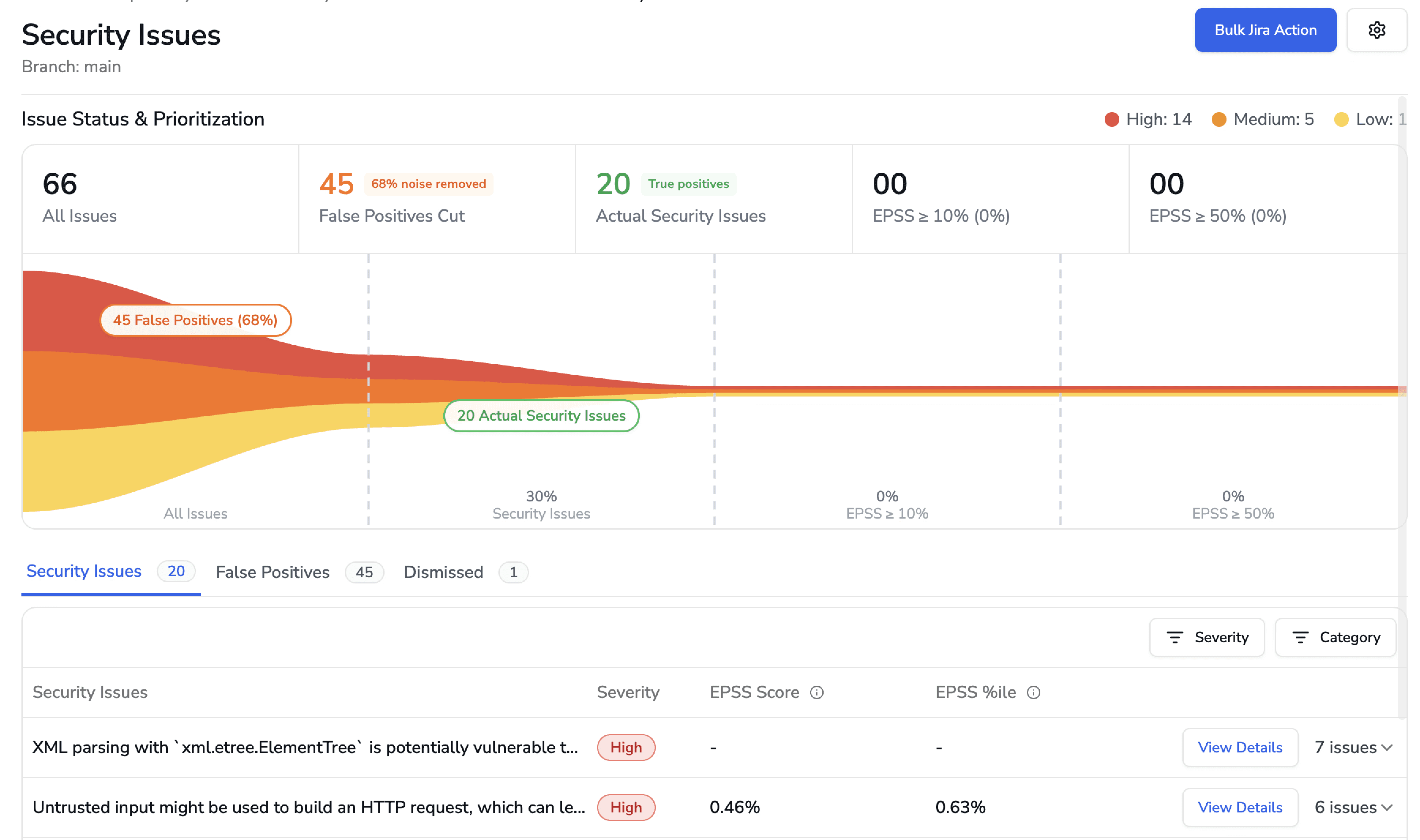
CodeAnt AI addresses several areas where enterprise teams encounter friction with Checkmarx, particularly around developer adoption, detection architecture, evidence-based findings, and pricing predictability.
AI-Native Detection vs. Hybrid Rule + AI
Checkmarx One uses a hybrid detection approach: a mature rule-based SAST engine combined with AI-assisted prioritization that correlates findings across scan types (SAST, SCA, DAST) to surface the most likely exploitable issues. The AI layer improves the signal-to-noise ratio of the underlying rule-based engine. In the AI tier taxonomy from our SAST comparison, Checkmarx is classified as AI-Assisted (Tier 2).
CodeAnt AI uses an AI-native detection engine (Tier 3) where AI is the primary analysis mechanism, not a post-processing layer. The scanner reasons about code semantics, how data flows, what functions are reachable, what inputs are user-controlled, rather than matching patterns against a rule library and then using AI to prioritize the results.
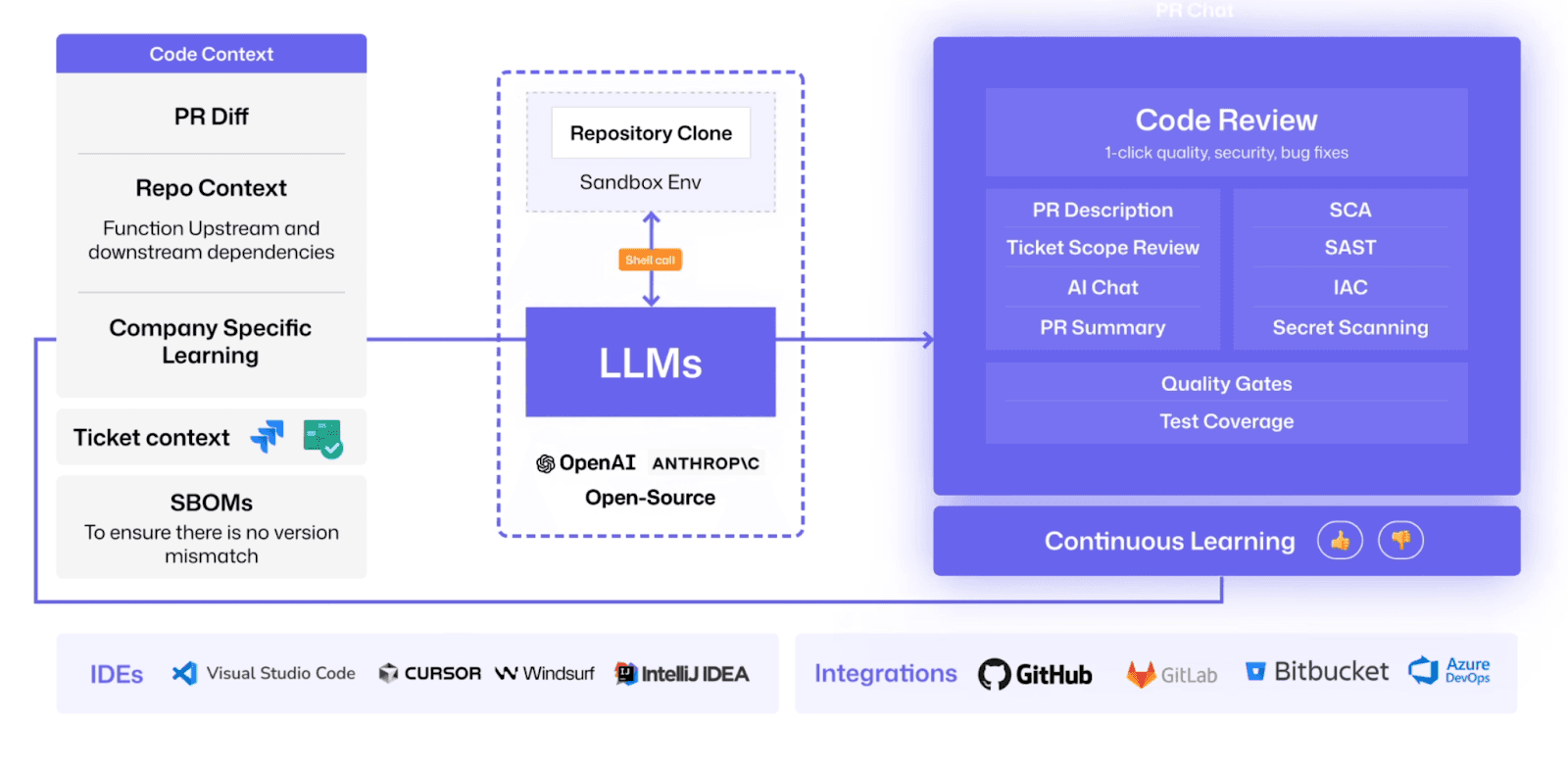
The practical difference surfaces with AI-generated code, novel vulnerability patterns, and complex cross-file taint flows that do not match existing rules. Checkmarx’s rule-based engine detects what rules define; CodeAnt AI’s AI-native engine reasons about code behavior. Both approaches have merit, Checkmarx’s is battle-tested across enterprise deployments, CodeAnt AI’s is designed for the increasing volume of AI-generated code and novel patterns.
Steps of Reproduction for Every Finding
When Checkmarx flags a vulnerability, it provides a CWE classification, a severity rating, the code location, and a data flow path showing how tainted data reaches the vulnerable sink. This is standard SAST output, more context than many tools provide, but the developer must still manually assess whether the finding is exploitable in their specific context.
CodeAnt AI generates Steps of Reproduction for every finding:
the exact entry point
the complete taint flow through each intermediate step
the vulnerable sink
a concrete exploitation scenario demonstrating how the vulnerability can be triggered
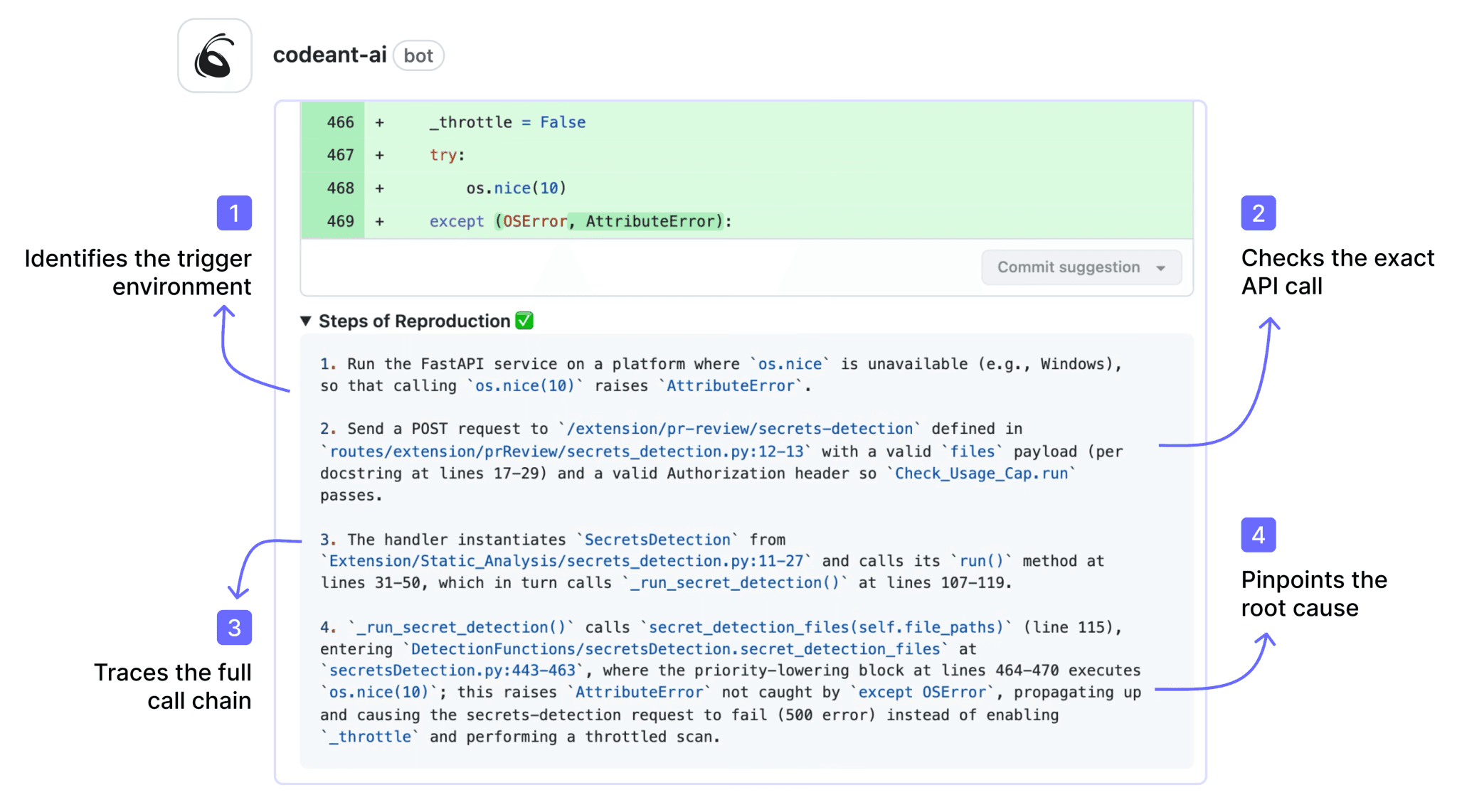
This transforms the developer’s task from “investigate whether this is real” to “review the evidence and decide on a fix.”
For enterprise teams, this evidence quality has a specific operational benefit: it reduces the security team’s triage burden. When findings come with reproduction evidence, security engineers spend less time validating alerts and more time on remediation strategy. The time saved per finding compounds across the hundreds or thousands of findings that enterprise SAST deployments typically generate.
Developer Experience: PR-Native vs. Portal-Centric
Checkmarx One’s primary interface is a centralized portal. Developers run scans, and results appear in the Checkmarx dashboard. Checkmarx offers IDE plugins (VS Code, IntelliJ) and can post PR comments, but the workflow is fundamentally portal-centric: the detailed finding analysis, remediation guidance, and triage workflows live in the Checkmarx portal, not in the developer’s PR.
CodeAnt AI delivers everything in the pull request. Findings appear as inline PR comments with Steps of Reproduction and one-click AI-generated fix suggestions. Developers review, accept, or reject fixes without leaving their PR. PR summaries provide an overview of all findings and code review observations. The developer never navigates to a separate portal.
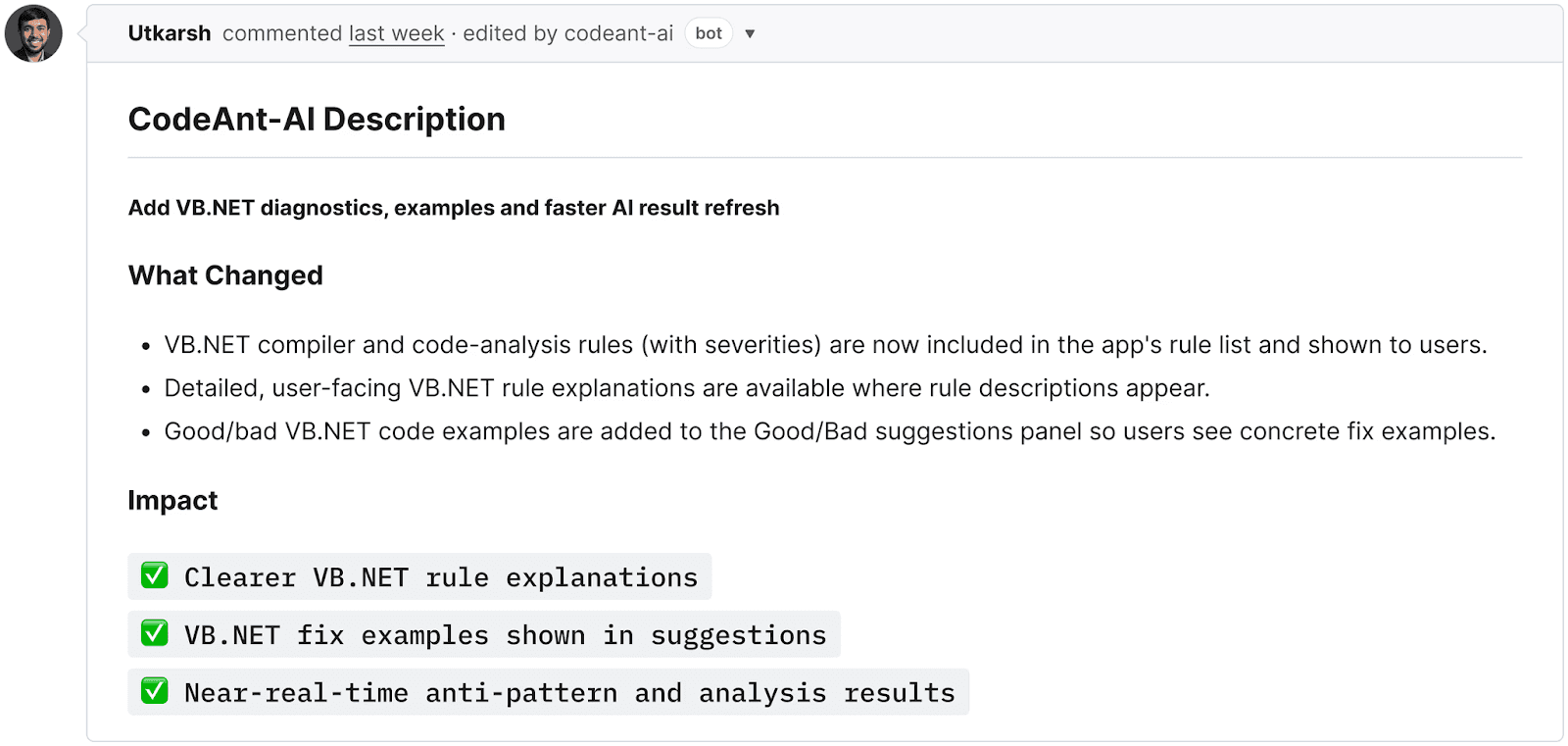
This distinction matters more than it appears. Enterprise SAST tools historically struggle with developer adoption, security teams buy the tool, configure it, and then find that developers defer or suppress findings because the workflow requires context-switching to a separate portal. PR-native delivery removes that friction. The finding, the evidence, and the fix are where the developer is already working.
Pricing Transparency and Simplicity
Checkmarx follows a custom enterprise pricing model: Contact Sales for a quote. Pricing depends on the number of developers, the modules selected (SAST, SCA, DAST, etc.), deployment model, and contract length. This is standard for enterprise security vendors, and for large deals the negotiation process is expected. However, it makes budgeting and vendor comparison difficult for teams in the evaluation phase.
CodeAnt AI publishes pricing on its website: $20/user/month for Code Security.
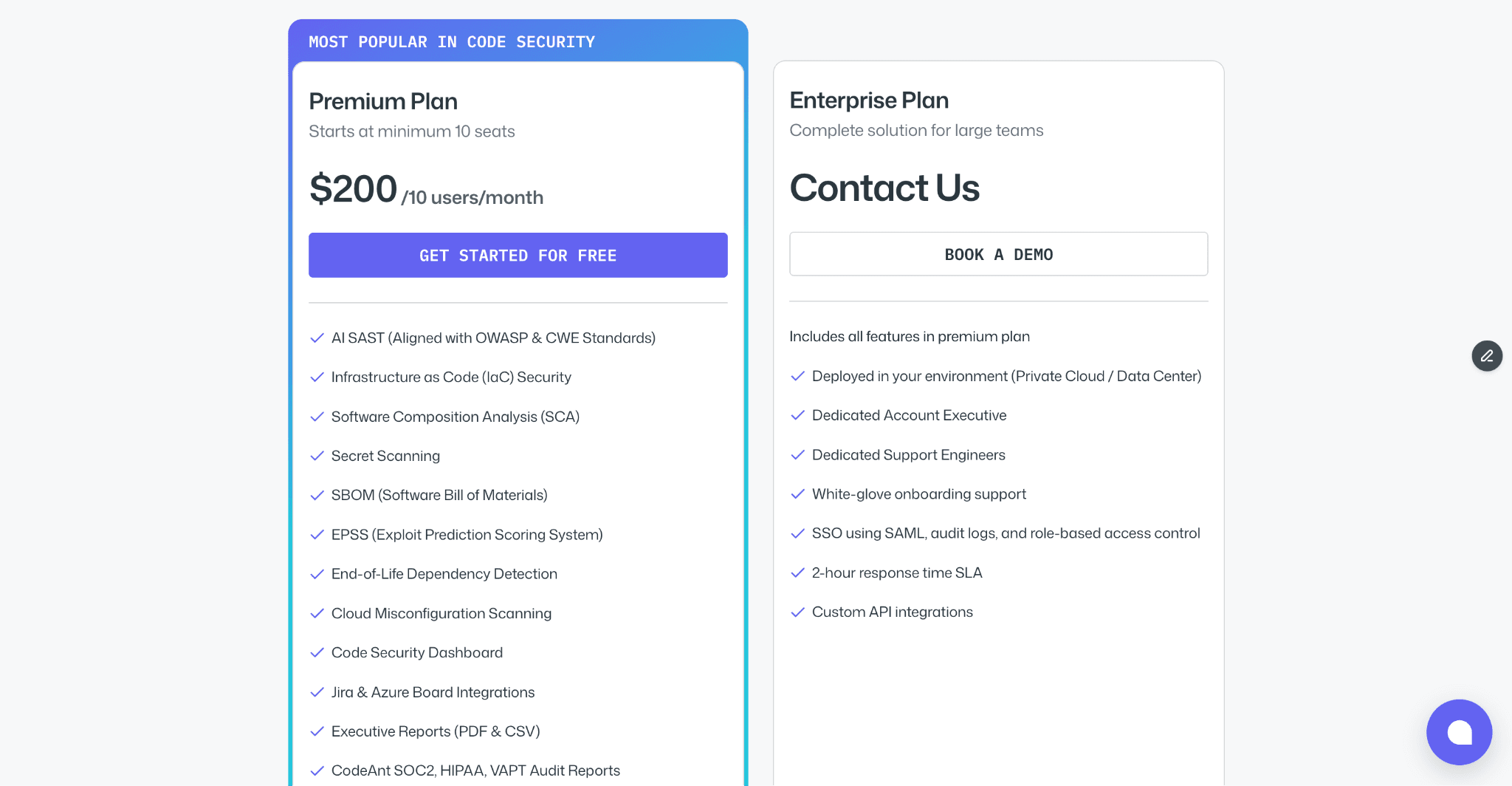
No per-repository surcharges, no per-scan fees, no module-based pricing. This transparency lets procurement teams model costs before engaging sales and compare directly against other vendors.
For a detailed enterprise pricing comparison, see the full SAST pricing guide.
Tool Consolidation (Code Review + Quality + Security)
Checkmarx focuses on security: SAST, SCA, DAST, API security, container scanning, and IaC. For code review and code quality analysis (code smells, duplication, dead code, complexity), enterprise teams using Checkmarx typically add separate tools: SonarQube for code quality, and a code review tool (GitHub reviews, CodeRabbit, or manual review processes).
CodeAnt AI consolidates AI code review, code quality analysis, SAST, SCA, secrets detection, IaC scanning, and SBOM generation into a single platform with a single dashboard. This reduces the number of vendors to manage, the number of dashboards to monitor, and the number of findings to deduplicate across tools. For more on how consolidation works in practice, see how tool consolidation simplifies enterprise security.
Feature-by-Feature Comparison
Feature | Checkmarx One | CodeAnt AI |
Detection Accuracy | ||
SAST (first-party code) | ✓ (rule-based + AI-assisted prioritization, 30+ languages) | ✓ (AI-native with semantic analysis, 30+ languages) |
SCA (open-source dependencies) | ✓ | ✓ (with EPSS scoring) |
DAST (runtime testing) | ✓ | ✗ |
API security testing | ✓ | ✗ |
Container scanning | ✓ | ✗ |
Secrets detection | ✓ | ✓ |
IaC scanning | ✓ | ✓ |
SBOM generation | ✓ | ✓ |
Steps of Reproduction | ✗ | ✓ (every finding) |
Cross-scan correlation | ✓ (correlates SAST + SCA + DAST findings) | ✗ (SAST-focused) |
AI Capabilities | ||
AI tier | AI-Assisted (Tier 2) | AI-Native (Tier 3) |
AI code review | ✗ | ✓ (line-by-line PR review) |
AI auto-fix | AI-assisted remediation suggestions | ✓ (one-click committable fixes in PR) |
AI triage / false positive reduction | ✓ (cross-scan correlation + priority scoring) | ✓ (AI-native detection + reachability analysis) |
PR summaries | ✗ | ✓ |
Batch auto-fix | ✗ | ✓ (resolve hundreds of findings at once) |
Developer Experience | ||
Primary interface | Portal-centric (Checkmarx One dashboard) | PR-native (inline comments) |
CLI scanning | ✓ (CxCLI, primarily for CI pipeline use) | ✓ |
Pre-commit hooks (secret/credential/SAST blocking) | ✗ | ✓ (blocks before commit) |
IDE integration | ✓ (VS Code, IntelliJ, CxOne plugins) | ✓ (VS Code, JetBrains, Visual Studio, Cursor, Windsurf) |
AI prompt generation for IDE fixes | ✗ | ✓ (generates prompts for Claude Code/Cursor) |
Inline PR comments | Partial (finding notifications; detail in portal) | ✓ (findings + Steps of Reproduction + fix suggestions) |
One-click fix application | ✗ | ✓ (committable suggestions in existing PR) |
Integrations | ||
GitHub | ✓ | ✓ |
GitLab | ✓ | ✓ |
Bitbucket | ✓ | ✓ |
Azure DevOps | ✓ | ✓ |
CI/CD pipelines | ✓ (broad, Jenkins, GitHub Actions, GitLab CI, Azure DevOps, etc.) | ✓ (GitHub Actions, Jenkins, GitLab CI, Bitbucket Pipelines, Azure DevOps Pipelines) |
Jira integration | ✓ | ✓ (native) |
Pricing | ||
Free tier | ✗ | 14-day free trial |
Pricing model | Custom enterprise contracts (Contact Sales) | Per user |
Starter price | Contact Sales | $20/user/month (Code Security) |
Enterprise price | Custom (typically $$$ tier) | Custom |
Enterprise Readiness | ||
Deployment options | Cloud (Checkmarx One) + on-prem (legacy CxSAST) | Customer DC (air-gapped), Customer Cloud (AWS/GCP/Azure), CodeAnt Cloud |
SOC 2 | ✓ | ✓ (Type II) |
ISO 27001 | ✓ | In progress |
HIPAA | ✓ | ✓ |
PCI DSS mapping | ✓ | ✓ |
FedRAMP | In progress | ✗ |
Zero data retention | ✗ | ✓ (across all deployment models) |
SecOps dashboard | ✓ (mature compliance reporting across scan types) | ✓ (vulnerability trends, fix rates, team risk, OWASP/CWE/CVE mapping) |
Ticketing integration | ✓ (Jira, ServiceNow) | ✓ (Jira, Azure Boards — native) |
Audit-ready reporting | ✓ (comprehensive — SOC 2, ISO 27001, PCI DSS, HIPAA, NIST) | ✓ (PDF/CSV exports for SOC 2, ISO 27001) |
Attribution / risk distribution | ✓ | ✓ (repo-level and developer-level risk) |
Code quality analysis | ✗ | ✓ (code smells, duplication, dead code, complexity) |
Developer productivity metrics | ✗ | ✓ (DORA metrics, PR cycle time, SLA tracking) |
Enterprise Readiness Compared
Both Checkmarx and CodeAnt AI serve enterprise customers, but their enterprise strengths are different.
Compliance Support
CodeAnt AI provides audit-ready PDF/CSV exports mapped to SOC 2 and ISO 27001, with OWASP/CWE/CVE categorization across all findings. The SecOps dashboard tracks vulnerability trends, fix rates, and team-level risk distribution.
This covers the compliance needs of most enterprise teams, but teams operating under PCI DSS, NIST, or FedRAMP requirements should verify that CodeAnt AI’s current compliance reporting meets their specific audit documentation needs. For a detailed comparison of how SAST tools handle compliance mapping, see our SAST compliance frameworks guide.
Integration Breadth
Both platforms integrate with the four major SCM platforms (GitHub, GitLab, Azure DevOps, or Bitbucket) and major CI/CD systems. Checkmarx has a broader integration ecosystem with enterprise service management platforms, ServiceNow, RSA Archer, and other GRC (governance, risk, and compliance) tools. CodeAnt AI integrates natively with Jira and Azure Boards for remediation ticketing.
For enterprise teams whose security workflow depends on ServiceNow or GRC platform integration, Checkmarx’s ecosystem is more mature. For teams whose workflow centers on Jira and Azure Boards, CodeAnt AI’s native integrations are sufficient.
End-to-End Workflow Comparison (CLI → IDE → PR → CI/CD → SecOps)
Enterprise SAST tools are typically evaluated on detection accuracy and compliance. But detection is only valuable if findings reach developers in a way that leads to remediation. The workflow comparison asks a different question: at each stage of the development lifecycle, what does each tool actually do?
Workflow Stage | Checkmarx One | CodeAnt AI |
CLI + Pre-Commit | CxCLI exists primarily for CI pipeline integration, triggering scans from the command line. No pre-commit hooks for blocking secrets, credentials, or SAST issues before commit. Developers can commit and push vulnerable code freely; it will be caught in CI (if configured). | ✓ CLI blocks secrets, credentials, API keys, tokens, and high-risk SAST/SCA issues before |
IDE | ✓ CxOne IDE plugins for VS Code and IntelliJ. Developers can trigger scans from the IDE and view results. Finding detail and remediation guidance are available, though the richest triage experience is in the Checkmarx portal. | ✓ VS Code, JetBrains (IntelliJ, PyCharm, WebStorm), Visual Studio, Cursor, Windsurf. In-context scanning with guided remediation and one-click fixes. AI prompt generation triggers Claude Code or Cursor to auto-fix vulnerabilities, the IDE becomes a remediation surface for AI coding environments. |
Pull Request | Partial. Checkmarx can post finding summaries to PRs, but the detailed vulnerability analysis, triage workflow, and remediation guidance live in the Checkmarx portal. Developer must navigate to the portal for full context. No AI code review. No one-click fix suggestions in PR. | ✓ AI code review + security analysis on every PR. Findings appear as inline comments with Steps of Reproduction and one-click AI-generated fixes. PR summaries. Line-by-line review. Developer never leaves the PR for the security context. |
CI/CD | ✓ Broad CI/CD integration (Jenkins, GitHub Actions, GitLab CI, Azure DevOps, CircleCI). Configurable scan policies with severity-based and compliance-based thresholds. Mature and well-tested in enterprise pipelines. | ✓ GitHub Actions, Jenkins, GitLab CI, Bitbucket Pipelines, Azure DevOps Pipelines. Configurable policy gates by severity, CWE category, OWASP classification, and custom rules. |
SecOps / Compliance | ✓ Mature compliance reporting across SAST, SCA, DAST, API, and container findings. Compliance framework mapping (SOC 2, ISO 27001, PCI DSS, HIPAA, NIST). ServiceNow and GRC platform integration. Dashboard correlates findings across scan types. | ✓ Unified SecOps dashboard: vulnerability trends, TP/FP rates, fix rates, EPSS scoring, OWASP/CWE/CVE mapping, team/repo risk distribution. Native Jira and Azure Boards integration. Audit-ready PDF/CSV for SOC 2, ISO 27001. Attribution reporting. |
Checkmarx is less strong in the developer-facing stages. The platform is built around a portal-centric model: security teams configure scans, results flow into the Checkmarx dashboard, and developers review findings in the portal. This works when remediation is security-led. It becomes friction-heavy when organizations expect developers to own security, because developers rarely adopt tools that require leaving their pull request to check a separate dashboard.
CodeAnt AI takes the opposite approach.
Pre-commit: Blocks high-risk issues (secrets, credentials, critical SAST findings) before code enters the repository, a stage Checkmarx does not cover.
IDE: Supports modern AI coding environments such as Cursor and Windsurf, with AI prompt generation that turns the IDE into a remediation surface.
Pull Request: Provides line-by-line AI code review, Steps of Reproduction for every security finding, and one-click fixes directly inside the PR.
The difference is structural:
Checkmarx centers security in a portal.
CodeAnt AI centers security in the developer workflow.
The tradeoff is real.
Checkmarx offers deeper SecOps and compliance capabilities, broader scan coverage, and stronger GRC alignment.
CodeAnt AI offers deeper developer-stage coverage, pre-commit prevention, AI-native review, and PR-based remediation.
The decision ultimately comes down to where your bottleneck sits:
If it is compliance evidence and audit readiness, Checkmarx leads.
If it is developer adoption and remediation speed, CodeAnt AI leads.
Deployment and Data Residency
For enterprises with strict data residency or air-gapped requirements, deployment architecture is a critical evaluation factor.
Checkmarx Deployment Model
Checkmarx offers two primary paths:
Checkmarx One: the cloud-native platform where new features are released first
CxSAST (legacy): the on-premises product for self-hosted environments
Checkmarx has extensive experience with enterprise on-prem deployments, including production installations across defense, financial services, and government sectors. This track record is a genuine strength for organizations requiring fully self-hosted security tooling.
However, there is a structural tradeoff:
The cloud-native platform and the legacy on-prem product are different products.
Feature parity is not guaranteed.
On-prem customers may not receive the latest cloud capabilities.
This cloud vs. legacy split is common among enterprise security vendors transitioning to modern architectures.
CodeAnt AI Deployment Model
CodeAnt AI is designed to avoid this feature gap by offering three deployment options with full feature parity:
Customer Data Center (Air-Gapped)
Fully deployed within on-prem infrastructure
Supports zero external network connectivity
No code, metadata, or telemetry leaves the environment
Same AI-native detection and PR workflow as cloud
Customer Cloud (AWS, GCP, Azure)
Deployed inside the customer’s VPC
Full control over infrastructure and network boundaries
CodeAnt Cloud
Hosted by CodeAnt
SOC 2 Type II certified
HIPAA compliant
Fastest time to deployment
Across all models, CodeAnt AI offers zero data retention, code is analyzed in memory and not persisted to disk.
The Practical Tradeoff
Checkmarx offers:
Longer enterprise on-prem track record
Deep roots in regulated industries
CodeAnt AI offers:
Full feature consistency across deployment models
No cloud-only vs. on-prem capability gap
Explicit zero data retention guarantees
The decision depends on what matters more for your organization:
Proven on-prem history in regulated sectors
Or deployment flexibility with consistent feature parity
For a broader analysis, see our on-prem and data residency guide.
Pricing Comparison
Dimension | Checkmarx One | CodeAnt AI |
Pricing model | Custom enterprise contracts (Contact Sales) | Per user |
Public pricing | ✗ (Contact Sales required) | ✓ ($20/user/month Code Security published on website) |
Free option | ✗ | 14-day free trial |
50-dev estimated annual cost | $50K–$150K+/yr (varies widely by module bundle and contract) | $12,000/yr (Code Security) |
Typical contract | Annual or multi-year; minimum commitments common | Monthly or annual; no minimums |
Includes SAST | ✓ | ✓ |
Includes SCA | ✓ | ✓ |
Includes AI code security review | ✗ | ✓ |
Includes DAST + API Security | ✓ (additional modules) | ✗ |
Includes code quality | ✗ | ✓ |
Includes SecOps Dashboard + Jira/Azure Boards | ✓ (included in platform) | ✓ |
Pricing page | checkmarx.com/request-a-demo |
The pricing comparison between Checkmarx and CodeAnt AI reflects two different procurement models. Checkmarx follows the traditional enterprise software approach: custom quotes, multi-year contracts, minimum commitments, and module-based pricing where adding DAST or API security increases cost. This model works for large enterprise procurement processes where negotiation is expected, but makes it difficult for teams to budget before engaging sales.
CodeAnt AI publishes pricing at $20/user/month for Code Security.
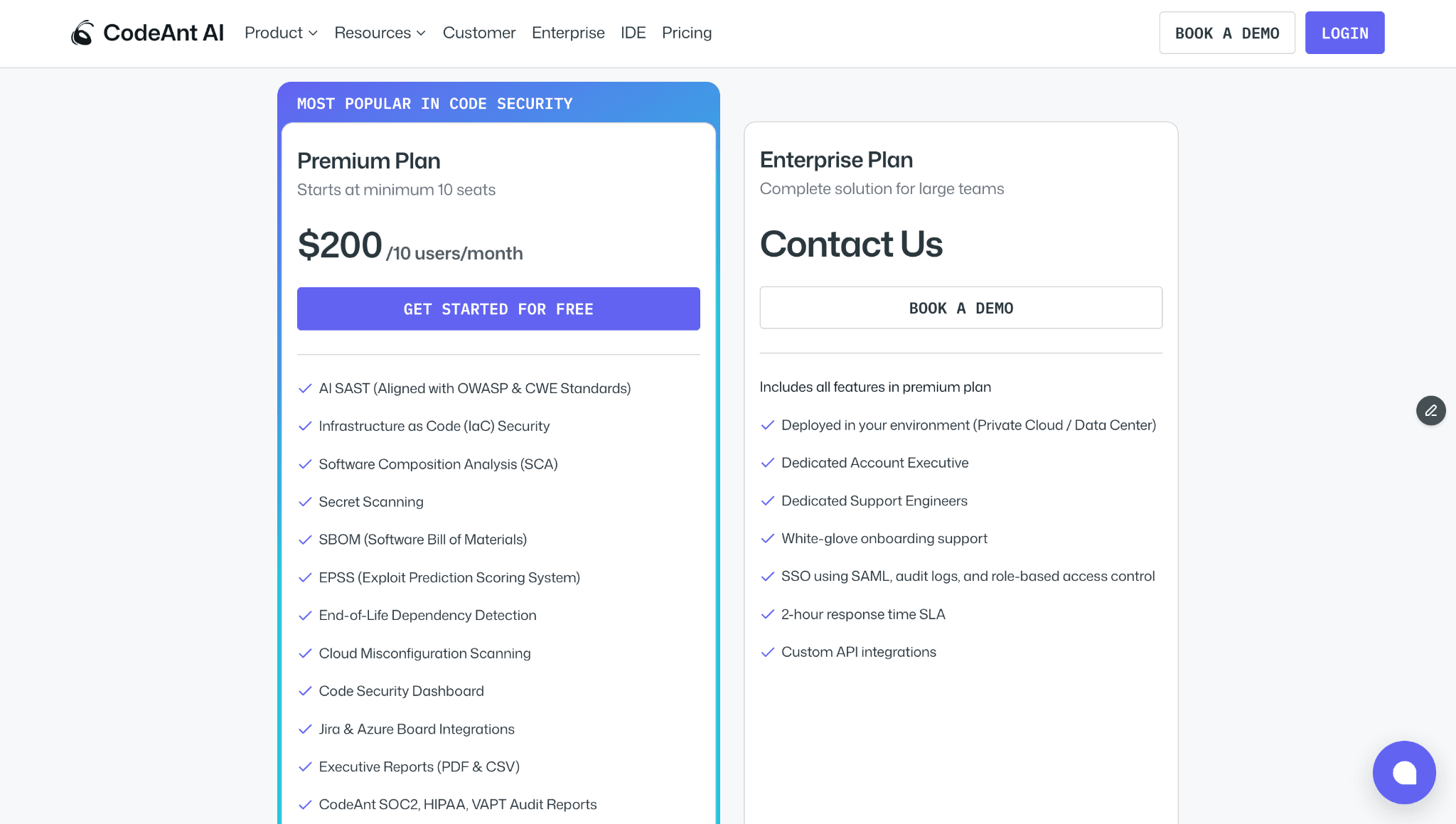
The price includes SAST, SCA, secrets detection, IaC scanning, SBOMs, AI code review, code quality analysis, SecOps dashboard, and native Jira/Azure Boards integration. No module-based pricing, every feature is included.
The cost gap is significant if you notice. For a detailed breakdown of enterprise SAST pricing across the market, see the SAST pricing guide.
Which Should You Choose?
There is no universally “better” tool, the right choice depends on your organization’s priorities, compliance requirements, and where your biggest pain points are.
Checkmarx is built for breadth. CodeAnt AI is built for depth in the developer workflow.
If your priority is full-spectrum AST coverage: SAST, SCA, DAST, API security, container scanning, and compliance mapping across PCI DSS and NIST, Checkmarx remains one of the most comprehensive enterprise security platforms available.
If your priority is developer adoption, AI-native detection, evidence-backed findings, and reducing remediation friction inside pull requests, CodeAnt AI offers a fundamentally different approach.
The real question is not which tool detects more. It is which tool your developers will actually use, and which workflow accelerates remediation instead of slowing it down.
Run both on the same repository. Compare detection depth. Compare remediation speed. Compare developer friction.
Book a 30-min enterprise demo: see how CodeAnt AI compares to your current Checkmarx setup
For a broader view beyond these two tools, see our full 15-tool SAST comparison.
Meta Title: CodeAnt AI vs Checkmarx: Enterprise SAST Comparison 2026 Meta Description: Compare CodeAnt AI and Checkmarx SAST across detection architecture, compliance coverage, developer workflow, pricing, and enterprise deployment models. Description: See how AI-native SAST compares to Checkmarx’s rule-based and AI-assisted engine across detection accuracy, workflow, and compliance mapping. Slug: |
CodeAnt AI vs Checkmarx: Enterprise SAST Compared for 2026
Checkmarx and CodeAnt AI address similar enterprise security needs, but from very different starting points.
Checkmarx established itself as an enterprise SAST leader. It offers a broad application security platform that includes SAST, SCA, DAST, API security, container scanning, and IaC analysis, supported by mature compliance reporting and years of Fortune 500 deployments.
CodeAnt AI was built as an AI-native platform. It unifies code review, code quality, and security scanning into a single developer-first workflow, spanning from pre-commit hooks to a centralized SecOps dashboard.
This page compares both tools using the same six-dimension framework from our full SAST comparison. It is written for CISOs, AppSec leaders, and engineering managers who need enterprise-grade application security without compromising developer adoption.
CodeAnt AI vs Checkmarx: Quick Summary

Dimension | Checkmarx One | CodeAnt AI |
Primary Strength | Comprehensive AST platform (SAST + SCA + DAST + API + Container + IaC) | Unified AI code review + quality + security |
AI Tier | AI-Assisted | AI-Native |
Detection Engine | Rule-based SAST + AI-assisted prioritization + correlation across scan types | AI as primary detection engine |
Steps of Reproduction | ✗ | ✓ (every finding) |
Auto-Fix | AI-assisted remediation suggestions | AI-generated one-click fixes in PR |
Security Coverage | SAST + SCA + DAST + API Security + Container + IaC | SAST + SCA + Secrets + IaC + SBOMs |
DAST / API Security | ✓ genuine differentiator | ✗ |
Code Quality | ✗ | ✓ (complexity, duplication, dead code) |
Code Review | ✗ | ✓ (AI code review with inline comments) |
Workflow Integration | Portal-centric (Checkmarx One dashboard) | CLI → IDE → PR → CI/CD → SecOps |
IDE Support | VS Code, IntelliJ (CxOne IDE plugins) | VS Code, JetBrains, Visual Studio, Cursor, Windsurf |
Pre-Commit / CLI | CxCLI for CI pipeline scanning (no pre-commit blocking) | ✓ (blocks secrets, credentials, SAST/SCA issues before commit) |
SecOps Dashboard | ✓ mature compliance reporting | ✓ (vulnerability trends, OWASP/CWE/CVE, team risk, Jira/Azure Boards) |
SCM Support | GitHub, GitLab, Bitbucket, Azure DevOps | GitHub, GitLab, Bitbucket, Azure DevOps |
Deployment | Cloud (Checkmarx One) + on-prem (legacy CxSAST) | Customer DC (air-gapped), Customer Cloud, CodeAnt Cloud |
Compliance | SOC 2, ISO 27001, PCI DSS, HIPAA, FedRAMP (in progress) | SOC 2 Type II, HIPAA, zero data retention |
Pricing Model | Custom enterprise contracts (Contact Sales) | Per user ($20/user/month Code Security) |
Languages | 30+ languages with deep framework coverage | 30+ languages, 85+ frameworks |
Comparison verified against Checkmarx documentation and CodeAnt AI documentation as of February 2026. Features change, verify with both vendors before purchasing.
Where Checkmarx Excels
Checkmarx has been a market leader in enterprise application security testing for over a decade. Any honest comparison starts with what Checkmarx does well, and in the enterprise segment, Checkmarx does several things very well.
Enterprise-Grade Compliance and Certifications
Checkmarx’s compliance reporting is one of the most mature in the SAST market. The platform maps findings to regulatory frameworks, SOC 2, ISO 27001, PCI DSS, HIPAA, NIST, OWASP, with a depth and granularity that reflects years of enterprise customer feedback. For organizations operating under strict regulatory requirements, Checkmarx’s compliance reports are battle-tested: they have been reviewed by auditors across industries and refined through hundreds of enterprise engagements.
This compliance maturity extends to Checkmarx’s own certifications. The platform holds SOC 2 and ISO 27001 certifications, with FedRAMP authorization in progress for government and defense customers. For procurement teams that require vendors to meet specific certification thresholds, Checkmarx’s compliance posture is among the strongest in the market. For a broader perspective on how SAST tools handle compliance requirements, see our SAST compliance mapping guide.
Broad AST Coverage (SAST, SCA, DAST, API)
Checkmarx One is one of the few platforms that offers SAST, SCA, DAST, API security testing, container scanning, and IaC analysis in a single product. This breadth is a genuine differentiator. Most competitors, including CodeAnt AI, focus on SAST and SCA with varying levels of additional coverage. Checkmarx covers the full application security testing spectrum.
The practical advantage: security teams can correlate findings across scan types. A vulnerability found through SAST (in first-party code) can be cross-referenced with findings from DAST (runtime testing) and SCA (dependency analysis) to prioritize issues that are both present in code and exploitable at runtime. This cross-correlation is one of the most effective approaches to reducing false positives in traditional SAST tools, and Checkmarx executes it well.
DAST and API security testing are capabilities that CodeAnt AI does not currently offer. Teams that need runtime security testing alongside static analysis should weigh this gap accordingly.
Established Enterprise Sales and Support
Checkmarx has a decade-plus track record of serving Fortune 500 companies, with dedicated account teams, professional services for implementation and custom configuration, and 24/7 enterprise support options.
For large organizations running procurement processes with vendor risk assessments, security questionnaires, and compliance audits, Checkmarx’s enterprise sales infrastructure is well-practiced, they have answered these questions thousands of times.
This enterprise maturity also means Checkmarx has referenced customers across virtually every regulated industry: banking, insurance, healthcare, government, defense, and critical infrastructure. When procurement asks “who else in our industry uses this tool?”, Checkmarx almost always has an answer.
Where CodeAnt AI Goes Further
CodeAnt AI addresses several areas where enterprise teams encounter friction with Checkmarx, particularly around developer adoption, detection architecture, evidence-based findings, and pricing predictability.
AI-Native Detection vs. Hybrid Rule + AI
Checkmarx One uses a hybrid detection approach: a mature rule-based SAST engine combined with AI-assisted prioritization that correlates findings across scan types (SAST, SCA, DAST) to surface the most likely exploitable issues. The AI layer improves the signal-to-noise ratio of the underlying rule-based engine. In the AI tier taxonomy from our SAST comparison, Checkmarx is classified as AI-Assisted (Tier 2).
CodeAnt AI uses an AI-native detection engine (Tier 3) where AI is the primary analysis mechanism, not a post-processing layer. The scanner reasons about code semantics, how data flows, what functions are reachable, what inputs are user-controlled, rather than matching patterns against a rule library and then using AI to prioritize the results.
The practical difference surfaces with AI-generated code, novel vulnerability patterns, and complex cross-file taint flows that do not match existing rules. Checkmarx’s rule-based engine detects what rules define; CodeAnt AI’s AI-native engine reasons about code behavior. Both approaches have merit, Checkmarx’s is battle-tested across enterprise deployments, CodeAnt AI’s is designed for the increasing volume of AI-generated code and novel patterns.
Steps of Reproduction for Every Finding
When Checkmarx flags a vulnerability, it provides a CWE classification, a severity rating, the code location, and a data flow path showing how tainted data reaches the vulnerable sink. This is standard SAST output, more context than many tools provide, but the developer must still manually assess whether the finding is exploitable in their specific context.
CodeAnt AI generates Steps of Reproduction for every finding:
the exact entry point
the complete taint flow through each intermediate step
the vulnerable sink
a concrete exploitation scenario demonstrating how the vulnerability can be triggered

This transforms the developer’s task from “investigate whether this is real” to “review the evidence and decide on a fix.”
For enterprise teams, this evidence quality has a specific operational benefit: it reduces the security team’s triage burden. When findings come with reproduction evidence, security engineers spend less time validating alerts and more time on remediation strategy. The time saved per finding compounds across the hundreds or thousands of findings that enterprise SAST deployments typically generate.
Developer Experience: PR-Native vs. Portal-Centric
Checkmarx One’s primary interface is a centralized portal. Developers run scans, and results appear in the Checkmarx dashboard. Checkmarx offers IDE plugins (VS Code, IntelliJ) and can post PR comments, but the workflow is fundamentally portal-centric: the detailed finding analysis, remediation guidance, and triage workflows live in the Checkmarx portal, not in the developer’s PR.
CodeAnt AI delivers everything in the pull request. Findings appear as inline PR comments with Steps of Reproduction and one-click AI-generated fix suggestions. Developers review, accept, or reject fixes without leaving their PR. PR summaries provide an overview of all findings and code review observations. The developer never navigates to a separate portal.
This distinction matters more than it appears. Enterprise SAST tools historically struggle with developer adoption, security teams buy the tool, configure it, and then find that developers defer or suppress findings because the workflow requires context-switching to a separate portal. PR-native delivery removes that friction. The finding, the evidence, and the fix are where the developer is already working.
Pricing Transparency and Simplicity
Checkmarx follows a custom enterprise pricing model: Contact Sales for a quote. Pricing depends on the number of developers, the modules selected (SAST, SCA, DAST, etc.), deployment model, and contract length. This is standard for enterprise security vendors, and for large deals the negotiation process is expected. However, it makes budgeting and vendor comparison difficult for teams in the evaluation phase.
CodeAnt AI publishes pricing on its website: $20/user/month for Code Security.

No per-repository surcharges, no per-scan fees, no module-based pricing. This transparency lets procurement teams model costs before engaging sales and compare directly against other vendors.
For a detailed enterprise pricing comparison, see the full SAST pricing guide.
Tool Consolidation (Code Review + Quality + Security)
Checkmarx focuses on security: SAST, SCA, DAST, API security, container scanning, and IaC. For code review and code quality analysis (code smells, duplication, dead code, complexity), enterprise teams using Checkmarx typically add separate tools: SonarQube for code quality, and a code review tool (GitHub reviews, CodeRabbit, or manual review processes).
CodeAnt AI consolidates AI code review, code quality analysis, SAST, SCA, secrets detection, IaC scanning, and SBOM generation into a single platform with a single dashboard. This reduces the number of vendors to manage, the number of dashboards to monitor, and the number of findings to deduplicate across tools. For more on how consolidation works in practice, see how tool consolidation simplifies enterprise security.
Feature-by-Feature Comparison
Feature | Checkmarx One | CodeAnt AI |
Detection Accuracy | ||
SAST (first-party code) | ✓ (rule-based + AI-assisted prioritization, 30+ languages) | ✓ (AI-native with semantic analysis, 30+ languages) |
SCA (open-source dependencies) | ✓ | ✓ (with EPSS scoring) |
DAST (runtime testing) | ✓ | ✗ |
API security testing | ✓ | ✗ |
Container scanning | ✓ | ✗ |
Secrets detection | ✓ | ✓ |
IaC scanning | ✓ | ✓ |
SBOM generation | ✓ | ✓ |
Steps of Reproduction | ✗ | ✓ (every finding) |
Cross-scan correlation | ✓ (correlates SAST + SCA + DAST findings) | ✗ (SAST-focused) |
AI Capabilities | ||
AI tier | AI-Assisted (Tier 2) | AI-Native (Tier 3) |
AI code review | ✗ | ✓ (line-by-line PR review) |
AI auto-fix | AI-assisted remediation suggestions | ✓ (one-click committable fixes in PR) |
AI triage / false positive reduction | ✓ (cross-scan correlation + priority scoring) | ✓ (AI-native detection + reachability analysis) |
PR summaries | ✗ | ✓ |
Batch auto-fix | ✗ | ✓ (resolve hundreds of findings at once) |
Developer Experience | ||
Primary interface | Portal-centric (Checkmarx One dashboard) | PR-native (inline comments) |
CLI scanning | ✓ (CxCLI, primarily for CI pipeline use) | ✓ |
Pre-commit hooks (secret/credential/SAST blocking) | ✗ | ✓ (blocks before commit) |
IDE integration | ✓ (VS Code, IntelliJ, CxOne plugins) | ✓ (VS Code, JetBrains, Visual Studio, Cursor, Windsurf) |
AI prompt generation for IDE fixes | ✗ | ✓ (generates prompts for Claude Code/Cursor) |
Inline PR comments | Partial (finding notifications; detail in portal) | ✓ (findings + Steps of Reproduction + fix suggestions) |
One-click fix application | ✗ | ✓ (committable suggestions in existing PR) |
Integrations | ||
GitHub | ✓ | ✓ |
GitLab | ✓ | ✓ |
Bitbucket | ✓ | ✓ |
Azure DevOps | ✓ | ✓ |
CI/CD pipelines | ✓ (broad, Jenkins, GitHub Actions, GitLab CI, Azure DevOps, etc.) | ✓ (GitHub Actions, Jenkins, GitLab CI, Bitbucket Pipelines, Azure DevOps Pipelines) |
Jira integration | ✓ | ✓ (native) |
Pricing | ||
Free tier | ✗ | 14-day free trial |
Pricing model | Custom enterprise contracts (Contact Sales) | Per user |
Starter price | Contact Sales | $20/user/month (Code Security) |
Enterprise price | Custom (typically $$$ tier) | Custom |
Enterprise Readiness | ||
Deployment options | Cloud (Checkmarx One) + on-prem (legacy CxSAST) | Customer DC (air-gapped), Customer Cloud (AWS/GCP/Azure), CodeAnt Cloud |
SOC 2 | ✓ | ✓ (Type II) |
ISO 27001 | ✓ | In progress |
HIPAA | ✓ | ✓ |
PCI DSS mapping | ✓ | ✓ |
FedRAMP | In progress | ✗ |
Zero data retention | ✗ | ✓ (across all deployment models) |
SecOps dashboard | ✓ (mature compliance reporting across scan types) | ✓ (vulnerability trends, fix rates, team risk, OWASP/CWE/CVE mapping) |
Ticketing integration | ✓ (Jira, ServiceNow) | ✓ (Jira, Azure Boards — native) |
Audit-ready reporting | ✓ (comprehensive — SOC 2, ISO 27001, PCI DSS, HIPAA, NIST) | ✓ (PDF/CSV exports for SOC 2, ISO 27001) |
Attribution / risk distribution | ✓ | ✓ (repo-level and developer-level risk) |
Code quality analysis | ✗ | ✓ (code smells, duplication, dead code, complexity) |
Developer productivity metrics | ✗ | ✓ (DORA metrics, PR cycle time, SLA tracking) |
Enterprise Readiness Compared
Both Checkmarx and CodeAnt AI serve enterprise customers, but their enterprise strengths are different.
Compliance Support
CodeAnt AI provides audit-ready PDF/CSV exports mapped to SOC 2 and ISO 27001, with OWASP/CWE/CVE categorization across all findings. The SecOps dashboard tracks vulnerability trends, fix rates, and team-level risk distribution.
This covers the compliance needs of most enterprise teams, but teams operating under PCI DSS, NIST, or FedRAMP requirements should verify that CodeAnt AI’s current compliance reporting meets their specific audit documentation needs. For a detailed comparison of how SAST tools handle compliance mapping, see our SAST compliance frameworks guide.
Integration Breadth
Both platforms integrate with the four major SCM platforms (GitHub, GitLab, Azure DevOps, or Bitbucket) and major CI/CD systems. Checkmarx has a broader integration ecosystem with enterprise service management platforms, ServiceNow, RSA Archer, and other GRC (governance, risk, and compliance) tools. CodeAnt AI integrates natively with Jira and Azure Boards for remediation ticketing.
For enterprise teams whose security workflow depends on ServiceNow or GRC platform integration, Checkmarx’s ecosystem is more mature. For teams whose workflow centers on Jira and Azure Boards, CodeAnt AI’s native integrations are sufficient.
End-to-End Workflow Comparison (CLI → IDE → PR → CI/CD → SecOps)
Enterprise SAST tools are typically evaluated on detection accuracy and compliance. But detection is only valuable if findings reach developers in a way that leads to remediation. The workflow comparison asks a different question: at each stage of the development lifecycle, what does each tool actually do?
Workflow Stage | Checkmarx One | CodeAnt AI |
CLI + Pre-Commit | CxCLI exists primarily for CI pipeline integration, triggering scans from the command line. No pre-commit hooks for blocking secrets, credentials, or SAST issues before commit. Developers can commit and push vulnerable code freely; it will be caught in CI (if configured). | ✓ CLI blocks secrets, credentials, API keys, tokens, and high-risk SAST/SCA issues before |
IDE | ✓ CxOne IDE plugins for VS Code and IntelliJ. Developers can trigger scans from the IDE and view results. Finding detail and remediation guidance are available, though the richest triage experience is in the Checkmarx portal. | ✓ VS Code, JetBrains (IntelliJ, PyCharm, WebStorm), Visual Studio, Cursor, Windsurf. In-context scanning with guided remediation and one-click fixes. AI prompt generation triggers Claude Code or Cursor to auto-fix vulnerabilities, the IDE becomes a remediation surface for AI coding environments. |
Pull Request | Partial. Checkmarx can post finding summaries to PRs, but the detailed vulnerability analysis, triage workflow, and remediation guidance live in the Checkmarx portal. Developer must navigate to the portal for full context. No AI code review. No one-click fix suggestions in PR. | ✓ AI code review + security analysis on every PR. Findings appear as inline comments with Steps of Reproduction and one-click AI-generated fixes. PR summaries. Line-by-line review. Developer never leaves the PR for the security context. |
CI/CD | ✓ Broad CI/CD integration (Jenkins, GitHub Actions, GitLab CI, Azure DevOps, CircleCI). Configurable scan policies with severity-based and compliance-based thresholds. Mature and well-tested in enterprise pipelines. | ✓ GitHub Actions, Jenkins, GitLab CI, Bitbucket Pipelines, Azure DevOps Pipelines. Configurable policy gates by severity, CWE category, OWASP classification, and custom rules. |
SecOps / Compliance | ✓ Mature compliance reporting across SAST, SCA, DAST, API, and container findings. Compliance framework mapping (SOC 2, ISO 27001, PCI DSS, HIPAA, NIST). ServiceNow and GRC platform integration. Dashboard correlates findings across scan types. | ✓ Unified SecOps dashboard: vulnerability trends, TP/FP rates, fix rates, EPSS scoring, OWASP/CWE/CVE mapping, team/repo risk distribution. Native Jira and Azure Boards integration. Audit-ready PDF/CSV for SOC 2, ISO 27001. Attribution reporting. |
Checkmarx is less strong in the developer-facing stages. The platform is built around a portal-centric model: security teams configure scans, results flow into the Checkmarx dashboard, and developers review findings in the portal. This works when remediation is security-led. It becomes friction-heavy when organizations expect developers to own security, because developers rarely adopt tools that require leaving their pull request to check a separate dashboard.
CodeAnt AI takes the opposite approach.
Pre-commit: Blocks high-risk issues (secrets, credentials, critical SAST findings) before code enters the repository, a stage Checkmarx does not cover.
IDE: Supports modern AI coding environments such as Cursor and Windsurf, with AI prompt generation that turns the IDE into a remediation surface.
Pull Request: Provides line-by-line AI code review, Steps of Reproduction for every security finding, and one-click fixes directly inside the PR.
The difference is structural:
Checkmarx centers security in a portal.
CodeAnt AI centers security in the developer workflow.
The tradeoff is real.
Checkmarx offers deeper SecOps and compliance capabilities, broader scan coverage, and stronger GRC alignment.
CodeAnt AI offers deeper developer-stage coverage, pre-commit prevention, AI-native review, and PR-based remediation.
The decision ultimately comes down to where your bottleneck sits:
If it is compliance evidence and audit readiness, Checkmarx leads.
If it is developer adoption and remediation speed, CodeAnt AI leads.
Deployment and Data Residency
For enterprises with strict data residency or air-gapped requirements, deployment architecture is a critical evaluation factor.
Checkmarx Deployment Model
Checkmarx offers two primary paths:
Checkmarx One: the cloud-native platform where new features are released first
CxSAST (legacy): the on-premises product for self-hosted environments
Checkmarx has extensive experience with enterprise on-prem deployments, including production installations across defense, financial services, and government sectors. This track record is a genuine strength for organizations requiring fully self-hosted security tooling.
However, there is a structural tradeoff:
The cloud-native platform and the legacy on-prem product are different products.
Feature parity is not guaranteed.
On-prem customers may not receive the latest cloud capabilities.
This cloud vs. legacy split is common among enterprise security vendors transitioning to modern architectures.
CodeAnt AI Deployment Model
CodeAnt AI is designed to avoid this feature gap by offering three deployment options with full feature parity:
Customer Data Center (Air-Gapped)
Fully deployed within on-prem infrastructure
Supports zero external network connectivity
No code, metadata, or telemetry leaves the environment
Same AI-native detection and PR workflow as cloud
Customer Cloud (AWS, GCP, Azure)
Deployed inside the customer’s VPC
Full control over infrastructure and network boundaries
CodeAnt Cloud
Hosted by CodeAnt
SOC 2 Type II certified
HIPAA compliant
Fastest time to deployment
Across all models, CodeAnt AI offers zero data retention, code is analyzed in memory and not persisted to disk.
The Practical Tradeoff
Checkmarx offers:
Longer enterprise on-prem track record
Deep roots in regulated industries
CodeAnt AI offers:
Full feature consistency across deployment models
No cloud-only vs. on-prem capability gap
Explicit zero data retention guarantees
The decision depends on what matters more for your organization:
Proven on-prem history in regulated sectors
Or deployment flexibility with consistent feature parity
For a broader analysis, see our on-prem and data residency guide.
Pricing Comparison
Dimension | Checkmarx One | CodeAnt AI |
Pricing model | Custom enterprise contracts (Contact Sales) | Per user |
Public pricing | ✗ (Contact Sales required) | ✓ ($20/user/month Code Security published on website) |
Free option | ✗ | 14-day free trial |
50-dev estimated annual cost | $50K–$150K+/yr (varies widely by module bundle and contract) | $12,000/yr (Code Security) |
Typical contract | Annual or multi-year; minimum commitments common | Monthly or annual; no minimums |
Includes SAST | ✓ | ✓ |
Includes SCA | ✓ | ✓ |
Includes AI code security review | ✗ | ✓ |
Includes DAST + API Security | ✓ (additional modules) | ✗ |
Includes code quality | ✗ | ✓ |
Includes SecOps Dashboard + Jira/Azure Boards | ✓ (included in platform) | ✓ |
Pricing page | checkmarx.com/request-a-demo |
The pricing comparison between Checkmarx and CodeAnt AI reflects two different procurement models. Checkmarx follows the traditional enterprise software approach: custom quotes, multi-year contracts, minimum commitments, and module-based pricing where adding DAST or API security increases cost. This model works for large enterprise procurement processes where negotiation is expected, but makes it difficult for teams to budget before engaging sales.
CodeAnt AI publishes pricing at $20/user/month for Code Security.

The price includes SAST, SCA, secrets detection, IaC scanning, SBOMs, AI code review, code quality analysis, SecOps dashboard, and native Jira/Azure Boards integration. No module-based pricing, every feature is included.
The cost gap is significant if you notice. For a detailed breakdown of enterprise SAST pricing across the market, see the SAST pricing guide.
Which Should You Choose?
There is no universally “better” tool, the right choice depends on your organization’s priorities, compliance requirements, and where your biggest pain points are.
Checkmarx is built for breadth. CodeAnt AI is built for depth in the developer workflow.
If your priority is full-spectrum AST coverage: SAST, SCA, DAST, API security, container scanning, and compliance mapping across PCI DSS and NIST, Checkmarx remains one of the most comprehensive enterprise security platforms available.
If your priority is developer adoption, AI-native detection, evidence-backed findings, and reducing remediation friction inside pull requests, CodeAnt AI offers a fundamentally different approach.
The real question is not which tool detects more. It is which tool your developers will actually use, and which workflow accelerates remediation instead of slowing it down.
Run both on the same repository. Compare detection depth. Compare remediation speed. Compare developer friction.
Book a 30-min enterprise demo: see how CodeAnt AI compares to your current Checkmarx setup
For a broader view beyond these two tools, see our full 15-tool SAST comparison.
FAQs
What is the main difference between Checkmarx and CodeAnt AI for SAST?
Is Checkmarx better for enterprise compliance requirements?
How does AI-native SAST differ from Checkmarx’s hybrid detection?
Which platform is better for developer adoption?
How do pricing models compare between Checkmarx and CodeAnt AI?
Table of Contents
Start Your 14-Day Free Trial
AI code reviews, security, and quality trusted by modern engineering teams. No credit card required!
Share blog:


