Code Security
CodeAnt AI vs GitHub Advanced Security: 2026 Comparison

Sonali Sood

Founding GTM, CodeAnt AI
GitHub Advanced Security (GHAS) and CodeAnt AI take fundamentally different approaches to developer security. GHAS is GitHub’s native security suite, code scanning powered by the CodeQL semantic analysis engine, secret scanning with push protection, and dependency alerts via Dependabot, all built directly into the GitHub platform with zero external configuration.
CodeAnt AI is a standalone, SCM-agnostic platform that combines AI-native code security review, code quality, and security scanning into a single workflow across GitHub, GitLab, Azure DevOps, or Bitbucket.
This page compares both tools across the same six-dimension evaluation framework used in our full SAST tools comparison. The comparison is written for developers and engineering managers deciding whether GitHub’s built-in security is sufficient or whether a dedicated platform delivers meaningful additional value.
CodeAnt AI vs GitHub Advanced Security: Quick Summary
Dimension | GitHub Advanced Security (GHAS) | CodeAnt AI |
Primary Strength | Native GitHub integration (zero setup) | Unified AI code security review + quality + security |
AI Tier | AI-Assisted (CodeQL + Copilot Autofix) | AI-Native |
Detection Engine | CodeQL semantic query engine + rule library | AI as primary detection engine |
Steps of Reproduction | ✗ | ✓ (every finding) |
Auto-Fix | Copilot Autofix (AI-generated fix suggestions) | AI-generated one-click fixes in PR |
Security Coverage | SAST (CodeQL) + Secret Scanning + SCA (Dependabot) | SAST + SCA + Secrets + IaC + SBOMs |
Code Quality | ✗ | ✓ (complexity, duplication, dead code) |
Code Security Review | ✗ (GitHub’s native reviews are manual, not AI-powered) | ✓ (AI code security review with inline comments) |
Secret Scanning Push Protection | ✓ included in Secret Protection add-on ($19/committer/mo) | ✓ (pre-commit hooks block secrets + credentials + SAST/SCA) |
Workflow Integration | GitHub-native (Security tab, PR alerts, Actions) | CLI → IDE → PR → CI/CD → SecOps |
IDE Support | VS Code (GitHub Copilot integration) | VS Code, JetBrains, Visual Studio, Cursor, Windsurf |
Pre-Commit / CLI | Secret scanning push protection (secrets only) | ✓ (blocks secrets + credentials + SAST + SCA before commit) |
SecOps Dashboard | GitHub Security tab (per-repo and org-level overview) | ✓ (vulnerability trends, OWASP/CWE/CVE, team risk, Jira/Azure Boards) |
SCM Support | GitHub only | GitHub, GitLab, Azure DevOps, or Bitbucket |
Deployment | GitHub Cloud or GitHub Enterprise Server | Customer DC (air-gapped), Customer Cloud, CodeAnt Cloud |
Compliance | SOC 2 (GitHub), FedRAMP (GitHub Enterprise Cloud) | SOC 2 Type II, HIPAA, zero data retention |
Pricing Model | Add-on: Secret Protection $19 + Code Security $30/active committer/mo | Per user ($20/user/month Code Security) |
Custom Rules | ✓ (CodeQL queries, SQL-like language) | AI-driven detection (custom policies in plain English) |
Languages | 40+ languages (CodeQL-supported) | 30+ languages, 85+ frameworks |
Where GitHub Advanced Security Excels
GHAS has a unique structural advantage: it is part of GitHub. Any honest comparison starts with what that native integration actually means in practice.
Native GitHub Integration (Zero Setup)
GHAS requires no external tool installation, no webhook configuration, no API token management, and no separate vendor relationship. If your organization uses GitHub Enterprise Cloud or GitHub Enterprise Server, GHAS is available by toggling a setting. Code scanning (CodeQL), secret scanning, and Dependabot alerts activate directly in the repository settings.
This zero-setup experience is a genuine competitive advantage that no external tool can fully replicate. External tools require installing a GitHub App, configuring webhooks or CI pipelines, and managing a separate vendor relationship. GHAS eliminates all of that friction. For engineering managers who need to roll out security scanning across hundreds of repositories, the ability to enable GHAS organization-wide with a single policy setting is operationally simpler than onboarding any third-party tool.
The integration depth extends beyond setup. GHAS findings appear in the GitHub Security tab, alongside pull request checks, Dependabot alerts, and code review comments, all in the interface developers already use daily. There is no second dashboard, no context switch, and no new login.
CodeQL’s Semantic Analysis Engine
CodeQL is not a simple pattern-matching tool. It is a semantic analysis engine that treats code as queryable data. Security researchers and engineers write queries in a SQL-like language (QL) that can express complex vulnerability patterns, multi-step taint flows, inter-procedural analysis, and framework-specific detection logic.
The CodeQL query library is substantial, covering OWASP Top 10, CWE Top 25, and language-specific vulnerability patterns across 40+ supported languages. GitHub’s security research team maintains and extends the default query packs, and the community contributes additional queries. For supported languages (particularly Java, JavaScript/TypeScript, Python, C/C++, C#, Go, and Ruby), CodeQL’s analysis depth is strong.
CodeQL also supports custom queries, teams can write organization-specific detection logic in the QL language. This is more powerful (and more complex) than simple pattern matching: QL queries can reason about data flow, control flow, and type hierarchies. The tradeoff is that writing CodeQL queries requires learning a new query language, which has a steeper learning curve than Semgrep’s YAML rules but enables more expressive analysis.
Secret Scanning and Dependabot Bundle
GHAS bundles three security capabilities that work together natively. Secret scanning detects leaked secrets (API keys, tokens, credentials) in committed code and, critically, offers push protection that blocks secret-containing pushes before they reach the repository. This push protection is one of the best native secret prevention mechanisms available, it intercepts the push at the Git level within GitHub’s infrastructure, requiring no client-side hooks.
Dependabot provides automated dependency vulnerability alerts and can automatically open pull requests to update vulnerable dependencies. This SCA capability is deeply integrated with GitHub’s dependency graph, providing clear visibility into which dependencies are used, which have known vulnerabilities, and what upgrade path is available.
For teams that want “good enough” security scanning with zero operational overhead, the GHAS bundle, CodeQL for SAST, push protection for secrets, Dependabot for SCA, provides meaningful coverage without adding any external tools.
Where CodeAnt AI Goes Further
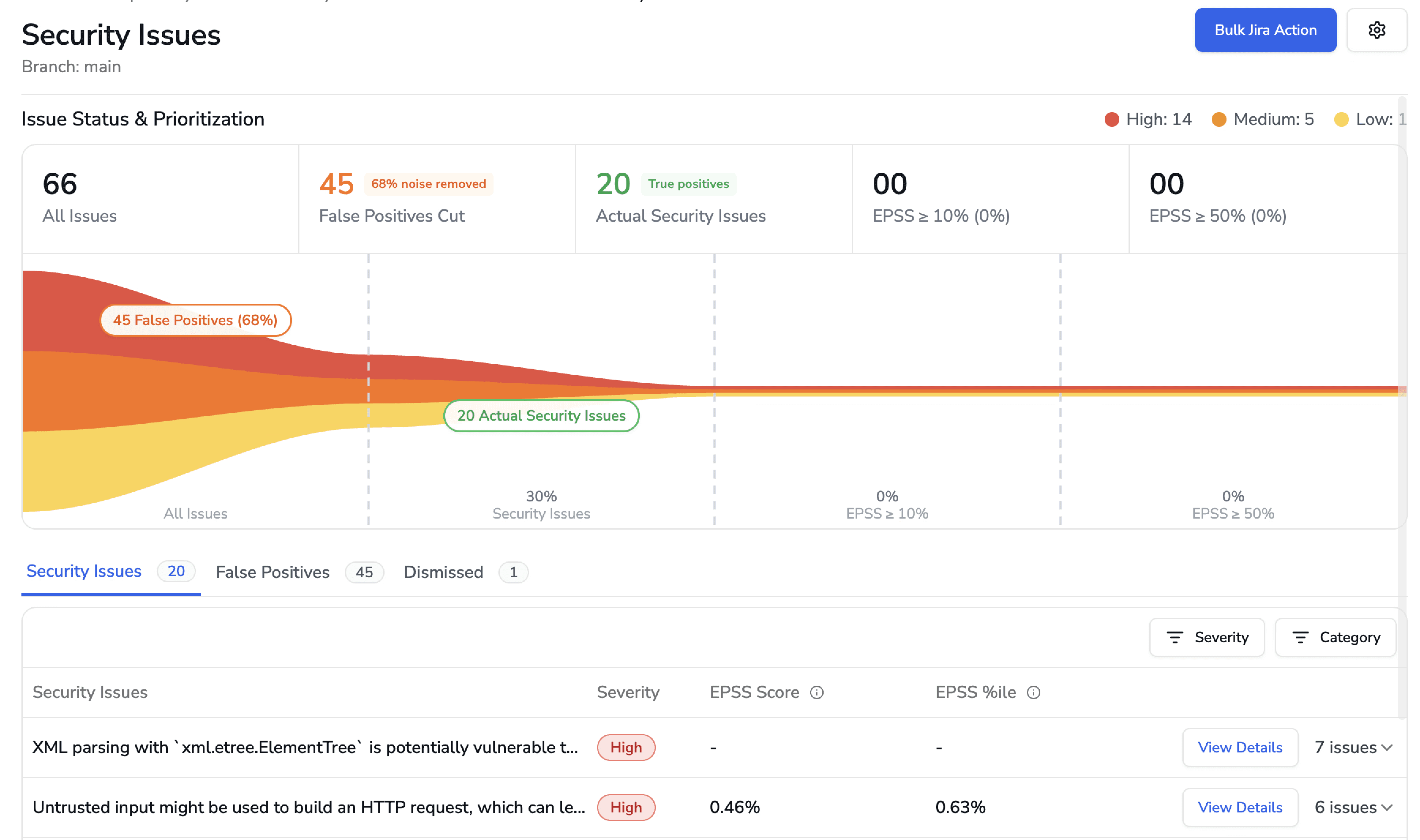
CodeAnt AI addresses several areas where teams outgrow GHAS, particularly around detection depth, multi-platform support, evidence-based findings, and the expansion from security scanning into AI code security review and quality analysis.
AI-Native Detection vs. Query-Language Rules
CodeQL uses a query-driven detection model.
Security queries define what to look for, and the engine executes those queries against the codebase. GitHub’s security team maintains the default query library, and organizations can write custom queries to detect internal patterns.
Detection is therefore bounded by the query set. If no query matches a vulnerability pattern, CodeQL will not detect it.
CodeAnt AI uses an AI-native detection engine. Machine learning models are the primary analysis mechanism. Instead of executing predefined queries, the scanner reasons about:
Code semantics
Data flow
Reachability
Input validation
Output encoding
This allows detection of vulnerability patterns that have not been explicitly defined in a rule or query, including novel issues in AI-generated code from tools like Copilot, Cursor, and Claude Code.
The difference is architectural.
CodeQL: Deterministic and transparent. Every finding maps to a readable query that can be audited and customized.
CodeAnt AI: Broader coverage driven by semantic reasoning, but without a human-readable rule file behind each detection.
Teams that require full auditability of detection logic may prefer CodeQL.
Teams that want to identify vulnerability patterns their query library has not anticipated, especially in AI-assisted development environments, may prefer AI-native detection.
Steps of Reproduction (Not Just Alerts)
When CodeQL flags a vulnerability, it provides a CWE classification, a severity rating, the code location, and a data flow path. Copilot Autofix can then generate a fix suggestion for some finding types. This is a useful context, but the developer must still determine whether the finding is exploitable in their specific context.
CodeAnt AI generates Steps of Reproduction for every finding: the exact entry point, the complete taint flow, the vulnerable sink, and a concrete exploitation scenario.
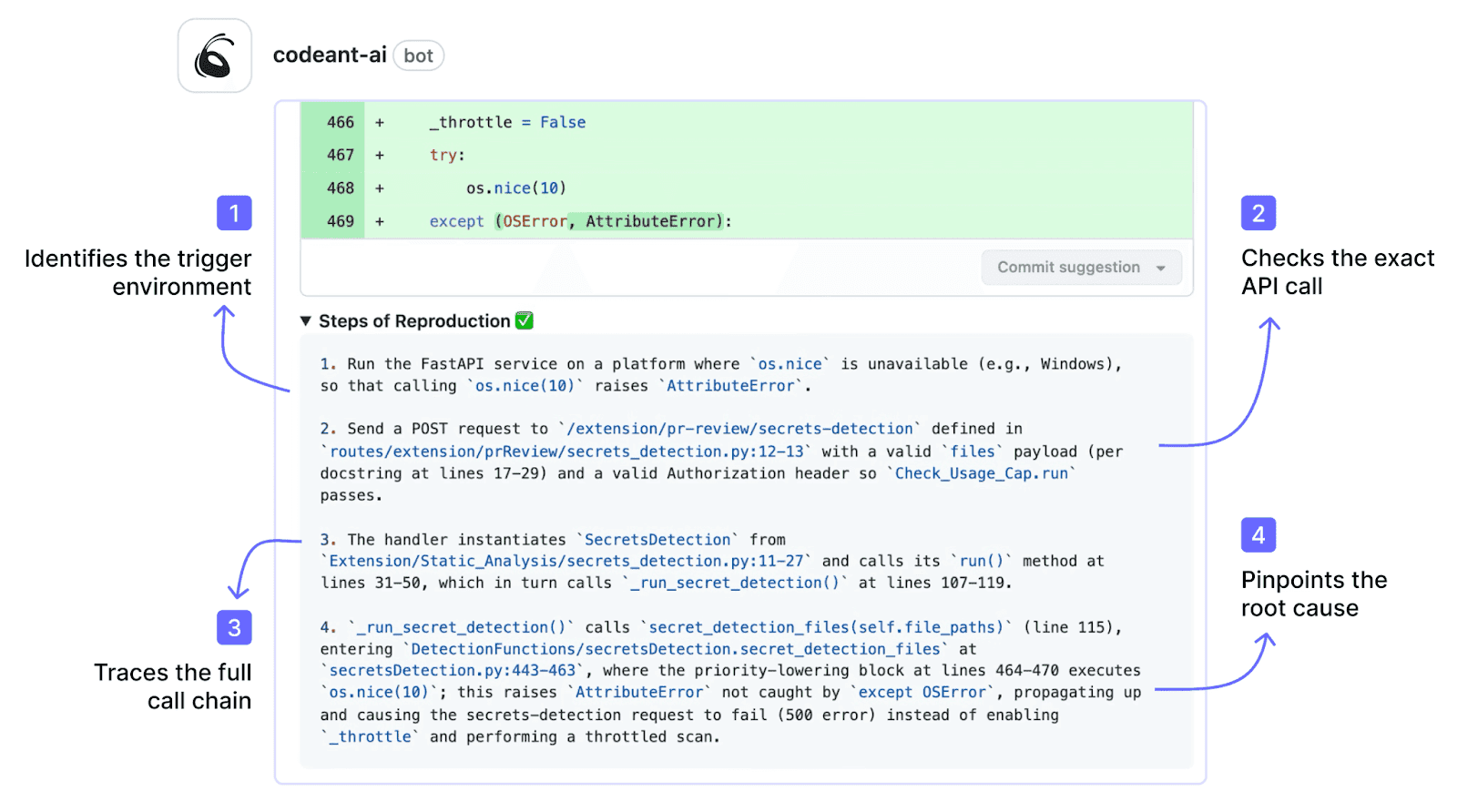
This transforms the developer’s task from “investigate whether this alert is real” to “review the evidence and apply the fix.” One-click fixes are committed directly in the PR, no separate fix PR, no manual remediation.
Multi-Platform (GitLab, Bitbucket, Azure DevOps)
GHAS is GitHub-only. It does not work with GitLab, Azure DevOps, or Bitbucket. For organizations that use multiple SCM platforms, or are considering migrating away from GitHub, GHAS creates platform lock-in. The security scanning capability is tied to the hosting platform.
CodeAnt AI works across GitHub, GitLab, Azure DevOps, or Bitbucket with the same features, the same detection engine, and the same PR-native workflow on every platform. For organizations with repositories spread across multiple SCMs (common after acquisitions or in organizations with division-level platform choices), CodeAnt AI provides consistent security coverage without requiring platform consolidation.
For a detailed comparison of how tool consolidation works across SCMs, see the tool consolidation guide.
Code Quality + Security + Code Security Review in One Tool
GHAS provides security scanning (SAST, secrets, SCA). It does not provide AI code security review or code quality analysis. GitHub’s native code review is manual, reviewers must inspect code themselves. Code quality tools (SonarQube, etc.) are separate products.
CodeAnt AI consolidates AI code security review (line-by-line PR review with comments, suggestions, and summaries), code quality analysis (code smells, duplication, dead code, cyclomatic complexity, DORA metrics), and security scanning into a single platform. One tool, one set of PR comments, one dashboard. This reduces tool sprawl and means developers get security, quality, and review feedback in a single PR thread rather than from three separate integrations.
Pricing for Teams on Any GitHub Plan
GitHub has restructured GHAS into two separate paid add-ons: Secret Protection ($19/active committer/month) and Code Security ($30/active committer/month). The full GHAS suite costs $49/active committer/month, available for both GitHub Team and Enterprise plans.
CodeAnt AI is available at $20/user/month for Code Security regardless of which GitHub plan you use (or which SCM platform you use).
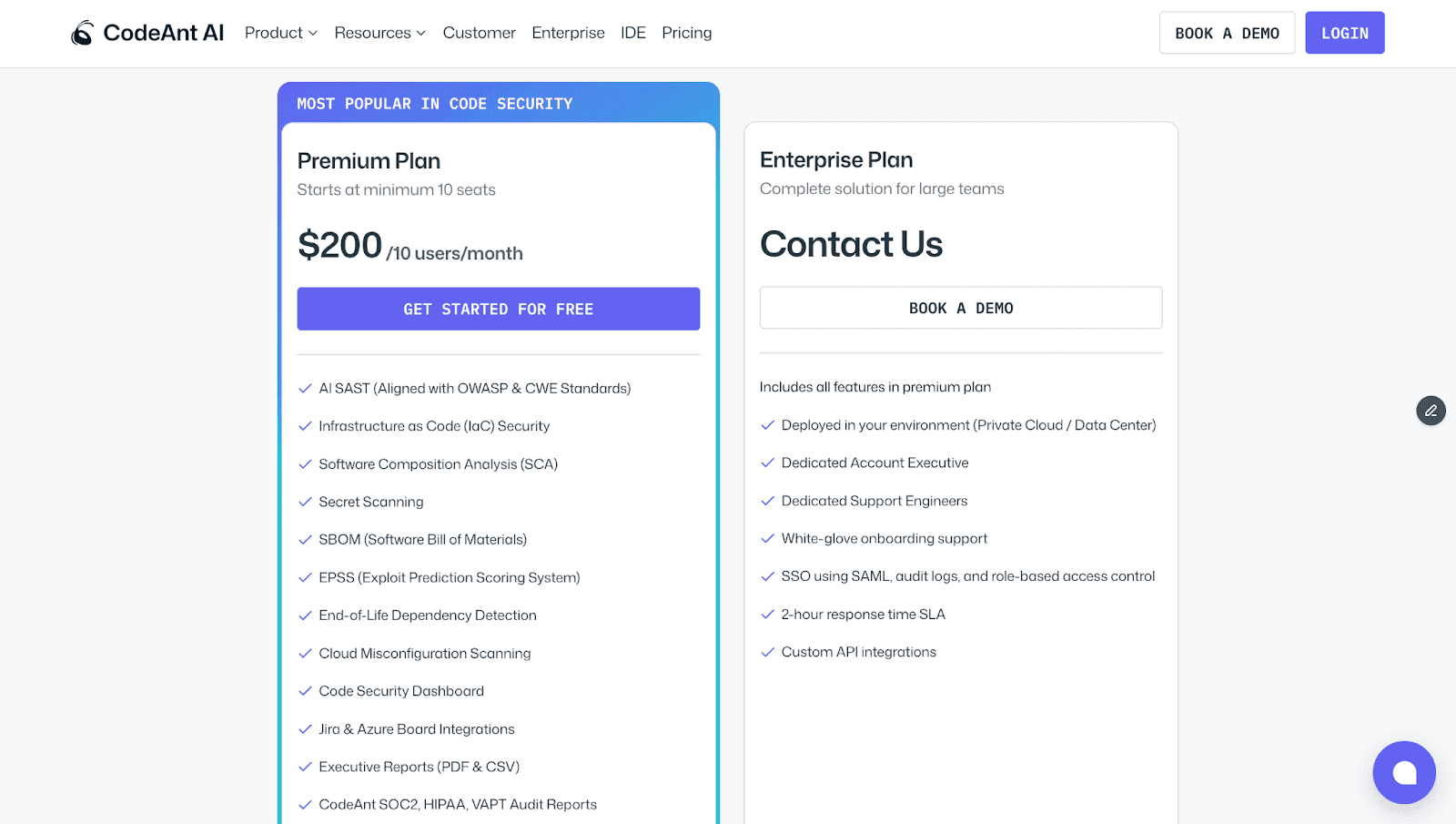
For a 50-developer team, full GHAS costs approximately $29,400/year while CodeAnt AI costs $12,000/year, and CodeAnt AI includes AI code security review, code quality, DORA metrics, and a SecOps dashboard with Jira/Azure Boards that GHAS does not provide.
Feature-by-Feature Comparison
Feature | GitHub Advanced Security | CodeAnt AI |
Detection Accuracy | ||
SAST (first-party code) | ✓ (CodeQL, semantic query engine, 40+ languages) | ✓ (AI-native with semantic analysis, 30+ languages) |
SCA (open-source dependencies) | ✓ (Dependabot, deeply integrated with dependency graph) | ✓ (with EPSS scoring) |
Secrets detection | ✓ (secret scanning with push protection, excellent) | ✓ |
IaC scanning | Partial (via third-party CodeQL queries) | ✓ (AWS, GCP, Azure) |
SBOM generation | ✓ (via dependency graph export) | ✓ |
Steps of Reproduction | ✗ | ✓ (every finding) |
Custom rule authoring | ✓ (CodeQL queries, powerful but steep learning curve) | Custom policies in plain English |
AI Capabilities | ||
AI tier | AI-Assisted (CodeQL + Copilot Autofix) | AI-Native (Tier 3) |
AI code security review | ✗ | ✓ (line-by-line PR review) |
AI auto-fix | ✓ (Copilot Autofix, AI-generated suggestions) | ✓ (one-click committable fixes in PR) |
AI triage / false positive reduction | Partial (severity scoring) | ✓ (AI-native detection + reachability analysis) |
PR summaries | ✗ | ✓ |
Batch auto-fix | ✗ | ✓ (resolve hundreds of findings at once) |
Developer Experience | ||
Primary interface | GitHub Security tab + PR checks | PR-native (inline comments) |
CLI scanning | Partial (CodeQL CLI exists but primarily for CI use) | ✓ |
Pre-commit hooks (secret/credential/SAST blocking) | Secret scanning push protection (secrets only, no SAST) | ✓ (blocks secrets + credentials + SAST + SCA before commit) |
IDE integration | VS Code (Copilot integration) | VS Code, JetBrains, Visual Studio, Cursor, Windsurf |
AI prompt generation for IDE fixes | ✗ | ✓ (generates prompts for Claude Code/Cursor) |
Inline PR comments | ✓ (CodeQL alerts appear as PR annotations) | ✓ (review comments + findings + Steps of Reproduction + fix suggestions) |
One-click fix application | ✓ (Copilot Autofix, suggests fix in PR) | ✓ (committable suggestions in existing PR) |
Integrations | ||
GitHub | ✓ (native, deepest possible integration) | ✓ |
GitLab | ✗ | ✓ |
Bitbucket | ✗ | ✓ |
Azure DevOps | ✗ | ✓ |
CI/CD pipelines | ✓ (GitHub Actions, native) | ✓ (GitHub Actions, Jenkins, GitLab CI, Bitbucket Pipelines, Azure DevOps Pipelines) |
Jira integration | ✗ (GitHub Issues integration only) | ✓ (native) |
Pricing | ||
Free tier | ✓ (free for public repos; Dependabot alerts free for all) | 14-day free trial |
Pricing model | Add-on per active committer | Per user |
Secret Protection | $19/active committer/month | Included in Code Security |
Code Security (CodeQL + Copilot Autofix) | $30/active committer/month | N/A |
CodeAnt AI Code Security | N/A | $20/user/month |
Full GHAS equivalent | $49/active committer/month (both add-ons) | $20/user/month (all features included) |
Enterprise | GitHub Enterprise Server, pricing varies | Custom |
Enterprise Readiness | ||
Deployment options | GitHub Cloud or GitHub Enterprise Server | Customer DC (air-gapped), Customer Cloud (AWS/GCP/Azure), CodeAnt Cloud |
SOC 2 | ✓ (GitHub) | ✓ (Type II) |
HIPAA | ✗ | ✓ |
FedRAMP | ✓ (GitHub Enterprise Cloud, FedRAMP Moderate) | ✗ |
Zero data retention | ✗ | ✓ (across all deployment models) |
SecOps dashboard | GitHub Security Overview (org-level, repo-level alerts) | ✓ (vulnerability trends, fix rates, team risk, OWASP/CWE/CVE mapping) |
Ticketing integration | GitHub Issues only | ✓ (Jira, Azure Boards, native) |
Audit-ready reporting | Security alerts + API export | ✓ (PDF/CSV exports for SOC 2, ISO 27001) |
Attribution / risk distribution | Per-repo alert counts | ✓ (repo-level and developer-level risk) |
Code quality analysis | ✗ | ✓ (code smells, duplication, dead code, complexity) |
Developer productivity metrics | ✗ | ✓ (DORA metrics, PR cycle time, SLA tracking) |
Detection Approach: CodeQL Queries vs. AI-Native Analysis
The detection architectures of GitHub Advanced Security (CodeQL) and CodeAnt AI differ in how they decide what to look for.
CodeQL treats code as a database. Source code is compiled into a relational representation, and security analysis is expressed as queries written in the QL language. A SQL injection query, for example, defines sources (user input), sinks (database calls), and taint propagation rules, then executes against the code database to find matches.
The default query library covers well-known vulnerability classes, and organizations can write custom queries for internal patterns.
This model has clear strengths:
Deterministic and auditable detection
Shareable and customizable queries
Deep inter-procedural analysis across functions and modules
Expressive logic that can reason about type hierarchies and complex data flow
GitHub’s security research team continuously maintains and expands these query packs.
CodeAnt AI takes a different approach. It uses machine learning as the primary detection engine. Instead of executing predefined queries, the model reasons about:
What the code does
How data moves
What validations exist
Where assumptions could fail
This allows detection of vulnerability patterns that no query explicitly defines, including novel issues in AI-generated code and business-logic flaws that depend on understanding intent rather than syntax.
The tradeoff is simple:
CodeQL detects what queries define, reliably, transparently, and deeply for supported languages.
CodeAnt AI detects what the model identifies, more broadly, including patterns beyond any rule library, but without a human-readable query behind each finding.
For teams generating significant AI-authored code through tools like Copilot, Cursor, or Claude Code, AI-native detection addresses a practical gap: new combinations of code patterns may not yet exist in any query pack.
The decision ultimately depends on whether your priority is deterministic query transparency or broader semantic detection coverage.
End-to-End Workflow Comparison (CLI → IDE → PR → CI/CD → SecOps)
GHAS’s workflow advantage is its native GitHub integration, every stage it covers is deeply embedded in the GitHub experience. The comparison here asks: which stages does each tool cover, and with what depth?
Workflow Stage | GitHub Advanced Security | CodeAnt AI |
CLI + Pre-Commit | Secret scanning push protection blocks secrets at the push level, excellent native implementation. No SAST or SCA pre-commit blocking. CodeQL CLI exists but is designed for CI pipeline use, not developer pre-commit workflows. | ✓ Blocks secrets, credentials, API keys, tokens, and high-risk SAST/SCA issues before |
IDE | VS Code with GitHub Copilot integration. Copilot can suggest code and Copilot Autofix generates security fix suggestions. No JetBrains, Visual Studio, or AI coding environment (Cursor, Windsurf) support for GHAS specifically. | ✓ VS Code, JetBrains (IntelliJ, PyCharm, WebStorm), Visual Studio, Cursor, Windsurf. In-context scanning with guided remediation. AI prompt generation triggers Claude Code or Cursor to auto-fix vulnerabilities. |
Pull Request | ✓ CodeQL findings appear as PR annotations. Copilot Autofix suggests fixes for some finding types. Secret scanning alerts in PR. Dependabot opens upgrade PRs for vulnerable dependencies. All native to GitHub, no external integrations. But: no AI code security review, no PR summaries, no Steps of Reproduction. | ✓ AI code security review + security analysis on every PR. Line-by-line review. Steps of Reproduction for every security finding. One-click AI-generated fixes committed directly in PR. PR summaries. Works on GitHub, GitLab, Bitbucket, and Azure DevOps. |
CI/CD | ✓ CodeQL runs as a GitHub Action (native, zero-config for GitHub repos). Results feed directly into GitHub Security tab. Configurable severity thresholds. Deeply integrated but GitHub Actions only. | ✓ GitHub Actions, Jenkins, GitLab CI, Bitbucket Pipelines, Azure DevOps Pipelines. Configurable policy gates by severity, CWE category, OWASP classification, and custom rules. |
SecOps / Compliance | GitHub Security Overview provides org-level and repo-level alert dashboards. Alert counts, severity distribution, open/closed status. No native Jira/Azure Boards integration (GitHub Issues only). Limited audit-ready export (API-based). | ✓ Unified SecOps dashboard: vulnerability trends, TP/FP rates, fix rates, EPSS scoring, OWASP/CWE/CVE mapping, team/repo risk distribution. Native Jira and Azure Boards. Audit-ready PDF/CSV for SOC 2, ISO 27001. Attribution reporting. |
Where GHAS is more limited:
Pre-commit protection covers secrets only, not SAST or SCA findings
IDE support is effectively limited to VS Code via Copilot
CI/CD integration is GitHub Actions only
SecOps reporting provides alert dashboards but lacks deeper compliance workflows such as native Jira/Azure Boards integration, audit-ready exports, and detailed attribution reporting
CodeAnt AI covers all five workflow stages and does so across multiple SCM platforms.
Pre-commit: Blocks SAST and SCA findings in addition to secrets
IDE: Supports multiple environments, including AI coding tools
Pull Request: Provides AI code security review with Steps of Reproduction and one-click fixes
CI/CD: Integrates beyond a single pipeline ecosystem
SecOps: Adds compliance analytics, native ticketing, and audit-ready reporting
The summary is simple:
On GitHub alone, GHAS delivers the smoothest native experience, zero setup, familiar interface, tightly integrated tooling.
CodeAnt AI delivers broader coverage across more stages, more platforms, and more capability layers, including AI code review, code quality analysis, and enterprise-grade SecOps reporting.
The decision depends on whether your priority is GitHub-native simplicity or cross-platform depth.
Deployment and Data Residency
GHAS and CodeAnt AI differ in deployment because they are fundamentally different products.
GitHub Advanced Security is part of GitHub. Its deployment model mirrors GitHub’s:
GitHub Cloud (SaaS)
GitHub Enterprise Server (self-hosted)
If you run GitHub Enterprise Server on-premises, GHAS runs within that environment. If you use GitHub Cloud, GHAS runs in GitHub’s cloud. GitHub Enterprise Cloud holds FedRAMP Moderate authorization.
This model has clear advantages.
GHAS inherits GitHub’s security posture and compliance certifications
No additional vendor to assess
No separate infrastructure to deploy
But it also creates constraints.
GHAS’s data residency is tied to GitHub’s. If your repositories are in GitHub Cloud, your security findings are stored there as well. GHAS cannot separate scanning data from your SCM location. It also cannot operate outside the GitHub ecosystem.
CodeAnt AI offers deployment independent of any single SCM platform:
Customer Data Center (Air-Gapped): Fully deployed within on-prem infrastructure with zero external connectivity. Supports GitHub Enterprise Server, GitLab Self-Managed, Bitbucket Data Center, and Azure DevOps Server.
Customer Cloud (AWS, GCP, Azure): Deployed inside the customer’s VPC with full control over infrastructure and data boundaries.
CodeAnt Cloud: Hosted infrastructure that is SOC 2 Type II certified and HIPAA compliant.
Across all models, CodeAnt AI offers zero data retention.
Pricing Comparison
Dimension | GitHub Advanced Security | CodeAnt AI |
Pricing model | Per active committer (two separate add-ons) | Per user |
GitHub Secret Protection | $19/active committer/month | Included |
GitHub Code Security (CodeQL + Autofix) | $30/active committer/month | N/A |
Full GHAS (both add-ons) | $49/active committer/month | N/A |
CodeAnt AI Code Security | N/A | $20/user/month |
Free option | ✓ (free for public repos; Dependabot free for all) | 14-day free trial |
50-dev annual cost (full security) | ~$29,400/yr (both add-ons at $49/committer/mo) | $12,000/yr |
50-dev annual cost (code scanning only) | ~$18,000/yr (Code Security add-on only) | $12,000/yr |
Includes AI code security review | ✗ | ✓ |
Includes code quality | ✗ | ✓ |
Includes SecOps Dashboard + Jira/Azure Boards | GitHub Security Overview; no Jira/Azure Boards | ✓ (native) |
Works on GitLab/Bitbucket/Azure DevOps | ✗ | ✓ |
Pricing page | github.com/security/plans |
GitHub has restructured GHAS pricing into two separate add-ons:
Secret Protection: $19 per active committer per month
Code Security: (CodeQL, Copilot Autofix, advanced Dependabot) $30 per active committer per month
Teams that want full GHAS coverage pay $49 per active committer per month. Both add-ons are available on GitHub Team and Enterprise plans.
The cost impact is material.
For a 50-developer team:
Full GHAS: ~ $29,400 per year
Code Security only: ~ $18,000 per year
CodeAnt AI at $20 per user per month costs ~$12,000 per year for the same team, and includes AI code security review, code quality analysis, DORA metrics, and a SecOps dashboard with native Jira/Azure Boards integration.
Platform scope also differs.
GHAS works only within GitHub. CodeAnt AI works across GitHub, GitLab, Azure DevOps, and Bitbucket.
For multi-SCM teams, GHAS protects only GitHub repositories, while CodeAnt AI provides consistent coverage across platforms.
One clear GHAS advantage remains: public repositories. For open-source projects, CodeQL, Copilot Autofix, push protection, and Dependabot are free, a meaningful contribution to open-source security.
Final Verdict: GitHub Advanced Security vs CodeAnt AI for SAST
GitHub Advanced Security is the smoothest security experience for GitHub-native teams. It requires no setup, integrates seamlessly into pull requests, and bundles CodeQL, secret push protection, and Dependabot into one GitHub interface.
CodeAnt AI is built for teams that want more than built-in security scanning. It delivers AI-native detection, Steps of Reproduction for every finding, AI code security review, multi-SCM support, and predictable per-user pricing.
If your organization is entirely on GitHub and prioritizes native integration over extended capabilities, GHAS is a logical starting point.
If your challenge is developer adoption, cross-platform coverage, pricing efficiency, or detection of AI-generated code vulnerabilities, CodeAnt AI provides additional depth beyond GitHub’s built-in tooling.
The fastest way to decide is not by reading feature tables.
Enable GHAS. Run CodeAnt AI on the same repository. Compare findings, remediation speed, and developer workflow.
See results directly in your PR. Start a 14-day CodeAnt AI trial.
FAQs
What is the difference between GitHub CodeQL and AI-native SAST?
Is GitHub Advanced Security enough for enterprise SAST?
How does pricing compare between GitHub Advanced Security and CodeAnt AI?
Does GitHub Advanced Security work outside GitHub?
Which SAST tool is better for AI-generated code?