Code Security
Exploiting Git’s ext:: Protocol for Command Execution

Sonali Sood

Founding GTM, CodeAnt AI
Most developers think of Git as a version control tool. A way to clone repositories, push commits, and collaborate on code. But buried inside Git’s transport system is something far more powerful, and dangerous.
A protocol that allows Git to execute arbitrary system commands.
That protocol is called ext::.
And when exposed incorrectly, it becomes a remote command execution primitive. This protocol was central to the exploitation chain behind CVE-2026-28292, a critical vulnerability discovered during security research using CodeAnt AI’s code reviewer.
But understanding that vulnerability requires stepping back and looking at Git itself as an execution environment.
Because once you understand how Git’s transport layer works, you realize something unsettling:
Git isn’t just fetching repositories.
It’s running commands.
Git Transport Architecture
Git supports multiple repository transport mechanisms. Developers commonly interact with:
Transport | Example |
|---|---|
HTTPS |
|
SSH |
|
Git native |
|
File |
|
But Git also supports custom command transports. These allow Git to execute arbitrary commands to retrieve repository data. The syntax looks like this:
Example:
Instead of fetching a repository over the network, Git executes the command locally. This feature exists for flexibility, enabling custom protocols and tooling. But it also introduces a powerful attack primitive.
How ext:: Executes Commands
When Git encounters an ext:: transport, it launches the command using the system shell. Execution flow looks like this:
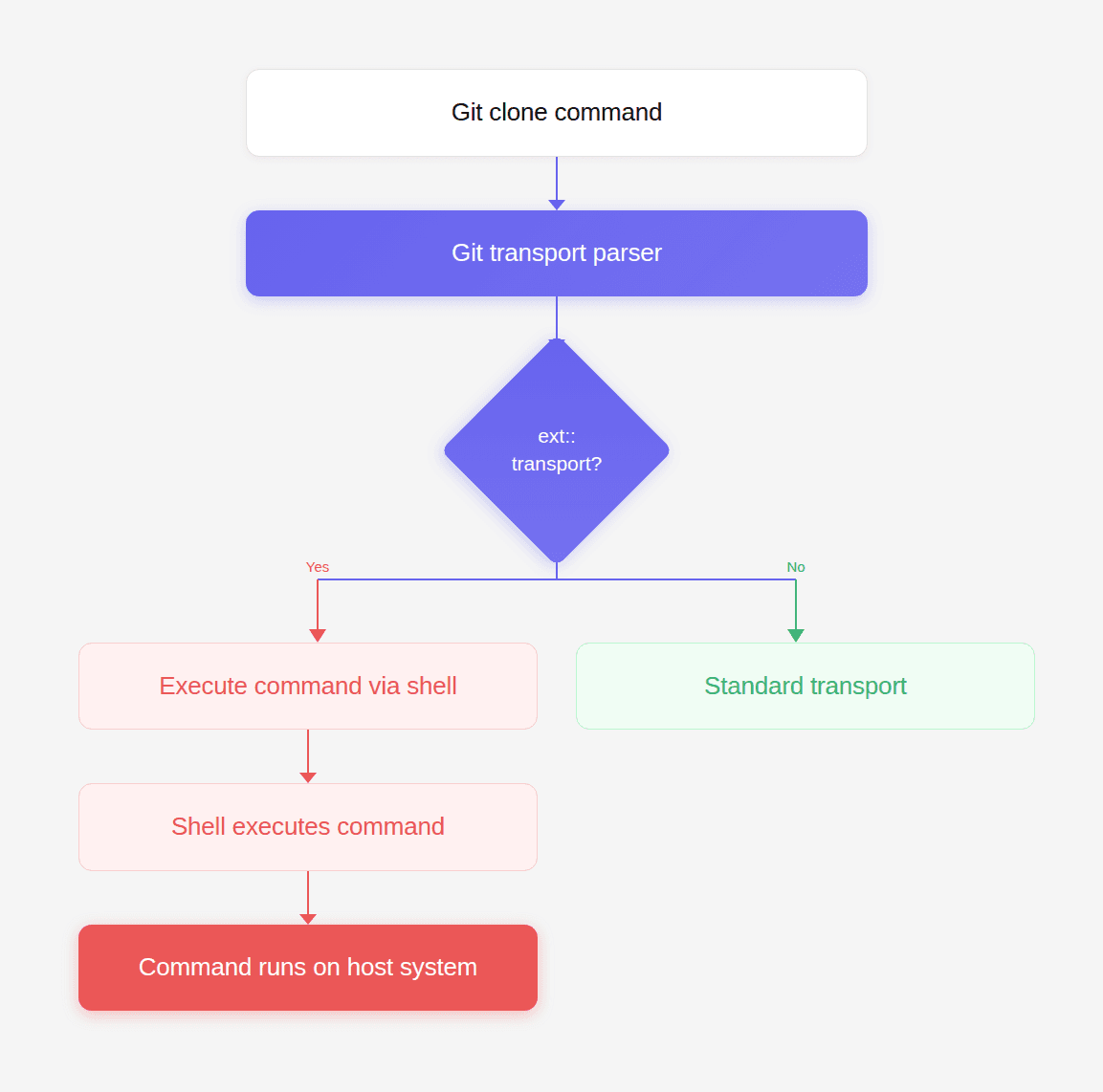
This means any ext:: URL becomes code execution.
Example:
Git internally runs:
The repository fetch never happens. The command executes instead.
Why Git Supports This Feature
Git’s architecture was designed for flexibility. The ext transport allows Git to integrate with:
custom version control gateways
proprietary network protocols
internal SCM systems
specialized deployment environments
For example, a company could implement a custom transport like:
Git simply executes the program and expects repository data through stdout. But this flexibility also means Git trusts the command entirely. Git assumes the caller has validated the input. When that assumption fails, ext becomes a powerful attack surface.
The Security Boundary
To understand exploitation scenarios, consider where Git commands appear in real systems.
Examples include:
CI/CD platforms
developer tooling
build pipelines
deployment systems
In many systems, repository URLs originate from user input.
Examples:
pull request URLs
webhook payloads
repository import tools
automation workflows
plugin ecosystems
If those URLs are not strictly validated, an attacker can supply an ext transport. And Git will happily execute it.
Real-World Attack Surface
Imagine a web application that allows users to import repositories.
Example code:
The developer expects input like:
But the attacker provides:
Git executes:
The server is now compromised.
Visualizing the Exploit Path

Once the command reaches the shell, the attacker gains arbitrary code execution.
Exploiting ext:: with simple-git
Libraries like simple-git wrap Git CLI commands for Node.js applications.
Typical usage:
Internally this produces:
If repoURL contains an ext transport, Git executes it. But simple-git attempted to prevent this by blocking configuration overrides that enable dangerous protocols.
That is where CVE-2026-28292 emerged. The protection logic relied on a regex-based filter that assumed Git configuration keys would appear in lowercase.
Git does not enforce this. Git treats configuration keys as case-insensitive. So attackers bypassed the filter using:
Once the filter failed, ext transport execution became possible.
Crafting an ext:: Exploit Payload
The simplest payload is a file creation test.
Full exploit example:
If the exploit works, the file /tmp/pwned appears.
Advanced Exploit Payloads
Once command execution works, attackers escalate quickly.
Data exfiltration
reverse shell
credential theft
malware installation
Each payload runs with the privileges of the application.
Multi-Step Attack Scenario
Consider a CI platform that allows repository imports.
attacker submits repository URL
server executes git clone
Git executes ext transport
attacker obtains shell access
Attack chain visualization:
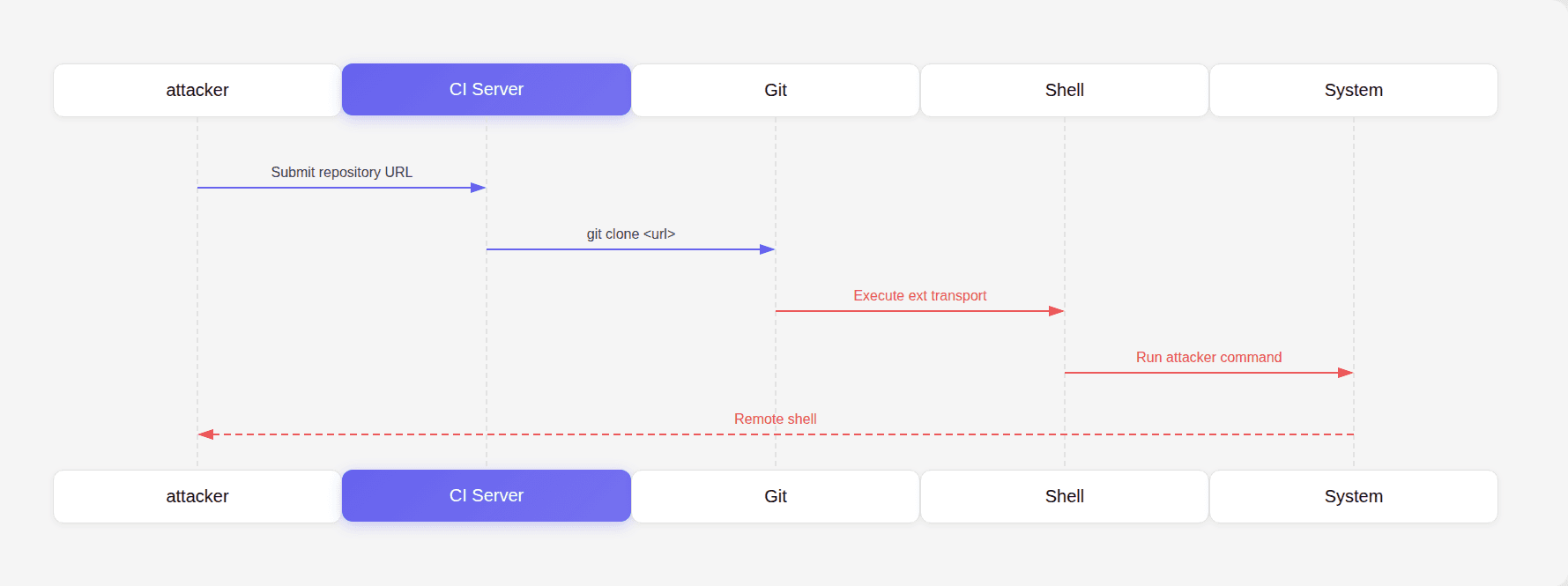
Once inside the CI server, attackers can access:
environment variables
secrets
deployment tokens
cloud credentials
Why This Attack Is Dangerous
Many developers assume Git operations are safe because Git is widely trusted. But Git is not just a data transfer tool. It is a command execution engine. If input reaches Git unchecked, the attacker gains access to that execution engine. This is why secure Git wrappers must enforce strict validation.
Why Code Review Misses This
This class of vulnerability often survives code review because the code looks harmless.
Example:
Nothing appears suspicious. But security risk depends entirely on where repoURL originates. Code reviewers often focus on:
logic correctness
performance
readability
Not on hidden command execution surfaces inside third-party tools. This is precisely why automated reasoning tools are becoming critical. During internal security research, CodeAnt AI’s code reviewer analyzed a patch protecting Git transport overrides and flagged a mismatch between the filter and Git’s configuration semantics.
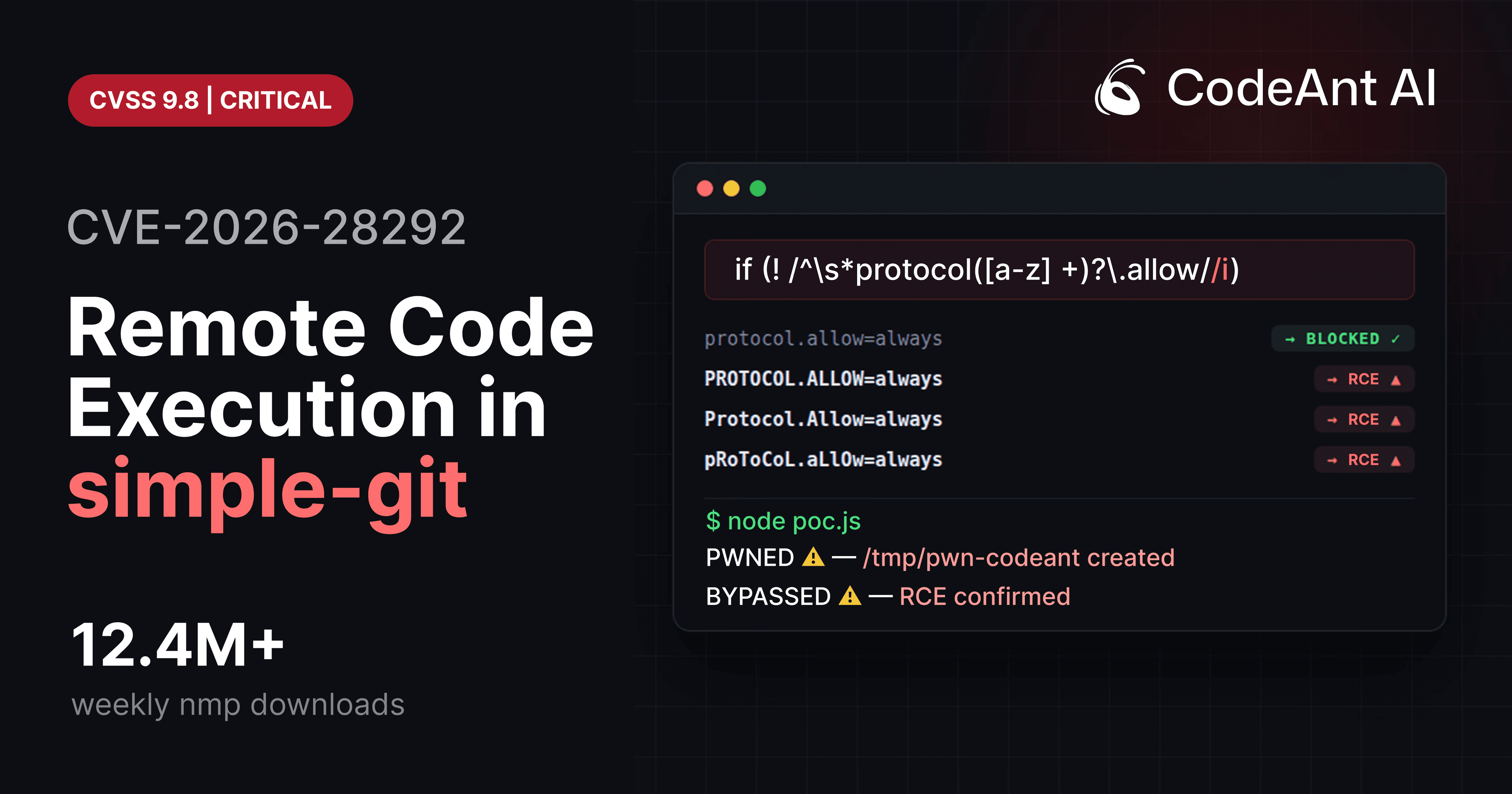
That observation led to the discovery of the exploit chain behind CVE-2026-28292. This is the kind of finding that code review systems should aim to catch. Not stylistic issues. But vulnerabilities hiding inside complex toolchains.
Defensive Architecture
Developers interacting with Git should apply multiple safeguards.
1 Strict URL validation
Allow only approved protocols.
Reject everything else.
2 Explicit allowlists
Example validation:
3 Normalize inputs
Always normalize case before validation.
This prevents bypasses like those in CVE-2026-28292.
4 Avoid user-controlled command arguments
Never pass user input into:
These options allow arbitrary argument injection.
Security Testing Techniques
Developers should test Git integrations using adversarial inputs.
Example fuzzing cases:
Testing case variations often reveals security gaps.
The Bigger Lesson for Code Review
The vulnerability behind CVE-2026-28292 demonstrates a deeper shift happening in developer tooling. For years, automated code review tools have optimized for developer productivity feedback:
style suggestions
formatting improvements
refactoring ideas
Those improvements are useful. But they are not the moments developers remember. The moment developers remember is when a tool stops a pull request because it detected a critical security issue nobody else saw.
A hidden authentication bypass.
A logic flaw.
A semantic mismatch between a filter and the system it protects.
Those are the discoveries that justify code review gates.
During security research, CodeAnt AI’s code reviewer helped identify this exact type of vulnerability by analyzing patch logic and understanding the underlying behavior of the system being protected. That ability to reason about code, not just match patterns, is where AI-assisted code review is heading. And vulnerabilities like this illustrate why that shift matters.
Conclusion
Git’s ext transport protocol is a powerful feature designed for flexibility. But when exposed improperly, it becomes an arbitrary command execution mechanism. The exploit chain behind CVE-2026-28292 shows how a small validation mistake can unlock that capability.
A single mismatch between a regex filter and Git’s configuration semantics created a bypass. Once the bypass existed, ext transport provided the attacker with immediate command execution.
The vulnerability itself was subtle. But the consequences were severe. This is exactly the type of issue code review systems should prioritize.
Not formatting suggestions.
Not variable naming improvements.
But the rare, high-impact bugs that can compromise an entire system.
During internal security research, CodeAnt AI’s code reviewer identified this vulnerability by analyzing the logic of a security patch and recognizing that the protection mechanism did not fully account for Git’s behavior.
That kind of reasoning, understanding how code interacts with the systems around it, is where the future of AI-assisted code review lies. Because when a single string like PROTOCOL.ALLOW=always can lead to remote command execution, the most valuable code review is the one that catches it before it ever ships.
FAQs
What exactly is Git’s ext:: protocol?
Why is the ext:: protocol dangerous in web applications?
How did CVE-2026-28292 enable exploitation of the ext protocol?
How can developers safely integrate Git operations into their applications?
Why are vulnerabilities like this difficult for traditional tools to detect?




Ship clean & secure code faster

Made with Love in San Francisco
355 Bryant St. San Francisco, CA 94107, USA


Ask AI for summary of CodeAnt




