AI Code Review

Mar 1, 2026

AI Code Review in Azure DevOps: Automate PR Feedback with CodeAnt AI

Amartya | CodeAnt AI Code Review Platform
Sonali Sood

Founding GTM, CodeAnt AI

AI code review in Azure DevOps is the process of using a machine-learning-powered tool to automatically analyze pull requests in Azure Repos and post inline feedback, code quality issues, security vulnerabilities, performance concerns, and suggested fixes, directly inside the PR, before a human reviewer sees it. The AI tool connects to Azure DevOps via webhooks and personal access tokens, triggers on every new or updated PR, and posts its findings as PR comments that look identical to human reviewer comments.

You can check the full guide on “How to set-up Azure DevOps in AI Code Review” here:

Unlike static analysis tools that run in pipelines and return pass/fail results, AI code review tools understand context, they read the PR description, the diff, the surrounding code, and often the linked work items, to produce feedback that reads like it came from a senior engineer. The AI reviewer doesn’t replace human reviewers; it handles the mechanical work (catching null pointer errors, spotting hardcoded credentials, flagging missing error handling, enforcing naming conventions) so human reviewers can focus on architecture, business logic, and design decisions.

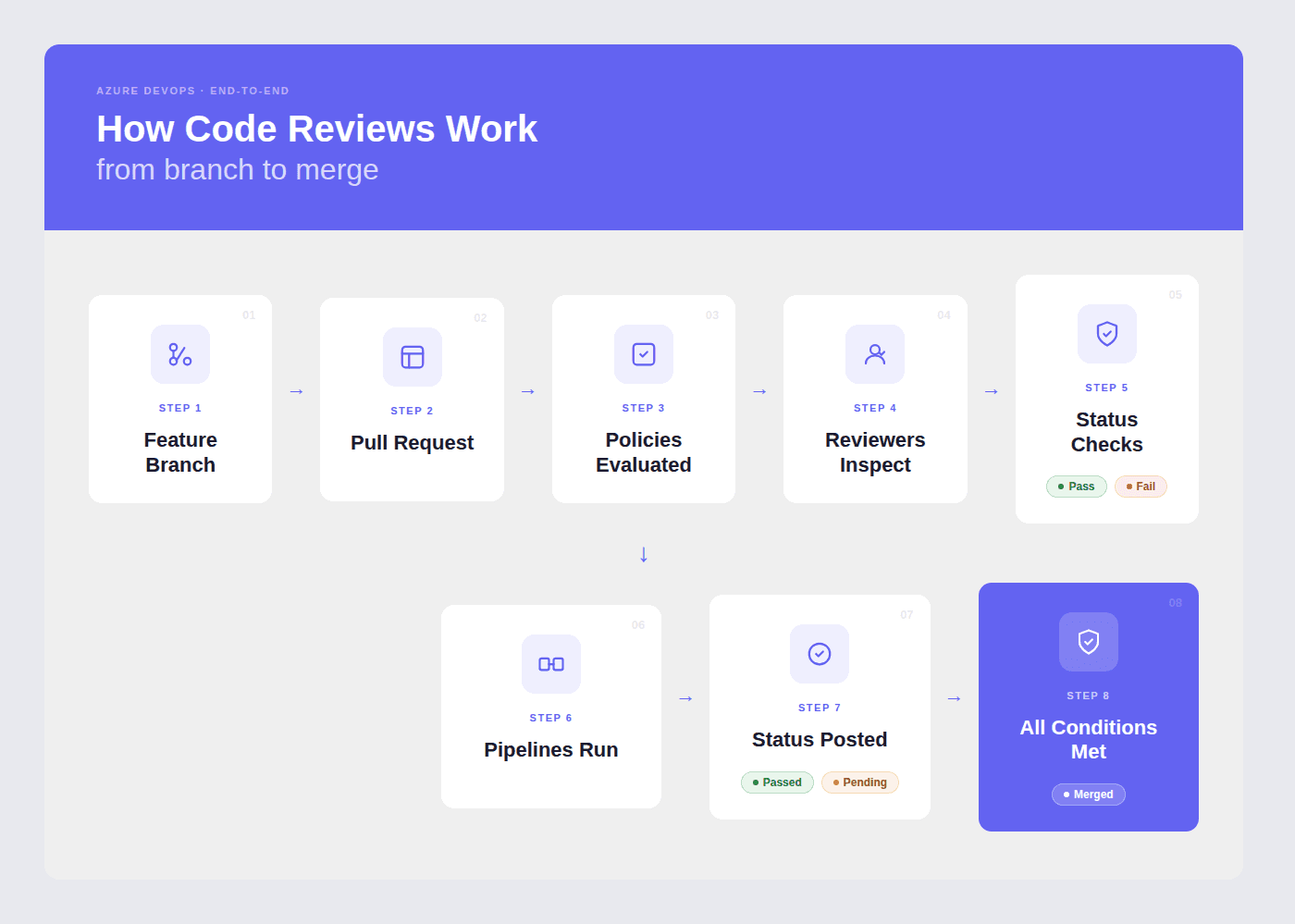
Azure DevOps supports AI code review through third-party tools that integrate at the PR level. The most common integration pattern is: webhook fires when a PR is created or updated → AI tool pulls the diff and context → AI analyzes the changes → findings are posted as inline PR comments → optionally, a pipeline status check is posted to gate the merge.

Why Manual Code Review Alone Isn’t Enough

Manual code review is essential. No AI tool can decide whether an architectural direction aligns with your long-term strategy or whether a feature truly matches the product spec.

But manual review alone creates bottlenecks, and those bottlenecks compound as teams scale.

1. The Latency Problem

The typical pattern looks like this:

  • A developer opens a PR

  • Tags two reviewers

  • Waits

One reviewer is in another timezone. The other is in back-to-back meetings until 3 PM. By the time both reviews arrive, it’s the next day.

Meanwhile:

  • The developer has context-switched

  • The original problem space has faded

  • Addressing feedback now requires reloading mental state

Multiply that by:

  • 20 PRs per day

  • Across a team of 30 engineers

Review latency quickly becomes the single biggest drag on engineering velocity.

2. The Consistency Problem

Human review quality varies.

  • Reviewer A catches security issues but ignores naming conventions

  • Reviewer B enforces code style strictly but misses SQL injection vectors

What gets caught depends on:

  • Who reviews the PR

  • When they review it

  • How overloaded they are

No team can maintain uniform review quality across every PR, every hour of the day, purely through human effort.

3. The Security Gap

Most development teams don’t have security specialists reviewing every PR.

Even when they do:

  • Security review often happens separately from code review

  • That creates a second waiting period

Meanwhile:

  • Median time to exploit a known vulnerability: 44 days

  • Median time to patch: 60+ days

Security issues that slip through review don’t disappear, they linger in the codebase for months.

4. The Cost Multiplier

Industry data consistently shows:

The cost of fixing a defect increases roughly 10x at each stage of the lifecycle.

  • Caught in PR → hours to fix

  • Caught in production → weeks of incident response, customer communication, and remediation

Every issue caught at the PR stage avoids a 10x downstream cost.

AI code review solves the mechanical layer:

  • Null pointer checks

  • Hardcoded credentials

  • Missing error handling

  • Obvious security flaws

  • Naming and consistency issues

It applies the same baseline checks:

  • On every PR

  • Every time

  • With zero variation

It does not replace human judgment. Instead, it creates a higher starting point. Human reviewers begin from a baseline where obvious issues are already flagged, and their time goes to architecture, business logic, and design decisions that only humans can evaluate.

That shift is what removes bottlenecks without sacrificing quality.

How AI Code Review Works in Azure DevOps: Step by Step

Here’s the exact flow of what happens when an AI code review tool like CodeAnt AI is integrated with Azure DevOps:

Step 1: PR created or updated 

A developer pushes code and creates (or updates) a pull request in Azure Repos. Azure DevOps fires a webhook event to the connected AI review tool.

Step 2: Context gathering 

The AI tool pulls the PR diff, the full file context for changed files, the PR description, linked work items from Azure Boards, and the target branch history. Better tools use this context to understand not just what changed but why, which reduces false positives significantly.

Step 3: AI analysis

The tool’s ML models analyze the changes across multiple dimensions simultaneously:

Analysis Dimension

What the AI Checks

Logical flaws

Incorrect conditionals, off-by-one errors, wrong variable references, unreachable code paths, race conditions

Business logic errors

Changes that contradict the intent described in the linked work item or PR description, scope creep beyond the ticket, missing edge cases in domain-specific workflows

Critical code flaws

Null pointer dereferences, unhandled exceptions, resource leaks (unclosed connections, file handles), infinite loops, deadlocks

Performance issues

N+1 queries, unnecessary memory allocations, blocking calls in async contexts, full-table scans where indexed lookups should be used

Best practices

Framework-specific anti-patterns, naming convention violations, missing error handling, test coverage gaps, deprecated API usage

Security (SAST)

Injection flaws (SQL, XSS, SSRF, command injection), hardcoded secrets, insecure cryptographic usage, authentication and authorization flaws, OWASP Top 10 coverage

Dependencies (SCA)

Known CVEs in direct and transitive dependencies, outdated packages with security patches available, license compliance issues

IaC misconfigurations

Terraform, CloudFormation, ARM template, and Kubernetes manifest security and compliance issues

Secret scanning

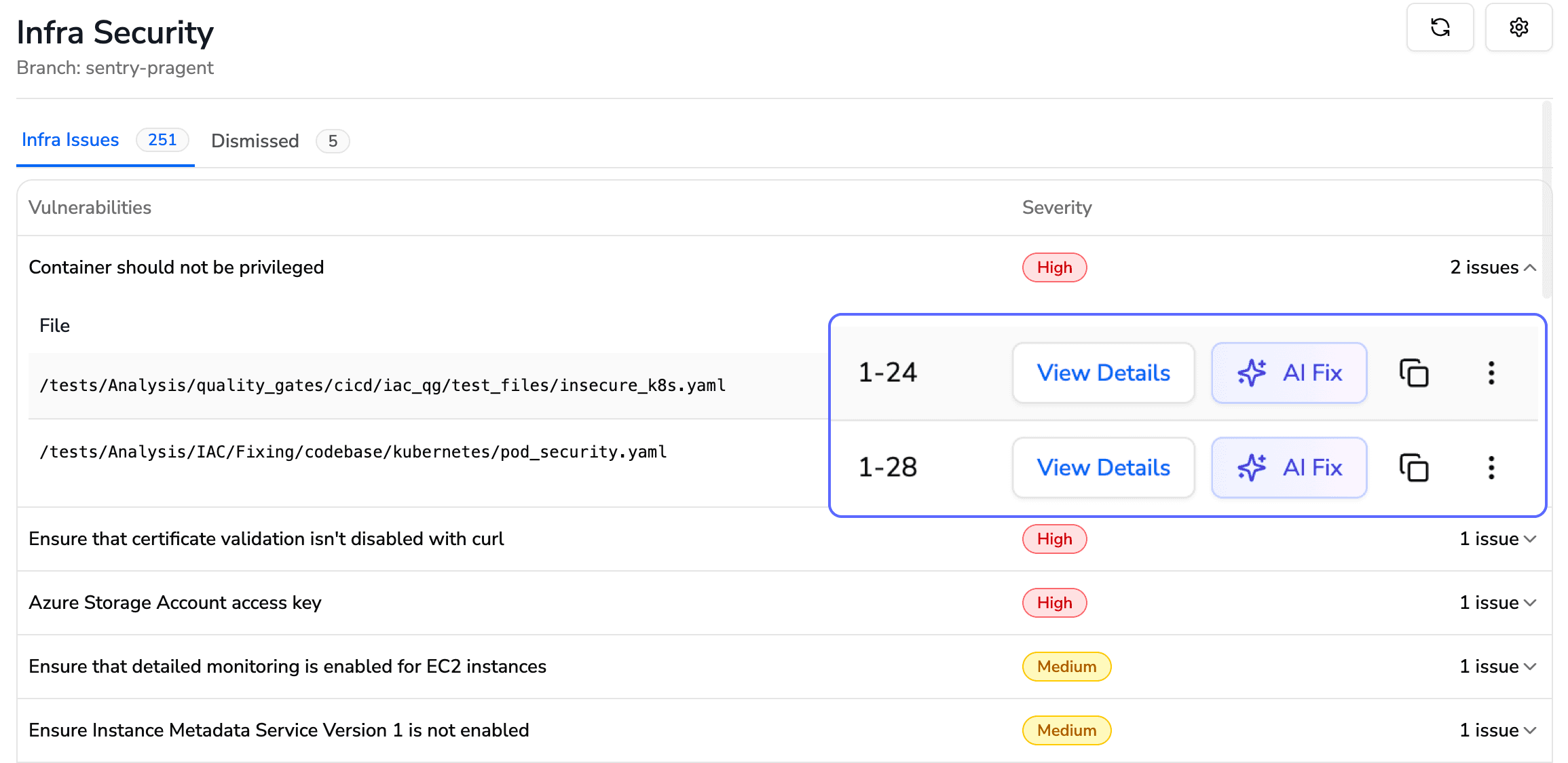
API keys, access tokens, database connection strings, private keys, cloud provider credentials committed in the diff

Step 4: Inline feedback posted 

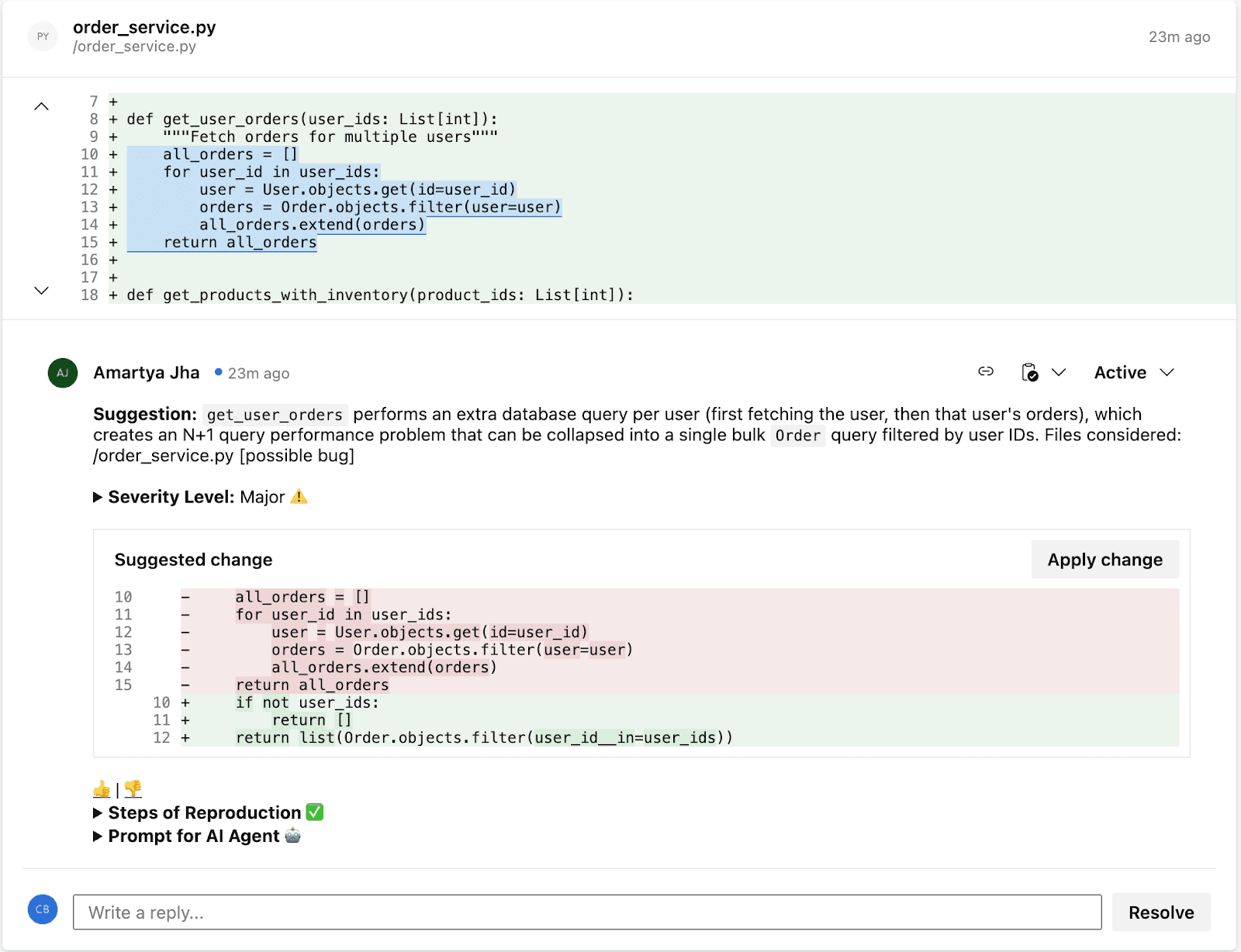
Findings are posted as inline comments directly on the relevant lines in the Azure DevOps PR, the same place human reviewer comments appear. Each comment includes the issue, why it matters, and in many cases a suggested fix that the developer can apply with one click. The developer doesn’t leave Azure DevOps. There’s no separate dashboard to check.

Step 5: Quality gate (optional) 

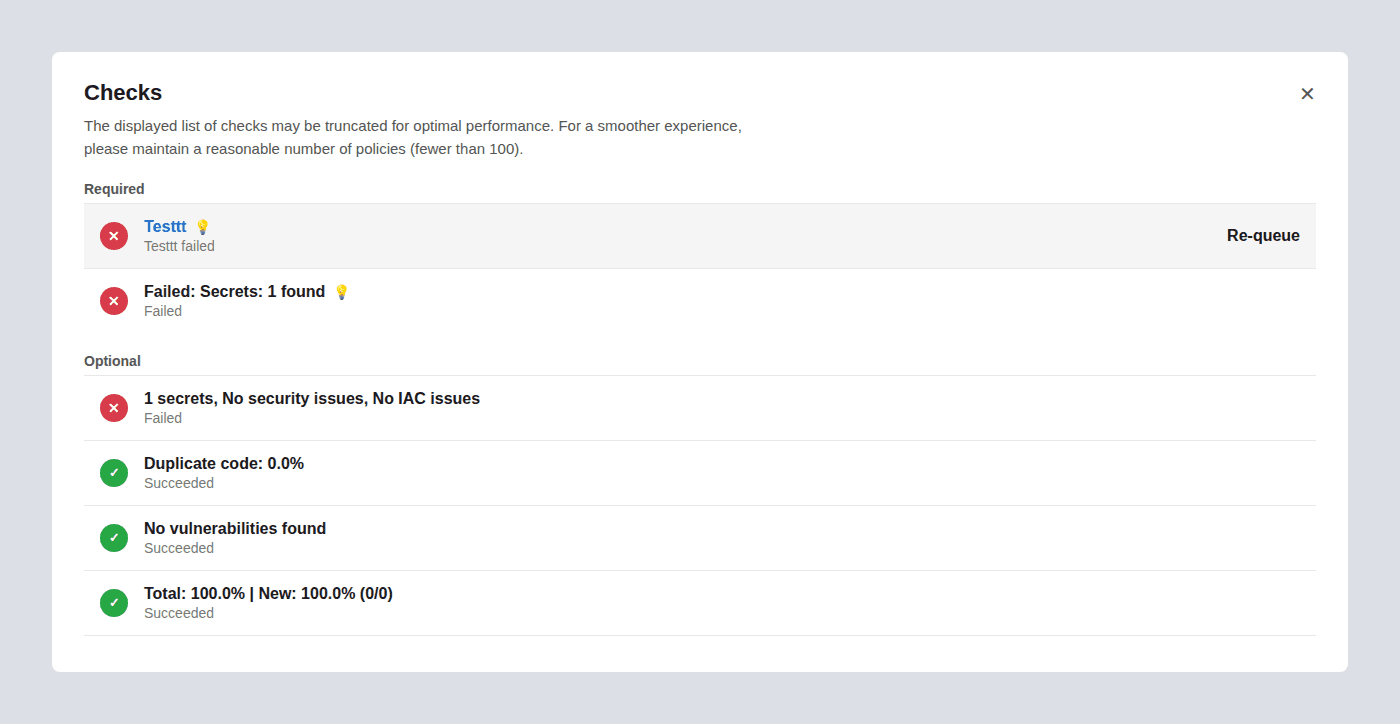
If configured, the AI tool posts a status check to the PR. You can configure branch policies to require this status check to pass before the PR can be merged. This means a PR with critical security vulnerabilities or quality issues can’t be merged, even if human reviewers approve it, the AI quality gate blocks the merge independently.

Step 6: Re-review on update 

When the developer pushes fixes and updates the PR, the AI tool re-analyzes only the changed lines, verifies the fixes actually resolve the flagged issues, and updates the status check. This creates a tight feedback loop, developers get immediate validation that their fixes are correct without waiting for a human re-review.

Architecture: Where AI Code Review Fits in Your Azure DevOps Workflow

Understanding where AI code review sits relative to your existing Azure DevOps toolchain helps clarify what it replaces, what it complements, and what it doesn’t touch.

The Typical Azure DevOps Review Stack

Most mature Azure DevOps teams have four layers of quality control:

Layer 1: Branch policies

Azure DevOps’s built-in enforcement. Required reviewers, linked work items, comment resolution rules, and merge type restrictions. These are organizational guardrails that ensure process compliance. They answer: 

  • Did the right people look at this? 

  • Is it linked to a tracked work item? 

  • Did the required discussions happen?

Layer 2: Build validation (Azure Pipelines) 

Automated builds and tests that run on every PR. Unit tests, integration tests, and any custom validation you’ve added to your pipeline. These answer: 

  • Does the code compile? 

  • Do existing tests pass?

  • Does it meet the automated quality bar?

Layer 3: Human code review 

The reviewers who read the diff, understand the design decisions, evaluate the architectural approach, and provide feedback on maintainability and readability. This answers: 

  • Is this the right approach? 

  • Does it align with our architecture? 

  • Will it be maintainable?

Layer 4: AI code review (CodeAnt AI)

Automated, context-aware analysis posted as inline PR comments. This answers: 

… the mechanical findings that humans are inconsistent at catching.

How the Layers Interact

The key insight is that CodeAnt AI doesn’t replace any of these layers, infact it adds the one layer that’s missing from most Azure DevOps setups. Branch policies enforce process. Pipelines enforce tests. Humans enforce design. AI enforces the mechanical quality and security checks that fall between the cracks: 

  • too granular for branch policies

  • too context-dependent for regex-based pipeline tools

  • too tedious for humans to catch reliably on every PR

Setting Up AI Code Review in Azure DevOps with CodeAnt AI

Prerequisites

Before starting, you’ll need:

  • An Azure DevOps organization (cloud at dev.azure.com or self-hosted Azure DevOps Server)

  • A project with at least one repository in Azure Repos

  • Admin permissions on the project (to configure service connections)

  • A CodeAnt AI account (sign up at codeant.ai)

Setup Overview

The setup process follows the same pattern for both cloud and self-hosted Azure DevOps:

Step 1: Connect your Azure DevOps organization 

From the CodeAnt AI dashboard, connect your Azure DevOps organization. For cloud Azure DevOps, follow the cloud setup guide. For self-hosted Azure DevOps Server, follow the self-hosted setup guide.

Step 2: Select repositories 

Choose which repositories to enable AI code review on. You can enable repositories individually or across the organization.

Step 3: Configure AI code review 

Set up how CodeAnt AI reviews pull requests, what to scan, severity thresholds, and which file paths to include or exclude. For detailed configuration options, see the cloud PR configuration guide or the self-hosted PR configuration guide.

Step 4: Test on a PR 

Create a pull request in one of your enabled repositories. CodeAnt AI will post inline review comments on the PR. Review the findings and adjust configuration as needed.

Step 5: Enable quality gates (optional) 

Once you’re confident in the review quality, configure CodeAnt AI as a quality gate so PRs with critical findings can’t be merged until the issues are addressed.

Setup by Deployment Type

CodeAnt AI supports both cloud and self-hosted Azure DevOps environments:

Azure DevOps Environment

How CodeAnt AI Connects

Configuration Guide

Azure DevOps Services (Cloud): dev.azure.com

Connect directly from the CodeAnt AI dashboard. No agents to install, no infrastructure to manage.

Cloud setup guide · Configure AI code review

Azure DevOps Server (Self-Hosted): on-premises or private cloud

Connect to your self-hosted instance. Your source code is analyzed in-place, it never leaves your network. Compatible with air-gapped and VPN-only environments.

Self-hosted setup guide · Configure AI code review

This matters for enterprise teams: most AI code review tools: including CodeRabbit and SonarQube, only support cloud-hosted Azure DevOps. If your organization runs Azure DevOps Server on-premises (common in financial services, healthcare, government, and defense), CodeAnt AI is one of the few tools that integrates natively without requiring you to migrate to the cloud first.

How CodeAnt AI Actually Reviews Your Code: Under the Hood

Most AI code review tools read the diff and generate comments. CodeAnt AI builds full engineering context before generating any review. Here’s the exact pipeline, what happens between “developer opens a PR” and “AI comments appear”:

Step 1: Pull Request Diff

CodeAnt AI starts with the PR diff, the exact lines of code that changed. This gives the immediate surface-level change, but a diff alone isn’t enough context for a meaningful review. Reviewing a diff without understanding the surrounding system is like editing a paragraph without reading the chapter.

Step 2: Deep Repository Context

Next, CodeAnt AI clones the repository into an ephemeral sandbox and builds a full understanding of the codebase:

Context Layer

What CodeAnt AI Analyzes

Why It Matters

Upstream functions

Functions that call the changed code

Identifies callers that may break due to the change

Downstream dependencies

Functions the changed code calls

Catches cases where the change passes unexpected values downstream

Call graphs

The full chain of function calls touching the change

Maps the blast radius, how far this change’s impact reaches

Abstract Syntax Trees (ASTs)

Structural representation of the code

Enables pattern matching beyond text, understanding code structure, not just strings

This means reviews aren’t isolated to the modified files. If you change a function signature, CodeAnt AI knows every caller and can flag the ones that will break. If you modify error handling, it knows which downstream paths are affected.

Step 3: Company-Specific Learning

Every engineering team has tribal knowledge, internal best practices, architecture patterns, what’s considered acceptable vs. not acceptable in your codebase. CodeAnt AI learns these over time:

  • Naming conventions specific to your team

  • Architectural patterns you’ve adopted (e.g., “all database access goes through the repository layer”)

  • Internal libraries that should be used instead of third-party alternatives

  • Code patterns your senior engineers consistently flag in manual reviews

This means reviews are tailored to your engineering standards, not generic rules. A finding that says “use InternalLogger instead of Console.WriteLine” is more actionable than “avoid logging to console” and it’s the kind of feedback that only comes from understanding your specific codebase.

Step 4: Ticket Context (Jira / Azure Boards)

CodeAnt AI pulls the linked work item from Jira or Azure Boards to understand:

  • What problem this PR is solving

  • The business intent behind the change

  • Scope expectations from the ticket description

This is the context layer that eliminates a large class of false positives. If the work item says “add admin bypass for debugging,” CodeAnt AI won’t flag the admin check as a security issue. If the ticket scope is “update the payment processing endpoint,” and the PR also modifies unrelated user profile code, CodeAnt AI flags the scope creep. The AI reviews code in the context of why it exists, not just how it’s written.

Step 5: Dependency and SBOM Analysis

CodeAnt AI inspects the dependency tree and Software Bill of Materials (SBOM):

  • Language and runtime versions (Java, .NET, Node.js, Python, etc.)

  • Direct and transitive dependency trees

  • Known CVEs in dependencies (NVD, GitHub Advisory Database)

  • License compliance (GPL in proprietary codebases, conflicting licenses)

  • Version mismatches between declared and actual dependencies

This catches dependency-level risks before they reach production: vulnerable packages, version conflicts, and license issues that would otherwise surface during security audits or, worse, in production incidents.

Step 6: Ephemeral Sandbox Execution

All of this analysis runs inside a temporary, isolated sandbox environment:

  1. The repository is cloned into the sandbox

  2. Full analysis runs (ASTs, call graphs, dependency trees, AI review)

  3. Results are generated and posted to the PR

  4. The sandbox is destroyed immediately, code, artifacts, and all intermediate data are deleted

No customer code is stored. No code is persisted to disk, even temporarily. The sandbox exists only for the duration of the analysis. This is true across all three deployment models (customer data center, customer cloud, and CodeAnt cloud).

Step 7: LLM-Powered Review Generation

With the full context assembled, PR diff, repository understanding, company knowledge, ticket context, and dependency intelligence, CodeAnt AI passes everything into LLMs (supporting OpenAI, Anthropic, and open-source models) to generate:

Output

What It Does

Where It Appears

Inline PR review comments

Contextual findings on specific lines, quality, security, performance, best practices

Inline on the PR diff in Azure DevOps

PR summary

High-level overview of what the PR does, why, and what to pay attention to

PR comment at the top of the review

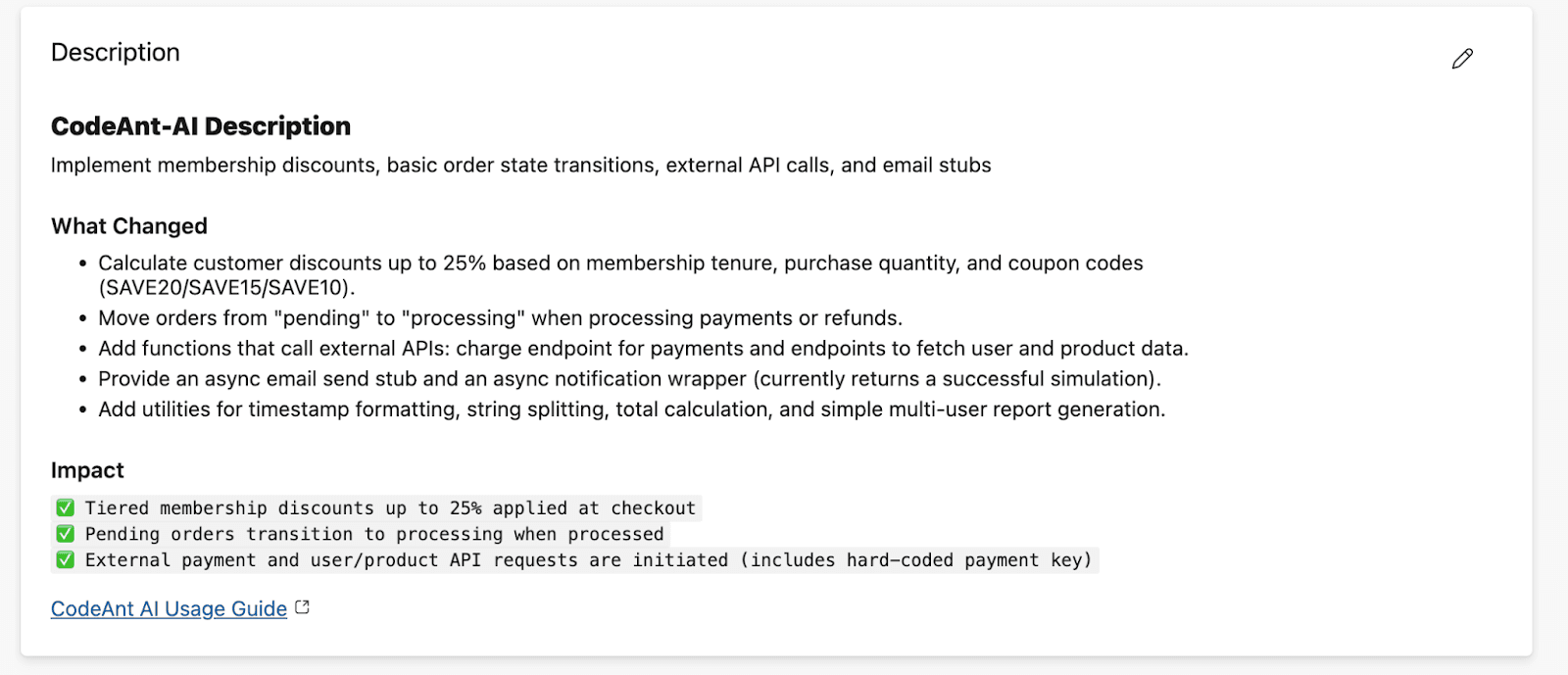
PR description

Auto-generated description if the developer left it blank

PR description field

Ticket scope review

Validates that the PR changes align with the scope of the linked work item

PR comment

AI chat

Interactive chat within the PR, developers can ask the AI follow-up questions about findings or the code

PR conversation

Security findings (SAST)

SQL injection, XSS, SSRF, hardcoded secrets, OWASP Top 10, each with Steps of Reproduction

Inline on the PR diff

SCA findings

Vulnerable dependencies, license issues, outdated packages

Inline + summary comment

IaC scanning

Misconfigurations in Terraform, CloudFormation, ARM templates, Kubernetes manifests

Inline on the PR diff

Secret scanning

API keys, tokens, connection strings, private keys, cloud credentials

Inline on the PR diff

Quality gates

Pass/fail status check based on configurable severity thresholds

Azure DevOps branch policy status check

Test coverage feedback

Identifies code paths that lack test coverage

PR comment

One-click fixes

Suggested code changes that developers can apply directly from the PR

Inline suggestion on the PR diff

Every finding includes Steps of Reproduction, a detailed proof of how the vulnerability or defect actually manifests, so developers don’t have to take the tool’s word for it.

They can verify the issue themselves before spending time on a fix.

Step 8: Continuous Learning Loop

Every AI review comment includes a like/dislike feedback mechanism.

When developers accept or reject recommendations, that feedback flows back into the system:

  • Accepted suggestions reinforce patterns the AI should continue flagging

  • Rejected suggestions teach the AI what your team considers acceptable

  • Over time, the review quality improves specifically for your codebase, your patterns, and your preferences

This means the first week of AI reviews is the worst it will ever be. Every PR makes the next review sharper. Teams typically report that after 2–4 weeks, the AI’s feedback quality is indistinguishable from what their most thorough senior engineers would catch, except it happens in minutes instead of hours or days.

How CodeAnt AI Integrates Across the Azure DevOps Ecosystem

Most code review tools integrate with Azure DevOps at one point: they read the diff and post comments. CodeAnt AI integrates across the full Azure DevOps ecosystem:

Azure DevOps Service

What CodeAnt AI Does

Why It Matters

Azure Repos

Connects directly to repositories; analyzes every pull request automatically

Seamless integration, no manual triggers, no separate tool to check

Pull Requests

Posts inline, context-aware AI review comments directly inside PRs, identical UX to human reviewer comments

Developers don’t leave Azure DevOps. No context switching, no separate dashboard. Findings appear exactly where human feedback appears

Azure Pipelines

Posts a status check that branch policies can gate on; can fail builds when critical issues are detected

Automated enforcement, a PR with a critical security finding can’t merge even if human reviewers approve it

Azure Boards

Pulls linked work item context into the review, the AI understands the intent behind the code, not just the diff

Reduces false positives. If a work item says “add admin bypass for debugging,” the AI won’t flag the admin check as a security issue

This full-ecosystem integration is unique. Competitor tools connect at the PR level only. 

  • They don’t read work item context from Boards.

  • They don’t post pipeline-integrated status checks. 

  • They can’t gate merges through branch policies independently of the build. 

CodeAnt AI does all of this natively, which means you get a single tool that works across repos, PRs, pipelines, and project management, not a patchwork of plugins.

How Teams Typically Roll Out AI Code Review: A Phased Approach

Adopting AI code review isn’t a switch you flip on day one across your entire organization. The teams that get the most value follow a phased approach that builds confidence before expanding scope.

Phase 1: Shadow Mode (Week 1–2)

Start with 2–3 repositories that have active PR traffic. Enable CodeAnt AI with the PR status check set to optional (not required). During this phase, the AI posts review comments on every PR, but can’t block merges. This lets your team:

  • See the quality of AI feedback on real code (not demo repos)

  • Identify any categories of findings they want to suppress (e.g., style preferences that conflict with your team’s conventions)

  • Build trust before giving the tool enforcement power

  • Calibrate the severity threshold, start at “Warning” and lower to “Info” once the team is comfortable with signal-to-noise

What to watch for: If the AI is flagging things your team consistently dismisses, add those patterns to the ignore rules. If it’s missing things your team cares about, tighten the relevant rule categories. The goal is to tune signal quality before giving the tool enforcement authority.

Phase 2: Enforcement on High-Risk Repos (Week 3–4)

Once the team trusts the feedback quality, enable the CodeAnt AI status check as required on your highest-risk repositories, typically your main product codebase, anything handling payment data, and public-facing APIs. Keep lower-risk repos (internal tools, documentation, infrastructure scripts) in shadow mode.

At this phase, add security scanning as a hard gate: any PR with a Critical or High severity security finding cannot be merged until the finding is addressed or explicitly triaged as a false positive.

Phase 3: Organization-Wide Rollout (Week 5–8)

Expand to all active repositories. By now your team has 4+ weeks of calibration data, ignore rules are tuned, and developers have adapted their workflow to address AI feedback as part of normal PR hygiene.

At full rollout, the typical improvements teams report:

Metric

Before AI Code Review

After AI Code Review

Average PR review time

1–3 days (waiting for human availability)

AI feedback within minutes; human review focused on architecture only

Review consistency

Varies by reviewer, time of day, workload

Uniform baseline across all PRs, AI applies the same checks every time

Security defects caught at PR stage

Depends entirely on reviewer expertise

Systematic, every PR gets the same SAST, SCA, and secrets scanning

Developer time on mechanical review

Significant (style, naming, obvious bugs)

Near zero, AI handles the mechanical layer

Phase 4: Optimization (Ongoing)

After full rollout, the focus shifts to:

  • Identifying which categories of findings appear most frequently (these indicate systemic patterns worth addressing at the architecture or documentation level, not just PR-by-PR)

  • Tuning custom rules for organization-specific patterns (e.g., “always use our internal logging library, not Console.WriteLine”)

  • Expanding the quality gate to include code coverage thresholds, documentation requirements, or other team-specific standards

  • Using trend data to measure the impact of engineering practices changes over time

CodeAnt AI vs. Other Code Review Tools on Azure DevOps

If you’re evaluating AI code review tools for Azure DevOps, here’s how the main options compare across the dimensions that actually matter for enterprise teams:

Capability

CodeAnt AI

CodeRabbit

Native Azure DevOps (built-in)

SonarCloud / SonarQube

AI-powered review comments

Yes, inline, contextual, with one-click fixes

Yes, inline comments on PRs

No, no AI capability built in

No, 100% manual, rule-based only. Zero AI capability.

Security scanning (SAST)

Yes, built-in, runs on every PR

No, code review only

No, requires third-party pipeline tasks

Yes, extensive SAST rules

SCA (dependency scanning)

Yes, CVEs, licenses, transitive deps

No

No, requires separate tooling (e.g., WhiteSource/Mend)

Partial, via SonarQube plugins

IaC scanning

Yes, Terraform, CloudFormation, ARM templates, Kubernetes

No

No, requires separate tooling

No

Secrets detection

Yes, built-in

No

No, requires CredScan or similar

No, requires separate tool

Steps of Reproduction

Yes, detailed proof of how each vulnerability manifests

No

N/A

No, rule ID + description only

Azure Boards integration

Yes, reads work item context to reduce false positives

No

Yes (native)

No

Azure Pipelines status check

Yes, gates merge independently

Limited

N/A (use build policies)

Yes, quality gate via pipeline task

Self-hosted Azure DevOps Server

Yes, full support, code stays on-prem

No, cloud Azure DevOps only

Yes (native)

Yes (SonarQube self-hosted)

Air-gapped deployment

Yes, fully air-gapped, zero external connectivity

No

Yes (native)

Yes (SonarQube self-hosted)

Customer cloud deployment (VPC)

Yes, deploy in customer’s AWS/GCP/Azure VPC

No

N/A

Yes (SonarQube self-hosted)

Continuous learning from feedback

Yes, learns your codebase patterns over time

Partial

No

No

One-click fix suggestions

Yes

Partial

No

No

Languages supported

30+

Multiple

N/A

30+ (varies by edition)

Setup time

Minutes, no pipeline changes required

~15 minutes

Already there

30–60 minutes + pipeline config

Pricing model

Per user / per month

Per user / per month

Included in Azure DevOps

Free tier + paid plans

CodeAnt AI vs. CodeRabbit

Both tools offer AI-powered PR review comments. But enterprise teams choose CodeAnt AI over CodeRabbit for three core reasons:

1. Security Posture & Deployment Flexibility

CodeAnt AI supports three deployment models: fully air-gapped on-premises, customer VPC (AWS/GCP/Azure), and hosted cloud.
CodeRabbit is SaaS-only, your source code is processed through their infrastructure.

For regulated industries such as financial services, healthcare, government, and defense, SaaS-only processing is often a non-starter.

2. In-Depth Security Coverage

CodeAnt AI goes beyond code review. It includes built-in:

CodeRabbit focuses on code review only, it does not provide integrated security scanning.

More importantly, CodeAnt AI’s security findings include Steps of Reproduction:

  • What input an attacker provides

  • How the data flows through your code

  • What the exploit achieves

  • Exactly how to fix it

That’s the difference between:

“SQL injection on line 42”

and

A concrete, reproducible attack path that eliminates false-positive guesswork.

3. Azure DevOps Depth

CodeAnt AI integrates deeply with Azure DevOps:

  • Reads Azure Boards work item context to reduce false positives

  • Supports self-hosted Azure DevOps Server

CodeRabbit supports neither.

In short: both tools add AI comments to PRs, but CodeAnt AI is built for enterprise security, regulated environments, and Azure-native teams.

CodeAnt AI vs. SonarCloud/SonarQube

SonarQube has no AI capability. It is a rule-based static analysis tool built on manually written and maintained rules. Every rule is predefined, which means SonarQube can only detect issues that match those patterns.

  • It does not reason about code semantics. 

  • It does not understand business context. 

  • It does not generate contextual explanations.

When SonarQube flags an issue, developers see:

  • A rule ID

  • A generic description

  • A severity level

What they don’t get is context specific to their codebase, why this issue matters here, how it could be exploited, or the fastest way to fix it.

As a result, developers still do all the intellectual work:

  • Interpreting the finding

  • Deciding whether it’s real

  • Determining the fix

  • Verifying the solution

SonarQube also doesn’t behave like a human reviewer in pull requests. It posts a pass/fail quality gate on the PR. That’s effective for enforcement, but it doesn’t provide inline explanations, teach developers, or reduce review back-and-forth.

CodeAnt AI takes a different approach.

It provides:

  • AI-powered contextual PR review

  • Clear explanations

  • Steps of Reproduction for security findings

  • One-click fixes

  • Built-in SAST, SCA, and secrets scanning

For teams using SonarQube today, CodeAnt AI either:

  • Replaces it entirely by consolidating review + security into one platform

  • Or complements it by adding the AI review layer SonarQube fundamentally cannot provide

The difference is enforcement versus intelligence, and that gap becomes more visible as teams scale.

CodeAnt AI vs. native Azure DevOps

Azure DevOps has excellent branch policies and PR workflows, but zero AI capability. You’ll always use native Azure DevOps features (branch policies, required reviewers, build validation), CodeAnt AI layers on top of them, adding AI review + security scanning + automated quality gates. They’re complementary, not competing.

CodeAnt AI vs. GitHub Copilot Code Review

GitHub Copilot’s code review feature is tightly integrated with GitHub, it doesn’t work with Azure Repos. If your code lives in Azure DevOps, Copilot’s review capabilities aren’t available to you. CodeAnt AI was built to work natively with Azure DevOps from day one, including the full ecosystem (Repos, PRs, Pipelines, Boards) and both cloud and self-hosted environments.

When to Choose What

Your Situation

Recommended Tool

Azure DevOps + need AI review + security scanning + self-hosted

CodeAnt AI, only tool that covers all three on Azure DevOps

Azure DevOps + already running SonarQube + want to add AI review

CodeAnt AI, adds the AI layer SonarQube cannot provide (or replaces it entirely)

Enterprise + regulated industry + need air-gapped or VPC deployment

CodeAnt AI, only AI review tool with air-gapped and customer-cloud deployment

Azure DevOps + need security reviews with full attack path analysis

CodeAnt AI, Steps of Reproduction shows the complete exploit chain, not just a rule ID

GitHub repos + don’t use Azure DevOps

GitHub Copilot Code Review, CodeRabbit, or CodeAnt AI (all support GitHub)

Azure DevOps + don’t need AI + only need basic SAST rules

SonarCloud or SonarQube, but understand it’s 100% manual with no AI capability

Enterprise + compliance requirements + on-prem Azure DevOps Server

CodeAnt AI, only AI review tool with native self-hosted ADO support

Deployment Models: Enterprise-First Architecture

CodeAnt AI is built enterprise-first. Instead of offering a single SaaS product and asking enterprises to work around it, CodeAnt AI offers three deployment models that match how enterprise security and infrastructure teams actually operate:

Deployment Options

Deployment Model

Where It Runs

Data Boundary

Best For

Customer Data Center (Air-Gapped)

Entirely within the customer’s on-premises infrastructure

Zero external connectivity. No code, no metadata, no telemetry leaves the customer’s network.

Government, defense, financial services with air-gapped requirements, organizations with strict network isolation policies

Customer Cloud (AWS, GCP, Azure)

Within the customer’s own cloud VPC

Customer retains full control over infrastructure, data, and network boundaries. Data stays within the customer’s cloud account.

Enterprise teams that want cloud scalability but need data sovereignty, code never enters a third-party environment

CodeAnt Cloud (SaaS)

CodeAnt AI’s hosted infrastructure

SOC 2 Type II certified, HIPAA compliant. CodeAnt manages infrastructure, scaling, and upgrades.

Teams that want the fastest deployment with zero infrastructure to manage

Zero data retention is available across all three models. Code is analyzed in memory inside an ephemeral sandbox and never persisted to disk, even temporarily. When the review completes, the sandbox is destroyed, code, intermediate artifacts, and all analysis data are deleted immediately.

This is a fundamental architectural difference from most AI code review tools, which only offer a SaaS model and route your source code through their infrastructure. For enterprise teams where source code is the most sensitive IP, and that’s most enterprise teams, the deployment model matters as much as the feature set.

How Each Deployment Model Works with Azure DevOps

Azure DevOps Environment

Compatible Deployment Models

Typical Enterprise Pattern

Azure DevOps Services (Cloud): dev.azure.com

All three: customer data center, customer cloud, CodeAnt cloud

Most teams use CodeAnt Cloud or Customer Cloud (Azure VPC). Air-gapped is available but uncommon for cloud ADO.

Azure DevOps Server (Self-Hosted): on-premises

Customer data center (air-gapped) or customer cloud

Most teams with self-hosted ADO choose customer data center deployment. Code stays fully on-prem.

Compliance Certifications

Certification

Status

SOC 2 Type II

Certified

GDPR

Compliant

HIPAA

Compliant (BAA available for healthcare customers)

ISO 27001

Compliant

Enterprise Security Controls

  • Access management: SSO (SAML), role-based access controls, and audit logging on Enterprise plans. CodeAnt AI respects your existing Azure DevOps permission model, it only accesses repositories the authenticated service account has permission to read. No blanket organization-wide access.

  • LLM provider flexibility: CodeAnt AI supports OpenAI, Anthropic, and open-source models. For customer data center and customer cloud deployments, you can bring your own LLM, including self-hosted open-source models running on your infrastructure, meaning the AI analysis itself never touches external APIs.

  • Ephemeral sandbox architecture: Every code review runs inside a temporary, isolated sandbox. The repository is cloned, analysis runs, results are posted to the PR, and the sandbox is destroyed. No code is persisted to disk, even temporarily. This is true across all three deployment models.

Results from Teams Using CodeAnt AI on Azure DevOps

Fortune 500 Healthcare Company: 300+ Developers on Azure DevOps

A Fortune 500 publicly listed healthcare company rolled out CodeAnt AI across their Azure DevOps environment serving 300+ developers:

Before CodeAnt AI:

  • Code reviews took days, PRs sat waiting for reviewer availability

  • Security findings were caught late in the cycle (penetration testing) or not at all

  • Inconsistent review quality across teams, what got caught depended on who reviewed it

  • Developers spent significant time on mechanical review work instead of architectural decisions

After CodeAnt AI:

  • Review time reduced from days to minutes

  • 98% faster review turnaround

  • Security vulnerabilities caught at the PR level before they reach any shared branch

  • Consistent quality enforcement across all repositories and teams

  • Human reviewers focus on architecture, business logic, and design, the mechanical layer is handled

The key driver of adoption was the inline PR experience: developers didn’t need to check a separate dashboard or learn a new tool. AI feedback appeared inside the same PR interface they already used, in the same format as human review comments. Adoption reached full team coverage within weeks, not months.

What Customers Say

“CodeAnt has tightened our pull request workflow and reduced review back-and-forth. The code analysis tool catches issues early, and the inline comments are clear and actionable.” — VP of IT, Retail Industry (via Gartner Peer Insights)

Enterprise teams across financial services, healthcare, automotive, retail, and technology trust CodeAnt AI on Azure DevOps, ranging from Fortune 500 companies to fast-growing enterprises with hundreds of developers.

Read more real use cases here.

Why Enterprise Teams Choose CodeAnt AI Over Alternatives

When evaluating AI code review tools, enterprise teams consistently cite the same decision factors. Here’s what drives the choice for Azure DevOps teams specifically:

Full Azure DevOps ecosystem integration, not just PR comments

Most AI code review tools bolt onto the PR layer. CodeAnt AI integrates with Repos, PRs, Pipelines, and Boards, reading work item context, posting pipeline status checks, and gating merges through branch policies. Enterprise teams don’t want another point solution; they want a tool that fits natively into their existing Azure DevOps workflow.

Self-hosted Azure DevOps Server support

Financial services companies, government agencies, healthcare organizations, and defense contractors often can’t use cloud-hosted tools. Their code lives on-premises in Azure DevOps Server. CodeAnt AI is one of the only AI code review tools that works natively with self-hosted Azure DevOps Server, no data leaves the network, no cloud dependency required.

Consolidated toolchain

Before CodeAnt AI, many teams ran separate tools for AI code review, SAST, SCA, and secrets detection, each with its own dashboard, configuration, and false positive management workflow. CodeAnt AI consolidates AI review, security scanning, dependency analysis, and secrets detection into a single tool with a single set of inline PR comments. Fewer tools means less context switching, lower licensing costs, and simpler vendor management.

Steps of Reproduction, full attack path analysis, not just rule IDs

When a security tool reports “SQL injection on line 42,” developers spend significant time determining if it’s a real finding or a false positive. CodeAnt AI’s Steps of Reproduction shows the complete attack path: the exact malicious input an attacker would provide, how that input flows through your code (which functions it passes through, where sanitization is missing), what the exploit achieves (data exfiltration, privilege escalation, remote code execution), and exactly what to change to fix it. This is the difference between a rule ID that requires 30 minutes of investigation and a detailed proof that a developer can verify and fix in minutes. No other AI code review tool provides this level of security evidence.

Measuring the Impact of AI Code Review

After deploying AI code review, you’ll want to track whether it’s actually making your team faster and your code more secure. Here are the metrics that matter and how to measure them in Azure DevOps:

Lead Time Metrics

Metric

How to Measure

What “Good” Looks Like

PR time-to-first-review

Time from PR creation to first review comment (human or AI)

Minutes with AI review vs. hours/days without

PR time-to-merge

Time from PR creation to merge

Under 24 hours for standard PRs, under 4 hours for hotfixes

Review iterations

Number of push-then-review cycles before merge

1–2 iterations, AI catches issues on the first pass, reducing back-and-forth

Review throughput

PRs merged per developer per week

Trend upward over time, more throughput with same or better quality

Quality Metrics

Metric

How to Measure

What “Good” Looks Like

Defect escape rate

Number of bugs found in staging/production that could have been caught in PR review

Trending down after AI review deployment

Security findings caught in PR vs. production

Ratio of security issues caught at PR time vs. later stages

Majority caught at PR time vs. production

AI finding acceptance rate

Percentage of AI review comments that developers act on (vs. dismiss)

70%+ indicates good calibration; under 50% means you need to tune rules

False positive rate

Percentage of AI findings dismissed as irrelevant

Low and decreasing over time as continuous learning kicks in

DORA Metrics Connection

AI code review directly impacts two of the four DORA metrics:

  • Deployment frequency goes up because PR review is no longer the bottleneck. When AI handles the mechanical review layer in minutes, human reviewers only need to focus on architecture and business logic, which means they can review faster and with less back-and-forth.

  • Change failure rate goes down because security vulnerabilities and code quality issues are caught at the PR stage instead of escaping to production. The earlier you catch a defect, the less likely it is to cause a production incident.

The other two DORA metrics (lead time for changes, mean time to recovery) are influenced indirectly: faster review turnaround reduces lead time, and catching issues earlier means fewer production incidents to recover from.

Common Misconceptions About AI Code Review

“AI code review will replace human reviewers”

No. AI code review handles the mechanical layer, the checks that should happen on every PR but that humans are inconsistent at: catching null pointer errors, spotting hardcoded credentials, flagging missing error handling, enforcing naming conventions. Human reviewers remain essential for architecture decisions, business logic validation, API design review, and any decision that requires understanding the broader system context beyond the diff. The best outcome is that AI handles 60-70% of the mechanical findings, freeing human reviewers to focus 100% of their time on the 30-40% of issues that require human judgment.

“AI review will flood my PRs with noise”

This is a valid concern with poorly calibrated tools. The solution is the phased rollout described above: start in shadow mode with the severity threshold set to “Warning,” observe for 1-2 weeks, tune the ignore rules for your team’s conventions, then enable enforcement. CodeAnt AI’s default ruleset is intentionally conservative, it starts with high-confidence findings and lets you expand coverage gradually. Teams that skip calibration and turn everything on at once do get noise. Teams that follow the phased approach typically report 90%+ signal-to-noise within the first month.

“We already run linters and SonarQube, we don’t need AI review”

Linters and SonarQube are rule-based: they apply predefined pattern matching to find known issue types. They’re excellent at catching style violations, code smells, and well-documented vulnerability patterns. AI code review is complementary, not competing, it catches context-dependent issues that rule-based tools miss: logic errors specific to your codebase, edge cases that depend on understanding the PR’s intent, security issues that span multiple files, and architectural anti-patterns that don’t match any predefined rule. Think of it as: linters catch “your code violates a known rule,” while AI review catches “your code has a problem that no rule was written for yet.”

“AI code review only works for simple/scripting languages”

CodeAnt AI supports 30+ languages including compiled languages with complex type systems (C#, Java, C++, Rust, Go, Kotlin) and dynamically typed languages (Python, JavaScript, TypeScript, Ruby, PHP). The security scanning is language-aware, so findings are relevant to each language’s specific vulnerability patterns and framework conventions.

Stop Waiting on PR Reviews. Start Shipping With Confidence.

Azure DevOps gives you branch policies, required reviewers, and build validation. What it doesn’t give you is intelligence.

Manual review alone doesn’t scale. Rule-based tools like SonarQube don’t understand context. SaaS-only AI reviewers don’t meet enterprise security requirements.

CodeAnt AI closes that gap.

  • It reviews every PR in minutes. 

  • It catches security flaws with full attack-path evidence. 

  • It posts inline comments where developers already work. 

  • It gates merges when critical issues slip through. 

  • It works with both Azure DevOps Cloud and Azure DevOps Server.

  • It deploys air-gapped, in your VPC, or in managed cloud.

This isn’t just faster review. It’s consistent, enforceable, enterprise-grade quality at scale.

  • If your PRs sit idle waiting for reviewers… 

  • If security findings surface late in pipelines or production… 

  • If you’re running multiple tools just to cover AI review + SAST + SCA + secrets…

You don’t need more reviewers. You need a smarter review layer.

See what your next PR looks like with AI reviewing it in minutes, not days.

Start your CodeAnt AI rollout today!!

AI code review in Azure DevOps is the process of using a machine-learning-powered tool to automatically analyze pull requests in Azure Repos and post inline feedback, code quality issues, security vulnerabilities, performance concerns, and suggested fixes, directly inside the PR, before a human reviewer sees it. The AI tool connects to Azure DevOps via webhooks and personal access tokens, triggers on every new or updated PR, and posts its findings as PR comments that look identical to human reviewer comments.

You can check the full guide on “How to set-up Azure DevOps in AI Code Review” here:

Unlike static analysis tools that run in pipelines and return pass/fail results, AI code review tools understand context, they read the PR description, the diff, the surrounding code, and often the linked work items, to produce feedback that reads like it came from a senior engineer. The AI reviewer doesn’t replace human reviewers; it handles the mechanical work (catching null pointer errors, spotting hardcoded credentials, flagging missing error handling, enforcing naming conventions) so human reviewers can focus on architecture, business logic, and design decisions.

Azure DevOps supports AI code review through third-party tools that integrate at the PR level. The most common integration pattern is: webhook fires when a PR is created or updated → AI tool pulls the diff and context → AI analyzes the changes → findings are posted as inline PR comments → optionally, a pipeline status check is posted to gate the merge.

Why Manual Code Review Alone Isn’t Enough

Manual code review is essential. No AI tool can decide whether an architectural direction aligns with your long-term strategy or whether a feature truly matches the product spec.

But manual review alone creates bottlenecks, and those bottlenecks compound as teams scale.

1. The Latency Problem

The typical pattern looks like this:

  • A developer opens a PR

  • Tags two reviewers

  • Waits

One reviewer is in another timezone. The other is in back-to-back meetings until 3 PM. By the time both reviews arrive, it’s the next day.

Meanwhile:

  • The developer has context-switched

  • The original problem space has faded

  • Addressing feedback now requires reloading mental state

Multiply that by:

  • 20 PRs per day

  • Across a team of 30 engineers

Review latency quickly becomes the single biggest drag on engineering velocity.

2. The Consistency Problem

Human review quality varies.

  • Reviewer A catches security issues but ignores naming conventions

  • Reviewer B enforces code style strictly but misses SQL injection vectors

What gets caught depends on:

  • Who reviews the PR

  • When they review it

  • How overloaded they are

No team can maintain uniform review quality across every PR, every hour of the day, purely through human effort.

3. The Security Gap

Most development teams don’t have security specialists reviewing every PR.

Even when they do:

  • Security review often happens separately from code review

  • That creates a second waiting period

Meanwhile:

  • Median time to exploit a known vulnerability: 44 days

  • Median time to patch: 60+ days

Security issues that slip through review don’t disappear, they linger in the codebase for months.

4. The Cost Multiplier

Industry data consistently shows:

The cost of fixing a defect increases roughly 10x at each stage of the lifecycle.

  • Caught in PR → hours to fix

  • Caught in production → weeks of incident response, customer communication, and remediation

Every issue caught at the PR stage avoids a 10x downstream cost.

AI code review solves the mechanical layer:

  • Null pointer checks

  • Hardcoded credentials

  • Missing error handling

  • Obvious security flaws

  • Naming and consistency issues

It applies the same baseline checks:

  • On every PR

  • Every time

  • With zero variation

It does not replace human judgment. Instead, it creates a higher starting point. Human reviewers begin from a baseline where obvious issues are already flagged, and their time goes to architecture, business logic, and design decisions that only humans can evaluate.

That shift is what removes bottlenecks without sacrificing quality.

How AI Code Review Works in Azure DevOps: Step by Step

Here’s the exact flow of what happens when an AI code review tool like CodeAnt AI is integrated with Azure DevOps:

Step 1: PR created or updated 

A developer pushes code and creates (or updates) a pull request in Azure Repos. Azure DevOps fires a webhook event to the connected AI review tool.

Step 2: Context gathering 

The AI tool pulls the PR diff, the full file context for changed files, the PR description, linked work items from Azure Boards, and the target branch history. Better tools use this context to understand not just what changed but why, which reduces false positives significantly.

Step 3: AI analysis

The tool’s ML models analyze the changes across multiple dimensions simultaneously:

Analysis Dimension

What the AI Checks

Logical flaws

Incorrect conditionals, off-by-one errors, wrong variable references, unreachable code paths, race conditions

Business logic errors

Changes that contradict the intent described in the linked work item or PR description, scope creep beyond the ticket, missing edge cases in domain-specific workflows

Critical code flaws

Null pointer dereferences, unhandled exceptions, resource leaks (unclosed connections, file handles), infinite loops, deadlocks

Performance issues

N+1 queries, unnecessary memory allocations, blocking calls in async contexts, full-table scans where indexed lookups should be used

Best practices

Framework-specific anti-patterns, naming convention violations, missing error handling, test coverage gaps, deprecated API usage

Security (SAST)

Injection flaws (SQL, XSS, SSRF, command injection), hardcoded secrets, insecure cryptographic usage, authentication and authorization flaws, OWASP Top 10 coverage

Dependencies (SCA)

Known CVEs in direct and transitive dependencies, outdated packages with security patches available, license compliance issues

IaC misconfigurations

Terraform, CloudFormation, ARM template, and Kubernetes manifest security and compliance issues

Secret scanning

API keys, access tokens, database connection strings, private keys, cloud provider credentials committed in the diff

Step 4: Inline feedback posted 

Findings are posted as inline comments directly on the relevant lines in the Azure DevOps PR, the same place human reviewer comments appear. Each comment includes the issue, why it matters, and in many cases a suggested fix that the developer can apply with one click. The developer doesn’t leave Azure DevOps. There’s no separate dashboard to check.

Step 5: Quality gate (optional) 

If configured, the AI tool posts a status check to the PR. You can configure branch policies to require this status check to pass before the PR can be merged. This means a PR with critical security vulnerabilities or quality issues can’t be merged, even if human reviewers approve it, the AI quality gate blocks the merge independently.

Step 6: Re-review on update 

When the developer pushes fixes and updates the PR, the AI tool re-analyzes only the changed lines, verifies the fixes actually resolve the flagged issues, and updates the status check. This creates a tight feedback loop, developers get immediate validation that their fixes are correct without waiting for a human re-review.

Architecture: Where AI Code Review Fits in Your Azure DevOps Workflow

Understanding where AI code review sits relative to your existing Azure DevOps toolchain helps clarify what it replaces, what it complements, and what it doesn’t touch.

The Typical Azure DevOps Review Stack

Most mature Azure DevOps teams have four layers of quality control:

Layer 1: Branch policies

Azure DevOps’s built-in enforcement. Required reviewers, linked work items, comment resolution rules, and merge type restrictions. These are organizational guardrails that ensure process compliance. They answer: 

  • Did the right people look at this? 

  • Is it linked to a tracked work item? 

  • Did the required discussions happen?

Layer 2: Build validation (Azure Pipelines) 

Automated builds and tests that run on every PR. Unit tests, integration tests, and any custom validation you’ve added to your pipeline. These answer: 

  • Does the code compile? 

  • Do existing tests pass?

  • Does it meet the automated quality bar?

Layer 3: Human code review 

The reviewers who read the diff, understand the design decisions, evaluate the architectural approach, and provide feedback on maintainability and readability. This answers: 

  • Is this the right approach? 

  • Does it align with our architecture? 

  • Will it be maintainable?

Layer 4: AI code review (CodeAnt AI)

Automated, context-aware analysis posted as inline PR comments. This answers: 

… the mechanical findings that humans are inconsistent at catching.

How the Layers Interact

The key insight is that CodeAnt AI doesn’t replace any of these layers, infact it adds the one layer that’s missing from most Azure DevOps setups. Branch policies enforce process. Pipelines enforce tests. Humans enforce design. AI enforces the mechanical quality and security checks that fall between the cracks: 

  • too granular for branch policies

  • too context-dependent for regex-based pipeline tools

  • too tedious for humans to catch reliably on every PR

Setting Up AI Code Review in Azure DevOps with CodeAnt AI

Prerequisites

Before starting, you’ll need:

  • An Azure DevOps organization (cloud at dev.azure.com or self-hosted Azure DevOps Server)

  • A project with at least one repository in Azure Repos

  • Admin permissions on the project (to configure service connections)

  • A CodeAnt AI account (sign up at codeant.ai)

Setup Overview

The setup process follows the same pattern for both cloud and self-hosted Azure DevOps:

Step 1: Connect your Azure DevOps organization 

From the CodeAnt AI dashboard, connect your Azure DevOps organization. For cloud Azure DevOps, follow the cloud setup guide. For self-hosted Azure DevOps Server, follow the self-hosted setup guide.

Step 2: Select repositories 

Choose which repositories to enable AI code review on. You can enable repositories individually or across the organization.

Step 3: Configure AI code review 

Set up how CodeAnt AI reviews pull requests, what to scan, severity thresholds, and which file paths to include or exclude. For detailed configuration options, see the cloud PR configuration guide or the self-hosted PR configuration guide.

Step 4: Test on a PR 

Create a pull request in one of your enabled repositories. CodeAnt AI will post inline review comments on the PR. Review the findings and adjust configuration as needed.

Step 5: Enable quality gates (optional) 

Once you’re confident in the review quality, configure CodeAnt AI as a quality gate so PRs with critical findings can’t be merged until the issues are addressed.

Setup by Deployment Type

CodeAnt AI supports both cloud and self-hosted Azure DevOps environments:

Azure DevOps Environment

How CodeAnt AI Connects

Configuration Guide

Azure DevOps Services (Cloud): dev.azure.com

Connect directly from the CodeAnt AI dashboard. No agents to install, no infrastructure to manage.

Cloud setup guide · Configure AI code review

Azure DevOps Server (Self-Hosted): on-premises or private cloud

Connect to your self-hosted instance. Your source code is analyzed in-place, it never leaves your network. Compatible with air-gapped and VPN-only environments.

Self-hosted setup guide · Configure AI code review

This matters for enterprise teams: most AI code review tools: including CodeRabbit and SonarQube, only support cloud-hosted Azure DevOps. If your organization runs Azure DevOps Server on-premises (common in financial services, healthcare, government, and defense), CodeAnt AI is one of the few tools that integrates natively without requiring you to migrate to the cloud first.

How CodeAnt AI Actually Reviews Your Code: Under the Hood

Most AI code review tools read the diff and generate comments. CodeAnt AI builds full engineering context before generating any review. Here’s the exact pipeline, what happens between “developer opens a PR” and “AI comments appear”:

Step 1: Pull Request Diff

CodeAnt AI starts with the PR diff, the exact lines of code that changed. This gives the immediate surface-level change, but a diff alone isn’t enough context for a meaningful review. Reviewing a diff without understanding the surrounding system is like editing a paragraph without reading the chapter.

Step 2: Deep Repository Context

Next, CodeAnt AI clones the repository into an ephemeral sandbox and builds a full understanding of the codebase:

Context Layer

What CodeAnt AI Analyzes

Why It Matters

Upstream functions

Functions that call the changed code

Identifies callers that may break due to the change

Downstream dependencies

Functions the changed code calls

Catches cases where the change passes unexpected values downstream

Call graphs

The full chain of function calls touching the change

Maps the blast radius, how far this change’s impact reaches

Abstract Syntax Trees (ASTs)

Structural representation of the code

Enables pattern matching beyond text, understanding code structure, not just strings

This means reviews aren’t isolated to the modified files. If you change a function signature, CodeAnt AI knows every caller and can flag the ones that will break. If you modify error handling, it knows which downstream paths are affected.

Step 3: Company-Specific Learning

Every engineering team has tribal knowledge, internal best practices, architecture patterns, what’s considered acceptable vs. not acceptable in your codebase. CodeAnt AI learns these over time:

  • Naming conventions specific to your team

  • Architectural patterns you’ve adopted (e.g., “all database access goes through the repository layer”)

  • Internal libraries that should be used instead of third-party alternatives

  • Code patterns your senior engineers consistently flag in manual reviews

This means reviews are tailored to your engineering standards, not generic rules. A finding that says “use InternalLogger instead of Console.WriteLine” is more actionable than “avoid logging to console” and it’s the kind of feedback that only comes from understanding your specific codebase.

Step 4: Ticket Context (Jira / Azure Boards)

CodeAnt AI pulls the linked work item from Jira or Azure Boards to understand:

  • What problem this PR is solving

  • The business intent behind the change

  • Scope expectations from the ticket description

This is the context layer that eliminates a large class of false positives. If the work item says “add admin bypass for debugging,” CodeAnt AI won’t flag the admin check as a security issue. If the ticket scope is “update the payment processing endpoint,” and the PR also modifies unrelated user profile code, CodeAnt AI flags the scope creep. The AI reviews code in the context of why it exists, not just how it’s written.

Step 5: Dependency and SBOM Analysis

CodeAnt AI inspects the dependency tree and Software Bill of Materials (SBOM):

  • Language and runtime versions (Java, .NET, Node.js, Python, etc.)

  • Direct and transitive dependency trees

  • Known CVEs in dependencies (NVD, GitHub Advisory Database)

  • License compliance (GPL in proprietary codebases, conflicting licenses)

  • Version mismatches between declared and actual dependencies

This catches dependency-level risks before they reach production: vulnerable packages, version conflicts, and license issues that would otherwise surface during security audits or, worse, in production incidents.

Step 6: Ephemeral Sandbox Execution

All of this analysis runs inside a temporary, isolated sandbox environment:

  1. The repository is cloned into the sandbox

  2. Full analysis runs (ASTs, call graphs, dependency trees, AI review)

  3. Results are generated and posted to the PR

  4. The sandbox is destroyed immediately, code, artifacts, and all intermediate data are deleted

No customer code is stored. No code is persisted to disk, even temporarily. The sandbox exists only for the duration of the analysis. This is true across all three deployment models (customer data center, customer cloud, and CodeAnt cloud).

Step 7: LLM-Powered Review Generation

With the full context assembled, PR diff, repository understanding, company knowledge, ticket context, and dependency intelligence, CodeAnt AI passes everything into LLMs (supporting OpenAI, Anthropic, and open-source models) to generate:

Output

What It Does

Where It Appears

Inline PR review comments

Contextual findings on specific lines, quality, security, performance, best practices

Inline on the PR diff in Azure DevOps

PR summary

High-level overview of what the PR does, why, and what to pay attention to

PR comment at the top of the review

PR description

Auto-generated description if the developer left it blank

PR description field

Ticket scope review

Validates that the PR changes align with the scope of the linked work item

PR comment

AI chat

Interactive chat within the PR, developers can ask the AI follow-up questions about findings or the code

PR conversation

Security findings (SAST)

SQL injection, XSS, SSRF, hardcoded secrets, OWASP Top 10, each with Steps of Reproduction

Inline on the PR diff

SCA findings

Vulnerable dependencies, license issues, outdated packages

Inline + summary comment

IaC scanning

Misconfigurations in Terraform, CloudFormation, ARM templates, Kubernetes manifests

Inline on the PR diff

Secret scanning

API keys, tokens, connection strings, private keys, cloud credentials

Inline on the PR diff

Quality gates

Pass/fail status check based on configurable severity thresholds

Azure DevOps branch policy status check

Test coverage feedback

Identifies code paths that lack test coverage

PR comment

One-click fixes

Suggested code changes that developers can apply directly from the PR

Inline suggestion on the PR diff

Every finding includes Steps of Reproduction, a detailed proof of how the vulnerability or defect actually manifests, so developers don’t have to take the tool’s word for it.

They can verify the issue themselves before spending time on a fix.

Step 8: Continuous Learning Loop

Every AI review comment includes a like/dislike feedback mechanism.

When developers accept or reject recommendations, that feedback flows back into the system:

  • Accepted suggestions reinforce patterns the AI should continue flagging

  • Rejected suggestions teach the AI what your team considers acceptable

  • Over time, the review quality improves specifically for your codebase, your patterns, and your preferences

This means the first week of AI reviews is the worst it will ever be. Every PR makes the next review sharper. Teams typically report that after 2–4 weeks, the AI’s feedback quality is indistinguishable from what their most thorough senior engineers would catch, except it happens in minutes instead of hours or days.

How CodeAnt AI Integrates Across the Azure DevOps Ecosystem

Most code review tools integrate with Azure DevOps at one point: they read the diff and post comments. CodeAnt AI integrates across the full Azure DevOps ecosystem:

Azure DevOps Service

What CodeAnt AI Does

Why It Matters

Azure Repos

Connects directly to repositories; analyzes every pull request automatically

Seamless integration, no manual triggers, no separate tool to check

Pull Requests

Posts inline, context-aware AI review comments directly inside PRs, identical UX to human reviewer comments

Developers don’t leave Azure DevOps. No context switching, no separate dashboard. Findings appear exactly where human feedback appears

Azure Pipelines

Posts a status check that branch policies can gate on; can fail builds when critical issues are detected

Automated enforcement, a PR with a critical security finding can’t merge even if human reviewers approve it

Azure Boards

Pulls linked work item context into the review, the AI understands the intent behind the code, not just the diff

Reduces false positives. If a work item says “add admin bypass for debugging,” the AI won’t flag the admin check as a security issue

This full-ecosystem integration is unique. Competitor tools connect at the PR level only. 

  • They don’t read work item context from Boards.

  • They don’t post pipeline-integrated status checks. 

  • They can’t gate merges through branch policies independently of the build. 

CodeAnt AI does all of this natively, which means you get a single tool that works across repos, PRs, pipelines, and project management, not a patchwork of plugins.

How Teams Typically Roll Out AI Code Review: A Phased Approach

Adopting AI code review isn’t a switch you flip on day one across your entire organization. The teams that get the most value follow a phased approach that builds confidence before expanding scope.

Phase 1: Shadow Mode (Week 1–2)

Start with 2–3 repositories that have active PR traffic. Enable CodeAnt AI with the PR status check set to optional (not required). During this phase, the AI posts review comments on every PR, but can’t block merges. This lets your team:

  • See the quality of AI feedback on real code (not demo repos)

  • Identify any categories of findings they want to suppress (e.g., style preferences that conflict with your team’s conventions)

  • Build trust before giving the tool enforcement power

  • Calibrate the severity threshold, start at “Warning” and lower to “Info” once the team is comfortable with signal-to-noise

What to watch for: If the AI is flagging things your team consistently dismisses, add those patterns to the ignore rules. If it’s missing things your team cares about, tighten the relevant rule categories. The goal is to tune signal quality before giving the tool enforcement authority.

Phase 2: Enforcement on High-Risk Repos (Week 3–4)

Once the team trusts the feedback quality, enable the CodeAnt AI status check as required on your highest-risk repositories, typically your main product codebase, anything handling payment data, and public-facing APIs. Keep lower-risk repos (internal tools, documentation, infrastructure scripts) in shadow mode.

At this phase, add security scanning as a hard gate: any PR with a Critical or High severity security finding cannot be merged until the finding is addressed or explicitly triaged as a false positive.

Phase 3: Organization-Wide Rollout (Week 5–8)

Expand to all active repositories. By now your team has 4+ weeks of calibration data, ignore rules are tuned, and developers have adapted their workflow to address AI feedback as part of normal PR hygiene.

At full rollout, the typical improvements teams report:

Metric

Before AI Code Review

After AI Code Review

Average PR review time

1–3 days (waiting for human availability)

AI feedback within minutes; human review focused on architecture only

Review consistency

Varies by reviewer, time of day, workload

Uniform baseline across all PRs, AI applies the same checks every time

Security defects caught at PR stage

Depends entirely on reviewer expertise

Systematic, every PR gets the same SAST, SCA, and secrets scanning

Developer time on mechanical review

Significant (style, naming, obvious bugs)

Near zero, AI handles the mechanical layer

Phase 4: Optimization (Ongoing)

After full rollout, the focus shifts to:

  • Identifying which categories of findings appear most frequently (these indicate systemic patterns worth addressing at the architecture or documentation level, not just PR-by-PR)

  • Tuning custom rules for organization-specific patterns (e.g., “always use our internal logging library, not Console.WriteLine”)

  • Expanding the quality gate to include code coverage thresholds, documentation requirements, or other team-specific standards

  • Using trend data to measure the impact of engineering practices changes over time

CodeAnt AI vs. Other Code Review Tools on Azure DevOps

If you’re evaluating AI code review tools for Azure DevOps, here’s how the main options compare across the dimensions that actually matter for enterprise teams:

Capability

CodeAnt AI

CodeRabbit

Native Azure DevOps (built-in)

SonarCloud / SonarQube

AI-powered review comments

Yes, inline, contextual, with one-click fixes

Yes, inline comments on PRs

No, no AI capability built in

No, 100% manual, rule-based only. Zero AI capability.

Security scanning (SAST)

Yes, built-in, runs on every PR

No, code review only

No, requires third-party pipeline tasks

Yes, extensive SAST rules

SCA (dependency scanning)

Yes, CVEs, licenses, transitive deps

No

No, requires separate tooling (e.g., WhiteSource/Mend)

Partial, via SonarQube plugins

IaC scanning

Yes, Terraform, CloudFormation, ARM templates, Kubernetes

No

No, requires separate tooling

No

Secrets detection

Yes, built-in

No

No, requires CredScan or similar

No, requires separate tool

Steps of Reproduction

Yes, detailed proof of how each vulnerability manifests

No

N/A

No, rule ID + description only

Azure Boards integration

Yes, reads work item context to reduce false positives

No

Yes (native)

No

Azure Pipelines status check

Yes, gates merge independently

Limited

N/A (use build policies)

Yes, quality gate via pipeline task

Self-hosted Azure DevOps Server

Yes, full support, code stays on-prem

No, cloud Azure DevOps only

Yes (native)

Yes (SonarQube self-hosted)

Air-gapped deployment

Yes, fully air-gapped, zero external connectivity

No

Yes (native)

Yes (SonarQube self-hosted)

Customer cloud deployment (VPC)

Yes, deploy in customer’s AWS/GCP/Azure VPC

No

N/A

Yes (SonarQube self-hosted)

Continuous learning from feedback

Yes, learns your codebase patterns over time

Partial

No

No

One-click fix suggestions

Yes

Partial

No

No

Languages supported

30+

Multiple

N/A

30+ (varies by edition)

Setup time

Minutes, no pipeline changes required

~15 minutes

Already there

30–60 minutes + pipeline config

Pricing model

Per user / per month

Per user / per month

Included in Azure DevOps

Free tier + paid plans

CodeAnt AI vs. CodeRabbit

Both tools offer AI-powered PR review comments. But enterprise teams choose CodeAnt AI over CodeRabbit for three core reasons:

1. Security Posture & Deployment Flexibility

CodeAnt AI supports three deployment models: fully air-gapped on-premises, customer VPC (AWS/GCP/Azure), and hosted cloud.
CodeRabbit is SaaS-only, your source code is processed through their infrastructure.

For regulated industries such as financial services, healthcare, government, and defense, SaaS-only processing is often a non-starter.

2. In-Depth Security Coverage

CodeAnt AI goes beyond code review. It includes built-in:

CodeRabbit focuses on code review only, it does not provide integrated security scanning.

More importantly, CodeAnt AI’s security findings include Steps of Reproduction:

  • What input an attacker provides

  • How the data flows through your code

  • What the exploit achieves

  • Exactly how to fix it

That’s the difference between:

“SQL injection on line 42”

and

A concrete, reproducible attack path that eliminates false-positive guesswork.

3. Azure DevOps Depth

CodeAnt AI integrates deeply with Azure DevOps:

  • Reads Azure Boards work item context to reduce false positives

  • Supports self-hosted Azure DevOps Server

CodeRabbit supports neither.

In short: both tools add AI comments to PRs, but CodeAnt AI is built for enterprise security, regulated environments, and Azure-native teams.

CodeAnt AI vs. SonarCloud/SonarQube

SonarQube has no AI capability. It is a rule-based static analysis tool built on manually written and maintained rules. Every rule is predefined, which means SonarQube can only detect issues that match those patterns.

  • It does not reason about code semantics. 

  • It does not understand business context. 

  • It does not generate contextual explanations.

When SonarQube flags an issue, developers see:

  • A rule ID

  • A generic description

  • A severity level

What they don’t get is context specific to their codebase, why this issue matters here, how it could be exploited, or the fastest way to fix it.

As a result, developers still do all the intellectual work:

  • Interpreting the finding

  • Deciding whether it’s real

  • Determining the fix

  • Verifying the solution

SonarQube also doesn’t behave like a human reviewer in pull requests. It posts a pass/fail quality gate on the PR. That’s effective for enforcement, but it doesn’t provide inline explanations, teach developers, or reduce review back-and-forth.

CodeAnt AI takes a different approach.

It provides:

  • AI-powered contextual PR review

  • Clear explanations

  • Steps of Reproduction for security findings

  • One-click fixes

  • Built-in SAST, SCA, and secrets scanning

For teams using SonarQube today, CodeAnt AI either:

  • Replaces it entirely by consolidating review + security into one platform

  • Or complements it by adding the AI review layer SonarQube fundamentally cannot provide

The difference is enforcement versus intelligence, and that gap becomes more visible as teams scale.

CodeAnt AI vs. native Azure DevOps

Azure DevOps has excellent branch policies and PR workflows, but zero AI capability. You’ll always use native Azure DevOps features (branch policies, required reviewers, build validation), CodeAnt AI layers on top of them, adding AI review + security scanning + automated quality gates. They’re complementary, not competing.

CodeAnt AI vs. GitHub Copilot Code Review

GitHub Copilot’s code review feature is tightly integrated with GitHub, it doesn’t work with Azure Repos. If your code lives in Azure DevOps, Copilot’s review capabilities aren’t available to you. CodeAnt AI was built to work natively with Azure DevOps from day one, including the full ecosystem (Repos, PRs, Pipelines, Boards) and both cloud and self-hosted environments.

When to Choose What

Your Situation

Recommended Tool

Azure DevOps + need AI review + security scanning + self-hosted

CodeAnt AI, only tool that covers all three on Azure DevOps

Azure DevOps + already running SonarQube + want to add AI review

CodeAnt AI, adds the AI layer SonarQube cannot provide (or replaces it entirely)

Enterprise + regulated industry + need air-gapped or VPC deployment

CodeAnt AI, only AI review tool with air-gapped and customer-cloud deployment

Azure DevOps + need security reviews with full attack path analysis

CodeAnt AI, Steps of Reproduction shows the complete exploit chain, not just a rule ID

GitHub repos + don’t use Azure DevOps

GitHub Copilot Code Review, CodeRabbit, or CodeAnt AI (all support GitHub)

Azure DevOps + don’t need AI + only need basic SAST rules

SonarCloud or SonarQube, but understand it’s 100% manual with no AI capability

Enterprise + compliance requirements + on-prem Azure DevOps Server

CodeAnt AI, only AI review tool with native self-hosted ADO support

Deployment Models: Enterprise-First Architecture

CodeAnt AI is built enterprise-first. Instead of offering a single SaaS product and asking enterprises to work around it, CodeAnt AI offers three deployment models that match how enterprise security and infrastructure teams actually operate:

Deployment Options

Deployment Model

Where It Runs

Data Boundary

Best For

Customer Data Center (Air-Gapped)

Entirely within the customer’s on-premises infrastructure

Zero external connectivity. No code, no metadata, no telemetry leaves the customer’s network.

Government, defense, financial services with air-gapped requirements, organizations with strict network isolation policies

Customer Cloud (AWS, GCP, Azure)

Within the customer’s own cloud VPC

Customer retains full control over infrastructure, data, and network boundaries. Data stays within the customer’s cloud account.

Enterprise teams that want cloud scalability but need data sovereignty, code never enters a third-party environment

CodeAnt Cloud (SaaS)

CodeAnt AI’s hosted infrastructure

SOC 2 Type II certified, HIPAA compliant. CodeAnt manages infrastructure, scaling, and upgrades.

Teams that want the fastest deployment with zero infrastructure to manage

Zero data retention is available across all three models. Code is analyzed in memory inside an ephemeral sandbox and never persisted to disk, even temporarily. When the review completes, the sandbox is destroyed, code, intermediate artifacts, and all analysis data are deleted immediately.

This is a fundamental architectural difference from most AI code review tools, which only offer a SaaS model and route your source code through their infrastructure. For enterprise teams where source code is the most sensitive IP, and that’s most enterprise teams, the deployment model matters as much as the feature set.

How Each Deployment Model Works with Azure DevOps

Azure DevOps Environment

Compatible Deployment Models

Typical Enterprise Pattern

Azure DevOps Services (Cloud): dev.azure.com

All three: customer data center, customer cloud, CodeAnt cloud

Most teams use CodeAnt Cloud or Customer Cloud (Azure VPC). Air-gapped is available but uncommon for cloud ADO.

Azure DevOps Server (Self-Hosted): on-premises

Customer data center (air-gapped) or customer cloud

Most teams with self-hosted ADO choose customer data center deployment. Code stays fully on-prem.

Compliance Certifications

Certification

Status

SOC 2 Type II

Certified

GDPR

Compliant

HIPAA

Compliant (BAA available for healthcare customers)

ISO 27001

Compliant

Enterprise Security Controls

  • Access management: SSO (SAML), role-based access controls, and audit logging on Enterprise plans. CodeAnt AI respects your existing Azure DevOps permission model, it only accesses repositories the authenticated service account has permission to read. No blanket organization-wide access.

  • LLM provider flexibility: CodeAnt AI supports OpenAI, Anthropic, and open-source models. For customer data center and customer cloud deployments, you can bring your own LLM, including self-hosted open-source models running on your infrastructure, meaning the AI analysis itself never touches external APIs.

  • Ephemeral sandbox architecture: Every code review runs inside a temporary, isolated sandbox. The repository is cloned, analysis runs, results are posted to the PR, and the sandbox is destroyed. No code is persisted to disk, even temporarily. This is true across all three deployment models.

Results from Teams Using CodeAnt AI on Azure DevOps

Fortune 500 Healthcare Company: 300+ Developers on Azure DevOps

A Fortune 500 publicly listed healthcare company rolled out CodeAnt AI across their Azure DevOps environment serving 300+ developers:

Before CodeAnt AI:

  • Code reviews took days, PRs sat waiting for reviewer availability

  • Security findings were caught late in the cycle (penetration testing) or not at all

  • Inconsistent review quality across teams, what got caught depended on who reviewed it

  • Developers spent significant time on mechanical review work instead of architectural decisions

After CodeAnt AI:

  • Review time reduced from days to minutes

  • 98% faster review turnaround

  • Security vulnerabilities caught at the PR level before they reach any shared branch

  • Consistent quality enforcement across all repositories and teams

  • Human reviewers focus on architecture, business logic, and design, the mechanical layer is handled

The key driver of adoption was the inline PR experience: developers didn’t need to check a separate dashboard or learn a new tool. AI feedback appeared inside the same PR interface they already used, in the same format as human review comments. Adoption reached full team coverage within weeks, not months.

What Customers Say

“CodeAnt has tightened our pull request workflow and reduced review back-and-forth. The code analysis tool catches issues early, and the inline comments are clear and actionable.” — VP of IT, Retail Industry (via Gartner Peer Insights)

Enterprise teams across financial services, healthcare, automotive, retail, and technology trust CodeAnt AI on Azure DevOps, ranging from Fortune 500 companies to fast-growing enterprises with hundreds of developers.

Read more real use cases here.

Why Enterprise Teams Choose CodeAnt AI Over Alternatives

When evaluating AI code review tools, enterprise teams consistently cite the same decision factors. Here’s what drives the choice for Azure DevOps teams specifically:

Full Azure DevOps ecosystem integration, not just PR comments

Most AI code review tools bolt onto the PR layer. CodeAnt AI integrates with Repos, PRs, Pipelines, and Boards, reading work item context, posting pipeline status checks, and gating merges through branch policies. Enterprise teams don’t want another point solution; they want a tool that fits natively into their existing Azure DevOps workflow.

Self-hosted Azure DevOps Server support

Financial services companies, government agencies, healthcare organizations, and defense contractors often can’t use cloud-hosted tools. Their code lives on-premises in Azure DevOps Server. CodeAnt AI is one of the only AI code review tools that works natively with self-hosted Azure DevOps Server, no data leaves the network, no cloud dependency required.

Consolidated toolchain

Before CodeAnt AI, many teams ran separate tools for AI code review, SAST, SCA, and secrets detection, each with its own dashboard, configuration, and false positive management workflow. CodeAnt AI consolidates AI review, security scanning, dependency analysis, and secrets detection into a single tool with a single set of inline PR comments. Fewer tools means less context switching, lower licensing costs, and simpler vendor management.

Steps of Reproduction, full attack path analysis, not just rule IDs

When a security tool reports “SQL injection on line 42,” developers spend significant time determining if it’s a real finding or a false positive. CodeAnt AI’s Steps of Reproduction shows the complete attack path: the exact malicious input an attacker would provide, how that input flows through your code (which functions it passes through, where sanitization is missing), what the exploit achieves (data exfiltration, privilege escalation, remote code execution), and exactly what to change to fix it. This is the difference between a rule ID that requires 30 minutes of investigation and a detailed proof that a developer can verify and fix in minutes. No other AI code review tool provides this level of security evidence.

Measuring the Impact of AI Code Review

After deploying AI code review, you’ll want to track whether it’s actually making your team faster and your code more secure. Here are the metrics that matter and how to measure them in Azure DevOps:

Lead Time Metrics

Metric

How to Measure

What “Good” Looks Like

PR time-to-first-review

Time from PR creation to first review comment (human or AI)

Minutes with AI review vs. hours/days without

PR time-to-merge

Time from PR creation to merge

Under 24 hours for standard PRs, under 4 hours for hotfixes

Review iterations

Number of push-then-review cycles before merge

1–2 iterations, AI catches issues on the first pass, reducing back-and-forth

Review throughput

PRs merged per developer per week

Trend upward over time, more throughput with same or better quality

Quality Metrics

Metric

How to Measure

What “Good” Looks Like

Defect escape rate

Number of bugs found in staging/production that could have been caught in PR review

Trending down after AI review deployment

Security findings caught in PR vs. production

Ratio of security issues caught at PR time vs. later stages

Majority caught at PR time vs. production

AI finding acceptance rate

Percentage of AI review comments that developers act on (vs. dismiss)

70%+ indicates good calibration; under 50% means you need to tune rules

False positive rate

Percentage of AI findings dismissed as irrelevant

Low and decreasing over time as continuous learning kicks in

DORA Metrics Connection

AI code review directly impacts two of the four DORA metrics:

  • Deployment frequency goes up because PR review is no longer the bottleneck. When AI handles the mechanical review layer in minutes, human reviewers only need to focus on architecture and business logic, which means they can review faster and with less back-and-forth.

  • Change failure rate goes down because security vulnerabilities and code quality issues are caught at the PR stage instead of escaping to production. The earlier you catch a defect, the less likely it is to cause a production incident.

The other two DORA metrics (lead time for changes, mean time to recovery) are influenced indirectly: faster review turnaround reduces lead time, and catching issues earlier means fewer production incidents to recover from.

Common Misconceptions About AI Code Review

“AI code review will replace human reviewers”

No. AI code review handles the mechanical layer, the checks that should happen on every PR but that humans are inconsistent at: catching null pointer errors, spotting hardcoded credentials, flagging missing error handling, enforcing naming conventions. Human reviewers remain essential for architecture decisions, business logic validation, API design review, and any decision that requires understanding the broader system context beyond the diff. The best outcome is that AI handles 60-70% of the mechanical findings, freeing human reviewers to focus 100% of their time on the 30-40% of issues that require human judgment.

“AI review will flood my PRs with noise”

This is a valid concern with poorly calibrated tools. The solution is the phased rollout described above: start in shadow mode with the severity threshold set to “Warning,” observe for 1-2 weeks, tune the ignore rules for your team’s conventions, then enable enforcement. CodeAnt AI’s default ruleset is intentionally conservative, it starts with high-confidence findings and lets you expand coverage gradually. Teams that skip calibration and turn everything on at once do get noise. Teams that follow the phased approach typically report 90%+ signal-to-noise within the first month.

“We already run linters and SonarQube, we don’t need AI review”

Linters and SonarQube are rule-based: they apply predefined pattern matching to find known issue types. They’re excellent at catching style violations, code smells, and well-documented vulnerability patterns. AI code review is complementary, not competing, it catches context-dependent issues that rule-based tools miss: logic errors specific to your codebase, edge cases that depend on understanding the PR’s intent, security issues that span multiple files, and architectural anti-patterns that don’t match any predefined rule. Think of it as: linters catch “your code violates a known rule,” while AI review catches “your code has a problem that no rule was written for yet.”

“AI code review only works for simple/scripting languages”

CodeAnt AI supports 30+ languages including compiled languages with complex type systems (C#, Java, C++, Rust, Go, Kotlin) and dynamically typed languages (Python, JavaScript, TypeScript, Ruby, PHP). The security scanning is language-aware, so findings are relevant to each language’s specific vulnerability patterns and framework conventions.

Stop Waiting on PR Reviews. Start Shipping With Confidence.

Azure DevOps gives you branch policies, required reviewers, and build validation. What it doesn’t give you is intelligence.

Manual review alone doesn’t scale. Rule-based tools like SonarQube don’t understand context. SaaS-only AI reviewers don’t meet enterprise security requirements.

CodeAnt AI closes that gap.

  • It reviews every PR in minutes. 

  • It catches security flaws with full attack-path evidence. 

  • It posts inline comments where developers already work. 

  • It gates merges when critical issues slip through. 

  • It works with both Azure DevOps Cloud and Azure DevOps Server.

  • It deploys air-gapped, in your VPC, or in managed cloud.

This isn’t just faster review. It’s consistent, enforceable, enterprise-grade quality at scale.

  • If your PRs sit idle waiting for reviewers… 

  • If security findings surface late in pipelines or production… 

  • If you’re running multiple tools just to cover AI review + SAST + SCA + secrets…

You don’t need more reviewers. You need a smarter review layer.

See what your next PR looks like with AI reviewing it in minutes, not days.

Start your CodeAnt AI rollout today!!

FAQs

What does “Steps of Reproduction” mean?

Can I use CodeAnt AI alongside existing branch policies and required reviewers?

How is CodeAnt AI different from running SonarQube in my pipeline?

What languages does CodeAnt AI support?

How long does it take to set up CodeAnt AI on Azure DevOps?

Table of Contents

Start Your 14-Day Free Trial

AI code reviews, security, and quality trusted by modern engineering teams. No credit card required!

Share blog: