

Why This Section Kills More Pentest Authorizations Than Any Other
Most authorization letter mistakes are about scope or signing authority. Cloud provider notification is where organizations consistently fail, not because the requirements are complicated, but because people assume they've covered it when they haven't.
The failure pattern is always the same:
the authorization letter is signed by appropriate C-suite officers
the scope is carefully defined
the emergency procedures are in place, and nobody checked whether the cloud provider requires notification before testing begins
The testing starts. The provider's automated abuse detection flags the scanning activity. The account gets suspended mid-engagement.
That's not a hypothetical. Cloud providers do suspend accounts. They do terminate engagements without notice when testing violates their terms.
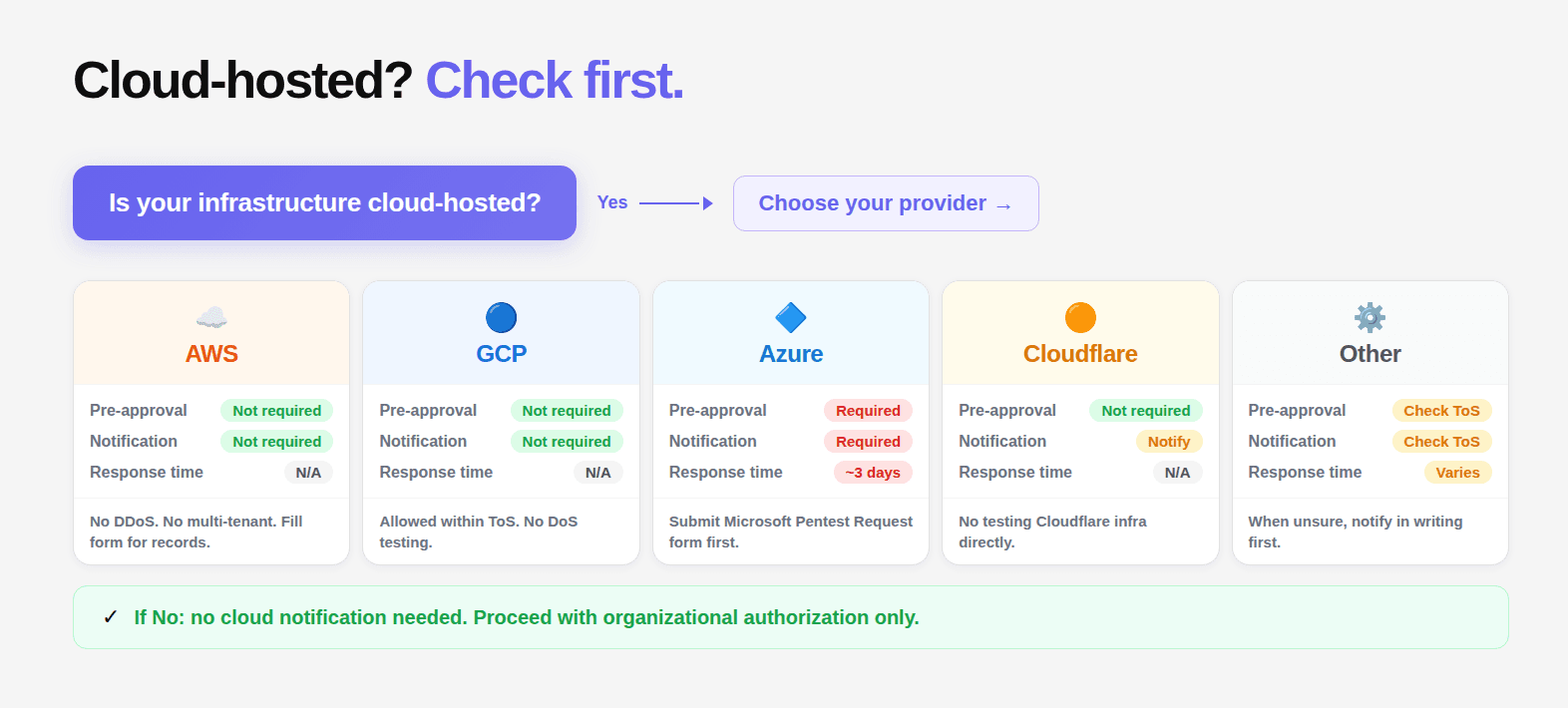
This guide covers the current requirements for every major cloud provider as of 2026, the language to include in your authorization letter for each, and the prohibited activities that many organizations don't realize extend to their own infrastructure.
AWS Penetration Testing
Current policy position: AWS does not require prior approval for most penetration testing against infrastructure you own.
What you can test without approval:
EC2 instances and RDS databases you own
API Gateway, Lambda, ECS, EKS
Elastic Beanstalk environments
CloudFront distributions
S3 buckets (your own)
Aurora databases
AWS WAF
What is always prohibited regardless of authorization:
DNS zone walking against Route 53
DoS or DDoS attacks against any AWS infrastructure
Port flooding, protocol flooding, request flooding
Simulated DDoS attacks
Testing that degrades AWS service for other customers
What requires prior approval (AWS Simulated Events form):
Simulated DDoS testing
Load testing that may affect AWS infrastructure
Testing AWS-managed services in ways that could affect other tenants
Current policy URL: aws.amazon.com/security/penetration-testing
Authorization letter language:
If you need the complete AWS-specific testing methodology beyond the authorization requirements, see our guide to AWS penetration testing.
GCP Penetration Testing
Current policy position: Google does not require prior approval or notification for penetration testing of GCP resources you own.
Requirements:
Testing must be limited to your own GCP resources
You must not test GCP infrastructure itself
Testing that impacts other GCP customers is prohibited
Vulnerabilities discovered in GCP itself should be reported to Google's Vulnerability Reward Program
What is prohibited:
DoS/DDoS testing against any Google services
Testing systems you don't own that happen to be on GCP
Testing that could affect shared GCP infrastructure
Current policy: google.com/about/appsecurity + Google Cloud AUP
Authorization letter language:
Azure Penetration Testing
Current policy position: Microsoft requires notification via the Penetration Testing Rules of Engagement (PTROE) form before testing begins.
PTROE form location: portal.msrc.microsoft.com/en-us/engage/pentest
Timeline: Submit at least 1-2 business days before testing. Keep within the approved timeline. Notify if extending.
What requires notification:
Any penetration testing against Azure-hosted resources
Load testing that might impact Azure infrastructure
Security assessments of Azure Marketplace solutions
What is prohibited:
Testing Azure infrastructure itself
DoS or DDoS of any kind
Testing affecting other Azure tenants
Testing Azure management portals (portal.azure.com)
Authorization letter language:
Other Cloud and Infrastructure Providers
Cloudflare: Contact required before testing. Some activities require explicit approval. DDoS simulation of any kind is prohibited. Testing Cloudflare's own infrastructure is prohibited. Email security@cloudflare.com or use their responsible disclosure portal.
Fastly: Contact Fastly directly before testing. DDoS simulation prohibited. Testing Fastly edge infrastructure prohibited.
Heroku: No pre-approval required for your own apps. Recommended to notify. Testing Heroku platform infrastructure or other customer apps prohibited.
DigitalOcean: No pre-approval required. Notify if testing is extensive. DoS prohibited. Cross-customer impact prohibited.
GitHub (for self-hosted runners and GitHub Enterprise): No approval needed for your own GitHub Enterprise instance. For testing GitHub.com itself, separate authorization required (not typically in scope for customer engagements).
Cloud penetration testing can identify weaknesses in deployed environments, but teams can also catch many configuration problems earlier by managing infrastructure as code. See our infrastructure as code guide for the implementation details.
The Multi-Cloud Authorization Reference Table
Provider | Pre-Approval | Notification | Where to Notify | Typical Response | Prohibited |
|---|---|---|---|---|---|
AWS | No (most services) | Recommended | aws.amazon.com/security/penetration-testing | N/A | DoS, DNS zone walking |
GCP | No | Not required | N/A | N/A | DoS, cross-customer |
Azure | Via PTROE | Yes — mandatory | portal.msrc.microsoft.com | 1-2 business days | DoS, Azure infra |
Cloudflare | Contact | Yes | security@cloudflare.com | Variable | DDoS, Cloudflare infra |
Fastly | Contact | Yes | Direct contact | Variable | DDoS, Fastly edge |
Heroku | No | Recommended | N/A | N/A | Platform, other customers |
DigitalOcean | No | If extensive | N/A | N/A | DoS, cross-customer |
What Happens If You Skip Notification
Account suspension: Azure is most aggressive about this. Testing that triggers Azure's abuse detection without a corresponding PTROE notification can result in account suspension. This has happened to real organizations mid-engagement.
Engagement termination: Providers that detect unusual traffic patterns may contact the account holder to investigate. This interrupts the engagement and may require explaining to the account team what was being tested.
Terms of service violation: Even where accounts aren't suspended, testing without following the provider's policy creates a terms of service violation. This matters for regulated industries where cloud provider compliance is part of your own compliance posture.
No coverage for provider-originated disruption: If testing triggers a provider's security controls and causes service disruption to your own systems, the authorization letter's liability provisions may not cover that disruption if you didn't follow the provider's required notification process.
Cloud Authorization Is External. That Is Why It Gets Missed.
Most penetration testing failures are internal. Scope is unclear. Signing authority is wrong. Procedures are incomplete. Cloud provider notification is different. It sits outside your organization. That is exactly why it gets overlooked.
Penetration testing is one layer of cloud security. Cloud infrastructure security tools can provide continuous visibility into configuration and exposure issues between testing engagements.
Everything inside the authorization letter can be correct. The right people sign it. The scope is precise. The testing firm is prepared. But if the cloud provider requirements are not followed, none of that matters when the platform itself intervenes.
This is where control shifts. You are no longer just operating within your own systems. You are operating on infrastructure governed by another entity with its own rules, enforcement mechanisms, and automated detection systems.
The fix is simple but non negotiable. Before testing begins, verify provider requirements for every environment in scope. Document compliance directly in the authorization letter. Submit required notifications. Confirm timelines.
Because once testing starts, you do not control how the provider responds. And when they respond, they do not wait for your explanation.

