Code Security
CodeAnt AI vs GitLab SAST: Independent vs Built-In Security (2026)

Sonali Sood

Founding GTM, CodeAnt AI
GitLab and CodeAnt AI represent two fundamentally different approaches to developer security. GitLab SAST is a built-in feature of GitLab Ultimate — it runs multiple open-source scanning engines under the hood, aggregates findings into GitLab’s vulnerability management dashboard, and appears directly in merge requests without installing any external tool. CodeAnt AI is a standalone, SCM-agnostic defensive and offensive security platform that uses AI-native detection to provide code security review, code quality analysis, and security scanning across GitHub, GitLab, Azure DevOps, or Bitbucket.
This page compares both tools across the same six-dimension evaluation framework used in our full SAST tools comparison. The comparison is written for developers and DevOps engineers on GitLab teams deciding whether GitLab’s built-in scanning is sufficient or whether a dedicated security platform delivers meaningful additional value.
CodeAnt AI vs GitLab SAST: Quick Summary
Dimension | GitLab SAST | CodeAnt AI |
Primary Strength | Built into GitLab Ultimate (zero tool sprawl) | Unified AI code security review + quality + security |
AI Tier | Rule-Based (wraps open-source scanners) | AI-Native |
Detection Engine | Multi-scanner aggregation (Semgrep, SpotBugs, others) | AI as primary detection engine |
Steps of Reproduction | ✗ | ✓ (every finding) |
Auto-Fix | ✗ | AI-generated one-click fixes in MR |
Security Coverage | SAST + DAST + SCA + Secrets + Container + License Compliance | SAST + SCA + Secrets + IaC + SBOMs |
DAST | ✓ (included in Ultimate) | ✗ |
Container Scanning | ✓ (included in Ultimate) | ✗ |
Code Quality | GitLab Code Quality (basic, Code Climate engine) | ✓ (complexity, duplication, dead code, DORA metrics) |
Code Security Review | ✗ | ✓ (AI code security review with inline comments) |
Workflow Integration | GitLab CI pipeline → MR results → Vulnerability dashboard | CLI → IDE → MR → CI/CD → SecOps |
IDE Support | ✗ (no IDE integration for SAST) | VS Code, JetBrains, Visual Studio, Cursor, Windsurf |
Pre-Commit / CLI | ✗ | ✓ (blocks secrets, credentials, SAST/SCA issues before commit) |
SecOps Dashboard | ✓ Vulnerability Management Dashboard (built-in, mature) | ✓ (vulnerability trends, OWASP/CWE/CVE, team risk, Jira/Azure Boards) |
SCM Support | GitLab only | GitHub, GitLab, Azure DevOps, or Bitbucket |
Deployment | GitLab.com (cloud) or GitLab Self-Managed (on-prem) | Customer DC (air-gapped), Customer Cloud, CodeAnt Cloud |
Compliance | SOC 2 (GitLab.com); self-managed inherits customer’s posture | SOC 2 Type II, HIPAA, zero data retention |
Pricing Model | Included in GitLab Ultimate ($99/user/month) | Per user ($20/user/month Code Security) |
Languages | 15+ languages (varies by scanner) | 30+ languages, 85+ frameworks |
Comparison verified against GitLab SAST documentation and CodeAnt AI documentation. Features change, verify with both vendors before purchasing.
Where GitLab SAST Excels
GitLab SAST has a structural advantage that external tools cannot replicate: it is part of GitLab. For teams already invested in the GitLab ecosystem, this built-in nature provides operational simplicity that deserves honest recognition.
Built into GitLab Ultimate (Zero Added Cost)
If your team is already on GitLab Ultimate, SAST scanning is included at no additional cost. There is no separate vendor to evaluate, no additional procurement process, no external tool to install, and no integration to configure. Add a SAST template to your .gitlab-ci.yml file, a few lines of YAML, and scanning activates across your project.
This zero-overhead onboarding is GitLab SAST’s strongest advantage. For organizations that have already invested in GitLab Ultimate for its broader DevOps platform (planning, source control, CI/CD, monitoring), the SAST capability is an incremental benefit that arrives without incremental cost or operational complexity. Security scanning becomes a feature toggle, not a procurement project.
Integrated Vulnerability Management Dashboard
GitLab’s vulnerability management dashboard provides a centralized view of security findings across all projects in a GitLab instance. Findings from SAST, DAST, dependency scanning, and container scanning are aggregated into a single triage interface. Security teams can assign findings, track remediation status, set vulnerability SLAs, and view trends over time, all within GitLab.
The dashboard integrates with GitLab’s issue tracking, meaning findings can be converted into issues and assigned to developers without leaving the platform. For teams that use GitLab for project management alongside source control and CI/CD, this end-to-end traceability (finding → issue → merge request → resolution) within a single platform is operationally valuable.
SAST + DAST + SCA + Secrets in One Platform
GitLab Ultimate bundles a comprehensive application security suite: SAST (static analysis), DAST (dynamic/runtime testing), dependency scanning (SCA), container scanning, secret detection, and license compliance, all under a single subscription. For teams that need multiple scanning modalities, GitLab provides them without requiring separate vendor relationships for each capability.
DAST and container scanning are capabilities that CodeAnt AI does not offer. Teams that need runtime testing of deployed applications or vulnerability scanning of container images will find these capabilities in GitLab Ultimate without adding external tools.
Where CodeAnt AI Goes Further
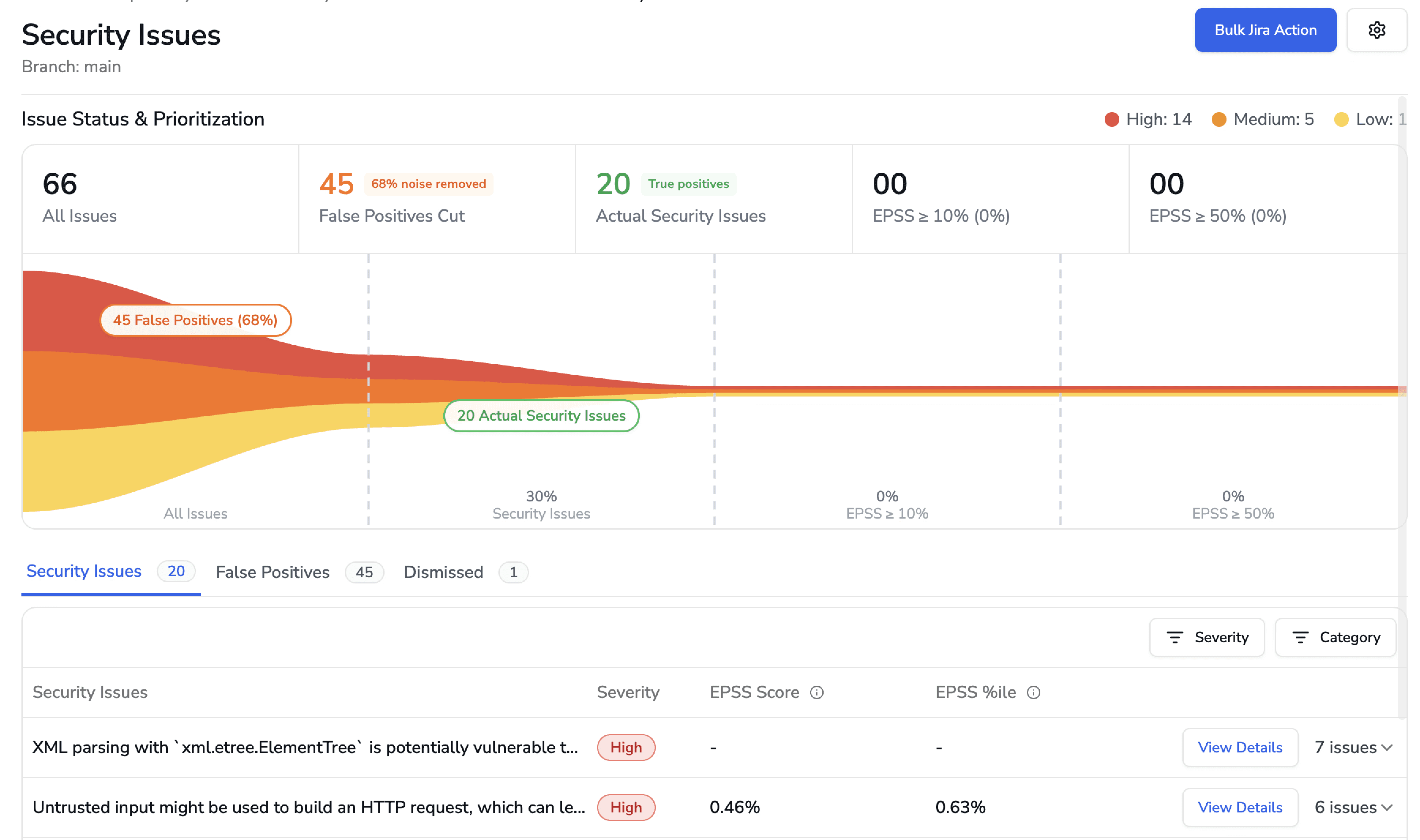
CodeAnt AI addresses several areas where teams encounter limitations with GitLab’s built-in scanning, particularly around detection depth, evidence-based findings, developer-facing remediation, and multi-platform support.
AI-Native Detection vs. Open-Source Scanner Wrappers
GitLab SAST works by running multiple open-source scanning engines and aggregating their results. Under the hood, the primary SAST engine is Semgrep (which replaced several language-specific scanners), with SpotBugs for Java bytecode analysis and other specialized engines for specific languages. GitLab orchestrates these scanners, normalizes their output, and presents findings in a unified format.
This aggregation approach has a practical consequence: GitLab SAST’s detection capabilities are bounded by what the underlying open-source engines can detect. The scanners use rule-based pattern matching, they find what their rule sets define. If a vulnerability pattern is not covered by the rules in the bundled scanner version, GitLab SAST will not detect it.
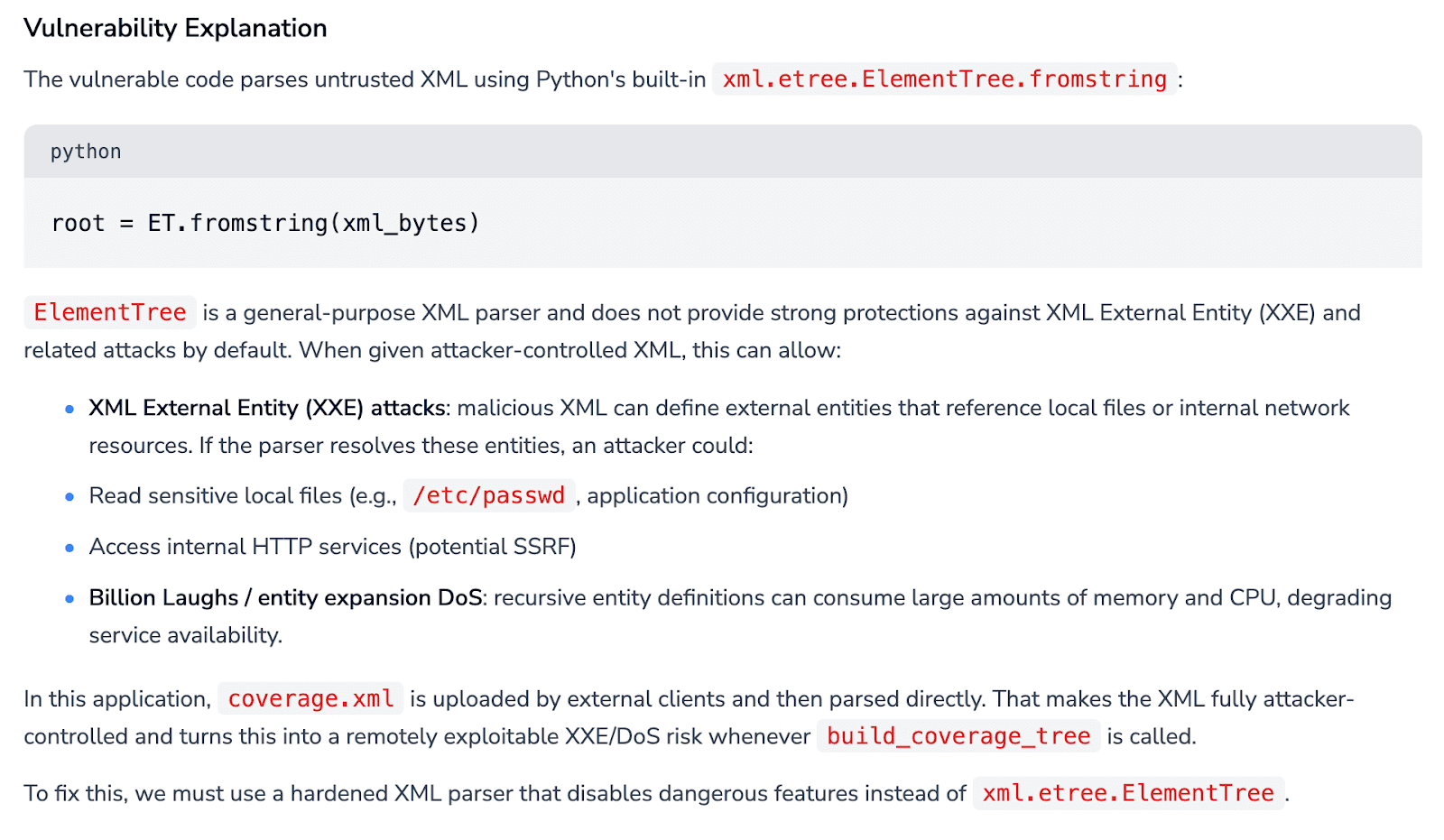
CodeAnt AI uses an AI-native detection engine where machine learning models are the primary analysis mechanism. The scanner reasons about code semantics, data flow, reachability, input validation, output encoding, rather than matching patterns against rule libraries. This means CodeAnt AI can detect vulnerability classes that no rule has been written for, including novel patterns in AI-generated code and complex multi-file taint flows that rule-based matching struggles with.
Steps of Reproduction vs. Basic Alerts
When GitLab SAST flags a vulnerability, it provides a CWE classification, a severity rating, the file location, and a brief description of the vulnerability type. The depth of context depends on the underlying scanner, some provide data flow information, others provide only the matched pattern location.
CodeAnt AI generates Steps of Reproduction for every finding: the exact entry point, the complete taint flow through each intermediate function, the vulnerable sink, and a concrete exploitation scenario.
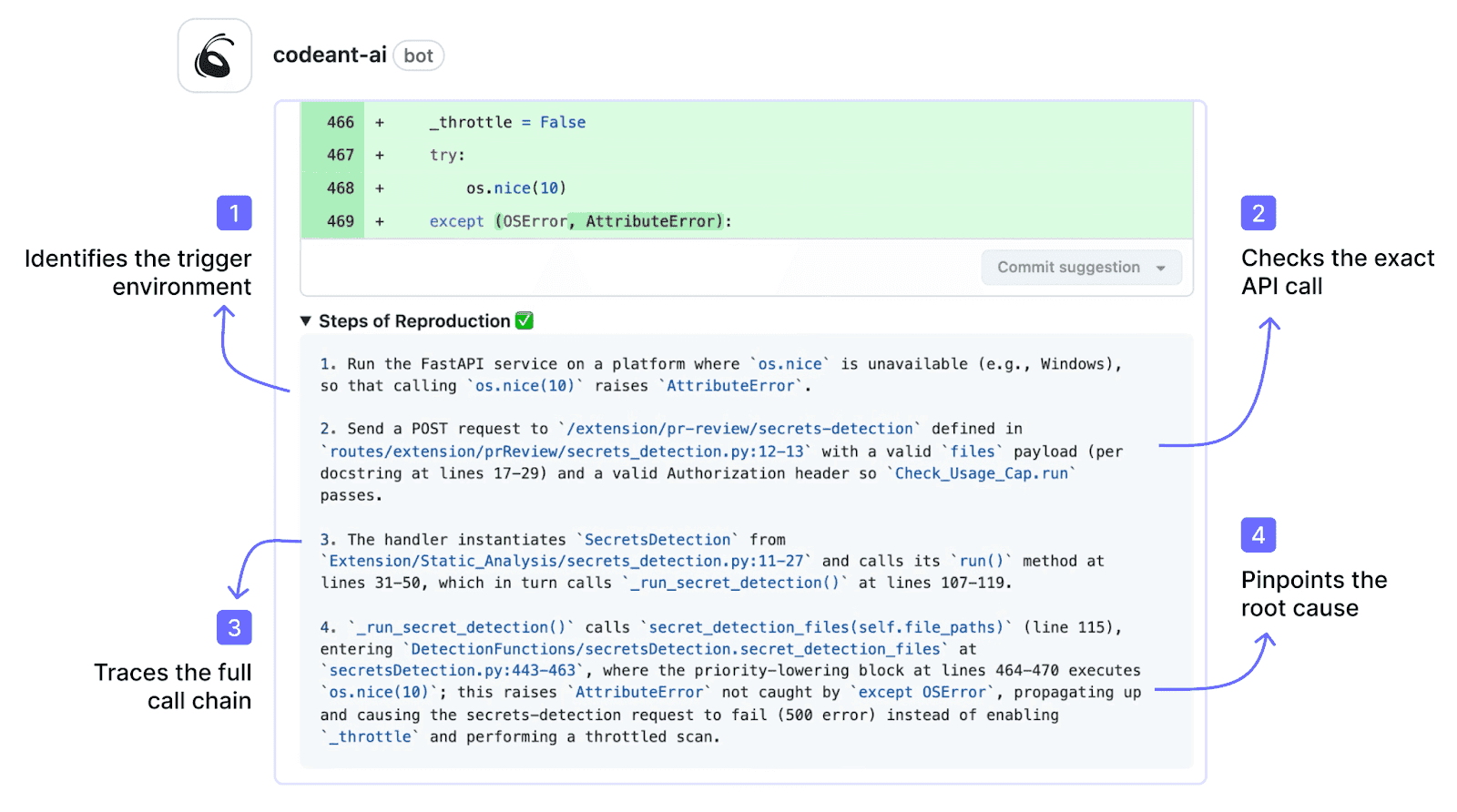
The developer does not need to investigate whether the finding is a real vulnerability, they review the step-by-step evidence and decide on a fix. For more on how evidence quality affects developer trust and remediation velocity, see why Steps of Reproduction change how developers trust findings.
Deeper Remediation Guidance and Auto-Fix
GitLab SAST does not generate code-level fix suggestions. Findings include the vulnerability description and CWE reference, but developers must determine the appropriate fix and implement it manually.
CodeAnt AI generates AI-powered fix suggestions for every finding: a concrete code change that the developer can apply with one click directly in the merge request. The fix is presented as a committable suggestion, click “Apply Fix” and the change is committed to the MR branch.
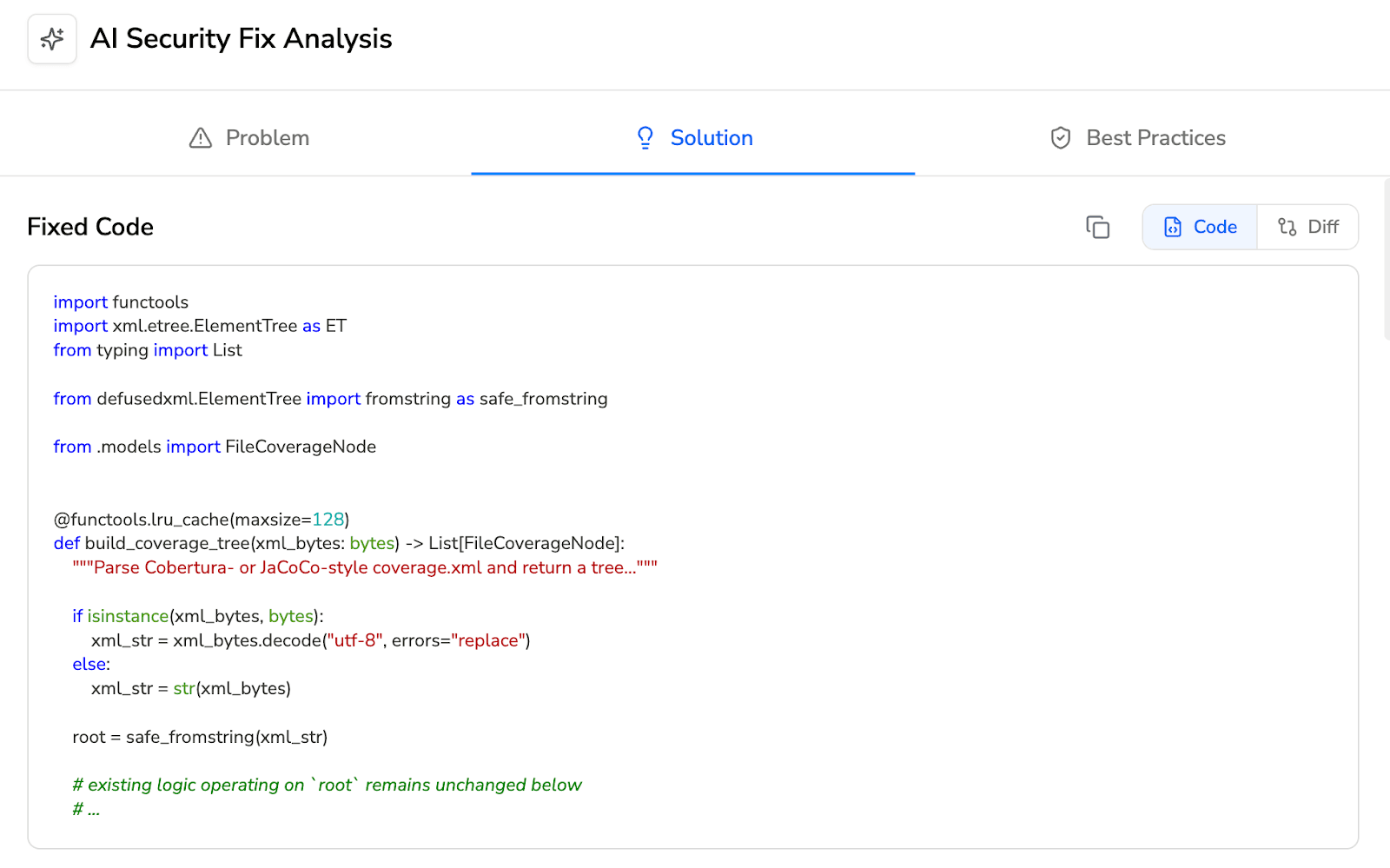
No manual remediation, no separate fix MR. At scale, dozens of findings per sprint across multiple projects, the difference between “here’s what’s wrong” and “here’s the fix, click to apply” is substantial in terms of remediation velocity.
Works Across SCMs (Not GitLab-Only)
GitLab SAST works exclusively within GitLab. It does not support GitHub, Bitbucket, or Azure DevOps. For organizations with repositories across multiple SCM platforms common after acquisitions, in multi-division organizations, or in teams maintaining legacy repositories on different platforms, GitLab SAST covers only the GitLab portion.
CodeAnt AI works across GitHub, GitLab, Azure DevOps, or Bitbucket with the same features, the same detection engine, and the same workflow on every platform.
For a detailed perspective on how tool consolidation works across SCMs, see the SAST tool consolidation guide.
Feature-by-Feature Comparison
Feature | GitLab SAST | CodeAnt AI |
Detection Accuracy | ||
SAST (first-party code) | ✓ (multi-scanner aggregation — Semgrep, SpotBugs, others) | ✓ (AI-native with semantic analysis) |
SCA (open-source dependencies) | ✓ (GitLab Dependency Scanning) | ✓ (with EPSS scoring) |
DAST (runtime testing) | ✓ (included in Ultimate) | ✗ |
Container scanning | ✓ (included in Ultimate) | ✗ |
Secrets detection | ✓ (GitLab Secret Detection) | ✓ |
IaC scanning | ✓ (GitLab IaC scanning) | ✓ (AWS, GCP, Azure) |
SBOM generation | ✓ (via dependency list) | ✓ |
License compliance | ✓ (included in Ultimate) | ✗ |
Steps of Reproduction | ✗ | ✓ (every finding) |
AI Capabilities | ||
AI tier | Rule-Based (Tier 1, wraps OSS scanners) | AI-Native (Tier 3) |
AI code security review | ✗ | ✓ (line-by-line MR review) |
AI auto-fix | ✗ | ✓ (one-click committable fixes in MR) |
AI triage / false positive reduction | ✗ | ✓ (AI-native detection + reachability analysis) |
MR/PR summaries | ✗ | ✓ |
Batch auto-fix | ✗ | ✓ (resolve hundreds of findings at once) |
Developer Experience | ||
Primary interface | GitLab MR + Vulnerability Dashboard | MR-native (inline comments) |
CLI scanning | ✗ (SAST runs only in GitLab CI pipeline) | ✓ |
Pre-commit hooks (secret/credential/SAST blocking) | ✗ | ✓ (blocks before commit) |
IDE integration | ✗ | VS Code, JetBrains, Visual Studio, Cursor, Windsurf |
AI prompt generation for IDE fixes | ✗ | ✓ (generates prompts for Claude Code/Cursor) |
Inline MR/PR comments | ✓ (findings appear in MR diff — basic annotation) | ✓ (review comments + findings + Steps of Reproduction + fix suggestions) |
One-click fix application | ✗ | ✓ (committable suggestions in existing MR) |
Integrations | ||
GitHub | ✗ | ✓ |
GitLab | ✓ (native) | ✓ |
Bitbucket | ✗ | ✓ |
Azure DevOps | ✗ | ✓ |
CI/CD pipelines | ✓ (GitLab CI only — native) | ✓ (GitHub Actions, Jenkins, GitLab CI, Bitbucket Pipelines, Azure DevOps Pipelines) |
Jira integration | Partial (via GitLab Jira integration — not security-specific) | ✓ (native, security findings to Jira) |
Pricing | ||
Free tier | ✗ (SAST requires Ultimate) | 14-day free trial |
Pricing model | Included in GitLab Ultimate subscription | Per user |
GitLab Ultimate cost | $99/user/month | N/A |
CodeAnt AI cost | N/A | $20/user/month (Code Security) |
Enterprise | GitLab Dedicated (custom) | Custom |
Enterprise Readiness | ||
Deployment options | GitLab.com (cloud) or GitLab Self-Managed (on-prem) | Customer DC (air-gapped), Customer Cloud (AWS/GCP/Azure), CodeAnt Cloud |
SOC 2 | ✓ (GitLab.com) | ✓ (Type II) |
HIPAA | ✗ | ✓ |
FedRAMP | ✓ (GitLab Dedicated FedRAMP Moderate) | ✗ |
Zero data retention | ✗ | ✓ (across all deployment models) |
SecOps dashboard | ✓ Vulnerability Management Dashboard (mature, built-in) | ✓ (vulnerability trends, fix rates, team risk, OWASP/CWE/CVE mapping) |
Ticketing integration | GitLab Issues (native); Jira (via GitLab integration) | ✓ (Jira, Azure Boards native) |
Audit-ready reporting | ✓ (compliance dashboard, vulnerability reports) | ✓ (PDF/CSV exports for SOC 2, ISO 27001) |
Attribution / risk distribution | Per-project vulnerability counts | ✓ (repo-level and developer-level risk) |
Code quality analysis | GitLab Code Quality (basic — Code Climate engine) | ✓ (code smells, duplication, dead code, complexity) |
Developer productivity metrics | GitLab Value Stream Analytics | ✓ (DORA metrics, MR cycle time, SLA tracking) |
Detection Depth: AI-Native vs. Multi-Scanner Aggregation
The most fundamental difference between GitLab SAST and CodeAnt AI is how findings are generated.
GitLab SAST acts as an orchestration layer. It runs multiple open-source scanners in CI, primarily Semgrep for broad language coverage, SpotBugs for Java bytecode, and additional specialized analyzers where applicable. GitLab configures these tools, executes them in pipelines, normalizes the output into its Security Report format, and displays aggregated results in merge requests and the vulnerability dashboard.
Detection depth therefore depends on the underlying scanners. Semgrep relies on rule-based pattern matching. SpotBugs analyzes compiled Java bytecode. GitLab bundles specific rule packs and scanner versions; detection changes when scanner versions are updated and remains static between releases.
This aggregation model has a real advantage. Combining multiple engines can provide broader technical coverage than relying on a single scanner. For example:
SpotBugs catches certain bytecode-level issues Semgrep cannot.
Semgrep detects cross-language pattern-based vulnerabilities.
Together, they cover more ground than either tool alone.
CodeAnt AI takes a different approach. It uses machine learning as the primary detection engine. Instead of executing predefined rule sets, the model reasons about:
Code semantics
Data flow
Reachability
Conditional logic
Intended behavior
This enables detection of vulnerability patterns that no rule explicitly defines, including novel issues in AI-generated code, complex multi-file flows, and business-logic flaws that require understanding intent rather than matching syntax.
The tradeoff is clear:
GitLab SAST offers deterministic, rule-based detection. You know exactly which scanners and rules are running, and behavior is consistent across identical codebases.
CodeAnt AI offers broader AI-driven detection, capable of identifying patterns beyond rule libraries, but with less rule-level transparency.
For teams that must audit and document exactly which detection rules are in place, common in regulated environments, GitLab’s deterministic model has clear value. For teams prioritizing discovery breadth and modern code patterns, AI-native detection expands coverage beyond predefined rule sets.
End-to-End Workflow Comparison (CLI → IDE → MR → CI/CD → SecOps)
GitLab SAST is deeply integrated into the GitLab CI/CD workflow, but its coverage across the full developer workflow is narrower than it appears.
Workflow Stage | GitLab SAST | CodeAnt AI |
CLI + Pre-Commit | ✗ GitLab SAST has no CLI scanner and no pre-commit hooks. Scanning runs only in GitLab CI pipelines. A developer can commit and push secrets, credentials, and vulnerable code without any local feedback. | ✓ CLI blocks secrets, credentials, API keys, tokens, and high-risk SAST/SCA issues before |
IDE | ✗ GitLab SAST provides no IDE integration. Developers receive no security feedback until code is pushed and the CI pipeline runs. | ✓ VS Code, JetBrains (IntelliJ, PyCharm, WebStorm), Visual Studio, Cursor, Windsurf. In-context scanning with guided remediation. AI prompt generation triggers Claude Code or Cursor to auto-fix vulnerabilities. |
Merge Request | ✓ SAST findings appear in the MR security widget with severity, CWE, and file location. The MR diff shows inline annotations for new findings. No AI code security review. No fix suggestions. No Steps of Reproduction. Useful but limited to basic alerts. | ✓ AI code security review + security analysis on every MR. Line-by-line review. Steps of Reproduction for every security finding. One-click AI-generated fixes committed directly in MR. MR summaries. |
CI/CD | ✓ Deeply integrated with GitLab CI. SAST runs as a pipeline job using GitLab-managed Docker images. Zero configuration beyond adding the template. Findings are automatically associated with the pipeline and MR. GitLab CI only, does not work with Jenkins, GitHub Actions, or other CI systems. | ✓ GitHub Actions, Jenkins, GitLab CI, Bitbucket Pipelines, Azure DevOps Pipelines. Configurable policy gates by severity, CWE category, OWASP classification, and custom rules. |
SecOps / Compliance | ✓ Vulnerability Management Dashboard provides centralized findings across all projects. Vulnerability tracking, assignment, status management, SLA monitoring, compliance reports. Integrated with GitLab Issues for triage-to-resolution workflow. Mature and well-designed for GitLab-native teams. | ✓ Unified SecOps dashboard: vulnerability trends, TP/FP rates, fix rates, EPSS scoring, OWASP/CWE/CVE mapping, team/repo risk distribution. Native Jira and Azure Boards. Audit-ready PDF/CSV for SOC 2, ISO 27001. Attribution reporting. |
Where GitLab SAST is limited:
No pre-commit or CLI scanning
No IDE integration
Security feedback only after the CI pipeline runs
Developers must push code and wait for the pipeline before seeing results. Vulnerable code enters the repository before detection.
CodeAnt AI covers all five workflow stages:
Pre-commit: Blocks secrets, credentials, and high-risk SAST/SCA findings before they reach Git
IDE: Real-time feedback across multiple environments, including AI coding tools
Merge Request: AI code security review with Steps of Reproduction and one-click fixes
CI/CD: Policy gates and enforcement
SecOps: Analytics, native Jira/Azure Boards integration, audit-ready reporting
The summary is simple:
Within GitLab, GitLab SAST offers the most seamless CI integration possible.
CodeAnt AI provides broader workflow coverage, especially in the two stages GitLab SAST does not address at all: pre-commit and IDE, along with richer MR-level remediation.
Deployment and Data Residency
GitLab SAST and CodeAnt AI differ in deployment because they are different product types.
GitLab SAST is built into GitLab. It inherits GitLab’s deployment model:
GitLab.com (SaaS): SAST runs in GitLab’s cloud
GitLab Self-Managed: SAST runs entirely within your infrastructure
In a Self-Managed setup, scanners execute in your CI runners, findings are stored in your GitLab instance, and no data leaves your network. For GitLab-native teams that require both source code and security findings to remain on-premises, this is a real advantage, no separate security deployment required. GitLab Dedicated offers a managed single-tenant cloud option with FedRAMP Moderate authorization.
CodeAnt AI is independent of any SCM platform and offers three deployment options:
Customer Data Center (Air-Gapped): Fully on-prem, zero external connectivity. Works with GitLab Self-Managed, GitHub Enterprise Server, Bitbucket Data Center, and Azure DevOps Server.
Customer Cloud (AWS, GCP, Azure): Deployed inside the customer’s VPC with full infrastructure and data control.
CodeAnt Cloud: Hosted infrastructure that is SOC 2 Type II certified and HIPAA compliant.
Across all models, CodeAnt AI supports zero data retention, code is analyzed in memory and not persisted.
The comparison is simple:
For GitLab-only teams already running Self-Managed, SAST deploys automatically as part of the platform.
For organizations using multiple SCMs or requiring deployment independence from their SCM provider, CodeAnt AI offers greater flexibility, including HIPAA compliance and zero-retention options not available as standalone capabilities in GitLab SAST.
Pricing Comparison
Dimension | GitLab SAST | CodeAnt AI |
Pricing model | Included in GitLab Ultimate subscription | Per user |
GitLab Ultimate | $99/user/month (includes SAST + DAST + SCA + container + secrets + license compliance) | N/A |
CodeAnt AI Code Security | N/A | $20/user/month |
50-dev annual cost | $59,400/yr (GitLab Ultimate at $99/user/mo — includes all GitLab features) | $12,000/yr (Code Security) |
Free option | ✗ (SAST requires Ultimate; not available in Free or Premium) | 14-day free trial |
Includes DAST | ✓ | ✗ |
Includes container scanning | ✓ | ✗ |
Includes license compliance | ✓ | ✗ |
Includes AI code security review | ✗ | ✓ |
Includes code quality (advanced) | Basic (Code Climate engine) | ✓ (complexity, duplication, dead code, DORA metrics) |
Includes SecOps Dashboard + Jira/Azure Boards | Vulnerability Dashboard + GitLab Issues; Jira via integration | ✓ (native Jira, Azure Boards) |
Works on GitHub/Bitbucket/Azure DevOps | ✗ | ✓ |
Pricing page | about.gitlab.com/pricing |
Pricing needs context because GitLab Ultimate and CodeAnt AI are not equivalent products.
If you are already on GitLab Ultimate ($99/user/month), SAST is included. There is no incremental cost. Adding CodeAnt AI at $20/user/month is an additional investment, justified if you need:
AI-native detection beyond bundled open-source scanners
AI code security review
One-click fixes
Pre-commit blocking
IDE integration
Multi-SCM support
If you are not on Ultimate, the economics shift.
Upgrading from GitLab Premium ($29/user/month) to Ultimate ($99/user/month) adds $70 per user per month, and you are paying for the full Ultimate suite, not just SAST.
CodeAnt AI at $20 per user per month delivers advanced security capabilities (AI-native detection, auto-fix, code quality, AI review) without requiring an Ultimate upgrade. For teams on Premium or Free tiers, this is often the more cost-effective path to deeper security scanning.
One important distinction:
GitLab Ultimate includes DAST, container scanning, and license compliance in the bundle. CodeAnt AI does not provide DAST or container scanning, so teams needing those capabilities will require additional tools regardless.
The decision comes down to whether you want bundled breadth under GitLab Ultimate — or targeted, deeper security capabilities without upgrading your entire DevOps plan.
Final Verdict: GitLab SAST vs CodeAnt AI for 2026
GitLab SAST is the most seamless security option for GitLab-native teams already on Ultimate. It requires no additional vendor, no additional integration, and delivers SAST, DAST, SCA, container scanning, and license compliance under one subscription.
CodeAnt AI takes a different approach. Instead of bundling scanners inside a DevOps platform, it focuses on AI-native detection depth, developer workflow coverage, and remediation speed. Pre-commit blocking. IDE integration. AI code security review. Steps of Reproduction. One-click fixes.
If your organization prioritizes simplicity and you are already paying for GitLab Ultimate, GitLab SAST is a logical baseline.
If your bottleneck is remediation speed, developer friction, or multi-SCM coverage, or if you are not on Ultimate, CodeAnt AI may deliver stronger ROI.
The fastest way to decide:
Run GitLab SAST. Run CodeAnt AI on the same repository. Compare findings. Compare false positives. Compare time to fix.
See what your CI pipeline misses. Start a 14-day CodeAnt AI trial.
FAQs
What is the main difference between GitLab SAST and CodeAnt AI?
Is GitLab SAST enough if I am already on GitLab Ultimate?
Does GitLab SAST support pre-commit or local scanning?
How does pricing compare between GitLab SAST and CodeAnt AI?
Can GitLab SAST and CodeAnt AI be used together?













