

Before “AI pentesting” means anything, the word “penetration testing” has to mean something precise.
Penetration testing, often shortened to pentesting or pen test, is the practice of deliberately attacking a system with the same tools, techniques, and objectives as a real adversary, in order to find exploitable vulnerabilities before someone else does.
The key word is exploitable. Not theoretical. Not “this header is missing.” Exploitable, meaning a real attacker, with real intent, could use this to extract data, escalate privileges, or cause damage.
Penetration testing has traditionally relied on security researchers manually exploring an authorized target, testing hypotheses, validating vulnerabilities, and documenting evidence.
That model becomes harder to scale as applications become more distributed.
Modern SaaS products can span microservices, cloud infrastructure, APIs, third-party services, and continuously changing authentication and authorization flows.
That complexity is the problem penetration testing is trying to solve in 2026. But there is a second problem: the attack surface does not wait for the pentest window.
Applications change every day. New endpoints ship, dependencies change, authentication flows get rewritten, and cloud configurations drift between assessments.
A traditional pentest tests a snapshot. The modern security problem requires that snapshot to be tested more often, with more context, and with enough depth to determine whether a vulnerability can actually be exploited and what impact it could have.
AI Penetration Testing vs. Traditional Penetration Testing
AI penetration testing and traditional penetration testing use many of the same security concepts, but they differ in how reconnaissance, testing, exploitation, and analysis are performed.
Area | Traditional penetration testing | AI penetration testing |
|---|---|---|
Reconnaissance | Primarily researcher-driven | AI agents automate and expand reconnaissance |
Attack-surface discovery | Manual and tool-assisted | Automated enumeration and correlation |
Vulnerability discovery | Researcher selects tests and tools | AI agents can select and adapt tests dynamically |
Exploitation | Human-led | AI can attempt and validate exploitation autonomously |
Attack chains | Researchers correlate findings | AI can reason across multiple findings and attack steps |
Scale | Limited by tester time | Can run many tests and paths in parallel |
Reporting | Researcher-written | Automatically structured with evidence and remediation context |
Human involvement | High throughout the engagement | Still important for scope, authorization, interpretation, and high-impact findings |
AI does not simply replace the tools used in traditional penetration testing. The key difference is the ability to combine reconnaissance, reasoning, exploitation, and validation into an adaptive testing loop.
Why Traditional Penetration Testing Does Not Scale
Traditional penetration testing remains valuable, but its point-in-time model can be difficult to scale with continuously changing applications.
A conventional engagement may run for days or weeks and produce a detailed assessment of the target during that testing window.
But applications continue to change after the assessment ends. New endpoints are deployed, authentication flows change, dependencies are updated, and cloud configurations drift.
The result is a timing problem: the security assessment describes a snapshot, while the application continues to evolve.
This is how a $1.5 billion industry operates today. And it is why companies that have passed annual penetration tests are still getting breached.
The model isn't inherently wrong. Human researchers have to spend time understanding the target, testing hypotheses, documenting evidence, and producing the report.
The problem is what happens when that model is applied to a security environment that changes continuously. A two-week engagement produces a report about a system that may already have changed by the time the report arrives.
The challenge is balancing depth, coverage, and testing frequency as the application changes.
Consider this real scenario. Three findings come back from an engagement:
Finding A: Broken object-level authorization on
/api/orders/{id}. No ownership check. Any authenticated user can pass any order ID and get a response. CVSS 6.5.Finding B: Order IDs are sequential and predictable. The full ID space can be enumerated in under 40 seconds. CVSS 5.9.
Finding C: Database queries return rows across all tenants when no tenant scope is applied. Missing filter at the data layer. CVSS 4.1.
Your engineering team puts all three in the backlog. Medium severity. Fix when we get to it.
Chained together: an attacker authenticates as any user, enumerates the full order ID space in 40 seconds, and reads 1.8 million order records across every tenant in the system. Customer names, addresses, payment details, order histories.
A full cross-tenant data breach from three findings that would never have been prioritized individually.
Individually, these findings may not communicate the full business impact. Together, however, they describe a reproducible cross-tenant data-access path with potentially critical consequences.
Traditional pentesting can make these findings look unrelated because each is scored and presented independently. An attacker doesn't have to respect those boundaries. They can combine weaknesses into a single path to impact.
This is the gap AI penetration testing was built to close.
What is AI Penetration Testing?
AI penetration testing uses AI systems to automate and reason through parts of a penetration testing engagement, including reconnaissance, attack-surface analysis, vulnerability discovery, exploit validation, and attack-path analysis.
Human security researchers can then validate findings, investigate edge cases, and help interpret remediation requirements.
The key difference is not simply that AI makes penetration testing faster. AI can continuously use context from different parts of an application to decide what to test next.
External attack surfaces, application behavior, source code, authentication flows, data flows, and cloud configuration can all provide context for subsequent tests.
This makes AI penetration testing different from both traditional penetration testing and automated vulnerability scanning.
Traditional penetration testing is primarily researcher-driven. Human testers decide which assets to investigate, which techniques to use, and how to connect individual findings into a potential attack path. AI can automate parts of this process and evaluate more potential paths within the same engagement.
Vulnerability scanners are primarily designed to identify known weaknesses and patterns. They can be highly effective at detecting issues such as vulnerable dependencies, insecure configurations, and known vulnerability signatures, but they typically do not attempt to reproduce a multi-step attack against an application.
AI penetration testing focuses on reasoning about how weaknesses can be combined and exploited. An AI-driven system can use information gathered during reconnaissance and testing to identify promising attack paths, attempt exploitation, and generate evidence of impact.
For a deeper explanation of the underlying workflow, see our guide to how AI penetration testing works. For the full phase-by-phase approach, see our AI penetration testing methodology.
The result is a testing approach that combines automated scale with security-focused reasoning, while keeping human validation important for high-impact findings and remediation decisions.
The Shift From Finding Vulnerabilities to Proving Breaches
A suspected vulnerability becomes much more useful when its exploitability and impact can be demonstrated.
Modern AI pentesting is increasingly moving beyond "this endpoint looks vulnerable" toward evidence of what an attacker can actually do with the weakness.
That means a serious finding should answer four questions:
Can it be exploited?
Can it be chained with another weakness?
What asset or data does the attack reach?
Can the engineering team reproduce the result?
This distinction matters because a theoretical SQL injection and a SQL injection that actually retrieves sensitive records are not the same security outcome.
CodeAnt's current methodology explicitly treats extracted-data evidence as part of the validation process rather than stopping at theoretical vulnerability confirmation.
How AI Penetration Testing Works
AI penetration testing combines automated reconnaissance, application analysis, vulnerability discovery, exploitation, attack-path analysis, and evidence validation. Instead of treating each security check as an isolated test, an AI-driven system can use information discovered during one stage to determine what to investigate next.
The process typically moves through the following stages.
1. Application and Attack-Surface Modeling
The AI first builds a working model of the application and its attack surface. Depending on the scope of the engagement, this can include endpoints, HTTP methods, parameters, authentication requirements, application components, external services, exposed assets, and relevant configuration.
The goal is to understand how the application works before attempting to exploit it.
For example, an endpoint such as /api/v2/users/{id}/orders may accept a GET request, require a Bearer token, expect a UUID as the id parameter, and return order history associated with that user. Understanding these relationships gives the testing system context for determining whether the endpoint is behaving securely.
This is different from simply matching an HTTP response against a known vulnerability signature. The system can use application context to determine which tests are relevant and which paths deserve further investigation.
2. Trust Boundary Identification
The next step is identifying where the application crosses trust boundaries and makes security-sensitive decisions.
This includes questions such as:
Where does user-controlled input enter the application?
Where does the application trust data supplied by a client?
Where are authentication and authorization decisions made?
Which routes or services handle privileged operations?
Are security controls consistently enforced across different paths?
These boundaries are important because vulnerabilities often arise when an application makes an incorrect assumption about the identity, authority, or integrity of incoming data.
AI-driven testing can map these relationships across the application and use them to prioritize subsequent security tests.
3. Dataflow and Control-Flow Analysis
Once important entry points and trust boundaries are identified, the system can trace how inputs move through the application.
This may include following data through:
Function calls
Authentication and authorization logic
ORM queries
Serialization and deserialization
Internal APIs
Database operations
External service calls
Sensitive operations or data stores
For example, an endpoint may appear protected because authentication exists elsewhere in the application. Tracing the actual execution path can reveal that a particular route bypasses the expected authorization check, or that a user-controlled identifier reaches a sensitive database operation without the required validation.
This context helps distinguish a potentially exploitable weakness from a pattern that merely looks suspicious in isolation.
4. Attack-Path and Chain Construction
Individual vulnerabilities do not always tell the complete security story.
An AI penetration testing system can evaluate discovered weaknesses in the context of other findings and application relationships, asking whether one weakness can be used to reach another part of the system.
A simplified attack path might look like:
Each weakness may have limited impact when considered independently. When combined into a reproducible attack path, however, they can demonstrate a much more significant security impact.
This is one of the key differences between vulnerability discovery and penetration testing. The objective is not only to identify weaknesses, but also to understand how those weaknesses can be combined and whether they can produce a meaningful security impact.
5. Exploitation and Impact Validation
When a potentially exploitable vulnerability is identified, the system can attempt to validate whether the weakness can actually be exploited within the authorized scope of the engagement.
Depending on the vulnerability, validation may involve:
Reproducing the vulnerable behavior
Demonstrating unauthorized access
Confirming privilege escalation
Verifying data exposure
Establishing code or command execution
Demonstrating an exploitable attack path
Collecting evidence that shows practical impact
The objective is to move from a suspected vulnerability to evidence that demonstrates exploitability and impact.
Testing must remain within the agreed rules of engagement. Production data, destructive actions, rate limits, and other operational constraints should be handled according to the engagement's authorization and safety requirements.
6. Evidence Validation and Finding Evaluation
A potential exploit is not automatically a reportable finding.
Before a finding is included in a final report, it should be evaluated for factors such as:
Reproducibility
Exploitability
Evidence quality
Affected assets
Security impact
Severity
Remediation requirements
This validation step helps reduce false positives and ensures that reported findings contain enough evidence for engineers and security teams to reproduce and investigate the issue.
The goal is to reduce the gap between "the system believes this is vulnerable" and "the security team can reproduce and understand the issue."
7. Reporting and Remediation Context
The final stage turns validated findings into actionable security results.
A useful penetration testing report should explain:
What was found
Which asset or component is affected
How the vulnerability can be reproduced
What evidence demonstrates exploitability
What the potential impact is
How the issue should be remediated
How the finding should be prioritized
AI can help structure and correlate this information, while security researchers remain important for validating high-impact findings, interpreting ambiguous results, and working through remediation decisions.
For an example of what this output can look like in practice, see CodeAnt AI's penetration testing platform.
How AI Uses Context During a Penetration Test
Context is what allows AI-driven penetration testing to move beyond isolated security checks.
Information gathered during reconnaissance can influence application analysis. Application analysis can reveal promising attack surfaces. A discovered authorization weakness can influence which endpoints are tested next. An exposed credential can lead to additional authenticated testing, subject to the rules of engagement.
The workflow can therefore look like:
This feedback loop is important because penetration testing is fundamentally about understanding relationships between vulnerabilities, application behavior, and attacker actions.
For a deeper technical walkthrough of this workflow, see How AI Penetration Testing Works.
For the complete phase-by-phase approach, see our AI penetration testing methodology.
AI Penetration Testing Methodology: How CodeAnt's 7 Phase Pentesting Works
AI penetration testing typically follows a sequence of connected phases, from defining the authorized scope to validating vulnerabilities and producing evidence-backed findings.
The exact depth depends on the access model, such as black box, white box, or gray box testing, but the phases inform one another rather than operating as isolated scans.
For a deeper phase-by-phase breakdown, see our guide to AI penetration testing methodology.
Phase 1: Reconnaissance and Attack Surface Mapping
Starting from your domain name only. No credentials, no architecture diagrams handed over by your team.
Certificate transparency logs surface subdomains you may have forgotten exist. Internet-wide scan databases identify infrastructure your security team may not know is exposed. DNS records are checked for dangling entries that could enable subdomain takeover. CORS policies, HTTP security headers, TLS configuration, and email security posture, all evaluated before a single line of code is touched.
In a recent engagement with a major Indian utility company, this phase discovered three public-facing Swagger specifications exposing 131 undocumented API endpoints, a SAP NetWeaver 7.50 instance reachable from the internet, and a CORS configuration that reflected any origin with credentials. None of these were in scope when the engagement started, because the client did not know they existed.
Phase 2: Source Code and Configuration Intelligence
When source code is available, AI agents can use it to understand application structure, authentication flows, data paths, dependencies, and security-sensitive operations before executing targeted tests.
Six detection methodologies run in parallel: taint analysis tracing user-controlled data to dangerous sinks, path traversal through string manipulation, regex checks with missing flags or catastrophic backtracking, vulnerable library patterns, numeric edge cases, and end-of-life dependency risks. Full software composition analysis, hardcoded-secret scanning, infrastructure configuration review, container and Kubernetes analysis, CI/CD review, and cloud configuration analysis run alongside the application-level analysis.
For cloud environments, the analysis extends into IAM relationships, exposed storage, serverless functions, metadata services, privilege escalation paths, and cloud-to-application attack chains.
Phase 3: Client-Side and Application Intelligence
Modern web applications ship enormous JavaScript bundles to the browser containing information developers never intended to make public. Our agents download every bundle from every endpoint discovered in Phase 1 and extract: cloud infrastructure URLs, internal API endpoints, serverless function URLs, storage bucket identifiers, authentication configuration details, feature flag states, admin route definitions, and hardcoded credentials.
In one engagement, this phase extracted the full source code of an application including 219 internal API endpoints, 35 carrier configurations, and a complete RBAC model, all from publicly served JavaScript bundles that included source maps. The development team had no idea source maps were being shipped to browsers.
In another engagement, we extracted 26,000 CRM contact records including names, titles, and company affiliations for employees at Fortune 500 companies, embedded directly in a client-facing JavaScript bundle.
Phase 4: Targeted Test Queue Construction
After reconnaissance, source code analysis, and bundle intelligence, agents build a prioritized queue of every test to run against live infrastructure. Every test is informed by what was found in Phases 1–3. If source code contains a SQL injection vulnerability in a specific route handler, we know the exact endpoint, the exact parameter, and the exact payload before sending a single request.
Blackbox testing is not spraying thousands of generic payloads hoping something sticks. It is executing targeted, evidence-driven tests against specific weaknesses already identified.
Phase 5: Blackbox Execution with WAF Evasion
500+ specialized exploit agents execute concurrently. Each is purpose-built for a single vulnerability class. SQL injection agents use time-based blind detection when error-based payloads are blocked. XSS agents escalate through encoding variations when initial payloads are filtered. Authentication bypass agents attempt multiple vectors in sequence: token manipulation, parameter pollution, method override, IP-based access control circumvention.
Hundreds of targeted tests can run in parallel, allowing reconnaissance, exploitation, and validation to happen at machine speed rather than being constrained by sequential researcher hours.
Phase 6: Attack Chain Construction
All confirmed findings are modeled as a directed graph. Agents identify multi-step chains where individually moderate vulnerabilities combine into critical breach scenarios. Eight known chain patterns are mapped systematically, session theft, GraphQL data exfiltration, credential-to-compromise, XSS session hijack, redirect-to-SSRF, SQL injection privilege escalation, admin console takeover, compound infrastructure degradation, plus novel chain discovery for combinations real attackers would attempt.
A CORS misconfiguration that allows cross-origin requests, combined with a session cookie missing its SameSite flag, combined with a GraphQL endpoint that returns user data, becomes a one-click account takeover. Every chain comes with a working reproduction command, a curl command your engineering team can run in a terminal and see the breach happen in front of them.
Phase 7: Evidence-Based Reporting
Every finding includes: a working reproduction command, the actual data exposed (appropriately redacted but specific enough that severity is unambiguous), a before-and-after code fix at the file, function, and line level, full CVSS 4.0 scoring with justification, and regulatory penalty exposure mapped to SOC 2 Type II, HIPAA, GDPR, PCI-DSS, ISO 27001, and CERT-In.
Full report delivered within 48 hours of engagement start. The output is an evidence-backed report containing reproducible findings, impact, root cause, remediation guidance, and relevant compliance context.
Unlimited re-scans for every finding until it is fully remediated, no additional cost, no new engagement required.
AI Penetration Testing vs. Vulnerability Scanning
AI penetration testing is broader than vulnerability scanning.
A scanner may identify a potentially vulnerable component or security pattern, while a penetration test attempts to determine whether that weakness can actually be exploited and what an attacker could reach next.
Capability | Vulnerability scanning | AI penetration testing |
|---|---|---|
Known vulnerability detection | Yes | Yes |
Configuration checks | Yes | Yes |
Automated reconnaissance | Limited to product scope | Core capability |
Exploitation | Usually limited | Core capability |
Multi-step attack chains | Limited | Yes |
Business-logic testing | Limited | Can test application workflows |
Attack-path reasoning | Limited | Yes |
Proof of exploitability | Varies | Central objective |
Security report | Yes | Yes, with exploitation evidence |
For a broader comparison of vulnerability detection technologies, see our guide to security vulnerability detection tools.
What a Real AI Pentest Report Contains
The report is the deliverable. It’s what you act on, what you hand to your auditor, and what engineers use to remediate.
A good report is an evidence package. A bad report is a PDF with a list of CVEs and a link to OWASP.
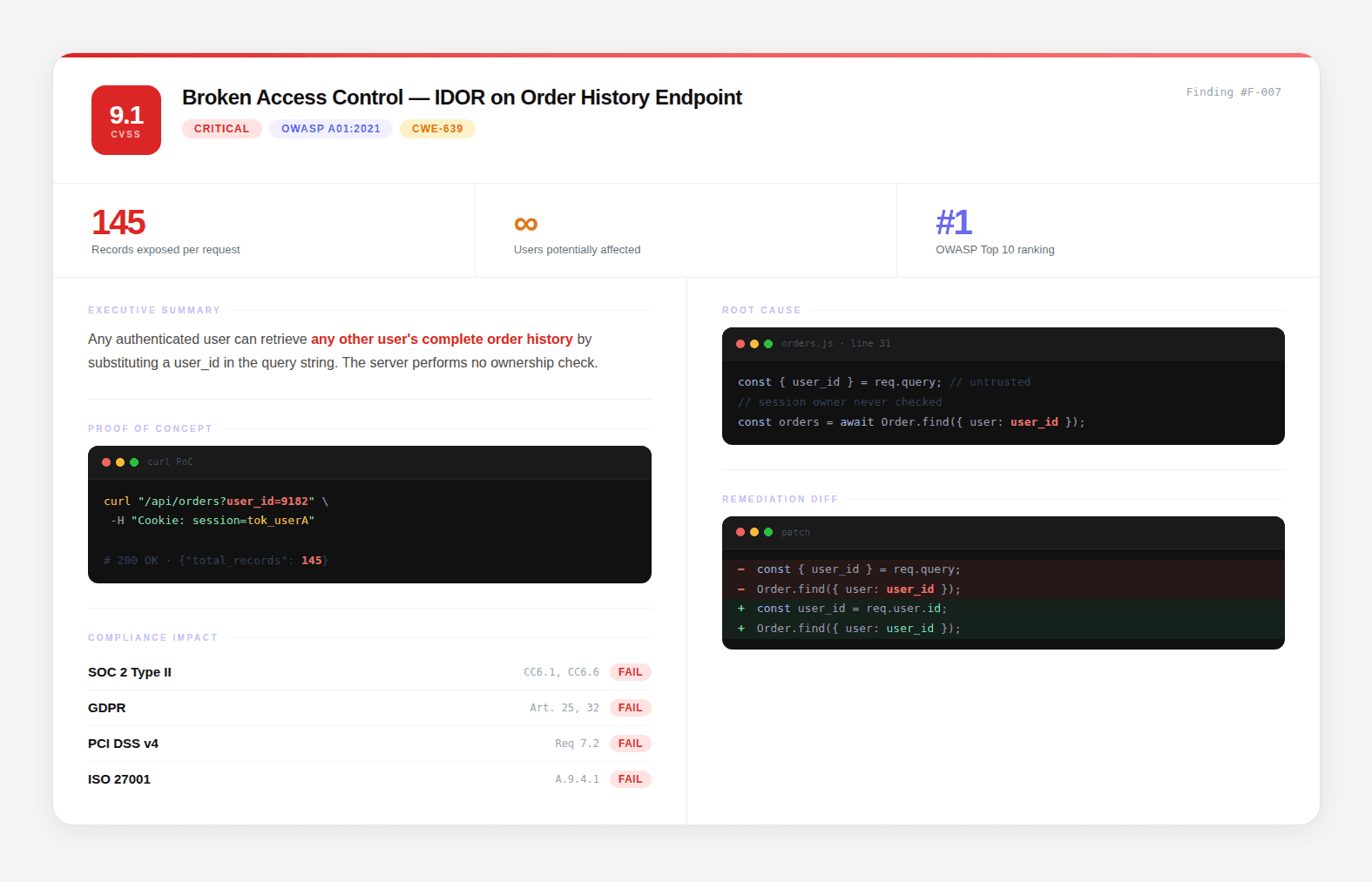
A strong AI penetration testing report should contain:
Finding Title and Severity: A precise, descriptive title and CVSS 4.0 score. Not “SQL Injection,” “Unauthenticated SQL Injection in Product Search Endpoint Exposing Complete Product Database via Category Parameter.”
Executive Summary: One paragraph. Business impact, not technical description. “An unauthenticated attacker can retrieve the name, price, and internal cost of every product in the database by manipulating the category search parameter. This exposes commercially sensitive pricing data to any external party.”
Proof of Concept: A working reproduction, a curl command, a Python script, or browser reproduction steps. Any engineer on your team should be able to run it and reproduce the finding in under 5 minutes.
Root Cause: File, Class, Method, Line Not “authentication is missing.” The exact location in the codebase where the vulnerability exists.
Remediation: Specific Diff Not “implement input validation.” The exact code change that closes the vulnerability:
Compliance Mapping Which specific controls this finding affects:
Standard | Control | Status |
|---|---|---|
SOC 2 | CC6.1, Logical and physical access controls | Fails |
PCI-DSS | Requirement 6.2.4, Software development practices | Fails |
OWASP Top 10 | A03:2021, Injection | Affected |
Evidence of Actual Impact
A mature pentest report should distinguish between a vulnerability that can theoretically be exploited and one that has been demonstrated against the target.
Where authorized, the evidence should show the actual asset reached, records accessed, privilege obtained, or other concrete impact, with sensitive data appropriately redacted.
This makes severity a consequence of demonstrated impact rather than a theoretical score alone.
CodeAnt AI follows this evidence-first approach by providing reproducible findings, root-cause context, remediation guidance, and impact information as part of its penetration testing reports.
Security Research and Real-World Findings
Security research provides a useful way to evaluate whether a security testing methodology can uncover vulnerabilities beyond theoretical patterns.
CodeAnt AI publishes vulnerability research across widely used software ecosystems. These disclosures provide real-world examples of the types of security weaknesses that can emerge in production software.
CodeAnt's security research team has published 87+ CVEs across npm, PyPI, Maven, and NuGet ecosystems, packages with a combined 1.85 billion monthly downloads.
Every CVE has an assigned number, publicly searchable in the National Vulnerability Database.
Selected findings:
CVE | Package | CVSS | Vulnerability Type | Impact |
|---|---|---|---|---|
CVE-2026-29000 | pac4j-jwt | 10.0 | Full authentication bypass | Access any account without credentials |
CVE-2026-28292 | simple-git | 9.8 | Arbitrary command execution | RCE via crafted repository URLs |
MSRC (AutoGen Studio) | AutoGen Studio | 9.8 | Remote code execution (CWE-78) | Shell command injection |
MSRC (AutoGen FunctionTool) | AutoGen | 9.1 | Code execution (CWE-94) | Arbitrary code via function tool |
The significance of this track record is not the number. It’s what the number proves: the AI reasoning engine that produces these findings is applied, with full source code access, to your codebase.
It finds CVSS 10.0 vulnerabilities in production software that major security scanners did not flag before CVE assignment.
For the full collection of CodeAnt security research and vulnerability disclosures, visit the security research hub.
The Vulnerability Landscape: What Attackers Are Actually Exploiting
To understand why penetration testing exists, it helps to understand what vulnerabilities actually look like in production applications. The most damaging weaknesses are not always obvious bugs. They often appear in authentication flows, authorization checks, application logic, APIs, cloud configurations, and the boundaries between different components.
How Vulnerabilities Are Classified
The security industry commonly uses the Common Vulnerability Scoring System (CVSS) to communicate the severity of vulnerabilities on a 0 to 10 scale. CVSS 4.0 is the current major version.
CVSS provides a standardized severity framework, but a score alone does not describe the complete risk of a vulnerability. Exploitability, affected assets, demonstrated impact, and the possibility of chaining a vulnerability with other weaknesses also matter.
CVSS Score Range | Severity | What It Typically Means |
|---|---|---|
0.0 | None | No security impact |
0.1 - 3.9 | Low | Limited impact or exploitation under less common conditions |
4.0 - 6.9 | Medium | Meaningful security impact that may require specific conditions or attacker effort |
7.0 - 8.9 | High | Significant impact and relatively practical exploitation |
9.0 - 10.0 | Critical | Severe impact with highly favorable exploitation characteristics |
CVSS scores are calculated from multiple metrics that describe how a vulnerability can be exploited and what happens when it is successfully exploited.
Metric | What It Measures |
|---|---|
Attack Vector | How the vulnerability can be reached, such as over the network, locally, or physically |
Attack Complexity | Whether exploitation requires additional conditions or unusual circumstances |
Privileges Required | The level of access an attacker needs before exploitation |
User Interaction | Whether another user must take an action for exploitation to succeed |
Attack Requirements | Conditions beyond the attacker's control that must exist for exploitation |
Confidentiality | The potential impact on access to information |
Integrity | The potential impact on modification of information |
Availability | The potential impact on system or service availability |
A critical CVSS score does not automatically mean that every system using the affected component can be fully compromised.
The actual risk depends on how the vulnerable component is deployed, whether the vulnerable path is reachable, what privileges are available, and what an attacker can accomplish after exploitation.
A real-world example is CVE-2026-29000, a pac4j-jwt authentication bypass vulnerability documented by CodeAnt's security research team.
The finding demonstrates why authentication vulnerabilities need to be evaluated in the context of how an application actually validates credentials and establishes user identity.
The Categories That Cause Actual Breaches
CVSS tells you how severe a vulnerability may be. The more operationally useful question for penetration testing is what kind of weakness is actually present and how can it be exploited?
Several vulnerability categories appear repeatedly in real-world applications.
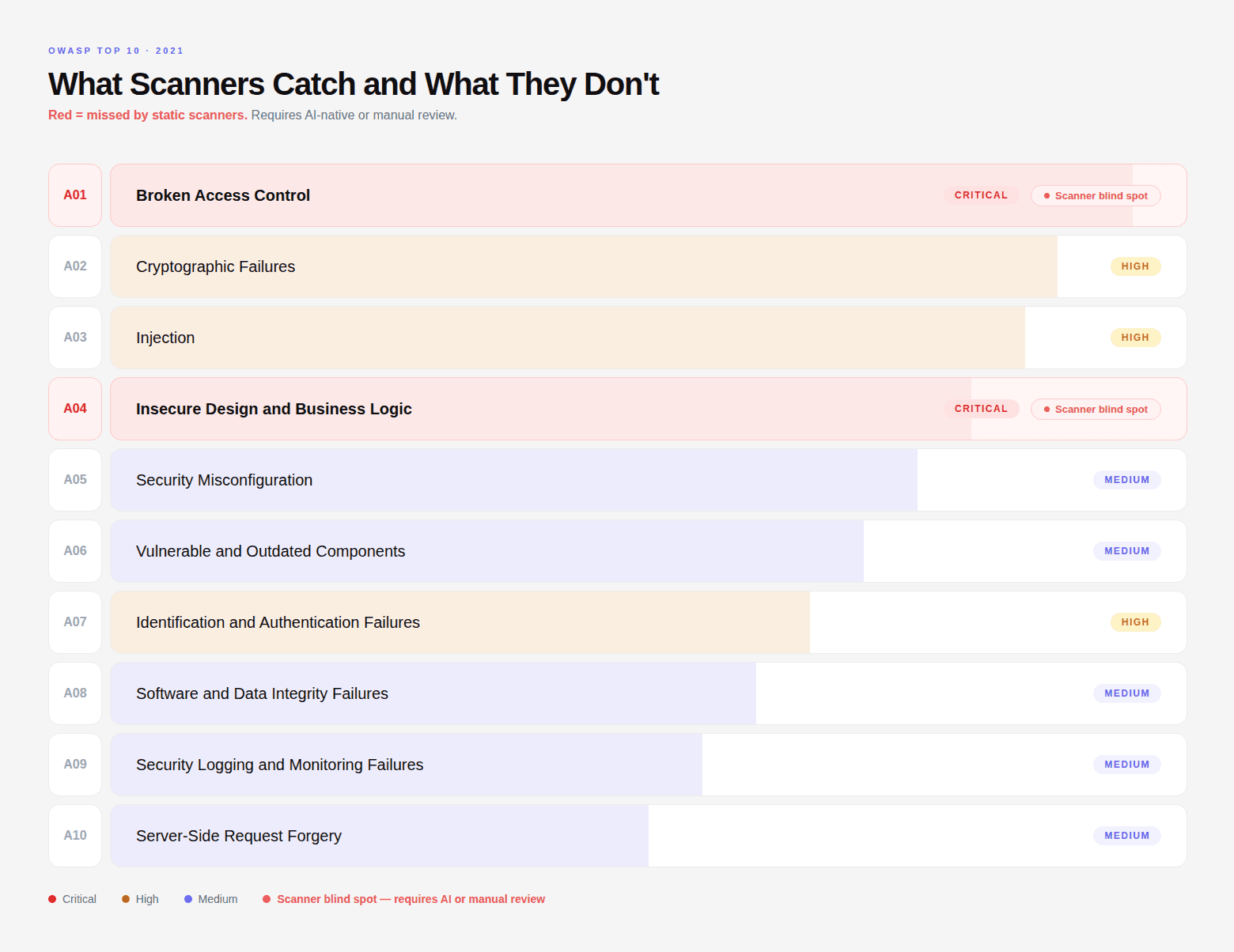
Broken Access Control: Authorization failures allow users to access resources or perform actions outside their intended permissions. Examples include IDOR, privilege escalation, missing authorization checks, and APIs that enforce authentication without verifying whether the authenticated user is authorized to access a particular resource. These vulnerabilities can look like completely normal API requests because the server may simply return a successful
200 OKresponse to an unauthorized request.Injection: Injection vulnerabilities occur when untrusted input reaches an interpreter or sensitive operation without adequate validation or sanitization. Common examples include SQL injection, command injection, and server-side template injection. The important question during penetration testing is not simply whether an input field exists, but whether attacker-controlled data can travel through the application and reach a sensitive operation in an exploitable form.
Authentication Flaws: Authentication vulnerabilities can allow an attacker to bypass or weaken the mechanisms used to establish identity. Examples include incorrect JWT validation, session-management weaknesses, authentication bypasses, and inconsistently applied authentication middleware. These issues can be difficult to identify from external behavior alone because an application may continue returning apparently normal responses while applying the wrong authentication decision.
Security Misconfiguration: Misconfigured systems can expose functionality or data that should not be publicly accessible. Examples include exposed administrative interfaces, overly permissive cloud storage, insecure CORS configuration, unnecessary services, weak access policies, and secrets exposed through source code or configuration. These weaknesses are often less about sophisticated exploitation and more about discovering an unintended exposure and determining what access it provides.
Business Logic Vulnerabilities: Business logic flaws occur when an application allows a workflow to be manipulated in a way its developers did not intend. Examples include skipping required steps in a transaction, reusing a single-use discount, modifying a price before payment confirmation, or performing an operation with a sequence of requests that should not be allowed. These vulnerabilities require understanding how the application is supposed to behave, not just matching code or responses against known signatures.
API and Cloud Attack Paths: Modern applications often span APIs, cloud services, databases, serverless functions, and third-party services. Vulnerabilities can emerge at the boundaries between these components. Examples include broken object-level authorization, excessive API privileges, SSRF paths into cloud services, IAM privilege escalation, exposed storage, misconfigured serverless functions, and credentials that allow an attacker to move from an application compromise into another part of the environment.
Why Context Matters
Many of these vulnerabilities cannot be evaluated properly in isolation.
An authorization weakness might expose one resource. A compromised credential might provide access to another service. An exposed API might reveal information about an internal component.
When these weaknesses can be connected into a reproducible attack path, their combined impact can be substantially greater than the severity of any individual finding.
That is where penetration testing differs from simply running a vulnerability scan.
The goal is to understand how vulnerabilities behave in the context of the specific application, determine whether they can actually be exploited, and establish what an attacker could accomplish.
For a broader comparison of vulnerability detection technologies, see our security vulnerability detection tools guide.
For a deeper look at how AI-driven testing moves from vulnerability discovery to exploitation and attack-path validation, see How AI Penetration Testing Works.
You can also explore the CodeAnt security research hub for real-world vulnerability research and disclosures.
AI Penetration Testing Tools and Platforms
AI penetration testing tools vary significantly in what they can test and how independently they can operate.
Some focus primarily on external web applications. Others specialize in internal networks, infrastructure, continuous attack-surface monitoring, or human-led penetration testing augmented by AI. Some platforms also combine offensive testing with source-code analysis and defensive security controls.
When evaluating a platform, look beyond whether it uses AI. Check whether it can:
Discover and map your actual attack surface
Test authenticated applications and APIs
Perform autonomous exploitation
Validate findings with working evidence
Identify multi-step attack paths
Test business logic and authorization boundaries
Use source-code context where available
Integrate with engineering and security workflows
Provide actionable remediation and retesting
For a current comparison of AI penetration testing platforms, testing models, capabilities, and pricing, see our AI penetration testing platforms comparison.
AI Penetration Testing Use Cases
AI penetration testing is particularly useful when security teams need broader testing coverage or more frequent validation than a traditional point-in-time engagement can provide.
Web Applications and APIs
AI agents can enumerate endpoints, test authentication and authorization controls, identify input-validation weaknesses, and attempt multi-step attacks across application workflows.
Cloud and Internet-Facing Infrastructure
Continuous reconnaissance can help identify exposed services, unexpected assets, configuration weaknesses, and changes to the external attack surface.
Continuous Security Testing
Teams with frequent deployments can use automated testing to validate security after significant application or infrastructure changes rather than relying exclusively on annual or quarterly assessments.
Business Logic and Authorization
Some of the most difficult application vulnerabilities require understanding how users, roles, objects, and workflows interact. AI-driven testing can help systematically explore these relationships when the platform supports authenticated or gray-box testing.
Pre-Production Security Testing
AI pentesting can also be used before production releases to identify exploitable weaknesses while engineering teams still have an opportunity to address them.
The Three Test Types: Black Box, White Box, and Gray Box
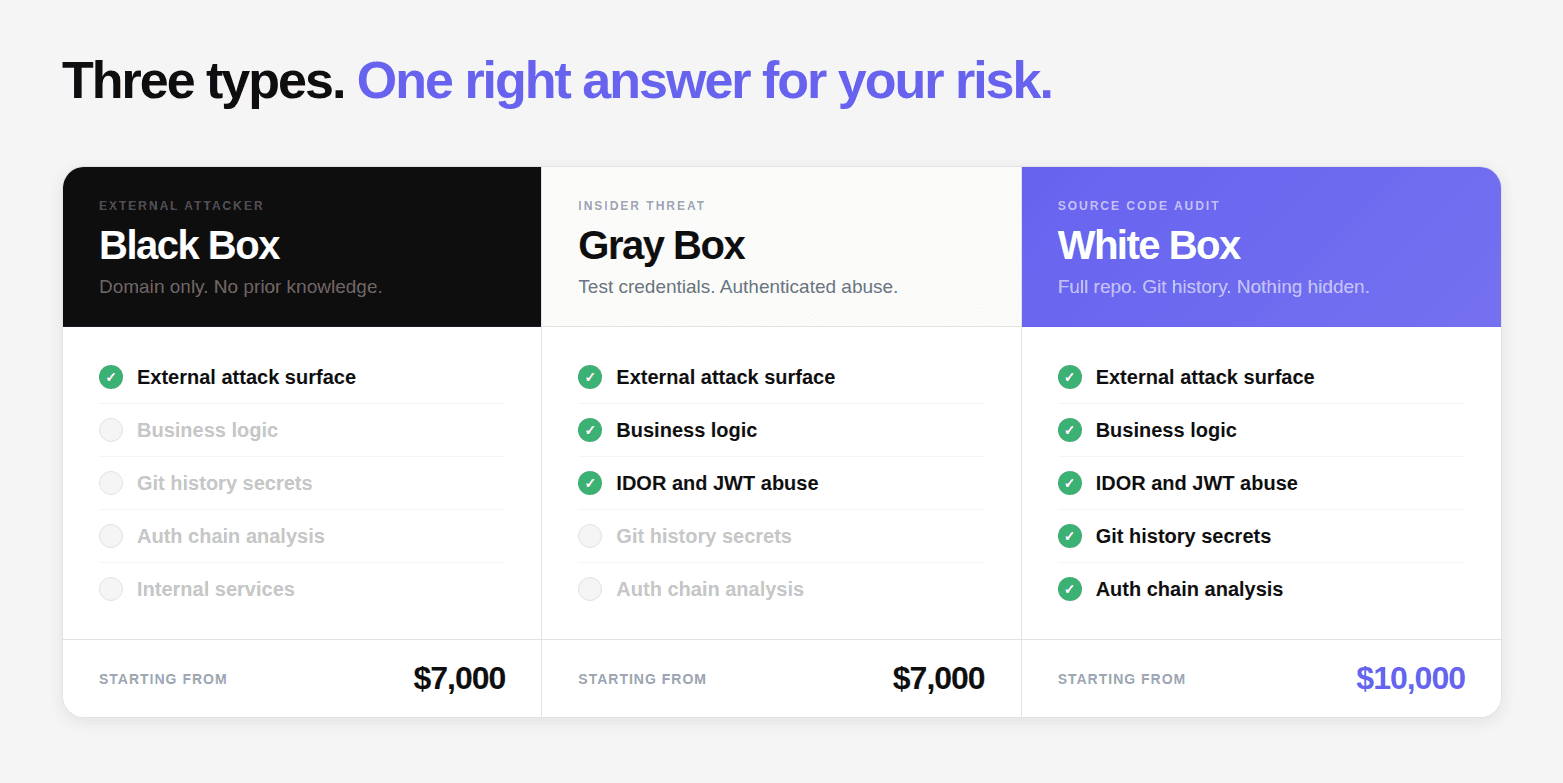
Penetration tests are commonly described as black box, white box, or gray box based on how much information and access the tester receives before testing begins.
Black Box: The External Attacker Simulation
The tester starts with a single piece of information: your domain. No credentials. No code access. No documentation. This is the most faithful simulation of what an external attacker with no prior knowledge would be able to do.
What black box reliably misses: authentication bypass vulnerabilities buried in middleware configuration that produce normal HTTP responses, business logic flaws in flows that require authentication to reach, secrets in Git history or config files, and vulnerabilities in internal microservices not exposed to the internet.
Gray Box: The Insider Threat Simulation
The tester starts with authenticated access, test credentials for one or more user roles. This simulates the most operationally dangerous threat model: a legitimate user who decides to abuse their access.
Every admin endpoint is tested with non-admin credentials. JWT claim manipulation is tested. Every endpoint accepting a record identifier is tested for IDOR. Business logic flows are tested systematically: price manipulation, discount code reuse, workflow bypass, subscription tier abuse, rate limit evasion, quantity manipulation, concurrent request exploitation.
None of these produce anomalous HTTP response patterns. None match known CVE signatures. They require understanding what the application is supposed to do, and then testing whether it actually enforces that intent at every entry point.
Gray Box + Code Memory: The Code-Aware Attack
There is another distinction when the same security platform is used for both defensive and offensive analysis.
A conventional gray-box test gives the tester credentials or internal knowledge. A code-aware testing system can go further by using security intelligence gathered during analysis of the same codebase.
If earlier analysis has identified authentication patterns, API relationships, data flows, or security-sensitive operations, that context can inform subsequent offensive testing.
This can reduce duplicated analysis and help testing focus on attack paths that are specific to the application. It is an attacker model that already understands how the application is constructed.
White Box: The Source Code Audit
The tester has read-only access to the complete repository: source code, configuration files, infrastructure definitions, and version history. This is the only way to find vulnerabilities that are completely invisible from the outside, middleware misconfigurations, auth chain breaks, secrets in configuration files, and dataflow-level injection vulnerabilities that produce no anomalous external response.
Git history is scanned separately from the current HEAD. A credential committed and deleted is still in version control. Dependency reachability analysis determines whether a vulnerable function is actually reachable given the application’s dependency usage patterns.
Which Test Type Do You Need?
Your Situation | Recommended Approach |
|---|---|
First pentest, no security baseline | Full Assessment (all three) |
Pre-launch, shipping customer data | Gray Box + White Box |
SOC 2 / PCI-DSS audit incoming | Full Assessment |
Recent codebase change, regression check | White Box |
Ongoing continuous security validation | Continuous |
Previously pentested, want deeper coverage | White Box |
Acquired a company, assessing their security | Full Assessment |
Where AI Penetration Testing Fits Into the Security Lifecycle
AI penetration testing becomes more useful when it is connected to the security signals already produced during development.
For example, source-code analysis, pull request review, dependency analysis, secrets detection, and infrastructure analysis can provide context that helps prioritize offensive testing.
CodeAnt AI connects defensive security analysis with adversarial testing so that findings from earlier stages can inform later testing.
The result is a workflow that moves from:
Defend: identify security issues during development
Validate: test whether weaknesses are exploitable
Attack: explore external exposure and attack paths
Remediate: provide evidence and remediation guidance
Retest: verify that fixes address the original issue
Learn more about CodeAnt AI penetration testing.
CodeAnt AI vs Aikido vs Astra: An Honest Comparison
The “AI security testing” market is crowded and the marketing language has converged. Here is what these products actually do.
Aikido Security is a developer-facing application security platform, SCA, SAST, IaC scanning, DAST, container scanning, and secrets detection in a unified interface. Their AI pentest feature runs automated DAST-style attack simulations with AI-assisted report generation. It is a genuinely well-built product for continuous monitoring and low-friction developer integration. What it does not do: source code auth flow tracing, exploit chain construction, business logic testing, Git history scanning, or producing a working proof-of-exploit per finding.
Astra Security offers web application pentesting and compliance audits, combining automated scanning with human review of findings. Good for compliance-oriented audits at accessible pricing. What it does not do at depth: source code analysis, dataflow tracing, auth bypass detection at the configuration level, or exploit chaining.
Capability | CodeAnt AI | Aikido | Astra |
|---|---|---|---|
Source code auth flow tracing | ✅ Full | ❌ | ❌ |
Dataflow tracing (HTTP → DB) | ✅ Full | ❌ | ❌ Limited |
Business logic testing | ✅ Structured | ❌ | ⚠️ Limited manual |
Git history secret scanning | ✅ Always | ❌ | ❌ |
Exploit chain construction | ✅ Systematic | ❌ | ❌ |
Proof-of-exploit per finding | ✅ Required | ❌ | ⚠️ Partial |
Published CVE track record | ✅ 87+ CVEs | ❌ | ❌ |
No critical finding = no payment | ✅ | ❌ | ❌ |
Grey Box + Code Memory | ✅ Only us | ❌ | ❌ |
Report in 48 hours | ✅ | ❌ | ❌ |
How to Choose an AI Penetration Testing Platform
The right AI penetration testing platform depends on your attack surface, testing depth, compliance requirements, and workflow.
1. What do you need to test?
Start with the actual risk surface: web applications, APIs, cloud infrastructure, internal networks, endpoints, source code, or a combination.
2. Does it validate exploitability?
A useful platform should distinguish between a theoretical vulnerability and a vulnerability that can actually be exploited.
3. Can it reason across attack paths?
Individual findings do not always represent the full risk. Look for platforms that can determine whether several weaknesses can be combined into a meaningful attack chain.
4. What evidence does it provide?
Prioritize platforms that provide reproducible evidence, clear impact, affected assets, and enough technical context for remediation.
5. How does it fit into your workflow?
Consider integrations with CI/CD, ticketing, security workflows, and developer tooling. The value of automated pentesting is lower if findings become another disconnected report.
6. How often can you realistically run it?
Compare annual engagements, per-test pricing, subscriptions, and continuous testing models based on how frequently your attack surface changes.
7. Where does human expertise remain necessary?
AI can automate discovery and validation, but authorization, scope decisions, business context, risk acceptance, and interpretation of high-impact findings still require human judgment.
If you want to compare specific vendors, see our AI penetration testing platforms comparison.
AI Penetration Testing in Practice
The effectiveness of a penetration testing methodology ultimately depends on whether it can uncover real security weaknesses and produce evidence that developers and security teams can act on.
CodeAnt AI publishes security research and vulnerability disclosures from real-world testing, including application, API, and infrastructure findings.
Explore the CodeAnt security research hub to see examples of vulnerabilities discovered through security research and testing.
What an AI Penetration Testing Engagement Looks Like
An AI penetration testing engagement typically moves through five stages:
Scope and authorization: Define the assets, environments, testing model, and rules of engagement.
Reconnaissance and testing: Map the attack surface and perform targeted security testing.
Exploitation and validation: Reproduce exploitable weaknesses and establish their potential impact.
Reporting: Document findings with evidence, severity, root cause, and remediation guidance.
Retesting: Validate that fixes address the original vulnerabilities.
The exact duration, testing depth, access requirements, and retesting process depend on the platform, scope, and engagement model.
For details on CodeAnt AI's testing process, see AI penetration testing.
The Guarantee: No critical finding? No bill.
Low and medium findings are always free. You only pay when we confirm a high or critical vulnerability.
This is not a marketing position. It is financially sustainable because the methodology works.
The same reasoning engine that produced 87+ published CVEs is applied to your codebase. If it doesn’t find something critical, you learn that for free.
→ Book a 30-minute scoping call. Fixed-price quote delivered same day. Testing starts within 24 hours.
Continue reading:

