

Fortify and CodeAnt AI represent two generations of static application security testing. Fortify (now under OpenText, formerly Micro Focus and HP) is one of the longest-tenured SAST tools in the market, nearly two decades of vulnerability rule development, the deepest language coverage in the industry including legacy languages like COBOL and ABAP, and one of the strongest on-premises deployment histories in application security. CodeAnt AI is an AI-native platform built for modern development workflows, combining AI code security, code quality analysis, and code review into a single PR-native experience across GitHub, GitLab, Azure DevOps, or Bitbucket.
This page compares both tools across the same six-dimension evaluation framework used in our full SAST tools comparison:
Detection accuracy
AI capabilities
Developer experience
Integrations
Pricing
Enterprise readiness
The comparison is written for CISOs and AppSec leads evaluating whether to modernize their SAST tooling, people who need to maintain compliance and detection coverage while improving developer adoption and remediation velocity.
CodeAnt AI vs Fortify: Quick Summary
Dimension | Fortify (OpenText) | CodeAnt AI |
Primary Strength | Deepest language coverage + on-prem deployment history | Unified AI code security review + quality + security |
AI Tier | Rule-Based (Fortify Aviator adds AI-assisted features) | AI-Native |
Detection Engine | Rule-based (rulepack libraries, nearly 20 years of development) | AI as primary detection engine |
Steps of Reproduction | ✗ | ✓ (every finding) |
Auto-Fix | ✗ | AI-generated one-click fixes in PR |
Security Coverage | SAST + SCA (Fortify + Sonatype integration) + DAST (WebInspect) | SAST + SCA + Secrets + IaC + SBOMs |
Legacy Language Support | ✓ genuine differentiator (COBOL, ABAP, PL/I, RPG) | ✗ (modern language stack) |
DAST | ✓ (WebInspect) | ✗ |
Code Quality | ✗ | ✓ (complexity, duplication, dead code) |
Code Security Review | ✗ | ✓ (AI code security review with inline comments) |
Workflow Integration | CLI → IDE (Audit Workbench) → CI/CD → SSC Dashboard | CLI → IDE → PR → CI/CD → SecOps |
IDE Support | Eclipse, IntelliJ (Fortify Security Assistant) | VS Code, JetBrains, Visual Studio, Cursor, Windsurf |
Pre-Commit / CLI | ✓ Fortify SCA (sourceanalyzer CLI). No pre-commit secret blocking. | ✓ (blocks secrets, credentials, SAST/SCA issues before commit) |
SecOps Dashboard | ✓ Software Security Center (SSC), audit-battle-tested | ✓ (vulnerability trends, OWASP/CWE/CVE, team risk, Jira/Azure Boards) |
SCM Support | GitHub, GitLab, Bitbucket, Azure DevOps (via plugins) | GitHub, GitLab, Azure DevOps, or Bitbucket |
Deployment | On-premises (self-hosted) + Fortify on Demand (cloud) | Customer DC (air-gapped), Customer Cloud, CodeAnt Cloud |
Compliance | Deep compliance history (government, defense, finance, FedRAMP via FoD) | SOC 2 Type II, HIPAA, zero data retention |
Pricing Model | Custom enterprise contracts (Contact Sales) | Per user ($20/user/month Code Security) |
Languages | 30+ languages including legacy (COBOL, ABAP, PL/I) | 30+ languages, 85+ frameworks |
Typical Scan Time | Minutes to hours (depends on codebase size and rule depth) | Seconds (incremental, real-time) |
Where Fortify Excels
Fortify has been in the SAST market longer than most tools have existed. Any honest comparison must acknowledge the dimensions where nearly two decades of enterprise deployment create genuine advantages.
Deepest Language and Framework Coverage (30+ Languages)
Fortify supports over 30 languages and their associated frameworks, including legacy enterprise languages that no other modern SAST tool covers. COBOL, ABAP, PL/I, RPG, and other legacy languages remain critical in banking, insurance, government, and defense systems. If your organization has legacy codebases in these languages, Fortify may be your only SAST option, not because it is the best tool for those languages, but because it is one of the few tools that supports them at all.
The rulepacks for mainstream languages (Java, C/C++, C#, JavaScript, Python) have been refined through nearly two decades of vulnerability research and enterprise feedback. For well-known vulnerability classes in established languages, Fortify’s detection is mature, well-calibrated, and backed by extensive real-world validation across thousands of enterprise deployments.
On-Premises and Air-Gapped Deployment
Fortify has the deepest on-premises deployment history in the SAST market. This is not a marginal advantage, it is Fortify’s strongest competitive dimension. The self-hosted Fortify Static Code Analyzer runs entirely within a customer’s infrastructure, including fully air-gapped environments with zero external connectivity. Fortify on Demand (FoD) provides the cloud alternative for teams that prefer managed scanning.
For defense contractors, intelligence agencies, and government organizations operating in classified environments, Fortify’s on-premises deployment is not a feature checkbox, it is the product of years of hardened deployment experience in the most security-sensitive environments in the world. The platform has been deployed in environments with the strictest security requirements on the planet, and those deployments have informed the platform’s architecture.
Decades of Enterprise Adoption and Compliance History
Fortify has been used in enterprise compliance programs for nearly 20 years. Government agencies, defense contractors, and regulated financial institutions have built compliance processes, audit documentation, and security workflows around Fortify’s output format, severity taxonomy, and reporting capabilities.
The Software Security Center (SSC) dashboard has been refined through thousands of enterprise deployments. Its compliance reporting capabilities, including government-specific audit templates, trend analysis over multi-year timescales, and application portfolio risk scoring, reflect years of enterprise feedback. For organizations where the SAST tool’s output is part of a formal compliance submission (FedRAMP, PCI DSS, government security assessments), Fortify’s established reporting format reduces the compliance translation effort. For more on how SAST tools map to compliance frameworks, see our SAST compliance guide.
Where CodeAnt AI Goes Further
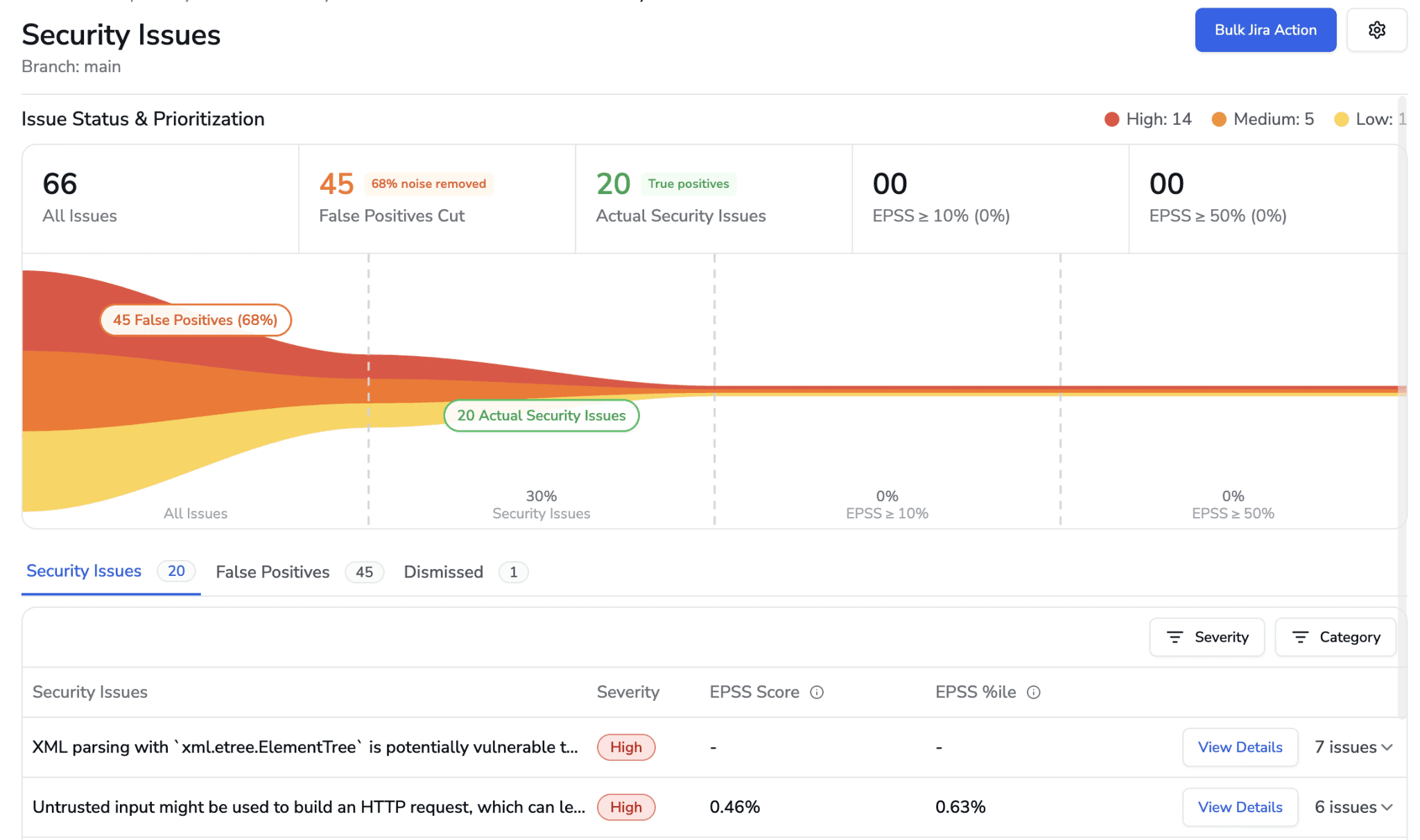
CodeAnt AI addresses areas where enterprise teams encounter friction with Fortify, particularly around detection approach, developer experience, evidence-based findings, and the speed of the security feedback loop.
AI-Native vs. Rule-Based Detection
Fortify’s detection engine is primarily rule-based.
At the core of the platform are rulepack libraries, collections of vulnerability patterns built and refined by Fortify’s security research team over nearly two decades. These rulepacks define what the scanner should look for, and the engine analyzes code by matching patterns against these predefined rules.
If a piece of code resembles a known vulnerability pattern, the rule triggers and the issue is reported.
Fortify Aviator, a newer capability introduced to the platform, adds AI-assisted features such as:
AI-powered audit assistance
vulnerability prioritization
smarter triaging of findings
However, these AI features operate around the detection engine, not inside it. The underlying detection still relies on rulepacks.
This approach has clear advantages:
Highly mature detection for well-known vulnerability classes
Predictable behavior based on predefined rules
Extensive calibration based on decades of enterprise feedback
For common issues like SQL injection, XSS, and insecure deserialization, these rules are deeply tuned and reliable.
CodeAnt AI takes a different approach.
Instead of relying on predefined vulnerability patterns, CodeAnt AI uses an AI-native detection engine where machine learning models perform the primary analysis.
Rather than matching patterns against a rule library, the scanner attempts to reason about the code itself.
This includes analyzing:
data flow through the application
whether untrusted inputs reach sensitive sinks
validation and sanitization logic
output encoding paths
control flow and reachability
In other words, CodeAnt AI focuses on what the code actually does, not just whether it resembles a known vulnerability pattern.
This allows it to detect issues that traditional rule-based scanners may miss, including:
novel vulnerability patterns
security flaws in AI-generated code
complex business-logic vulnerabilities
architectural misuse across multiple files
Because the system reasons about behavior instead of matching static patterns, it can surface issues even when no predefined rule exists.
The difference between the two systems ultimately comes down to maturity versus analytical breadth.
CodeAnt AI’s AI-native engine offers broader analytical capability. It can identify patterns that fall outside traditional rule libraries, including those introduced by modern development practices such as AI-generated code.
The practical implication is that each approach performs best in slightly different environments:
Fortify may be a strong fit for:
legacy enterprise codebases
applications dominated by well-known vulnerability classes
organizations prioritizing long-established scanning rules
CodeAnt AI may be better suited for:
modern codebases with rapidly evolving patterns
teams heavily using AI coding assistants
environments where business-logic vulnerabilities are a major concern
Both approaches aim to improve software security, but they operate using fundamentally different detection philosophies.
Developer Experience: PR-Native vs. IDE Plugin
Fortify’s developer experience was designed for a different era of software development. The primary developer interaction model:
run a scan (via CLI or CI pipeline) → wait for results (minutes to hours for large codebases) → review findings in Fortify Audit Workbench (a desktop application) or the SSC web dashboard → manually implement fixes → re-scan to verify.
The Fortify Security Assistant provides IDE-level feedback for Eclipse and IntelliJ, but the scan-and-wait model means developers are not receiving real-time security feedback as they code. Long scan times for large codebases, sometimes hours, mean that security feedback arrives well after the code was written, often after the developer has moved to a different task.
CodeAnt AI delivers findings in seconds as inline PR comments.
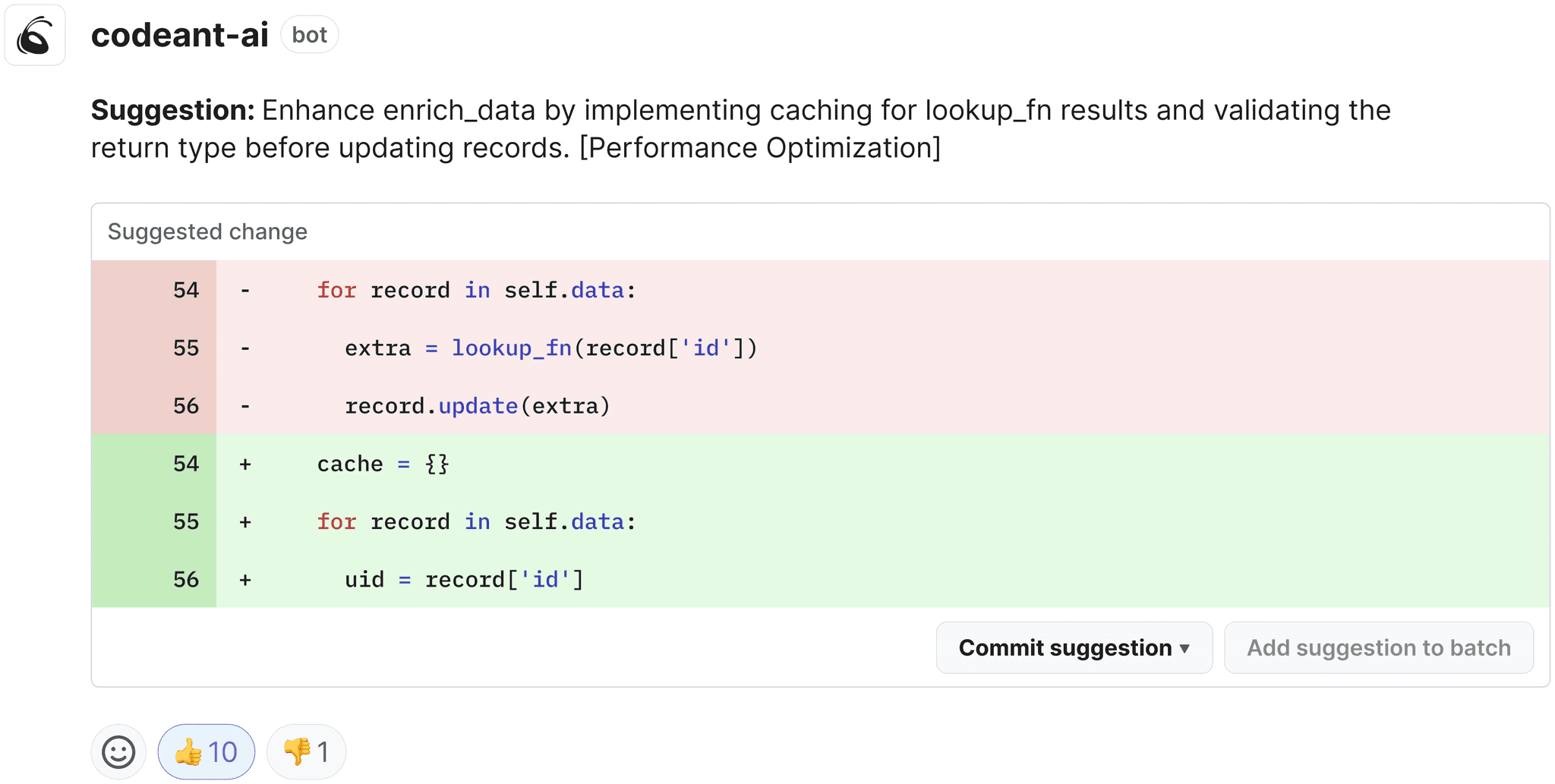
The developer opens a merge request, CodeAnt AI scans it in real time, and findings appear as inline comments with Steps of Reproduction and one-click fix suggestions.
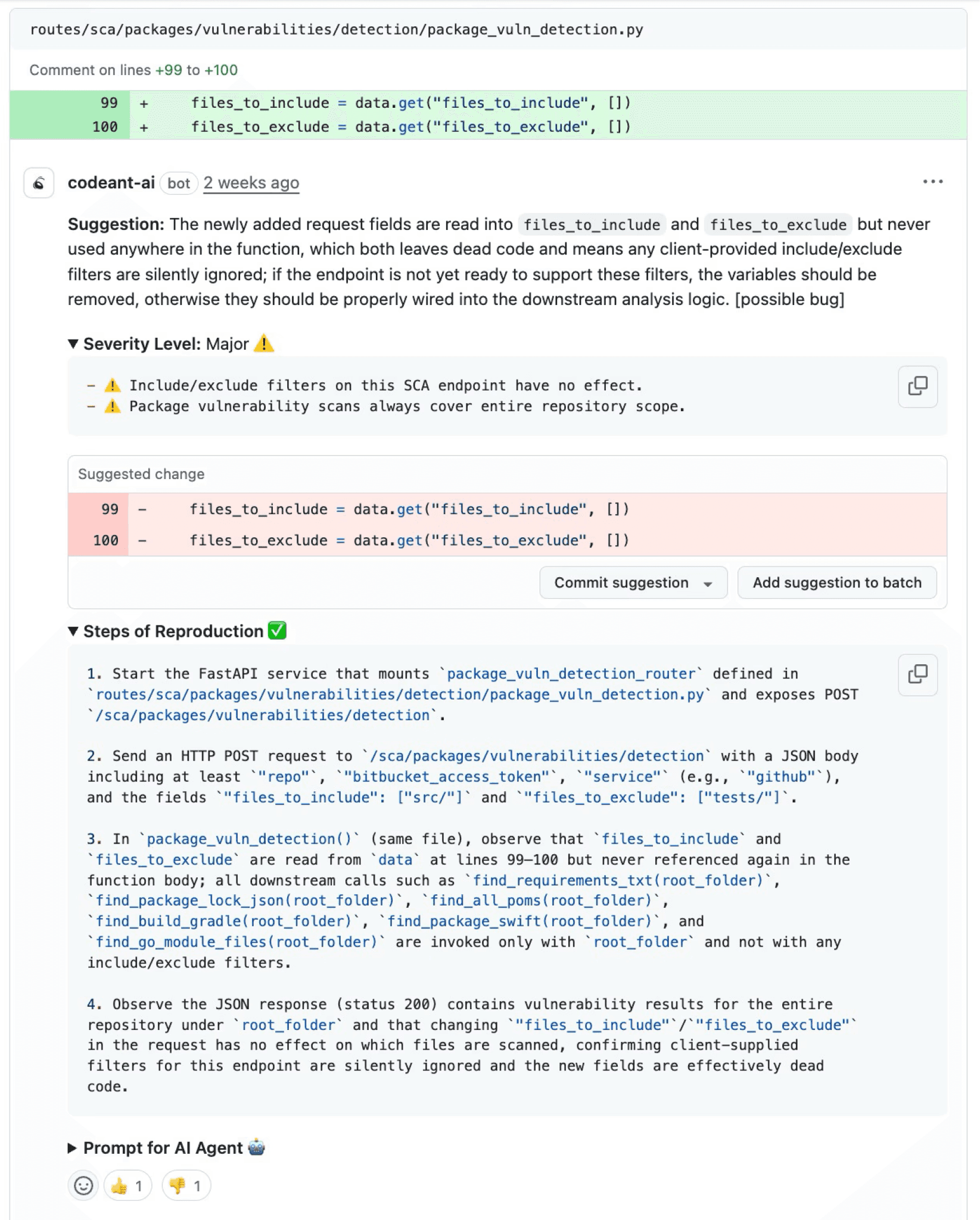
There is no upload step, no waiting for a scan to complete, and no context-switching to a separate audit tool. The developer reviews findings, applies fixes, and merges, all within the PR interface they already use.
Steps of Reproduction vs. Audit-Style Reports
Fortify findings are presented in an audit-oriented format: CWE classification, severity, code location, data flow path (for taint analysis findings), and Fortify’s proprietary priority scoring (Critical, High, Medium, Low). This format is well-suited for security auditors who review findings in batches using Audit Workbench or SSC, but it requires developers to investigate each finding to determine real-world exploitability.
CodeAnt AI generates Steps of Reproduction for every finding: the exact entry point, the complete taint flow, the vulnerable sink, and a concrete exploitation scenario.
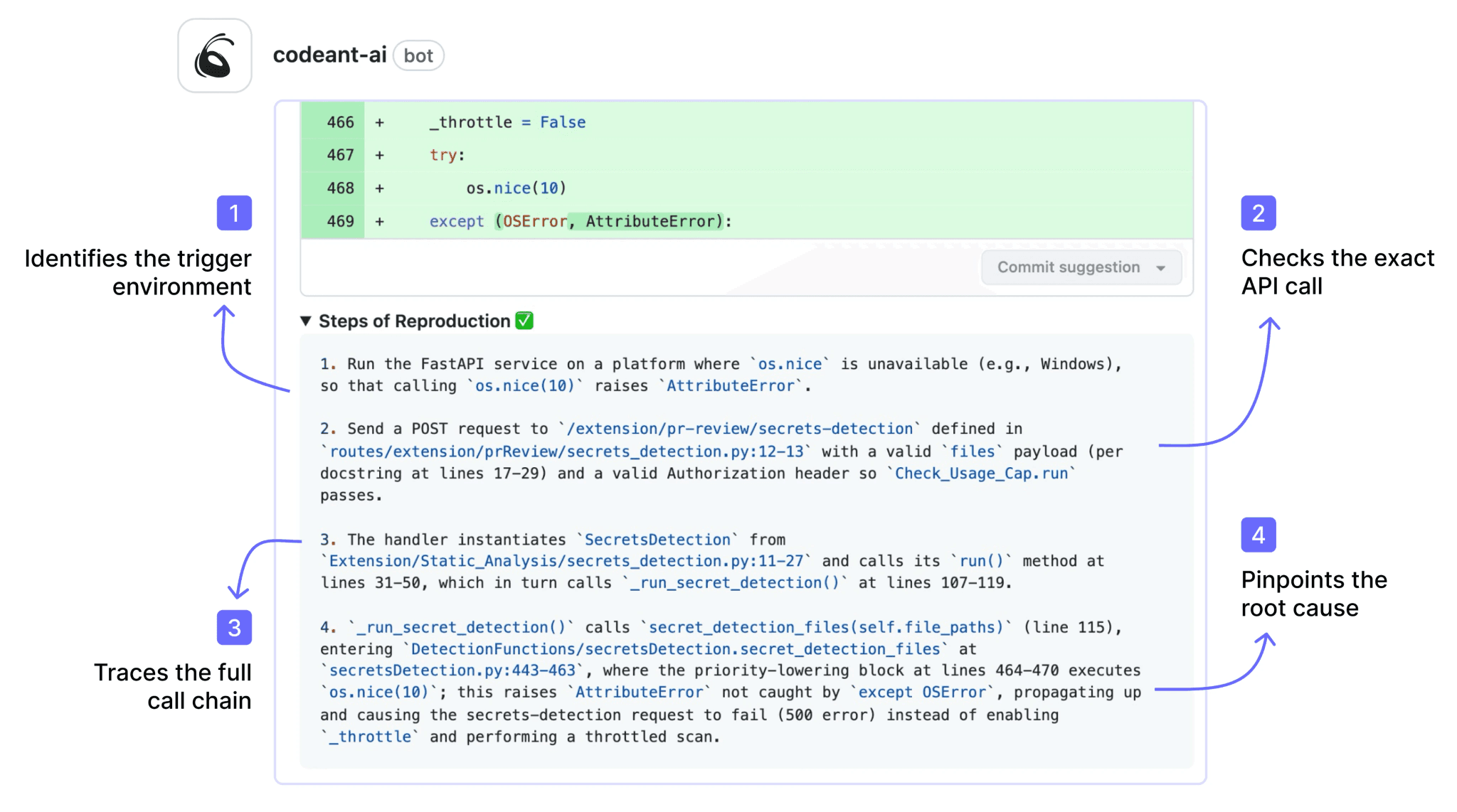
This transforms the developer’s task from “investigate this audit finding” to “review the evidence and apply the fix.”
Speed and Developer Adoption
Fortify’s scan times are a persistent pain point for development teams. Full scans of large codebases can take minutes to hours depending on codebase size, language complexity, and rule depth. This latency means security feedback does not fit naturally into the developer’s workflow, it arrives after the context window has closed.
CodeAnt AI scans incrementally in seconds.
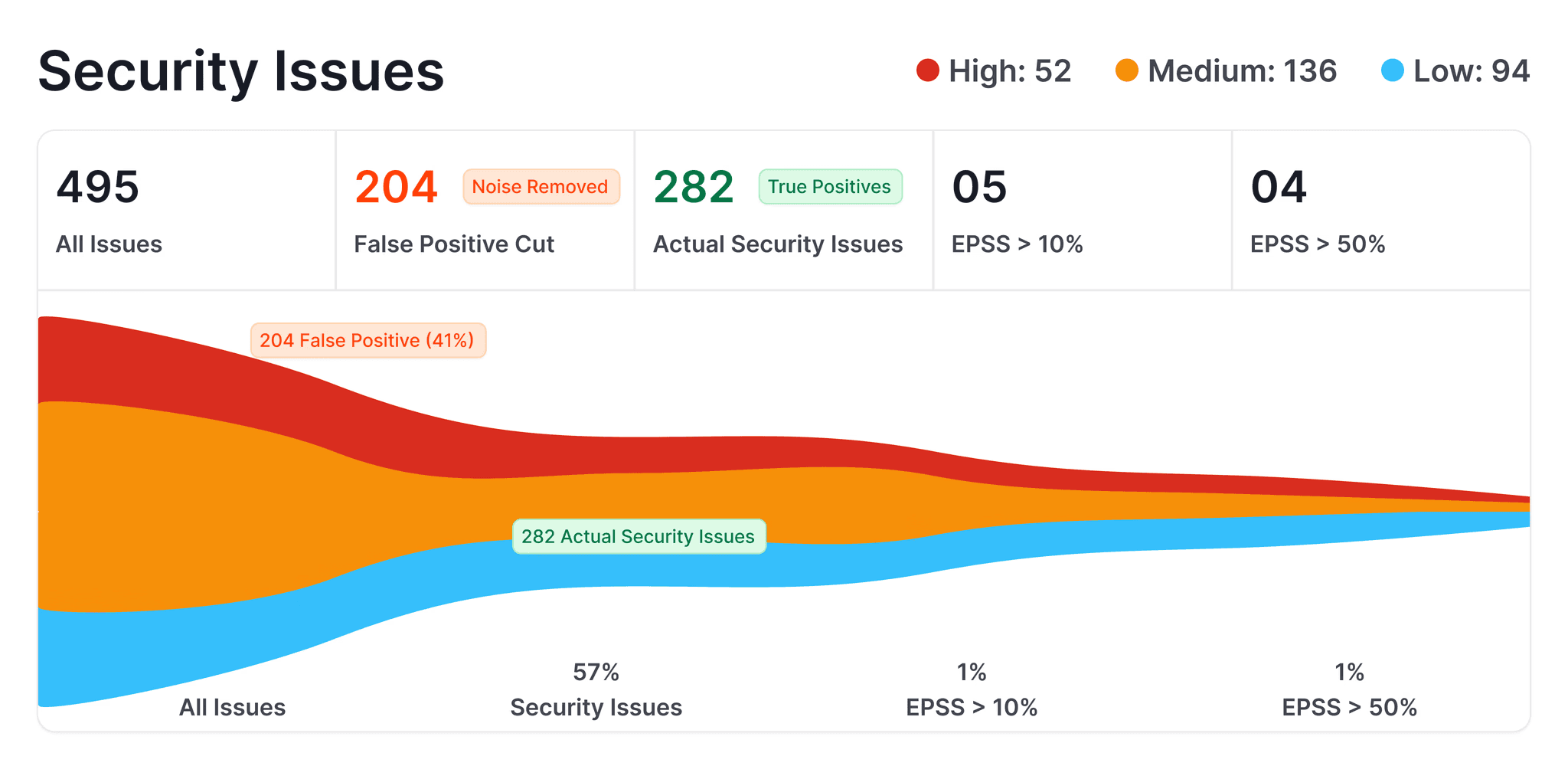
The scan analyzes only the changed code in a PR, and results appear before the developer has moved on to another task. This speed difference is not just a convenience improvement, it fundamentally changes whether developers engage with security findings (immediate feedback while context is fresh) or ignore them (findings that arrive hours later about code written yesterday).
Feature-by-Feature Comparison
Feature | Fortify (OpenText) | CodeAnt AI |
Detection Accuracy | ||
SAST (first-party code) | ✓ (rule-based, 30+ languages, legacy language support) | ✓ (AI-native with semantic analysis, 30+ languages) |
SCA (open-source dependencies) | ✓ (via Sonatype integration or Fortify SCA) | ✓ (with EPSS scoring) |
DAST (runtime testing) | ✓ (WebInspect) | ✗ |
Secrets detection | Partial (limited rule-based detection) | ✓ |
IaC scanning | ✗ | ✓ (AWS, GCP, Azure) |
SBOM generation | ✓ | ✓ |
Legacy language support (COBOL, ABAP, PL/I) | ✓ unique in market | ✗ |
Steps of Reproduction | ✗ | ✓ (every finding) |
AI Capabilities | ||
AI tier | Rule-Based (Tier 1); Fortify Aviator adds AI assistance | AI-Native (Tier 3) |
AI code security review | ✗ | ✓ (line-by-line PR review) |
AI auto-fix | ✗ | ✓ (one-click committable fixes in PR) |
AI triage / false positive reduction | Partial (Fortify Aviator AI-assisted audit) | ✓ (AI-native detection + reachability analysis) |
PR summaries | ✗ | ✓ |
Batch auto-fix | ✗ | ✓ (resolve hundreds of findings at once) |
Developer Experience | ||
Primary interface | Fortify Audit Workbench (desktop) + SSC (web dashboard) | PR-native (inline comments) |
Scan speed | Minutes to hours (full scan) | Seconds (incremental, real-time) |
CLI scanning | ✓ (sourceanalyzer powerful but complex) | ✓ |
Pre-commit hooks (secret/credential/SAST blocking) | ✗ | ✓ (blocks before commit) |
IDE integration | Eclipse, IntelliJ (Fortify Security Assistant) | VS Code, JetBrains, Visual Studio, Cursor, Windsurf |
AI prompt generation for IDE fixes | ✗ | ✓ (generates prompts for Claude Code/Cursor) |
Inline PR comments | Partial (via CI plugin limited context) | ✓ (review comments + findings + Steps of Reproduction + fix suggestions) |
One-click fix application | ✗ | ✓ (committable suggestions in existing PR) |
Integrations | ||
GitHub | ✓ (via plugin) | ✓ |
GitLab | ✓ (via plugin) | ✓ |
Bitbucket | ✓ (via plugin) | ✓ |
Azure DevOps | ✓ (via plugin) | ✓ |
CI/CD pipelines | ✓ (Jenkins, GitHub Actions, GitLab CI, Azure DevOps, Bamboo) | ✓ (GitHub Actions, Jenkins, GitLab CI, Bitbucket Pipelines, Azure DevOps Pipelines) |
Jira integration | ✓ (via SSC integration) | ✓ (native) |
ServiceNow | ✓ | ✗ |
Pricing | ||
Free tier | ✗ | 14-day free trial |
Pricing model | Custom enterprise contracts (Contact Sales) | Per user |
Starter price | Contact Sales (typically $$$ tier) | $20/user/month (Code Security) |
Enterprise | Custom | Custom |
Enterprise Readiness | ||
Deployment options | On-premises (self-hosted) + Fortify on Demand (cloud) | Customer DC (air-gapped), Customer Cloud (AWS/GCP/Azure), CodeAnt Cloud |
On-premises track record | ✓ deepest in SAST market (nearly 20 years) | ✓ (air-gapped deployment available) |
SOC 2 | ✓ (FoD) | ✓ (Type II) |
FedRAMP | ✓ (Fortify on Demand FedRAMP Authorized) | ✗ |
PCI DSS | ✓ | ✓ (mapping) |
HIPAA | ✓ | ✓ |
Zero data retention | ✗ | ✓ (across all deployment models) |
SecOps dashboard | ✓ Software Security Center (SSC) decades of refinement | ✓ (vulnerability trends, fix rates, team risk, OWASP/CWE/CVE mapping) |
Ticketing integration | ✓ (Jira, ServiceNow, ALM Octane) | ✓ (Jira, Azure Boards, native) |
Audit-ready reporting | ✓ (comprehensive government-grade, multi-year trend analysis) | ✓ (PDF/CSV exports for SOC 2, ISO 27001) |
Attribution / risk distribution | ✓ (application portfolio risk scoring) | ✓ (repo-level and developer-level risk) |
Code quality analysis | ✗ | ✓ (code smells, duplication, dead code, complexity) |
Developer productivity metrics | ✗ | ✓ (DORA metrics, PR cycle time, SLA tracking) |
End-to-End Workflow Comparison (CLI → IDE → PR → CI/CD → SecOps)
Fortify covers multiple workflow stages, but its coverage reflects a platform designed before pull-request-centric development became the industry standard.
Workflow Stage | Fortify (OpenText) | CodeAnt AI |
CLI + Pre-Commit | ✓ | ✓ CLI blocks secrets, credentials, API keys, tokens, and high-risk SAST/SCA issues before |
IDE | ✓ Fortify Security Assistant provides IDE-level feedback for Eclipse and IntelliJ. Findings appear inline based on Fortify rules. No support for VS Code, Visual Studio, or AI coding environments (Cursor, Windsurf). Feedback depth depends on having a recent scan available. | ✓ VS Code, JetBrains (IntelliJ, PyCharm, WebStorm), Visual Studio, Cursor, Windsurf. Real-time scanning with guided remediation. AI prompt generation triggers Claude Code or Cursor to auto-fix vulnerabilities. |
Pull Request | Partial. CI plugins can post scan results to PRs, but findings are typically summary-level (finding count, severity breakdown) with links to the full results in SSC. The PR is not the primary review interface, SSC and Audit Workbench are. No AI code security review. No one-click fixes. No Steps of Reproduction in PR. | ✓ AI code security review + security analysis on every PR. Line-by-line review. Steps of Reproduction for every security finding. One-click AI-generated fixes committed directly in PR. PR summaries. Developer never leaves the PR. |
CI/CD | ✓ Integrates with Jenkins, GitHub Actions, GitLab CI, Azure DevOps, Bamboo, and others. Scans triggered by pipeline. Configurable thresholds by severity and category. Mature CI/CD integration, but scan times (minutes to hours) can slow pipelines significantly. | ✓ GitHub Actions, Jenkins, GitLab CI, Bitbucket Pipelines, Azure DevOps Pipelines. Configurable policy gates by severity, CWE category, OWASP classification, and custom rules. Scans in seconds, does not slow pipelines. |
SecOps / Compliance | ✓ Software Security Center (SSC) is one of the most mature compliance dashboards in the SAST market. Multi-year vulnerability trending, application portfolio risk scoring, government-grade audit templates, compliance reporting for FedRAMP/PCI DSS/SOC 2. Integrates with Jira, ServiceNow, ALM Octane. Decades of refinement. | ✓ Unified SecOps dashboard: vulnerability trends, TP/FP rates, fix rates, EPSS scoring, OWASP/CWE/CVE mapping, team/repo risk distribution. Native Jira and Azure Boards. Audit-ready PDF/CSV for SOC 2, ISO 27001. Attribution reporting. |
Fortify’s strongest workflow components are its CLI, CI/CD integrations, and the SSC compliance dashboard. The CLI is powerful, CI/CD integrations are mature, and the SSC dashboard remains one of the most audit-focused reporting systems in the SAST market.
This workflow fits organizations where security teams lead the scanning process, running scans, triaging findings, and generating compliance reports centrally.
However, Fortify is weaker in developer-facing workflows.
Limited IDE support: only Eclipse and IntelliJ are supported. Popular environments like VS Code, Visual Studio, and modern AI coding IDEs are not supported.
Minimal PR integration: CI plugins typically post summary results, but detailed findings must be reviewed in SSC or Audit Workbench rather than directly in the pull request.
Slow feedback cycles: scan times often range from minutes to hours, which means developers receive feedback long after they have moved on from the code they wrote.
As a result, Fortify works best in security-driven review workflows, but it is less optimized for fast developer feedback during pull requests.
CodeAnt AI’s workflow is designed around the pull request, not a separate security dashboard.
Pre-commit hooks catch critical issues in seconds before code even reaches a PR.
IDE integrations support the environments developers actually use, including modern AI coding tools.
PR-native reviews surface full findings directly in the pull request, including Steps of Reproduction and one-click fixes, not just summary links to an external dashboard.
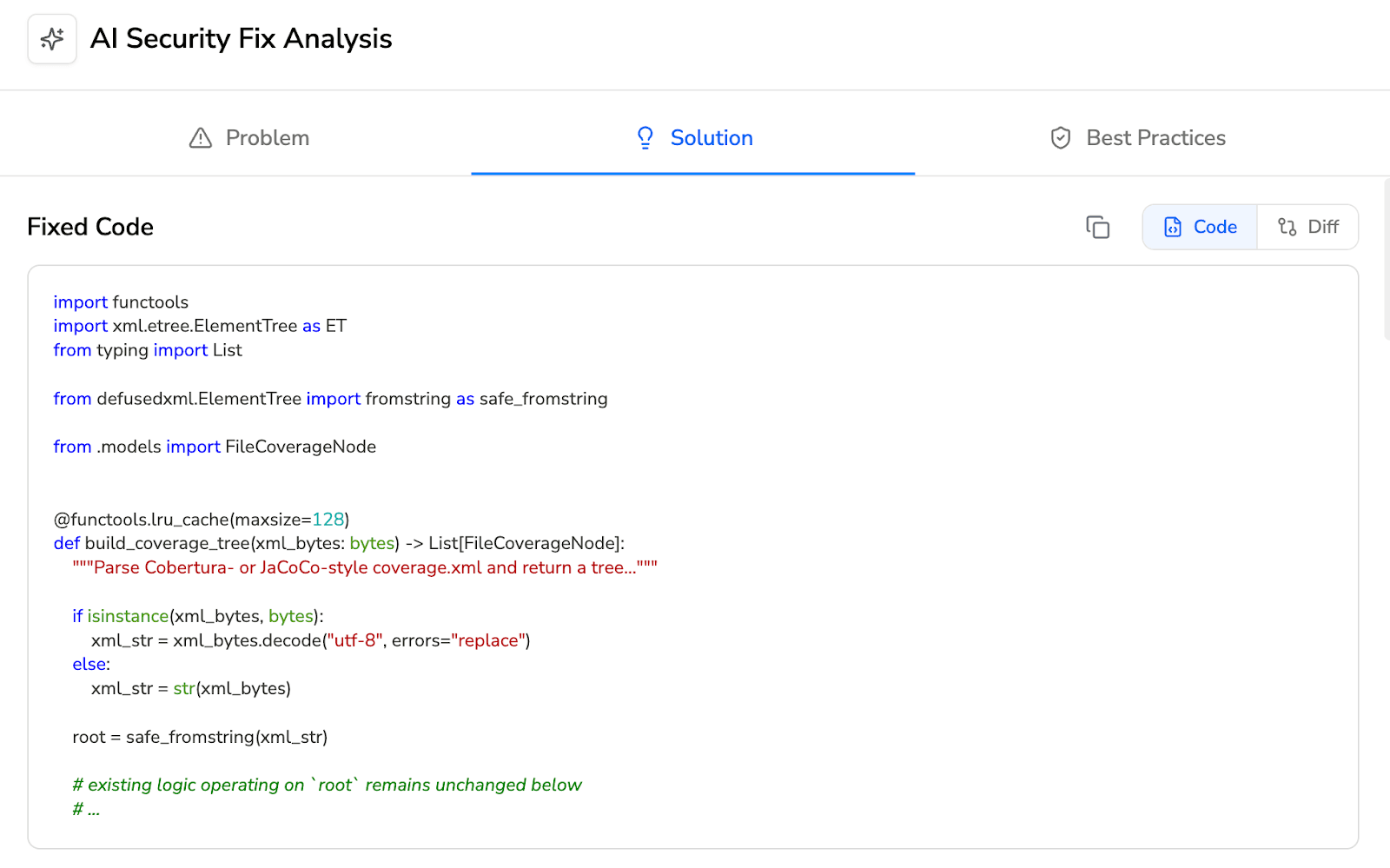
Fast scans complete in seconds, keeping security feedback inside the developer’s normal workflow.
In practice, the difference is simple.
Fortify offers a more mature compliance dashboard and a workflow optimized for security teams managing audits and centralized reporting.
CodeAnt AI focuses on developer adoption, delivering security feedback directly where developers work.
For organizations where the bottleneck is compliance reporting and audit evidence, Fortify’s SSC remains a proven solution.
For teams struggling with developer engagement and slow security feedback, CodeAnt AI’s PR-native workflow addresses a long-standing adoption problem in traditional SAST tools.
Deployment and Data Residency
Both Fortify and CodeAnt AI support on-premises deployment, but their histories and approaches differ.
Fortify has one of the longest on-premises deployment track records in the SAST market.
For nearly 20 years, the platform has been deployed inside enterprise environments, including classified and air-gapped infrastructure used by government and defense organizations.
Key deployment options include:
Fortify Static Code Analyzer (SCA): Runs entirely within a customer’s infrastructure and supports highly restricted environments.
Fortify on Demand (FoD): A managed cloud version of the platform that holds FedRAMP authorization.
Because of this history, Fortify’s architecture, hardening practices, and operational procedures are designed for high-security environments where strict infrastructure control and compliance are required.
For organizations such as defense contractors, intelligence agencies, and government institutions, this long deployment history is often a significant procurement factor.
CodeAnt AI supports three deployment models, giving teams flexibility depending on their infrastructure and data residency requirements.
1. Customer Data Center (Air-Gapped Deployment): The platform runs entirely inside the customer’s on-premises environment with no external connectivity.
No code, metadata, or telemetry leaves the network
Full platform functionality runs locally, including:
CLI scanning
PR-native findings
SecOps dashboards
2. Customer Cloud (VPC Deployment): CodeAnt AI can be deployed inside a customer-owned AWS, GCP, or Azure VPC, allowing teams to control infrastructure boundaries while running the platform in their own cloud environment.
3. CodeAnt Managed Cloud: A hosted version of the platform that is SOC 2 Type II certified and HIPAA compliant.
Across all deployment models, CodeAnt AI offers zero data retention, code is analyzed in memory and never written to disk.
The main difference comes down to deployment history versus modern architecture.
Fortify has one of the longest on-premises deployment histories in the SAST market, with extensive use in highly regulated and classified environments.
CodeAnt AI provides a modern air-gapped deployment model with zero data retention and developer-centric workflows.
For teams that require on-premises deployment combined with modern developer workflows, such as PR-native reviews, AI-driven analysis, and faster scans, CodeAnt AI offers an alternative approach with a different developer experience. For more on how SAST tools handle on-premises deployment, see our deployment and data residency guide.
Pricing Comparison
Dimension | Fortify (OpenText) | CodeAnt AI |
Pricing model | Custom enterprise contracts (Contact Sales) | Per user |
Public pricing | ✗ (Contact Sales required) | ✓ ($20/user/month published on website) |
Free option | ✗ | 14-day free trial |
50-dev estimated annual cost | $75K–$300K+/yr (varies by modules, languages, deployment model) | $12,000/yr (Code Security) |
Typical contract | Annual or multi-year; significant implementation and tuning investment | Monthly or annual; no minimums |
Includes SAST | ✓ | ✓ |
Includes SCA | ✓ (via integration) | ✓ |
Includes DAST | ✓ (WebInspect, additional module) | ✗ |
Includes legacy language support | ✓ (COBOL, ABAP, PL/I) | ✗ |
Includes AI code security review | ✗ | ✓ |
Includes code quality | ✗ | ✓ |
Includes auto-fix | ✗ | ✓ |
Implementation effort | Significant (rule tuning, build integration, SSC configuration) | Minimal (SCM integration in minutes) |
Pricing page | opentext.com/products/fortify (Contact Sales) |
Fortify pricing is custom and not publicly listed. Cost estimates based on industry reports and enterprise procurement data. Actual pricing varies significantly by language coverage, scan volume, deployment model (self-hosted vs. FoD), and contract terms. CodeAnt AI pricing from codeant.ai/pricing.
The pricing difference between Fortify and CodeAnt AI is significant.
For a 50-developer team, CodeAnt AI costs roughly $12,000 per year, while Fortify typically ranges from $75,000 to $300,000+ annually, depending on deployment model and modules.
CodeAnt AI setup is much simpler. Teams install the SCM integration, and scanning begins automatically on the next pull request.
Which Should You Choose?
The right choice depends on your codebase characteristics, compliance requirements, and where your organization’s security bottleneck lies.
If Compliance and On-Prem Are Non-Negotiable
Fortify is the safer procurement choice for organizations with deeply entrenched compliance requirements, particularly government agencies, defense contractors, and regulated financial institutions. Fortify’s SSC compliance dashboard has been producing audit-accepted reports for nearly two decades. The on-premises deployment has been hardened through years of classified-environment deployments. And the rulepack library covers legacy languages that no other tool supports.
If your organization’s compliance program is built around Fortify’s reporting format, your auditors expect Fortify output, and changing SAST tools would require re-validating your compliance documentation, the switching cost may outweigh the benefits of a modern tool.
Consider adding CodeAnt AI alongside Fortify if: developer adoption of security findings is low (common with Fortify’s scan-and-audit workflow); your development teams are writing modern code alongside legacy code; or you want AI code security review and code quality analysis without disrupting your compliance scanning.
If Developer Adoption Is the Priority
CodeAnt AI is the stronger choice for organizations where the primary SAST challenge is not detection or compliance, it is getting developers to actually engage with security findings and fix vulnerabilities.
Fortify’s audit-oriented workflow (scan, wait, review in SSC, manually fix, re-scan) creates friction that reduces developer engagement. Findings arrive after the developer has moved on. Context requires navigating to a separate audit tool. Fixes require manual implementation with no automated suggestions. And long scan times discourage re-scanning after fixes.
CodeAnt AI’s PR-native workflow (scan in seconds, findings in PR with Steps of Reproduction, one-click fix, merge) eliminates these friction points.
Developer engagement with security findings is fundamentally different when findings arrive in the PR with evidence and fixes rather than in a separate audit dashboard days later.
Book an enterprise consultation: We’ll map your Fortify config to CodeAnt AI →
For a broader view beyond these two tools, see our full 15-tool SAST comparison.
Final Verdict: Fortify vs CodeAnt AI for SAST in 2026
Fortify represents the legacy enterprise standard. CodeAnt AI represents the modern developer-first shift.
If your organization operates in classified environments, depends on legacy languages like COBOL or ABAP, or requires audit documentation refined through decades of government deployments, Fortify remains one of the safest procurement choices in the SAST market.
If your organization’s bottleneck is not compliance, but developer adoption, remediation speed, and friction in the PR workflow, CodeAnt AI offers a fundamentally different model.
Scan in seconds, not hours.
Review findings in the PR, not in a separate audit tool.
Apply fixes with one click, not manual rewrites.
The real modernization question is not “Does Fortify detect vulnerabilities?”
It does.
The question is: Does your current SAST workflow help developers fix them faster?
Run Fortify on your legacy code.
Run CodeAnt AI on your next pull request.
Compare remediation velocity.
Modernize your SAST without sacrificing coverage. Start a 14-day CodeAnt AI trial →

