AI Pentesting

External Penetration Testing for Enterprises: Methodology, Tools, and What Most Teams Miss

Amartya | CodeAnt AI Code Review Platform
Sonali Sood

Founding GTM, CodeAnt AI

External penetration testing evaluates what attackers can discover, access, and exploit from the internet without credentials or insider access. Modern external testing now combines external attack surface discovery, automated penetration testing, AI pentesting, and continuous testing workflows to identify internet-facing risk before attackers do.

This includes:

  • Public web applications

  • APIs and GraphQL endpoints

  • Cloud infrastructure across AWS, Azure, and GCP

  • VPN and remote access portals

  • Internet-facing services

  • Public storage buckets

  • CI/CD exposure paths

  • External authentication systems

Traditional external pentests were periodic assessments.

Modern external penetration testing is increasingly continuous.

Fast-moving SaaS companies now rely on AI penetration testing, external attack surface monitoring, and continuous pentest workflows integrated into CI/CD pipelines to reduce exposure between annual assessments.

This shift matters because attackers do not wait for scheduled pentests. They continuously scan, enumerate, and exploit exposed infrastructure.

In this guide, you will learn:

  • What external penetration testing actually tests

  • The complete external pentest methodology

  • Which external pentest tools are most commonly used

  • How AI pentesting improves external testing

  • How continuous pentesting works in CI/CD environments

  • How enterprises evaluate modern PTaaS vendors

  • What the best external pentest platforms actually provide
What External Penetration Testing Actually Means

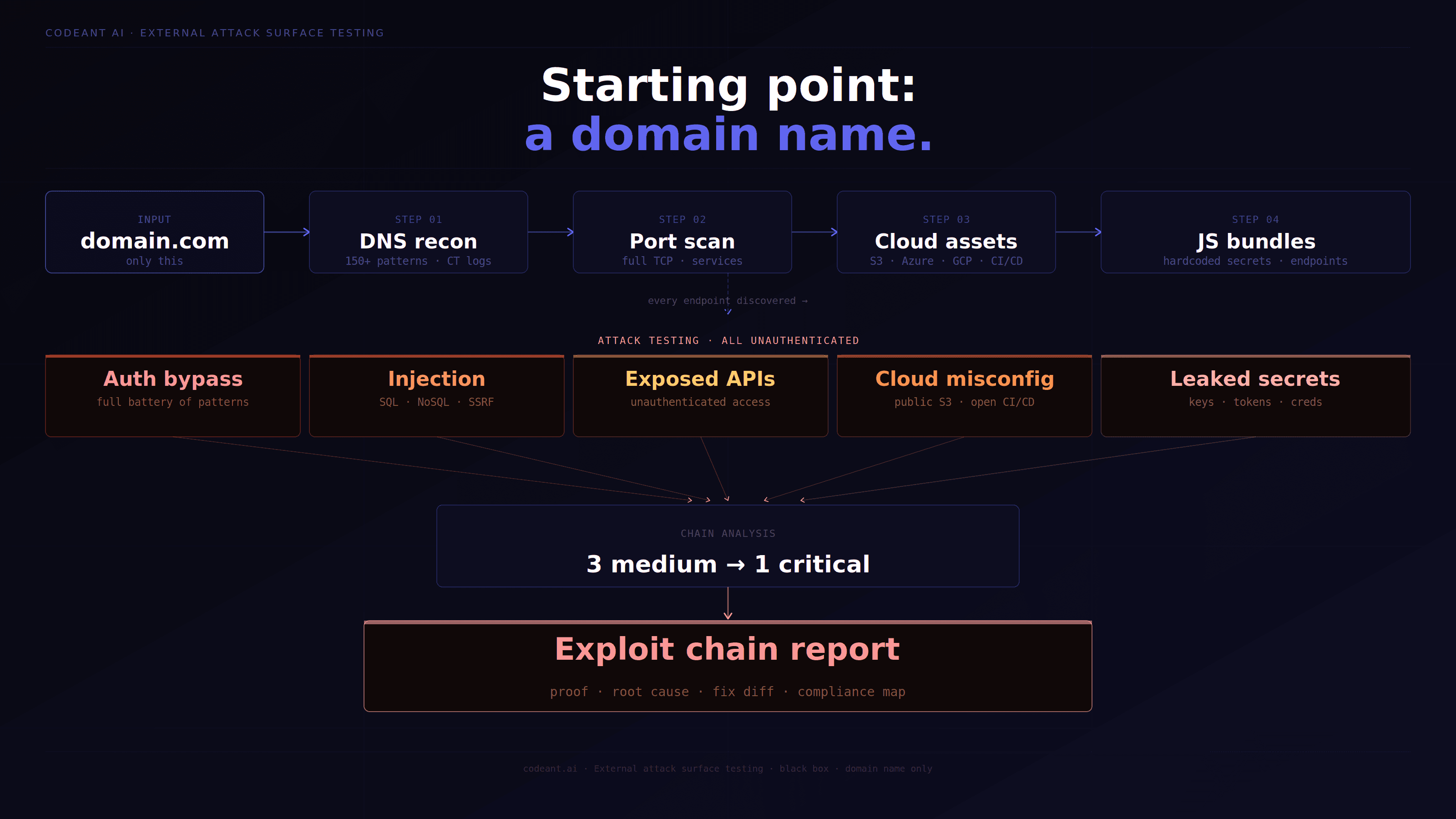
External penetration testing simulates an attacker who has no prior access to the organization's internal network, someone operating entirely from the internet, starting with nothing but the organization's domain name.

The question it answers: what can a motivated attacker accomplish from the internet, with no insider knowledge, no credentials, and no access to internal systems?

This is the most important security question for most organizations because it represents the realistic threat model for the majority of attacks. Ransomware groups, nation-state actors, and opportunistic criminals typically start from the internet. They don't have insider access. They use OSINT to enumerate the target, find exposed vulnerabilities, and work inward from the external attack surface.

The External Attack Surface, What Gets Tested


The External Penetration Testing Methodology

Phase 1: Passive OSINT (No Target Interaction)

# Passive reconnaissance — no packets sent to target

# 1. DNS enumeration
dig +short company.com MX
dig +short company.com TXT  # SPF, DKIM, verification records
dig +short company.com NS

# Check for zone transfer (information disclosure if successful)
dig axfr company.com @ns1.company.com

# 2. ASN and IP range discovery
# Find all IPs registered to the organization
whois -h whois.radb.net -- '-i origin AS12345' | grep route:

# 3. Certificate Transparency search
curl -s "<https://crt.sh/?q=%25.company.com&output=json>" | \\
    jq -r '.[].name_value' | sort -u

# 4. Google dorking for sensitive exposures
# site:company.com filetype:pdf
# site:company.com inurl:admin
# site:company.com "password" OR "credentials"
# site:github.com "company.com" password
# "company.com" site:pastebin.com

# 5. Shodan for historical exposure data
# shodan search hostname:company.com
# shodan search org:"Company Name"

# 6. GitHub repository search
# Search GitHub for organization name + common sensitive terms
# "company.com" API_KEY
# "company.com" secret
# "company-internal" credentials
# Passive reconnaissance — no packets sent to target

# 1. DNS enumeration
dig +short company.com MX
dig +short company.com TXT  # SPF, DKIM, verification records
dig +short company.com NS

# Check for zone transfer (information disclosure if successful)
dig axfr company.com @ns1.company.com

# 2. ASN and IP range discovery
# Find all IPs registered to the organization
whois -h whois.radb.net -- '-i origin AS12345' | grep route:

# 3. Certificate Transparency search
curl -s "<https://crt.sh/?q=%25.company.com&output=json>" | \\
    jq -r '.[].name_value' | sort -u

# 4. Google dorking for sensitive exposures
# site:company.com filetype:pdf
# site:company.com inurl:admin
# site:company.com "password" OR "credentials"
# site:github.com "company.com" password
# "company.com" site:pastebin.com

# 5. Shodan for historical exposure data
# shodan search hostname:company.com
# shodan search org:"Company Name"

# 6. GitHub repository search
# Search GitHub for organization name + common sensitive terms
# "company.com" API_KEY
# "company.com" secret
# "company-internal" credentials
# Passive reconnaissance — no packets sent to target

# 1. DNS enumeration
dig +short company.com MX
dig +short company.com TXT  # SPF, DKIM, verification records
dig +short company.com NS

# Check for zone transfer (information disclosure if successful)
dig axfr company.com @ns1.company.com

# 2. ASN and IP range discovery
# Find all IPs registered to the organization
whois -h whois.radb.net -- '-i origin AS12345' | grep route:

# 3. Certificate Transparency search
curl -s "<https://crt.sh/?q=%25.company.com&output=json>" | \\
    jq -r '.[].name_value' | sort -u

# 4. Google dorking for sensitive exposures
# site:company.com filetype:pdf
# site:company.com inurl:admin
# site:company.com "password" OR "credentials"
# site:github.com "company.com" password
# "company.com" site:pastebin.com

# 5. Shodan for historical exposure data
# shodan search hostname:company.com
# shodan search org:"Company Name"

# 6. GitHub repository search
# Search GitHub for organization name + common sensitive terms
# "company.com" API_KEY
# "company.com" secret
# "company-internal" credentials

Phase 2: Active Reconnaissance

# Active recon — sends packets to target (notify client first)

# 1. Subdomain enumeration with resolution
subfinder -d company.com -silent | \\
    httpx -silent -status-code -title -follow-redirects | \\
    tee live_subdomains.txt

# 2. Port scanning — full TCP range on discovered IPs
nmap -p- --open -sV -sC --min-rate=500 \\
    -oA nmap_full_scan [IP_RANGE]

# Focus on interesting ports:
# 22: SSH (check version for CVEs, test default credentials)
# 80/443: HTTP/HTTPS (web application)
# 3389: RDP (exposed to internet = critical finding usually)
# 5900: VNC (exposed to internet = critical finding)
# 1433, 5432, 3306: Database ports (exposed = critical)
# 8080, 8443, 9090: Alternative web ports
# 6379: Redis (exposed without auth = critical)
# 9200: Elasticsearch (exposed = data exposure)

# 3. Service fingerprinting
nmap -sV -sC -p 22,80,443,8080,8443 \\
    --script=banner,http-title,ssl-cert [TARGET]

# 4. Web application discovery
gobuster dir -u <https://company.com> \\
    -w /usr/share/wordlists/dirbuster/directory-list-2.3-medium.txt \\
    -x php,asp,aspx,jsp,html,txt,xml,json \\
    -t 50 --no-error

# 5. Cloud storage enumeration
# Check for public S3 buckets
for subdomain in $(cat live_subdomains.txt | awk '{print $1}'); do
    bucket_name="${subdomain%%.company.com}"
    # Test various bucket name patterns
    for bucket in "$bucket_name" "$bucket_name-public" "$bucket_name-assets" \\
                  "company-$bucket_name" "$bucket_name-backup"; do
        aws s3 ls s3://$bucket --no-sign-request 2>/dev/null && \\
            echo "PUBLIC BUCKET: $bucket"
    done
done
# Active recon — sends packets to target (notify client first)

# 1. Subdomain enumeration with resolution
subfinder -d company.com -silent | \\
    httpx -silent -status-code -title -follow-redirects | \\
    tee live_subdomains.txt

# 2. Port scanning — full TCP range on discovered IPs
nmap -p- --open -sV -sC --min-rate=500 \\
    -oA nmap_full_scan [IP_RANGE]

# Focus on interesting ports:
# 22: SSH (check version for CVEs, test default credentials)
# 80/443: HTTP/HTTPS (web application)
# 3389: RDP (exposed to internet = critical finding usually)
# 5900: VNC (exposed to internet = critical finding)
# 1433, 5432, 3306: Database ports (exposed = critical)
# 8080, 8443, 9090: Alternative web ports
# 6379: Redis (exposed without auth = critical)
# 9200: Elasticsearch (exposed = data exposure)

# 3. Service fingerprinting
nmap -sV -sC -p 22,80,443,8080,8443 \\
    --script=banner,http-title,ssl-cert [TARGET]

# 4. Web application discovery
gobuster dir -u <https://company.com> \\
    -w /usr/share/wordlists/dirbuster/directory-list-2.3-medium.txt \\
    -x php,asp,aspx,jsp,html,txt,xml,json \\
    -t 50 --no-error

# 5. Cloud storage enumeration
# Check for public S3 buckets
for subdomain in $(cat live_subdomains.txt | awk '{print $1}'); do
    bucket_name="${subdomain%%.company.com}"
    # Test various bucket name patterns
    for bucket in "$bucket_name" "$bucket_name-public" "$bucket_name-assets" \\
                  "company-$bucket_name" "$bucket_name-backup"; do
        aws s3 ls s3://$bucket --no-sign-request 2>/dev/null && \\
            echo "PUBLIC BUCKET: $bucket"
    done
done
# Active recon — sends packets to target (notify client first)

# 1. Subdomain enumeration with resolution
subfinder -d company.com -silent | \\
    httpx -silent -status-code -title -follow-redirects | \\
    tee live_subdomains.txt

# 2. Port scanning — full TCP range on discovered IPs
nmap -p- --open -sV -sC --min-rate=500 \\
    -oA nmap_full_scan [IP_RANGE]

# Focus on interesting ports:
# 22: SSH (check version for CVEs, test default credentials)
# 80/443: HTTP/HTTPS (web application)
# 3389: RDP (exposed to internet = critical finding usually)
# 5900: VNC (exposed to internet = critical finding)
# 1433, 5432, 3306: Database ports (exposed = critical)
# 8080, 8443, 9090: Alternative web ports
# 6379: Redis (exposed without auth = critical)
# 9200: Elasticsearch (exposed = data exposure)

# 3. Service fingerprinting
nmap -sV -sC -p 22,80,443,8080,8443 \\
    --script=banner,http-title,ssl-cert [TARGET]

# 4. Web application discovery
gobuster dir -u <https://company.com> \\
    -w /usr/share/wordlists/dirbuster/directory-list-2.3-medium.txt \\
    -x php,asp,aspx,jsp,html,txt,xml,json \\
    -t 50 --no-error

# 5. Cloud storage enumeration
# Check for public S3 buckets
for subdomain in $(cat live_subdomains.txt | awk '{print $1}'); do
    bucket_name="${subdomain%%.company.com}"
    # Test various bucket name patterns
    for bucket in "$bucket_name" "$bucket_name-public" "$bucket_name-assets" \\
                  "company-$bucket_name" "$bucket_name-backup"; do
        aws s3 ls s3://$bucket --no-sign-request 2>/dev/null && \\
            echo "PUBLIC BUCKET: $bucket"
    done
done

Phase 3: Vulnerability Identification and Exploitation


How AI Penetration Testing Improves External Attack Surface Testing

AI penetration testing improves external penetration testing by continuously correlating reconnaissance, exploit validation, source intelligence, and attack surface changes across internet-facing systems.

Traditional external pentests are often limited by time-boxed engagements and manual prioritization. AI-driven systems expand visibility by automating reconnaissance, continuously tracking infrastructure changes, and validating exploitability across APIs, cloud services, authentication systems, and exposed applications.

This becomes especially important for:

  • B2B SaaS platforms

  • Cloud-native infrastructure

  • CI/CD-driven deployment environments

  • Multi-cloud environments across AWS, Azure, and GCP

Modern AI penetration testing platforms increasingly combine:

  • Continuous subdomain discovery

  • Cloud asset enumeration

  • API attack surface analysis

  • Automated exploit validation

  • CI/CD-integrated testing

  • External attack path modeling

This allows organizations to reduce exposure windows between traditional assessments.

Best Continuous Pentest Tools For CI/CD Pipelines

Modern CI/CD environments require security testing models that operate continuously rather than quarterly or annually.

The strongest continuous pentest platforms integrate directly into deployment workflows and continuously monitor external attack surface changes introduced during rapid releases.

Key capabilities typically include:

  • Continuous external asset discovery

  • Automated attack surface monitoring

  • CI/CD-integrated testing triggers

  • Cloud infrastructure exposure detection

  • Continuous exploit validation

  • API security testing

  • Drift detection for internet-facing services

This is why many organizations are shifting from periodic pentests toward PTaaS and AI-driven continuous penetration testing workflows.

External Penetration Testing Tool Reference

Tool

Purpose

When to Use

subfinder + amass

Subdomain discovery

First step of every engagement

httpx

HTTP probe bulk endpoints

After subdomain discovery

nmap

Port scanning, service detection

Network reconnaissance

nuclei

Known CVE/misconfiguration scanning

After service discovery

gobuster / ffuf

Directory and path discovery

Web application recon

theHarvester

Email and domain OSINT

Passive reconnaissance

Shodan/Censys

Historical internet scan data

Passive reconnaissance

waybackurls + gau

Historical URL discovery

Web app recon

s3scanner

Public S3 bucket discovery

Cloud reconnaissance

gitrob / trufflehog

GitHub secret scanning

OSINT phase

Burp Suite Pro

Web app testing

Active exploitation

Metasploit

Known exploit execution

Confirmed vulnerability exploitation

CrackMapExec

Network service authentication

Auth testing

enum4linux

SMB/LDAP enumeration

If ports 445/389 exposed

Exposed Services That Are Automatic Critical Findings


AI Pentesting For Cloud Infrastructure Across AWS, Azure, And GCP

Modern external penetration testing increasingly includes cloud infrastructure reconnaissance and exploitation testing across AWS, Azure, and GCP environments.

Cloud attack surface testing commonly includes:

  • Public storage bucket exposure

  • IAM privilege escalation paths

  • Exposed Kubernetes services

  • Publicly accessible databases

  • SSRF-to-cloud-metadata exploitation

  • CI/CD credential exposure

  • Misconfigured security groups and firewall rules

AI-driven testing improves cloud security assessments by continuously correlating exposed assets, identity permissions, network exposure, and exploit paths across cloud environments.

External vs Internal Penetration Testing: Key Differences

Dimension

External

Internal

Starting position

Internet, no access

Inside network, basic user access

Initial phase

OSINT + recon

Network discovery

Authentication needed

No (tests unauthenticated surface)

Yes (simulates insider/compromised user)

Primary threat model

External attacker

Malicious insider, compromised account

Most common critical findings

Exposed services, web app auth bypass

Lateral movement, AD attacks, data access

Compliance driver

PCI-DSS 11.3.1 (external test)

PCI-DSS 11.3.2 (internal test)

Frequency for compliance

Annual minimum

Annual minimum

Duration

3–7 days

5–10 days

How Enterprises Evaluate Modern PTaaS Vendors

Enterprise buyers increasingly evaluate PTaaS and AI penetration testing vendors based on speed, continuity, exploit validation, and cloud-native coverage rather than static compliance reports alone.

Key evaluation areas now include:

  • Continuous testing capabilities

  • CI/CD integration support

  • AI-assisted reconnaissance and exploit validation

  • Retesting SLAs

  • Cloud infrastructure testing coverage

  • SOC 2 and HIPAA evidence support

  • Delivery timelines for critical findings

  • Multi-cloud attack surface visibility

Fast-growing SaaS companies increasingly prioritize vendors that combine automated penetration testing, AI-driven testing workflows, and continuous external attack surface monitoring into a single platform.

Conclusion: External Penetration Testing Must Become Continuous

External penetration testing is no longer just an annual perimeter assessment.

Modern attack surfaces evolve continuously across APIs, CI/CD pipelines, cloud infrastructure, SaaS environments, and internet-facing applications. A single exposed service, forgotten subdomain, weak authentication flow, or cloud misconfiguration can become the starting point for a serious breach.

That is why organizations are increasingly moving toward AI penetration testing, and continuous external attack surface monitoring rather than relying only on periodic assessments.

The strongest modern security programs combine:

  • External reconnaissance

  • Exploit validation

  • Cloud infrastructure testing

  • Continuous attack surface discovery

  • CI/CD-integrated security workflows

This is where modern PTaaS and AI-driven penetration testing platforms are changing how external security is performed.

👉 If you want to improve perimeter security, start evaluating your external attack surface continuously, not just during scheduled pentests. Try our Agentic Security Platform. Free penetration test. Pay only on high & critical issues. Low and medium findings? Always free. No engagement fee.

FAQs

What Are The Best Continuous Pentest Tools For CI/CD Pipelines?

How Does AI Penetration Testing Compare To Traditional Manual Pentesting?

Which Automated Pentest Platforms Offer Continuous Testing?

How Do I Write An RFP For AI Penetration Testing?

What Are The Best AI Penetration Testing Tools In 2026?

Table of Contents

Start Your 14-Day Free Trial

AI code reviews, security, and quality trusted by modern engineering teams. No credit card required!

Share blog: